<?xml version="1.0" encoding="utf-8"?>
<feed xmlns="http://www.w3.org/2005/Atom">
  <title>Kritner&#39;s Blog</title>
  <icon>https://blog.kritner.com/icon.png</icon>
  <subtitle>Just tryin to learn some stuff and teach some stuff</subtitle>
  <link href="https://blog.kritner.com/atom.xml" rel="self"/>
  
  <link href="https://blog.kritner.com/"/>
  <updated>2022-10-14T02:43:21.694Z</updated>
  <id>https://blog.kritner.com/</id>
  
  <author>
    <name>Russ Hammett</name>
    
  </author>
  
  <generator uri="https://hexo.io/">Hexo</generator>
  
  <entry>
    <title>Microsoft Orleans: Grain Caches</title>
    <link href="https://blog.kritner.com/2022/10/14/microsoft-orleans-grain-caches/"/>
    <id>https://blog.kritner.com/2022/10/14/microsoft-orleans-grain-caches/</id>
    <published>2022-10-14T16:00:00.000Z</published>
    <updated>2022-10-14T02:43:21.694Z</updated>
    
    <content type="html"><![CDATA[<p>Holy moly it’s been a while.  Time for some more Orleans goodness, hopefully? Caches!</p><span id="more"></span><h2 id="Overview"><a href="#Overview" class="headerlink" title="Overview"></a>Overview</h2><p>What are caches and what do they do?  As usual, going to lean on Wikipedia to help me out:</p><p>From <a href="https://en.wikipedia.org/wiki/Cache_(computing)">https://en.wikipedia.org/wiki/Cache_(computing)</a>:</p><blockquote><p>In computing, a cache is a hardware or software component that stores data so that future requests for that data can be served faster; the data stored in a cache might be the result of an earlier computation or a copy of data stored elsewhere.</p></blockquote><p>So basically a means of getting data faster, sign me up!</p><p>Often, you’ll see multiple levels of caching on varying pieces of infrastructure, whether those pieces are all contained within a single piece of hardware (like a computer), or spread across multiple pieces of hardware (like a network).  We have the need for speed, and caches gonna give it to ya… ideally!</p><h2 id="Problems-with-caching"><a href="#Problems-with-caching" class="headerlink" title="Problems with caching"></a>Problems with caching</h2><p><a href="https://aws.amazon.com/builders-library/caching-challenges-and-strategies/">https://aws.amazon.com/builders-library/caching-challenges-and-strategies/</a> has a lot of good information, but just to name a few:</p><ul><li>Stale data</li><li>Inconsistent data across caches</li><li>In the case of local caches - memory and/or additional CPU pressure on a system that is otherwise acting as a webserver</li><li>In the case of external caches - additional system complexity, additional hop to get to data (though seemingly still better than having to rerun some sort of querying/aggregating of data from potentially numerous data sources when not caching)</li></ul><h2 id="A-naive-Orleans-Cache"><a href="#A-naive-Orleans-Cache" class="headerlink" title="A (naive) Orleans Cache"></a>A (naive) Orleans Cache</h2><p>So, it’s been a while since I’ve written <em>anything</em>, much less about Orleans.  It’s Hacktoberfest though so I at least gotta try to get that shirt!</p><p>Like in past posts where I’m demonstrating something Orleansly, we’ll be working from my github repo starting here <a href="https://github.com/Kritner-Blogs/OrleansGettingStarted/releases/tag/v0.62.0">https://github.com/Kritner-Blogs/OrleansGettingStarted/releases/tag/v0.62.0</a>. Prior to us creating another <code>IOrleansFunction</code>, we actually need to write the thing we’re be demonstrating, the cache!</p><p>A cache abstraction can (and perhaps should?) have more methods available to it than what we’ll be doing in this post, but this isn’t meant to be a full fledged solution.</p><figure class="highlight cs"><table><tr><td class="gutter"><pre><span class="line">1</span><br><span class="line">2</span><br><span class="line">3</span><br><span class="line">4</span><br><span class="line">5</span><br></pre></td><td class="code"><pre><code class="hljs cs"><span class="hljs-keyword">public</span> <span class="hljs-keyword">interface</span> <span class="hljs-title">IOrleansCache</span>&lt;<span class="hljs-title">TValue</span>&gt; : <span class="hljs-title">IGrainWithStringKey</span>, <span class="hljs-title">IGrainInterfaceMarker</span><br>&#123;<br>    <span class="hljs-function">Task <span class="hljs-title">AddOrUpdate</span>(<span class="hljs-params"><span class="hljs-built_in">string</span> key, TValue <span class="hljs-keyword">value</span></span>)</span>;<br>    <span class="hljs-function">Task&lt;TValue&gt; <span class="hljs-title">Get</span>(<span class="hljs-params"><span class="hljs-built_in">string</span> key</span>)</span>;<br>&#125;<br></code></pre></td></tr></table></figure><p>The above should look pretty straight forward, but just to go over it anyway:</p><ul><li><code>TValue</code> is the type of value our cache will be storing</li><li><code>IGrainWithStringKey</code> states that cache will have a string primary key</li><li><code>AddOrUpdate</code> - for adding/updating <code>value</code>s based on a string <code>key</code> (not to be confused with the grain primary key)</li><li><code>Get</code> for retrieving a <code>value</code> from the cache based on a string <code>key</code></li></ul><p>In case it isn’t obvious, we have two “keys” in the above declaration.  A grain “primary” key, and a “key value pair” key.  What’s the difference?  Well by having the primary key be a string, we can get different grain instances for each individual string key we provide.  Why would we do that?  You may have different caches with different value types you want to store, bring up a different cache per customer, or a bit of both.</p><p>As for the implementation of the grain, I’m leaning heavily on an LRU cache from the package <a href="https://github.com/bitfaster/BitFaster.Caching/">https://github.com/bitfaster/BitFaster.Caching/</a>.</p><figure class="highlight cs"><table><tr><td class="gutter"><pre><span class="line">1</span><br><span class="line">2</span><br><span class="line">3</span><br><span class="line">4</span><br><span class="line">5</span><br><span class="line">6</span><br><span class="line">7</span><br><span class="line">8</span><br><span class="line">9</span><br><span class="line">10</span><br><span class="line">11</span><br><span class="line">12</span><br><span class="line">13</span><br><span class="line">14</span><br><span class="line">15</span><br><span class="line">16</span><br><span class="line">17</span><br><span class="line">18</span><br><span class="line">19</span><br><span class="line">20</span><br><span class="line">21</span><br><span class="line">22</span><br><span class="line">23</span><br><span class="line">24</span><br></pre></td><td class="code"><pre><code class="hljs cs"><span class="hljs-keyword">public</span> <span class="hljs-keyword">class</span> <span class="hljs-title">OrleansLruCache</span>&lt;<span class="hljs-title">TValue</span>&gt; : <span class="hljs-title">Grain</span>, <span class="hljs-title">IOrleansCache</span>&lt;<span class="hljs-title">TValue</span>&gt;<br>&#123;<br>    <span class="hljs-keyword">private</span> <span class="hljs-keyword">readonly</span> ConcurrentLru&lt;<span class="hljs-built_in">string</span>, TValue&gt; _cache;<br><br>    <span class="hljs-function"><span class="hljs-keyword">public</span> <span class="hljs-title">OrleansLruCache</span>(<span class="hljs-params"></span>)</span><br>    &#123;<br>        _cache = <span class="hljs-keyword">new</span> ConcurrentLru&lt;<span class="hljs-built_in">string</span>, TValue&gt;(<span class="hljs-number">50</span>);<br>    &#125;<br><br>    <span class="hljs-function"><span class="hljs-keyword">public</span> Task <span class="hljs-title">AddOrUpdate</span>(<span class="hljs-params"><span class="hljs-built_in">string</span> key, TValue <span class="hljs-keyword">value</span></span>)</span><br>    &#123;<br>        _cache.AddOrUpdate(key, <span class="hljs-keyword">value</span>);<br>        <span class="hljs-keyword">return</span> Task.CompletedTask;<br>    &#125;<br><br>    <span class="hljs-function"><span class="hljs-keyword">public</span> Task&lt;TValue&gt; <span class="hljs-title">Get</span>(<span class="hljs-params"><span class="hljs-built_in">string</span> key</span>)</span><br>    &#123;<br>        <span class="hljs-keyword">if</span> (_cache.TryGet(key, <span class="hljs-keyword">out</span> <span class="hljs-keyword">var</span> result))<br>            <span class="hljs-keyword">return</span> Task.FromResult(result);<br><br>        TValue nullResult = <span class="hljs-literal">default</span>;<br>        <span class="hljs-keyword">return</span> Task.FromResult(nullResult);<br>    &#125;<br>&#125;<br></code></pre></td></tr></table></figure><p>Again this should all be pretty self explanatory, just a plain old consuming of a cache and not (currently) worrying about things like parameterizing configuration, providing cache eviction methods, persisting the cache to disk in any way, etc.</p><h2 id="Wrap-up"><a href="#Wrap-up" class="headerlink" title="Wrap up"></a>Wrap up</h2><p>Keeping this one pretty short and sweet, I implemented within the final code (found here <a href="https://github.com/Kritner-Blogs/OrleansGettingStarted/releases/tag/v0.63.0">https://github.com/Kritner-Blogs/OrleansGettingStarted/releases/tag/v0.63.0</a>) our <code>IOrleansFunction</code> so it can be played around with.  I might have another post or two this month elaborating on this some more, just cuz I need to do some more PRs! (And get back into the habit of writing, but this is at least the 50th time I’ve said that)</p><h2 id="References"><a href="#References" class="headerlink" title="References"></a>References</h2><ul><li><a href="https://en.wikipedia.org/wiki/Cache_(computing)">https://en.wikipedia.org/wiki/Cache_(computing)</a></li><li><a href="https://aws.amazon.com/builders-library/caching-challenges-and-strategies/">https://aws.amazon.com/builders-library/caching-challenges-and-strategies/</a></li><li><a href="https://github.com/bitfaster/BitFaster.Caching/">https://github.com/bitfaster/BitFaster.Caching/</a></li><li>Code (beginning) <a href="https://github.com/Kritner-Blogs/OrleansGettingStarted/releases/tag/v0.62.0">https://github.com/Kritner-Blogs/OrleansGettingStarted/releases/tag/v0.62.0</a></li><li>Code (end) <a href="https://github.com/Kritner-Blogs/OrleansGettingStarted/releases/tag/v0.63.0">https://github.com/Kritner-Blogs/OrleansGettingStarted/releases/tag/v0.63.0</a></li><li><span class="unsplash-credit">Photo by <a href="https://unsplash.com/photos/mkxTOAxqTTo" target="_blank">“ashin_k_suresh”</a> on <a href="https://unsplash.com/" target="_blank">Unsplash</a>.</span>]]></content>
    
    
    <summary type="html">&lt;p&gt;Holy moly it’s been a while.  Time for some more Orleans goodness, hopefully? Caches!&lt;/p&gt;</summary>


    <category term="programming" scheme="https://blog.kritner.com/categories/programming/"/>
    
    <category term="c#" scheme="https://blog.kritner.com/categories/programming/c/"/>
    
    <category term=".net core" scheme="https://blog.kritner.com/categories/programming/net-core/"/>
    
    <category term="Microsoft Orleans" scheme="https://blog.kritner.com/categories/programming/microsoft-orleans/"/>
    
    
    <category term="programming" scheme="https://blog.kritner.com/tags/programming/"/>
    
    <category term="c#" scheme="https://blog.kritner.com/tags/c/"/>
    
    <category term=".net core" scheme="https://blog.kritner.com/tags/net-core/"/>
    
    <category term="Microsoft Orleans" scheme="https://blog.kritner.com/tags/microsoft-orleans/"/>
    
  </entry>
  
  <entry>
    <title>Microsoft Orleans - Orleans.SyncWork now a part of OrleansContrib</title>
    <link href="https://blog.kritner.com/2021/12/01/microsoft-orleans-orleans-syncwork-now-a-part-of-orleanscontrib/"/>
    <id>https://blog.kritner.com/2021/12/01/microsoft-orleans-orleans-syncwork-now-a-part-of-orleanscontrib/</id>
    <published>2021-12-01T18:40:00.000Z</published>
    <updated>2022-10-14T02:43:21.694Z</updated>
    
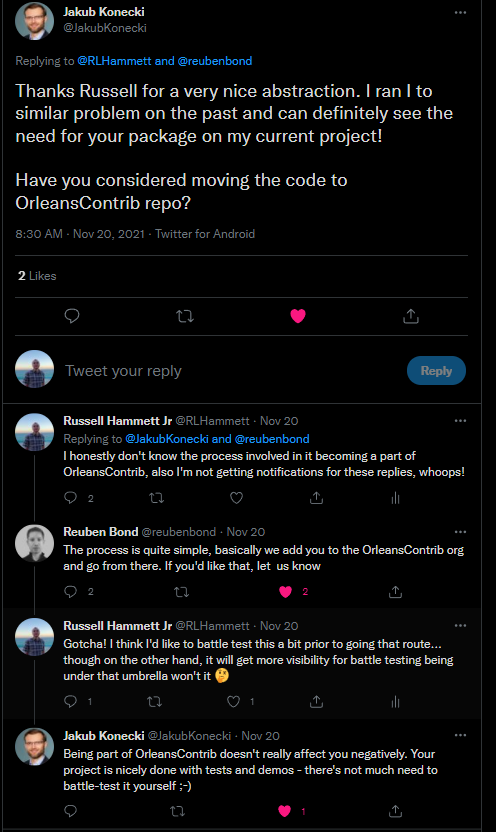
    <content type="html"><![CDATA[<p>The package I wrote about in <a href="/2021/11/22/microsoft-orleans-long-running-cpu-bound-work/">this post</a> is now a part of the <a href="https://github.com/OrleansContrib">OrleansContrib</a> organization!</p><span id="more"></span><p>This is a pretty short post, I think, but after a <a href="https://twitter.com/RLHammett/status/1461814378710409217">tweet</a> about the release of <a href="https://github.com/OrleansContrib/Orleans.SyncWork">Orleans.SyncWork</a>, there was a bit of back and forth in the thread:</p><p><img src="/2021/12/01/microsoft-orleans-orleans-syncwork-now-a-part-of-orleanscontrib/tweet.PNG" alt="back and forth in a twitter thread"></p><p>I reached out to Reuben shortly after, and now the repository is a part of the OrleansContrib organization!  I don’t think this actually means anything of super significance, but it’s pretty cool!  Maybe the package will now get better visibility!</p><p>That’s it!</p><h2 id="Resources"><a href="#Resources" class="headerlink" title="Resources:"></a>Resources:</h2><ul><li><a href="/2021/11/22/microsoft-orleans-long-running-cpu-bound-work/">Microsoft Orleans - Long running CPU bound work</a></li><li><a href="https://github.com/OrleansContrib/Orleans.SyncWork">OrleansContrib/Orleans.SyncWork</a></li></ul>]]></content>
    
    
    <summary type="html">&lt;p&gt;The package I wrote about in &lt;a href=&quot;/2021/11/22/microsoft-orleans-long-running-cpu-bound-work/&quot;&gt;this post&lt;/a&gt; is now a part of the &lt;a href=&quot;https://github.com/OrleansContrib&quot;&gt;OrleansContrib&lt;/a&gt; organization!&lt;/p&gt;</summary>


    <category term="programming" scheme="https://blog.kritner.com/categories/programming/"/>
    
    <category term="c#" scheme="https://blog.kritner.com/categories/programming/c/"/>
    
    <category term=".net core" scheme="https://blog.kritner.com/categories/programming/net-core/"/>
    
    <category term="Microsoft Orleans" scheme="https://blog.kritner.com/categories/programming/microsoft-orleans/"/>
    
    
    <category term="programming" scheme="https://blog.kritner.com/tags/programming/"/>
    
    <category term="c#" scheme="https://blog.kritner.com/tags/c/"/>
    
    <category term=".net core" scheme="https://blog.kritner.com/tags/net-core/"/>
    
    <category term="Microsoft Orleans" scheme="https://blog.kritner.com/tags/microsoft-orleans/"/>
    
  </entry>
  
  <entry>
    <title>CI/CD for .net 6, using GitHub actions</title>
    <link href="https://blog.kritner.com/2021/11/29/cicd-for-net6-with-github-actions/"/>
    <id>https://blog.kritner.com/2021/11/29/cicd-for-net6-with-github-actions/</id>
    <published>2021-11-29T14:15:51.000Z</published>
    <updated>2022-10-14T02:43:21.694Z</updated>
    
    <content type="html"><![CDATA[<p>With the publishing of <a href="https://github.com/OrleansContrib/Orleans.SyncWork/">Orleans.SyncWork</a>, I’ve had the opportunity to explore GitHub actions - which is a way to automate workflows.  Here’s some of my first experience into the “action” (groan).</p><span id="more"></span><h2 id="Automated-workflow"><a href="#Automated-workflow" class="headerlink" title="Automated workflow"></a>Automated workflow</h2><p>First things first, what even is a workflow, and what does it mean to automate one?  Well dear potential reader, a workflow is nothing more than a set of steps taken to complete a task.</p><p>From <a href="https://en.wikipedia.org/wiki/Workflow">Wikipedia</a>:</p><blockquote><p>A workflow consists of an orchestrated and repeatable pattern of activity, enabled by the systematic organization of resources into processes that transform materials, provide services, or process information. It can be depicted as a sequence of operations, the work of a person or group, the work of an organization of staff, or one or more simple or complex mechanisms.</p></blockquote><p>You can think of a workflow as the steps taken to accomplish “something”.  That “something” can be any number of things, related to any number of subjects. In the context of this post, we’ll be mostly covering workflows as it relates to a build and release pipeline, also commonly referred to as continuous integration (CI) and continuous delivery (CD).</p><p>I’d like to cover both the CI and CD aspects of the <a href="https://github.com/OrleansContrib/Orleans.SyncWork/">Orleans.SyncWork</a>, so let’s get started.</p><h2 id="What-you’ll-probably-need"><a href="#What-you’ll-probably-need" class="headerlink" title="What you’ll (probably) need"></a>What you’ll (probably) need</h2><ul><li>Experience working with a <a href="https://docs.microsoft.com/en-us/dotnet/core/tools/">CLI</a></li><li><a href="/2018/12/06/getting-started-with-xunit/">Unit tests</a></li><li>An idea of the steps that you need to take in order to build, test, and deploy your code.  If these steps are already in your head in the form of CLI commands, then you’re already most of the way there!</li><li>Some patience in getting your workflow properly laid out</li></ul><h2 id="Continuous-Integration"><a href="#Continuous-Integration" class="headerlink" title="Continuous Integration"></a>Continuous Integration</h2><p>Before you’re able to deploy code through a work flow (continuous delivery), you need to be able to integrate it safely into your main/trunk.  For dotnet, through a handful of CLI commands, the building and testing of code is pretty straight forward.  Doing CI has the added benefit of bringing up a brand new environment for builds, each and every time, a similar idea to why I’ve been a proponent of <a href="/2015/01/21/And-its-like-whats-the-deal-with-build-servers">build servers</a> for so long.</p><h3 id="Build"><a href="#Build" class="headerlink" title="Build"></a>Build</h3><figure class="highlight cmd"><table><tr><td class="gutter"><pre><span class="line">1</span><br></pre></td><td class="code"><pre><code class="hljs cmd">dotnet build<br></code></pre></td></tr></table></figure><p>The above command is the minimum you need to build either a solution file or project file on the dotnet side of things.  From a continuous integration perspective, you may want to throw a few flags onto the command, such as:</p><figure class="highlight cmd"><table><tr><td class="gutter"><pre><span class="line">1</span><br></pre></td><td class="code"><pre><code class="hljs cmd">dotnet build --configuration release<br></code></pre></td></tr></table></figure><p>and things of that nature, see what’s available to you with the <a href="https://docs.microsoft.com/en-us/dotnet/core/tools/dotnet-build">dotnet build</a> documentation.</p><p>That could look like this from the CLI:</p><p><img src="dotnetBuild.PNG" alt="dotnet build"></p><h3 id="Test"><a href="#Test" class="headerlink" title="Test"></a>Test</h3><p>Next is testing.  I’ve probably already said it too many times, but <a href="/2018/12/06/getting-started-with-xunit/">test your code</a>!  Especially if you’re building libraries!  Tests help ensure that the code you’re writing does what you say it does. Additionally tests be used as “documentation” in a way, if the tests are named well, and are invoking the code in a similar manner to how your consumer will use it, they’ll be in a better place to get started using what you’ve delivered.</p><p>Like the <a href="#build">build</a> command, the test command is quite straightforward as well:</p><figure class="highlight bash"><table><tr><td class="gutter"><pre><span class="line">1</span><br></pre></td><td class="code"><pre><code class="hljs bash">dotnet <span class="hljs-built_in">test</span><br></code></pre></td></tr></table></figure><p>Of course the above is the absolute bare minimum command, there are lots of parameters that can be passed to <a href="https://docs.microsoft.com/en-us/dotnet/core/tools/dotnet-test">dotnet test</a> as well.</p><p>A test run could look like this from the CLI:</p><p><img src="dotnetTest.PNG" alt="dotnet test"></p><h3 id="CI-Action"><a href="#CI-Action" class="headerlink" title="CI Action"></a>CI Action</h3><p>With the above <code>dotnet build</code> and <code>dotnet test</code> commands, we have <em>most</em> of what we’ll need to put together an action to build and test our code, automatically!</p><p>There is lots of good information, even some specific to .net testing on the <a href="https://docs.github.com/en/actions/automating-builds-and-tests/building-and-testing-net">documentation</a>.  I pretty much used the documentation as a starting point, and ended up with this…</p><p>.github/workflows/ci.yml:</p><figure class="highlight yml"><table><tr><td class="gutter"><pre><span class="line">1</span><br><span class="line">2</span><br><span class="line">3</span><br><span class="line">4</span><br><span class="line">5</span><br><span class="line">6</span><br><span class="line">7</span><br><span class="line">8</span><br><span class="line">9</span><br><span class="line">10</span><br><span class="line">11</span><br><span class="line">12</span><br><span class="line">13</span><br><span class="line">14</span><br><span class="line">15</span><br><span class="line">16</span><br><span class="line">17</span><br><span class="line">18</span><br><span class="line">19</span><br><span class="line">20</span><br><span class="line">21</span><br><span class="line">22</span><br><span class="line">23</span><br><span class="line">24</span><br><span class="line">25</span><br><span class="line">26</span><br><span class="line">27</span><br><span class="line">28</span><br><span class="line">29</span><br><span class="line">30</span><br></pre></td><td class="code"><pre><code class="hljs yml"><span class="hljs-attr">name:</span> <span class="hljs-string">Build</span> <span class="hljs-string">and</span> <span class="hljs-string">test</span><br><br><span class="hljs-attr">on:</span><br>  <span class="hljs-attr">pull_request:</span><br>    <span class="hljs-attr">branches:</span> [ <span class="hljs-string">main</span> ]<br><br><span class="hljs-attr">jobs:</span><br>  <span class="hljs-attr">build:</span><br><br>    <span class="hljs-attr">runs-on:</span> <span class="hljs-string">ubuntu-latest</span><br><br>    <span class="hljs-attr">steps:</span><br>    <span class="hljs-bullet">-</span> <span class="hljs-attr">uses:</span> <span class="hljs-string">actions/checkout@v2</span><br>      <span class="hljs-attr">with:</span><br>        <span class="hljs-attr">fetch-depth:</span> <span class="hljs-number">0</span><br><br>    <span class="hljs-bullet">-</span> <span class="hljs-attr">name:</span> <span class="hljs-string">Setup</span> <span class="hljs-string">.NET</span><br>      <span class="hljs-attr">uses:</span> <span class="hljs-string">actions/setup-dotnet@v1</span><br>      <span class="hljs-attr">with:</span><br>        <span class="hljs-attr">dotnet-version:</span> <span class="hljs-number">6.0</span><span class="hljs-string">.x</span><br>    <br>    <span class="hljs-bullet">-</span> <span class="hljs-attr">name:</span> <span class="hljs-string">Restore</span> <span class="hljs-string">dependencies</span><br>      <span class="hljs-attr">run:</span> <span class="hljs-string">dotnet</span> <span class="hljs-string">restore</span><br>    <br>    <span class="hljs-bullet">-</span> <span class="hljs-attr">name:</span> <span class="hljs-string">Build</span><br>      <span class="hljs-attr">run:</span> <span class="hljs-string">dotnet</span> <span class="hljs-string">build</span> <span class="hljs-string">-c</span> <span class="hljs-string">Release</span> <span class="hljs-string">--no-restore</span><br>    <br>    <span class="hljs-bullet">-</span> <span class="hljs-attr">name:</span> <span class="hljs-string">Test</span><br>      <span class="hljs-attr">run:</span> <span class="hljs-string">dotnet</span> <span class="hljs-string">test</span> <span class="hljs-string">-c</span> <span class="hljs-string">Release</span> <span class="hljs-string">--no-build</span> <span class="hljs-string">--verbosity</span> <span class="hljs-string">normal</span> <span class="hljs-string">--filter</span> <span class="hljs-string">&quot;Category!=LongRunning&quot;</span><br><br></code></pre></td></tr></table></figure><p>The above file should be mostly straightforward, first we give a name to our workflow with <code>name</code>, specify the triggers for the workflow, in this case “on pull requests against the main branch”.  The file then goes on to define the job “build”, which specifies an OS to run on, then steps.  The steps do a few things of note:</p><ul><li>Checkout the code, placing it into the ubuntu instance that is being utilized from the step previous</li><li>Setup .NET with a prebuilt action</li><li>restore dependencies<ul><li>This is an explicit step, rather than implicit from our previous <code>dotnet build</code> command, as if this <em>explicit</em> restore step were to fail, we’d more quickly know at what point of the build there is a failure</li></ul></li><li>build the solution file at the project root</li><li>finally test the code</li></ul><p>We have a few new flags in our build and test commands, namely specifying a configuration of release, and don’t restore/build on steps after those steps having already occurred.  One final note is the <code>--filter &quot;Category!=LongRunning&quot;</code> - I was having trouble with the test runner getting through the tests I had laid out.  They took 3 minutes to run locally, but ran for over 25 minutes on the build agent.  Due to this fact, I added some classifications of “category” to the longer running tests, and excluded them from the test run in the above ci.yml file.</p><h2 id="Continuous-Delivery"><a href="#Continuous-Delivery" class="headerlink" title="Continuous Delivery"></a>Continuous Delivery</h2><p>Continuous delivery is a lot like continuous integration, and builds on top of it.  I’m of the thinking that CD should do everything CI should do, or perhaps even better, actually rely on the CI, rather than redefining the steps in your CICD like I ended up doing.  That was a bit rambly, but CD should do everything CI should do, except with the additional step of actually <em>delivering</em> (deploying/pushing) the code as a part of its workflow.</p><h3 id="Delivery-Complexities"><a href="#Delivery-Complexities" class="headerlink" title="Delivery Complexities"></a>Delivery Complexities</h3><p>That delivery part can have a lot of nuance to it that ups the complexity by a significant amount when compared to just “CI”.  What does it mean to actually deliver code?  Well, that could depend a lot on what type of code you’re actually delivering. In my case, I’m delivering a NuGet package, which has its own complexities, but what else is there?  Well the other obvious thing that comes to mind is a web site / web api, one which could potentially have database changes to roll out in addition to the code.  This to me, has the potential to be worlds more complex than just pushing a NuGet package up.  How do you not only handle failures, but detect them and roll back, in the case of something going wrong with either you web push or database push?  Perhaps I’ll be able to explore that one day, but for now, let’s get back to the NuGet package.</p><p>So, is there a complexity with delivering a NuGet package?  Yes.  NuGet package versioning can be a big undertaking when it comes to manual deployments, much less CD; as there is a requirement of NuGet packages being immutable.  Does this mean that for <em>every</em> check in, on <em>every</em> potential branch that will be pushed to NuGet, you need to update some text file or code to indicate the next built version?  That was my initial thinking, but thankfully that is not the case with the help of <a href="https://github.com/dotnet/Nerdbank.GitVersioning/">Nerdbank.GitVersioning</a>.</p><p>I don’t think I have my CICD set up <em>exactly</em> how I’ll end up having it, but for right now it works.  I installed the NerdBank.GitVersioning tool and package, and now for each build, I get a unique version number for the NuGet package upon build.  I can toggle between prerelease or release packages, and can even publish “nightly” builds that contain a commit hash on them, all in the name of uniquely identifiable NuGet packages.</p><p>There was a fair amount of setup, that in some ways I’m still working through, but this article is already getting long enough, take a look at the PR(s) if you’re curious: <a href="https://github.com/OrleansContrib/Orleans.SyncWork/pull/8">https://github.com/OrleansContrib/Orleans.SyncWork/pull/8</a> and <a href="https://github.com/OrleansContrib/Orleans.SyncWork/pull/13">https://github.com/OrleansContrib/Orleans.SyncWork/pull/13</a>.  The “tldr” of it is, <code>nbgv</code> tooling uses the git history to rev the version number being used during builds, allowing for unique build numbers each time the CI/CD fires.</p><h3 id="CD-Action"><a href="#CD-Action" class="headerlink" title="CD Action"></a>CD Action</h3><p>There’s been a fair amount of information so far, but between our CI action and the information about GitVersioning, we have everything we need to put together a “first pass” cicd.yml.  For CI, we were doing builds/tests against PRs to main.  For CD, we’ll want to do delivery when code is <em>pushed</em> to main, as well as branches that begin with “RELEASE/v*”.  My thinking here is that since we’ll be integrating often into main (theoretically), we don’t necessarily want to create full “new release packages” for <em>every</em> commit to main.  We could however, create “prerelease” NuGet packages to main for each commit, making those changes available to the NuGet feed, but them not being labeled as a release version.  Otherwise I have Nerdbank.GitVersioning set up to release “release” versions of packages from the “RELEASE/v*” branches.</p><p>The CD action file itself will look <em>very</em> similar to the CI one, just with the few additions of <code>dotnet nuget...</code> commands, shown below:</p><p>.github/workflows/cicd.yml</p><figure class="highlight yml"><table><tr><td class="gutter"><pre><span class="line">1</span><br><span class="line">2</span><br><span class="line">3</span><br><span class="line">4</span><br><span class="line">5</span><br><span class="line">6</span><br><span class="line">7</span><br><span class="line">8</span><br><span class="line">9</span><br><span class="line">10</span><br><span class="line">11</span><br><span class="line">12</span><br><span class="line">13</span><br><span class="line">14</span><br><span class="line">15</span><br><span class="line">16</span><br><span class="line">17</span><br><span class="line">18</span><br><span class="line">19</span><br><span class="line">20</span><br><span class="line">21</span><br><span class="line">22</span><br><span class="line">23</span><br><span class="line">24</span><br><span class="line">25</span><br><span class="line">26</span><br><span class="line">27</span><br><span class="line">28</span><br><span class="line">29</span><br><span class="line">30</span><br><span class="line">31</span><br><span class="line">32</span><br><span class="line">33</span><br><span class="line">34</span><br><span class="line">35</span><br><span class="line">36</span><br><span class="line">37</span><br><span class="line">38</span><br></pre></td><td class="code"><pre><code class="hljs yml"><span class="hljs-attr">name:</span> <span class="hljs-string">Build,</span> <span class="hljs-string">test,</span> <span class="hljs-string">and</span> <span class="hljs-string">deploy</span><br><br><span class="hljs-attr">on:</span><br>  <span class="hljs-attr">push:</span><br>    <span class="hljs-attr">branches:</span><br>      <span class="hljs-bullet">-</span> <span class="hljs-string">&#x27;main&#x27;</span><br>      <span class="hljs-bullet">-</span> <span class="hljs-string">&#x27;RELEASE/v**&#x27;</span><br><br><br><span class="hljs-attr">jobs:</span><br>  <span class="hljs-attr">build:</span><br><br>    <span class="hljs-attr">runs-on:</span> <span class="hljs-string">ubuntu-latest</span><br><br>    <span class="hljs-attr">steps:</span><br>    <span class="hljs-bullet">-</span> <span class="hljs-attr">uses:</span> <span class="hljs-string">actions/checkout@v2</span><br>      <span class="hljs-attr">with:</span><br>        <span class="hljs-attr">fetch-depth:</span> <span class="hljs-number">0</span><br><br>    <span class="hljs-bullet">-</span> <span class="hljs-attr">name:</span> <span class="hljs-string">Setup</span> <span class="hljs-string">.NET</span><br>      <span class="hljs-attr">uses:</span> <span class="hljs-string">actions/setup-dotnet@v1</span><br>      <span class="hljs-attr">with:</span><br>        <span class="hljs-attr">dotnet-version:</span> <span class="hljs-number">6.0</span><span class="hljs-string">.x</span><br>    <br>    <span class="hljs-bullet">-</span> <span class="hljs-attr">name:</span> <span class="hljs-string">Restore</span> <span class="hljs-string">dependencies</span><br>      <span class="hljs-attr">run:</span> <span class="hljs-string">dotnet</span> <span class="hljs-string">restore</span><br>    <br>    <span class="hljs-bullet">-</span> <span class="hljs-attr">name:</span> <span class="hljs-string">Build</span><br>      <span class="hljs-attr">run:</span> <span class="hljs-string">dotnet</span> <span class="hljs-string">build</span> <span class="hljs-string">-c</span> <span class="hljs-string">Release</span> <span class="hljs-string">--no-restore</span><br>    <br>    <span class="hljs-bullet">-</span> <span class="hljs-attr">name:</span> <span class="hljs-string">Test</span><br>      <span class="hljs-attr">run:</span> <span class="hljs-string">dotnet</span> <span class="hljs-string">test</span> <span class="hljs-string">-c</span> <span class="hljs-string">Release</span> <span class="hljs-string">--no-restore</span> <span class="hljs-string">--no-build</span> <span class="hljs-string">--verbosity</span> <span class="hljs-string">normal</span> <span class="hljs-string">--filter</span> <span class="hljs-string">&quot;Category!=LongRunning&quot;</span><br><br>    <span class="hljs-bullet">-</span> <span class="hljs-attr">name:</span> <span class="hljs-string">Pack</span><br>      <span class="hljs-attr">run:</span> <span class="hljs-string">dotnet</span> <span class="hljs-string">pack</span> <span class="hljs-string">src/Orleans.SyncWork/Orleans.SyncWork.csproj</span> <span class="hljs-string">-c</span> <span class="hljs-string">Release</span> <span class="hljs-string">--no-restore</span> <span class="hljs-string">--no-build</span> <span class="hljs-string">--include-symbols</span> <span class="hljs-string">-p:SymbolPackageFormat=snupkg</span> <span class="hljs-string">-o</span> <span class="hljs-string">.</span><br><br>    <span class="hljs-bullet">-</span> <span class="hljs-attr">name:</span> <span class="hljs-string">Push</span> <span class="hljs-string">to</span> <span class="hljs-string">NuGet</span><br>      <span class="hljs-attr">run:</span> <span class="hljs-string">dotnet</span> <span class="hljs-string">nuget</span> <span class="hljs-string">push</span> <span class="hljs-string">*.nupkg</span> <span class="hljs-string">--skip-duplicate</span> <span class="hljs-string">-s</span> <span class="hljs-string">https://api.nuget.org/v3/index.json</span> <span class="hljs-string">-k</span> <span class="hljs-string">$&#123;&#123;secrets.NUGET_API_KEY&#125;&#125;</span><br></code></pre></td></tr></table></figure><p>In the above, you’ll notice that it’s more than 50% “the same file” as CI.  I was going to potentially look into <a href="https://docs.github.com/en/actions/creating-actions/creating-a-composite-action">composite actions</a> as some point, so see if I could instead “chain” CI and CD, rather than redefining the CI within the CD file; but I’ve not yet had a chance to explore that.  </p><p>Aside from the change to the “on” event (pull_request -&gt; push), there are two new commands at the bottom <code>dotnet pack</code> and <code>dotnet nuget push</code>.  The <code>dotnet pack</code> command is used to “package” up the project specified into a “.nupkg” file (and snupkg in this case for symbols).  Finally the <code>dotnet nuget push</code> command is used to push those newly packed NuGet package(s) to the feed specified of nuget.org.  On this command you’ll also see the <code>&#123;&#123;secrets.NUGET_API_KEY&#125;&#125;</code> portion of the command, this is defined as a <a href="https://docs.github.com/en/actions/security-guides/encrypted-secrets">repository secret</a> and it can be used to pass “secret” information to things like workflows, in this case it’s my NuGet API key.  These secrets can be set from the repository “Settings” -&gt; “Secrets”:</p><p><img src="secrets.PNG" alt="Repository secrets"></p><h2 id="Still-to-do"><a href="#Still-to-do" class="headerlink" title="Still to do"></a>Still to do</h2><p>The “putting out a release branch” is still a bit of a manual step for me.  I need to run <code>nbgv prepare-release</code> from my <em>local</em> environment, then push up the subsequently created “RELEASE/v*” branch and updated new pre-release version that is created under main.</p><p>That may not have made sense.</p><p>If I’m working in main with a prerelease version of “1.0-prerelease”, when I <code>nbgv prepare-release</code>, main will be (as an example) updated to “1.1-prerelease” with a branch called “RELEASE/v1.0” created having a release version of “1.0”.  The push of these two changes will <em>currently</em> build a new prerelease package of “1.1-prerelease” and release package of “1.0”, both of which will contain “the same content” at the time of being pushed.</p><p>I’m not sure how I feel about the above.  I like the automatic build and deploying of packages, but I don’t like having to create the release locally.  I could conceivably create a manually dispatched workflow that did this release preparation for me, but then there’d still be the slight strangeness around immediately pushing out a prerelease package with no changes in comparison to the “previous” pre-release package built, and the new release package being built.  I’m not sure what the “right flow” is quite yet, what I have right now <em>does work</em>, it just seems a <em>bit</em> messy.</p><p>Perhaps I’ll eventually look into workflows more like this:</p><ul><li>CI - continues to be run on PRs to main</li><li>CICD - can be executed against the main branch and “RELEASE/v*” branches, but is not done automatically as it currently is<ul><li>I’m not sure about this part, main and the release should theoretically always be deployable, but do I really want to deploy <em>every</em> time there’s a change to main…?</li></ul></li><li>Prepare release workflow - with this workflow, I’d want to do the “local” steps I currently take for preparing a release, but do it through a github action.</li></ul><h2 id="References"><a href="#References" class="headerlink" title="References"></a>References</h2><ul><li><a href="https://github.com/OrleansContrib/Orleans.SyncWork">Orleans.SyncWork on GitHub</a></li><li><a href="https://en.wikipedia.org/wiki/Workflow">Wikipedia</a></li><li><a href="https://docs.microsoft.com/en-us/dotnet/core/tools/">CLI</a></li><li><a href="/2015/01/21/And-its-like-whats-the-deal-with-build-servers">And it’s like what’s the deal with build servers?</a></li><li><a href="/2018/12/06/getting-started-with-xunit/">Getting started with XUnit</a></li><li><a href="https://docs.microsoft.com/en-us/dotnet/core/tools/dotnet-build">dotnet build</a></li><li><a href="https://docs.microsoft.com/en-us/dotnet/core/tools/dotnet-test">dotnet test</a></li><li><a href="https://docs.github.com/en/actions/automating-builds-and-tests/building-and-testing-net">Building and Testing with .NET using GitHub actions</a></li><li><a href="https://github.com/dotnet/Nerdbank.GitVersioning/">Nerdbank.GitVersioning</a></li><li><a href="https://docs.github.com/en/actions/creating-actions/creating-a-composite-action">GitHub Composite Actions</a></li><li><a href="https://docs.github.com/en/actions/security-guides/encrypted-secrets">GitHub Encrypted Secrets</a></li></ul>]]></content>
    
    
    <summary type="html">&lt;p&gt;With the publishing of &lt;a href=&quot;https://github.com/OrleansContrib/Orleans.SyncWork/&quot;&gt;Orleans.SyncWork&lt;/a&gt;, I’ve had the opportunity to explore GitHub actions - which is a way to automate workflows.  Here’s some of my first experience into the “action” (groan).&lt;/p&gt;</summary>


    <category term="programming" scheme="https://blog.kritner.com/categories/programming/"/>
    
    <category term=".net" scheme="https://blog.kritner.com/categories/programming/net/"/>
    
    <category term="GitHub" scheme="https://blog.kritner.com/categories/programming/github/"/>
    
    <category term="GitHub" scheme="https://blog.kritner.com/categories/github/"/>
    
    <category term="actions" scheme="https://blog.kritner.com/categories/github/actions/"/>
    
    <category term="continuous-integration" scheme="https://blog.kritner.com/categories/programming/continuous-integration/"/>
    
    <category term="continuous-delivery" scheme="https://blog.kritner.com/categories/programming/continuous-delivery/"/>
    
    
    <category term="programming" scheme="https://blog.kritner.com/tags/programming/"/>
    
    <category term=".net" scheme="https://blog.kritner.com/tags/net/"/>
    
    <category term="GitHub" scheme="https://blog.kritner.com/tags/github/"/>
    
    <category term="continuous-integration" scheme="https://blog.kritner.com/tags/continuous-integration/"/>
    
    <category term="continuous-delivery" scheme="https://blog.kritner.com/tags/continuous-delivery/"/>
    
    <category term="workflow" scheme="https://blog.kritner.com/tags/workflow/"/>
    
  </entry>
  
  <entry>
    <title>Microsoft Orleans - Long running CPU bound work</title>
    <link href="https://blog.kritner.com/2021/11/22/microsoft-orleans-long-running-cpu-bound-work/"/>
    <id>https://blog.kritner.com/2021/11/22/microsoft-orleans-long-running-cpu-bound-work/</id>
    <published>2021-11-22T14:55:21.000Z</published>
    <updated>2022-10-14T02:43:21.694Z</updated>
    
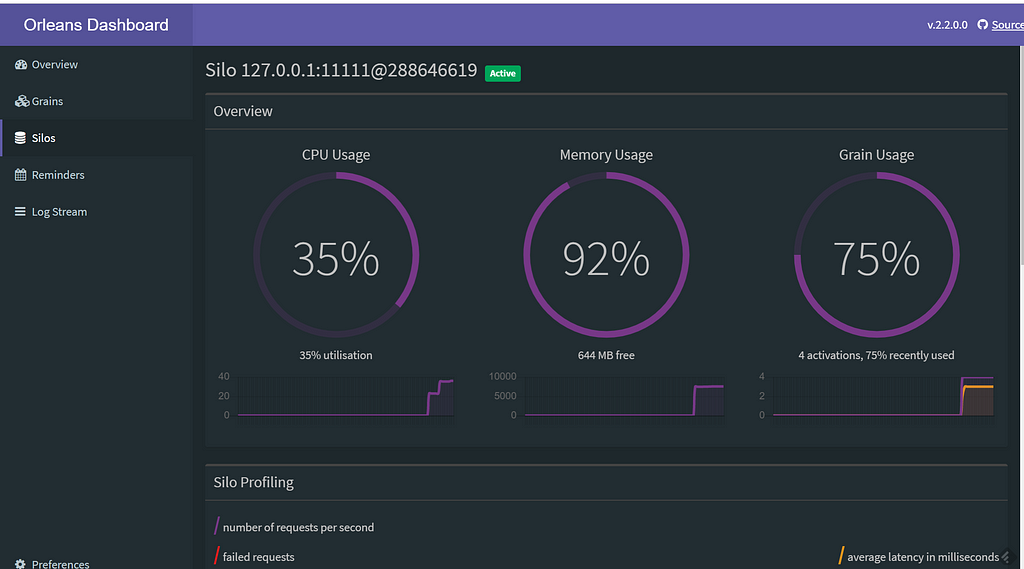
    <content type="html"><![CDATA[<p>I’ve been talking about the idea of long running, CPU bound, synchronous work for a long time.  Now, I’ve finally taken the time to build it out into a NuGet package!</p><span id="more"></span><p>Been talking about it for years at this point.  Between my <a href="https://blog.kritner.com/tags/microsoft-orleans/">other posts</a> on Orleans, or that one time (so far?) I was on a <a href="https://dotnetcore.show/episode-21-orleans-with-russell-hammett/">podcast</a> to talk about it, I never got around to writing the thing down that I was always talking about. That has changed now in the form of a NuGet package, and you too can solve problems (maybe!) with a small amount of code exposed by the package!</p><p>As a refresher, I needed to come up with a means of distributing compute calls for 10s of thousands of crypto calls, all hitting within a single moment.  I had done some experimenting/proof of concepting, and at the time settled on Orleans to accomplish the distribution.  Though I (still) haven’t used Orleans in more of an “intended use-case” of doing lots of distributed asynchronous work, using it in the way we are works <em>pretty well</em> for our use case.</p><p>If I were to do it all over again, perhaps it would make more sense to utilize a message queueing system with tried and true infrastructure.  I’m not sure if I didn’t <em>know</em> of these concepts at the time, but this route may have been a better option?  Even though the Orleans option seems like it would “conceptually” work, I’ve still also not personally worked on bringing up a queue system with workers and notifications. I feel like that was quite a brain fart when re-reading… but basically there may have been better ways to accomplish what this code does, but I still haven’t experimented with those better ways!</p><p>Anyway, onto the NuGet package!</p><h2 id="The-package"><a href="#The-package" class="headerlink" title="The package"></a>The package</h2><ul><li>The package repository can be found: <a href="https://github.com/OrleansContrib/Orleans.SyncWork">https://github.com/OrleansContrib/Orleans.SyncWork</a></li><li>And on NuGet: <a href="https://www.nuget.org/packages/Orleans.SyncWork/">https://www.nuget.org/packages/Orleans.SyncWork/</a></li></ul><p>There are only a few moving parts when it comes to the package:</p><ul><li><a href="#ISyncWorker-lt-TRequest-TResult-gt">ISyncWorker&lt;TRequest, TResult&gt;</a></li><li><a href="#SyncWorker-lt-TRequest-TResult-gt">SyncWorker&lt;TRequest, TResult&gt;</a></li><li><a href="#LimitedConcurrencyLevelTaskScheduler">LimitedConcurrencyLevelTaskScheduler</a></li></ul><h3 id="ISyncWorker-lt-TRequest-TResult-gt"><a href="#ISyncWorker-lt-TRequest-TResult-gt" class="headerlink" title="ISyncWorker&lt;TRequest, TResult&gt;"></a>ISyncWorker&lt;TRequest, TResult&gt;</h3><p>All your CPU bound, long running, and synchronous work will be implementing from this class, though it will be through the extension of the <code>SyncWorker&lt;TRequest, TResult&gt;</code> abstract base class.</p><p>This interface exposes a few separate methods/contracts that allow for the interaction with the long running grain work:</p><ul><li><code>Start(TRequest)</code><ul><li>This method is the “Entry point” into dispatching work to the grain.  This method is the only one that takes in a parameter in the form of the arguments needed to perform the work.  In the case of <a href="https://github.com/OrleansContrib/Orleans.SyncWork/blob/main/samples/Orleans.SyncWork.Demo.Api/Services/Grains/PasswordVerifier.cs">PasswordVerifier</a>, those parameters are both “the password” and “the password hash”, both of which are needed to actually do the verification of a password.</li></ul></li><li><code>GetWorkStatus()</code><ul><li>This method is used as a sort of “polling” mechanism, where callers can retrieve the current status of the grain work being worked on.  The statuses <code>Completed</code> or <code>Faulted</code> will then allow for the return of data from one of the following two methods, depending no which status the grain is in.</li></ul></li><li><code>GetResult()</code><ul><li>This method gets the result of a grain’s execution when the grain is in a <code>Completed</code> state, in the form of <code>TResult</code>.</li></ul></li><li><code>GetException()</code><ul><li>This method gets the exception from a grain’s execution when the grain is in a <code>Faulted</code> state.</li></ul></li></ul><h3 id="SyncWorker-lt-TRequest-TResult-gt"><a href="#SyncWorker-lt-TRequest-TResult-gt" class="headerlink" title="SyncWorker&lt;TRequest, TResult&gt;"></a>SyncWorker&lt;TRequest, TResult&gt;</h3><p>This is the abstract base class of the grains.  This class implements <code>ISyncWorker&lt;TRequest, TResult&gt;</code> and provides implementation details for the methods describe from the previously mentioned interface, as well as a few other methods:</p><ul><li><code>CreateTask(TRequest request)</code><ul><li>This private method is invoked by the <code>Start(TRequest request)</code> method, which sets the <code>_task</code> state on the instance, and enqueues that long running work onto a <code>LimitedConcurrencyLevelTaskScheduler</code></li></ul></li><li><code>PerformWork(TRequest request)</code><ul><li>This is the abstract method to this abstract class, it is invoked through the creation of the <code>_task</code>, and is the “thing” that needs to be implemented within the implementations of this class.</li></ul></li></ul><h3 id="LimitedConcurrencyLevelTaskScheduler"><a href="#LimitedConcurrencyLevelTaskScheduler" class="headerlink" title="LimitedConcurrencyLevelTaskScheduler"></a>LimitedConcurrencyLevelTaskScheduler</h3><p>This is a class that was more or less copied from <a href="https://msdn.microsoft.com/en-us/library/ee789351(v=vs.100).aspx">here</a>.  Its intended use is to limit the amount of work that can be performed at any one time as it relates to the work queued against this scheduler.</p><p>Without making use of this scheduler, queueing a massive amount of work on the “normal” scheduler quickly overwhelms the Orleans silo in such a way that there are no resources available to accommodate the asynchronous messaging calls required for Orleans to operate.  Using this scheduler, at some configurable level under the “amount of work that conceivably be done concurrently”, the Orleans cluster is able to continue asynchronous communication, while also performing these long running tasks being worked through the limited concurrency task scheduler.</p><h2 id="Not-the-package"><a href="#Not-the-package" class="headerlink" title="Not the package"></a>Not the package</h2><p>Aside from the package itself, the <a href="https://github.com/OrleansContrib/Orleans.SyncWork">repository</a> has a few other projects:</p><ul><li><a href="#Orleans-SyncWork-Demo-Api">Orleans.SyncWork.Demo.Api</a></li><li><a href="#Orleans-SyncWork-Demo-Api-Benchmark">Orleans.SyncWork.Demo.Api.Benchmark</a></li><li><a href="#Orleans-SyncWork-Tests">Orleans.SyncWork.Tests</a></li></ul><h3 id="Orleans-SyncWork-Demo-Api"><a href="#Orleans-SyncWork-Demo-Api" class="headerlink" title="Orleans.SyncWork.Demo.Api"></a>Orleans.SyncWork.Demo.Api</h3><p>a “sample” implementation of a set of Orleans grains, as well as the cluster hosting.  In this project, several long running grains are implemented and registered to the Orleans silo.  Those grains are then exposed through api endpoints, or are used as a means of testing some of the logic of <code>SyncWorker&lt;TRequest, TResult&gt;</code> within the <a href="#orleanssyncworktests">Orleans.SyncWork.Tests</a> project.</p><p>This project exposes an <a href="/2018/10/31/Microsoft-Orleans-Reporting-Dashboard/">Orleans Dashboard</a>, as well as SwaggerUI, for keeping an eye on the test cluster and invoking calls to the API respectively.</p><p><img src="dashboard.PNG" alt="The dashboard depicting 10k grains being fired off simultaneously"></p><h3 id="Orleans-SyncWork-Demo-Api-Benchmark"><a href="#Orleans-SyncWork-Demo-Api-Benchmark" class="headerlink" title="Orleans.SyncWork.Demo.Api.Benchmark"></a>Orleans.SyncWork.Demo.Api.Benchmark</h3><p>A <a href="https://benchmarkdotnet.org/index.html">Benchmark</a> project has been set up to get an idea of the timing differences between serial execution, <code>Parallel.For</code>,  and the parallel execution offered through the <code>SyncWork&lt;TRequest, TResponse&gt;</code> implementation.  The latter can be slower then <code>Parallel.For</code>, but faster then the serial execution - though keep in mind this benchmarking testing is done completely locally, where in a real world scenario, you’d be bringing up multiple silo hosts to make up a highly available cluster.  At this point it stands to reason that the functionality exposed by this package will far exceed the performance accomplished with a single machine.</p><p>An initial running of the benchmark gave the results:</p><table><thead><tr><th>Method</th><th align="right">Mean</th><th align="right">Error</th><th align="right">StdDev</th></tr></thead><tbody><tr><td>Serial</td><td align="right">12.284 s</td><td align="right">0.0145 s</td><td align="right">0.0135 s</td></tr><tr><td>MultipleTasks</td><td align="right">12.274 s</td><td align="right">0.0073 s</td><td align="right">0.0065 s</td></tr><tr><td>MultipleParallelTasks</td><td align="right">1.723 s</td><td align="right">0.0185 s</td><td align="right">0.0144 s</td></tr><tr><td>OrleansTasks</td><td align="right">1.118 s</td><td align="right">0.0080 s</td><td align="right">0.0074 s</td></tr></tbody></table><p>Though keep in mind this can be further improved with an actual cluster of orleans silos, rather than just my one locally.</p><h3 id="Orleans-SyncWork-Tests"><a href="#Orleans-SyncWork-Tests" class="headerlink" title="Orleans.SyncWork.Tests"></a>Orleans.SyncWork.Tests</h3><p>Unit testing project for the work exposed from the NuGet package.  These tests bring up a “TestCluster” which is used for the full duration of the tests against the grains.</p><p>One of the tests in particular throws 10k grains onto the cluster at once, all of which are long running (~200ms each) on my machine - more than enough time to overload the cluster if the limited concurrency task scheduler is not working along side the <code>SyncWork</code> base class correctly.</p><h2 id="Wrap-up"><a href="#Wrap-up" class="headerlink" title="Wrap up"></a>Wrap up</h2><p>So that’s it.  This is quite a bit simpler of an implementation that I ended up originally making for work.  The same basic idea is there, but the abstraction is quite different, if it holds up well enough, maybe using this package will be in order!</p><p>You can use this package to enable your Orleans cluster to handle your long running sync work, like 10s of thousands of crypto calls!</p><p><img src="https://media.giphy.com/media/wi8Ez1mwRcKGI/giphy.gif" alt="do it"></p><h2 id="Resources"><a href="#Resources" class="headerlink" title="Resources"></a>Resources</h2><ul><li><a href="https://github.com/OrleansContrib/Orleans.SyncWork">GitHub repository</a></li><li><a href="https://www.nuget.org/packages/Orleans.SyncWork/">NuGet package</a></li><li><a href="https://blog.kritner.com/tags/microsoft-orleans/">My other Orleans posts</a></li><li><a href="https://dotnetcore.show/episode-21-orleans-with-russell-hammett/">Talking about Orleans on the dotnetcore show</a></li><li><a href="/2018/10/31/Microsoft-Orleans-Reporting-Dashboard/">Orleans Dashboard blog post</a></li></ul>]]></content>
    
    
    <summary type="html">&lt;p&gt;I’ve been talking about the idea of long running, CPU bound, synchronous work for a long time.  Now, I’ve finally taken the time to build it out into a NuGet package!&lt;/p&gt;</summary>


    <category term="programming" scheme="https://blog.kritner.com/categories/programming/"/>
    
    <category term="c#" scheme="https://blog.kritner.com/categories/programming/c/"/>
    
    <category term=".net core" scheme="https://blog.kritner.com/categories/programming/net-core/"/>
    
    <category term="Microsoft Orleans" scheme="https://blog.kritner.com/categories/programming/microsoft-orleans/"/>
    
    
    <category term="programming" scheme="https://blog.kritner.com/tags/programming/"/>
    
    <category term="c#" scheme="https://blog.kritner.com/tags/c/"/>
    
    <category term=".net core" scheme="https://blog.kritner.com/tags/net-core/"/>
    
    <category term="Microsoft Orleans" scheme="https://blog.kritner.com/tags/microsoft-orleans/"/>
    
  </entry>
  
  <entry>
    <title>Hexo Updated to latest version</title>
    <link href="https://blog.kritner.com/2021/11/20/hexo-updated-to-latest-version/"/>
    <id>https://blog.kritner.com/2021/11/20/hexo-updated-to-latest-version/</id>
    <published>2021-11-20T13:20:12.000Z</published>
    <updated>2022-10-14T02:43:21.690Z</updated>
    
    <content type="html"><![CDATA[<p>Updated hexo to the latest version, trying out a new post!</p><span id="more"></span><p>I went through updating hexo to the latest version, under the hopes some of the <em>weird</em> code highlighting issues would be fixed.</p><p>Example:</p><p><img src="weirdHighlight.PNG" alt="Incorrect code highlighting even with language specified on old hexo version"></p><p>After the update:</p><p><img src="coolHighlight.PNG" alt="Code highlighting, same place, new hexo version"></p><p>It works!</p><p>I wanted to do this for a while, but was running into issues around my <code>post_asset_folder</code> images no longer resolving by just specifying <code>cover.jpg</code> (as an example).  In the new world, I need to (for front matter only) specify the full path (minus root): <code>/2021/11/20/my-post-title/cover.jpg</code>.</p><p>Not sure what the cause of this change is, but I spent too long looking into it.  Just had to go and update the front matter links to images for about 57 posts.</p><p>I did all of this because I had a few other posts in the (potential) works, and wanted to be in a better, more up to date state.<br>So yay!</p>]]></content>
    
    
    <summary type="html">&lt;p&gt;Updated hexo to the latest version, trying out a new post!&lt;/p&gt;</summary>


    <category term="blogging" scheme="https://blog.kritner.com/categories/blogging/"/>
    
    <category term="hexo" scheme="https://blog.kritner.com/categories/blogging/hexo/"/>
    
    
    <category term="blogging" scheme="https://blog.kritner.com/tags/blogging/"/>
    
    <category term="hexo" scheme="https://blog.kritner.com/tags/hexo/"/>
    
  </entry>
  
  <entry>
    <title>Simple SEO improvements for this week</title>
    <link href="https://blog.kritner.com/2021/10/15/simple-seo-improvements/"/>
    <id>https://blog.kritner.com/2021/10/15/simple-seo-improvements/</id>
    <published>2021-10-15T21:29:14.000Z</published>
    <updated>2022-10-14T02:43:21.690Z</updated>
    
    <content type="html"><![CDATA[<p>Blogging through <a href="https://kritner.medium.com/">medium</a> hasn’t exactly been a cash cow, but so far it’s been much more lucrative than <a href="https://blog.kritner.com/">blog.kritner.com</a>, in that I’ve never been paid for the latter!</p><span id="more"></span><p>Most of my posts come from my daily job, either prep from stuff I’m doing, planning on doing, or have done; In this case the <a href="https://www.codingblocks.net/slack/">coding blocks slack group</a>, led me down the path.  We were talking about Adsense in the #rants channel, and I had commented on how I have never had a payout from Adsense.  I was then informed by <a href="https://github.com/swharden">@swharden</a>, that I wasn’t actually displaying ads on my blog!</p><p>This of course led me down a rabbit hole of google “stuff” such as adsense, google search console, analytics, and an <a href="https://developers.google.com/search/docs/beginner/seo-starter-guide">SEO optimization resource</a>.</p><p>The tldr of my adsense problem was I hit the “verification threshold” of 10 dollars in revenue, but had not yet hit the “payment threshold” of 100 dollars, and the verification process involves snail mailing a pin to my residence… which happened to go to my old house… whoops!  So now hopefully, within the next 3-4 weeks I’ll have another PIN so that I can start making those sweet sweet pennies every now and then!  But in the interim, and seemingly for the past 8 or so months, I’ve been out of luck for any hopes of ad revenue /sad.</p><p>Anyway, that was the start of my journey pre-rabbit hole, and here’s a few pretty quick updates I was able to go through to get my site more SEO friendly.</p><h2 id="Not-using-H1s-for-some-reason"><a href="#Not-using-H1s-for-some-reason" class="headerlink" title="Not using H1s for some reason"></a>Not using H1s for some reason</h2><p>At this point, I had submit for my new PIN, but the blog has been dusty and neglected for a while, so I figured I would take care of some things regarding its SEO.  I ran my site through <a href="https://freetools.seobility.net/">https://freetools.seobility.net/</a> and one of the pieces of advice was to not use H1s in HTML?  At least I think it was this site that stated that.  So, I followed the directions, and changed all MD <code># </code>s to <code>## </code>.  This was a pretty simple find and replace and took all of 5 minutes for the entirety of my posts.</p><h2 id="Add-a-Sitemap"><a href="#Add-a-Sitemap" class="headerlink" title="Add a Sitemap"></a>Add a Sitemap</h2><p>This was a term I hadn’t heard in years!  I didn’t know sites actually still used these; but apparently they are <em>quite</em> useful for crawlers.  I use the <a href="https://hexo.io/">hexo</a> blog engine, which thankfully had an NPM plugin for generating a sitemap as a part of the static site generation process:</p><p><img src="npm.PNG" alt="npm package addition"></p><p>Then it was a matter of adding some configuration to my <code>config.yml</code> file:</p><figure class="highlight yml"><table><tr><td class="gutter"><pre><span class="line">1</span><br><span class="line">2</span><br><span class="line">3</span><br><span class="line">4</span><br><span class="line">5</span><br></pre></td><td class="code"><pre><code class="hljs yml"><span class="hljs-attr">sitemap:</span><br>  <span class="hljs-attr">path:</span> <span class="hljs-string">sitemap.xml</span><br>  <span class="hljs-attr">rel:</span> <span class="hljs-literal">false</span><br>  <span class="hljs-attr">tags:</span> <span class="hljs-literal">true</span><br>  <span class="hljs-attr">categories:</span> <span class="hljs-literal">true</span><br></code></pre></td></tr></table></figure><p>and then providing my sitemap.xml file to google search console:</p><p><img src="sitemap.PNG" alt="google search console sitemap"></p><h2 id="Add-a-sellers-json"><a href="#Add-a-sellers-json" class="headerlink" title="Add a sellers.json"></a>Add a sellers.json</h2><p>I don’t know if this step actually helps SEO or not, but it was recommended to me nonetheless: <a href="https://support.google.com/adsense/answer/9889911?hl=en">https://support.google.com/adsense/answer/9889911?hl=en</a>.  I added another static file to my hexo blog which at a minimum is seemingly a “best practice” for reasons of transparency.</p><p>I don’t have much more to say about this, it was a quick 7 line json file saved into sellers.json, and is now available on the site.</p><h2 id="Robots-txt"><a href="#Robots-txt" class="headerlink" title="Robots.txt"></a>Robots.txt</h2><p>One additional thing I didn’t realize I needed was a robots.txt.  This file, described <a href="https://developers.google.com/search/docs/advanced/robots/create-robots-txt">here</a>, is used to control which files on a site a crawler has access to, assuming it follows the rules.</p><p>Initially, I had set up my robots.txt to have the following:</p><figure class="highlight plaintext"><table><tr><td class="gutter"><pre><span class="line">1</span><br><span class="line">2</span><br><span class="line">3</span><br><span class="line">4</span><br></pre></td><td class="code"><pre><code class="hljs txt">User-agent: *<br>Allow: /<br><br>Sitemap: https://blog.kritner.com/sitemap.xml<br></code></pre></td></tr></table></figure><p>The above file allowed crawlers to all pages of the site, and also shared the location of my sitemap, which notes each page on the site.  This helps search engines like Google to be better able to return relevant search results when keywords are hit from my posts.</p><h3 id="Update-to-robots-txt"><a href="#Update-to-robots-txt" class="headerlink" title="Update to robots.txt"></a>Update to robots.txt</h3><p>After having read a bit more through <a href="https://developers.google.com/search/docs/beginner/seo-starter-guide">https://developers.google.com/search/docs/beginner/seo-starter-guide</a>, I saw that it recommended your robots.txt disallow crawlers from searching through your sites own “search pages”.  The point of the search engine is to find <em>literal content</em>, not find search pages within search pages, so this makes a lot of sense!</p><p>I have at least a few “search” type pages built into the static site that is my blog, namely:</p><ul><li><a href="https://blog.kritner.com/archives/">https://blog.kritner.com/archives/</a></li><li><a href="https://blog.kritner.com/categories/">https://blog.kritner.com/categories/</a></li><li><a href="https://blog.kritner.com/tags/">https://blog.kritner.com/tags/</a></li></ul><p>We’ll add those to the robots.txt:</p><figure class="highlight plaintext"><table><tr><td class="gutter"><pre><span class="line">1</span><br><span class="line">2</span><br><span class="line">3</span><br><span class="line">4</span><br><span class="line">5</span><br><span class="line">6</span><br><span class="line">7</span><br></pre></td><td class="code"><pre><code class="hljs txt">User-agent: *<br>Disallow: /archives/<br>Disallow: /categories/<br>Disallow: /tags/<br>Allow: /<br><br>Sitemap: https://blog.kritner.com/sitemap.xml<br></code></pre></td></tr></table></figure><h2 id="Wrap-up"><a href="#Wrap-up" class="headerlink" title="Wrap up"></a>Wrap up</h2><p>These were just a few of the low hanging fruit that were out there regarding SEO and my blog. There are definitely more things to take care of, but this is what I had time for in some downtime this week!</p><p>Obviously one of the most beneficial things you can do for your SEO… is to actually post more content… I’m working on it, sometimes!</p><h2 id="Resources"><a href="#Resources" class="headerlink" title="Resources"></a>Resources</h2><ul><li><a href="https://www.codingblocks.net/slack/">https://www.codingblocks.net/slack/</a></li><li><a href="https://developers.google.com/search/docs/beginner/seo-starter-guide">https://developers.google.com/search/docs/beginner/seo-starter-guide</a></li><li><a href="https://support.google.com/adsense/answer/9889911?hl=en">https://support.google.com/adsense/answer/9889911?hl=en</a></li><li><a href="https://developers.google.com/search/docs/advanced/robots/create-robots-txt">https://developers.google.com/search/docs/advanced/robots/create-robots-txt</a></li><li><a href="https://freetools.seobility.net/">https://freetools.seobility.net/</a></li><li><span class="unsplash-credit">Photo by <a href="https://unsplash.com/photos/l5if0iQfV4c" target="_blank">“Merakist”</a> on <a href="https://unsplash.com/" target="_blank">Unsplash</a>.</span>]]></content>
    
    
    <summary type="html">&lt;p&gt;Blogging through &lt;a href=&quot;https://kritner.medium.com/&quot;&gt;medium&lt;/a&gt; hasn’t exactly been a cash cow, but so far it’s been much more lucrative than &lt;a href=&quot;https://blog.kritner.com/&quot;&gt;blog.kritner.com&lt;/a&gt;, in that I’ve never been paid for the latter!&lt;/p&gt;</summary>


    <category term="blogging" scheme="https://blog.kritner.com/categories/blogging/"/>
    
    <category term="hexo" scheme="https://blog.kritner.com/categories/blogging/hexo/"/>
    
    <category term="seo" scheme="https://blog.kritner.com/categories/blogging/seo/"/>
    
    
    <category term="blogging" scheme="https://blog.kritner.com/tags/blogging/"/>
    
    <category term="hexo" scheme="https://blog.kritner.com/tags/hexo/"/>
    
    <category term="seo" scheme="https://blog.kritner.com/tags/seo/"/>
    
  </entry>
  
  <entry>
    <title>dotnet centralized package versioning</title>
    <link href="https://blog.kritner.com/2021/10/01/dotnet-centralized-package-versioning/"/>
    <id>https://blog.kritner.com/2021/10/01/dotnet-centralized-package-versioning/</id>
    <published>2021-10-01T14:00:00.000Z</published>
    <updated>2022-10-14T02:43:21.690Z</updated>
    
    <content type="html"><![CDATA[<p>In a <a href="/2018/10/10/using-configuration-files-to-manage-nuget-package-versions-and-other-stuff/">previous post</a> I talked about using variable for keeping NuGet packages across multiple projects; now there is a (potentially) better way.</p><span id="more"></span><h2 id="Overview"><a href="#Overview" class="headerlink" title="Overview"></a>Overview</h2><p>In the previous post, it was demonstrated how to utilize “repository wide” variables located in a Directory.Build.props folder.  With these variables defined, you could use the variable, rather than a literal value, in your csproj to keep dependencies throughout the repository on the same version.</p><p>There is now a feature (in review) at <a href="https://github.com/NuGet/Home/wiki/Centrally-managing-NuGet-package-versions">https://github.com/NuGet/Home/wiki/Centrally-managing-NuGet-package-versions</a> which allows for doing the same thing, just in a more elegant way, at least in my opinion.</p><h2 id="Setting-it-up"><a href="#Setting-it-up" class="headerlink" title="Setting it up"></a>Setting it up</h2><p>The in review feature relies on a new “repository wide” like file called “Directory.Packages.props”.  Using <a href="https://github.com/Kritner-Blogs/DirectoryBuildProps/releases/tag/v1.1">https://github.com/Kritner-Blogs/DirectoryBuildProps/releases/tag/v1.1</a> as a starting point, we’ll introduce the centralized package versioning.</p><h3 id="Update-Directory-Build-props"><a href="#Update-Directory-Build-props" class="headerlink" title="Update Directory.Build.props"></a>Update Directory.Build.props</h3><p>First, we’ll update the “Directory.Build.props” file to contain the following:</p><figure class="highlight xml"><table><tr><td class="gutter"><pre><span class="line">1</span><br></pre></td><td class="code"><pre><code class="hljs xml"><span class="hljs-tag">&lt;<span class="hljs-name">ManagePackageVersionsCentrally</span>&gt;</span>true<span class="hljs-tag">&lt;/<span class="hljs-name">ManagePackageVersionsCentrally</span>&gt;</span><br></code></pre></td></tr></table></figure><p>This tells visual studio, rider, the dotnet cli, etc., that the current folder, as well as its children (so repository wide if used at the root of the repo) that central package versioning is used.</p><h3 id="Create-Directory-Packages-props"><a href="#Create-Directory-Packages-props" class="headerlink" title="Create Directory.Packages.props"></a>Create Directory.Packages.props</h3><p>Within the same folder as the “Directory.Build.props”, we’ll be creating a new file “Directory.Packages.props”.  This file is used to specify the NuGet package version used for all packages used across the repository.  Continuing to use the “Kritner.SolarProjection”, we’ll set up our new “Directory.Packages.props” file to specify the version.</p><figure class="highlight xml"><table><tr><td class="gutter"><pre><span class="line">1</span><br><span class="line">2</span><br><span class="line">3</span><br><span class="line">4</span><br><span class="line">5</span><br></pre></td><td class="code"><pre><code class="hljs xml"><span class="hljs-tag">&lt;<span class="hljs-name">Project</span>&gt;</span><br>    <span class="hljs-tag">&lt;<span class="hljs-name">ItemGroup</span>&gt;</span><br>        <span class="hljs-tag">&lt;<span class="hljs-name">PackageVersion</span> <span class="hljs-attr">Include</span>=<span class="hljs-string">&quot;Kritner.SolarProjection&quot;</span> <span class="hljs-attr">Version</span>=<span class="hljs-string">&quot;1.0.2&quot;</span> /&gt;</span><br>    <span class="hljs-tag">&lt;/<span class="hljs-name">ItemGroup</span>&gt;</span><br><span class="hljs-tag">&lt;/<span class="hljs-name">Project</span>&gt;</span><br></code></pre></td></tr></table></figure><p>In the above, we’re just defining the package as well as a version that should be used when that package is listed within any csproj file at the same level or as a child of the directory where the “Directory.Build.props” file is located.</p><p>Note that the above file does <strong><em>not</em></strong> include the package automatically in csproj files, it only defines the version to use when the package is listed in the csproj file.</p><h3 id="Update-csproj-files"><a href="#Update-csproj-files" class="headerlink" title="Update csproj files"></a>Update csproj files</h3><p>Now that central package versioning is being used in our repository, we’ll need to make updates to our csproj file to make use of it; namely removing the version declaration from our csproj files.</p><p>Currently, we have the following in our csproj file:</p><figure class="highlight xml"><table><tr><td class="gutter"><pre><span class="line">1</span><br><span class="line">2</span><br><span class="line">3</span><br><span class="line">4</span><br><span class="line">5</span><br><span class="line">6</span><br><span class="line">7</span><br><span class="line">8</span><br><span class="line">9</span><br><span class="line">10</span><br><span class="line">11</span><br></pre></td><td class="code"><pre><code class="hljs xml"><span class="hljs-tag">&lt;<span class="hljs-name">Project</span> <span class="hljs-attr">Sdk</span>=<span class="hljs-string">&quot;Microsoft.NET.Sdk&quot;</span>&gt;</span><br><br>  <span class="hljs-tag">&lt;<span class="hljs-name">PropertyGroup</span>&gt;</span><br>    <span class="hljs-tag">&lt;<span class="hljs-name">TargetFramework</span>&gt;</span>net5.0<span class="hljs-tag">&lt;/<span class="hljs-name">TargetFramework</span>&gt;</span><br>  <span class="hljs-tag">&lt;/<span class="hljs-name">PropertyGroup</span>&gt;</span><br><br>  <span class="hljs-tag">&lt;<span class="hljs-name">ItemGroup</span>&gt;</span><br>    <span class="hljs-tag">&lt;<span class="hljs-name">PackageReference</span> <span class="hljs-attr">Include</span>=<span class="hljs-string">&quot;Kritner.SolarProjection&quot;</span> <span class="hljs-attr">Version</span>=<span class="hljs-string">&quot;$(NuGet-Kritner-SolarProjection)&quot;</span> /&gt;</span><br>  <span class="hljs-tag">&lt;/<span class="hljs-name">ItemGroup</span>&gt;</span><br>  <br><span class="hljs-tag">&lt;/<span class="hljs-name">Project</span>&gt;</span><br></code></pre></td></tr></table></figure><p>In the above you’ll note that the old “variable style” version is being used, now with central package management, we don’t even need that:</p><figure class="highlight xml"><table><tr><td class="gutter"><pre><span class="line">1</span><br><span class="line">2</span><br><span class="line">3</span><br><span class="line">4</span><br><span class="line">5</span><br><span class="line">6</span><br><span class="line">7</span><br><span class="line">8</span><br><span class="line">9</span><br><span class="line">10</span><br><span class="line">11</span><br></pre></td><td class="code"><pre><code class="hljs xml"><span class="hljs-tag">&lt;<span class="hljs-name">Project</span> <span class="hljs-attr">Sdk</span>=<span class="hljs-string">&quot;Microsoft.NET.Sdk&quot;</span>&gt;</span><br><br>  <span class="hljs-tag">&lt;<span class="hljs-name">PropertyGroup</span>&gt;</span><br>    <span class="hljs-tag">&lt;<span class="hljs-name">TargetFramework</span>&gt;</span>net5.0<span class="hljs-tag">&lt;/<span class="hljs-name">TargetFramework</span>&gt;</span><br>  <span class="hljs-tag">&lt;/<span class="hljs-name">PropertyGroup</span>&gt;</span><br><br>  <span class="hljs-tag">&lt;<span class="hljs-name">ItemGroup</span>&gt;</span><br>    <span class="hljs-tag">&lt;<span class="hljs-name">PackageReference</span> <span class="hljs-attr">Include</span>=<span class="hljs-string">&quot;Kritner.SolarProjection&quot;</span> /&gt;</span><br>  <span class="hljs-tag">&lt;/<span class="hljs-name">ItemGroup</span>&gt;</span><br>  <br><span class="hljs-tag">&lt;/<span class="hljs-name">Project</span>&gt;</span><br></code></pre></td></tr></table></figure><h2 id="Additional-notes"><a href="#Additional-notes" class="headerlink" title="Additional notes"></a>Additional notes</h2><p>In the previous post we learned how to utilize variables to control our nuget package versions used across the repository, where desired.  In this post we explored how to define a package version in one place, and for that same package version to be used across the whole repository.</p><p>There are a few other things to note when using central package versioning however:</p><ul><li>If a package version is defined in the csproj while central package versioning is turned on, you will be a compile error<ul><li>This is done (I believe) to help force the developer “into the pit of success”, making them aware of the fact that the package version is either already defined on a central level and you don’t need to specify the version, or that the package version needs to be defined in the “Directory.Packages.props” file.</li></ul></li><li>Related to the above point, you are still able to override the package version within a csproj by making use of the “OverrideVersion” property (as opposed to “Version” property) within the csproj file, as so:<br><img src="override.JPG" alt="OverrideVersion"></li><li>You can still make use of variables within your props files, as demonstrated in the above image.  I like using these variables for defining a “package version” for a suite of packages, where they’re all released with a similar version number all at the same time, even one something didn’t <em>necessarily</em> change for each package in the suite.  Examples of where this can be useful include the <a href="https://github.com/dotnet/aspnetcore">aspnetcore</a> repository itself, as well as <a href="https://github.com/dotnet/orleans">Microsoft Orleans</a> - define the version of the package suite you want to use as a variable, then in your “Build.Packages.props” file, rely on that variable for each package used, rather than defining the literal package version for each package.</li></ul><h2 id="Resources"><a href="#Resources" class="headerlink" title="Resources"></a>Resources</h2><ul><li><a href="https://github.com/NuGet/Home/wiki/Centrally-managing-NuGet-package-versions">https://github.com/NuGet/Home/wiki/Centrally-managing-NuGet-package-versions</a></li><li><a href="https://github.com/Kritner-Blogs/DirectoryBuildProps/releases/tag/v1.1">Code at beginning of post</a></li><li><a href="https://github.com/Kritner-Blogs/DirectoryBuildProps/releases/tag/v1.2">Code at end of post</a></li></ul>]]></content>
    
    
    <summary type="html">&lt;p&gt;In a &lt;a href=&quot;/2018/10/10/using-configuration-files-to-manage-nuget-package-versions-and-other-stuff/&quot;&gt;previous post&lt;/a&gt; I talked about using variable for keeping NuGet packages across multiple projects; now there is a (potentially) better way.&lt;/p&gt;</summary>


    <category term="programming" scheme="https://blog.kritner.com/categories/programming/"/>
    
    <category term=".net" scheme="https://blog.kritner.com/categories/programming/net/"/>
    
    <category term="configuration" scheme="https://blog.kritner.com/categories/programming/configuration/"/>
    
    
    <category term=".net" scheme="https://blog.kritner.com/tags/net/"/>
    
    <category term="configuration" scheme="https://blog.kritner.com/tags/configuration/"/>
    
  </entry>
  
  <entry>
    <title>How to build a &quot;tamperproof cookie&quot;</title>
    <link href="https://blog.kritner.com/2021/07/27/how-to-tamperproof-cookie/"/>
    <id>https://blog.kritner.com/2021/07/27/how-to-tamperproof-cookie/</id>
    <published>2021-07-27T14:00:00.000Z</published>
    <updated>2022-10-14T02:43:21.690Z</updated>
    
    <content type="html"><![CDATA[<p>All right! It’s been a minute! Tamperproof cookies, I needed one, it’s pretty simple after thinking it through.</p><span id="more"></span><p>I feel like I <em>always</em> say it’s been a while since my last post… but this time it has in fact been a while.</p><h2 id="The-problem"><a href="#The-problem" class="headerlink" title="The problem"></a>The problem</h2><p>So… working on a multi factor authentication setup for a freelance client.  Have the multi factor one time password all set up, but now I need a way to implement a “remember me for 30 days” feature.  That should be <em>relatively</em> simple, right?  Can’t we just use cookies?  </p><p>Not so fast there past me prior to thinking it through!  Cookies can easily be modified by the client, because they’re stored on the client local storage and aren’t signed with a <a href="https://searchsecurity.techtarget.com/definition/digital-signature">digital signature</a>!</p><p>Here’s some context into the situation:</p><p><img src="context.PNG" alt="Context from the Coding Blocks Slack"></p><p>Basically, I needed a way to store local to the user a secure (tamper proof) means of indicating the user has been dual factor authenticated for 30 days.  The <em>simplest</em> way to do this would seemingly be to store a cookie with a value of the expiration date and user name.  However, this first idea I had falls apart quickly, since a user could just change the cookie value (either expiration date and/or user name) and be able to get past the second factor.  The second factor one time password (OTP) entry should <em>only</em> be presented to the user if the cookie is valid, for the specific user, and is not yet expired (30 days from the cookie creation).</p><h2 id="Outline-of-Requirements"><a href="#Outline-of-Requirements" class="headerlink" title="Outline of Requirements"></a>Outline of Requirements</h2><p>There are a few things that are needed for a client side solution:</p><ul><li><em>Something</em> stored client side that can be <em>securely</em> used as a means of indicating the user does not need to enter a OTP<ul><li>Should have some sort of unique attribution to the user - either through a user ID, email address, or something similar</li><li>Should have an expiration date that is taken into account when checking the validity of the thing</li><li>Should not validate successfully in instances where the user information or the expiration date is changed</li></ul></li></ul><h2 id="The-solution"><a href="#The-solution" class="headerlink" title="The solution"></a>The solution</h2><p>Once documenting the above requirements coupled with the above screenshot, it became pretty clear to me that some sort of cryptography could be used to ensure the tamperproof part of the thing being stored on the client side - in this case a cookie.</p><p><a href="https://en.wikipedia.org/wiki/HMAC">HMAC</a> - Hash-base Message Authentication Code - is a cryptographic operation that utilizes a “key” and “message” to produce a “mac” which is (more or less) the combination of the two pieces.  The general hmac signature looks something like this:</p><figure class="highlight py"><table><tr><td class="gutter"><pre><span class="line">1</span><br></pre></td><td class="code"><pre><code class="hljs py">digest = hmac(key, message)<br></code></pre></td></tr></table></figure><p>The <code>key</code> portion is secret between one or more parties - in my case one party, and the <code>message</code> is data that is to be validated as genuine. In my case, the <code>key</code> will be kept secret from the user, as that <code>key</code> is what verifies the <code>message</code> is what we put into the cookie.</p><p>What’s a good <code>key</code> to use you may be asking yourself?  Well, it’s not the user name, though it’s something similar.  The user already knows their own username, so it’s not a good candidate for a <code>key</code>.  There is however, their password, specifically their password <em>hash</em>.  The user would not know the hash of their password that is stored in the remote system, so it is a good potential candidate for a <code>key</code>.</p><p>The user’s password is computed basically like this:</p><figure class="highlight reasonml"><table><tr><td class="gutter"><pre><span class="line">1</span><br></pre></td><td class="code"><pre><code class="hljs reasonml">password_digest = <span class="hljs-constructor">H(<span class="hljs-params">salt</span><span class="hljs-operator">||</span><span class="hljs-params">plaintext_password</span>, <span class="hljs-params">work_factor</span>)</span><br></code></pre></td></tr></table></figure><p>Where <code>password_digest</code> is the output of running <code>salt</code> concatenated with <code>plaintext_password</code> through a <a href="https://en.wikipedia.org/wiki/One-way_function">one way function</a> <code>H</code>, <code>work_factor</code> times.  The <code>password_digest</code> is not something the user would know, as their salt changes with each password change, nor do they know the underlying one way function applied to their <code>plaintext_password</code>.</p><p>So, now we have a <code>key</code> candidate, what about the actual message?  The message is thankfully very straightforward, and we can use the datetime of the OTP cookie expiration.  The full HMAC call will end up being: <code>cookie_hash_content = hmac(H(password_hash), expiration_date_string)</code>.</p><p>This entire <code>cookie_hash_content</code> can be stored in the body of the cookie, though we will <em>also</em> need to stored the <code>expiration_date_string</code> within the cookie as well, so that the server side can reconstruct the inputs into the <code>hmac</code> call, and verify they match.</p><p>Thankfully, this is easy enough to do with a pipe (or other) delimited set of fields within the cookie.  I will be using this format:</p><figure class="highlight dust"><table><tr><td class="gutter"><pre><span class="line">1</span><br></pre></td><td class="code"><pre><code class="hljs dust"><span class="hljs-template-variable">&#123;expiration_date_string&#125;</span><span class="xml">|</span><span class="hljs-template-variable">&#123;cookie_hash_content&#125;</span><br></code></pre></td></tr></table></figure><p>Validating the above cookie at authentication time is as simple as:</p><ul><li>Try to split the cookie value into two pieces, if less than two pieces exist, return false</li><li>Try to parse the first element in the split as a date, if fails, return false</li><li>Ensure the parsed date is after the current datetime, if it is not, return false</li><li>Validate the <code>cookie_hash_content</code> by comparing the cookie’s second part of the split, to a newly generated <code>hmac(H(password_hash), expiration_date_string)</code><ul><li>if they don’t match, return false</li><li>if they match, return true</li></ul></li></ul><p>The above pseudocode also has the added benefit if the user changes their password, they will immediately fail the OTP cookie check, as the mac using their old password hash will no longer match the newly generated/checked password hash upon login.  This in a few ways makes things just a bit more secure.</p><p>Here is a quick run through of the HMAC (and a few unit tests) using fake <code>expireDates</code> and <code>passwordHashes</code>: <a href="https://replit.com/@Kritner/TamperProofCookies#main.py">https://replit.com/@Kritner/TamperProofCookies#main.py</a></p><h2 id="Final-thoughts"><a href="#Final-thoughts" class="headerlink" title="Final thoughts"></a>Final thoughts</h2><ul><li>This works because the <code>key</code> is not known (or knowable) to the end user</li><li>The salts, while not <em>necessarily</em> secret, are not known to the end user, so they would have no chance of being able to recreate the same conditions to come up with the <code>key</code> being utilized</li><li>We verify the <code>cookie_hash_content</code> by re-computing the value based on the values stored in the cookie itself, along with the additional data of <code>key</code> that isn’t in the cookie, and can’t be known by the user, so there’s no chance the user would be able to come up with “the right information” that could pass the verify step.</li></ul><p>Resources:</p><ul><li><a href="https://searchsecurity.techtarget.com/definition/digital-signature">Digital Signatures</a></li><li><a href="https://en.wikipedia.org/wiki/HMAC">HMAC</a></li><li><a href="https://en.wikipedia.org/wiki/One-way_function">One Way Function</a></li><li><a href="https://replit.com/@Kritner/TamperProofCookies#main.py">replit</a></li><li><a href="https://www.codingblocks.net/slack/">Coding blocks slack</a></li><li><span class="unsplash-credit">Photo by <a href="https://unsplash.com/photos/_PGlV_zMXgw" target="_blank">nate_dumlao</a> on <a href="https://unsplash.com/" target="_blank">Unsplash</a>.</span></li></ul>]]></content>
    
    
    <summary type="html">&lt;p&gt;All right! It’s been a minute! Tamperproof cookies, I needed one, it’s pretty simple after thinking it through.&lt;/p&gt;</summary>


    <category term="programming" scheme="https://blog.kritner.com/categories/programming/"/>
    
    <category term="cookie" scheme="https://blog.kritner.com/categories/programming/cookie/"/>
    
    <category term="cryptography" scheme="https://blog.kritner.com/categories/programming/cryptography/"/>
    
    <category term="mfa" scheme="https://blog.kritner.com/categories/programming/mfa/"/>
    
    
    <category term="programming" scheme="https://blog.kritner.com/tags/programming/"/>
    
    <category term="cookie" scheme="https://blog.kritner.com/tags/cookie/"/>
    
    <category term="MFA" scheme="https://blog.kritner.com/tags/mfa/"/>
    
  </entry>
  
  <entry>
    <title>Getting Started with NDepend</title>
    <link href="https://blog.kritner.com/2021/02/16/getting-started-with-ndepend/"/>
    <id>https://blog.kritner.com/2021/02/16/getting-started-with-ndepend/</id>
    <published>2021-02-16T15:00:00.000Z</published>
    <updated>2022-10-14T02:43:21.686Z</updated>
    
    <content type="html"><![CDATA[<p>One of the folks over at <a href="https://www.ndepend.com/docs/getting-started-with-ndepend">NDepend</a> reached out to me to provide a license for their product; let’s do some exploring!</p><span id="more"></span><p>I’ve never actually used NDepend, and have only otherwise scratched the surface using other code analysis tools.  Perhaps this will be a mis-categorization, but the few I’ve worked with previously include:</p><ul><li>FxCop</li><li>StyleCop</li><li>VS Enterprise code analysis (I forget if this is the actual name, I no longer have an enterprise license)</li><li>SonarQube</li></ul><p>The idea of tools like NDepend seems pretty straight forward, look through your source code, and identify potential pain points that could use another look.  Sounds pretty simple in theory, but I’d imagine the details of such analysis goes way over my head.</p><h2 id="Getting-started-in-Visual-Studio"><a href="#Getting-started-in-Visual-Studio" class="headerlink" title="Getting started in Visual Studio"></a>Getting started in Visual Studio</h2><p>Visual Studio is no longer my IDE of choice when working in .net core, but I dusted it off to play around with NDepend.  It was quite simple to get installed as a plugin for visual studio, and here’s a helpful video if it’s not otherwise obvious on how to get started: <a href="https://www.ndepend.com/docs/getting-started-with-ndepend">https://www.ndepend.com/docs/getting-started-with-ndepend</a></p><p>I didn’t really know what to expect, and I don’t have any real significant (personal) code bases that I can hook this up to, so for now I’ll run it against my <a href="https://github.com/Kritner-Blogs/Kritner.PatternExamples">Design Patterns repository</a> to get a baseline.</p><p>To kick off the analysis I clicked the circle icon in the bottom right of my visual studio instance, and was quickly presented with a dashboard that looked like this:</p><p><img src="start.JPG" alt="Initial run of NDepend dashboard"></p><p>Note that this wasn’t <em>actually</em> my first run, I think it was my second or third after having changed a few lines of code in between runs to get a delta in the analysis.  Looking at the dashboard it became apparent the analyzer must keep “state” as to what the issues are over time; which is a great sounding feature as it will allow you to track your code “smells” as your code continues to be developed!</p><h2 id="The-Dashboard"><a href="#The-Dashboard" class="headerlink" title="The Dashboard"></a>The Dashboard</h2><p>Upon first gazing at the dashboard (pictured above), I was honestly a bit overwhelmed.  It was a lot of information, and I didn’t see an immediately obvious “starting point” of what I should be concerned with.</p><p>Twice weekly I meet with a few friends over a video/screen share session and we work through plural sight courses together, this week I actually had them on to do a “first impressions” of the NDepend tool; unfortunately my OBS setup was hosed up, and I lost <em>most</em> of the audio.  I say this as it is not only my own “first impression” but others as well - namely several who have (slightly) used static analysis tools previously, and others who have not.</p><h3 id="Sections"><a href="#Sections" class="headerlink" title="Sections"></a>Sections</h3><p>Here I’ll go over what I considered to be the “sections” that were present when going through the NDepend tool.</p><h4 id="Dashboard"><a href="#Dashboard" class="headerlink" title="Dashboard"></a>Dashboard</h4><p><img src="1_dashboard.JPG" alt="Dashboard"></p><p>Sorry for the awful quality of the above image, it was taken from the recording that I couldn’t end up using due to lack of audio.</p><p>This seemed to be more or less the “meat and potatoes” of it all.  We can see numerous metrics, some of which are pretty self explanatory, but several of which perhaps not so much for someone who is coming from a code base that has no testing; which granted is itself kind of a problem.</p><p>I did make a few adjustments to the code from the previous time I ran analysis, I am a <em>big</em> fan of tracking the code quality over time - so this is a huge benefit in my book.  It was not immediately obvious to me how this information is tracked over time in a “multi developer project” situation.  I am under the assumption that some of the files that were added to the project itself would need to be added to source control in order to track the information over time, but I’m not really a big fan of that (assuming my assumption is even correct).  NDepend <em>can</em> be installed in some build systems, which I would guess would keep the analysis separate from the source, but tied to that repository in some manner.  I believe I saw integrations for at TFS and TeamCity, I wonder if it could also be integrated with something like TravisCI or GitHub actions.</p><p>The sections:</p><ul><li>Lines of code - pretty obvious what this metric is, it shows the total number of lines of code in your analyzed solution, including a delta from the last time of analysis (or when comparing to a specific baseline).</li><li>Debt - based on what I (think I) know about what technical debt is, this metric would go up or down based on a potential variety of factors, namely method complexity and code coverage.  This was one that we all had questions around.</li><li>Quality Gates, Rules, Issues - None of us were sure what separates these issues from one another, but they seemed to be driven in some manner by the “Queries and Rules” that are enabled within a separate section, but that was another point of confusion coming to this for the “first time”.  The gist of these sections seemed to be based around a configurable set of rules that you can (or not) tailor to your project.  On the first run through it seemed like we were getting some false positives around use of System.Random being used in a “non security setting”.  Seems that rules can be enabled or disabled on a rule level, or by utilizing attributes to ignore specific NDepend rules for a particular member within your code.</li><li>Types - a breakdown of the various assemblies, namespaces, files, etc. that are a part of your codebase. It would be interesting to see how this changes over time within a code base.</li><li>Coverage - I did not have any coverage in this particular project, and it was definitely asked about by the folks I was doing the walk through with.  The way I assume it works it “Code Coverage” as a function of unit testing and exhausting code branches.  A very useful metric to have, as long as you have <a href="/2016/02/21/what-is-the-business-value-of-unit-testing/">meaningful tests and asserts</a>.</li><li>Method complexity - I’d imagine this is a similar metric to the <a href="https://en.wikipedia.org/wiki/Cyclomatic_complexity">Cyclomatic Complexity</a> that is a part of the enterprise Visual Studio analysis tool.  The more complex your methods are, the harder your code is to grok and/or maintain.  This metric likely plays a large part in the “Debt” metric mentioned above.</li></ul><p>Overall I found the dashboard pretty useful, if not a bit overwhelming.  One thing I think the dashboard could use that would benefit the users of NDepend greatly, especially when they’re just starting out, is a little “i” popup per metric:</p><p><img src="2_baseline.JPG" alt="&quot;i&quot; popup for &quot;Choose Baseline&quot;"></p><p>The popup could at a minimum describe the metric, but probably better still, link to the NDepend documentation on what exactly the metric means, what goes into its calculation, and why improving upon the metric and monitoring it can be beneficial to your code base.</p><h4 id="Queries-and-Rules-Explorer"><a href="#Queries-and-Rules-Explorer" class="headerlink" title="Queries and Rules Explorer"></a>Queries and Rules Explorer</h4><p><img src="3_qr.JPG" alt="Queries and Rules Explorer"></p><p>I was not really sure where to start here.  When poking around with checking and unchecking things within this window, it seemed to impact what is “in scope” of the analysis.  It seems like you can probably also define your own rules to look for in your code base, but we did not get into that in our first excursion into NDepend.</p><h4 id="Queries-and-Rules-Edit"><a href="#Queries-and-Rules-Edit" class="headerlink" title="Queries and Rules Edit"></a>Queries and Rules Edit</h4><p><img src="4.JPG" alt="Queries and Rules Edit"></p><p>When clicking on an action item within the dashboard be it “good or bad”, this pane was updated.  In the case of failed rule checks, you’d be given a means of fixing it, with navigation to the code block that failed the check.  This section was quite useful for helping get more “green lights” on the dashboard, though it was quite cramped in the tab it showed up in, though I understand <em>why</em> it showed up there, so you could view the dashboard and/or problem code while keeping the failed rules list visible as well.</p><h2 id="Review"><a href="#Review" class="headerlink" title="Review"></a>Review</h2><p>Overall I find the information provided through NDepend to be quite useful, having a tool like NDepend running as a part of your build process, even automatically rejecting PRs if certain quality gates aren’t met sounds fantastic.</p><p>I did have a few concerns about “what exactly I’m looking at” which could be remedied via “?” or “i” links on the (granted already quite busy) interface; but I think overall would be a welcome change, especially for first time users (perhaps a feature toggle?).</p><p>How does this static analysis compare with other, now free options like Roslyn analyzers, or other tools like sonar, or perhaps even ReSharper?  I would imagine there’s some overlap, but that’s not necessarily a bad thing if the multitude of tools bring something unique to the table.  The analysis as compared to other baselines I found very nice, though I’m curious how it works in a “multi developer” setting, and with source control and build systems.</p><p>I look forward to actually implementing some tests in my analyzed project, and/or putting the tool up against something “more real” than my Patterns repository.  Overall it seems like NDepend is a very powerful tool!</p><h2 id="References"><a href="#References" class="headerlink" title="References"></a>References</h2><ul><li><a href="https://www.ndepend.com/docs/getting-started-with-ndepend">NDepend</a></li><li><a href="https://www.ndepend.com/docs/getting-started-with-ndepend">Getting Started with NDepend</a></li><li><a href="https://github.com/Kritner-Blogs/Kritner.PatternExamples">Design Patterns repository</a></li><li><a href="/2016/02/21/what-is-the-business-value-of-unit-testing/">What is the Business Value of Unit Testing?</a></li><li><a href="https://en.wikipedia.org/wiki/Cyclomatic_complexity">Cyclomatic Complexity</a></li></ul>]]></content>
    
    
    <summary type="html">&lt;p&gt;One of the folks over at &lt;a href=&quot;https://www.ndepend.com/docs/getting-started-with-ndepend&quot;&gt;NDepend&lt;/a&gt; reached out to me to provide a license for their product; let’s do some exploring!&lt;/p&gt;</summary>


    <category term="programming" scheme="https://blog.kritner.com/categories/programming/"/>
    
    <category term="static analysis" scheme="https://blog.kritner.com/categories/programming/static-analysis/"/>
    
    <category term="NDepend" scheme="https://blog.kritner.com/categories/programming/ndepend/"/>
    
    
    <category term="programming" scheme="https://blog.kritner.com/tags/programming/"/>
    
    <category term="c#" scheme="https://blog.kritner.com/tags/c/"/>
    
    <category term="static analysis" scheme="https://blog.kritner.com/tags/static-analysis/"/>
    
    <category term="NDepend" scheme="https://blog.kritner.com/tags/ndepend/"/>
    
  </entry>
  
  <entry>
    <title>Design Patterns: Decorator</title>
    <link href="https://blog.kritner.com/2020/12/18/design-patterns-decorator/"/>
    <id>https://blog.kritner.com/2020/12/18/design-patterns-decorator/</id>
    <published>2020-12-18T15:00:00.000Z</published>
    <updated>2022-10-14T02:43:21.686Z</updated>
    
    <content type="html"><![CDATA[<p>The decorator pattern is a structural design pattern that can be used to add functionality to classes without modifying the original class or its interface.</p><span id="more"></span><h2 id="The-Decorator-Pattern"><a href="#The-Decorator-Pattern" class="headerlink" title="The Decorator Pattern"></a>The Decorator Pattern</h2><p>From <a href="https://en.wikipedia.org/wiki/Decorator_pattern">Wikipedia</a>:</p><blockquote><p>In object-oriented programming, the decorator pattern is a design pattern that allows behavior to be added to an individual object, dynamically, without affecting the behavior of other objects from the same class. The decorator pattern is often useful for adhering to the Single Responsibility Principle, as it allows functionality to be divided between classes with unique areas of concern. The decorator pattern is structurally nearly identical to the chain of responsibility pattern, the difference being that in a chain of responsibility, exactly one of the classes handles the request, while for the decorator, all classes handle the request.</p></blockquote><p>“Prefer composition over inheritance” might be something you’ve heard of before, and I feel like the decorator pattern is basically the epitome of this saying.  Decorators are themselves implementations of an abstraction, that also depend on the abstraction itself.  This allows for “composable” pieces of behavior in that you would likely have a single “main” implementation of an abstraction, then separate “decorator” implementations that build on top of it.</p><p>I’m not sure if that made sense, so hopefully an example will help clear things up.</p><h2 id="Implementing-the-decorator-pattern"><a href="#Implementing-the-decorator-pattern" class="headerlink" title="Implementing the decorator pattern"></a>Implementing the decorator pattern</h2><h3 id="The-abstraction"><a href="#The-abstraction" class="headerlink" title="The abstraction"></a>The abstraction</h3><p>For our abstraction, we’re going to create a service that retrieves the weather for us:</p><figure class="highlight cs"><table><tr><td class="gutter"><pre><span class="line">1</span><br><span class="line">2</span><br><span class="line">3</span><br><span class="line">4</span><br><span class="line">5</span><br><span class="line">6</span><br><span class="line">7</span><br><span class="line">8</span><br><span class="line">9</span><br><span class="line">10</span><br><span class="line">11</span><br><span class="line">12</span><br><span class="line">13</span><br><span class="line">14</span><br><span class="line">15</span><br><span class="line">16</span><br><span class="line">17</span><br><span class="line">18</span><br><span class="line">19</span><br><span class="line">20</span><br><span class="line">21</span><br><span class="line">22</span><br><span class="line">23</span><br><span class="line">24</span><br><span class="line">25</span><br><span class="line">26</span><br><span class="line">27</span><br></pre></td><td class="code"><pre><code class="hljs cs"><span class="hljs-keyword">public</span> <span class="hljs-keyword">interface</span> <span class="hljs-title">IWeatherGettinator</span><br>&#123;<br>    <span class="hljs-function">Task&lt;Weather&gt; <span class="hljs-title">GetWeather</span>(<span class="hljs-params"></span>)</span>;<br>&#125;<br><br><span class="hljs-keyword">public</span> <span class="hljs-keyword">class</span> <span class="hljs-title">Weather</span><br>&#123;<br>    <span class="hljs-keyword">public</span> Guid Id &#123; <span class="hljs-keyword">get</span>; &#125;<br>    <span class="hljs-keyword">public</span> <span class="hljs-built_in">int</span> FreedomUnits &#123; <span class="hljs-keyword">get</span>; <span class="hljs-keyword">set</span>; &#125;<br>    <span class="hljs-keyword">public</span> <span class="hljs-built_in">bool</span> ItGonRain &#123; <span class="hljs-keyword">get</span>; <span class="hljs-keyword">set</span>; &#125;<br><br>    <span class="hljs-function"><span class="hljs-keyword">public</span> <span class="hljs-title">Weather</span>(<span class="hljs-params"></span>)</span><br>    &#123;<br>        Id = Guid.NewGuid();<br>    &#125;<br>    <br>    <span class="hljs-function"><span class="hljs-keyword">public</span> <span class="hljs-keyword">override</span> <span class="hljs-built_in">string</span> <span class="hljs-title">ToString</span>(<span class="hljs-params"></span>)</span><br>    &#123;<br>        <span class="hljs-keyword">var</span> sb = <span class="hljs-keyword">new</span> StringBuilder()<br>            .AppendLine(<span class="hljs-string">&quot;The current weather:&quot;</span>)<br>            .AppendLine(<span class="hljs-string">$&quot;\tId: <span class="hljs-subst">&#123;Id&#125;</span>&quot;</span>)<br>            .AppendLine(<span class="hljs-string">$&quot;\tTemperature (in freedom units): <span class="hljs-subst">&#123;FreedomUnits&#125;</span>&quot;</span>)<br>            .AppendLine(<span class="hljs-string">$&quot;\tIt gon rain? <span class="hljs-subst">&#123;ItGonRain&#125;</span>&quot;</span>);<br><br>        <span class="hljs-keyword">return</span> sb.ToString();<br>    &#125;<br>&#125;<br></code></pre></td></tr></table></figure><p>In the above, we have an interface <code>IWeatherGettinator</code> that has a single method, which takes no arguments, and returns the weather; simple enough.</p><h3 id="The-base-implementation"><a href="#The-base-implementation" class="headerlink" title="The base implementation"></a>The base implementation</h3><p>For this example, we’re going to pretend that to get the weather is an expensive operation, just because it makes one of the decorators of <code>IWeatherGettinator</code> more interesting and easier to see the point of it all (IMO).</p><p>So for the implementation of the <code>IWeatherGettinator</code>:</p><figure class="highlight cs"><table><tr><td class="gutter"><pre><span class="line">1</span><br><span class="line">2</span><br><span class="line">3</span><br><span class="line">4</span><br><span class="line">5</span><br><span class="line">6</span><br><span class="line">7</span><br><span class="line">8</span><br><span class="line">9</span><br><span class="line">10</span><br><span class="line">11</span><br><span class="line">12</span><br><span class="line">13</span><br><span class="line">14</span><br><span class="line">15</span><br><span class="line">16</span><br><span class="line">17</span><br><span class="line">18</span><br><span class="line">19</span><br><span class="line">20</span><br><span class="line">21</span><br><span class="line">22</span><br><span class="line">23</span><br><span class="line">24</span><br><span class="line">25</span><br></pre></td><td class="code"><pre><code class="hljs cs"><span class="hljs-keyword">public</span> <span class="hljs-keyword">class</span> <span class="hljs-title">WeatherGettinator</span> : <span class="hljs-title">IWeatherGettinator</span><br>&#123;<br><br>    <span class="hljs-keyword">private</span> <span class="hljs-keyword">readonly</span> Random _random;<br><br>    <span class="hljs-function"><span class="hljs-keyword">public</span> <span class="hljs-title">WeatherGettinator</span>(<span class="hljs-params">Random random</span>)</span><br>    &#123;<br>        _random = random;<br>    &#125;<br><br>    <span class="hljs-comment"><span class="hljs-doctag">///</span> <span class="hljs-doctag">&lt;summary&gt;</span></span><br>    <span class="hljs-comment"><span class="hljs-doctag">///</span> Gets the weather, mimics a long running task.</span><br>    <span class="hljs-comment"><span class="hljs-doctag">///</span> <span class="hljs-doctag">&lt;/summary&gt;</span></span><br>    <span class="hljs-comment"><span class="hljs-doctag">///</span> <span class="hljs-doctag">&lt;returns&gt;</span><span class="hljs-doctag">&lt;see cref=&quot;Task&quot;/&gt;</span> of <span class="hljs-doctag">&lt;see cref=&quot;Weather&quot;/&gt;</span><span class="hljs-doctag">&lt;/returns&gt;</span></span><br>    <span class="hljs-function"><span class="hljs-keyword">public</span> <span class="hljs-keyword">async</span> Task&lt;Weather&gt; <span class="hljs-title">GetWeather</span>(<span class="hljs-params"></span>)</span><br>    &#123;<br>        <span class="hljs-keyword">await</span> Task.Delay(<span class="hljs-number">5000</span>);<br>        <br>        <span class="hljs-keyword">return</span> <span class="hljs-keyword">new</span> Weather()<br>        &#123;<br>            FreedomUnits = _random.Next(<span class="hljs-number">0</span>, <span class="hljs-number">100</span>),<br>            ItGonRain = _random.Next(<span class="hljs-number">0</span>, <span class="hljs-number">1</span>) == <span class="hljs-number">1</span><br>        &#125;;<br>    &#125;<br>&#125;<br></code></pre></td></tr></table></figure><p>On getting the weather (which is a ~5 second operation), we get a random temperature and a value that indicates if it’s going to rain or not.  Each time <code>GetWeather</code> is invoked, it takes another 5 seconds to retrieve a random “weather” instance.</p><p>The above implementation should look something like this when you <code>ToString</code> the retrieved <code>Weather</code> via a <code>GetWeather</code> invoke:</p><p><img src="./weatherGettinator.JPG" alt="Weather Gettinator Output"></p><h3 id="Our-first-decorator"><a href="#Our-first-decorator" class="headerlink" title="Our first decorator"></a>Our first decorator</h3><p>Getting the weather seems to take a pretty long time!  Perhaps we can introduce our first decorator to get some timing information on the implementation of <code>IWeatherGettinator</code>:</p><figure class="highlight cs"><table><tr><td class="gutter"><pre><span class="line">1</span><br><span class="line">2</span><br><span class="line">3</span><br><span class="line">4</span><br><span class="line">5</span><br><span class="line">6</span><br><span class="line">7</span><br><span class="line">8</span><br><span class="line">9</span><br><span class="line">10</span><br><span class="line">11</span><br><span class="line">12</span><br><span class="line">13</span><br><span class="line">14</span><br><span class="line">15</span><br><span class="line">16</span><br><span class="line">17</span><br><span class="line">18</span><br><span class="line">19</span><br></pre></td><td class="code"><pre><code class="hljs cs"><span class="hljs-keyword">public</span> <span class="hljs-keyword">class</span> <span class="hljs-title">StopWatchDecoratorWeather</span> : <span class="hljs-title">IWeatherGettinator</span><br>&#123;<br>    <span class="hljs-keyword">private</span> <span class="hljs-keyword">readonly</span> IWeatherGettinator _weatherGettinator;<br><br>    <span class="hljs-function"><span class="hljs-keyword">public</span> <span class="hljs-title">StopWatchDecoratorWeather</span>(<span class="hljs-params">IWeatherGettinator weatherGettinator</span>)</span><br>    &#123;<br>        _weatherGettinator = weatherGettinator;<br>    &#125;<br><br>    <span class="hljs-function"><span class="hljs-keyword">public</span> <span class="hljs-keyword">async</span> Task&lt;Weather&gt; <span class="hljs-title">GetWeather</span>(<span class="hljs-params"></span>)</span><br>    &#123;<br>        Stopwatch sw = Stopwatch.StartNew();<br>        <span class="hljs-keyword">var</span> weather = <span class="hljs-keyword">await</span> _weatherGettinator.GetWeather();<br>        sw.Stop();<br>        <br>        Console.WriteLine(<span class="hljs-string">$&quot;Decorated IWeatherGettinator ran for <span class="hljs-subst">&#123;sw.ElapsedMilliseconds&#125;</span>ms&quot;</span>);<br>        <span class="hljs-keyword">return</span> weather;<br>    &#125;<br>&#125;<br></code></pre></td></tr></table></figure><p>This might look a little strange, so let’s go over it a bit.  The <code>StopWatchDecoratorWeather</code> is an implementation of <code>IWeatherGettinator</code> that also <em>depends</em> on an implementation of <code>IWeatherGettinator</code>.  You can see that the method implementation <code>GetWeather</code> starts a stop watch, calls the injected implementation of <code>IWeatherGettinator</code>, stops the stopwatch, and writes to the console the length of time the operation took.</p><p>Now you probably wouldn’t actually write a decorator exactly like the above, but you could do something <em>like</em> it, especially if you were to make use of a logging framework.  Logging the above could make more sense, especially if the invoke took more than a certain amount of time.</p><p>How does the above get used? Well, you could “compose” your object like so:</p><figure class="highlight cs"><table><tr><td class="gutter"><pre><span class="line">1</span><br></pre></td><td class="code"><pre><code class="hljs cs">IWeatherGettinator weatherGettinator = <span class="hljs-keyword">new</span> StopWatchDecoratorWeather(<span class="hljs-keyword">new</span> WeatherGettinator(<span class="hljs-keyword">new</span> Random()));<br></code></pre></td></tr></table></figure><p>You would actually want to be constructing these objects via an IOC container or something similar, this was to just get the point across… also there is some complexity to registering decorated objects with at least the .net core built in IOC container; though you could also use a <a href="https://blog.kritner.com/2020/02/27/design-patterns-factory/">factory</a> to accomplish it more easily.</p><p>What does the above construction mean? Well, we’re instantiating a new instance of a <code>StopWatchDecoratorWeather</code> which itself depends on a <code>IWeatherGettinator</code> instance, in this case we’re passing in a concrete implementation of <code>WeatherGettinator</code>.</p><p>Running the <code>IWeatherGettinator</code> while making use of the <code>StopWatchDecoratorWeather</code> would look like this:</p><p><img src="./stopWatchDecoratorWeather.JPG" alt="StopWatchDecoratorWeather Output"></p><h3 id="The-issue-with-inheritance"><a href="#The-issue-with-inheritance" class="headerlink" title="The issue with inheritance"></a>The issue with inheritance</h3><p>Inheritance has an issue; an issue that can be solved through composition.  I’ve mentioned this several times now, but it’s kind of hard (at least for me) to convey what I mean.</p><p>Say we wanted to introduce <em>another</em> piece of functionality; in this post we’re going to be doing it through the use of decorators, but just imagine for a moment that we weren’t.</p><p>In c# a class can only ever extend a single other class.  If we ever wanted to “mix and match” behaviors of an abstraction that relied on inheritance, that can be extremely difficult to do.  If we have an interface <code>IFoo</code>, with an implementation <code>Foo</code>, then had separate implementations <code>A</code> and <code>B</code>, both of which extended <code>Foo</code>, how would we go about introducing yet another implementation <code>C</code>, that needed some of its own unique characteristics, as well as the additional functionality provided by both <code>A</code> and <code>B</code>?  This would be challenging with an inheritance scenario, but is really trivial when making use of decorators.</p><p>To demonstrate that, let’s introduce another decorator to our <code>IWeatherGettinator</code>.</p><h3 id="The-second-decorator"><a href="#The-second-decorator" class="headerlink" title="The second decorator"></a>The second decorator</h3><p>We’ve done some testing with our <code>StopWatchDecoratorWeather</code> and determined that we could save a lot of time getting the weather if we introduced some caching.  Thankfully, introducing caching via a decorator is very simple, and should look pretty similar to our first decorator!</p><figure class="highlight cs"><table><tr><td class="gutter"><pre><span class="line">1</span><br><span class="line">2</span><br><span class="line">3</span><br><span class="line">4</span><br><span class="line">5</span><br><span class="line">6</span><br><span class="line">7</span><br><span class="line">8</span><br><span class="line">9</span><br><span class="line">10</span><br><span class="line">11</span><br><span class="line">12</span><br><span class="line">13</span><br><span class="line">14</span><br><span class="line">15</span><br><span class="line">16</span><br><span class="line">17</span><br><span class="line">18</span><br><span class="line">19</span><br><span class="line">20</span><br><span class="line">21</span><br><span class="line">22</span><br><span class="line">23</span><br><span class="line">24</span><br><span class="line">25</span><br><span class="line">26</span><br><span class="line">27</span><br><span class="line">28</span><br><span class="line">29</span><br><span class="line">30</span><br><span class="line">31</span><br></pre></td><td class="code"><pre><code class="hljs cs"><span class="hljs-keyword">public</span> <span class="hljs-keyword">class</span> <span class="hljs-title">CachedWeatherGettinator</span> : <span class="hljs-title">IWeatherGettinator</span><br>&#123;<br>    <span class="hljs-keyword">private</span> <span class="hljs-keyword">readonly</span> IWeatherGettinator _weatherGettinator;<br><br>    <span class="hljs-keyword">private</span> Weather _cachedWeather;<br>    <span class="hljs-keyword">private</span> DateTime _cachedOn;<br>    <br>    <span class="hljs-function"><span class="hljs-keyword">public</span> <span class="hljs-title">CachedWeatherGettinator</span>(<span class="hljs-params">IWeatherGettinator weatherGettinator</span>)</span><br>    &#123;<br>        _weatherGettinator = weatherGettinator;<br>    &#125;<br><br>    <span class="hljs-function"><span class="hljs-keyword">public</span> <span class="hljs-keyword">async</span> Task&lt;Weather&gt; <span class="hljs-title">GetWeather</span>(<span class="hljs-params"></span>)</span><br>    &#123;<br>        <span class="hljs-keyword">var</span> now = DateTime.Now; <span class="hljs-comment">// this should be injected for testability, but we&#x27;re demonstrating a decorator so...</span><br>        <span class="hljs-keyword">var</span> timeDiffSecondsSinceCachedValue = now.Subtract(_cachedOn).TotalSeconds;<br>        <br>        <span class="hljs-keyword">if</span> (_cachedWeather == <span class="hljs-literal">null</span> || timeDiffSecondsSinceCachedValue &gt; <span class="hljs-number">30</span>)<br>        &#123;<br>            Console.WriteLine(<span class="hljs-string">&quot;Cached value does not exist or is expired, get a new one.&quot;</span>);<br>            _cachedOn = now;<br>            _cachedWeather = <span class="hljs-keyword">await</span> _weatherGettinator.GetWeather();<br>        &#125;<br>        <span class="hljs-keyword">else</span><br>        &#123;<br>            Console.WriteLine(<span class="hljs-string">&quot;Using cached value...&quot;</span>);<br>        &#125;<br><br>        <span class="hljs-keyword">return</span> _cachedWeather;<br>    &#125;<br>&#125;<br></code></pre></td></tr></table></figure><p>In our new <code>CachedWeatherGettinator</code>, we’re making use of some instance state to return the previously retrieved weather if it’s less than 30 seconds since it was retrieved.  You’ll notice this implementation, like our first decorator, both implements <em>and</em> depends on <code>IWeatherGettinator</code>.</p><p>We can now try out our new decorator like this:</p><figure class="highlight cs"><table><tr><td class="gutter"><pre><span class="line">1</span><br></pre></td><td class="code"><pre><code class="hljs cs">IWeatherGettinator weatherGettinator = <span class="hljs-keyword">new</span> CachedWeatherGettinator(<span class="hljs-keyword">new</span> WeatherGettinator(<span class="hljs-keyword">new</span> Random()));<br></code></pre></td></tr></table></figure><p>And you’ll see that the “first” call to the <code>IWeatherGettinator</code> will take the 5 seconds, but another call made immediately after will return much faster.</p><p>But even <em>more</em> interesting that that, is we can make use of <em>multiple</em> decorators for the same abstraction, the construction of which is considered composition.</p><p>What could that look like?</p><figure class="highlight cs"><table><tr><td class="gutter"><pre><span class="line">1</span><br></pre></td><td class="code"><pre><code class="hljs cs">IWeatherGettinator weatherGettinator = <span class="hljs-keyword">new</span> StopWatchDecoratorWeather(<span class="hljs-keyword">new</span> CachedWeatherGettinator(<span class="hljs-keyword">new</span> WeatherGettinator(random)));<br></code></pre></td></tr></table></figure><p>We’re “composing” our object by decorating our base <code>WeatherGettinator</code> with multiple decorators!  We have decorated the base object with both a <code>StopWatch</code> as well as <code>Caching</code> layer, mostly to demonstrate that the caching layer is in fact working.  Let’s take a look!</p><p><img src="cachedWeatherGettinator.JPG" alt="StopWatch and Caching Decoration"></p><h2 id="Reasons-to-use-this-pattern"><a href="#Reasons-to-use-this-pattern" class="headerlink" title="Reasons to use this pattern"></a>Reasons to use this pattern</h2><p>Hopefully it should be pretty clear after going through the post why this pattern can be quite powerful, but just to reiterate:</p><ul><li>Adding additional functionality to an abstraction without changing the abstraction or its concretions.</li><li>Keeping concerns of caching or logging separate from the base implementation.  These are taken care of via decorators, allowing your core “business logic” to stay pure, and uncaring about the functionality provided by the decorators.</li></ul><h2 id="References"><a href="#References" class="headerlink" title="References"></a>References</h2><ul><li><a href="https://en.wikipedia.org/wiki/Decorator_pattern">Wikipedia: The Decorator Pattern</a></li><li><a href="https://github.com/Kritner-Blogs/Kritner.PatternExamples/pull/2">The Decorator Pattern Code</a></li><li><a href="https://blog.kritner.com/categories/design-patterns/">My other posts on Design Patterns</a></li><li><span class="unsplash-credit">Photo by <a href="https://unsplash.com/photos/Y_vfj8HV7GU" target="_blank">thetechnomaid</a> on <a href="https://unsplash.com/" target="_blank">Unsplash</a>.</span></li></ul>]]></content>
    
    
    <summary type="html">&lt;p&gt;The decorator pattern is a structural design pattern that can be used to add functionality to classes without modifying the original class or its interface.&lt;/p&gt;</summary>


    <category term="programming" scheme="https://blog.kritner.com/categories/programming/"/>
    
    <category term="design patterns" scheme="https://blog.kritner.com/categories/programming/design-patterns/"/>
    
    <category term="design patterns" scheme="https://blog.kritner.com/categories/design-patterns/"/>
    
    <category term="decorator" scheme="https://blog.kritner.com/categories/design-patterns/decorator/"/>
    
    
    <category term="programming" scheme="https://blog.kritner.com/tags/programming/"/>
    
    <category term="c#" scheme="https://blog.kritner.com/tags/c/"/>
    
    <category term="design patterns" scheme="https://blog.kritner.com/tags/design-patterns/"/>
    
    <category term="decorator pattern" scheme="https://blog.kritner.com/tags/decorator-pattern/"/>
    
  </entry>
  
  <entry>
    <title>Prettifying HealthChecks</title>
    <link href="https://blog.kritner.com/2020/12/04/prettifying-healthchecks/"/>
    <id>https://blog.kritner.com/2020/12/04/prettifying-healthchecks/</id>
    <published>2020-12-04T19:12:11.000Z</published>
    <updated>2022-10-14T02:43:21.686Z</updated>
    
    <content type="html"><![CDATA[<p>Previously I wrote about creating <a href="/2020/10/13/microsoft-orleans-health-checks/">Health Checks for Microsoft Orleans</a>, but the JSON response was too minimal.  In this post we’ll see about prettifying that output!</p><span id="more"></span><p>In the previous post we learned a bit about health checks, how to create them, and view their “health” from the perspective of Microsoft Orleans.  The end result was a single word response of “Healthy”, “Degraded”, or “Unhealthy”; not very exciting stuff.</p><p><img src="https://blog.kritner.com/2020/10/13/microsoft-orleans-health-checks/tada.JPG" alt="super boring response"></p><p>In this post, I’d like to quickly go over how you’d go about not only reporting on the “overarching status”, but giving details on the individual health checks that make up that overarching status.</p><p>(Note: I did have an <a href="https://github.com/Kritner-Blogs/OrleansGettingStarted/issues/22">issue</a> out there with a hacktoberfest label, that I did get a <a href="https://github.com/Kritner-Blogs/OrleansGettingStarted/pull/24">PR</a> for, but I wanted to go a <em>slightly</em> different route in the end, though I did have it integrated into master for some time.)</p><p>The <a href="https://docs.microsoft.com/en-us/aspnet/core/host-and-deploy/health-checks?view=aspnetcore-5.0#customize-output">Health check documentation</a> does go into some detail about how to accomplish this health check prettifying, but I’m not a <em>huge fan</em> of “manually” writing out JSON; instead I opted for an anonymous object.</p><h2 id="Prettifying-Property-Potentials"><a href="#Prettifying-Property-Potentials" class="headerlink" title="Prettifying Property Potentials"></a>Prettifying Property Potentials</h2><p>A few new things I want to report on from the response to the health check GET endpoint:</p><ul><li>Health Check Name</li><li>Health Check Description</li><li>Individual Health Check Status</li><li>Some additional information specific to the health check that describes what makes the health check return “Degraded” or “Unhealthy”</li></ul><p>Luckily all of this information can be made available to us via the <code>HealthReport</code> generated as a part of the health check.</p><h2 id="Health-Check-Response-Writer"><a href="#Health-Check-Response-Writer" class="headerlink" title="Health Check Response Writer"></a>Health Check Response Writer</h2><p>We’re going to introduce a new method that writes a custom response for our health check endpoint.  From startup, we’ll want to provide a custom <code>ResponseWriter</code> within <code>MapHealthChecks</code>:</p><figure class="highlight cs"><table><tr><td class="gutter"><pre><span class="line">1</span><br><span class="line">2</span><br><span class="line">3</span><br><span class="line">4</span><br><span class="line">5</span><br><span class="line">6</span><br><span class="line">7</span><br><span class="line">8</span><br><span class="line">9</span><br><span class="line">10</span><br><span class="line">11</span><br><span class="line">12</span><br></pre></td><td class="code"><pre><code class="hljs cs">app.UseEndpoints(endpoints =&gt;<br>    &#123;<br>        endpoints.MapHealthChecks(<br>                <span class="hljs-string">&quot;/health&quot;</span>,<br>                <span class="hljs-keyword">new</span> HealthCheckOptions<br>                &#123;<br>                    AllowCachingResponses = <span class="hljs-literal">false</span>,<br>                    ResponseWriter = HealthCheckResponseWriter.WriteResponse<br>                &#125;)<br>            .WithMetadata(<span class="hljs-keyword">new</span> AllowAnonymousAttribute());<br>        endpoints.MapControllers();<br>    &#125;);<br></code></pre></td></tr></table></figure><p>Where the referenced <code>HealthCheckResponseWriter</code> is a new static class we’ll be introducing next.</p><p>the <code>ResponseWriter</code> expects a method with the following signature:</p><p><img src="startup.JPG" alt="ResponseWriter method signature"></p><p>You’ll notice above the method receives an <code>HttpContext</code> as well as <a href="https://docs.microsoft.com/en-us/dotnet/api/microsoft.extensions.diagnostics.healthchecks.healthreport?view=dotnet-plat-ext-3.1">HealthReport</a>. This <code>HealthReport</code> will make available to us several pieces of data that we can report on, specific to each individual health check.</p><p>As for our actual response writer implementation, here is the original that was merged into master from <a href="https://github.com/L-Dogg">L-Dogg</a>‘s PR:</p><figure class="highlight cs"><table><tr><td class="gutter"><pre><span class="line">1</span><br><span class="line">2</span><br><span class="line">3</span><br><span class="line">4</span><br><span class="line">5</span><br><span class="line">6</span><br><span class="line">7</span><br><span class="line">8</span><br><span class="line">9</span><br><span class="line">10</span><br><span class="line">11</span><br><span class="line">12</span><br><span class="line">13</span><br><span class="line">14</span><br><span class="line">15</span><br><span class="line">16</span><br><span class="line">17</span><br><span class="line">18</span><br><span class="line">19</span><br><span class="line">20</span><br><span class="line">21</span><br><span class="line">22</span><br><span class="line">23</span><br><span class="line">24</span><br><span class="line">25</span><br><span class="line">26</span><br><span class="line">27</span><br><span class="line">28</span><br><span class="line">29</span><br><span class="line">30</span><br><span class="line">31</span><br><span class="line">32</span><br><span class="line">33</span><br><span class="line">34</span><br><span class="line">35</span><br><span class="line">36</span><br><span class="line">37</span><br><span class="line">38</span><br><span class="line">39</span><br></pre></td><td class="code"><pre><code class="hljs cs"><span class="hljs-function"><span class="hljs-keyword">private</span> <span class="hljs-keyword">static</span> Task <span class="hljs-title">WriteResponse</span>(<span class="hljs-params">HttpContext context, HealthReport result</span>)</span><br>&#123;<br>    context.Response.ContentType = <span class="hljs-string">&quot;application/json; charset=utf-8&quot;</span>;<br><br>    <span class="hljs-keyword">var</span> options = <span class="hljs-keyword">new</span> JsonWriterOptions<br>    &#123;<br>        Indented = <span class="hljs-literal">true</span><br>    &#125;;<br><br>    <span class="hljs-keyword">using</span> <span class="hljs-keyword">var</span> stream = <span class="hljs-keyword">new</span> MemoryStream();<br>    <span class="hljs-keyword">using</span> (<span class="hljs-keyword">var</span> writer = <span class="hljs-keyword">new</span> Utf8JsonWriter(stream, options))<br>    &#123;<br>        writer.WriteStartObject();<br>        writer.WriteString(<span class="hljs-string">&quot;status&quot;</span>, result.Status.ToString());<br>        writer.WriteStartObject(<span class="hljs-string">&quot;results&quot;</span>);<br>        <span class="hljs-keyword">foreach</span> (<span class="hljs-keyword">var</span> entry <span class="hljs-keyword">in</span> result.Entries)<br>        &#123;<br>            writer.WriteStartObject(entry.Key);<br>            writer.WriteString(<span class="hljs-string">&quot;status&quot;</span>, entry.Value.Status.ToString());<br>            writer.WriteString(<span class="hljs-string">&quot;description&quot;</span>, entry.Value.Description);<br>            writer.WriteStartObject(<span class="hljs-string">&quot;data&quot;</span>);<br>            <span class="hljs-keyword">foreach</span> (<span class="hljs-keyword">var</span> item <span class="hljs-keyword">in</span> entry.Value.Data)<br>            &#123;<br>                writer.WritePropertyName(item.Key);<br>                JsonSerializer.Serialize(<br>                    writer, item.Value, item.Value?.GetType() ??<br>                                        <span class="hljs-keyword">typeof</span>(<span class="hljs-built_in">object</span>));<br>            &#125;<br>            writer.WriteEndObject();<br>            writer.WriteEndObject();<br>        &#125;<br>        writer.WriteEndObject();<br>        writer.WriteEndObject();<br>    &#125;<br><br>    <span class="hljs-keyword">var</span> json = Encoding.UTF8.GetString(stream.ToArray());<br><br>    <span class="hljs-keyword">return</span> context.Response.WriteAsync(json);<br>&#125;<br></code></pre></td></tr></table></figure><p>The above definitely works, but I’m not huge on writing the json “manually” (if that makes sense).  I wanted to write another blog post on this anyway, as I already had a branch going (and didn’t actually expect a PR :O), so here’s my solution:</p><figure class="highlight cs"><table><tr><td class="gutter"><pre><span class="line">1</span><br><span class="line">2</span><br><span class="line">3</span><br><span class="line">4</span><br><span class="line">5</span><br><span class="line">6</span><br><span class="line">7</span><br><span class="line">8</span><br><span class="line">9</span><br><span class="line">10</span><br><span class="line">11</span><br><span class="line">12</span><br><span class="line">13</span><br><span class="line">14</span><br><span class="line">15</span><br><span class="line">16</span><br><span class="line">17</span><br><span class="line">18</span><br><span class="line">19</span><br><span class="line">20</span><br><span class="line">21</span><br></pre></td><td class="code"><pre><code class="hljs cs"><span class="hljs-keyword">internal</span> <span class="hljs-keyword">static</span> <span class="hljs-keyword">class</span> <span class="hljs-title">HealthCheckResponseWriter</span><br>&#123;<br>    <span class="hljs-function"><span class="hljs-keyword">public</span> <span class="hljs-keyword">static</span> Task <span class="hljs-title">WriteResponse</span>(<span class="hljs-params">HttpContext context, HealthReport healthReport</span>)</span><br>    &#123;<br>        context.Response.ContentType = <span class="hljs-string">&quot;application/json; charset=utf-8&quot;</span>;<br><br>        <span class="hljs-keyword">var</span> result = JsonConvert.SerializeObject(<span class="hljs-keyword">new</span><br>        &#123;<br>            status = healthReport.Status.ToString(),<br>            details = healthReport.Entries.Select(e =&gt; <span class="hljs-keyword">new</span><br>            &#123;<br>                key = e.Key,<br>                description = e.Value.Description,<br>                status = e.Value.Status.ToString(),<br>                data = e.Value.Data<br>            &#125;)<br>        &#125;, Formatting.Indented);<br>        <br>        <span class="hljs-keyword">return</span> context.Response.WriteAsync(result);<br>    &#125;<br>&#125;<br></code></pre></td></tr></table></figure><p>I find it a <em>bit</em> more concise working with the anonymous object. </p><h2 id="Health-Check-updates"><a href="#Health-Check-updates" class="headerlink" title="Health Check updates"></a>Health Check updates</h2><p>We’re not currently generating “data” information from the health checks that the <code>HealthCheckResponseWriter</code> would be able to make use of, so let’s take a look at what we could do there.</p><p>My intention for the “data” property of the anonymous object is to describe what would make the specific health check return a “Degraded” or “Unhealthy”, anything aside from those two statuses can be assumed to be “Healthy”.</p><p>If you recall, we already built thresholds into the health checks to represent the degraded and unhealthy statuses, now we’ll just need to provide those available to the health report.  </p><p>Taking a look at the <code>HealthCheckResult</code> class:</p><p><img src="healthCheckResult.JPG" alt="HealthCheckResult"></p><p>you’ll see that method takes in an optional <code>IReadOnlyDictionary&lt;string, object&gt; data = null</code>, which happens to be the “data” member we made sure to return from our <code>WriteResponse</code> method in the previous section of the post.</p><p>We will make use of this <code>IReadonlyDictionary</code> to provide our “threshold” information on a per grain basis.  I will be putting this threshold information into both the CPU and Memory grains, but just as an example here’s what one of those will look like:</p><figure class="highlight cs"><table><tr><td class="gutter"><pre><span class="line">1</span><br><span class="line">2</span><br><span class="line">3</span><br><span class="line">4</span><br><span class="line">5</span><br><span class="line">6</span><br><span class="line">7</span><br><span class="line">8</span><br><span class="line">9</span><br><span class="line">10</span><br><span class="line">11</span><br><span class="line">12</span><br><span class="line">13</span><br><span class="line">14</span><br><span class="line">15</span><br><span class="line">16</span><br><span class="line">17</span><br><span class="line">18</span><br><span class="line">19</span><br><span class="line">20</span><br><span class="line">21</span><br><span class="line">22</span><br><span class="line">23</span><br><span class="line">24</span><br><span class="line">25</span><br><span class="line">26</span><br><span class="line">27</span><br><span class="line">28</span><br><span class="line">29</span><br><span class="line">30</span><br><span class="line">31</span><br><span class="line">32</span><br><span class="line">33</span><br><span class="line">34</span><br><span class="line">35</span><br><span class="line">36</span><br><span class="line">37</span><br><span class="line">38</span><br><span class="line">39</span><br><span class="line">40</span><br><span class="line">41</span><br><span class="line">42</span><br></pre></td><td class="code"><pre><code class="hljs cs">[<span class="hljs-meta">StatelessWorker(1)</span>]<br><span class="hljs-keyword">public</span> <span class="hljs-keyword">class</span> <span class="hljs-title">CpuHealthCheckGrain</span> : <span class="hljs-title">Grain</span>, <span class="hljs-title">ICpuHealthCheckGrain</span><br>&#123;<br>    <span class="hljs-keyword">private</span> <span class="hljs-keyword">const</span> <span class="hljs-built_in">float</span> UnhealthyThreshold = <span class="hljs-number">90</span>;<br>    <span class="hljs-keyword">private</span> <span class="hljs-keyword">const</span> <span class="hljs-built_in">float</span> DegradedThreshold = <span class="hljs-number">70</span>;<br>    <span class="hljs-function"><span class="hljs-keyword">private</span> <span class="hljs-keyword">readonly</span> <span class="hljs-title">ReadOnlyDictionary</span>&lt;<span class="hljs-title">string</span>, <span class="hljs-title">object</span>&gt; HealthCheckData</span> = <span class="hljs-keyword">new</span> ReadOnlyDictionary&lt;<span class="hljs-built_in">string</span>, <span class="hljs-built_in">object</span>&gt;(<br>        <span class="hljs-keyword">new</span> Dictionary&lt;<span class="hljs-built_in">string</span>, <span class="hljs-built_in">object</span>&gt;()<br>        &#123;<br>            &#123; <span class="hljs-string">&quot;Unhealthy Threshold&quot;</span>,  UnhealthyThreshold&#125;,<br>            &#123; <span class="hljs-string">&quot;Degraded Threshold&quot;</span>,  DegradedThreshold&#125;<br>        &#125;);<br><br>    <span class="hljs-keyword">private</span> <span class="hljs-keyword">readonly</span> IHostEnvironmentStatistics _hostEnvironmentStatistics;<br><br>    <span class="hljs-function"><span class="hljs-keyword">public</span> <span class="hljs-title">CpuHealthCheckGrain</span>(<span class="hljs-params">IHostEnvironmentStatistics hostEnvironmentStatistics</span>)</span><br>    &#123;<br>        _hostEnvironmentStatistics = hostEnvironmentStatistics;<br>    &#125;<br><br>    <span class="hljs-function"><span class="hljs-keyword">public</span> Task&lt;HealthCheckResult&gt; <span class="hljs-title">CheckHealthAsync</span>(<span class="hljs-params">HealthCheckContext context, CancellationToken cancellationToken = <span class="hljs-keyword">new</span> CancellationToken(</span>))</span><br>    &#123;<br>        <span class="hljs-keyword">if</span> (_hostEnvironmentStatistics.CpuUsage == <span class="hljs-literal">null</span>)<br>        &#123;<br>            <span class="hljs-keyword">return</span> Task.FromResult(HealthCheckResult.Unhealthy(<span class="hljs-string">&quot;Could not determine CPU usage.&quot;</span>, data: HealthCheckData));<br>        &#125;<br><br>        <span class="hljs-keyword">if</span> (_hostEnvironmentStatistics.CpuUsage &gt; UnhealthyThreshold)<br>        &#123;<br>            <span class="hljs-keyword">return</span> Task.FromResult(HealthCheckResult.Unhealthy(<br>                <span class="hljs-string">$&quot;CPU utilization is unhealthy at <span class="hljs-subst">&#123;_hostEnvironmentStatistics.CpuUsage:<span class="hljs-number">0.00</span>&#125;</span>%.&quot;</span>, data: HealthCheckData));<br>        &#125;<br><br>        <span class="hljs-keyword">if</span> (_hostEnvironmentStatistics.CpuUsage &gt; DegradedThreshold)<br>        &#123;<br>            <span class="hljs-keyword">return</span> Task.FromResult(HealthCheckResult.Degraded(<br>                <span class="hljs-string">$&quot;CPU utilization is degraded at <span class="hljs-subst">&#123;_hostEnvironmentStatistics.CpuUsage:<span class="hljs-number">0.00</span>&#125;</span>%.&quot;</span>, data: HealthCheckData));<br>        &#125;<br><br>        <span class="hljs-keyword">return</span> Task.FromResult(HealthCheckResult.Healthy(<br>            <span class="hljs-string">$&quot;CPU utilization is healthy at <span class="hljs-subst">&#123;_hostEnvironmentStatistics.CpuUsage:<span class="hljs-number">0.00</span>&#125;</span>%.&quot;</span>, data: HealthCheckData));<br>    &#125;<br>&#125;<br></code></pre></td></tr></table></figure><p>You should notice in the above that we introduce a <code>ReadOnlyDictionary</code> with the thresholds for degraded and unhealthy, then passed that <code>ReadOnlyDictionary</code> to the <code>data</code> parameter of the static method within <code>HealthCheckResult</code>.</p><h2 id="Testing-it-out"><a href="#Testing-it-out" class="headerlink" title="Testing it out"></a>Testing it out</h2><p>The only thing left to do is test it out!  You may have seen the cover image which contained spoilers, but just to wrap things up, here’s what it looks like when hitting the “/health” endpoint after our changes:</p><p><img src="postman.JPG" alt="JSON response against the &quot;/health&quot; endpoint"></p><h2 id="References"><a href="#References" class="headerlink" title="References"></a>References</h2><ul><li><a href="https://github.com/Kritner-Blogs/OrleansGettingStarted/releases/tag/v0.60.1">Code at beginning of post</a></li><li><a href="https://github.com/Kritner-Blogs/OrleansGettingStarted/releases/tag/v0.60.2">Code at end of post</a></li><li><a href="https://github.com/Kritner-Blogs/OrleansGettingStarted/pull/24">PR with changes from this post</a></li><li><a href="/2020/10/13/microsoft-orleans-health-checks/">Microsoft Orleans - Health Checks</a></li><li><a href="https://blog.kritner.com/categories/programming/microsoft-orleans/">My other Orleans posts</a></li><li><a href="https://docs.microsoft.com/en-us/aspnet/core/host-and-deploy/health-checks?view=aspnetcore-5.0#customize-output">Health check documentation</a></li><li><a href="https://docs.microsoft.com/en-us/dotnet/api/microsoft.extensions.diagnostics.healthchecks.healthreport?view=dotnet-plat-ext-3.1">HealthReport class</a></li></ul>]]></content>
    
    
    <summary type="html">&lt;p&gt;Previously I wrote about creating &lt;a href=&quot;/2020/10/13/microsoft-orleans-health-checks/&quot;&gt;Health Checks for Microsoft Orleans&lt;/a&gt;, but the JSON response was too minimal.  In this post we’ll see about prettifying that output!&lt;/p&gt;</summary>


    <category term="programming" scheme="https://blog.kritner.com/categories/programming/"/>
    
    <category term="c#" scheme="https://blog.kritner.com/categories/programming/c/"/>
    
    <category term=".net core" scheme="https://blog.kritner.com/categories/programming/net-core/"/>
    
    <category term="infrastructure" scheme="https://blog.kritner.com/categories/infrastructure/"/>
    
    <category term="health check" scheme="https://blog.kritner.com/categories/infrastructure/health-check/"/>
    
    
    <category term="programming" scheme="https://blog.kritner.com/tags/programming/"/>
    
    <category term="c#" scheme="https://blog.kritner.com/tags/c/"/>
    
    <category term=".net core" scheme="https://blog.kritner.com/tags/net-core/"/>
    
    <category term="health check" scheme="https://blog.kritner.com/tags/health-check/"/>
    
  </entry>
  
  <entry>
    <title>Practical Guide to Hire and Retain Tech Talent</title>
    <link href="https://blog.kritner.com/2020/11/17/practical-guide-to-hire-and-retain-tech-talent/"/>
    <id>https://blog.kritner.com/2020/11/17/practical-guide-to-hire-and-retain-tech-talent/</id>
    <published>2020-11-17T17:00:00.000Z</published>
    <updated>2022-10-14T02:43:21.682Z</updated>
    
    <content type="html"><![CDATA[<p>In this world where most companies rely on technology regardless of their niche, it’s indispensable to hire top-notch tech professionals. <span id="more"></span> Therefore, there’s high competition among most companies when it comes to tech talent recruiting. It is no surprise for anyone to see the difficulties of hiring tech talent. The tech shortage is real, and it’s affecting most companies. </p><p>In this guide, you’ll find some handy tips to help you hire and retain tech employees. Besides, we’ll also show you how to maintain your current staff up-to-date with the current trends. </p><h2 id="Reconsider-Your-Requirements"><a href="#Reconsider-Your-Requirements" class="headerlink" title="Reconsider Your Requirements"></a>Reconsider Your Requirements</h2><p>When you’re hiring a tech professional, you may think the most important factor is education. People usually put education as their main priority. However, in today’s world, there’s no need to have a <a href="https://computersciencehero.com/degrees/bachelors/">bachelor’s degree in computer science</a> to be a killer developer, for example. Many high-level software developers were self-taught, and others didn’t even go to college. </p><p><a href="https://careerkarma.com/blog/best-online-coding-bootcamps/">Coding bootcamps</a> are very popular these days, and they’re usually focused on employment, so don’t be surprised to see how prepared bootcamps graduates are. When creating a list of requirements, try to be more flexible. Instead of asking for a bachelor’s degree, opt for experience. Usually, their experience will tell more than their education. </p><h2 id="Don’t-Limit-Yourself-by-Hiring-Only-From-Certain-Areas"><a href="#Don’t-Limit-Yourself-by-Hiring-Only-From-Certain-Areas" class="headerlink" title="Don’t Limit Yourself by Hiring Only From Certain Areas"></a>Don’t Limit Yourself by Hiring Only From Certain Areas</h2><p>Remember that the tech world is usually a remote working environment. Depending on the type of professional you’d like to hire, you can consider recruiting a remote worker if you have a strong candidate. You shouldn’t limit yourself to hiring tech workers from a specific location since you have a vast pool of talent on the Internet. </p><h2 id="Career-Development"><a href="#Career-Development" class="headerlink" title="Career Development"></a>Career Development</h2><p>Even though it sounds like something irrelevant for most companies, the lack of career development is one of tech workers’ major <a href="https://careerkarma.com/blog/reasons-for-leaving-a-job/">reasons for leaving a job</a>, according to a recent LinkedIn <a href="https://business.linkedin.com/content/dam/me/learning/en-us/pdfs/lil-guide-attract-retain-top-tech-talent.pdf">report</a>. In this survey, we can see that more than a third of Millenials expect their employers to provide career development.</p><p>Therefore, it would be a good idea to offer career development to tech workers. You don’t necessarily need to pay for a college education. Even a coding bootcamp would count as they’re leveling up their skills. </p><h2 id="Good-Compensation"><a href="#Good-Compensation" class="headerlink" title="Good Compensation"></a>Good Compensation</h2><p>It’s no secret that tech workers have a good salary. According to the <a href="https://www.bls.gov/ooh/computer-and-information-technology/home.htm#:~:text=The%20median%20annual%20wage%20for,for%20all%20occupations%20of%20%2439%2C810.">Bureau of Labor Statistics</a>, the average tech worker makes up to $88,240 annually. This wage is high compared to other sectors in the job market. Therefore, most of them expect to have good compensation at work, so if you’re trying to recruit tech talent, keep this in mind. </p><p>However, it’s also important to consider that benefits are usually more relevant for them than compensation. So if you offer them work-life balance and career development, they might think about it when deciding where to work. </p><h2 id="Provide-Them-With-Decent-Tools"><a href="#Provide-Them-With-Decent-Tools" class="headerlink" title="Provide Them With Decent Tools"></a>Provide Them With Decent Tools</h2><p>Tech tools and hardware do matter. Think about this when you’re trying to attract tech talent. They’d be more productive when working with the right tools. Otherwise, they won’t feel valued. Companies that continue to have outdated equipment aren’t as appealing as those that have up-to-date tools. </p><p>This is particularly important when it comes to tech workers because technology is constantly evolving. If you want your company to succeed, you’ll have to invest in the latest tech trends. </p><h2 id="Reskill-Your-Workers"><a href="#Reskill-Your-Workers" class="headerlink" title="Reskill Your Workers"></a>Reskill Your Workers</h2><p>Another thing you can consider is reskilling your workers. Many of your employees are probably willing to reskill themselves so they can continue to be valuable to your company. This is also beneficial for you because they already know the dynamic of your company. Here are some of the best online bootcamps you can use to reskill your employees:</p><p><a href="https://careerkarma.com/schools/thinkful/">Thinkful</a>: Thinkful has a variety of bootcamps that can be beneficial for all companies regardless of their niche. Its courses cover product management, data science, software engineering, UX/UI design, and more. This school has a good reputation and flexible payment methods.<br><a href="https://careerkarma.com/schools/flatiron-school/">Flatiron School</a>: This school offers different courses that are helpful in any business. Flatiron School’s bootcamps range from cybersecurity and software engineering to data science.<br><a href="https://careerkarma.com/schools/general-assembly/">General Assembly</a>: General Assembly is another great school that teaches relevant tech fundamentals like digital marketing, visual design, and front end and back end development.</p><h2 id="Work-Life-Balance"><a href="#Work-Life-Balance" class="headerlink" title="Work-Life Balance"></a>Work-Life Balance</h2><p>Work-life balance is another relevant aspect that most tech workers consider when choosing a company. As we mentioned before, benefits are usually more important than compensation for tech workers since they typically have a high salary. Work-life balance means they can work productively while still having time to live their lives and enjoy their spare time.</p><p>One of the best ways to offer work-life balance is to allow them to work remotely at least once a week. They’ll continue to work, but they’ll do it from the comfort of their home. Besides, most tech workers only need a laptop and software to perform their tasks. </p><h2 id="Take-Care-of-Your-Reputation-as-an-Employer"><a href="#Take-Care-of-Your-Reputation-as-an-Employer" class="headerlink" title="Take Care of Your Reputation as an Employer"></a>Take Care of Your Reputation as an Employer</h2><p>It’s also essential for you to start building your brand as an employer. This way, tech workers will easily find information about your company so they can decide if you’re a good match. To do this, you should create a profile on review sites like Indeed and Glassdoor. </p><p>You can add some information about your company and the perks of working for you. Besides, your employees can also leave their opinion about you as an employer. This will give tech candidates information about your company’s background and other things like workplace culture. </p><h2 id="Conclusion"><a href="#Conclusion" class="headerlink" title="Conclusion"></a>Conclusion</h2><p>Hiring tech talent is essential these days if you want to succeed in your industry. It’s a very competitive task, but if you do the right things, you’ll be able to attract the best candidates and retain them in your company. Remember to provide them with the right tools and offer them career development to make them feel they can grow in your company. And don’t forget to build your brand as an employer!</p><hr><p>This has been a guest post (my first one!) from:</p><p>Artur Meyster<br>Founder of <a href="https://careerkarma.com/">Career Karma</a></p>]]></content>
    
    
    <summary type="html">&lt;p&gt;In this world where most companies rely on technology regardless of their niche, it’s indispensable to hire top-notch tech professionals.</summary>


    <category term="career" scheme="https://blog.kritner.com/categories/career/"/>
    
    <category term="job-seeking" scheme="https://blog.kritner.com/categories/career/job-seeking/"/>
    
    
    <category term="career" scheme="https://blog.kritner.com/tags/career/"/>
    
    <category term="job-seeking" scheme="https://blog.kritner.com/tags/job-seeking/"/>
    
  </entry>
  
  <entry>
    <title>Microsoft Orleans - Health Checks</title>
    <link href="https://blog.kritner.com/2020/10/13/microsoft-orleans-health-checks/"/>
    <id>https://blog.kritner.com/2020/10/13/microsoft-orleans-health-checks/</id>
    <published>2020-10-13T15:00:00.000Z</published>
    <updated>2022-10-14T02:43:21.682Z</updated>
    
    <content type="html"><![CDATA[<p>Health Checks are a means of seeing how a system is running at the time of performing the check.  Let’s see how we can apply them to Orleans!</p><span id="more"></span><h2 id="Overview"><a href="#Overview" class="headerlink" title="Overview"></a>Overview</h2><p><a href="https://docs.microsoft.com/en-us/aspnet/core/host-and-deploy/health-checks?view=aspnetcore-3.1">Health Checks</a> are generally exposed via HTTP endpoints, and when hit (often at a “/hc” or “/health” endpoint) they are able to report of the “health” of the current system.</p><p>The health checks, at least in .net land, are comprised of an enum <a href="https://docs.microsoft.com/en-us/dotnet/api/microsoft.extensions.diagnostics.healthchecks.healthstatus?view=dotnet-plat-ext-3.1">HealthStatus</a> which indicates Health, Degraded, or Unhealthy.  The health checks themselves are created by implementing concretions of the <a href="https://docs.microsoft.com/en-us/dotnet/api/microsoft.extensions.diagnostics.healthchecks.ihealthcheck?view=dotnet-plat-ext-3.1">IHealthCheck</a> interface.</p><p>Any system can include one or more health checks, and what “a health check” means is completely up to you as the implementer.  You could as an example have 1 health check that “checks”:</p><ul><li>Foo</li><li>Bar</li><li>Baz</li></ul><p>All contained within a “single” health check called “muhSystem” (or whatever), <em>or</em> you could implement the three above “checks” as their own individual health checks; so a single check vs multiple checks, all of which represent “the same thing”.  Why would you choose one over the other?  Well, going the single check route allows you to check on <code>Foo</code>, <code>Bar</code>, and <code>Baz</code>es health, without “leaking” any information about what’s being checked.  This sort of check could be useful if you needed to be careful about revealing information on some of the internal workings of your system.  </p><p>In the “three separate checks” scenario, it might not matter to you if you leak some information about your system, you want to give your users (or perhaps your <a href="https://docs.microsoft.com/en-us/dotnet/architecture/microservices/implement-resilient-applications/monitor-app-health#use-watchdogs">watchdog</a>) information on a more detailed level.</p><h2 id="Getting-set-up"><a href="#Getting-set-up" class="headerlink" title="Getting set up"></a>Getting set up</h2><p>We’ll be starting the code section of this post from the <a href="https://github.com/Kritner-Blogs/OrleansGettingStarted/releases/tag/v0.58">v0.58</a> tag on my OrleansGettingStarted repository.</p><p>I did not write a blog post about the changes that were performed in the update to the v0.58 tag, but one of the changes was getting the silo host running under the next <code>UseOrleans</code> extension method.  In the newer version of .net core and Orleans, you’re able to host multiple “processes” from the same <code>IHostBuilder</code>.  What this allows us to do is host a small API that will serve the health check endpoint through http requests.</p><p>First thing we’ll do is add a default web host to our host builder - which after the change will be hosting both our silo host, as well as our api:</p><figure class="highlight cs"><table><tr><td class="gutter"><pre><span class="line">1</span><br></pre></td><td class="code"><pre><code class="hljs cs">hostBuilder.ConfigureWebHostDefaults(builder =&gt; &#123; builder.UseStartup&lt;Startup&gt;(); &#125;)<br></code></pre></td></tr></table></figure><p>(Note there are going to be other varying changes that I may not be specifically calling out, but the end code is <a href="https://github.com/Kritner-Blogs/OrleansGettingStarted/releases/tag/v0.60.1">here</a> and in the references at the bottom of the post.)</p><p>We’ll also introduce a <code>Startup</code> class:</p><figure class="highlight cs"><table><tr><td class="gutter"><pre><span class="line">1</span><br><span class="line">2</span><br><span class="line">3</span><br><span class="line">4</span><br><span class="line">5</span><br><span class="line">6</span><br><span class="line">7</span><br><span class="line">8</span><br><span class="line">9</span><br><span class="line">10</span><br><span class="line">11</span><br><span class="line">12</span><br><span class="line">13</span><br><span class="line">14</span><br><span class="line">15</span><br><span class="line">16</span><br><span class="line">17</span><br><span class="line">18</span><br><span class="line">19</span><br><span class="line">20</span><br><span class="line">21</span><br><span class="line">22</span><br><span class="line">23</span><br><span class="line">24</span><br><span class="line">25</span><br><span class="line">26</span><br><span class="line">27</span><br><span class="line">28</span><br><span class="line">29</span><br><span class="line">30</span><br><span class="line">31</span><br><span class="line">32</span><br><span class="line">33</span><br><span class="line">34</span><br><span class="line">35</span><br></pre></td><td class="code"><pre><code class="hljs cs"><span class="hljs-keyword">public</span> <span class="hljs-keyword">class</span> <span class="hljs-title">Startup</span><br>&#123;<br>    <span class="hljs-function"><span class="hljs-keyword">public</span> <span class="hljs-title">Startup</span>(<span class="hljs-params">IConfiguration configuration</span>)</span><br>    &#123;<br>        Configuration = configuration;<br>    &#125;<br><br>    <span class="hljs-keyword">public</span> IConfiguration Configuration &#123; <span class="hljs-keyword">get</span>; &#125;<br><br>    <span class="hljs-comment">// This method gets called by the runtime. Use this method to add services to the container.</span><br>    <span class="hljs-function"><span class="hljs-keyword">public</span> <span class="hljs-keyword">void</span> <span class="hljs-title">ConfigureServices</span>(<span class="hljs-params">IServiceCollection services</span>)</span><br>    &#123;<br>        services.AddControllers();<br>    &#125;<br><br>    <span class="hljs-comment">// This method gets called by the runtime. Use this method to configure the HTTP request pipeline.</span><br>    <span class="hljs-function"><span class="hljs-keyword">public</span> <span class="hljs-keyword">void</span> <span class="hljs-title">Configure</span>(<span class="hljs-params">IApplicationBuilder app, IWebHostEnvironment env</span>)</span><br>    &#123;<br>        <span class="hljs-keyword">if</span> (env.IsDevelopment())<br>        &#123;<br>            app.UseDeveloperExceptionPage();<br>        &#125;<br><br>        app.UseHttpsRedirection();<br><br>        app.UseRouting();<br><br>        app.UseAuthorization();<br><br>        app.UseEndpoints(endpoints =&gt;<br>        &#123;<br>            endpoints.MapControllers();<br>        &#125;);<br>    &#125;<br>&#125;<br></code></pre></td></tr></table></figure><p>The above class should more or less be the “default” <code>Startup</code> class present when creating a new web API project from template.</p><h2 id="Health-Checks"><a href="#Health-Checks" class="headerlink" title="Health Checks"></a>Health Checks</h2><h3 id="Basic-Health-Check"><a href="#Basic-Health-Check" class="headerlink" title="Basic Health Check"></a>Basic Health Check</h3><p>The first health check we’re going to do will be a basic one - in fact that’s what we’ll name it.  For this health check, we’ll use an <code>IClusterClient</code> and ensure it can get an instance of a grain, and get a result from that grain.  If it can get a result from the grain the health check should return “Healthy”, otherwise “Unhealthy”.</p><p>As always, we first need our Orleans grain interface:</p><figure class="highlight cs"><table><tr><td class="gutter"><pre><span class="line">1</span><br><span class="line">2</span><br><span class="line">3</span><br></pre></td><td class="code"><pre><code class="hljs cs"><span class="hljs-keyword">public</span> <span class="hljs-keyword">interface</span> <span class="hljs-title">IBasicHealthCheckGrain</span> : <span class="hljs-title">IHealthCheck</span>, <span class="hljs-title">IGrainWithGuidKey</span><br>&#123;    <br>&#125;<br></code></pre></td></tr></table></figure><p>The above is quite simple, we’re creating a class that implements both a <code>IHealthCheck</code> and <code>IGrainWithGuidKey</code>.  <code>IGrainWithGuidKey</code> should be familiar from some of my <a href="https://blog.kritner.com/categories/programming/microsoft-orleans/">other Orleans posts</a>, and the <code>IHealthCheck</code> grain was mentioned earlier in this post, it’s an interface that describes a health check.  We’re not adding anything to this interface that isn’t already provided via the <code>IHealthCheck</code> or <code>IGrainWithGuidKey</code>.</p><p>Our basic health check grain implementation looks like this:</p><figure class="highlight cs"><table><tr><td class="gutter"><pre><span class="line">1</span><br><span class="line">2</span><br><span class="line">3</span><br><span class="line">4</span><br><span class="line">5</span><br><span class="line">6</span><br><span class="line">7</span><br><span class="line">8</span><br></pre></td><td class="code"><pre><code class="hljs cs">[<span class="hljs-meta">StatelessWorker(1)</span>]<br><span class="hljs-keyword">public</span> <span class="hljs-keyword">class</span> <span class="hljs-title">BasicHealthCheckGrain</span> : <span class="hljs-title">Grain</span>, <span class="hljs-title">IBasicHealthCheckGrain</span><br>&#123;<br>    <span class="hljs-function"><span class="hljs-keyword">public</span> Task&lt;HealthCheckResult&gt; <span class="hljs-title">CheckHealthAsync</span>(<span class="hljs-params">HealthCheckContext context, CancellationToken cancellationToken = <span class="hljs-keyword">new</span> CancellationToken(</span>))</span><br>    &#123;<br>        <span class="hljs-keyword">return</span> Task.FromResult(<span class="hljs-keyword">new</span> HealthCheckResult(HealthStatus.Healthy));<br>    &#125;<br>&#125;<br></code></pre></td></tr></table></figure><p>That’s it!  Just return a healthy result.  If our actual <code>IHealthCheck</code> implementation is unable to get an instance of this grain and an exception is encountered, the exception handler will return “Unhealthy” for us.</p><p>Now that we have a health check grain, we’ll need an actual <code>IHealthCheck</code> implementation that will utilize our newly created “health check grain”.  I know we’ll be creating several health checks here, all of which do “a lot of the same thing”, so this seems like the perfect opportunity to introduce an abstract class <code>OrleansHealthCheckBase</code>:</p><figure class="highlight cs"><table><tr><td class="gutter"><pre><span class="line">1</span><br><span class="line">2</span><br><span class="line">3</span><br><span class="line">4</span><br><span class="line">5</span><br><span class="line">6</span><br><span class="line">7</span><br><span class="line">8</span><br><span class="line">9</span><br><span class="line">10</span><br><span class="line">11</span><br><span class="line">12</span><br><span class="line">13</span><br><span class="line">14</span><br><span class="line">15</span><br><span class="line">16</span><br><span class="line">17</span><br><span class="line">18</span><br><span class="line">19</span><br><span class="line">20</span><br><span class="line">21</span><br><span class="line">22</span><br><span class="line">23</span><br><span class="line">24</span><br><span class="line">25</span><br><span class="line">26</span><br><span class="line">27</span><br><span class="line">28</span><br><span class="line">29</span><br><span class="line">30</span><br><span class="line">31</span><br><span class="line">32</span><br><span class="line">33</span><br></pre></td><td class="code"><pre><code class="hljs cs"><span class="hljs-keyword">public</span> <span class="hljs-keyword">abstract</span> <span class="hljs-keyword">class</span> <span class="hljs-title">OrleansHealthCheckBase</span> : <span class="hljs-title">IHealthCheck</span><br>&#123;<br>    <span class="hljs-keyword">protected</span> <span class="hljs-keyword">readonly</span> IClusterClient _client;<br><br>    <span class="hljs-function"><span class="hljs-keyword">protected</span> <span class="hljs-title">OrleansHealthCheckBase</span>(<span class="hljs-params">IClusterClient client</span>)</span><br>    &#123;<br>        _client = client;<br>    &#125;<br>    <br>    <span class="hljs-comment"><span class="hljs-doctag">///</span> <span class="hljs-doctag">&lt;summary&gt;</span></span><br>    <span class="hljs-comment"><span class="hljs-doctag">///</span> Entry into health check, ensures the client is initialized, if it is not returns a healthy status.</span><br>    <span class="hljs-comment"><span class="hljs-doctag">///</span> <span class="hljs-doctag">&lt;/summary&gt;</span></span><br>    <span class="hljs-comment"><span class="hljs-doctag">///</span> <span class="hljs-doctag">&lt;param name=&quot;context&quot;&gt;</span>The health check context.<span class="hljs-doctag">&lt;/param&gt;</span></span><br>    <span class="hljs-comment"><span class="hljs-doctag">///</span> <span class="hljs-doctag">&lt;param name=&quot;cancellationToken&quot;&gt;</span>The cancellation token.<span class="hljs-doctag">&lt;/param&gt;</span></span><br>    <span class="hljs-comment"><span class="hljs-doctag">///</span> <span class="hljs-doctag">&lt;returns&gt;</span><span class="hljs-doctag">&lt;see cref=&quot;Task&quot;/&gt;</span> of <span class="hljs-doctag">&lt;see cref=&quot;HealthCheckResult&quot;/&gt;</span><span class="hljs-doctag">&lt;/returns&gt;</span></span><br>    <span class="hljs-function"><span class="hljs-keyword">public</span> <span class="hljs-keyword">virtual</span> <span class="hljs-keyword">async</span> Task&lt;HealthCheckResult&gt; <span class="hljs-title">CheckHealthAsync</span>(<span class="hljs-params">HealthCheckContext context, CancellationToken cancellationToken = <span class="hljs-keyword">new</span> CancellationToken(</span>))</span><br>    &#123;<br>        <span class="hljs-keyword">if</span> (!_client.IsInitialized)<br>        &#123;<br>            <span class="hljs-keyword">return</span> HealthCheckResult.Healthy(<span class="hljs-string">$&quot;<span class="hljs-subst">&#123;<span class="hljs-keyword">nameof</span>(_client)&#125;</span> not yet initialized.&quot;</span>);<br>        &#125;<br><br>        <span class="hljs-keyword">return</span> <span class="hljs-keyword">await</span> CheckHealthGrainAsync(context, cancellationToken);<br>    &#125;<br><br>    <span class="hljs-comment"><span class="hljs-doctag">///</span> <span class="hljs-doctag">&lt;summary&gt;</span></span><br>    <span class="hljs-comment"><span class="hljs-doctag">///</span> Perform the actual health check work within this implemented method.</span><br>    <span class="hljs-comment"><span class="hljs-doctag">///</span> <span class="hljs-doctag">&lt;/summary&gt;</span></span><br>    <span class="hljs-comment"><span class="hljs-doctag">///</span> <span class="hljs-doctag">&lt;param name=&quot;context&quot;&gt;</span>The health check context.<span class="hljs-doctag">&lt;/param&gt;</span></span><br>    <span class="hljs-comment"><span class="hljs-doctag">///</span> <span class="hljs-doctag">&lt;param name=&quot;cancellationToken&quot;&gt;</span>The cancellation token.<span class="hljs-doctag">&lt;/param&gt;</span></span><br>    <span class="hljs-comment"><span class="hljs-doctag">///</span> <span class="hljs-doctag">&lt;returns&gt;</span><span class="hljs-doctag">&lt;see cref=&quot;Task&quot;/&gt;</span> of <span class="hljs-doctag">&lt;see cref=&quot;HealthCheckResult&quot;/&gt;</span><span class="hljs-doctag">&lt;/returns&gt;</span></span><br>    <span class="hljs-function"><span class="hljs-keyword">protected</span> <span class="hljs-keyword">abstract</span> Task&lt;HealthCheckResult&gt; <span class="hljs-title">CheckHealthGrainAsync</span>(<span class="hljs-params">HealthCheckContext context, CancellationToken cancellationToken</span>)</span>;<br>&#125;<br></code></pre></td></tr></table></figure><p>All of our health checks will depend on a connection to the cluster, so the above will take in a <code>IClusterClient</code>, and ensure the cluster is initialized prior to proceeding with the to be implemented actual check.</p><p>As I mentioned previously, for our “Basic” health check, we’ll just be checking that we can get an instance of a grain, and return a value.  Such a health check will look like:</p><figure class="highlight cs"><table><tr><td class="gutter"><pre><span class="line">1</span><br><span class="line">2</span><br><span class="line">3</span><br><span class="line">4</span><br><span class="line">5</span><br><span class="line">6</span><br><span class="line">7</span><br><span class="line">8</span><br><span class="line">9</span><br><span class="line">10</span><br><span class="line">11</span><br><span class="line">12</span><br><span class="line">13</span><br><span class="line">14</span><br><span class="line">15</span><br><span class="line">16</span><br><span class="line">17</span><br><span class="line">18</span><br><span class="line">19</span><br><span class="line">20</span><br></pre></td><td class="code"><pre><code class="hljs cs"><span class="hljs-keyword">public</span> <span class="hljs-keyword">class</span> <span class="hljs-title">BasicOrleansHealthCheck</span> :  <span class="hljs-title">OrleansHealthCheckBase</span><br>&#123;<br>    <span class="hljs-function"><span class="hljs-keyword">public</span> <span class="hljs-title">BasicOrleansHealthCheck</span>(<span class="hljs-params">IClusterClient client</span>) : <span class="hljs-title">base</span>(<span class="hljs-params">client</span>)</span><br>    &#123;<br>        <br>    &#125;<br>    <br>    <span class="hljs-function"><span class="hljs-keyword">protected</span> <span class="hljs-keyword">override</span> <span class="hljs-keyword">async</span> Task&lt;HealthCheckResult&gt; <span class="hljs-title">CheckHealthGrainAsync</span>(<span class="hljs-params">HealthCheckContext context, CancellationToken cancellationToken</span>)</span><br>    &#123;<br>        <span class="hljs-keyword">try</span><br>        &#123;<br>            <span class="hljs-keyword">return</span> <span class="hljs-keyword">await</span> _client.GetGrain&lt;IBasicHealthCheckGrain&gt;(Guid.Empty)<br>                .CheckHealthAsync(context, cancellationToken);<br>        &#125;<br>        catch (Exception e)<br>        &#123;<br>            <span class="hljs-keyword">return</span> HealthCheckResult.Unhealthy(<span class="hljs-string">$&quot;Health check failed.&quot;</span>, e);<br>        &#125;<br>    &#125;<br>&#125;<br></code></pre></td></tr></table></figure><h3 id="Performance-Health-Checks"><a href="#Performance-Health-Checks" class="headerlink" title="Performance Health Checks"></a>Performance Health Checks</h3><p>Now that the basic health check is out of the way, we can implement some more meaningful ones.  The following health checks require a registered <code>IHostEnvironmentStatistics</code> (which you can find out more about <a href="https://blog.kritner.com/2019/02/25/microsoft-orleans-dashboard-update-cpu-memory-stats/">here</a>).</p><p>These health checks will be especially useful for gauging the utilization of an Orleans node over time, which would allow you to make decisions on questions such as “should I spin up or down additional nodes for this cluster?”.  Answers to such questions, especially if running your Orleans cluster in a k8s environment, are much simpler when you have performance metrics exposed via a health check endpoint, and are making use of a watchdog.</p><p>Going to go through these fast, they should be mostly self explanatory but you can view the completed code for anything I don’t specifically cover.</p><h4 id="CPU-Health-Check"><a href="#CPU-Health-Check" class="headerlink" title="CPU Health Check"></a>CPU Health Check</h4><figure class="highlight cs"><table><tr><td class="gutter"><pre><span class="line">1</span><br><span class="line">2</span><br><span class="line">3</span><br><span class="line">4</span><br><span class="line">5</span><br><span class="line">6</span><br><span class="line">7</span><br><span class="line">8</span><br><span class="line">9</span><br><span class="line">10</span><br><span class="line">11</span><br><span class="line">12</span><br><span class="line">13</span><br><span class="line">14</span><br><span class="line">15</span><br><span class="line">16</span><br><span class="line">17</span><br><span class="line">18</span><br><span class="line">19</span><br><span class="line">20</span><br><span class="line">21</span><br><span class="line">22</span><br><span class="line">23</span><br><span class="line">24</span><br><span class="line">25</span><br><span class="line">26</span><br><span class="line">27</span><br><span class="line">28</span><br><span class="line">29</span><br><span class="line">30</span><br><span class="line">31</span><br><span class="line">32</span><br><span class="line">33</span><br><span class="line">34</span><br><span class="line">35</span><br><span class="line">36</span><br><span class="line">37</span><br></pre></td><td class="code"><pre><code class="hljs cs"><span class="hljs-keyword">public</span> <span class="hljs-keyword">interface</span> <span class="hljs-title">ICpuHealthCheckGrain</span> : <span class="hljs-title">IHealthCheck</span>, <span class="hljs-title">IGrainWithGuidKey</span><br>&#123;<br>    <br>&#125;<br><br>[<span class="hljs-meta">StatelessWorker(1)</span>]<br><span class="hljs-keyword">public</span> <span class="hljs-keyword">class</span> <span class="hljs-title">CpuHealthCheckGrain</span> : <span class="hljs-title">Grain</span>, <span class="hljs-title">ICpuHealthCheckGrain</span><br>&#123;<br>    <span class="hljs-keyword">private</span> <span class="hljs-keyword">const</span> <span class="hljs-built_in">float</span> UnhealthyThreshold = <span class="hljs-number">90</span>;<br>    <span class="hljs-keyword">private</span> <span class="hljs-keyword">const</span> <span class="hljs-built_in">float</span> DegradedThreshold = <span class="hljs-number">70</span>;<br>    <br>    <span class="hljs-keyword">private</span> <span class="hljs-keyword">readonly</span> IHostEnvironmentStatistics _hostEnvironmentStatistics;<br><br>    <span class="hljs-function"><span class="hljs-keyword">public</span> <span class="hljs-title">CpuHealthCheckGrain</span>(<span class="hljs-params">IHostEnvironmentStatistics hostEnvironmentStatistics</span>)</span><br>    &#123;<br>        _hostEnvironmentStatistics = hostEnvironmentStatistics;<br>    &#125;<br>    <br>    <span class="hljs-function"><span class="hljs-keyword">public</span> Task&lt;HealthCheckResult&gt; <span class="hljs-title">CheckHealthAsync</span>(<span class="hljs-params">HealthCheckContext context, CancellationToken cancellationToken = <span class="hljs-keyword">new</span> CancellationToken(</span>))</span><br>    &#123;<br>        <span class="hljs-keyword">if</span> (_hostEnvironmentStatistics.CpuUsage &gt; UnhealthyThreshold)<br>        &#123;<br>            <span class="hljs-keyword">return</span> Task.FromResult(HealthCheckResult.Unhealthy(<br>                <span class="hljs-string">$&quot;CPU utilization is unhealthy at <span class="hljs-subst">&#123;_hostEnvironmentStatistics.CpuUsage&#125;</span>%.&quot;</span>));<br>            <br>        &#125;<br>        <br>        <span class="hljs-keyword">if</span> (_hostEnvironmentStatistics.CpuUsage &gt; DegradedThreshold)<br>        &#123;<br>            <span class="hljs-keyword">return</span> Task.FromResult(HealthCheckResult.Degraded(<br>                <span class="hljs-string">$&quot;CPU utilization is degraded at <span class="hljs-subst">&#123;_hostEnvironmentStatistics.CpuUsage&#125;</span>%.&quot;</span>));<br>        &#125;<br>        <br>        <span class="hljs-keyword">return</span> Task.FromResult(HealthCheckResult.Healthy(<br>            <span class="hljs-string">$&quot;CPU utilization is healthy at <span class="hljs-subst">&#123;_hostEnvironmentStatistics.CpuUsage&#125;</span>%.&quot;</span>));<br>    &#125;<br>&#125;<br></code></pre></td></tr></table></figure><p>New grain interface, new grain implementation for CPU health checking.  We’re going to return Unhealthy if above 90% CPU, Degraded if above 70%, Healthy otherwise.  </p><h4 id="Memory-Health-Check"><a href="#Memory-Health-Check" class="headerlink" title="Memory Health Check"></a>Memory Health Check</h4><p>Same basic idea for the memory health check, again making use of our registered <code>IHostEnvironmentStatistics</code>:</p><figure class="highlight cs"><table><tr><td class="gutter"><pre><span class="line">1</span><br><span class="line">2</span><br><span class="line">3</span><br><span class="line">4</span><br><span class="line">5</span><br><span class="line">6</span><br><span class="line">7</span><br><span class="line">8</span><br><span class="line">9</span><br><span class="line">10</span><br><span class="line">11</span><br><span class="line">12</span><br><span class="line">13</span><br><span class="line">14</span><br><span class="line">15</span><br><span class="line">16</span><br><span class="line">17</span><br><span class="line">18</span><br><span class="line">19</span><br><span class="line">20</span><br><span class="line">21</span><br><span class="line">22</span><br><span class="line">23</span><br><span class="line">24</span><br><span class="line">25</span><br><span class="line">26</span><br><span class="line">27</span><br><span class="line">28</span><br><span class="line">29</span><br><span class="line">30</span><br><span class="line">31</span><br><span class="line">32</span><br><span class="line">33</span><br><span class="line">34</span><br><span class="line">35</span><br><span class="line">36</span><br><span class="line">37</span><br><span class="line">38</span><br><span class="line">39</span><br><span class="line">40</span><br><span class="line">41</span><br><span class="line">42</span><br><span class="line">43</span><br><span class="line">44</span><br><span class="line">45</span><br><span class="line">46</span><br><span class="line">47</span><br><span class="line">48</span><br><span class="line">49</span><br></pre></td><td class="code"><pre><code class="hljs cs"><span class="hljs-keyword">public</span> <span class="hljs-keyword">interface</span> <span class="hljs-title">IMemoryHealthCheckGrain</span> : <span class="hljs-title">IHealthCheck</span>, <span class="hljs-title">IGrainWithGuidKey</span><br>&#123;<br>    <br>&#125;<br><br>[<span class="hljs-meta">StatelessWorker(1)</span>]<br><span class="hljs-keyword">public</span> <span class="hljs-keyword">class</span> <span class="hljs-title">MemoryHealthCheckGrain</span> : <span class="hljs-title">Grain</span>, <span class="hljs-title">IMemoryHealthCheckGrain</span><br>&#123;<br>    <span class="hljs-keyword">private</span> <span class="hljs-keyword">const</span> <span class="hljs-built_in">float</span> UnhealthyThreshold = <span class="hljs-number">95</span>;<br>    <span class="hljs-keyword">private</span> <span class="hljs-keyword">const</span> <span class="hljs-built_in">float</span> DegradedThreshold = <span class="hljs-number">90</span>;<br>    <br>    <span class="hljs-keyword">private</span> <span class="hljs-keyword">readonly</span> IHostEnvironmentStatistics _hostEnvironmentStatistics;<br><br>    <span class="hljs-function"><span class="hljs-keyword">public</span> <span class="hljs-title">MemoryHealthCheckGrain</span>(<span class="hljs-params">IHostEnvironmentStatistics hostEnvironmentStatistics</span>)</span><br>    &#123;<br>        _hostEnvironmentStatistics = hostEnvironmentStatistics;<br>    &#125;<br>    <br>    <span class="hljs-function"><span class="hljs-keyword">public</span> Task&lt;HealthCheckResult&gt; <span class="hljs-title">CheckHealthAsync</span>(<span class="hljs-params">HealthCheckContext context, CancellationToken cancellationToken = <span class="hljs-keyword">new</span> CancellationToken(</span>))</span><br>    &#123;<br>        <span class="hljs-keyword">if</span> (_hostEnvironmentStatistics?.AvailableMemory == <span class="hljs-literal">null</span> || _hostEnvironmentStatistics?.TotalPhysicalMemory == <span class="hljs-literal">null</span>)<br>        &#123;<br>            <span class="hljs-keyword">return</span> Task.FromResult(HealthCheckResult.Unhealthy(<span class="hljs-string">&quot;Could not determine memory calculation.&quot;</span>));<br>        &#125;<br>        <br>        <span class="hljs-keyword">if</span> (_hostEnvironmentStatistics?.AvailableMemory == <span class="hljs-number">0</span> &amp;&amp; _hostEnvironmentStatistics?.AvailableMemory == <span class="hljs-number">0</span>)<br>        &#123;<br>            <span class="hljs-keyword">return</span> Task.FromResult(HealthCheckResult.Unhealthy(<span class="hljs-string">&quot;Could not determine memory calculation.&quot;</span>));<br>        &#125;<br>        <br>        <span class="hljs-keyword">var</span> memoryUsed = <span class="hljs-number">100</span> - ((<span class="hljs-built_in">float</span>)_hostEnvironmentStatistics.AvailableMemory / (<span class="hljs-built_in">float</span>)_hostEnvironmentStatistics.TotalPhysicalMemory * <span class="hljs-number">100</span>);<br>        <br>        <span class="hljs-keyword">if</span> (memoryUsed &gt; UnhealthyThreshold)<br>        &#123;<br>            <span class="hljs-keyword">return</span> Task.FromResult(HealthCheckResult.Unhealthy(<br>                <span class="hljs-string">$&quot;Memory utilization is unhealthy at <span class="hljs-subst">&#123;memoryUsed:<span class="hljs-number">0.00</span>&#125;</span>%.&quot;</span>));<br>            <br>        &#125;<br>        <br>        <span class="hljs-keyword">if</span> (memoryUsed &gt; DegradedThreshold)<br>        &#123;<br>            <span class="hljs-keyword">return</span> Task.FromResult(HealthCheckResult.Degraded(<br>                <span class="hljs-string">$&quot;Memory utilization is degraded at <span class="hljs-subst">&#123;memoryUsed:<span class="hljs-number">0.00</span>&#125;</span>%.&quot;</span>));<br>        &#125;<br>        <br>        <span class="hljs-keyword">return</span> Task.FromResult(HealthCheckResult.Healthy(<br>            <span class="hljs-string">$&quot;Memory utilization is healthy at <span class="hljs-subst">&#123;memoryUsed:<span class="hljs-number">0.00</span>&#125;</span>%.&quot;</span>));<br>    &#125;<br>&#125;<br></code></pre></td></tr></table></figure><p>In this case, I’m going a slightly different route and returning “Unhealthy” if the memory information cannot be determined, this should probably be consistently done between this and the CPU health check, but I wanted to show how <em>you</em> as the implementer is able to choose what “Healthy” vs “Unhealthy” means.  For this memory health check, we’re unhealthy if above 95% memory utilization, degraded if above 90, healthy otherwise.</p><h2 id="Wiring-up-the-health-checks"><a href="#Wiring-up-the-health-checks" class="headerlink" title="Wiring up the health checks"></a>Wiring up the health checks</h2><p>Now that we have our health check grains, we’ll introduce new <code>IHealthChecks</code> very similar to the <code>BasicOrleansHealthCheck</code> which extended <code>OrleansHealthCheckBase</code>.</p><figure class="highlight cs"><table><tr><td class="gutter"><pre><span class="line">1</span><br><span class="line">2</span><br><span class="line">3</span><br><span class="line">4</span><br><span class="line">5</span><br><span class="line">6</span><br><span class="line">7</span><br><span class="line">8</span><br><span class="line">9</span><br><span class="line">10</span><br><span class="line">11</span><br><span class="line">12</span><br><span class="line">13</span><br><span class="line">14</span><br><span class="line">15</span><br><span class="line">16</span><br><span class="line">17</span><br><span class="line">18</span><br><span class="line">19</span><br><span class="line">20</span><br><span class="line">21</span><br><span class="line">22</span><br><span class="line">23</span><br><span class="line">24</span><br><span class="line">25</span><br><span class="line">26</span><br><span class="line">27</span><br><span class="line">28</span><br><span class="line">29</span><br><span class="line">30</span><br><span class="line">31</span><br><span class="line">32</span><br><span class="line">33</span><br><span class="line">34</span><br><span class="line">35</span><br><span class="line">36</span><br><span class="line">37</span><br><span class="line">38</span><br><span class="line">39</span><br></pre></td><td class="code"><pre><code class="hljs cs"><span class="hljs-keyword">public</span> <span class="hljs-keyword">class</span> <span class="hljs-title">CpuOrleansHealthCheck</span> : <span class="hljs-title">OrleansHealthCheckBase</span><br>&#123;<br>    <span class="hljs-function"><span class="hljs-keyword">public</span> <span class="hljs-title">CpuOrleansHealthCheck</span>(<span class="hljs-params">IClusterClient client</span>) : <span class="hljs-title">base</span>(<span class="hljs-params">client</span>)</span><br>    &#123;<br>    &#125;<br>    <br>    <span class="hljs-function"><span class="hljs-keyword">protected</span> <span class="hljs-keyword">override</span> <span class="hljs-keyword">async</span> Task&lt;HealthCheckResult&gt; <span class="hljs-title">CheckHealthGrainAsync</span>(<span class="hljs-params">HealthCheckContext context, CancellationToken cancellationToken</span>)</span><br>    &#123;<br>        <span class="hljs-keyword">try</span><br>        &#123;<br>            <span class="hljs-keyword">return</span> <span class="hljs-keyword">await</span> _client.GetGrain&lt;ICpuHealthCheckGrain&gt;(Guid.Empty)<br>                .CheckHealthAsync(context, cancellationToken);<br>        &#125;<br>        catch (Exception e)<br>        &#123;<br>            <span class="hljs-keyword">return</span> HealthCheckResult.Unhealthy(<span class="hljs-string">$&quot;Health check failed.&quot;</span>, e);<br>        &#125;<br>    &#125;<br>&#125;<br><br><span class="hljs-keyword">public</span> <span class="hljs-keyword">class</span> <span class="hljs-title">MemoryOrleansHealthCheck</span> : <span class="hljs-title">OrleansHealthCheckBase</span><br>&#123;<br>    <span class="hljs-function"><span class="hljs-keyword">public</span> <span class="hljs-title">MemoryOrleansHealthCheck</span>(<span class="hljs-params">IClusterClient client</span>) : <span class="hljs-title">base</span>(<span class="hljs-params">client</span>)</span><br>    &#123;<br>    &#125;<br>    <br>    <span class="hljs-function"><span class="hljs-keyword">protected</span> <span class="hljs-keyword">override</span> <span class="hljs-keyword">async</span> Task&lt;HealthCheckResult&gt; <span class="hljs-title">CheckHealthGrainAsync</span>(<span class="hljs-params">HealthCheckContext context, CancellationToken cancellationToken</span>)</span><br>    &#123;<br>        <span class="hljs-keyword">try</span><br>        &#123;<br>            <span class="hljs-keyword">return</span> <span class="hljs-keyword">await</span> _client.GetGrain&lt;IMemoryHealthCheckGrain&gt;(Guid.Empty)<br>                .CheckHealthAsync(context, cancellationToken);<br>        &#125;<br>        catch (Exception e)<br>        &#123;<br>            <span class="hljs-keyword">return</span> HealthCheckResult.Unhealthy(<span class="hljs-string">$&quot;Health check failed.&quot;</span>, e);<br>        &#125;<br>    &#125;<br>&#125;<br></code></pre></td></tr></table></figure><p>Now we need to wire all of these health checks up to our “/health” endpoint within our webhost.  Luckily, this is pretty easy.  The earlier <code>Startup</code>:</p><p><img src="preChangeStartup.JPG" alt="Pre-change Startup.cs"></p><p>Becomes:</p><figure class="highlight cs"><table><tr><td class="gutter"><pre><span class="line">1</span><br><span class="line">2</span><br><span class="line">3</span><br><span class="line">4</span><br><span class="line">5</span><br><span class="line">6</span><br><span class="line">7</span><br><span class="line">8</span><br><span class="line">9</span><br><span class="line">10</span><br><span class="line">11</span><br><span class="line">12</span><br><span class="line">13</span><br><span class="line">14</span><br><span class="line">15</span><br><span class="line">16</span><br><span class="line">17</span><br><span class="line">18</span><br><span class="line">19</span><br><span class="line">20</span><br><span class="line">21</span><br><span class="line">22</span><br><span class="line">23</span><br><span class="line">24</span><br><span class="line">25</span><br><span class="line">26</span><br><span class="line">27</span><br><span class="line">28</span><br><span class="line">29</span><br><span class="line">30</span><br><span class="line">31</span><br><span class="line">32</span><br><span class="line">33</span><br><span class="line">34</span><br><span class="line">35</span><br><span class="line">36</span><br><span class="line">37</span><br><span class="line">38</span><br><span class="line">39</span><br><span class="line">40</span><br></pre></td><td class="code"><pre><code class="hljs cs"><span class="hljs-keyword">public</span> <span class="hljs-keyword">class</span> <span class="hljs-title">Startup</span><br>&#123;<br>    <span class="hljs-function"><span class="hljs-keyword">public</span> <span class="hljs-title">Startup</span>(<span class="hljs-params">IConfiguration configuration</span>)</span><br>    &#123;<br>        Configuration = configuration;<br>    &#125;<br><br>    <span class="hljs-keyword">public</span> IConfiguration Configuration &#123; <span class="hljs-keyword">get</span>; &#125;<br><br>    <span class="hljs-comment">// This method gets called by the runtime. Use this method to add services to the container.</span><br>    <span class="hljs-function"><span class="hljs-keyword">public</span> <span class="hljs-keyword">void</span> <span class="hljs-title">ConfigureServices</span>(<span class="hljs-params">IServiceCollection services</span>)</span><br>    &#123;<br>        services.AddControllers();<br>        services.AddHealthChecks()<br>            .AddCheck&lt;BasicOrleansHealthCheck&gt;(<span class="hljs-string">&quot;basicOrleans&quot;</span>)<br>            .AddCheck&lt;CpuOrleansHealthCheck&gt;(<span class="hljs-string">&quot;cpuOrleans&quot;</span>)<br>            .AddCheck&lt;MemoryOrleansHealthCheck&gt;(<span class="hljs-string">&quot;memoryOrleans&quot;</span>);<br>    &#125;<br><br>    <span class="hljs-comment">// This method gets called by the runtime. Use this method to configure the HTTP request pipeline.</span><br>    <span class="hljs-function"><span class="hljs-keyword">public</span> <span class="hljs-keyword">void</span> <span class="hljs-title">Configure</span>(<span class="hljs-params">IApplicationBuilder app, IWebHostEnvironment env</span>)</span><br>    &#123;<br>        <span class="hljs-keyword">if</span> (env.IsDevelopment())<br>        &#123;<br>            app.UseDeveloperExceptionPage();<br>        &#125;<br><br>        app.UseHttpsRedirection();<br><br>        app.UseRouting();<br><br>        app.UseAuthorization();<br><br>        app.UseEndpoints(endpoints =&gt;<br>        &#123;<br>            endpoints.MapHealthChecks(<span class="hljs-string">&quot;/health&quot;</span>).WithMetadata(<span class="hljs-keyword">new</span> AllowAnonymousAttribute());<br>            endpoints.MapControllers();<br>        &#125;);<br>    &#125;<br>&#125;<br></code></pre></td></tr></table></figure><p>The difference being we’re adding the health checks (and giving them names) within <code>ConfigureServices</code>, and mapping the health checks to a “/health” endpoint within <code>Configure</code>.</p><h2 id="Testing-it-out"><a href="#Testing-it-out" class="headerlink" title="Testing it out"></a>Testing it out</h2><p>Let’s fire up the silo, and test this thing out!</p><p><img src="healthCheck.JPG" alt="Health Check breakpoint"></p><p><img src="tada.JPG" alt="tada!"></p><p>Well, that was pretty anticlimactic… we’ll have to see about prettying up that health check response, hopefully in another post that I’ll totally write real soon!</p><h2 id="References"><a href="#References" class="headerlink" title="References"></a>References</h2><ul><li><a href="https://github.com/Kritner-Blogs/OrleansGettingStarted/releases/tag/v0.58">Code at beginning of post</a></li><li><a href="https://github.com/Kritner-Blogs/OrleansGettingStarted/releases/tag/v0.60.1">Code at end of post</a></li><li><a href="https://blog.kritner.com/categories/programming/microsoft-orleans/">My other Orleans posts</a></li><li><a href="https://blog.kritner.com/2019/02/25/microsoft-orleans-dashboard-update-cpu-memory-stats/">Microsoft Orleans - Dashboard Update - CPU/Memory Stats</a></li><li><a href="https://docs.microsoft.com/en-us/aspnet/core/host-and-deploy/health-checks?view=aspnetcore-3.1">Health Checks</a></li><li><a href="https://docs.microsoft.com/en-us/dotnet/api/microsoft.extensions.diagnostics.healthchecks.healthstatus?view=dotnet-plat-ext-3.1">HealthStatus</a></li><li><a href="https://docs.microsoft.com/en-us/dotnet/api/microsoft.extensions.diagnostics.healthchecks.ihealthcheck?view=dotnet-plat-ext-3.1">IHealthCheck</a></li><li><a href="https://docs.microsoft.com/en-us/dotnet/architecture/microservices/implement-resilient-applications/monitor-app-health#use-watchdogs">Watchdog</a></li></ul>]]></content>
    
    
    <summary type="html">&lt;p&gt;Health Checks are a means of seeing how a system is running at the time of performing the check.  Let’s see how we can apply them to Orleans!&lt;/p&gt;</summary>


    <category term="programming" scheme="https://blog.kritner.com/categories/programming/"/>
    
    <category term="c#" scheme="https://blog.kritner.com/categories/programming/c/"/>
    
    <category term=".net core" scheme="https://blog.kritner.com/categories/programming/net-core/"/>
    
    <category term="Microsoft Orleans" scheme="https://blog.kritner.com/categories/programming/microsoft-orleans/"/>
    
    <category term="infrastructure" scheme="https://blog.kritner.com/categories/infrastructure/"/>
    
    <category term="health check" scheme="https://blog.kritner.com/categories/infrastructure/health-check/"/>
    
    
    <category term="programming" scheme="https://blog.kritner.com/tags/programming/"/>
    
    <category term="c#" scheme="https://blog.kritner.com/tags/c/"/>
    
    <category term=".net core" scheme="https://blog.kritner.com/tags/net-core/"/>
    
    <category term="Microsoft Orleans" scheme="https://blog.kritner.com/tags/microsoft-orleans/"/>
    
    <category term="health check" scheme="https://blog.kritner.com/tags/health-check/"/>
    
  </entry>
  
  <entry>
    <title>Self Notes - React Router Getting Started</title>
    <link href="https://blog.kritner.com/2020/09/07/self-notes-react-router-getting-started/"/>
    <id>https://blog.kritner.com/2020/09/07/self-notes-react-router-getting-started/</id>
    <published>2020-09-07T13:30:33.000Z</published>
    <updated>2022-10-14T02:43:21.678Z</updated>
    
    <content type="html"><![CDATA[<p>My notes about trying to get started with React. </p><span id="more"></span><p>I’m <em>mostly</em> a backend-dev.  The bit of front-end dev I’ve done was on web-forms with asp.net.  Getting started in this whole ecosystem seems pretty daunting coming from a background where I have access to strongly typed, easily testable code.</p><p>This is probably rehashing things I’ve stated before, but with front end I feel like it’s more of an “opinion” on if something is implemented in an “good” way.</p><p>Anyway, I’m trying to mess about with React.  I want to hopefully at some point, replace the mostly placeholder site I have at kritner.com, with something a bit more substantial.</p><p>The first thing I thought would make sense to get started with is a general shared layout for pages.</p><p>I’ll be making use of <a href="https://codesandbox.io/">Code Sandbox</a> for my experimentation.  Code sandbox, if you’ve never used it, allows for a playground (or sandbox…) for putting together sample apps with varying tech stacks like React, Vue, with or without TypeScript, etc.</p><h2 id="Stubbed-Components"><a href="#Stubbed-Components" class="headerlink" title="Stubbed Components"></a>Stubbed Components</h2><p>Starting out with the template <a href="https://codesandbox.io/s/react-typescript-react-ts">React Typescript</a>. First thing I’ll do is introduce a few page stubs that my navigation will link to:</p><p>About.tsx</p><figure class="highlight js"><table><tr><td class="gutter"><pre><span class="line">1</span><br><span class="line">2</span><br><span class="line">3</span><br><span class="line">4</span><br><span class="line">5</span><br></pre></td><td class="code"><pre><code class="hljs js"><span class="hljs-keyword">import</span> React <span class="hljs-keyword">from</span> <span class="hljs-string">&quot;react&quot;</span>;<br><br><span class="hljs-keyword">export</span> <span class="hljs-keyword">default</span> <span class="hljs-function"><span class="hljs-keyword">function</span> <span class="hljs-title">About</span>(<span class="hljs-params"></span>) </span>&#123;<br>  <span class="hljs-keyword">return</span> <span class="xml"><span class="hljs-tag">&lt;<span class="hljs-name">div</span>&gt;</span>About me<span class="hljs-tag">&lt;/<span class="hljs-name">div</span>&gt;</span></span>;<br>&#125;<br></code></pre></td></tr></table></figure><p>Contact.tsx</p><figure class="highlight js"><table><tr><td class="gutter"><pre><span class="line">1</span><br><span class="line">2</span><br><span class="line">3</span><br><span class="line">4</span><br><span class="line">5</span><br></pre></td><td class="code"><pre><code class="hljs js"><span class="hljs-keyword">import</span> React <span class="hljs-keyword">from</span> <span class="hljs-string">&quot;react&quot;</span>;<br><br><span class="hljs-keyword">export</span> <span class="hljs-keyword">default</span> <span class="hljs-function"><span class="hljs-keyword">function</span> <span class="hljs-title">Contact</span>(<span class="hljs-params"></span>) </span>&#123;<br>  <span class="hljs-keyword">return</span> <span class="xml"><span class="hljs-tag">&lt;<span class="hljs-name">div</span>&gt;</span>Contact<span class="hljs-tag">&lt;/<span class="hljs-name">div</span>&gt;</span></span>;<br>&#125;<br></code></pre></td></tr></table></figure><p>Home.tsx</p><figure class="highlight js"><table><tr><td class="gutter"><pre><span class="line">1</span><br><span class="line">2</span><br><span class="line">3</span><br><span class="line">4</span><br><span class="line">5</span><br></pre></td><td class="code"><pre><code class="hljs js"><span class="hljs-keyword">import</span> React <span class="hljs-keyword">from</span> <span class="hljs-string">&quot;react&quot;</span>;<br><br><span class="hljs-keyword">export</span> <span class="hljs-keyword">default</span> <span class="hljs-function"><span class="hljs-keyword">function</span> <span class="hljs-title">Home</span>(<span class="hljs-params"></span>) </span>&#123;<br>  <span class="hljs-keyword">return</span> <span class="xml"><span class="hljs-tag">&lt;<span class="hljs-name">div</span>&gt;</span>Home<span class="hljs-tag">&lt;/<span class="hljs-name">div</span>&gt;</span></span>;<br>&#125;<br></code></pre></td></tr></table></figure><p>In the above I’m utilizing function components, rather than class components <a href="https://reactjs.org/docs/components-and-props.html#function-and-class-components">https://reactjs.org/docs/components-and-props.html#function-and-class-components</a> as they seem to be preferred unless otherwise needed; they look a lot simpler as well.</p><h2 id="Routing"><a href="#Routing" class="headerlink" title="Routing"></a>Routing</h2><h3 id="Url-Routing"><a href="#Url-Routing" class="headerlink" title="Url Routing"></a>Url Routing</h3><p>Not sure if this is the best place to introduce routing (I’d guess not), but not knowing a whole lot about the conventions/standards of React yet, this is what I’m going with. I’m going to update the <code>App.tsx</code> to include routing.</p><p>The starting code for App is:</p><figure class="highlight js"><table><tr><td class="gutter"><pre><span class="line">1</span><br><span class="line">2</span><br><span class="line">3</span><br><span class="line">4</span><br><span class="line">5</span><br><span class="line">6</span><br><span class="line">7</span><br><span class="line">8</span><br></pre></td><td class="code"><pre><code class="hljs js"><span class="hljs-keyword">export</span> <span class="hljs-keyword">default</span> <span class="hljs-function"><span class="hljs-keyword">function</span> <span class="hljs-title">App</span>(<span class="hljs-params"></span>) </span>&#123;<br>  <span class="hljs-keyword">return</span> (<br>    <span class="xml"><span class="hljs-tag">&lt;<span class="hljs-name">div</span> <span class="hljs-attr">className</span>=<span class="hljs-string">&quot;App&quot;</span>&gt;</span></span><br><span class="xml">      <span class="hljs-tag">&lt;<span class="hljs-name">h1</span>&gt;</span>Hello CodeSandbox<span class="hljs-tag">&lt;/<span class="hljs-name">h1</span>&gt;</span></span><br><span class="xml">      <span class="hljs-tag">&lt;<span class="hljs-name">h2</span>&gt;</span>Start editing to see some magic happen!<span class="hljs-tag">&lt;/<span class="hljs-name">h2</span>&gt;</span></span><br><span class="xml">    <span class="hljs-tag">&lt;/<span class="hljs-name">div</span>&gt;</span></span><br>  );<br>&#125;<br></code></pre></td></tr></table></figure><p>For routing, I’ll pull in the “react-router-dom” package into code sandbox:</p><p><img src="addDep.jpg" alt="Add react-routing-dom dependency"></p><p>We’ll now add routing to our App component, which supports URL routing.  first our imports (there are a few extra that we’ll be getting to):</p><figure class="highlight js"><table><tr><td class="gutter"><pre><span class="line">1</span><br><span class="line">2</span><br><span class="line">3</span><br><span class="line">4</span><br><span class="line">5</span><br><span class="line">6</span><br></pre></td><td class="code"><pre><code class="hljs js"><span class="hljs-keyword">import</span> &#123; BrowserRouter, Route, Switch, Link &#125; <span class="hljs-keyword">from</span> <span class="hljs-string">&quot;react-router-dom&quot;</span>;<br><br><span class="hljs-comment">// Also importing the components that will be routed to</span><br><span class="hljs-keyword">import</span> Home <span class="hljs-keyword">from</span> <span class="hljs-string">&quot;./pages/Home&quot;</span>;<br><span class="hljs-keyword">import</span> Contact <span class="hljs-keyword">from</span> <span class="hljs-string">&quot;./pages/Contact&quot;</span>;<br><span class="hljs-keyword">import</span> About <span class="hljs-keyword">from</span> <span class="hljs-string">&quot;./pages/About&quot;</span>;<br></code></pre></td></tr></table></figure><p>I’ll be making use of <a href="https://reactrouter.com/core/api/Router">BrowserRouter</a>, <a href="https://reactrouter.com/core/api/Switch">Switch</a>, and <a href="https://reactrouter.com/core/api/Route">Route</a> for the URL routing.  The App component will need to be updated to route to our earlier created “Home”, “About”, and “Contact” components.</p><figure class="highlight js"><table><tr><td class="gutter"><pre><span class="line">1</span><br><span class="line">2</span><br><span class="line">3</span><br><span class="line">4</span><br><span class="line">5</span><br><span class="line">6</span><br><span class="line">7</span><br><span class="line">8</span><br><span class="line">9</span><br><span class="line">10</span><br><span class="line">11</span><br></pre></td><td class="code"><pre><code class="hljs js"><span class="hljs-keyword">export</span> <span class="hljs-keyword">default</span> <span class="hljs-function"><span class="hljs-keyword">function</span> <span class="hljs-title">App</span>(<span class="hljs-params"></span>) </span>&#123;<br>  <span class="hljs-keyword">return</span> (<br>    <span class="xml"><span class="hljs-tag">&lt;<span class="hljs-name">BrowserRouter</span>&gt;</span></span><br><span class="xml">      <span class="hljs-tag">&lt;<span class="hljs-name">Switch</span>&gt;</span></span><br><span class="xml">        <span class="hljs-tag">&lt;<span class="hljs-name">Route</span> <span class="hljs-attr">path</span>=<span class="hljs-string">&quot;/&quot;</span> <span class="hljs-attr">component</span>=<span class="hljs-string">&#123;Home&#125;</span> <span class="hljs-attr">exact</span> /&gt;</span></span><br><span class="xml">        <span class="hljs-tag">&lt;<span class="hljs-name">Route</span> <span class="hljs-attr">path</span>=<span class="hljs-string">&quot;/contact&quot;</span> <span class="hljs-attr">component</span>=<span class="hljs-string">&#123;Contact&#125;</span> /&gt;</span></span><br><span class="xml">        <span class="hljs-tag">&lt;<span class="hljs-name">Route</span> <span class="hljs-attr">path</span>=<span class="hljs-string">&quot;/about&quot;</span> <span class="hljs-attr">component</span>=<span class="hljs-string">&#123;About&#125;</span> /&gt;</span></span><br><span class="xml">      <span class="hljs-tag">&lt;/<span class="hljs-name">Switch</span>&gt;</span></span><br><span class="xml">    <span class="hljs-tag">&lt;/<span class="hljs-name">BrowserRouter</span>&gt;</span></span><br>  );<br>&#125;<br></code></pre></td></tr></table></figure><p>The above should look pretty straightforward, though the “exact” on the root route seems to be necessary, at least in the order I have the routes defined.  It seems that “/contact” matches first on “/“, and would show the Home component rather than Contact, unless the exact is specified (or if the “/“ is the last route defined).</p><p>Now the application should be responsive to the routes defined above:</p><p><img src="urlRouting.png" alt="URL based routing"></p><h3 id="Navigation-Routing"><a href="#Navigation-Routing" class="headerlink" title="Navigation Routing"></a>Navigation Routing</h3><p>Next to handle link based navigation, we’ll make use of <a href="https://reactrouter.com/web/api/Link">Link</a>.</p><figure class="highlight js"><table><tr><td class="gutter"><pre><span class="line">1</span><br><span class="line">2</span><br><span class="line">3</span><br><span class="line">4</span><br><span class="line">5</span><br></pre></td><td class="code"><pre><code class="hljs js">&lt;div&gt;<br>    <span class="xml"><span class="hljs-tag">&lt;<span class="hljs-name">Link</span> <span class="hljs-attr">to</span>=<span class="hljs-string">&quot;/&quot;</span>&gt;</span>Home <span class="hljs-tag">&lt;/<span class="hljs-name">Link</span>&gt;</span></span><br>    <span class="xml"><span class="hljs-tag">&lt;<span class="hljs-name">Link</span> <span class="hljs-attr">to</span>=<span class="hljs-string">&quot;/about&quot;</span>&gt;</span>About <span class="hljs-tag">&lt;/<span class="hljs-name">Link</span>&gt;</span></span><br>    <span class="xml"><span class="hljs-tag">&lt;<span class="hljs-name">Link</span> <span class="hljs-attr">to</span>=<span class="hljs-string">&quot;/contact&quot;</span>&gt;</span>Contact <span class="hljs-tag">&lt;/<span class="hljs-name">Link</span>&gt;</span></span><br>&lt;/div&gt;<br></code></pre></td></tr></table></figure><p>The full <code>App.jsx</code> now looks like:</p><figure class="highlight js"><table><tr><td class="gutter"><pre><span class="line">1</span><br><span class="line">2</span><br><span class="line">3</span><br><span class="line">4</span><br><span class="line">5</span><br><span class="line">6</span><br><span class="line">7</span><br><span class="line">8</span><br><span class="line">9</span><br><span class="line">10</span><br><span class="line">11</span><br><span class="line">12</span><br><span class="line">13</span><br><span class="line">14</span><br><span class="line">15</span><br><span class="line">16</span><br><span class="line">17</span><br><span class="line">18</span><br><span class="line">19</span><br><span class="line">20</span><br><span class="line">21</span><br><span class="line">22</span><br><span class="line">23</span><br><span class="line">24</span><br><span class="line">25</span><br></pre></td><td class="code"><pre><code class="hljs js"><span class="hljs-keyword">import</span> * <span class="hljs-keyword">as</span> React <span class="hljs-keyword">from</span> <span class="hljs-string">&quot;react&quot;</span>;<br><span class="hljs-keyword">import</span> &#123; BrowserRouter, Route, Switch, Link &#125; <span class="hljs-keyword">from</span> <span class="hljs-string">&quot;react-router-dom&quot;</span>;<br><br><span class="hljs-keyword">import</span> Home <span class="hljs-keyword">from</span> <span class="hljs-string">&quot;./pages/Home&quot;</span>;<br><span class="hljs-keyword">import</span> Contact <span class="hljs-keyword">from</span> <span class="hljs-string">&quot;./pages/Contact&quot;</span>;<br><span class="hljs-keyword">import</span> About <span class="hljs-keyword">from</span> <span class="hljs-string">&quot;./pages/About&quot;</span>;<br><br><span class="hljs-keyword">import</span> <span class="hljs-string">&quot;./styles.css&quot;</span>;<br><br><span class="hljs-keyword">export</span> <span class="hljs-keyword">default</span> <span class="hljs-function"><span class="hljs-keyword">function</span> <span class="hljs-title">App</span>(<span class="hljs-params"></span>) </span>&#123;<br>  <span class="hljs-keyword">return</span> (<br>    <span class="xml"><span class="hljs-tag">&lt;<span class="hljs-name">BrowserRouter</span>&gt;</span></span><br><span class="xml">      <span class="hljs-tag">&lt;<span class="hljs-name">div</span>&gt;</span></span><br><span class="xml">        <span class="hljs-tag">&lt;<span class="hljs-name">Link</span> <span class="hljs-attr">to</span>=<span class="hljs-string">&quot;/&quot;</span>&gt;</span>Home <span class="hljs-tag">&lt;/<span class="hljs-name">Link</span>&gt;</span></span><br><span class="xml">        <span class="hljs-tag">&lt;<span class="hljs-name">Link</span> <span class="hljs-attr">to</span>=<span class="hljs-string">&quot;/about&quot;</span>&gt;</span>About <span class="hljs-tag">&lt;/<span class="hljs-name">Link</span>&gt;</span></span><br><span class="xml">        <span class="hljs-tag">&lt;<span class="hljs-name">Link</span> <span class="hljs-attr">to</span>=<span class="hljs-string">&quot;/contact&quot;</span>&gt;</span>Contact <span class="hljs-tag">&lt;/<span class="hljs-name">Link</span>&gt;</span></span><br><span class="xml">      <span class="hljs-tag">&lt;/<span class="hljs-name">div</span>&gt;</span></span><br><span class="xml">      <span class="hljs-tag">&lt;<span class="hljs-name">Switch</span>&gt;</span></span><br><span class="xml">        <span class="hljs-tag">&lt;<span class="hljs-name">Route</span> <span class="hljs-attr">path</span>=<span class="hljs-string">&quot;/&quot;</span> <span class="hljs-attr">component</span>=<span class="hljs-string">&#123;Home&#125;</span> <span class="hljs-attr">exact</span> /&gt;</span></span><br><span class="xml">        <span class="hljs-tag">&lt;<span class="hljs-name">Route</span> <span class="hljs-attr">path</span>=<span class="hljs-string">&quot;/contact&quot;</span> <span class="hljs-attr">component</span>=<span class="hljs-string">&#123;Contact&#125;</span> /&gt;</span></span><br><span class="xml">        <span class="hljs-tag">&lt;<span class="hljs-name">Route</span> <span class="hljs-attr">path</span>=<span class="hljs-string">&quot;/about&quot;</span> <span class="hljs-attr">component</span>=<span class="hljs-string">&#123;About&#125;</span> /&gt;</span></span><br><span class="xml">      <span class="hljs-tag">&lt;/<span class="hljs-name">Switch</span>&gt;</span></span><br><span class="xml">    <span class="hljs-tag">&lt;/<span class="hljs-name">BrowserRouter</span>&gt;</span></span><br>  );<br>&#125;<br></code></pre></td></tr></table></figure><p>I tried playing around with some of the routing portions being their own component, but was getting errors around trying to include things outside of a router.  I’m guessing this can still refactored a bit, and am curious how others do it!</p><p>Obviously the above has no styling or anything of that nature, which is something else I need to learn more about ^^</p><hr><p>References:</p><ul><li><a href="https://codesandbox.io/s/kritner-react-browserrouter-fefnx">Finished CodeSandbox</a></li><li><a href="https://reactjs.org/docs/components-and-props.html#function-and-class-components">ReactJS documentation Function and Class Components</a></li><li><a href="https://reactrouter.com/core/api/Router">React Router</a></li></ul>]]></content>
    
    
    <summary type="html">&lt;p&gt;My notes about trying to get started with React. &lt;/p&gt;</summary>


    <category term="programming" scheme="https://blog.kritner.com/categories/programming/"/>
    
    <category term="tutorial" scheme="https://blog.kritner.com/categories/programming/tutorial/"/>
    
    <category term="react" scheme="https://blog.kritner.com/categories/programming/react/"/>
    
    
    <category term="React" scheme="https://blog.kritner.com/tags/react/"/>
    
    <category term="react-router-dom" scheme="https://blog.kritner.com/tags/react-router-dom/"/>
    
  </entry>
  
  <entry>
    <title>Setting up mTLS and Kestrel (cont.)</title>
    <link href="https://blog.kritner.com/2020/07/22/setting-up-mtls-and-kestrel-cont/"/>
    <id>https://blog.kritner.com/2020/07/22/setting-up-mtls-and-kestrel-cont/</id>
    <published>2020-07-22T13:44:11.000Z</published>
    <updated>2022-10-14T02:43:21.670Z</updated>
    
    <content type="html"><![CDATA[<p>In the <a href="/2020/07/15/setting-up-mtls-and-kestrel/">last post</a> we started talking about mTLS.  In the post I pointed out that the client cert’s signing CA was not verified, let’s fix that!</p><span id="more"></span><h2 id="The-problem"><a href="#The-problem" class="headerlink" title="The problem"></a>The problem</h2><p>The main thing accomplished in the <a href="/2020/07/15/setting-up-mtls-and-kestrel/">previous post</a> was getting a CA up and running with a client certificate signed by that CA.  We updated our web api to require client certificates, and successfully connected to the application using our new client certificate. </p><p>The flaw in the previous post was though we were validating a client certificate was present, we weren’t actually validating that the client certificate was signed by the CA we created.  If the client certificate were valid for some other reason (like if it were signed by another trusted root CA on the system, like an actual internet CA) it would still “get in”.</p><h2 id="Steps-to-Remedy"><a href="#Steps-to-Remedy" class="headerlink" title="Steps to Remedy"></a>Steps to Remedy</h2><ul><li>Set up for depicting the problem</li><li>Demonstrate the problem</li><li>Solve the problem with code</li></ul><h3 id="Set-up-for-depicting-the-problem"><a href="#Set-up-for-depicting-the-problem" class="headerlink" title="Set up for depicting the problem"></a>Set up for depicting the problem</h3><p>So first things first, we need to show that this is in fact a problem.  I’ve already described the problem, but how can we go about proving it?</p><p>Easiest thing IMO, is to just create another CA and client cert with the new CA.  The web api should accept both the original “client” cert, as well as the “badClient” cert.</p><p>I’m going to do all the steps from the previous post for setting up the CA, including trusting our “badCa”.  The reason this is being done has already been covered above, but just to reiterate, we want to show that <em>any</em> valid cert is currently getting in; where we want <em>only valid certs from our intended CA</em> to get in.</p><p>So now we should have the following:</p><ul><li>A “good” CA - the one we want to ensure checked out client certs</li><li>A “good” client cert - the one that should be accepted via our app</li><li>A “bad” CA - a valid CA, but not one that should be allowed to sign certificates that can get into our app</li><li>A “bad” client cert - signed by the “bad” ca, should <em>not</em> (but currently will be able to) get into our app</li></ul><p>It’ll look something like this if you’re inspecting the certificates:</p><p><img src="certs.JPG" alt="So many certs"></p><h3 id="Demonstrate-the-problem"><a href="#Demonstrate-the-problem" class="headerlink" title="Demonstrate the problem"></a>Demonstrate the problem</h3><p>Now all there is to do is hit our web api with both the “good” cert and the “bad” cert, and confirm we are in fact able to get output from both.</p><p>Just like previously, let’s make sure the web api is running with a <code>dotnet run</code> from the “Kritner.Mtls” project.</p><p>Then hit the application first w/o a cert:</p><figure class="highlight cmd"><table><tr><td class="gutter"><pre><span class="line">1</span><br></pre></td><td class="code"><pre><code class="hljs cmd">curl --insecure -v https://localhost:<span class="hljs-number">5001</span>/weatherForecast<br></code></pre></td></tr></table></figure><p><img src="preChangeNoCert.JPG" alt="No cert"></p><p>With the “good” cert:</p><figure class="highlight cmd"><table><tr><td class="gutter"><pre><span class="line">1</span><br></pre></td><td class="code"><pre><code class="hljs cmd">curl --insecure -v --key client.key --cert client.crt https://localhost:<span class="hljs-number">5001</span>/weatherForecast<br></code></pre></td></tr></table></figure><p><img src="preChangeGoodCert.JPG" alt="Good cert"></p><p>With the “bad” cert:</p><figure class="highlight cmd"><table><tr><td class="gutter"><pre><span class="line">1</span><br></pre></td><td class="code"><pre><code class="hljs cmd">curl --insecure -v --key badClient.key --cert badClient.crt https://localhost:<span class="hljs-number">5001</span>/weatherForecast<br></code></pre></td></tr></table></figure><p><img src="preChangeBadCert.JPG" alt="Good cert"></p><hr><p>You can see, as expected, the request w/o a client cert is rejected, and the requests with both the “good” and “bad” client certs get through.  Now, we need to figure out how to go about restricting the app to only accept client certificates signed by our “good” CA</p><h3 id="Solve-the-problem-with-code"><a href="#Solve-the-problem-with-code" class="headerlink" title="Solve the problem with code"></a>Solve the problem with code</h3><p>So first things first, we need to identify something about what makes “good” client certificate “good”, and what makes “bad” client certificate “bad”.  If you inspect the certificates on your system, you’ll see there is an “Authority Key Identifier” as an attribute.  This “Authority Key Identifier” on the client certificate matches the <a href="https://knowledge.digicert.com/solution/SO18140#AKI">“Authority Key Identifier”</a> and/or <a href="https://knowledge.digicert.com/solution/SO18140#SKI">“Subject Key Identifier”</a> on the CA that signed the certificate:</p><p><img src="authorityKeyIdentifier.JPG" alt="Authority Key Identifier"></p><p>Apologies about all different CA labels and whatnot if you’ve noticed them in the screenshots, I’m switching around computers like a madlad!</p><p>In the above, you’ll be able to see that the “good” cert “belongs” to the “good” CA, and the “bad” cert “belongs” to the “bad” CA - this is the information we need!  Now we just need a way to get to the information in code.</p><h4 id="Introduce-an-additional-service-to-validate-the-CA"><a href="#Introduce-an-additional-service-to-validate-the-CA" class="headerlink" title="Introduce an additional service to validate the CA"></a>Introduce an additional service to validate the CA</h4><p>Note the starting point of the code I’m working with is <a href="https://github.com/Kritner-Blogs/Kritner.Mtls/releases/tag/v0.9.1">https://github.com/Kritner-Blogs/Kritner.Mtls/releases/tag/v0.9.1</a></p><p>Let’s review the current code within <code>Startup</code> I even left a little note for myself and others from the last post:</p><h5 id="Implementation-Stub"><a href="#Implementation-Stub" class="headerlink" title="Implementation Stub"></a>Implementation Stub</h5><figure class="highlight cs"><table><tr><td class="gutter"><pre><span class="line">1</span><br><span class="line">2</span><br><span class="line">3</span><br><span class="line">4</span><br><span class="line">5</span><br><span class="line">6</span><br><span class="line">7</span><br><span class="line">8</span><br><span class="line">9</span><br><span class="line">10</span><br><span class="line">11</span><br><span class="line">12</span><br><span class="line">13</span><br><span class="line">14</span><br></pre></td><td class="code"><pre><code class="hljs cs">OnCertificateValidated = context =&gt;<br>&#123;<br>    <span class="hljs-keyword">var</span> logger = context.HttpContext.RequestServices.GetService&lt;ILogger&lt;Startup&gt;&gt;();<br><br>    <span class="hljs-comment">// You should implement a service that confirms the certificate passed in</span><br>    <span class="hljs-comment">// was signed by the root CA.</span><br>    <br>    <span class="hljs-comment">// Otherwise, a certificate that is valid to one of the other trusted CAs on the webserver,</span><br>    <span class="hljs-comment">// would be valid in this case as well.</span><br>    <br>    logger.LogInformation(<span class="hljs-string">&quot;You did it my dudes!&quot;</span>);<br><br>    <span class="hljs-keyword">return</span> Task.CompletedTask;<br>&#125; <br></code></pre></td></tr></table></figure><p>Let’s introduce a service into this section of code, its abstraction will look like this:</p><figure class="highlight cs"><table><tr><td class="gutter"><pre><span class="line">1</span><br><span class="line">2</span><br><span class="line">3</span><br><span class="line">4</span><br></pre></td><td class="code"><pre><code class="hljs cs"><span class="hljs-keyword">public</span> <span class="hljs-keyword">interface</span> <span class="hljs-title">ICertificateAuthorityValidator</span><br>&#123;<br>    <span class="hljs-function"><span class="hljs-built_in">bool</span> <span class="hljs-title">IsValid</span>(<span class="hljs-params">X509Certificate2 clientCert</span>)</span>;<br>&#125;<br></code></pre></td></tr></table></figure><p>In the above abstraction, we’re taking in a client certificate, and returning whether or not it’s valid (obviously).  the <code>context</code> within <code>OnCertificateValidated</code> has access to the <code>ClientCertificate</code> and it’s already in the form of <code>X509Certificate2</code>.</p><p>Let’s stub out our implementation:</p><figure class="highlight cs"><table><tr><td class="gutter"><pre><span class="line">1</span><br><span class="line">2</span><br><span class="line">3</span><br><span class="line">4</span><br><span class="line">5</span><br><span class="line">6</span><br><span class="line">7</span><br><span class="line">8</span><br><span class="line">9</span><br><span class="line">10</span><br><span class="line">11</span><br><span class="line">12</span><br><span class="line">13</span><br><span class="line">14</span><br><span class="line">15</span><br></pre></td><td class="code"><pre><code class="hljs cs"><span class="hljs-keyword">public</span> <span class="hljs-keyword">class</span> <span class="hljs-title">CertificateAuthorityValidator</span> : <span class="hljs-title">ICertificateAuthorityValidator</span><br>&#123;<br>    <span class="hljs-keyword">private</span> <span class="hljs-keyword">readonly</span> ILogger&lt;CertificateAuthorityValidator&gt; _logger;<br><br>    <span class="hljs-function"><span class="hljs-keyword">public</span> <span class="hljs-title">CertificateAuthorityValidator</span>(<span class="hljs-params">ILogger&lt;CertificateAuthorityValidator&gt; logger</span>)</span><br>    &#123;<br>        _logger = logger;<br>    &#125;<br><br>    <span class="hljs-function"><span class="hljs-keyword">public</span> <span class="hljs-built_in">bool</span> <span class="hljs-title">IsValid</span>(<span class="hljs-params">X509Certificate2 clientCert</span>)</span><br>    &#123;<br>        _logger.LogInformation(<span class="hljs-string">$&quot;Validating certificate within the <span class="hljs-subst">&#123;<span class="hljs-keyword">nameof</span>(CertificateAuthorityValidator)&#125;</span>&quot;</span>);<br>        <span class="hljs-keyword">return</span> <span class="hljs-literal">true</span>;<br>    &#125;<br>&#125;<br></code></pre></td></tr></table></figure><p>The above is obviously just a “starting point”, where we’re always saying its valid.  We’ll wire it up by registering it as a service, and plugging it into our <code>OnCertificateValidated</code>.  The writing up of the services I’ve covered several times in other posts but if you need help, take a look at the finished code (TODO put a link here… if I miss this on my review, there’ll probably be a link at the bottom).</p><figure class="highlight cs"><table><tr><td class="gutter"><pre><span class="line">1</span><br><span class="line">2</span><br><span class="line">3</span><br><span class="line">4</span><br><span class="line">5</span><br><span class="line">6</span><br><span class="line">7</span><br><span class="line">8</span><br><span class="line">9</span><br><span class="line">10</span><br><span class="line">11</span><br><span class="line">12</span><br><span class="line">13</span><br><span class="line">14</span><br><span class="line">15</span><br></pre></td><td class="code"><pre><code class="hljs cs">OnCertificateValidated = context =&gt;<br>&#123;<br>    <span class="hljs-keyword">var</span> logger = context.HttpContext.RequestServices.GetService&lt;ILogger&lt;Startup&gt;&gt;();<br>    logger.LogInformation(<span class="hljs-string">&quot;Within the OnCertificateValidated portion of Startup&quot;</span>);<br><br>    <span class="hljs-keyword">var</span> caValidator = context.HttpContext.RequestServices.GetService&lt;ICertificateAuthorityValidator&gt;();<br>    <span class="hljs-keyword">if</span> (!caValidator.IsValid(context.ClientCertificate))<br>    &#123;<br>        <span class="hljs-keyword">const</span> <span class="hljs-built_in">string</span> failValidationMsg = <span class="hljs-string">&quot;The client certificate failed to validate&quot;</span>;<br>        logger.LogWarning(failValidationMsg);<br>        context.Fail(failValidationMsg);<br>    &#125;<br><br>    <span class="hljs-keyword">return</span> Task.CompletedTask;<br>&#125;<br></code></pre></td></tr></table></figure><p>Above, we’re getting an instance of our <code>ICertificateAuthorityValidator</code> once the client certificate is (otherwise) validated, then running out additional validation procedure on it.  If the validation fails, it will mark the validation as failure, otherwise it will still be successful.</p><p>With our stubbed implementation returning <code>true</code> from <code>IsValid</code>, let’s see what that looks like:</p><p><img src="implStubTrue.JPG" alt="Success with our IsValid stub always returning true"></p><p>Changing the stubbed implementation to return <code>false</code> from <code>IsValid</code>:</p><p><img src="implStubFalse.JPG" alt="Failure with our IsValid stub always returning false"></p><h5 id="Actual-Implementation"><a href="#Actual-Implementation" class="headerlink" title="Actual Implementation"></a>Actual Implementation</h5><p>Now we can work on our actual implementation of the <code>CertificateAuthorityValidator</code>.  You’ll recall that we can (hopefully) rely on the “Authority Key Identifier” to ensure only our intended CA’s signed certificates can make it through validation.</p><p>Shall we do some debugging?</p><p><img src="authorityKeyIdentifierDebug.JPG" alt="Authority Key Identifier within clientCert"></p><p>The screenshot above shows that the information we need is in fact present in the data presented to us from the <code>X509Certificate2</code>.  To save a bit of time and writing, know that the “raw data” on this extension does represent the same value on the CA cert, but there’s a few additional bytes of information, namely “KeyID=” (as seen in the screenshots earlier).  I could not actually get this data from the bytes to confirm (tried getting the byte string as ascii, utf8, and several others), but that’s what it seemed to be.  This means for our implementation, we need the “raw data” from this extension, minus a few of the first bytes to account for what I can only assume is “KeyID=”.</p><p>The full <code>CertificateAuthorityValidator</code>:</p><figure class="highlight cs"><table><tr><td class="gutter"><pre><span class="line">1</span><br><span class="line">2</span><br><span class="line">3</span><br><span class="line">4</span><br><span class="line">5</span><br><span class="line">6</span><br><span class="line">7</span><br><span class="line">8</span><br><span class="line">9</span><br><span class="line">10</span><br><span class="line">11</span><br><span class="line">12</span><br><span class="line">13</span><br><span class="line">14</span><br><span class="line">15</span><br><span class="line">16</span><br><span class="line">17</span><br><span class="line">18</span><br><span class="line">19</span><br><span class="line">20</span><br><span class="line">21</span><br><span class="line">22</span><br><span class="line">23</span><br><span class="line">24</span><br><span class="line">25</span><br><span class="line">26</span><br><span class="line">27</span><br><span class="line">28</span><br><span class="line">29</span><br><span class="line">30</span><br><span class="line">31</span><br><span class="line">32</span><br><span class="line">33</span><br><span class="line">34</span><br><span class="line">35</span><br><span class="line">36</span><br><span class="line">37</span><br><span class="line">38</span><br><span class="line">39</span><br><span class="line">40</span><br><span class="line">41</span><br><span class="line">42</span><br><span class="line">43</span><br><span class="line">44</span><br><span class="line">45</span><br><span class="line">46</span><br><span class="line">47</span><br><span class="line">48</span><br><span class="line">49</span><br><span class="line">50</span><br><span class="line">51</span><br><span class="line">52</span><br><span class="line">53</span><br><span class="line">54</span><br><span class="line">55</span><br><span class="line">56</span><br><span class="line">57</span><br><span class="line">58</span><br><span class="line">59</span><br><span class="line">60</span><br><span class="line">61</span><br></pre></td><td class="code"><pre><code class="hljs cs"><span class="hljs-keyword">public</span> <span class="hljs-keyword">class</span> <span class="hljs-title">CertificateAuthorityValidator</span> : <span class="hljs-title">ICertificateAuthorityValidator</span><br>&#123;<br>    <span class="hljs-keyword">private</span> <span class="hljs-keyword">readonly</span> ILogger&lt;CertificateAuthorityValidator&gt; _logger;<br><br>    <span class="hljs-comment">// this should probably be injected via config or loaded from the cert</span><br>    <span class="hljs-comment">// Apparently the bytes are in the reverse order when using this BigInteger parse method,</span><br>    <span class="hljs-comment">// hence the reverse</span><br>    <span class="hljs-keyword">private</span> <span class="hljs-keyword">readonly</span> <span class="hljs-built_in">byte</span>[] _caCertSubjectKeyIdentifier = BigInteger.Parse(<br>        <span class="hljs-string">&quot;e9be86f64eb53bc12c1b5fe0f63df450274811da&quot;</span>,<br>        System.Globalization.NumberStyles.HexNumber<br>    ).ToByteArray().Reverse().ToArray();<br><br>    <span class="hljs-keyword">private</span> <span class="hljs-keyword">const</span> <span class="hljs-built_in">string</span> AuthorityKeyIdentifier = <span class="hljs-string">&quot;Authority Key Identifier&quot;</span>;<br>    <br>    <span class="hljs-function"><span class="hljs-keyword">public</span> <span class="hljs-title">CertificateAuthorityValidator</span>(<span class="hljs-params">ILogger&lt;CertificateAuthorityValidator&gt; logger</span>)</span><br>    &#123;<br>        _logger = logger;<br>    &#125;<br><br>    <span class="hljs-function"><span class="hljs-keyword">public</span> <span class="hljs-built_in">bool</span> <span class="hljs-title">IsValid</span>(<span class="hljs-params">X509Certificate2 clientCert</span>)</span><br>    &#123;<br>        _logger.LogInformation(<span class="hljs-string">$&quot;Validating certificate within the <span class="hljs-subst">&#123;<span class="hljs-keyword">nameof</span>(CertificateAuthorityValidator)&#125;</span>&quot;</span>);<br>        <br>        <span class="hljs-keyword">if</span> (clientCert == <span class="hljs-literal">null</span>)<br>            <span class="hljs-keyword">return</span> <span class="hljs-literal">false</span>;<br>        <span class="hljs-keyword">foreach</span> (<span class="hljs-keyword">var</span> extension <span class="hljs-keyword">in</span> clientCert.Extensions)<br>        &#123;<br>            <span class="hljs-keyword">if</span> (extension.Oid.FriendlyName.Equals(AuthorityKeyIdentifier, StringComparison.OrdinalIgnoreCase))<br>            &#123;<br>                <span class="hljs-keyword">try</span><br>                &#123;<br>                    <span class="hljs-keyword">var</span> authorityKeyIdentifier = <span class="hljs-keyword">new</span> <span class="hljs-built_in">byte</span>[_caCertSubjectKeyIdentifier.Length];<br>                    <span class="hljs-comment">// Copy from the extension raw data, starting at the index that should be after the &quot;KeyID=&quot; bytes</span><br>                    Array.Copy(<br>                        extension.RawData, extension.RawData.Length - _caCertSubjectKeyIdentifier.Length, <br>                        authorityKeyIdentifier, <span class="hljs-number">0</span>, <br>                        authorityKeyIdentifier.Length);<br><br>                    <span class="hljs-keyword">if</span> (_caCertSubjectKeyIdentifier.SequenceEqual(authorityKeyIdentifier))<br>                    &#123;<br>                        _logger.LogInformation(<span class="hljs-string">&quot;Successfully validated the certificate came from the intended CA.&quot;</span>);<br>                        <span class="hljs-keyword">return</span> <span class="hljs-literal">true</span>;<br>                    &#125;<br>                    <span class="hljs-keyword">else</span><br>                    &#123;<br>                        _logger.LogError(<span class="hljs-string">$&quot;Client cert with subject &#x27;<span class="hljs-subst">&#123;clientCert.Subject&#125;</span>&#x27; not signed by our CA.&quot;</span>);<br>                        <span class="hljs-keyword">return</span> <span class="hljs-literal">false</span>;<br>                    &#125;<br>                &#125;<br>                catch (Exception e)<br>                &#123;<br>                    _logger.LogError(e, <span class="hljs-built_in">string</span>.Empty);<br>                    <span class="hljs-keyword">return</span> <span class="hljs-literal">false</span>;<br>                &#125;<br>            &#125;<br>        &#125;<br>        <br>        _logger.LogError(<span class="hljs-string">$&quot;&#x27;<span class="hljs-subst">&#123;clientCert.Subject&#125;</span>&#x27; did not contain the extension to check for CA validity.&quot;</span>);<br>        <span class="hljs-keyword">return</span> <span class="hljs-literal">false</span>;<br>    &#125;<br>&#125;<br></code></pre></td></tr></table></figure><p>Should be <em>relatively</em> self explanatory what’s going on in the above, but here’s the breakdown:</p><ul><li>Setting a variable as the CA certificates “Subject Key Identifier” (SKI), using the hex string from the images near the beginning of the post.  (I pointed it out in the comments in code but note that the byte array is reversed from how we want it, so we reversed the bytes to get what we needed)</li><li>Enumerate through the <code>clientCert.Extensions</code> until finding the one with a “Friendly Name” of “Authority Key Identifier”</li><li>When found, drop the “KeyID=” (assumed) bytes by doing an array copy starting at the full raw bytes length minus the length of the SKI</li><li>Compare the two sequences</li><li>Return true if they match, false otherwise</li></ul><h3 id="Testing-it-out"><a href="#Testing-it-out" class="headerlink" title="Testing it out"></a>Testing it out</h3><p>It’s now time to check our work! Run the app if it’s not already running, and let’s check if we can get information using our good certificate:</p><figure class="highlight cmd"><table><tr><td class="gutter"><pre><span class="line">1</span><br></pre></td><td class="code"><pre><code class="hljs cmd">curl --insecure -v --key client.key --cert client.crt https://localhost:<span class="hljs-number">5001</span>/weatherForecast<br></code></pre></td></tr></table></figure><p><img src="fixGoodCert.JPG" alt="Good cert test"></p><figure class="highlight cmd"><table><tr><td class="gutter"><pre><span class="line">1</span><br></pre></td><td class="code"><pre><code class="hljs cmd">curl --insecure -v --key badClient.key --cert badClient.crt https://localhost:<span class="hljs-number">5001</span>/weatherForecast<br></code></pre></td></tr></table></figure><p><img src="fixBadCert.JPG" alt="Bad cert test"></p><p><img src="https://media.giphy.com/media/26u4lOMA8JKSnL9Uk/giphy.gif" alt="It works!"></p><h2 id="References"><a href="#References" class="headerlink" title="References"></a>References</h2><ul><li><a href="/2020/07/15/setting-up-mtls-and-kestrel/">Setting up mTLS and Kestrel</a></li><li><a href="https://knowledge.digicert.com/solution/SO18140#AKI">What extensions and details are included in a SSL certificate?</a></li><li><a href="https://github.com/Kritner-Blogs/Kritner.Mtls/releases/tag/v0.9.1">Starting point of code at beginning of post</a></li><li><a href="https://github.com/Kritner-Blogs/Kritner.Mtls/releases/tag/v1.0">Ending point of code</a></li><li><span class="unsplash-credit">Photo by <a href="https://unsplash.com/photos/tqxzgJlDbZg" target="_blank">blackwood_castle</a> on <a href="https://unsplash.com/" target="_blank">Unsplash</a>.</span></li></ul>]]></content>
    
    
    <summary type="html">&lt;p&gt;In the &lt;a href=&quot;/2020/07/15/setting-up-mtls-and-kestrel/&quot;&gt;last post&lt;/a&gt; we started talking about mTLS.  In the post I pointed out that the client cert’s signing CA was not verified, let’s fix that!&lt;/p&gt;</summary>


    <category term="programming" scheme="https://blog.kritner.com/categories/programming/"/>
    
    <category term=".net core" scheme="https://blog.kritner.com/categories/programming/net-core/"/>
    
    <category term="tutorial" scheme="https://blog.kritner.com/categories/programming/tutorial/"/>
    
    <category term="security" scheme="https://blog.kritner.com/categories/programming/security/"/>
    
    
    <category term="programming" scheme="https://blog.kritner.com/tags/programming/"/>
    
    <category term="security" scheme="https://blog.kritner.com/tags/security/"/>
    
    <category term="mTLS" scheme="https://blog.kritner.com/tags/mtls/"/>
    
    <category term="kestrel" scheme="https://blog.kritner.com/tags/kestrel/"/>
    
  </entry>
  
  <entry>
    <title>Setting up mTLS and Kestrel</title>
    <link href="https://blog.kritner.com/2020/07/15/setting-up-mtls-and-kestrel/"/>
    <id>https://blog.kritner.com/2020/07/15/setting-up-mtls-and-kestrel/</id>
    <published>2020-07-15T16:19:58.000Z</published>
    <updated>2022-10-14T02:43:21.662Z</updated>
    
    <content type="html"><![CDATA[<p>Pretty sure everyone at this point knows what TLS is, but what about mTLS? How is it different from TLS, what’s it used for?</p><span id="more"></span><h2 id="TLS"><a href="#TLS" class="headerlink" title="TLS"></a>TLS</h2><p>What is TLS? TLS, or Transport Layer Security, is the successor to SSL; both of which are means of secure communication.  There have been several versions of TLS, each subsequent version being more secure, easier to use, or a combination of the two.  We’re up to TLS v1.3.</p><p>You can read a lot more about TLS <a href="https://www.cloudflare.com/learning/ssl/transport-layer-security-tls/">here</a>.</p><p>The basic idea of TLS is to secure communications between multiple parties, you’re probably very used to “seeing” it when you visit websites like this one.</p><p><img src="tlsWeb.PNG" alt="TLS on a website"></p><p>There’s a lot of “magic” going on when connecting to a website, in the form of back and forth between client and server.  The link I posted about goes into greater detail regarding this, but we can also pretty easily see some of it using a cURL command.</p><p>We’re going to use a testing web api project for this post, I’ll start it with:</p><figure class="highlight cmd"><table><tr><td class="gutter"><pre><span class="line">1</span><br><span class="line">2</span><br><span class="line">3</span><br></pre></td><td class="code"><pre><code class="hljs cmd"><span class="hljs-built_in">mkdir</span> Kritner.Mtls<br><span class="hljs-built_in">cd</span> Kritner.Mtls<br>dotnet new webapi<br></code></pre></td></tr></table></figure><p>Now run the project with <code>dotnet run</code>, and submit a cURL command to the default WeatherForecast controller:</p><figure class="highlight cmd"><table><tr><td class="gutter"><pre><span class="line">1</span><br></pre></td><td class="code"><pre><code class="hljs cmd">curl --insecure -v https://localhost:<span class="hljs-number">5001</span>/weatherForecast<br></code></pre></td></tr></table></figure><p><img src="tlsCurl.PNG" alt="TLS establishment via cURL"></p><p>You’ll notice in the above that we’re using the <code>--insecure</code> flag in our cURL command as we’re using a “development” certificate through the web api to establish secure connections.</p><h2 id="mTLS"><a href="#mTLS" class="headerlink" title="mTLS"></a>mTLS</h2><p>So now that we’ve established a very high level of what TLS is and what it looks like, what is mTLS?</p><p>From Wikipedia:</p><blockquote><p>Mutual authentication or two-way authentication refers to two parties authenticating each other at the same time, being a default mode of authentication in some protocols (IKE, SSH) and optional in others (TLS).<br>By default the TLS protocol only proves the identity of the server to the client using X.509 certificate and the authentication of the client to the server is left to the application layer. TLS also offers client-to-server authentication using client-side X.509 authentication.[1] As it requires provisioning of the certificates to the clients and involves less user-friendly experience, it’s rarely used in end-user applications.<br>Mutual TLS authentication (mTLS) is much more widespread in business-to-business (B2B) applications, where a limited number of programmatic and homogeneous clients are connecting to specific web services, the operational burden is limited, and security requirements are usually much higher as compared to consumer environments.</p></blockquote><p>There’s a fair amount of information in the above, but the tdlr in my opinion is:</p><ul><li>both parties provide their identity by some means</li><li>often used in business to business applications</li></ul><p>What this means is that application access can be controlled to our system through our system generating “passwords” for our users to use, in the form of certificates signed by our CA, that we provide back to them.</p><p><del>Note (I’m going to make it several times throughout the post) that the code is not set up in a way to verify that the client provided cert was signed by <em>our</em> CA, just that it is signed.  This is <em>not</em> desired behavior, but I will try to handle the additional auth in another post.  Additionally, you will often want to set up another layer of security than just the cert, dual auth of some sort provided by a one time password or something similar.  This will <em>help</em> protect your system in an instance where a client’s cert/private key has made it out into the wild; without that “second factor” users won’t be able to get in (also not covered in this post).</del></p><p>Update: <a href="/2020/07/22/setting-up-mtls-and-kestrel-cont/">Setting up mTLS and Kestrel (cont.)</a></p><h2 id="mTLS-Setup"><a href="#mTLS-Setup" class="headerlink" title="mTLS Setup"></a>mTLS Setup</h2><p>mTLS, at least in the way we’re going to set it up in this post, has a few steps, many of which are outside the bounds of “coding”. A high level list of steps includes:</p><ul><li>Create a local CA</li><li>Import the CA as a trusted root CA for our “server” (our local machine in this case)</li><li>Create a certificate for use by the “client” which is signed by the CA</li><li>Enable/enforce client certificates in our .net core application</li><li>run a cURL command against our code again, without providing a cert, see our request is denied</li><li>run a cURL command against our code, this time providing our client cert, see our request gets through</li></ul><h3 id="Create-a-local-CA"><a href="#Create-a-local-CA" class="headerlink" title="Create a local CA"></a>Create a local CA</h3><p>I followed this tutorial: <a href="https://deliciousbrains.com/ssl-certificate-authority-for-local-https-development/">https://deliciousbrains.com/ssl-certificate-authority-for-local-https-development/</a></p><figure class="highlight cmd"><table><tr><td class="gutter"><pre><span class="line">1</span><br><span class="line">2</span><br><span class="line">3</span><br><span class="line">4</span><br><span class="line">5</span><br><span class="line">6</span><br><span class="line">7</span><br><span class="line">8</span><br></pre></td><td class="code"><pre><code class="hljs cmd"># Generate a key<br>openssl genrsa -aes256 -out myCA.key <span class="hljs-number">2048</span><br><br># Generate root certificate<br>openssl req -x509 -new -nodes -key myCA.key -sha256 -days <span class="hljs-number">10240</span> -out myCA.pem<br><br># Create a .crt file so it can be installed on yucky windows (can *probably* just out <span class="hljs-keyword">in</span> this <span class="hljs-built_in">format</span> from the step above, but i don&#x27;t know much about openssl)<br>openssl x509 -outform der -<span class="hljs-keyword">in</span> myCa.pem -out myCa.crt<br></code></pre></td></tr></table></figure><h3 id="Import-the-CA-cert-as-a-trusted-root-CA"><a href="#Import-the-CA-cert-as-a-trusted-root-CA" class="headerlink" title="Import the CA cert as a trusted root CA"></a>Import the CA cert as a trusted root CA</h3><p>Now install the crt as a trusted root authority by double clicking it and “install cert”:</p><p><img src="installRootCa.png" alt="Install cert as trusted root CA"></p><h3 id="Create-a-certificate-signed-by-the-CA-to-be-used-by-the-client"><a href="#Create-a-certificate-signed-by-the-CA-to-be-used-by-the-client" class="headerlink" title="Create a certificate signed by the CA to be used by the client"></a>Create a certificate signed by the CA to be used by the client</h3><p>create a file client.ext with the following information:</p><figure class="highlight ini"><table><tr><td class="gutter"><pre><span class="line">1</span><br><span class="line">2</span><br><span class="line">3</span><br></pre></td><td class="code"><pre><code class="hljs ini"><span class="hljs-attr">authorityKeyIdentifier</span>=keyid,issuer<br><span class="hljs-attr">basicConstraints</span>=CA:<span class="hljs-literal">FALSE</span><br><span class="hljs-attr">keyUsage</span> = digitalSignature, nonRepudiation, keyEncipherment, dataEncipherment<br></code></pre></td></tr></table></figure><p>Now generate the client key/cert:</p><figure class="highlight cmd"><table><tr><td class="gutter"><pre><span class="line">1</span><br><span class="line">2</span><br><span class="line">3</span><br><span class="line">4</span><br><span class="line">5</span><br><span class="line">6</span><br><span class="line">7</span><br><span class="line">8</span><br></pre></td><td class="code"><pre><code class="hljs cmd"># Generate a key <span class="hljs-keyword">for</span> the &quot;client&quot; to use<br>openssl genrsa -out client.key <span class="hljs-number">2048</span><br><br># Generate a Certificate Signing Request (csr)<br>openssl req -new -key client.key -out client.csr<br><br># Using the CA, create client cert based on the CSR<br>openssl x509 -req -<span class="hljs-keyword">in</span> client.csr -CA myCA.pem -CAkey myCA.key -CAcreateserial -out client.crt -days <span class="hljs-number">1024</span> -sha256 -extfile client.ext<br></code></pre></td></tr></table></figure><p>You should now have a client.crt available, and when viewing, you should be able to see the “full certificate chain” in that the certificate was signed by the myCa (kritnerCa in my case):</p><p><img src="signedCert.png" alt="Signed Certificate"></p><h3 id="Enable-mTLS-from-Kestrel-net-core-code"><a href="#Enable-mTLS-from-Kestrel-net-core-code" class="headerlink" title="Enable mTLS from Kestrel/.net core code"></a>Enable mTLS from Kestrel/.net core code</h3><p>It’s pretty straight forward getting mTLS working with Kestrel, a bit more involved with IIS (which I may cover in another post…?)</p><p>Add to the project file a NuGet package that allows for client certificate authentication:</p><figure class="highlight xml"><table><tr><td class="gutter"><pre><span class="line">1</span><br><span class="line">2</span><br><span class="line">3</span><br></pre></td><td class="code"><pre><code class="hljs xml"><span class="hljs-tag">&lt;<span class="hljs-name">ItemGroup</span>&gt;</span><br>    <span class="hljs-tag">&lt;<span class="hljs-name">PackageReference</span> <span class="hljs-attr">Include</span>=<span class="hljs-string">&quot;Microsoft.AspNetCore.Authentication.Certificate&quot;</span> <span class="hljs-attr">Version</span>=<span class="hljs-string">&quot;3.1.0&quot;</span> /&gt;</span><br><span class="hljs-tag">&lt;/<span class="hljs-name">ItemGroup</span>&gt;</span><br></code></pre></td></tr></table></figure><p>We’ll be adding “Require Client Certificate” to our application bootstrapping in the <code>Program.cs</code>:</p><figure class="highlight cs"><table><tr><td class="gutter"><pre><span class="line">1</span><br><span class="line">2</span><br><span class="line">3</span><br><span class="line">4</span><br><span class="line">5</span><br><span class="line">6</span><br><span class="line">7</span><br><span class="line">8</span><br><span class="line">9</span><br><span class="line">10</span><br><span class="line">11</span><br><span class="line">12</span><br><span class="line">13</span><br><span class="line">14</span><br><span class="line">15</span><br></pre></td><td class="code"><pre><code class="hljs cs"><span class="hljs-function"><span class="hljs-keyword">public</span> <span class="hljs-keyword">static</span> IHostBuilder <span class="hljs-title">CreateHostBuilder</span>(<span class="hljs-params"><span class="hljs-built_in">string</span>[] args</span>)</span> =&gt;<br>    Host.CreateDefaultBuilder(args)<br>        .ConfigureWebHostDefaults(webBuilder =&gt;<br>        &#123;<br>            webBuilder.UseStartup&lt;Startup&gt;();<br>            <span class="hljs-comment">// vvv requires client certificate when connecting vvv </span><br>            webBuilder.ConfigureKestrel(options =&gt;<br>            &#123;<br>                options.ConfigureHttpsDefaults(configureOptions =&gt;<br>                &#123;<br>                    configureOptions.ClientCertificateMode = ClientCertificateMode.RequireCertificate;<br>                &#125;);<br>            &#125;);<br>            <span class="hljs-comment">// ^^^ requires client certificate when connecting ^^^</span><br>        &#125;);<br></code></pre></td></tr></table></figure><p>Then in the <code>Startup.cs</code>, we’ll need to update <code>ConfigureServices</code> and <code>Configure</code> to set up the authentication and register the authentication middleware.</p><p><code>ConfigureServices</code>:</p><figure class="highlight cs"><table><tr><td class="gutter"><pre><span class="line">1</span><br><span class="line">2</span><br><span class="line">3</span><br><span class="line">4</span><br><span class="line">5</span><br><span class="line">6</span><br><span class="line">7</span><br><span class="line">8</span><br><span class="line">9</span><br><span class="line">10</span><br><span class="line">11</span><br><span class="line">12</span><br><span class="line">13</span><br><span class="line">14</span><br><span class="line">15</span><br><span class="line">16</span><br><span class="line">17</span><br><span class="line">18</span><br><span class="line">19</span><br><span class="line">20</span><br><span class="line">21</span><br><span class="line">22</span><br><span class="line">23</span><br><span class="line">24</span><br><span class="line">25</span><br><span class="line">26</span><br><span class="line">27</span><br><span class="line">28</span><br><span class="line">29</span><br><span class="line">30</span><br><span class="line">31</span><br><span class="line">32</span><br><span class="line">33</span><br><span class="line">34</span><br><span class="line">35</span><br><span class="line">36</span><br><span class="line">37</span><br><span class="line">38</span><br><span class="line">39</span><br><span class="line">40</span><br></pre></td><td class="code"><pre><code class="hljs cs"><span class="hljs-function"><span class="hljs-keyword">public</span> <span class="hljs-keyword">void</span> <span class="hljs-title">ConfigureServices</span>(<span class="hljs-params">IServiceCollection services</span>)</span><br>&#123;<br>    services<br>        .AddAuthentication(CertificateAuthenticationDefaults.AuthenticationScheme)<br>        .AddCertificate(options =&gt;<br>        &#123;<br>            <span class="hljs-comment">// Only allow chained certs, no self signed</span><br>            options.AllowedCertificateTypes = CertificateTypes.Chained;<br>            <span class="hljs-comment">// Don&#x27;t perform the check if a certificate has been revoked - requires an &quot;online CA&quot;, which was not set up in our case.</span><br>            options.RevocationMode = X509RevocationMode.NoCheck;<br>            options.Events = <span class="hljs-keyword">new</span> CertificateAuthenticationEvents()<br>            &#123;<br>                OnAuthenticationFailed = context =&gt;<br>                &#123;<br>                    <span class="hljs-keyword">var</span> logger = context.HttpContext.RequestServices.GetService&lt;ILogger&lt;Startup&gt;&gt;();<br><br>                    logger.LogError(context.Exception, <span class="hljs-string">&quot;Failed auth.&quot;</span>);<br><br>                    <span class="hljs-keyword">return</span> Task.CompletedTask;<br>                &#125;,<br>                OnCertificateValidated = context =&gt;<br>                &#123;<br>                    <span class="hljs-keyword">var</span> logger = context.HttpContext.RequestServices.GetService&lt;ILogger&lt;Startup&gt;&gt;();<br><br>                    <span class="hljs-comment">// You should implement a service that confirms the certificate passed in</span><br>                    <span class="hljs-comment">// was signed by the root CA.</span><br>                    <br>                    <span class="hljs-comment">// Otherwise, a certificate that is valid to one of the other trusted CAs on the webserver,</span><br>                    <span class="hljs-comment">// would be valid in this case as well.</span><br>                    <span class="hljs-comment">// https://blog.kritner.com/2020/07/22/setting-up-mtls-and-kestrel-cont/</span><br>                    <br>                    logger.LogInformation(<span class="hljs-string">&quot;You did it my dudes!&quot;</span>);<br><br>                    <span class="hljs-keyword">return</span> Task.CompletedTask;<br>                &#125; <br>            &#125;;<br>        &#125;);<br>    <br>    services.AddControllers();<br>&#125;<br></code></pre></td></tr></table></figure><p><del><strong><em>Please be aware of the comments in the above code block.</em></strong>  If you do not implement your own validation to go on top of the normal cert validation, then <em>any</em> valid certificate passed in from the client will be allowed, regardless of whether or not it was signed by the CA we created earlier in the post.  I’m not going to cover writing such a validator in this post, but I’ll try to remember to do so in another; this post is taking me more time than I had intended already!</del></p><p>Update: <a href="/2020/07/22/setting-up-mtls-and-kestrel-cont/">Setting up mTLS and Kestrel (cont.)</a></p><p><code>Configure</code>:</p><figure class="highlight cs"><table><tr><td class="gutter"><pre><span class="line">1</span><br></pre></td><td class="code"><pre><code class="hljs cs">app.UseAuthentication();<br></code></pre></td></tr></table></figure><p>Note the above <code>app.UseAuthentication</code> should be done after <code>app.UseRouting();</code> and before <code>app.UseAuthorization();</code>.  The whole <code>Configure</code> method now looks like this:</p><figure class="highlight cs"><table><tr><td class="gutter"><pre><span class="line">1</span><br><span class="line">2</span><br><span class="line">3</span><br><span class="line">4</span><br><span class="line">5</span><br><span class="line">6</span><br><span class="line">7</span><br><span class="line">8</span><br><span class="line">9</span><br><span class="line">10</span><br><span class="line">11</span><br><span class="line">12</span><br><span class="line">13</span><br><span class="line">14</span><br><span class="line">15</span><br><span class="line">16</span><br><span class="line">17</span><br><span class="line">18</span><br><span class="line">19</span><br><span class="line">20</span><br><span class="line">21</span><br></pre></td><td class="code"><pre><code class="hljs cs"><span class="hljs-function"><span class="hljs-keyword">public</span> <span class="hljs-keyword">void</span> <span class="hljs-title">Configure</span>(<span class="hljs-params">IApplicationBuilder app, IWebHostEnvironment env</span>)</span><br>&#123;<br>    <span class="hljs-keyword">if</span> (env.IsDevelopment())<br>    &#123;<br>        app.UseDeveloperExceptionPage();<br>    &#125;<br><br>    app.UseHttpsRedirection();<br><br>    app.UseRouting();<br><br>    <span class="hljs-comment">// vvv Order is important vvv</span><br>    app.UseAuthentication();<br>    <span class="hljs-comment">// ^^^ Order is important ^^^</span><br>    app.UseAuthorization();<br><br>    app.UseEndpoints(endpoints =&gt;<br>    &#123;<br>        endpoints.MapControllers();<br>    &#125;);<br>&#125;<br></code></pre></td></tr></table></figure><h2 id="Testing-it-out"><a href="#Testing-it-out" class="headerlink" title="Testing it out"></a>Testing it out</h2><p>Now we have mTLS set up in regards to our system, and our code.  Let’s give it a run!</p><p>First, start the web application.</p><p>Next, let’s try our same curl command we used in the beginning of the post:</p><figure class="highlight cmd"><table><tr><td class="gutter"><pre><span class="line">1</span><br></pre></td><td class="code"><pre><code class="hljs cmd">curl --insecure -v https://localhost:<span class="hljs-number">5001</span>/weatherForecast<br></code></pre></td></tr></table></figure><p>which looks like:</p><p><img src="mtlsNoCertProvided.JPG" alt="cURL command no cert provided"></p><p>The above makes sense, we haven’t provided a certificate to the web application, so we are being rejected.  </p><p>Now let’s make sure we can actually get in with our signed cert, using the following command:</p><figure class="highlight cmd"><table><tr><td class="gutter"><pre><span class="line">1</span><br></pre></td><td class="code"><pre><code class="hljs cmd">curl --insecure -v --key client.key --cert client.crt https://localhost:<span class="hljs-number">5001</span>/weatherForecast<br></code></pre></td></tr></table></figure><p>which looks like:</p><p><img src="mtlsCertProvided.JPG" alt="cURL command with cert provided"></p><p>it works!</p><h2 id="Self-Notes-future-posts"><a href="#Self-Notes-future-posts" class="headerlink" title="Self Notes / future posts"></a>Self Notes / future posts</h2><ul><li>Cover setting up mTLS on IIS - there are registry settings that need to be updated in some cases (yuck!)</li><li><del>Setting up a custom certificate validator, right now we’re just letting in any cert that is not self signed, rather than checking that the signed cert was signed by <em>our</em> CA.</del><ul><li><a href="/2020/07/22/setting-up-mtls-and-kestrel-cont/">Setting up mTLS and Kestrel (cont.)</a></li></ul></li><li>Multi factor auth</li></ul><h2 id="References"><a href="#References" class="headerlink" title="References"></a>References</h2><ul><li><a href="https://deliciousbrains.com/ssl-certificate-authority-for-local-https-development/">How to Create Your Own SSL Certificate Authority for Local HTTPS Development</a></li><li><a href="https://www.cloudflare.com/learning/ssl/transport-layer-security-tls/">What is Transport Layer Security (TLS)?</a></li><li><a href="https://en.wikipedia.org/wiki/Mutual_authentication">Mutual Authentication - Wikipedia</a></li><li><a href="https://github.com/Kritner-Blogs/Kritner.Mtls/releases/tag/v0.9">Code as of post</a></li><li><a href="/2020/07/22/setting-up-mtls-and-kestrel-cont/">Setting up mTLS and Kestrel (cont.)</a></li><li><span class="unsplash-credit">Photo by <a href="https://unsplash.com/photos/8_NI1WTqCGY" target="_blank">mmayyer</a> on <a href="https://unsplash.com/" target="_blank">Unsplash</a>.</span></li></ul>]]></content>
    
    
    <summary type="html">&lt;p&gt;Pretty sure everyone at this point knows what TLS is, but what about mTLS? How is it different from TLS, what’s it used for?&lt;/p&gt;</summary>


    <category term="programming" scheme="https://blog.kritner.com/categories/programming/"/>
    
    <category term=".net core" scheme="https://blog.kritner.com/categories/programming/net-core/"/>
    
    <category term="tutorial" scheme="https://blog.kritner.com/categories/programming/tutorial/"/>
    
    <category term="security" scheme="https://blog.kritner.com/categories/programming/security/"/>
    
    
    <category term="programming" scheme="https://blog.kritner.com/tags/programming/"/>
    
    <category term="security" scheme="https://blog.kritner.com/tags/security/"/>
    
    <category term="mTLS" scheme="https://blog.kritner.com/tags/mtls/"/>
    
    <category term="kestrel" scheme="https://blog.kritner.com/tags/kestrel/"/>
    
  </entry>
  
  <entry>
    <title>Design Patterns: Builder</title>
    <link href="https://blog.kritner.com/2020/06/06/design-patterns-builder/"/>
    <id>https://blog.kritner.com/2020/06/06/design-patterns-builder/</id>
    <published>2020-06-06T10:14:38.000Z</published>
    <updated>2022-10-14T02:43:21.662Z</updated>
    
    <content type="html"><![CDATA[<p>The builder is a creational pattern that can be used to construct “more complex” objects, without having to directly new them up in calling code.</p><span id="more"></span><p>Though the builder pattern is not my <em>most used</em> creational pattern (that’s the <a href="/2020/02/27/design-patterns-factory">Factory</a>), it is one that I often rely on for the creation of more complex objects than what the factory easily allows for.</p><h2 id="The-Builder-Pattern"><a href="#The-Builder-Pattern" class="headerlink" title="The Builder Pattern"></a>The Builder Pattern</h2><p>From <a href="https://en.wikipedia.org/wiki/Builder_pattern">Wikipedia</a>:</p><blockquote><p>The builder pattern is a design pattern designed to provide a flexible solution to various object creation problems in object-oriented programming. The intent of the Builder design pattern is to separate the construction of a complex object from its representation. It is one of the Gang of Four design patterns.</p></blockquote><p>I can’t think of an exceedingly straight forward example that truly shows of the power of the builder, but I am going to throw <em>something</em> together as a demonstration.  Also note that a lot of the .net core app bootstrapping works around the concept of a builder, <a href="https://docs.microsoft.com/en-us/aspnet/core/fundamentals/host/generic-host?view=aspnetcore-3.1">IHostBuilder</a> comes immediately to mind.</p><h3 id="Abstraction"><a href="#Abstraction" class="headerlink" title="Abstraction"></a>Abstraction</h3><figure class="highlight cs"><table><tr><td class="gutter"><pre><span class="line">1</span><br><span class="line">2</span><br><span class="line">3</span><br><span class="line">4</span><br><span class="line">5</span><br><span class="line">6</span><br><span class="line">7</span><br><span class="line">8</span><br><span class="line">9</span><br><span class="line">10</span><br><span class="line">11</span><br><span class="line">12</span><br><span class="line">13</span><br><span class="line">14</span><br><span class="line">15</span><br><span class="line">16</span><br><span class="line">17</span><br><span class="line">18</span><br><span class="line">19</span><br><span class="line">20</span><br></pre></td><td class="code"><pre><code class="hljs cs"><span class="hljs-keyword">public</span> <span class="hljs-keyword">interface</span> <span class="hljs-title">IAddress</span><br>&#123;<br>    <span class="hljs-built_in">string</span> Address1 &#123; <span class="hljs-keyword">get</span>; &#125;<br>    <span class="hljs-built_in">string</span> Address2 &#123; <span class="hljs-keyword">get</span>; &#125;<br>    <span class="hljs-built_in">string</span> Address3 &#123; <span class="hljs-keyword">get</span>; &#125;<br>    <span class="hljs-built_in">string</span> City &#123; <span class="hljs-keyword">get</span>; &#125;<br>    <span class="hljs-built_in">string</span> State &#123; <span class="hljs-keyword">get</span>; &#125;<br>    <span class="hljs-built_in">string</span> Zip &#123; <span class="hljs-keyword">get</span>; &#125;<br>&#125;<br><br><span class="hljs-keyword">public</span> <span class="hljs-keyword">interface</span> <span class="hljs-title">IAddressBuilder</span><br>&#123;<br>    <span class="hljs-function">IAddressBuilder <span class="hljs-title">WithAddress1</span>(<span class="hljs-params"><span class="hljs-built_in">string</span> <span class="hljs-keyword">value</span></span>)</span>;<br>    <span class="hljs-function">IAddressBuilder <span class="hljs-title">WithAddress2</span>(<span class="hljs-params"><span class="hljs-built_in">string</span> <span class="hljs-keyword">value</span></span>)</span>;<br>    <span class="hljs-function">IAddressBuilder <span class="hljs-title">WithAddress3</span>(<span class="hljs-params"><span class="hljs-built_in">string</span> <span class="hljs-keyword">value</span></span>)</span>;<br>    <span class="hljs-function">IAddressBuilder <span class="hljs-title">WithCity</span>(<span class="hljs-params"><span class="hljs-built_in">string</span> <span class="hljs-keyword">value</span></span>)</span>;<br>    <span class="hljs-function">IAddressBuilder <span class="hljs-title">WithState</span>(<span class="hljs-params"><span class="hljs-built_in">string</span> <span class="hljs-keyword">value</span></span>)</span>;<br>    <span class="hljs-function">IAddressBuilder <span class="hljs-title">WithZip</span>(<span class="hljs-params"><span class="hljs-built_in">string</span> <span class="hljs-keyword">value</span></span>)</span>;<br>    <span class="hljs-function">IAddress <span class="hljs-title">Build</span>(<span class="hljs-params"></span>)</span>;<br>&#125;<br></code></pre></td></tr></table></figure><p>The above shows a bit of what the pattern can accomplish, but keep in mind this is going to be nothing like what the <code>IHostBuilder</code> will give you access to from the framework.  </p><p>Let’s break down one of the similar methods exposed by the interface: <code>IAddressBuilder WithAddress1(string value);</code>.  This method takes in a <code>string value</code> and returns an <code>IAddressBuilder</code>.  What does that mean exactly? That means it exposes a fluent api!</p><p>Wait, what’s a fluent api?  Fluent APIs allow for “method chaining”, which can look like this:</p><figure class="highlight cs"><table><tr><td class="gutter"><pre><span class="line">1</span><br><span class="line">2</span><br><span class="line">3</span><br><span class="line">4</span><br><span class="line">5</span><br><span class="line">6</span><br><span class="line">7</span><br><span class="line">8</span><br><span class="line">9</span><br></pre></td><td class="code"><pre><code class="hljs cs"><span class="hljs-function"><span class="hljs-keyword">public</span> <span class="hljs-keyword">void</span> <span class="hljs-title">DoStuff</span>(<span class="hljs-params"></span>)</span><br>&#123;<br>    <span class="hljs-keyword">var</span> address = builder<br>        .WithAddress1(<span class="hljs-string">&quot;123 Anywhere Blvd.&quot;</span>)<br>        .WithCity(<span class="hljs-string">&quot;Chicago&quot;</span>)<br>        .WithState(<span class="hljs-string">&quot;IL&quot;</span>)<br>        .WithZip(<span class="hljs-string">&quot;60652&quot;</span>)<br>        .Build();<br>&#125;<br></code></pre></td></tr></table></figure><p>Because each “non build” method within <code>IAddressBuilder</code> returns an <code>IAddressBuilder</code> that allows for the “chaining” of method calls on the builder as seen above, finally culminating in the built <code>IAddress</code> when <code>.Build()</code> is called.</p><h3 id="Implementation"><a href="#Implementation" class="headerlink" title="Implementation"></a>Implementation</h3><figure class="highlight cs"><table><tr><td class="gutter"><pre><span class="line">1</span><br><span class="line">2</span><br><span class="line">3</span><br><span class="line">4</span><br><span class="line">5</span><br><span class="line">6</span><br><span class="line">7</span><br><span class="line">8</span><br><span class="line">9</span><br><span class="line">10</span><br><span class="line">11</span><br><span class="line">12</span><br><span class="line">13</span><br><span class="line">14</span><br><span class="line">15</span><br><span class="line">16</span><br><span class="line">17</span><br><span class="line">18</span><br><span class="line">19</span><br><span class="line">20</span><br><span class="line">21</span><br><span class="line">22</span><br><span class="line">23</span><br><span class="line">24</span><br><span class="line">25</span><br><span class="line">26</span><br><span class="line">27</span><br><span class="line">28</span><br><span class="line">29</span><br><span class="line">30</span><br><span class="line">31</span><br><span class="line">32</span><br><span class="line">33</span><br><span class="line">34</span><br><span class="line">35</span><br><span class="line">36</span><br><span class="line">37</span><br><span class="line">38</span><br><span class="line">39</span><br><span class="line">40</span><br><span class="line">41</span><br><span class="line">42</span><br><span class="line">43</span><br><span class="line">44</span><br><span class="line">45</span><br><span class="line">46</span><br><span class="line">47</span><br><span class="line">48</span><br><span class="line">49</span><br><span class="line">50</span><br><span class="line">51</span><br><span class="line">52</span><br><span class="line">53</span><br><span class="line">54</span><br><span class="line">55</span><br><span class="line">56</span><br><span class="line">57</span><br><span class="line">58</span><br><span class="line">59</span><br><span class="line">60</span><br><span class="line">61</span><br><span class="line">62</span><br><span class="line">63</span><br><span class="line">64</span><br><span class="line">65</span><br><span class="line">66</span><br><span class="line">67</span><br><span class="line">68</span><br><span class="line">69</span><br><span class="line">70</span><br></pre></td><td class="code"><pre><code class="hljs cs"><span class="hljs-keyword">internal</span> <span class="hljs-keyword">class</span> <span class="hljs-title">Address</span> : <span class="hljs-title">IAddress</span><br>&#123;<br>    <span class="hljs-keyword">public</span> <span class="hljs-built_in">string</span> Address1 &#123; <span class="hljs-keyword">get</span>; &#125;<br>    <span class="hljs-keyword">public</span> <span class="hljs-built_in">string</span> Address2 &#123; <span class="hljs-keyword">get</span>; &#125;<br>    <span class="hljs-keyword">public</span> <span class="hljs-built_in">string</span> Address3 &#123; <span class="hljs-keyword">get</span>; &#125;<br>    <span class="hljs-keyword">public</span> <span class="hljs-built_in">string</span> City &#123; <span class="hljs-keyword">get</span>; &#125;<br>    <span class="hljs-keyword">public</span> <span class="hljs-built_in">string</span> State &#123; <span class="hljs-keyword">get</span>; &#125;<br>    <span class="hljs-keyword">public</span> <span class="hljs-built_in">string</span> Zip &#123; <span class="hljs-keyword">get</span>; &#125;<br><br>    <span class="hljs-function"><span class="hljs-keyword">public</span> <span class="hljs-title">Address</span>(<span class="hljs-params"><span class="hljs-built_in">string</span> address1, <span class="hljs-built_in">string</span> address2, <span class="hljs-built_in">string</span> address3, <span class="hljs-built_in">string</span> city, <span class="hljs-built_in">string</span> state, <span class="hljs-built_in">string</span> zip</span>)</span><br>    &#123;<br>        Address1 = address1;<br>        Address2 = address2;<br>        Address3 = address3;<br>        City = city;<br>        State = state;<br>        Zip = zip;<br>    &#125;<br>&#125;<br><br><span class="hljs-keyword">public</span> <span class="hljs-keyword">class</span> <span class="hljs-title">AddressBuilder</span> : <span class="hljs-title">IAddressBuilder</span><br>&#123;<br>    <span class="hljs-keyword">private</span> <span class="hljs-built_in">string</span> _address1;<br>    <span class="hljs-keyword">private</span> <span class="hljs-built_in">string</span> _address2;<br>    <span class="hljs-keyword">private</span> <span class="hljs-built_in">string</span> _address3;<br>    <span class="hljs-keyword">private</span> <span class="hljs-built_in">string</span> _city;<br>    <span class="hljs-keyword">private</span> <span class="hljs-built_in">string</span> _state;<br>    <span class="hljs-keyword">private</span> <span class="hljs-built_in">string</span> _zip;<br><br>    <span class="hljs-function"><span class="hljs-keyword">public</span> IAddressBuilder <span class="hljs-title">WithAddress1</span>(<span class="hljs-params"><span class="hljs-built_in">string</span> <span class="hljs-keyword">value</span></span>)</span><br>    &#123;<br>        _address1 = <span class="hljs-keyword">value</span>;<br>        <span class="hljs-keyword">return</span> <span class="hljs-keyword">this</span>;<br>    &#125;<br><br>    <span class="hljs-function"><span class="hljs-keyword">public</span> IAddressBuilder <span class="hljs-title">WithAddress2</span>(<span class="hljs-params"><span class="hljs-built_in">string</span> <span class="hljs-keyword">value</span></span>)</span><br>    &#123;<br>        _address2 = <span class="hljs-keyword">value</span>;<br>        <span class="hljs-keyword">return</span> <span class="hljs-keyword">this</span>;<br>    &#125;<br><br>    <span class="hljs-function"><span class="hljs-keyword">public</span> IAddressBuilder <span class="hljs-title">WithAddress3</span>(<span class="hljs-params"><span class="hljs-built_in">string</span> <span class="hljs-keyword">value</span></span>)</span><br>    &#123;<br>        _address3 = <span class="hljs-keyword">value</span>;<br>        <span class="hljs-keyword">return</span> <span class="hljs-keyword">this</span>;<br>    &#125;<br><br>    <span class="hljs-function"><span class="hljs-keyword">public</span> IAddressBuilder <span class="hljs-title">WithCity</span>(<span class="hljs-params"><span class="hljs-built_in">string</span> <span class="hljs-keyword">value</span></span>)</span><br>    &#123;<br>        _city = <span class="hljs-keyword">value</span>;<br>        <span class="hljs-keyword">return</span> <span class="hljs-keyword">this</span>;<br>    &#125;<br><br>    <span class="hljs-function"><span class="hljs-keyword">public</span> IAddressBuilder <span class="hljs-title">WithState</span>(<span class="hljs-params"><span class="hljs-built_in">string</span> <span class="hljs-keyword">value</span></span>)</span><br>    &#123;<br>        _state = <span class="hljs-keyword">value</span>;<br>        <span class="hljs-keyword">return</span> <span class="hljs-keyword">this</span>;<br>    &#125;<br><br>    <span class="hljs-function"><span class="hljs-keyword">public</span> IAddressBuilder <span class="hljs-title">WithZip</span>(<span class="hljs-params"><span class="hljs-built_in">string</span> <span class="hljs-keyword">value</span></span>)</span><br>    &#123;<br>        _zip = <span class="hljs-keyword">value</span>;<br>        <span class="hljs-keyword">return</span> <span class="hljs-keyword">this</span>;<br>    &#125;<br><br>    <span class="hljs-function"><span class="hljs-keyword">public</span> IAddress <span class="hljs-title">Build</span>(<span class="hljs-params"></span>)</span><br>    &#123;<br>        <span class="hljs-keyword">return</span> <span class="hljs-keyword">new</span> Address(_address1, _address2, _address3, _city, _state, _zip);<br>    &#125;<br>&#125;<br></code></pre></td></tr></table></figure><p>The above should be pretty straightforward looking, the only thing to me that seems “weird” if you haven’t seen it before is the <code>return this;</code> within all the <code>With[x]</code> implementations.  The <code>return this;</code> accomplishes the method chaining discussed earlier in that “the instance (this) is returned from the method, and can immediately be invoked again”.</p><p>Here’s an example of it running:</p><p><img src="example.jpg" alt="Example"></p><h3 id="Reasons-to-use-this-pattern"><a href="#Reasons-to-use-this-pattern" class="headerlink" title="Reasons to use this pattern"></a>Reasons to use this pattern</h3><p>It may not be immediately obvious why you would want to use this pattern, so hopefully this section will help shed some light!</p><ul><li>Can handle more complex object construction over a factory.  A factory will generally (hopefully) have one to two different parameters that determine what sort of instance to return; a builder’s API can easily support more without becoming overwhelming.</li><li>“Optional” parameters are simpler for object construction, just invoke that part of the builder.</li><li>“Default” implementations are possible within the builder implementations (not shown in the above example).<ul><li>Perhaps not super useful for “production” code, but I’ve used more than a handful of times for testing code.</li></ul></li><li>“Readonly” classes possible w/o needing to expose a constructor handling every iteration of parameter combinations<ul><li>For this scenario you’ll still likely want a “all encompassing constructor” that your builder can call, but the builder is the thing that worries about “plugging the right parameters into the right ‘slot’ within the constructor”.  Consumers just call the (hopefully) well named “With” methods on the builder.</li></ul></li><li>Not covered in this post, or in the factory post, but both of these patterns can return “concretes” that are internal to their assemblies, thus ensuring objects are constructed by their builder/factory rather than newed up directly in code.</li><li>Builders can contain “validation” logic, and can take in dependencies that you wouldn’t otherwise necessarily want in a POCO.<ul><li>If the above builder had a constructor that took in something like a <code>IStateValidator</code>, it could be utilized when setting the state (or as a <code>Build()</code> step)</li></ul></li><li>This one’s probably going to be confusing, but I have used it in the past, I don’t know if it’s good, but it’s at least <em>clever</em>?<ul><li>Builders can rather than returning the object to be built, return another different builder, depending on the state of the builder.<ul><li>Imagine an instance where some options are valid in scenario A, and other options are valid in Scenario B.</li><li>You wouldn’t necessarily want the consumer of the builder to be able to set invalid options on your builder, so you can introduce additional builders (scenario A and scenario B) returned by your root builder.  </li><li>Example of what I mean: <a href="https://stackoverflow.com/questions/51392145/conditional-variable-scope-in-c-sharp/51392536#51392536">https://stackoverflow.com/questions/51392145/conditional-variable-scope-in-c-sharp/51392536#51392536</a></li></ul></li></ul></li></ul><h3 id="Important-notes-about-builders"><a href="#Important-notes-about-builders" class="headerlink" title="Important notes about builders"></a>Important notes about builders</h3><ul><li>Scope - I generally try to stick to a singleton type scope as much as possible, as there’s no need to have multiple instances of a class around unless necessary. <del>In the builders case <em>it is necessary to have multiple instances around</em>!  Builders by their nature contain <em>state</em>, and as such should never be in a singleton scope, as multiple contexts acting upon a singleton builder can lead to some very unexpected behavior.</del> If you use a copy constructor and rather than returning <code>this</code> return a copy of the instance, then you can continue with a singleton scope.</li><li>“Target audience” - I’m not sure if that’s the right word, but when looking at a builder vs a factory, I tend to think the target audience for the two patterns differs.  The factory usually takes in a parameter or two to determine what instance of “thing” to return.  In a builder, more often than not, I just have one “thing” that <em>can</em> be returned, there’s just a lot of options that can go into the construction of said thing.</li></ul><h2 id="References"><a href="#References" class="headerlink" title="References"></a>References</h2><ul><li><a href="/2020/02/27/design-patterns-factory">Design Patterns: Factory</a></li><li><a href="https://en.wikipedia.org/wiki/Builder_pattern">Wikipedia</a></li><li><a href="https://docs.microsoft.com/en-us/aspnet/core/fundamentals/host/generic-host?view=aspnetcore-3.1">IHostBuilder</a></li><li><a href="https://stackoverflow.com/questions/51392145/conditional-variable-scope-in-c-sharp/51392536#51392536">https://stackoverflow.com/questions/51392145/conditional-variable-scope-in-c-sharp/51392536#51392536</a></li><li><a href="https://github.com/Kritner-Blogs/Kritner.PatternExamples">GitHub: Kritner.PatternExamples</a></li><li><span class="unsplash-credit">Photo by <a href="https://unsplash.com/photos/OLaa2RO2RRo" target="_blank">“mikitayo”</a> on <a href="https://unsplash.com/" target="_blank">Unsplash</a>.</span>]]></content>
    
    
    <summary type="html">&lt;p&gt;The builder is a creational pattern that can be used to construct “more complex” objects, without having to directly new them up in calling code.&lt;/p&gt;</summary>


    <category term="programming" scheme="https://blog.kritner.com/categories/programming/"/>
    
    <category term="design patterns" scheme="https://blog.kritner.com/categories/programming/design-patterns/"/>
    
    <category term="design patterns" scheme="https://blog.kritner.com/categories/design-patterns/"/>
    
    <category term="builder" scheme="https://blog.kritner.com/categories/design-patterns/builder/"/>
    
    
    <category term="programming" scheme="https://blog.kritner.com/tags/programming/"/>
    
    <category term="c#" scheme="https://blog.kritner.com/tags/c/"/>
    
    <category term="design patterns" scheme="https://blog.kritner.com/tags/design-patterns/"/>
    
    <category term="builder pattern" scheme="https://blog.kritner.com/tags/builder-pattern/"/>
    
  </entry>
  
  <entry>
    <title>How to rely on configuration during application bootstrapping?</title>
    <link href="https://blog.kritner.com/2020/03/13/how-to-rely-on-configuration-during-application-bootstrapping/"/>
    <id>https://blog.kritner.com/2020/03/13/how-to-rely-on-configuration-during-application-bootstrapping/</id>
    <published>2020-03-13T20:28:41.000Z</published>
    <updated>2022-10-14T02:43:21.662Z</updated>
    
    <content type="html"><![CDATA[<p>Working with the IHostBuilder introduced to .netcore has been an overall pleasant experience… until I needed configuration from appsettings for app bootstrapping. Luckily, there’s still a way to do it!</p><span id="more"></span><h2 id="Introduction"><a href="#Introduction" class="headerlink" title="Introduction"></a>Introduction</h2><p>The <a href="https://docs.microsoft.com/en-us/aspnet/core/fundamentals/host/generic-host?view=aspnetcore-3.1">docs</a> on <code>IHostBuilder</code> are a good place to start if you’ve not worked with it before - though if you’ve found this post I’d imagine you have and are having the same struggle as me!</p><p>The idea of the <code>IHostBuilder</code> is the place where you “set up” all the startup bits of the application - the “services” that are a part of it like WebHost, <a href="/2018/10/07/getting-started-with-microsoft-orleans">Orleans</a>, Logging, IOC configuration, etc.</p><p>Here’s an example of what it can look like:</p><figure class="highlight cs"><table><tr><td class="gutter"><pre><span class="line">1</span><br><span class="line">2</span><br><span class="line">3</span><br><span class="line">4</span><br><span class="line">5</span><br><span class="line">6</span><br><span class="line">7</span><br><span class="line">8</span><br><span class="line">9</span><br><span class="line">10</span><br><span class="line">11</span><br><span class="line">12</span><br><span class="line">13</span><br><span class="line">14</span><br><span class="line">15</span><br><span class="line">16</span><br><span class="line">17</span><br><span class="line">18</span><br><span class="line">19</span><br><span class="line">20</span><br><span class="line">21</span><br><span class="line">22</span><br><span class="line">23</span><br><span class="line">24</span><br><span class="line">25</span><br><span class="line">26</span><br></pre></td><td class="code"><pre><code class="hljs cs"><span class="hljs-function"><span class="hljs-keyword">private</span> <span class="hljs-keyword">static</span> IHostBuilder <span class="hljs-title">CreateHostBuilder</span>(<span class="hljs-params"><span class="hljs-built_in">string</span>[] args</span>)</span> =&gt;<br>    Host.CreateDefaultBuilder(args)<br>        .ConfigureAppConfiguration((context, builder) =&gt;<br>        &#123;<br>            <span class="hljs-keyword">var</span> env = Environment.GetEnvironmentVariable(<span class="hljs-string">&quot;ASPNETCORE_ENVIRONMENT&quot;</span>);<br>            <span class="hljs-keyword">if</span> (<span class="hljs-built_in">string</span>.IsNullOrWhiteSpace(env))<br>            &#123;<br>                <span class="hljs-keyword">throw</span> <span class="hljs-keyword">new</span> Exception(<span class="hljs-string">&quot;ASPNETCORE_ENVIRONMENT env variable not set.&quot;</span>);<br>            &#125;<br><br>            context.HostingEnvironment.EnvironmentName = env;<br>            <br>            builder<br>                .AddJsonFile(<span class="hljs-string">&quot;appsettings.json&quot;</span>, optional: <span class="hljs-literal">false</span>, reloadOnChange: <span class="hljs-literal">false</span>)<br>                .AddJsonFile(<span class="hljs-string">$&quot;appsettings.<span class="hljs-subst">&#123;env&#125;</span>.json&quot;</span>, optional: <span class="hljs-literal">false</span>, reloadOnChange: <span class="hljs-literal">false</span>);<br>        &#125;)<br>        .ConfigureLogging(builder =&gt; &#123; builder.AddConsole(); &#125;)<br>        .ConfigureServices((hostContext, services) =&gt;<br>        &#123;<br>            <span class="hljs-comment">// Add some services</span><br>        &#125;)<br>        .ConfigureWebHostDefaults(builder =&gt;<br>        &#123;<br>            builder.UseUrls(<span class="hljs-string">$&quot;https://*:443&quot;</span>);<br>            builder.UseStartup&lt;Startup&gt;();<br>        &#125;);<br></code></pre></td></tr></table></figure><p>The above should be pretty straight forward, though I am setting some things “again” that the <code>CreateDefaultBuilder</code> has already set - like logging and the loading of app settings, for example.  What is the issue with the above? Well in my case, I needed a way to be able to change the port the web host was running on, depending on the environment.</p><p>There are ways to accomplish this with environment variables, as well as variables passed in the <code>args</code> at application run, but I wanted to do it via configuration files.  I needed a way to get configuration files “loaded and accessible” during the <code>ConfigureWebHostDefaults</code>.</p><p>First, we need a class that will represent our configuration, I’ve gone over a bit of this before in <a href="/2018/09/14/dotnet-core-console-application-ioptions-t-configuration/">dotnet core console application IOptions configuration</a>; see that for a refresher if needed.</p><p>The POCO:</p><figure class="highlight cs"><table><tr><td class="gutter"><pre><span class="line">1</span><br><span class="line">2</span><br><span class="line">3</span><br><span class="line">4</span><br></pre></td><td class="code"><pre><code class="hljs cs"><span class="hljs-keyword">public</span> <span class="hljs-keyword">class</span> <span class="hljs-title">MyWebsiteConfig</span><br>&#123;<br>    <span class="hljs-keyword">public</span> <span class="hljs-built_in">int</span> Port &#123; <span class="hljs-keyword">get</span>; <span class="hljs-keyword">set</span>; &#125;<br>&#125;<br></code></pre></td></tr></table></figure><p>The appsettings.json:</p><figure class="highlight json"><table><tr><td class="gutter"><pre><span class="line">1</span><br><span class="line">2</span><br><span class="line">3</span><br><span class="line">4</span><br><span class="line">5</span><br></pre></td><td class="code"><pre><code class="hljs json">&#123;<br>    <span class="hljs-attr">&quot;MyWebsiteConfig&quot;</span>: &#123;<br>        <span class="hljs-attr">&quot;Port&quot;</span>: <span class="hljs-number">443</span><br>    &#125;<br>&#125;<br></code></pre></td></tr></table></figure><p>The appsettings.prod.json:</p><figure class="highlight json"><table><tr><td class="gutter"><pre><span class="line">1</span><br><span class="line">2</span><br><span class="line">3</span><br><span class="line">4</span><br><span class="line">5</span><br></pre></td><td class="code"><pre><code class="hljs json">&#123;<br>    <span class="hljs-attr">&quot;MyWebsiteConfig&quot;</span>: &#123;<br>        <span class="hljs-attr">&quot;Port&quot;</span>: <span class="hljs-number">4337</span><br>    &#125;<br>&#125;<br></code></pre></td></tr></table></figure><p>In the above, sure we could have just use a “root” level property in our config, but I like doing it this way for getting a strongly typed <code>IOptions&lt;T&gt;</code>, as well as demonstrating the fact you could do this with multiple properties via the strongly typed configuration object within your application bootstrapping.</p><h2 id="The-problem"><a href="#The-problem" class="headerlink" title="The problem"></a>The problem</h2><p>So, why can’t we just do what we usually do and either inject the <code>IOptions&lt;T&gt;</code> or get the service from our <code>IServiceProvider</code>? The problem I was running into is the place where I’d need the <code>MyWebSiteConfig</code> - under <code>ConfigureWebHostDefaults</code> from the intro, has not yet actually “built” the configuration by ingesting the config files via <code>ConfigureAppConfiguration</code> nor set up the services via <code>ConfigureServices</code>.  This can be confirmed by placing breakpoints in each section (<code>ConfigureWebHostDefaults</code>, <code>ConfigureAppConfiguration</code>, and <code>ConfigureServices</code>) and observing that <code>ConfigureWebHostDefaults</code> is the first breakpoint to hit, well before the things we need from configuration are actually loaded.</p><p>My initial thoughts were to just create two <code>HostBuilder</code>s, one to load the settings I need, get an instance of my <code>MyWebSiteConfig</code> and pass it into a new <code>HostBuilder</code> that will do (some) of the work again, but this time I’ll have access to what I need.</p><p>This <em>seemed</em> to work, aside from the fact that I got a few warnings that stated something to the effect of “don’t do this cuz singleton scoped things will be weird” - I don’t recall the exact warning (or was it error?), but I immediately went on to find another way to do it.</p><h2 id="The-solution"><a href="#The-solution" class="headerlink" title="The solution"></a>The solution</h2><p>Thankfully, I found something promising <a href="https://docs.microsoft.com/en-us/dotnet/api/microsoft.extensions.configuration.chainedbuilderextensions.addconfiguration?view=dotnet-plat-ext-3.1">IConfigurationBuilder.AddConfiguration</a>.  This extension method allows for that adding of an <code>IConfiguration</code> onto an <code>IConfigurationBuilder</code>.  What does this mean? It means that I can do <em>almost</em> was I was working toward from “the problem” above, but rather than two separate <code>HostBuilders</code>, we’ll use two separate <code>IConfiguration</code>s.</p><p>So what does our first <code>IConfiguration</code> need to be made up of?  We know we <em>at least</em> need the app settings files loaded, and a service provider that can return an instance of our <code>MyWebsiteConfig</code>. That looks like this:</p><figure class="highlight cs"><table><tr><td class="gutter"><pre><span class="line">1</span><br><span class="line">2</span><br><span class="line">3</span><br><span class="line">4</span><br><span class="line">5</span><br><span class="line">6</span><br><span class="line">7</span><br><span class="line">8</span><br><span class="line">9</span><br><span class="line">10</span><br><span class="line">11</span><br><span class="line">12</span><br><span class="line">13</span><br><span class="line">14</span><br><span class="line">15</span><br><span class="line">16</span><br><span class="line">17</span><br><span class="line">18</span><br><span class="line">19</span><br><span class="line">20</span><br><span class="line">21</span><br><span class="line">22</span><br><span class="line">23</span><br><span class="line">24</span><br><span class="line">25</span><br><span class="line">26</span><br><span class="line">27</span><br><span class="line">28</span><br></pre></td><td class="code"><pre><code class="hljs cs"><span class="hljs-function"><span class="hljs-keyword">private</span> <span class="hljs-keyword">static</span> (<span class="hljs-params"><span class="hljs-built_in">string</span> env, IConfigurationRoot configurationRoot, MyWebsiteConfig myWebsiteConfig</span>) <span class="hljs-title">BootstrapConfigurationRoot</span>(<span class="hljs-params"></span>)</span><br>&#123;<br>    <span class="hljs-keyword">var</span> env = GetEnvironmentName();<br>    <span class="hljs-keyword">var</span> tempConfigBuilder = <span class="hljs-keyword">new</span> ConfigurationBuilder();<br>    <br>    tempConfigBuilder<br>        .AddJsonFile(<span class="hljs-string">$&quot;appsettings.json&quot;</span>, optional: <span class="hljs-literal">false</span>, reloadOnChange: <span class="hljs-literal">false</span>)<br>        .AddJsonFile(<span class="hljs-string">$&quot;appsettings.<span class="hljs-subst">&#123;env&#125;</span>.json&quot;</span>, optional: <span class="hljs-literal">false</span>, reloadOnChange: <span class="hljs-literal">false</span>);<br><br>    <span class="hljs-keyword">var</span> configurationRoot = tempConfigBuilder.Build();<br><br>    <span class="hljs-keyword">var</span> serviceCollection = <span class="hljs-keyword">new</span> ServiceCollection();<br>    serviceCollection.Configure&lt;MyWebsiteConfig&gt;(configurationRoot.GetSection(<span class="hljs-keyword">nameof</span>(MyWebsiteConfig)));<br>    <span class="hljs-keyword">var</span> serviceProvider = serviceCollection.BuildServiceProvider();<br>    <span class="hljs-keyword">var</span> myWebsiteConfig = serviceProvider.GetService&lt;IOptions&lt;MyWebsiteConfig&gt;&gt;().Value;<br>    <span class="hljs-keyword">return</span> (env, configurationRoot, myWebsiteConfig);<br>&#125;<br><br><span class="hljs-function"><span class="hljs-keyword">private</span> <span class="hljs-keyword">static</span> <span class="hljs-built_in">string</span> <span class="hljs-title">GetEnvironmentName</span>(<span class="hljs-params"></span>)</span><br>&#123;<br>    <span class="hljs-keyword">var</span> env = Environment.GetEnvironmentVariable(<span class="hljs-string">&quot;ASPNETCORE_ENVIRONMENT&quot;</span>);<br>    <span class="hljs-keyword">if</span> (<span class="hljs-built_in">string</span>.IsNullOrWhiteSpace(env))<br>    &#123;<br>        <span class="hljs-keyword">throw</span> <span class="hljs-keyword">new</span> Exception(<span class="hljs-string">&quot;ASPNETCORE_ENVIRONMENT env variable not set.&quot;</span>);<br>    &#125;<br><br>    <span class="hljs-keyword">return</span> env;<br>&#125;<br></code></pre></td></tr></table></figure><p>In the above I’m returning a <a href="https://docs.microsoft.com/en-us/dotnet/csharp/tuples#named-and-unnamed-tuples">named tuple</a> with a <code>env</code>, <code>configurationRoot</code>, and <code>myWebsiteConfig</code>.  Much of this should look familiar:</p><ul><li>Get the environment name</li><li>Create a temporary configuration builder</li><li>Add the settings files to the builder using the environment</li><li>get the <code>IConfigurationRoot</code> by building the <code>tempConfigBuilder</code></li><li>Create a new service collection</li><li>Configure the service for <code>MyWebsiteConfig</code></li><li>Build the <code>IServiceProvider</code> from the <code>IServiceCollection</code></li><li>Get the service from the <code>IServiceProvider</code></li><li>Return the <code>env</code>, <code>configurationRoot</code>, and <code>myWebsiteConfig</code></li></ul><p>Now that we actually have an instance of <code>MyWebsiteConfig</code>, we are able to build our configuration dependent <code>IHost</code>:</p><figure class="highlight cs"><table><tr><td class="gutter"><pre><span class="line">1</span><br><span class="line">2</span><br><span class="line">3</span><br><span class="line">4</span><br><span class="line">5</span><br><span class="line">6</span><br><span class="line">7</span><br><span class="line">8</span><br><span class="line">9</span><br><span class="line">10</span><br><span class="line">11</span><br><span class="line">12</span><br><span class="line">13</span><br><span class="line">14</span><br><span class="line">15</span><br><span class="line">16</span><br><span class="line">17</span><br></pre></td><td class="code"><pre><code class="hljs cs"><span class="hljs-function"><span class="hljs-keyword">private</span> <span class="hljs-keyword">static</span> IHostBuilder <span class="hljs-title">CreateHostBuilder</span>(<span class="hljs-params"><span class="hljs-built_in">string</span>[] args, <span class="hljs-built_in">string</span> env, IConfigurationRoot configurationRoot, MyWebsiteConfig myWebsiteConfig</span>)</span> =&gt;<br>    Host.CreateDefaultBuilder(args)<br>        .ConfigureAppConfiguration((context, builder) =&gt;<br>        &#123;<br>            context.HostingEnvironment.EnvironmentName = env;<br>            builder.AddConfiguration(configurationRoot);<br>        &#125;)<br>        .ConfigureLogging(builder =&gt; &#123; builder.AddConsole(); &#125;)<br>        .ConfigureServices((hostContext, services) =&gt;<br>        &#123;<br>            <span class="hljs-comment">// Add some services</span><br>        &#125;)<br>        .ConfigureWebHostDefaults(builder =&gt;<br>        &#123;<br>            builder.UseUrls(<span class="hljs-string">$&quot;http://*:<span class="hljs-subst">&#123;myWebsiteConfig.Port&#125;</span>&quot;</span>);<br>            builder.UseStartup&lt;Startup&gt;();<br>        &#125;);<br></code></pre></td></tr></table></figure><p>In the above, we’re doing a lot of the same things as before, with just a few additions. First, our method signature is now receiving in addition to <code>args</code>, the three items from our named tuple.  We’re able to add our existing <code>configurationRoot</code> onto the <code>IHostBuilder</code>, as well as set the environment.  Now, we are able to utilize our <code>myWebsiteConfig</code> without having to worry about the ordering of the builder methods of <code>IHostBuilder</code>, since we already have our instance of <code>MyWebsiteConfig</code> prior to entering the method.</p><p>Here’s what it all looks like:</p><figure class="highlight cs"><table><tr><td class="gutter"><pre><span class="line">1</span><br><span class="line">2</span><br><span class="line">3</span><br><span class="line">4</span><br><span class="line">5</span><br><span class="line">6</span><br><span class="line">7</span><br><span class="line">8</span><br><span class="line">9</span><br><span class="line">10</span><br><span class="line">11</span><br><span class="line">12</span><br><span class="line">13</span><br><span class="line">14</span><br><span class="line">15</span><br><span class="line">16</span><br><span class="line">17</span><br><span class="line">18</span><br><span class="line">19</span><br><span class="line">20</span><br><span class="line">21</span><br><span class="line">22</span><br><span class="line">23</span><br><span class="line">24</span><br><span class="line">25</span><br><span class="line">26</span><br><span class="line">27</span><br><span class="line">28</span><br><span class="line">29</span><br><span class="line">30</span><br><span class="line">31</span><br><span class="line">32</span><br><span class="line">33</span><br><span class="line">34</span><br><span class="line">35</span><br><span class="line">36</span><br><span class="line">37</span><br><span class="line">38</span><br><span class="line">39</span><br><span class="line">40</span><br><span class="line">41</span><br><span class="line">42</span><br><span class="line">43</span><br><span class="line">44</span><br><span class="line">45</span><br><span class="line">46</span><br><span class="line">47</span><br><span class="line">48</span><br><span class="line">49</span><br><span class="line">50</span><br><span class="line">51</span><br><span class="line">52</span><br><span class="line">53</span><br></pre></td><td class="code"><pre><code class="hljs cs"><span class="hljs-function"><span class="hljs-keyword">public</span> <span class="hljs-keyword">static</span> <span class="hljs-title">Main</span>(<span class="hljs-params"><span class="hljs-built_in">string</span>[] args</span>)</span><br>&#123;<br>    <span class="hljs-keyword">var</span> (env, configurationRoot, myWebsiteConfig) = BootstrapConfigurationRoot();<br><br>    CreateHostBuilder(args, env, configurationRoot, myWebsiteConfig).Build().Run();<br>&#125;<br><br><span class="hljs-function"><span class="hljs-keyword">private</span> <span class="hljs-keyword">static</span> (<span class="hljs-params"><span class="hljs-built_in">string</span> env, IConfigurationRoot configurationRoot, MyWebsiteConfig myWebsiteConfig</span>) <span class="hljs-title">BootstrapConfigurationRoot</span>(<span class="hljs-params"></span>)</span><br>&#123;<br>    <span class="hljs-keyword">var</span> env = GetEnvironmentName();<br>    <span class="hljs-keyword">var</span> tempConfigBuilder = <span class="hljs-keyword">new</span> ConfigurationBuilder();<br>    <br>    tempConfigBuilder<br>        .AddJsonFile(<span class="hljs-string">$&quot;appsettings.json&quot;</span>, optional: <span class="hljs-literal">false</span>, reloadOnChange: <span class="hljs-literal">false</span>)<br>        .AddJsonFile(<span class="hljs-string">$&quot;appsettings.<span class="hljs-subst">&#123;env&#125;</span>.json&quot;</span>, optional: <span class="hljs-literal">false</span>, reloadOnChange: <span class="hljs-literal">false</span>);<br><br>    <span class="hljs-keyword">var</span> configurationRoot = tempConfigBuilder.Build();<br><br>    <span class="hljs-keyword">var</span> serviceCollection = <span class="hljs-keyword">new</span> ServiceCollection();<br>    serviceCollection.Configure&lt;MyWebsiteConfig&gt;(configurationRoot.GetSection(<span class="hljs-keyword">nameof</span>(MyWebsiteConfig)));<br>    <span class="hljs-keyword">var</span> serviceProvider = serviceCollection.BuildServiceProvider();<br>    <span class="hljs-keyword">var</span> myWebsiteConfig = serviceProvider.GetService&lt;IOptions&lt;MyWebsiteConfig&gt;&gt;().Value;<br>    <span class="hljs-keyword">return</span> (env, configurationRoot, myWebsiteConfig);<br>&#125;<br><br><span class="hljs-function"><span class="hljs-keyword">private</span> <span class="hljs-keyword">static</span> <span class="hljs-built_in">string</span> <span class="hljs-title">GetEnvironmentName</span>(<span class="hljs-params"></span>)</span><br>&#123;<br>    <span class="hljs-keyword">var</span> env = Environment.GetEnvironmentVariable(<span class="hljs-string">&quot;ASPNETCORE_ENVIRONMENT&quot;</span>);<br>    <span class="hljs-keyword">if</span> (<span class="hljs-built_in">string</span>.IsNullOrWhiteSpace(env))<br>    &#123;<br>        <span class="hljs-keyword">throw</span> <span class="hljs-keyword">new</span> Exception(<span class="hljs-string">&quot;ASPNETCORE_ENVIRONMENT env variable not set.&quot;</span>);<br>    &#125;<br><br>    <span class="hljs-keyword">return</span> env;<br>&#125;<br><br><span class="hljs-function"><span class="hljs-keyword">private</span> <span class="hljs-keyword">static</span> IHostBuilder <span class="hljs-title">CreateHostBuilder</span>(<span class="hljs-params"><span class="hljs-built_in">string</span>[] args, <span class="hljs-built_in">string</span> env, IConfigurationRoot configurationRoot, MyWebsiteConfig myWebsiteConfig</span>)</span> =&gt;<br>    Host.CreateDefaultBuilder(args)<br>        .ConfigureAppConfiguration((context, builder) =&gt;<br>        &#123;<br>            context.HostingEnvironment.EnvironmentName = env;<br>            builder.AddConfiguration(configurationRoot);<br>        &#125;)<br>        .ConfigureLogging(builder =&gt; &#123; builder.AddConsole(); &#125;)<br>        .ConfigureServices((hostContext, services) =&gt;<br>        &#123;<br>            <span class="hljs-comment">// Add some services</span><br>        &#125;)<br>        .ConfigureWebHostDefaults(builder =&gt;<br>        &#123;<br>            builder.UseUrls(<span class="hljs-string">$&quot;http://*:<span class="hljs-subst">&#123;myWebsiteConfig.Port&#125;</span>&quot;</span>);<br>            builder.UseStartup&lt;Startup&gt;();<br>        &#125;);<br></code></pre></td></tr></table></figure><p>Running the app and breaking on the <code>UseUrls</code> line you can see:</p><p><img src="debugging.png" alt="Port value from config"></p><p>Code for this post can be found: <a href="https://github.com/Kritner-Blogs/Kritner.ConfigDuringBootstrapNetCore">https://github.com/Kritner-Blogs/Kritner.ConfigDuringBootstrapNetCore</a></p><h3 id="References"><a href="#References" class="headerlink" title="References"></a>References</h3><ul><li><a href="/2018/10/07/getting-started-with-microsoft-orleans">Getting started with Microsoft Orleans</a></li><li><a href="/2018/09/14/dotnet-core-console-application-ioptions-t-configuration/">dotnet core console application IOptions configuration</a></li><li><a href="https://docs.microsoft.com/en-us/aspnet/core/fundamentals/host/generic-host?view=aspnetcore-3.1">.NET Generic Host</a></li><li><a href="https://docs.microsoft.com/en-us/dotnet/csharp/tuples#named-and-unnamed-tuples">Named Tuples</a></li><li><a href="https://docs.microsoft.com/en-us/dotnet/api/microsoft.extensions.configuration.chainedbuilderextensions.addconfiguration?view=dotnet-plat-ext-3.1">IConfigurationBuilder.AddConfiguration</a></li><li><a href="https://github.com/Kritner-Blogs/Kritner.ConfigDuringBootstrapNetCore">GitHub Kritner.ConfigDuringBootstrapNetCore</a></li><li><span class="unsplash-credit">Photo by <a href="https://unsplash.com/photos/gpKe3hmIawg" target="_blank">rimakruciene</a> on <a href="https://unsplash.com/" target="_blank">Unsplash</a>.</span></li></ul>]]></content>
    
    
    <summary type="html">&lt;p&gt;Working with the IHostBuilder introduced to .netcore has been an overall pleasant experience… until I needed configuration from appsettings for app bootstrapping. Luckily, there’s still a way to do it!&lt;/p&gt;</summary>


    <category term="programming" scheme="https://blog.kritner.com/categories/programming/"/>
    
    <category term="c#" scheme="https://blog.kritner.com/categories/programming/c/"/>
    
    <category term=".net core" scheme="https://blog.kritner.com/categories/programming/net-core/"/>
    
    <category term="configuration" scheme="https://blog.kritner.com/categories/configuration/"/>
    
    <category term="c#" scheme="https://blog.kritner.com/categories/configuration/c/"/>
    
    <category term="bootstrapping" scheme="https://blog.kritner.com/categories/configuration/bootstrapping/"/>
    
    
    <category term="programming" scheme="https://blog.kritner.com/tags/programming/"/>
    
    <category term="c#" scheme="https://blog.kritner.com/tags/c/"/>
    
    <category term=".net core" scheme="https://blog.kritner.com/tags/net-core/"/>
    
    <category term="bootstrapping" scheme="https://blog.kritner.com/tags/bootstrapping/"/>
    
  </entry>
  
  <entry>
    <title>Design Patterns: Factory</title>
    <link href="https://blog.kritner.com/2020/02/27/design-patterns-factory/"/>
    <id>https://blog.kritner.com/2020/02/27/design-patterns-factory/</id>
    <published>2020-02-27T11:14:38.000Z</published>
    <updated>2022-10-14T02:43:21.662Z</updated>
    
    <content type="html"><![CDATA[<p>The factory is a creational pattern that can be used to retrieve instances of objects, without having to new them up directly in calling code.</p><span id="more"></span><p>At my job, I find I’m using creational patterns constantly; and most of the time it’s a factory.</p><h2 id="The-factory-pattern"><a href="#The-factory-pattern" class="headerlink" title="The factory pattern"></a>The factory pattern</h2><blockquote><p>In class-based programming, the factory method pattern is a creational pattern that uses factory methods to deal with the problem of creating objects without having to specify the exact class of the object that will be created. This is done by creating objects by calling a factory method—either specified in an interface and implemented by child classes, or implemented in a base class and optionally overridden by derived classes—rather than by calling a constructor.</p></blockquote><p>From <a href="https://en.wikipedia.org/wiki/Factory_method_pattern">Wikipedia</a></p><p>This pattern is very related to the strategy pattern - at least as far as I’m concerned.  In the <a href="/2020/02/11/design-patterns-strategy">previous post on the strategy pattern</a> we learned that you can use multiple implementations of a single interface as differing “strategies”.  In the post, we were deciding based on some pretend run time situation of which strategy to use:</p><figure class="highlight cs"><table><tr><td class="gutter"><pre><span class="line">1</span><br><span class="line">2</span><br><span class="line">3</span><br><span class="line">4</span><br><span class="line">5</span><br><span class="line">6</span><br></pre></td><td class="code"><pre><code class="hljs cs">ILogger logger = <span class="hljs-literal">null</span>;<br><span class="hljs-keyword">if</span> (args[<span class="hljs-number">0</span>] == <span class="hljs-string">&quot;file&quot;</span>)<br>    logger = <span class="hljs-keyword">new</span> FileLogger(); <span class="hljs-comment">// create a file logger because the consumer specified it in some way.</span><br><span class="hljs-keyword">else</span><br>    logger = <span class="hljs-keyword">new</span> ConsoleLogger(); <span class="hljs-comment">// create a console logger as the fall back strategy.</span><br><br></code></pre></td></tr></table></figure><p>The above could be an example of the application choosing a strategy based on some run time input (the value in <code>args[0]</code>).</p><p>Why is the snippet a problem? It probably won’t be the first time it happens, and when your codebase is very simple.  As your codebase evolves however, and you get perhaps more places where you would want to instantiate a ILogger, and more ILoggers get added, you start needing to update more and more code.  What do I mean by that? Well, imagine you added this “if/else” logger logic to 50 additional files.  That if/else logic now exists in 50 files!  </p><p>Every time a “branch” occurs in code, that makes the code harder to understand.  This may be only one simple 4 line set of instructions, with a simple to follow branch, but what if this same sort of situation were throughout your codebase, applying to more than just an <code>ILogger</code>?  </p><p>What if, even worse, you add a <code>MsSqlLogger</code>, and a <code>MongoLogger</code> to your possibilities of loggers, now you have an if/else branch to update in a hypothetical 50 files; that’s no good!</p><p>How can we avoid some of this hassle?  The factory method to the rescue!</p><h3 id="Implementation"><a href="#Implementation" class="headerlink" title="Implementation"></a>Implementation</h3><p>We’ll be using the same <code>ILogger</code> strategy and implementation from the previous post as a base line.  The few additions are:</p><figure class="highlight cs"><table><tr><td class="gutter"><pre><span class="line">1</span><br><span class="line">2</span><br><span class="line">3</span><br><span class="line">4</span><br><span class="line">5</span><br><span class="line">6</span><br><span class="line">7</span><br><span class="line">8</span><br><span class="line">9</span><br><span class="line">10</span><br></pre></td><td class="code"><pre><code class="hljs cs"><span class="hljs-keyword">public</span> <span class="hljs-built_in">enum</span> LoggerType<br>&#123;<br>    Console,<br>    File<br>&#125;<br><br><span class="hljs-keyword">public</span> <span class="hljs-keyword">interface</span> <span class="hljs-title">ILoggerFactory</span><br>&#123;<br>    <span class="hljs-function">ILogger <span class="hljs-title">GetLogger</span>(<span class="hljs-params">LoggerType loggerType</span>)</span>;<br>&#125;<br></code></pre></td></tr></table></figure><p>That’s it for the “<a href="/2018/09/27/its-all-about-the-abstractions-baby/">abstraction</a>“ part of our factory. Now the implementation:</p><figure class="highlight cs"><table><tr><td class="gutter"><pre><span class="line">1</span><br><span class="line">2</span><br><span class="line">3</span><br><span class="line">4</span><br><span class="line">5</span><br><span class="line">6</span><br><span class="line">7</span><br><span class="line">8</span><br><span class="line">9</span><br><span class="line">10</span><br><span class="line">11</span><br><span class="line">12</span><br><span class="line">13</span><br><span class="line">14</span><br><span class="line">15</span><br></pre></td><td class="code"><pre><code class="hljs cs"><span class="hljs-keyword">public</span> <span class="hljs-keyword">class</span> <span class="hljs-title">LoggerFactory</span> : <span class="hljs-title">ILoggerFactory</span><br>&#123;<br>    <span class="hljs-function"><span class="hljs-keyword">public</span> ILogger <span class="hljs-title">GetLogger</span>(<span class="hljs-params">LoggerType loggerType</span>)</span><br>    &#123;<br>        <span class="hljs-keyword">switch</span> (loggerType)<br>        &#123;<br>            <span class="hljs-keyword">case</span> LoggerType.Console:<br>                <span class="hljs-keyword">return</span> <span class="hljs-keyword">new</span> ConsoleLogger();<br>            <span class="hljs-keyword">case</span> LoggerType.File:<br>                <span class="hljs-keyword">return</span> <span class="hljs-keyword">new</span> FileLogger();<br>            <span class="hljs-literal">default</span>:<br>                <span class="hljs-keyword">throw</span> <span class="hljs-keyword">new</span> ArgumentException(<span class="hljs-string">$&quot;<span class="hljs-subst">&#123;<span class="hljs-keyword">nameof</span>(loggerType)&#125;</span> was invalid.&quot;</span>);<br>        &#125;<br>    &#125;<br>&#125;<br></code></pre></td></tr></table></figure><p>and a (bad) example of how to use it (since we aren’t for this example using <a href="/2018/11/14/microsoft-orleans-dependency-injection/">dependency injection</a> like we should in the real world):</p><figure class="highlight cs"><table><tr><td class="gutter"><pre><span class="line">1</span><br><span class="line">2</span><br><span class="line">3</span><br><span class="line">4</span><br><span class="line">5</span><br><span class="line">6</span><br><span class="line">7</span><br><span class="line">8</span><br><span class="line">9</span><br><span class="line">10</span><br><span class="line">11</span><br></pre></td><td class="code"><pre><code class="hljs cs"><span class="hljs-function"><span class="hljs-keyword">static</span> <span class="hljs-keyword">void</span> <span class="hljs-title">Main</span>(<span class="hljs-params"><span class="hljs-built_in">string</span>[] args</span>)</span><br>&#123;<br>    ILoggerFactory loggerFactory = <span class="hljs-keyword">new</span> LoggerFactory();<br>    ILogger logger = <span class="hljs-literal">null</span>;<br><br>    logger = loggerFactory.GetLogger(LoggerType.Console);<br>    logger.Log(<span class="hljs-string">$&quot;Doot doot, this should be a <span class="hljs-subst">&#123;<span class="hljs-keyword">nameof</span>(ConsoleLogger)&#125;</span>.  <span class="hljs-subst">&#123;logger.GetType()&#125;</span>&quot;</span>);<br><br>    logger = loggerFactory.GetLogger(LoggerType.File);<br>    logger.Log(<span class="hljs-string">$&quot;Doot doot, this should be a <span class="hljs-subst">&#123;<span class="hljs-keyword">nameof</span>(FileLogger)&#125;</span>.  <span class="hljs-subst">&#123;logger.GetType()&#125;</span>&quot;</span>);<br>&#125;<br></code></pre></td></tr></table></figure><h3 id="Reasons-to-use-this-pattern"><a href="#Reasons-to-use-this-pattern" class="headerlink" title="Reasons to use this pattern"></a>Reasons to use this pattern</h3><p>How does the previous section actually help us?  If you recall, in our hypothetical scenario our original “if/else” branching logic occurred in 50 files.  We needed to then add two additional strategies, meaning we needed to update 50 files.  How did the factory help us? Well now, that branching logic is completely contained within the factory implementation itself.  We simply add our <code>MsSql</code> and <code>Mongo</code> values to our enum, and add two new case statements to our factory implementation - a total of 2 files updated, rather than 50.</p><p>This not only saves us a <em>ton</em> of time, it help ensure that we don’t miss making updates in any of our 50 files.  One additional thought is the factory itself is <a href="/2016/02/21/what-is-the-business-value-of-unit-testing/"><em>very testable</em></a>.  It’s easy to test all the “logic” that’s involved with choosing the correct strategy, because <em>all</em> of that logic is completely contained within the factory itself, rather than across 50 files!</p><h2 id="References"><a href="#References" class="headerlink" title="References"></a>References</h2><ul><li><a href="https://en.wikipedia.org/wiki/Factory_method_pattern">Wikipedia</a></li><li><a href="/2020/02/11/design-patterns-strategy">Design Patterns: Strategy</a></li><li><a href="/2018/09/27/its-all-about-the-abstractions-baby/">It’s all about the abstractions baby</a></li><li><a href="/2018/11/14/microsoft-orleans-dependency-injection/">Microsoft Orleans-Dependency Injection</a></li><li><a href="/2016/02/21/what-is-the-business-value-of-unit-testing/">What is the Business Value of unit testing?</a></li><li><a href="https://github.com/Kritner-Blogs/Kritner.PatternExamples">GitHub: Kritner.PatternExamples</a></li><li><span class="unsplash-credit">Photo by <a href="https://unsplash.com/photos/wnOJ83k8r4w" target="_blank">“robin_sommer”</a> on <a href="https://unsplash.com/" target="_blank">Unsplash</a>.</span>]]></content>
    
    
    <summary type="html">&lt;p&gt;The factory is a creational pattern that can be used to retrieve instances of objects, without having to new them up directly in calling code.&lt;/p&gt;</summary>


    <category term="programming" scheme="https://blog.kritner.com/categories/programming/"/>
    
    <category term="design patterns" scheme="https://blog.kritner.com/categories/programming/design-patterns/"/>
    
    <category term="design patterns" scheme="https://blog.kritner.com/categories/design-patterns/"/>
    
    <category term="factory" scheme="https://blog.kritner.com/categories/design-patterns/factory/"/>
    
    
    <category term="programming" scheme="https://blog.kritner.com/tags/programming/"/>
    
    <category term="c#" scheme="https://blog.kritner.com/tags/c/"/>
    
    <category term="design patterns" scheme="https://blog.kritner.com/tags/design-patterns/"/>
    
    <category term="factory pattern" scheme="https://blog.kritner.com/tags/factory-pattern/"/>
    
  </entry>
  
  <entry>
    <title>Design Patterns: Strategy</title>
    <link href="https://blog.kritner.com/2020/02/11/design-patterns-strategy/"/>
    <id>https://blog.kritner.com/2020/02/11/design-patterns-strategy/</id>
    <published>2020-02-11T22:05:00.000Z</published>
    <updated>2022-10-14T02:43:21.662Z</updated>
    
    <content type="html"><![CDATA[<p>The strategy pattern is one of the first patterns I learned, and it leads into at least one other pattern that I used constantly!  Let’s do this thing!</p><span id="more"></span><p>I’ve not been having as much time to focus on writing as I’d like, so I figured I’d try to knock out some pattern review for myself while hopefully working on more significant posts in the background.  The first post in this potential series of posts - The strategy pattern!</p><h2 id="The-strategy-pattern"><a href="#The-strategy-pattern" class="headerlink" title="The strategy pattern"></a>The strategy pattern</h2><blockquote><p>In computer programming, the strategy pattern (also known as the policy pattern) is a behavioral software design pattern that enables selecting an algorithm at runtime. Instead of implementing a single algorithm directly, code receives run-time instructions as to which in a family of algorithms to use.</p></blockquote><p>from <a href="https://en.wikipedia.org/wiki/Strategy_pattern">Wikipedia</a></p><p>What does that mean? Well to me, it’s just having multiple implementations of a single interface.  That’s it.  One of the first things I think about when it comes to the strategy pattern, is having multiple “Provider” implementations for something like logging.</p><h3 id="Implementation"><a href="#Implementation" class="headerlink" title="Implementation"></a>Implementation</h3><figure class="highlight cs"><table><tr><td class="gutter"><pre><span class="line">1</span><br><span class="line">2</span><br><span class="line">3</span><br><span class="line">4</span><br></pre></td><td class="code"><pre><code class="hljs cs"><span class="hljs-keyword">public</span> <span class="hljs-keyword">interface</span> <span class="hljs-title">ILogger</span><br>&#123;<br>    <span class="hljs-function"><span class="hljs-keyword">void</span> <span class="hljs-title">Log</span>(<span class="hljs-params"><span class="hljs-built_in">string</span> message</span>)</span>;<br>&#125;<br></code></pre></td></tr></table></figure><p>That’s our interface.  There’s not much to the contract.  We have a method called <code>Log</code> which expects a <code>string</code> message.</p><p>So how does this get utilized as a “strategy”? Multiple implementations!</p><figure class="highlight cs"><table><tr><td class="gutter"><pre><span class="line">1</span><br><span class="line">2</span><br><span class="line">3</span><br><span class="line">4</span><br><span class="line">5</span><br><span class="line">6</span><br><span class="line">7</span><br><span class="line">8</span><br><span class="line">9</span><br><span class="line">10</span><br><span class="line">11</span><br><span class="line">12</span><br><span class="line">13</span><br><span class="line">14</span><br><span class="line">15</span><br><span class="line">16</span><br><span class="line">17</span><br><span class="line">18</span><br><span class="line">19</span><br></pre></td><td class="code"><pre><code class="hljs cs"><span class="hljs-keyword">public</span> <span class="hljs-keyword">class</span> <span class="hljs-title">ConsoleLogger</span> : <span class="hljs-title">ILogger</span><br>&#123;<br>    <span class="hljs-function"><span class="hljs-keyword">public</span> <span class="hljs-keyword">void</span> <span class="hljs-title">Log</span>(<span class="hljs-params"><span class="hljs-built_in">string</span> message</span>)</span><br>    &#123;<br>        Console.WriteLine(message);<br>    &#125;<br>&#125;<br><br><span class="hljs-keyword">public</span> <span class="hljs-keyword">class</span> <span class="hljs-title">FileLogger</span> : <span class="hljs-title">ILogger</span><br>&#123;<br>    <span class="hljs-function"><span class="hljs-keyword">public</span> <span class="hljs-keyword">void</span> <span class="hljs-title">Log</span>(<span class="hljs-params"><span class="hljs-built_in">string</span> message</span>)</span><br>    &#123;<br>        <span class="hljs-comment">// Gonna have to use our imagination here...</span><br>        <span class="hljs-keyword">var</span> currentColor = Console.ForegroundColor;<br>        Console.ForegroundColor = ConsoleColor.Blue;<br>        Console.WriteLine(message);<br>        Console.ForegroundColor = currentColor;        <br>    &#125;<br>&#125;<br></code></pre></td></tr></table></figure><p>(Note, don’t use that file logger, it’s terrible… In fact! don’t use any of it, it’s just an example!)</p><figure class="highlight cs"><table><tr><td class="gutter"><pre><span class="line">1</span><br><span class="line">2</span><br><span class="line">3</span><br><span class="line">4</span><br><span class="line">5</span><br><span class="line">6</span><br><span class="line">7</span><br><span class="line">8</span><br><span class="line">9</span><br><span class="line">10</span><br></pre></td><td class="code"><pre><code class="hljs cs"><span class="hljs-function"><span class="hljs-keyword">static</span> <span class="hljs-keyword">void</span> <span class="hljs-title">Main</span>(<span class="hljs-params"><span class="hljs-built_in">string</span>[] args</span>)</span><br>&#123;<br>    ILogger logger = <span class="hljs-literal">null</span>;<br><br>    logger = <span class="hljs-keyword">new</span> ConsoleLogger();<br>    logger.Log(<span class="hljs-string">$&quot;Doot doot, this should be a <span class="hljs-subst">&#123;<span class="hljs-keyword">nameof</span>(ConsoleLogger)&#125;</span>.  <span class="hljs-subst">&#123;logger.GetType()&#125;</span>&quot;</span>);<br><br>    logger = <span class="hljs-keyword">new</span> FileLogger();<br>    logger.Log(<span class="hljs-string">$&quot;Doot doot, this should be a <span class="hljs-subst">&#123;<span class="hljs-keyword">nameof</span>(FileLogger)&#125;</span>.  <span class="hljs-subst">&#123;logger.GetType()&#125;</span>&quot;</span>);<br>&#125;<br></code></pre></td></tr></table></figure><h3 id="Reasons-to-use-this-pattern"><a href="#Reasons-to-use-this-pattern" class="headerlink" title="Reasons to use this pattern"></a>Reasons to use this pattern</h3><p>What does the use of this pattern buy us?</p><ul><li>Writing code to the abstraction that is <code>ILogger</code> rather than a concrete implementation - making <a href="/2018/12/06/getting-started-with-xunit/">Unit testing</a> easier.</li><li>Select an algorithm implementation at run time, perhaps based on a user’s input, or configuration.</li><li>Ties into other patterns, one of my favorites being the “<a href="/2020/02/27/design-patterns-factory">Factory</a>“.</li></ul><hr><p>Note that I got some pushback in a programming slack group that the above is not in fact an example of the strategy pattern, due to not having selected the implementation at run time (since I did it in code at compile time).  I disagree, but wanted to throw that out there cuz I’ve been wrong before! :D</p><p>The code for this pattern can be found on my pattern repo: <a href="https://github.com/Kritner-Blogs/Kritner.PatternExamples">https://github.com/Kritner-Blogs/Kritner.PatternExamples</a></p><p>Resources:</p><ul><li><a href="https://en.wikipedia.org/wiki/Strategy_pattern">Wikipedia</a></li><li><a href="/2020/02/27/design-patterns-factory">Design Patterns: Factory</a></li><li><a href="/2018/12/06/getting-started-with-xunit/">Getting started with XUnit</a></li><li><a href="https://github.com/Kritner-Blogs/Kritner.PatternExamples">GitHub: Kritner.PatternExamples</a></li><li><span class="unsplash-credit">Photo by <a href="https://unsplash.com/photos/fzOITuS1DIQ" target="_blank">“jeshoots”</a> on <a href="https://unsplash.com/" target="_blank">Unsplash</a>.</span>]]></content>
    
    
    <summary type="html">&lt;p&gt;The strategy pattern is one of the first patterns I learned, and it leads into at least one other pattern that I used constantly!  Let’s do this thing!&lt;/p&gt;</summary>


    <category term="programming" scheme="https://blog.kritner.com/categories/programming/"/>
    
    <category term="design patterns" scheme="https://blog.kritner.com/categories/programming/design-patterns/"/>
    
    <category term="design patterns" scheme="https://blog.kritner.com/categories/design-patterns/"/>
    
    <category term="strategy" scheme="https://blog.kritner.com/categories/design-patterns/strategy/"/>
    
    
    <category term="programming" scheme="https://blog.kritner.com/tags/programming/"/>
    
    <category term="c#" scheme="https://blog.kritner.com/tags/c/"/>
    
    <category term="design patterns" scheme="https://blog.kritner.com/tags/design-patterns/"/>
    
    <category term="strategy pattern" scheme="https://blog.kritner.com/tags/strategy-pattern/"/>
    
  </entry>
  
  <entry>
    <title>How do you prioritize learning new things?</title>
    <link href="https://blog.kritner.com/2019/11/11/How-do-you-prioritize-learning-new-things/"/>
    <id>https://blog.kritner.com/2019/11/11/How-do-you-prioritize-learning-new-things/</id>
    <published>2019-11-11T19:23:40.000Z</published>
    <updated>2022-10-14T02:43:21.662Z</updated>
    
    <content type="html"><![CDATA[<p>I’ve been having problems prioritizing my (limited) free time at home.  There are lots of things I want to do, but am unsure how to proceed.  How do other approach this?</p><span id="more"></span><h2 id="Free-time"><a href="#Free-time" class="headerlink" title="Free time?"></a>Free time?</h2><p>I don’t seem to have a lot of time for learning.  My expectation is that there will be more time available to me as the kids get a bit older (currently have a 6 month old and 3.5 year old.)</p><h3 id="The-list"><a href="#The-list" class="headerlink" title="The list"></a>The list</h3><p>When I do have free time, I struggle with what I should focus on. Here are a few of the things I would like to do, not necessarily in any order of priority:</p><ul><li>Work through Pluralsight courses</li><li>Write blog posts</li><li>Tinker with robotics. I currently know nothing of this, but would like to at least get a basic familiarity to try and get the kids into stuff like this at some point.</li><li>Work on personal portfolio website</li><li>Related to above, learn some front end frameworks to have “something” to build with.</li><li>Migrate my blog to yet another blog engine, as I’m seemingly having nothing but issues whenever I try to pick this thing back up.<ul><li>I am currently struggling with hexo not working with my images in the front matter correctly, it seems like every time I try to write a post, something new comes up.</li></ul></li><li>Work on things around the house - it’d be nice to pick up some woodworking skills.  I could really use some organization throughout the unfinished part of the basement, and garage. I think being able to just build some stupid shelves would be beneficial, but am worried about the up front costs to get started in something like this.</li><li>Read more</li><li>Participate with the non-profit I attempted to start a relationship with, then free time quickly became a thing that was non-existent.</li></ul><p>Ideally, I’ll get to all of this eventually, but how do I get started?  I guess writing this post is somewhat a step in the right direction, at least to get a list out there.</p><h2 id="What-I-used-to-do"><a href="#What-I-used-to-do" class="headerlink" title="What I used to do"></a>What I used to do</h2><p>Several years ago, when I had almost all the free time in the world (pre-kids :D) I did a lot of reading.  I would always alternate between a fiction book, then a non-fiction book.  Generally the non-fiction book was either a programming/technical book, self-help, etc.  The fiction book was usually always cyberpunk or fantasy.</p><p>I suppose something like the above would work, just seems like everything is such a time commitment, and if I don’t get through one “thing” in a week (using a plural sight course as an example), I’m not sure I’d retain enough to have made use of the time.</p><h2 id="What-my-current-weekdays-look-like"><a href="#What-my-current-weekdays-look-like" class="headerlink" title="What my current weekdays look like"></a>What my current weekdays look like</h2><p>My weekdays, I feel like are completely shot, but perhaps having it in a list will help me find points of opportunity.</p><h3 id="WFH-days-Tuesday-Wednesday-Friday"><a href="#WFH-days-Tuesday-Wednesday-Friday" class="headerlink" title="WFH days (Tuesday, Wednesday, Friday)"></a>WFH days (Tuesday, Wednesday, Friday)</h3><ul><li>4 - 4:30a wake up, feed baby, shower</li><li>5 begin working day</li><li>6-8, depending on when toddler wakes, help get kids ready for school, get em to school</li><li>3 wrap up working day</li><li>On Wednesday (try) to get a 30 minute workout in.</li><li>3 or 3:30-5 free time (I usually use this time to relax, rather than learn) </li><li>5 - 7 make dinner, eat dinner, clean up, spend time with family, prep for tomorrow</li><li>7-7:30 time with family</li><li>7:30 - 8:30 family bed time ritual, baths, bottles, bed time for kiddos</li><li>9 - 9:30 bed</li></ul><h3 id="Office-days-Monday-Thursday"><a href="#Office-days-Monday-Thursday" class="headerlink" title="Office days (Monday, Thursday)"></a>Office days (Monday, Thursday)</h3><ul><li>4 - 4:30a wake up, feed baby, shower</li><li>5 begin working day</li><li>6-8, depending on when toddler wakes, help get kids ready for school</li><li>8:30 - 9:30 / 10 depending on traffic, commute</li><li>3 - 4:30 commute home, pick up kids</li><li>4:30 - 5 free time</li><li>5 - 7 make dinner, eat dinner, clean up, spend time with family, prep for tomorrow</li><li>7-7:30 time with family</li><li>7:30 - 8:30 family bed time ritual, baths, bottles, bed time for kiddos</li><li>9 - 9:30 bed</li></ul><h3 id="Weekends"><a href="#Weekends" class="headerlink" title="Weekends"></a>Weekends</h3><ul><li>Weekends are pretty tough to put into a list, we generally have <em>some</em> activity going on, at least ideally.</li><li>Cleaning, laundry, vacuuming, etc.</li><li>Sunday workout</li><li>Can probably swing a few hours to myself assuming I’m able to get my butt out of bed at my normal time (though I generally try to sleep in a bit).</li></ul><h2 id="How-do-you-do-it"><a href="#How-do-you-do-it" class="headerlink" title="How do you do it?"></a>How do you do it?</h2><p>How do you make time for your continued learning?  All the while, keeping in mind, you obviously have to make some time for yourself.  You can’t spend <em>all</em> of your free-time head down learning, seems like a good way to go crazy, no?</p><p>Should I try to alternate between things on my list? Concentrate on one?  Curious what others do!</p><ul><li><span class="unsplash-credit">Photo by <a href="https://unsplash.com/photos/5mZ_M06Fc9g" target="_blank">roman_lazygeek</a> on <a href="https://unsplash.com/" target="_blank">Unsplash</a>.</span></li></ul>]]></content>
    
    
    <summary type="html">&lt;p&gt;I’ve been having problems prioritizing my (limited) free time at home.  There are lots of things I want to do, but am unsure how to proceed.  How do other approach this?&lt;/p&gt;</summary>


    <category term="programming" scheme="https://blog.kritner.com/categories/programming/"/>
    
    <category term="lifestyle" scheme="https://blog.kritner.com/categories/lifestyle/"/>
    
    <category term="learning" scheme="https://blog.kritner.com/categories/programming/learning/"/>
    
    <category term="learning" scheme="https://blog.kritner.com/categories/lifestyle/learning/"/>
    
    <category term="free-time" scheme="https://blog.kritner.com/categories/lifestyle/free-time/"/>
    
    
    <category term="learning" scheme="https://blog.kritner.com/tags/learning/"/>
    
    <category term="priorities" scheme="https://blog.kritner.com/tags/priorities/"/>
    
  </entry>
  
  <entry>
    <title>Test Post with Image</title>
    <link href="https://blog.kritner.com/2019/10/27/Test-Post-with-Image/"/>
    <id>https://blog.kritner.com/2019/10/27/Test-Post-with-Image/</id>
    <published>2019-10-27T18:21:44.000Z</published>
    <updated>2022-10-14T02:43:21.658Z</updated>
    
    <content type="html"><![CDATA[<p>Test post with image and code.</p><span id="more"></span><p><img src="/2019/10/27/Test-Post-with-Image/output.PNG" alt="Tis a picture"></p><p>Some Code:</p><figure class="highlight py"><table><tr><td class="gutter"><pre><span class="line">1</span><br><span class="line">2</span><br></pre></td><td class="code"><pre><code class="hljs py"><span class="hljs-function"><span class="hljs-keyword">def</span> <span class="hljs-title">hello</span>():</span><br>    <span class="hljs-built_in">print</span>(<span class="hljs-string">&quot;hello world&quot;</span>)<br></code></pre></td></tr></table></figure>]]></content>
    
    
    <summary type="html">&lt;p&gt;Test post with image and code.&lt;/p&gt;</summary>


    <category term="blog" scheme="https://blog.kritner.com/tags/blog/"/>
    
  </entry>
  
  <entry>
    <title>CORS headers with dot net core 3</title>
    <link href="https://blog.kritner.com/2019/10/05/CORS-headers-with-dotnetcore-3/"/>
    <id>https://blog.kritner.com/2019/10/05/CORS-headers-with-dotnetcore-3/</id>
    <published>2019-10-05T09:57:00.000Z</published>
    <updated>2022-10-14T02:43:21.658Z</updated>
    
    <content type="html"><![CDATA[<p>Setting up a blanket <a href="https://developer.mozilla.org/en-US/docs/Web/HTTP/CORS">CORS</a> for .net core 3 is pretty simple, figuring out how to test it took longer than I care to realize…</p><span id="more"></span><p>This will hopefully be a short and sweet post, just wanna put this out there as a reminder, and to help someone that may just not realize much about testing changes with CORS.  </p><h2 id="The-Project"><a href="#The-Project" class="headerlink" title="The Project"></a>The Project</h2><p>Let’s create a new <a href="https://dotnet.microsoft.com/download/dotnet-core/3.0">.net core 3</a> API with the command:</p><figure class="highlight cmd"><table><tr><td class="gutter"><pre><span class="line">1</span><br></pre></td><td class="code"><pre><code class="hljs cmd">dotnet new webapi -n dotnetcoreCors.Api<br></code></pre></td></tr></table></figure><p><img src="/2019/10/05/CORS-headers-with-dotnetcore-3/01_new.PNG" alt="command window create project command"></p><p>Now let’s run it with <code>dotnet run</code> and see what we’re working with:</p><p><img src="/2019/10/05/CORS-headers-with-dotnetcore-3/02_running.PNG" alt="the running api"></p><h3 id="CORS"><a href="#CORS" class="headerlink" title="CORS"></a>CORS</h3><p>CORS being ‘disabled’ by default is the safe thing to do, you don’t necessarily want any other website to be able to access your API on a user’s behalf, some nefarious deeds could potentially occur. You can read more about the background of CORS <a href="https://developer.mozilla.org/en-US/docs/Web/HTTP/CORS">here</a>.  All that being said, here’s how to do a blanket allow all origins.</p><p>From the <code>Startup.cs</code> page, which should currently look like this:</p><p><img src="/2019/10/05/CORS-headers-with-dotnetcore-3/03_startup.PNG" alt="Startup.cs"></p><p>We’ll want to make a few updates.</p><p>In the <code>void ConfigureServices(IServiceCollection services)</code> method, we’ll want to add a CORS policy:</p><figure class="highlight cs"><table><tr><td class="gutter"><pre><span class="line">1</span><br><span class="line">2</span><br><span class="line">3</span><br><span class="line">4</span><br><span class="line">5</span><br><span class="line">6</span><br><span class="line">7</span><br><span class="line">8</span><br><span class="line">9</span><br><span class="line">10</span><br><span class="line">11</span><br><span class="line">12</span><br><span class="line">13</span><br><span class="line">14</span><br></pre></td><td class="code"><pre><code class="hljs cs"><span class="hljs-function"><span class="hljs-keyword">public</span> <span class="hljs-keyword">void</span> <span class="hljs-title">ConfigureServices</span>(<span class="hljs-params">IServiceCollection services</span>)</span><br>&#123;<br>    <span class="hljs-comment">// Add CORS policy</span><br>    services.AddCors(options =&gt;<br>    &#123;<br>        options.AddPolicy(AllowAllOriginsPolicy, <span class="hljs-comment">// I introduced a string constant just as a label &quot;AllowAllOriginsPolicy&quot;</span><br>        builder =&gt;<br>        &#123;<br>            builder.AllowAnyOrigin();<br>        &#125;);<br>    &#125;);<br><br>    services.AddControllers();<br>&#125;<br></code></pre></td></tr></table></figure><p>and within <code>public void Configure(IApplicationBuilder app, IWebHostEnvironment env)</code>:</p><figure class="highlight cs"><table><tr><td class="gutter"><pre><span class="line">1</span><br><span class="line">2</span><br><span class="line">3</span><br><span class="line">4</span><br><span class="line">5</span><br><span class="line">6</span><br><span class="line">7</span><br><span class="line">8</span><br><span class="line">9</span><br><span class="line">10</span><br><span class="line">11</span><br><span class="line">12</span><br><span class="line">13</span><br><span class="line">14</span><br><span class="line">15</span><br><span class="line">16</span><br><span class="line">17</span><br></pre></td><td class="code"><pre><code class="hljs cs"><span class="hljs-function"><span class="hljs-keyword">public</span> <span class="hljs-keyword">void</span> <span class="hljs-title">Configure</span>(<span class="hljs-params">IApplicationBuilder app, IWebHostEnvironment env</span>)</span><br>&#123;<br>    <span class="hljs-keyword">if</span> (env.IsDevelopment())<br>    &#123;<br>        app.UseDeveloperExceptionPage();<br>    &#125;<br><br>    app.UseHttpsRedirection();<br>    app.UseRouting();<br>    app.UseCors(AllowAllOriginsPolicy);<br>    app.UseAuthorization();<br><br>    app.UseEndpoints(endpoints =&gt;<br>    &#123;<br>        endpoints.MapControllers();<br>    &#125;);<br>&#125;<br></code></pre></td></tr></table></figure><p>That’s all there is to it!</p><h2 id="To-test"><a href="#To-test" class="headerlink" title="To test"></a>To test</h2><p>Now to test our fancy new CORS header (here’s where I ended up having issues)… Let’s run our app again through <code>dotnet run</code> and hit our weatherForecast endpoint with <a href="https://www.getpostman.com/">Postman</a>:</p><p><img src="/2019/10/05/CORS-headers-with-dotnetcore-3/04_noHeader.PNG" alt="No header"></p><p>Hmm.  There’s no CORS header.  This is actually expected (maybe for people that have worked more closely with HTTP headers).  The CORS header is only present <em>when needed</em> - when the request is being done on behalf of another website, another <strong><em>origin</em></strong>.</p><p>We can update our postman get request to contain an “Origin” header which will make our request look like it’s coming from a website, at which point the CORS header will be present:</p><p><img src="/2019/10/05/CORS-headers-with-dotnetcore-3/05_header.PNG" alt="CORS header"></p><p>There are many options you can do with the CORS header, obviously you should not allow <em>ALL</em> origins as I did in my example code, unless that’s something you need.  You can very easily restrict it to specific domains.</p><p>That’s it, CORS headers on your .net core 3 API, and how to confirm the header!</p><p>Full code (although not much) can be found:</p><p><a href="https://github.com/Kritner-Blogs/dotnetcoreCors/releases/tag/v1">https://github.com/Kritner-Blogs/dotnetcoreCors/releases/tag/v1</a></p><ul><li>Cover photo by: <span class="unsplash-credit">Photo by <a href="https://unsplash.com/photos/bBavss4ZQcA" target="_blank">thejmoore</a> on <a href="https://unsplash.com/" target="_blank">Unsplash</a>.</span></li></ul>]]></content>
    
    
    <summary type="html">&lt;p&gt;Setting up a blanket &lt;a href=&quot;https://developer.mozilla.org/en-US/docs/Web/HTTP/CORS&quot;&gt;CORS&lt;/a&gt; for .net core 3 is pretty simple, figuring out how to test it took longer than I care to realize…&lt;/p&gt;</summary>


    <category term="programming" scheme="https://blog.kritner.com/categories/programming/"/>
    
    <category term=".net core" scheme="https://blog.kritner.com/categories/programming/net-core/"/>
    
    <category term="tutorial" scheme="https://blog.kritner.com/categories/programming/tutorial/"/>
    
    <category term="CORS" scheme="https://blog.kritner.com/categories/programming/cors/"/>
    
    <category term="security" scheme="https://blog.kritner.com/categories/programming/security/"/>
    
    <category term="postman" scheme="https://blog.kritner.com/categories/programming/postman/"/>
    
    
    <category term=".net core" scheme="https://blog.kritner.com/tags/net-core/"/>
    
    <category term="CORS" scheme="https://blog.kritner.com/tags/cors/"/>
    
    <category term="postman" scheme="https://blog.kritner.com/tags/postman/"/>
    
  </entry>
  
  <entry>
    <title>Test post with code</title>
    <link href="https://blog.kritner.com/2019/09/20/Test-post-with-code/"/>
    <id>https://blog.kritner.com/2019/09/20/Test-post-with-code/</id>
    <published>2019-09-20T20:28:38.000Z</published>
    <updated>2022-10-14T02:43:21.658Z</updated>
    
    <content type="html"><![CDATA[<p>I’m having issues with an import into dev.to, just testing out a post with code snippets.</p><span id="more"></span><p>Having an issue under <a href="https://github.com/thepracticaldev/dev.to/issues/3995">https://github.com/thepracticaldev/dev.to/issues/3995</a>, just attempting to make sure I can get posts with code to show up under drafts.</p><figure class="highlight cs"><table><tr><td class="gutter"><pre><span class="line">1</span><br><span class="line">2</span><br><span class="line">3</span><br><span class="line">4</span><br><span class="line">5</span><br><span class="line">6</span><br><span class="line">7</span><br><span class="line">8</span><br><span class="line">9</span><br></pre></td><td class="code"><pre><code class="hljs cs"><span class="hljs-function"><span class="hljs-keyword">public</span> <span class="hljs-keyword">void</span> <span class="hljs-title">DoStuff</span>(<span class="hljs-params"></span>)</span><br>&#123;<br>    <span class="hljs-keyword">var</span> x = <span class="hljs-number">5</span>;<br>    <span class="hljs-keyword">var</span> y = <span class="hljs-number">10</span>;<br><br>    x ^= y;<br>    x ^= y;<br>    x ^= y;<br>&#125;<br></code></pre></td></tr></table></figure>]]></content>
    
    
    <summary type="html">&lt;p&gt;I’m having issues with an import into dev.to, just testing out a post with code snippets.&lt;/p&gt;</summary>


    <category term="programming" scheme="https://blog.kritner.com/tags/programming/"/>
    
    <category term="dev.to" scheme="https://blog.kritner.com/tags/dev-to/"/>
    
  </entry>
  
  <entry>
    <title>Keto-ish ramen if you feel like it</title>
    <link href="https://blog.kritner.com/2019/08/30/Keto-ish-ramen-if-you-feel-like-it/"/>
    <id>https://blog.kritner.com/2019/08/30/Keto-ish-ramen-if-you-feel-like-it/</id>
    <published>2019-08-30T17:18:46.000Z</published>
    <updated>2022-10-14T02:43:21.654Z</updated>
    
    <content type="html"><![CDATA[<p>I like ramen, one of my favorite things to make especially now when it can be done quickly in my instant pot.</p><span id="more"></span><p>Here’s a recipe(ish) of a few different versions of ramen I’ve done, some more keto than others.  Note, I don’t generally do measurements, I just add stuff til it tastes good.</p><h2 id="The-broth"><a href="#The-broth" class="headerlink" title="The broth"></a>The broth</h2><h3 id="On-the-stove"><a href="#On-the-stove" class="headerlink" title="On the stove"></a>On the stove</h3><ul><li>two rotisserie chicken carcasses (like from safeway/giant)</li><li>1-2 pounds of fatty pork shoulder </li><li>3 cloves garlic, peeled and crushed</li><li>few slices of ginger</li><li>leeks, mushrooms, whatever else that makes sense in a broth</li><li>enough water to cover (maybe like 8 cups? /shrug)</li><li>throw it all on the stove for like 6 hours<ul><li>after first 3 hours take pork out, and crush chicken bones with a potato masher</li></ul></li><li>Put the broth through a fine meshed strainer to filter out the bone pieces</li><li>Back onto the stove to stay hot</li></ul><h3 id="In-the-instant-pot"><a href="#In-the-instant-pot" class="headerlink" title="In the instant pot"></a>In the instant pot</h3><ul><li>Same stuff as above, though I generally omit the pork shoulder.</li><li>Cook for 1 hour at high pressure, release pressure, crush chicken bones with potato masher.</li><li>Cook for another 30 minutes at high pressure</li></ul><h2 id="The-Tare"><a href="#The-Tare" class="headerlink" title="The Tare"></a>The Tare</h2><p>Tare is the primary flavor for ramen, it’s always salty (as the broth is not salted), and flavored in varying ways.  I generally go for a tare something like this:</p><ul><li>bring to boil 3 cups water</li><li>1/4 cup soy sauce (i use tamari), </li><li>1 bunch of scallion</li><li>few tablespoons chopped ginger</li><li>2 cloves of garlic</li><li>tbls sesame oil</li><li>2 tbls mirin </li><li>2 tbls rice wine vinegar</li></ul><p>all amounts are really estimates and to taste, it should be pretty salty on its own.  This tare will be used for a few other steps of the recipe, so i might even make more than what’s listed above.</p><h2 id="Toppings"><a href="#Toppings" class="headerlink" title="Toppings"></a>Toppings</h2><p>There are so many toppings that you can do with ramen, here are a few that I’ll generally do…</p><h3 id="Marinated-pork"><a href="#Marinated-pork" class="headerlink" title="Marinated pork"></a>Marinated pork</h3><p>When doing the pork shoulder on the stove, when taken out after three hours, store with some of the (maybe half) of the tare, diluted with a bit of water. Store in fridge while broth continues to cook with chicken bones.  The pork will be easier to slice thin when cold.</p><h3 id="Chicken-meatballs"><a href="#Chicken-meatballs" class="headerlink" title="Chicken meatballs"></a>Chicken meatballs</h3><p>I’ll generally do these when working with the instant pot, and going for a more keto version.</p><ul><li>1.5 pounds ground chicken</li><li>1 egg</li><li>4 tbls of almond flour</li><li>1-2 tablespoons of tare</li><li>salt, pepper</li><li>Mix it all up</li><li>10 minutes before serving -  using a spoon, scoop out heaping spoons of the mixture, dropping into the broth </li></ul><h3 id="6-minute-eggs"><a href="#6-minute-eggs" class="headerlink" title="6 minute eggs"></a>6 minute eggs</h3><ul><li>Bring enough water to boil to cover eggs (i usually do 4 eggs)</li><li>Gently place eggs in water</li><li>boil 6 minutes</li><li>rinse with cold water</li><li>Peel eggs after they’re no longer hot</li><li>Store in some dilluted tare for a few hours</li></ul><h3 id="Misc-toppings"><a href="#Misc-toppings" class="headerlink" title="Misc toppings"></a>Misc toppings</h3><ul><li>Roasted tomatoes - throw tomatoes on a baking sheet 400 freedom units or so, cook til they start bursting 10-15 minutes?</li><li>sautéed corn - frozen corn in a hot pan with butter</li><li>cooked bean sprouts</li><li>nori</li><li><a href="https://www.amazon.com/Katsuo-Dashi-Powder-Bonito-Yamaki/dp/B00JYF96OI?th=1">Bonito flake powder</a></li><li>quick pickled bamboo shoots - canned bamboo shoots stored with mirin and salt for a few hours, maybe some sugar</li><li>Noodles - I’d use fresh ramen noodles, or the brick from a pack of ramen<ul><li>When doing a keto version, <a href="https://en.wikipedia.org/wiki/Shirataki_noodles">shirataki noodles</a>.  They’re not even close to the same thing as real noodles, but suffice, sometimes.<ul><li>Just make sure to <a href="https://tjstaste.com/shirataki-noodles/">defunkify</a> them!</li></ul></li></ul></li></ul><h2 id="Put-it-all-together"><a href="#Put-it-all-together" class="headerlink" title="Put it all together"></a>Put it all together</h2><ul><li>Big ol bowl</li><li>Noodles at bottom</li><li>Few tbls of tare at the bottom (i would reheat this prior to serving)</li><li>Ladel boiling broth on top</li><li>top with protein, and misc toppings, slice that 6 minute egg in half before adding</li><li>more scallions (always more scallions)</li></ul><p>That’s pretty much it.</p><p><img src="/2019/08/30/Keto-ish-ramen-if-you-fell-like-it/anotherIteration.jpg" alt="Another iteration of nearly the same recipe"></p><p>I got lots of inspiration from varying recipes around the interwebs and cookbooks, specifically:</p><ul><li><a href="https://www.amazon.com/Japanese-Soul-Cooking-Tonkatsu-Kitchens-ebook/dp/B00BVJG5GC/ref=dp_kinw_strp_1">Japanese Soul Cooking</a></li><li><a href="https://www.youtube.com/watch?v=uPqzY8rZLZM">https://www.youtube.com/watch?v=uPqzY8rZLZM</a></li><li><a href="https://www.youtube.com/watch?v=6Bj5NJ5cJlc">https://www.youtube.com/watch?v=6Bj5NJ5cJlc</a></li><li><a href="https://www.youtube.com/watch?v=o1NmDcCrPXE">https://www.youtube.com/watch?v=o1NmDcCrPXE</a></li><li><a href="https://www.youtube.com/watch?v=qsk12Qqtw0s">https://www.youtube.com/watch?v=qsk12Qqtw0s</a></li></ul>]]></content>
    
    
    <summary type="html">&lt;p&gt;I like ramen, one of my favorite things to make especially now when it can be done quickly in my instant pot.&lt;/p&gt;</summary>


    <category term="food" scheme="https://blog.kritner.com/categories/food/"/>
    
    <category term="keto" scheme="https://blog.kritner.com/categories/food/keto/"/>
    
    <category term="ramen" scheme="https://blog.kritner.com/categories/food/ramen/"/>
    
    
    <category term="food" scheme="https://blog.kritner.com/tags/food/"/>
    
    <category term="keto" scheme="https://blog.kritner.com/tags/keto/"/>
    
    <category term="ramen" scheme="https://blog.kritner.com/tags/ramen/"/>
    
  </entry>
  
  <entry>
    <title>Python Flask with Heroku and TravisCI</title>
    <link href="https://blog.kritner.com/2019/08/25/Python-Flask-with-Heroku/"/>
    <id>https://blog.kritner.com/2019/08/25/Python-Flask-with-Heroku/</id>
    <published>2019-08-25T22:49:20.000Z</published>
    <updated>2022-10-14T02:43:21.654Z</updated>
    
    <content type="html"><![CDATA[<p>Attempting to get involved with a nonprofit organization <a href="https://magicinc.org/">MAGIC</a>.  They use a lot of Python, so here’s how I went about getting started!</p><span id="more"></span><p>I recently met with a few people from a non profit organization <a href="https://magicinc.org/">MAGIC</a>, that I’m hoping I will be able to help out in some manner.  They do a few major events throughout the year, as well as a cyber club that takes place at the local library.  Most of their work is done in Python, so I figured I better familiarize myself a bit more with it.</p><p>It’s been a while since I’ve had much of a chance to do any blogging.  We had another baby recently, and I’ve been super busy! Between the new baby, old baby, and work, I haven’t had much time or inspiration to do much of anything aside from stay alive.</p><p>MAGIC currently has (although from my understanding has not used) a python API for one of their events.  I thought it would be a good opportunity to figure out how to build and host a python application using the same framework - flask.</p><p><a href="https://palletsprojects.com/p/flask/">Flask</a> is described as:</p><blockquote><p>Flask is a lightweight WSGI web application framework. It is designed to make getting started quick and easy, with the ability to scale up to complex applications. It began as a simple wrapper around Werkzeug and Jinja and has become one of the most popular Python web application frameworks.</p></blockquote><p>With the little bit of code I’ve looked at around Flask, it seems to solve a similar problem that MVC and/or Web API solve from the .net world.  I’d like to see what it takes to get a minimal flask application up, running, and hosted on the interwebs!</p><h2 id="The-flask-application"><a href="#The-flask-application" class="headerlink" title="The flask application"></a>The flask application</h2><p>I’m only going to be using a hello world type application with Flask. In the future I hope to have a chance to further explore flask, and just python in general. From the tutorial on the flask site, I’ll be making a “app.py” with the following:</p><figure class="highlight py"><table><tr><td class="gutter"><pre><span class="line">1</span><br><span class="line">2</span><br><span class="line">3</span><br><span class="line">4</span><br><span class="line">5</span><br><span class="line">6</span><br><span class="line">7</span><br><span class="line">8</span><br><span class="line">9</span><br><span class="line">10</span><br><span class="line">11</span><br><span class="line">12</span><br><span class="line">13</span><br><span class="line">14</span><br></pre></td><td class="code"><pre><code class="hljs py"><span class="hljs-keyword">import</span> os<br><span class="hljs-keyword">from</span> flask <span class="hljs-keyword">import</span> Flask<br><br>app = Flask(__name__)<br><br><span class="hljs-meta">@app.route(<span class="hljs-params"><span class="hljs-string">&#x27;/&#x27;</span></span>)</span><br><span class="hljs-function"><span class="hljs-keyword">def</span> <span class="hljs-title">hello_world</span>():</span><br>    <span class="hljs-keyword">return</span> <span class="hljs-string">&#x27;Hello, World!&#x27;</span><br><br><br><span class="hljs-keyword">if</span> __name__ == <span class="hljs-string">&#x27;__main__&#x27;</span>:<br>    <span class="hljs-comment"># Bind to PORT if defined, otherwise default to 5000.</span><br>    port = <span class="hljs-built_in">int</span>(os.environ.get(<span class="hljs-string">&#x27;PORT&#x27;</span>, <span class="hljs-number">5000</span>))<br>    app.run(host=<span class="hljs-string">&#x27;0.0.0.0&#x27;</span>, port=port)<br></code></pre></td></tr></table></figure><p>Flask is not resolving here, and that’s because I have not installed it yet.  Working briefly with python before, I recalled using a virtual environment to house my project’s dependencies; hopefully that is still the standard.</p><p>From <a href="https://packaging.python.org/guides/installing-using-pip-and-virtual-environments/">https://packaging.python.org/guides/installing-using-pip-and-virtual-environments/</a>, I ran:<br><code>py -m pip install --user virtualenv </code>, <code>py -m venv env</code>, then <code>.\env\Scripts\activate</code>.</p><p>Next, I defined a file called “requirements.txt” and added:</p><figure class="highlight plaintext"><table><tr><td class="gutter"><pre><span class="line">1</span><br><span class="line">2</span><br></pre></td><td class="code"><pre><code class="hljs txt">Flask<br>pytest<br></code></pre></td></tr></table></figure><p>Now to install the requirements into the virtual environment:</p><figure class="highlight plaintext"><table><tr><td class="gutter"><pre><span class="line">1</span><br></pre></td><td class="code"><pre><code class="hljs txt">pip install -r requirements.txt<br></code></pre></td></tr></table></figure><p>This will install Flask, pytest, and all of their dependencies into the virtual environment created previously. Now the “flask” import is resolving from the “app.py” that was created.</p><h3 id="python-tests"><a href="#python-tests" class="headerlink" title="python tests"></a>python tests</h3><p>We don’t really have much to test right now, but why not just throw a few stubs out there so that we have something to run when we get to the travis build coming up.</p><p>app_test.py</p><figure class="highlight py"><table><tr><td class="gutter"><pre><span class="line">1</span><br><span class="line">2</span><br><span class="line">3</span><br><span class="line">4</span><br><span class="line">5</span><br><span class="line">6</span><br><span class="line">7</span><br><span class="line">8</span><br><span class="line">9</span><br><span class="line">10</span><br><span class="line">11</span><br><span class="line">12</span><br><span class="line">13</span><br><span class="line">14</span><br><span class="line">15</span><br><span class="line">16</span><br></pre></td><td class="code"><pre><code class="hljs py"><span class="hljs-keyword">from</span> . <span class="hljs-keyword">import</span> app<br><br><br><span class="hljs-function"><span class="hljs-keyword">def</span> <span class="hljs-title">func</span>(<span class="hljs-params">x</span>):</span><br>    <span class="hljs-keyword">return</span> x + <span class="hljs-number">1</span><br><br><br><span class="hljs-function"><span class="hljs-keyword">def</span> <span class="hljs-title">test_answer</span>():</span><br>    <span class="hljs-keyword">assert</span> func(<span class="hljs-number">3</span>) == <span class="hljs-number">4</span><br><br><br><span class="hljs-function"><span class="hljs-keyword">def</span> <span class="hljs-title">test_hello_world</span>():</span><br>    result = app.hello_world()<br>    expected_result = <span class="hljs-string">&#x27;Hello, World!&#x27;</span><br><br>    <span class="hljs-keyword">assert</span> expected_result == result<br></code></pre></td></tr></table></figure><p>the function “func(x)” is a “hello world” type test I found when googling about pytest, and the second test “test_hello_world” tests the endpoint defined in app.py returns the expected string.</p><p>Next, we’ll run <code>pytest</code> from the command line, and check that our tests are passing:</p><p><img src="/2019/08/25/Python-Flask-with-Heroku/pytest.png" alt="pytest output"></p><h3 id="Run-the-application"><a href="#Run-the-application" class="headerlink" title="Run the application"></a>Run the application</h3><p>we can run the application with a <code>python app.py</code>:</p><p><img src="/2019/08/25/Python-Flask-with-Heroku/run.png" alt="cmd - running the app"><br><img src="/2019/08/25/Python-Flask-with-Heroku/run2.png" alt="web - the running app"></p><h2 id="Travis-CI"><a href="#Travis-CI" class="headerlink" title="Travis CI"></a>Travis CI</h2><p>As stated at the beginning of the article, I’d like to have this application hosted on the internet somewhere, I’m going to use <a href="https://www.heroku.com/">Heroku</a>, since they have a free tier of hosting.  Prior to getting to the hosting however, I’d like to set up Travis to test my application, even with its extremely limited functionality and tests.</p><p>I’ve used Travis previously for .net projects, so it couldn’t be that difficult to get set up for python, python isn’t even compiled! :D</p><p>So to get travis to run on our repository, we simply goto <a href="https://travis-ci.org/">https://travis-ci.org</a>, set up an account if we don’t have one, and “enable” the functionality for the repository we want to have tested with travis.  In my case I want it to run against all PRs and commits.  Next, we’ll need a .travis.yml file with the following content:</p><figure class="highlight yml"><table><tr><td class="gutter"><pre><span class="line">1</span><br><span class="line">2</span><br><span class="line">3</span><br><span class="line">4</span><br><span class="line">5</span><br><span class="line">6</span><br><span class="line">7</span><br></pre></td><td class="code"><pre><code class="hljs yml"><span class="hljs-attr">dist:</span> <span class="hljs-string">xenial</span><br><span class="hljs-attr">language:</span> <span class="hljs-string">python</span><br><span class="hljs-attr">python:</span><br>  <span class="hljs-bullet">-</span> <span class="hljs-string">&quot;3.7&quot;</span><br><span class="hljs-attr">install:</span><br>  <span class="hljs-bullet">-</span> <span class="hljs-string">pip</span> <span class="hljs-string">install</span> <span class="hljs-string">-r</span> <span class="hljs-string">requirements.txt</span><br><span class="hljs-attr">script:</span> <span class="hljs-string">pytest</span><br></code></pre></td></tr></table></figure><p>The above should be pretty self explanatory, although the “dist: xenial” is apparently required for the most up to date versions of python.  We’re installing our requirements (flask and pytest), then running pytest.</p><p>Now, on commit and PR, travis will run out build, and test against our tests - this will give much better assurances that the incoming commit/PR didn’t “break” the build.  This build currently looks like this:</p><p><img src="/2019/08/25/Python-Flask-with-Heroku/travis.PNG" alt="Travis build"></p><h2 id="Heroku"><a href="#Heroku" class="headerlink" title="Heroku"></a>Heroku</h2><p>Now that our project is building and being tested, we can set up <a href="https://www.heroku.com/">Heroku</a> to serve our website, and for free! The set up of a heroku account is pretty straight forward, and there’s lots of tutorials.  You just need to point heroku to your github repo, then tell it to auto deploy pushes to master (note that travis CI ideally will fail builds to master if tests don’t pass, so we’re getting some level of assurance we’re not pushing “bad code”).</p><p>One thing I did <strong>not</strong> see from the tutorials I was finding, was information on how heroku assigns a random port to your application, and how to go about using that port from your flask app.  After weeks (though this was just mostly passive time) of trial and error, I found out it was simply using a Procfile to forward the <code>$PORT$</code> to my flask app as so:</p><p>Procfile:</p><figure class="highlight stata"><table><tr><td class="gutter"><pre><span class="line">1</span><br></pre></td><td class="code"><pre><code class="hljs stata">web: gunicorn src.<span class="hljs-keyword">app</span>:<span class="hljs-keyword">app</span> -b 0.0.0.0:<span class="hljs-variable">$PORT</span><br></code></pre></td></tr></table></figure><p>which will get utilized in the app.py lines:</p><figure class="highlight py"><table><tr><td class="gutter"><pre><span class="line">1</span><br><span class="line">2</span><br></pre></td><td class="code"><pre><code class="hljs py">port = <span class="hljs-built_in">int</span>(os.environ.get(<span class="hljs-string">&#x27;PORT&#x27;</span>, <span class="hljs-number">5000</span>))<br>app.run(host=<span class="hljs-string">&#x27;0.0.0.0&#x27;</span>, port=port)<br></code></pre></td></tr></table></figure><p>Where “port” (when defined and passed in by heroku) will be plugged in, otherwise the port 5000 is used.  gunicorn was (at least) a recommended way to serve the python app, so that was an additional dependency added to my requirements. txt.</p><p>On the next build of the application, it successfully deployed to <a href="https://kritnerflaskhelloworld.herokuapp.com/">https://kritnerflaskhelloworld.herokuapp.com/</a>. Note that with the free tier of heroku, apps will “go down” after a bout of inactivity, so the first few seconds after hitting the URL is just the application being brought back up.</p><p>I think that’s it!  Code for this post can be found at: <a href="https://github.com/Kritner-Blogs/FlaskHelloWorld">https://github.com/Kritner-Blogs/FlaskHelloWorld</a></p>]]></content>
    
    
    <summary type="html">&lt;p&gt;Attempting to get involved with a nonprofit organization &lt;a href=&quot;https://magicinc.org/&quot;&gt;MAGIC&lt;/a&gt;.  They use a lot of Python, so here’s how I went about getting started!&lt;/p&gt;</summary>


    <category term="programming" scheme="https://blog.kritner.com/categories/programming/"/>
    
    <category term="tutorial" scheme="https://blog.kritner.com/categories/programming/tutorial/"/>
    
    <category term="python" scheme="https://blog.kritner.com/categories/programming/python/"/>
    
    <category term="infrastructure" scheme="https://blog.kritner.com/categories/infrastructure/"/>
    
    <category term="python" scheme="https://blog.kritner.com/categories/python/"/>
    
    <category term="flask" scheme="https://blog.kritner.com/categories/python/flask/"/>
    
    <category term="TravisCI" scheme="https://blog.kritner.com/categories/infrastructure/travisci/"/>
    
    <category term="Heroku" scheme="https://blog.kritner.com/categories/infrastructure/heroku/"/>
    
    
    <category term="Getting started" scheme="https://blog.kritner.com/tags/getting-started/"/>
    
    <category term="Python" scheme="https://blog.kritner.com/tags/python/"/>
    
    <category term="Flask" scheme="https://blog.kritner.com/tags/flask/"/>
    
    <category term="Heroku" scheme="https://blog.kritner.com/tags/heroku/"/>
    
    <category term="TravisCI" scheme="https://blog.kritner.com/tags/travisci/"/>
    
    <category term="Tutorial" scheme="https://blog.kritner.com/tags/tutorial/"/>
    
  </entry>
  
  <entry>
    <title>Getting started with Java</title>
    <link href="https://blog.kritner.com/2019/05/23/Getting-started-with-Java/"/>
    <id>https://blog.kritner.com/2019/05/23/Getting-started-with-Java/</id>
    <published>2019-05-23T16:54:57.000Z</published>
    <updated>2022-10-14T02:43:21.654Z</updated>
    
    <content type="html"><![CDATA[<p>It’s been many years since I’ve done anything substantial with Java.  I’d like to try to do a series of posts to get a feel for the Java ecosystem.</p><span id="more"></span><h2 id="The-hello-world"><a href="#The-hello-world" class="headerlink" title="The hello world"></a>The hello world</h2><p>Just to start things off, the most simple thing.  Hello world along with trying out VSCode w/ Java.</p><p>Most of these steps are from <a href="https://code.visualstudio.com/docs/java/java-tutorial">https://code.visualstudio.com/docs/java/java-tutorial</a> - so this will be rehash of that, I just want to write it down as I learn better that way.</p><h3 id="Install-OpenJdk"><a href="#Install-OpenJdk" class="headerlink" title="Install OpenJdk"></a>Install OpenJdk</h3><p>Oracle is undergoing some changes with licensing for the Java SDK(?) - I won’t pretend to understand that, but it sounds like utilizing the <a href="https://adoptopenjdk.net/">open JDK</a> is the route to go.</p><h3 id="Install-VSCode-and-extensions"><a href="#Install-VSCode-and-extensions" class="headerlink" title="Install VSCode and extensions"></a>Install VSCode and extensions</h3><p>Install VSCode from <a href="https://code.visualstudio.com/">https://code.visualstudio.com</a>. After installation, install VSCode extensions (Control + Shift + X):</p><ul><li>Language Support for Java</li><li>Debugger for Java</li><li>Java Test Runner</li><li>Maven for Java</li><li>Java Dependency Viewer</li><li>Java Extension Pack</li></ul><p>Lastly, install <a href="https://maven.apache.org/">maven</a> - I’d like to use it from the CLI.</p><h3 id="Write-some-code"><a href="#Write-some-code" class="headerlink" title="Write some code"></a>Write some code</h3><p>I need to get into how Java projects and the like work, but for now, a simple hello world should suffice for this post.</p><figure class="highlight java"><table><tr><td class="gutter"><pre><span class="line">1</span><br><span class="line">2</span><br><span class="line">3</span><br><span class="line">4</span><br><span class="line">5</span><br><span class="line">6</span><br></pre></td><td class="code"><pre><code class="hljs java"><span class="hljs-keyword">public</span> <span class="hljs-class"><span class="hljs-keyword">class</span> <span class="hljs-title">HelloWorld</span> </span>&#123;<br>    <span class="hljs-function"><span class="hljs-keyword">public</span> <span class="hljs-keyword">static</span> <span class="hljs-keyword">void</span> <span class="hljs-title">main</span><span class="hljs-params">(String[] args)</span> </span>&#123;<br>        <span class="hljs-keyword">var</span> helloWorld = <span class="hljs-string">&quot;Hello world from Java!&quot;</span>;<br>        System.out.print(helloWorld);<br>    &#125;<br>&#125;<br></code></pre></td></tr></table></figure><p>Control F5 that bad boy and then get the output!</p><p><img src="/2019/05/23/Getting-started-with-Java/output.PNG" alt="Program output"></p><p>Note I did initially have some VSCode output errors - one related to a missing classpath, and one was complaining about not being able to create a launch.json file.</p><p>The missing classpath appeared to be related to the fact that I’m working with a raw .java file, and the secondary error was resolved when I restarted VSCode /shrug.</p><p>Next time, I hope to be able to dive into some of the boilerplate and ceremony of Java, so that I can better understand how to get a project up and running from the ground up; or to modify an already existing project.</p><span class="unsplash-credit">Photo by <a href="https://unsplash.com/photos/mk7zhx5lFbc" target="_blank">takeshi2</a> on <a href="https://unsplash.com/" target="_blank">Unsplash</a>.</span>]]></content>
    
    
    <summary type="html">&lt;p&gt;It’s been many years since I’ve done anything substantial with Java.  I’d like to try to do a series of posts to get a feel for the Java ecosystem.&lt;/p&gt;</summary>


    <category term="programming" scheme="https://blog.kritner.com/categories/programming/"/>
    
    <category term="Java" scheme="https://blog.kritner.com/categories/programming/java/"/>
    
    <category term="tutorials" scheme="https://blog.kritner.com/categories/programming/tutorials/"/>
    
    <category term="Getting started" scheme="https://blog.kritner.com/categories/programming/getting-started/"/>
    
    
    <category term="Java" scheme="https://blog.kritner.com/tags/java/"/>
    
    <category term="Getting started" scheme="https://blog.kritner.com/tags/getting-started/"/>
    
    <category term="tutorials" scheme="https://blog.kritner.com/tags/tutorials/"/>
    
  </entry>
  
  <entry>
    <title>Ferment round 2: cucumbers</title>
    <link href="https://blog.kritner.com/2019/04/13/Ferment-round-2-cucumbers/"/>
    <id>https://blog.kritner.com/2019/04/13/Ferment-round-2-cucumbers/</id>
    <published>2019-04-13T16:00:00.000Z</published>
    <updated>2022-10-14T02:43:21.650Z</updated>
    
    <content type="html"><![CDATA[<p>In my second round of fermentation (round 1 is undocumented, but was delicious vegan kimchi) - I’m trying out cucumbers and hot sauce!</p><span id="more"></span><h2 id="The-beginning-2019-04-03"><a href="#The-beginning-2019-04-03" class="headerlink" title="The beginning - 2019-04-03"></a>The beginning - 2019-04-03</h2><p>I’m starting this batch on 2019-04-03, plan on finishing it up in about 10 days (as per Brad from It’s Alive | Bon Appétit).  This is my second round of fermentation; the first being a vegan kimchi.  It was vegan mostly because I don’t care much for fish sauce, and my vegan SIL was staying with us.  I thought it was damn good, and may document if I end up doing it again.</p><p>Anyway… I’ve always enjoyed kimchi when I’ve made it in a “fake” manner previously, just vinegared and with sriracha.  The recipe I Frankenstein monstered together was <strong>so</strong> good, that I can’t believe I’d been missing this from my life for so long.</p><h3 id="The-recipe-ish"><a href="#The-recipe-ish" class="headerlink" title="The recipe-ish"></a>The recipe-ish</h3><p>Mostly the basic stuff you’d see in a jar of pickles you’d buy from the store: coriander, dill, garlic, peppercorns, cucumbers; the only thing absent is vinegar.</p><p>In the case of lacto-fermentation, you rely on the bacteria <a href="https://en.wikipedia.org/wiki/Lactobacillus">lactobacillus</a> to add the sourness to your food, rather than vinegar.  We’ll be accomplishing that by just using salt, and water.  With this sort of environment the food’s “good” bacteria like lactobacillus is able to thrive, where “bad” bacteria - the ones that cause food spoilage and food born illnesses, are retarded.</p><p>So the recipe:</p><ul><li>4 cloves of garlic, roughly chopped</li><li>One habanero, seeded</li><li>a few sprigs of dill</li><li>1 tbls of prepared ground mustard (I forgot the mustard seed at the store, doh!)</li><li>1 tbls black peppercorns</li><li>3 bay leaves</li><li>~20 small cucumbers, top and bottom cut off (some sources stated that cutting the ends off will help keep the cucumbers more crisp)</li><li>gallon glass jar</li><li>kosher salt</li><li>water</li></ul><p>Steps:</p><ul><li>Throw all the ingredients (minus the salt and water into the jar</li><li>Put the jar with ingredients on a scale, zero it out</li><li>Add enough water to cover the cucumbers</li><li>Get new jar weight (to get the weight of the water)</li><li>Add 3 - 3.5% of the water’s weight in salt to the jar</li><li>Top it, shake it up good.</li><li>Throw it in the fridge for 10 days.</li></ul><h2 id="The-end-2019-04-13"><a href="#The-end-2019-04-13" class="headerlink" title="The end - 2019-04-13"></a>The end - 2019-04-13</h2><p>So uh… I ended up eating all of the pickles before I took any additional pictures.  They didn’t really “transform” like the <a href="/2019/04/23/Ferment-round-2-hot-sauce">hot sauce</a> did.</p><p>The pickles tastes pretty good, but I don’t think they ever really got “sour”, or even “half sour”.  Perhaps on the next batch I’ll just try them at room temperature, rather than in the fridge.  I didn’t really understand how the recipes I found did them in the fridge anyway, since I was under the impression putting anything fermented into the fridge severely slows the ferment process.  The pickles tasted <strong><em>good</em></strong>, but just more like marinated salty cucumbers, rather than “sour”.</p>]]></content>
    
    
    <summary type="html">&lt;p&gt;In my second round of fermentation (round 1 is undocumented, but was delicious vegan kimchi) - I’m trying out cucumbers and hot sauce!&lt;/p&gt;</summary>


    <category term="food" scheme="https://blog.kritner.com/categories/food/"/>
    
    <category term="ferment" scheme="https://blog.kritner.com/categories/food/ferment/"/>
    
    <category term="fermenting" scheme="https://blog.kritner.com/categories/food/fermenting/"/>
    
    
    <category term="food" scheme="https://blog.kritner.com/tags/food/"/>
    
    <category term="ferment" scheme="https://blog.kritner.com/tags/ferment/"/>
    
    <category term="fermenting" scheme="https://blog.kritner.com/tags/fermenting/"/>
    
    <category term="lacto-ferment" scheme="https://blog.kritner.com/tags/lacto-ferment/"/>
    
  </entry>
  
  <entry>
    <title>Ferment round 2: hot sauce</title>
    <link href="https://blog.kritner.com/2019/04/13/Ferment-round-2-hot-sauce/"/>
    <id>https://blog.kritner.com/2019/04/13/Ferment-round-2-hot-sauce/</id>
    <published>2019-04-13T16:00:00.000Z</published>
    <updated>2022-10-14T02:43:21.654Z</updated>
    
    <content type="html"><![CDATA[<p>Blah blah all the same story stuff from <a href="/2019/04/23/Ferment-round-2-cucumbers">Ferment round 2: Cucumbers</a>, but this time with hot sauce! </p><span id="more"></span><h2 id="The-beginning-2019-04-03"><a href="#The-beginning-2019-04-03" class="headerlink" title="The beginning - 2019-04-03"></a>The beginning - 2019-04-03</h2><p>Started the ferment on 2019-04-03, plan on letting it go 1-2 weeks.</p><h3 id="The-recipe-ish"><a href="#The-recipe-ish" class="headerlink" title="The recipe-ish"></a>The recipe-ish</h3><p>I totally goof’d and bought entirely too few fresnos chillis, so my jar is looking a bit sad D:</p><p>Ingredients:</p><ul><li>Fresnos (a lot more than what I bought… I think i only bought like 10)</li><li>2 Habeneros (depending on how hot you like it - note that since I bought too few fresnos, I threw one of the habeneros into my cucumber pickle)</li><li>2 cloves garlic</li><li>Gallon glass jar</li><li>Water</li><li>Salt</li></ul><p>Steps:</p><ul><li>Throw all the ingredients (minus the salt and water into the jar</li><li>Put the jar with ingredients on a scale, zero it out</li><li>Add enough water to cover the peppers</li><li>Get new jar weight (to get the weight of the water)</li><li>Add 2 - 3% of the water’s weight in salt to the jar</li><li>Top it, shake it up good.</li><li>Store it in a room somewhere quiet, with smooth jazz playing, in order to tame some of the heat.</li></ul><p><img src="/2019/04/13/Ferment-round-2-hot-sauce/pre-hotsauce.jpg" alt="Pre-hotsauce"></p><h2 id="The-middle…-somewhere"><a href="#The-middle…-somewhere" class="headerlink" title="The middle… somewhere"></a>The middle… somewhere</h2><p>I added more brine as well as red bell pepper, and additional fresnos.  The jar was little a little too sad.  Hopefully now I’ll have a bit more of a substantial quantity of end product!</p><h2 id="The-end-2019-04-15"><a href="#The-end-2019-04-15" class="headerlink" title="The end - 2019-04-15"></a>The end - 2019-04-15</h2><p>I checked on the peppers once or twice a day, gave them a swirl and massage.  The peppers were really tasty! They definitely had a fair amount of sour to them, and a bit of an effervescence.  </p><p>This is what the bubbles looked like on the last day when I would jostle the jar:</p><div class="video-container"><iframe src="https://www.youtube.com/embed/mEghTPR-xZY" frameborder="0" loading="lazy" allowfullscreen></iframe></div><p>On the last day, I had a bit of a scare (this is mostly the reason I ended the ferment when I did) in that I thought I may have some mold forming, after the jar jostling settled, I was presented with:</p><p><img src="/2019/04/13/Ferment-round-2-hot-sauce/yeastAfaik.jpg" alt="Yeast AFAIK"></p><p>Doing some googling, it SOUNDED like what I was looking at was yeast; it was described as “thready” where mold was described as “fuzzy”.  Some sources said that white mold can be “ok”, but any other colors than white to throw out.  I took a gamble that this was yeast, and it’s been a few days since I ate the peppers, and I haven’t died - so hopefully I was right!</p><p>The actual hot sauce, after blending it, didn’t turn out exactly as I hoped.  I blended it for a good 3 minutes with a bit of the fermenting brine, but its consistency was a bit off, I could still feel little bits of the peppers skin.  I thought the solution was to add a bit more brine, but I never did get rid of that texture.  Once straining through a cheese cloth and colander, I was left with a hot sauce that had more of a consistency of tabasco, rather than sriracha; I was hoping more for sriracha.</p><p>The hot sauce definitely tastes good enough, it just wasn’t thick enough for me.  Perhaps next time I’ll try to take the skin off the peppers prior to blending.</p><p>The finished product:</p><p><img src="/2019/04/13/Ferment-round-2-hot-sauce/finishedProduct.jpg" alt="Hot sauce! (note there&#39;s a lot more than this)"></p><p>Next I’m doing saurkraut! om nom nom!</p>]]></content>
    
    
    <summary type="html">&lt;p&gt;Blah blah all the same story stuff from &lt;a href=&quot;/2019/04/23/Ferment-round-2-cucumbers&quot;&gt;Ferment round 2: Cucumbers&lt;/a&gt;, but this time with hot sauce! &lt;/p&gt;</summary>


    <category term="food" scheme="https://blog.kritner.com/categories/food/"/>
    
    <category term="ferment" scheme="https://blog.kritner.com/categories/food/ferment/"/>
    
    <category term="fermenting" scheme="https://blog.kritner.com/categories/food/fermenting/"/>
    
    
    <category term="food" scheme="https://blog.kritner.com/tags/food/"/>
    
    <category term="ferment" scheme="https://blog.kritner.com/tags/ferment/"/>
    
    <category term="fermenting" scheme="https://blog.kritner.com/tags/fermenting/"/>
    
    <category term="lacto-ferment" scheme="https://blog.kritner.com/tags/lacto-ferment/"/>
    
  </entry>
  
  <entry>
    <title>SEO and canonical links</title>
    <link href="https://blog.kritner.com/2019/03/24/SEO-and-canonical-links/"/>
    <id>https://blog.kritner.com/2019/03/24/SEO-and-canonical-links/</id>
    <published>2019-03-24T09:18:24.000Z</published>
    <updated>2022-10-14T02:43:21.642Z</updated>
    
    <content type="html"><![CDATA[<p>In the process of moving to hexo and off of Medium I ended up doing a bit of research into SEO and canonical links. <span id="more"></span> Luckily this research came just in time for assisting a fellow blogger who had similar questions, albeit for a different reason; his content was being copied without correct canonical attribution! :O</p><h2 id="What-are-canonical-links"><a href="#What-are-canonical-links" class="headerlink" title="What are canonical links"></a>What are canonical links</h2><p>A Canonical link is used when similar content exists in “more than one place” - be it in the same website, or somewhere across the internet.  The canonical link is used in order to tell search engines that “this content is duplicated from somewhere, and this somewhere is the original source”. It’s important to use canonical links for content that exists in multiple places, as it benefits your Search Engine Optimization (SEO) in that you aren’t punished for, or competing with, your own content hosted in multiple places.  SEO is important as it helps drive traffic to your site.</p><h2 id="Why-use-canonical-links"><a href="#Why-use-canonical-links" class="headerlink" title="Why use canonical links"></a>Why use canonical links</h2><p>It was stated above that you can use canonical links as to not compete with your own content hosted in multiple places - and that’s the biggest reason I’m doing it.  When not using canonical links, your search engine relevance can take a hit as there is “duplicate content” out there, potentially hurting all occurences of said duplicate content from a search engine perspective. With a canonical link, it is <em>known</em> that it’s not duplicate content, it’s just hosted in multiple places, and the search engine is smart enough to understand this fact, and not punish you for it.  </p><p>I’ve gone through various blogging platforms through the years:</p><ul><li><a href="https://kritner.blogspot.com/">Blogspot</a></li><li><a href="https://medium.com/@kritner">Medium</a></li><li><a href="https://dev.to/kritner/">dev.to</a></li></ul><p>In all of the above cases, I would generally write a post in one place, then within a few days or weeks cross post it to another platform, making sure to utilize a canonical URL to point back to the platform in which I originally posted the content.  Going this route allows me to keep my primary blog platform (at the time) as the “original source of truth”, but also allows me to get additional exposure by cross posting to other places (medium, dev.to), all of which have their own internal content distribution networks.</p><p>Now that I’m moving over to Hexo, I am in the process of cross posting some of my posts from other platforms, to this one.  This is probably the longest streak I’ve had with blogging, so I have a lot more posts to work with than previously, so I’m probably not going to do <strong>all</strong> of them, as I have in the past; but the ones I <em>do</em> do, I will be making sure to use a canonical URL!</p><h2 id="How-to-use-canonical-links"><a href="#How-to-use-canonical-links" class="headerlink" title="How to use canonical links"></a>How to use canonical links</h2><p>Canonical links are luckily quite easy to employ! You simply place <code>&lt;link rel=&quot;canonical&quot; href=&quot;https://myOriginalContentUrl&quot; /&gt;</code> within the head of your page, that’s it!</p><h3 id="What-about-on-Hexo-Icarus"><a href="#What-about-on-Hexo-Icarus" class="headerlink" title="What about on Hexo/Icarus?"></a>What about on Hexo/Icarus?</h3><p>One of the first things I needed to look into when moving over to Hexo, was how to specify the canonical URL, as I generally do some “back porting” of posts from my other platforms, to my new, just to have some content in there.  I did not see a built in way to do this with Hexo/Icarus, though I’m sure there are plugins.  Either way, I ended up submitting a <a href="https://github.com/ppoffice/hexo-theme-icarus/pull/436">PR</a> to the Icarus plugin code repo, and got a very rudimentary implementation on canonical URL specifying put into the Icarus code base! :D</p><p>The Icarus specific canonical URL can be used by placing <code>canonical_url: https://myUrl.com/</code> within your posts front matter, looking similar to this:</p><p><img src="/2019/03/24/SEO-and-canonical-links/vsCodeCanonicalLinks.png" alt="How to specify a canonical URL with Icarus"></p><p>And what it looks like from view source:</p><p><img src="/2019/03/24/SEO-and-canonical-links/source.png" alt="HTML source"></p><p>Related:</p><ul><li><a href="https://kritner.blogspot.com/">Blogspot</a></li><li><a href="https://medium.com/@kritner">Medium</a></li><li><a href="https://dev.to/kritner/">dev.to</a></li><li><a href="/2015/01/21/And-its-like-whats-the-deal-with-build-servers/">And It’s like what’s the deal with build servers?</a></li><li><a href="https://github.com/ppoffice/hexo-theme-icarus/pull/436">PR for canonical links with Icarus</a></li><li><span class="unsplash-credit">Photo by <a href="https://unsplash.com/photos/yeB9jDmHm6M" target="_blank">Edho Pratama</a> on <a href="https://unsplash.com/" target="_blank">Unsplash</a>.</span></li></ul>]]></content>
    
    
    <summary type="html">&lt;p&gt;In the process of moving to hexo and off of Medium I ended up doing a bit of research into SEO and canonical links.</summary>


    <category term="blogging" scheme="https://blog.kritner.com/categories/blogging/"/>
    
    <category term="hexo" scheme="https://blog.kritner.com/categories/blogging/hexo/"/>
    
    <category term="seo" scheme="https://blog.kritner.com/categories/blogging/seo/"/>
    
    
    <category term="blogging" scheme="https://blog.kritner.com/tags/blogging/"/>
    
    <category term="hexo" scheme="https://blog.kritner.com/tags/hexo/"/>
    
    <category term="seo" scheme="https://blog.kritner.com/tags/seo/"/>
    
  </entry>
  
  <entry>
    <title>Hexo - local configuration</title>
    <link href="https://blog.kritner.com/2019/03/19/Hexo-local-configuration/"/>
    <id>https://blog.kritner.com/2019/03/19/Hexo-local-configuration/</id>
    <published>2019-03-19T21:02:22.000Z</published>
    <updated>2022-10-14T02:43:21.642Z</updated>
    
    <content type="html"><![CDATA[<p>Exploring how to use merged config files for setting up a “local” vs “prod” workflow in Hexo.</p><span id="more"></span><p>Dave (from <a href="https://davefollett.io/">https://davefollett.io/</a>) and I were talking a bit about thumbnails, feature images, and our local vs deployed dev process in the <a href="https://codingblocks.net/slack">coding blocks slack channel</a> today. I discovered that a bit of research was needed on how to avoid changing config files when switching between a local dev and deployed situation.</p><p>The answer lies in numerous config files that can get merged together for local development…</p><p>My <code>url</code> from <code>_config.yml</code> was pointing to my actual domain of <a href="https://blog.kritner.com/">blog.kritner.com</a>. This caused issues when writing a new post because of images I had intended to use like “hexo-logo.png” would have its full URL built out as <code>[url]/[myPost]/hexo-logo.png</code>, which in my case would be <code>https://blog.kritner.com/...</code>.  The “URL” portion of my config file was being injected in, but since these images did not exist out on the internet yet, I was unable to confirm the image actually “worked”.</p><p>This led me to update my <code>url</code> to “localhost:4000”.  Now my images were showing up (when I spelled the image name right) but I now had to deal with another problem.  I needed to remember to change my <code>url</code> back to my actual domain of “blog.kritner.com”.</p><h2 id="Multiple-config-files-to-the-rescue"><a href="#Multiple-config-files-to-the-rescue" class="headerlink" title="Multiple config files to the rescue!"></a>Multiple config files to the rescue!</h2><p>Poking around the hexo documentation I happened across: <a href="https://hexo.io/docs/configuration.html#Using-an-Alternate-Config">Using an Alternate Config</a>. Going this route, I would be able to utilize multiple configuration files that get “merged” together, with the values further down the “chain” of configuration files taking priority.</p><p>With this in mind, I created a new config file:</p><p>_config.local.yml</p><figure class="highlight yml"><table><tr><td class="gutter"><pre><span class="line">1</span><br></pre></td><td class="code"><pre><code class="hljs yml"><span class="hljs-attr">url:</span> <span class="hljs-string">http://localhost:4000</span><br></code></pre></td></tr></table></figure><p>That’s it…  Now, we just need to use this file when generating and server-ing… as so:</p><figure class="highlight cmd"><table><tr><td class="gutter"><pre><span class="line">1</span><br></pre></td><td class="code"><pre><code class="hljs cmd">hexo clean &amp;&amp; hexo generate --config _config.yml,_config.local.yml &amp;&amp; hexo server --config _config.yml,_config.local.yml<br></code></pre></td></tr></table></figure><p>In the above (which I put in a .bat file called “serveLocal.bat”) we’re saying use the “_config.yml”, THEN the “_config.local.yml” file when building and serving.  This causes the “_config.yml”s <code>url</code> property to be overwritten - going from “<a href="https://blog.kritner.com&quot;/">https://blog.kritner.com&quot;</a> to “<a href="http://localhost:4000&quot;">http://localhost:4000&quot;</a>.</p><p>Now, when developing locally, rather than running <code>hexo generate &amp;&amp; hexo server</code>, I simply run the “serveLocal.bat” file.  When pushing to GitHub, which then kicks off a built to Netlify, the normal and original “_config.yml” file is the only file that gets considered under that build’s build step of <code>hexo generate</code>.</p><hr><p>One additional setting that almost immediately came to mind for the “_config.local.yml” file was <code>render_drafts: true</code>.  With this option in <em>only</em> the local config file, I can ensure that I’m able to view my drafts locally, while keeping them out of my deployed blog in instances where I want to check some drafts into my git repo - without having to remember to change configuration settings!</p><h2 id="Wrap-up"><a href="#Wrap-up" class="headerlink" title="Wrap up"></a>Wrap up</h2><p>Today I explored working with multiple configuration files in my hexo development process.  The full “_config.local.yml” that I’m using is:</p><figure class="highlight yml"><table><tr><td class="gutter"><pre><span class="line">1</span><br><span class="line">2</span><br></pre></td><td class="code"><pre><code class="hljs yml"><span class="hljs-attr">url:</span> <span class="hljs-string">http://localhost:4000</span><br><span class="hljs-attr">render_drafts:</span> <span class="hljs-literal">true</span><br></code></pre></td></tr></table></figure><p>I’m using a bat file for local generation and serving:</p><figure class="highlight cmd"><table><tr><td class="gutter"><pre><span class="line">1</span><br></pre></td><td class="code"><pre><code class="hljs cmd">hexo clean &amp;&amp; hexo generate --config _config.yml,_config.local.yml &amp;&amp; hexo server --config _config.yml,_config.local.yml<br></code></pre></td></tr></table></figure><p>And note that a “_multiconfig.yml” file is automatically generated based on the merge of your configuration files for (I assume) easier debugging.</p><p>Hexo logo by: <a href="https://github.com/hexojs/logo">https://github.com/hexojs/logo</a></p><p>Related:</p><ul><li><a href="https://davefollett.io/">https://davefollett.io/</a></li><li><a href="https://hexo.io/docs/configuration.html#Using-an-Alternate-Config">Using an Alternate Config</a></li></ul>]]></content>
    
    
    <summary type="html">&lt;p&gt;Exploring how to use merged config files for setting up a “local” vs “prod” workflow in Hexo.&lt;/p&gt;</summary>


    <category term="blogging" scheme="https://blog.kritner.com/categories/blogging/"/>
    
    <category term="hexo" scheme="https://blog.kritner.com/categories/blogging/hexo/"/>
    
    
    <category term="configuration" scheme="https://blog.kritner.com/tags/configuration/"/>
    
    <category term="blogging" scheme="https://blog.kritner.com/tags/blogging/"/>
    
    <category term="hexo" scheme="https://blog.kritner.com/tags/hexo/"/>
    
    <category term="development-environment" scheme="https://blog.kritner.com/tags/development-environment/"/>
    
  </entry>
  
  <entry>
    <title>Hello Hexo - also new home for blog?</title>
    <link href="https://blog.kritner.com/2019/03/17/Hello-Hexo-also-new-home-for-blog/"/>
    <id>https://blog.kritner.com/2019/03/17/Hello-Hexo-also-new-home-for-blog/</id>
    <published>2019-03-17T23:20:02.000Z</published>
    <updated>2022-10-14T02:43:21.642Z</updated>
    
    <content type="html"><![CDATA[<p>Greetings from Hexo and a markdown file!</p><p>Lately I’ve been thinking a bit about why I’ve been attempting to blog more.</p><p>There were a few reasons for my attempts to blog:</p><ul><li>Help people through teaching</li><li>Help myself through teaching</li><li>Perhaps make a little money by producing content</li><li>Build some of my “brand”</li><li>Become a better writer</li></ul><span id="more"></span> <p>In the past few months, I feel like I have accomplished something from most of those points, except the make money part - but I thought that was just an added bonus either way.</p><p>Through Medium, I had received a few dollars here and there for my posts, but it did not end up covering the cost of the Medium membership, much less the additional cost of filing an additional tax form on the piddly income that came in.</p><p>I don’t have much time before I gotta get the toddler in the bath, so I’ll make this quick.  I’ve decided to give Hexo a shot, and perhaps I’ll cross post to medium (but I will definitely still be posting to dev.to).</p><p>I’m waiting on a dev.to export so I can (hopefully) more easily migrate to Hexo; additionally I’ll need to update some canonical links everywhere.</p><p>Welp. That’s about it!</p><p>Oh… do code snippets work out of the box with Hexo?</p><figure class="highlight cs"><table><tr><td class="gutter"><pre><span class="line">1</span><br><span class="line">2</span><br><span class="line">3</span><br><span class="line">4</span><br><span class="line">5</span><br><span class="line">6</span><br><span class="line">7</span><br><span class="line">8</span><br><span class="line">9</span><br><span class="line">10</span><br><span class="line">11</span><br><span class="line">12</span><br><span class="line">13</span><br><span class="line">14</span><br><span class="line">15</span><br></pre></td><td class="code"><pre><code class="hljs cs"><span class="hljs-function"><span class="hljs-keyword">public</span> <span class="hljs-keyword">void</span> <span class="hljs-title">DoStuff</span>(<span class="hljs-params"><span class="hljs-built_in">int</span> numberOfStuffsToDo</span>)</span><br>&#123;<br>    <span class="hljs-keyword">var</span> count = <span class="hljs-number">0</span>;<br><br>    <span class="hljs-comment">// Do things that are neat</span><br>    <span class="hljs-keyword">while</span> (<span class="hljs-literal">true</span>) <br>    &#123;<br>        count++;<br><br>        <span class="hljs-keyword">if</span> (count == <span class="hljs-number">10</span>) <br>        &#123;<br>            <span class="hljs-keyword">return</span>;<br>        &#125;<br>    &#125;<br>&#125;<br></code></pre></td></tr></table></figure><p>Got some google analytics action going on as well.  </p><p>More to come?! Hope so!</p><p>Hexo logo by: <a href="https://github.com/hexojs/logo">https://github.com/hexojs/logo</a></p>]]></content>
    
    
    <summary type="html">&lt;p&gt;Greetings from Hexo and a markdown file!&lt;/p&gt;
&lt;p&gt;Lately I’ve been thinking a bit about why I’ve been attempting to blog more.&lt;/p&gt;
&lt;p&gt;There were a few reasons for my attempts to blog:&lt;/p&gt;
&lt;ul&gt;
&lt;li&gt;Help people through teaching&lt;/li&gt;
&lt;li&gt;Help myself through teaching&lt;/li&gt;
&lt;li&gt;Perhaps make a little money by producing content&lt;/li&gt;
&lt;li&gt;Build some of my “brand”&lt;/li&gt;
&lt;li&gt;Become a better writer&lt;/li&gt;
&lt;/ul&gt;</summary>


    <category term="blogging" scheme="https://blog.kritner.com/categories/blogging/"/>
    
    <category term="hexo" scheme="https://blog.kritner.com/categories/blogging/hexo/"/>
    
    
    <category term="blogging" scheme="https://blog.kritner.com/tags/blogging/"/>
    
    <category term="hexo" scheme="https://blog.kritner.com/tags/hexo/"/>
    
    <category term="medium" scheme="https://blog.kritner.com/tags/medium/"/>
    
    <category term="dev.to" scheme="https://blog.kritner.com/tags/dev-to/"/>
    
  </entry>
  
  <entry>
    <title>Getting Started with MongoDb with .NET Core</title>
    <link href="https://blog.kritner.com/2019/03/13/Getting-Started-with-MongoDb-with-NET-Core/"/>
    <id>https://blog.kritner.com/2019/03/13/Getting-Started-with-MongoDb-with-NET-Core/</id>
    <published>2019-03-13T15:56:05.000Z</published>
    <updated>2022-10-14T02:43:21.642Z</updated>
    
    <content type="html"><![CDATA[<h3 id="Getting-started-on-MongoDb-with-NET-Core"><a href="#Getting-started-on-MongoDb-with-NET-Core" class="headerlink" title="Getting started on MongoDb with .NET Core"></a>Getting started on MongoDb with .NET Core</h3><p>Coming from a strictly relational db world, NoSql style databases have always seemed a bit scary! I recently had the opportunity to play around with MongoDb for the first time, and I was quite surprised by how easy it was to get started!</p><span id="more"></span><h3 id="What-is-a-NoSql-database"><a href="#What-is-a-NoSql-database" class="headerlink" title="What is a NoSql database?"></a>What is a NoSql database?</h3><p>From <a href="https://en.wikipedia.org/wiki/NoSQL">wikipedia</a>:</p><blockquote><p>A <strong>NoSQL</strong> (originally referring to “non <a href="https://en.wikipedia.org/wiki/SQL">SQL</a>” or “non relational”)<a href="https://en.wikipedia.org/wiki/NoSQL#cite_note-1">[1]</a> <a href="https://en.wikipedia.org/wiki/Database">database</a> provides a mechanism for <a href="https://en.wikipedia.org/wiki/Computer_data_storage">storage</a> and <a href="https://en.wikipedia.org/wiki/Data_retrieval">retrieval</a> of data that is modeled in means other than the tabular relations used in <a href="https://en.wikipedia.org/wiki/Relational_database">relational databases</a>. Such databases have existed since the late 1960s, but did not obtain the “NoSQL” moniker until a surge of popularity in the early 21st century,<a href="https://en.wikipedia.org/wiki/NoSQL#cite_note-leavitt-2">[2]</a> triggered by the needs of <a href="https://en.wikipedia.org/wiki/Web_2.0">Web 2.0</a> companies.<a href="https://en.wikipedia.org/wiki/NoSQL#cite_note-3">[3]</a><a href="https://en.wikipedia.org/wiki/NoSQL#cite_note-4">[4]</a><a href="https://en.wikipedia.org/wiki/NoSQL#cite_note-5">[5]</a>NoSQL databases are increasingly used in <a href="https://en.wikipedia.org/wiki/Big_data">big data</a> and <a href="https://en.wikipedia.org/wiki/Real-time_web">real-time web</a> applications.<a href="https://en.wikipedia.org/wiki/NoSQL#cite_note-6">[6]</a> NoSQL systems are also sometimes called “Not only SQL” to emphasize that they may support <a href="https://en.wikipedia.org/wiki/SQL">SQL</a>-like query languages, or sit alongside SQL database in a <a href="https://en.wikipedia.org/wiki/Polyglot_persistence">polyglot persistence</a> architecture.</p></blockquote><p>Traditionally with relational databases you strive for as normalized of data as possible; tables with foreign key relationships more or less. With a NoSql database, it seems like doing a lot of that “design” around keeping your data structure is not as necessary — in a lot of situations you can simply get away with storing the entirety of the object in a single document.</p><h3 id="Why-MongoDb"><a href="#Why-MongoDb" class="headerlink" title="Why MongoDb?"></a>Why MongoDb?</h3><p>Honestly, I don’t know much at all about NoSql style databases. I knew I had a potentially massive amount of varying “schema” json objects that I needed to store, and I needed to figure out a way to do it quickly. MongoDb is something I’ve heard of, as well as a few others that were thrown out: Cassandra, Raven, Redis, Couch, etc. A few of these were out of reach immediately, as it seemed that they were only available on linux — at least at a cursory look. Others it was difficult to find information or packages that would interface with .net core. MongoDb luckily has a community addition, installs on windows, and a .net standard based NuGet package that can be used with .net core — sold!</p><h3 id="Installation"><a href="#Installation" class="headerlink" title="Installation"></a>Installation</h3><p>A straightforward tutorial on getting MongoDb up and running on Windows, as a service (or not) can be found here:</p><p><a href="https://docs.mongodb.com/manual/tutorial/install-mongodb-on-windows/">Install MongoDB Community Edition on Windows - MongoDB Manual</a></p><h3 id="Sample-code-for-net-core"><a href="#Sample-code-for-net-core" class="headerlink" title="Sample code for .net core"></a>Sample code for .net core</h3><p>So now that that the database is installed, we can now proceed onto the traditional hello world application when poking around something new!</p><h4 id="New-application"><a href="#New-application" class="headerlink" title="New application"></a>New application</h4><p>Let’s start a new application with .net core (SDK found <a href="https://dotnet.microsoft.com/download">here</a>) using the command:</p><figure class="highlight coffeescript"><table><tr><td class="gutter"><pre><span class="line">1</span><br></pre></td><td class="code"><pre><code class="hljs coffeescript">dotnet <span class="hljs-keyword">new</span> <span class="hljs-built_in">console</span> -n Kritner.MongoDb.GettingStarted.ConsoleApp<br></code></pre></td></tr></table></figure><p><img src="https://cdn-images-1.medium.com/max/1024/1*T8fD_hg_1lAfWysuo0a_Tw.png"></p><h4 id="MongoDB-Driver-NuGet-Package"><a href="#MongoDB-Driver-NuGet-Package" class="headerlink" title="MongoDB.Driver NuGet Package"></a>MongoDB.Driver NuGet Package</h4><p>Next we’ll need a NuGet package that will allow us to work with MongoDb easily:</p><p><a href="https://www.nuget.org/packages/MongoDB.Driver/">MongoDB.Driver 2.7.3</a></p><h4 id="The-Code"><a href="#The-Code" class="headerlink" title="The Code"></a>The Code</h4><p>Now all that is left is to write a bit of c# code to try out MongoDb!</p><figure class="highlight cs"><table><tr><td class="gutter"><pre><span class="line">1</span><br><span class="line">2</span><br><span class="line">3</span><br><span class="line">4</span><br><span class="line">5</span><br><span class="line">6</span><br><span class="line">7</span><br><span class="line">8</span><br><span class="line">9</span><br><span class="line">10</span><br><span class="line">11</span><br><span class="line">12</span><br><span class="line">13</span><br><span class="line">14</span><br><span class="line">15</span><br><span class="line">16</span><br><span class="line">17</span><br><span class="line">18</span><br><span class="line">19</span><br><span class="line">20</span><br><span class="line">21</span><br><span class="line">22</span><br><span class="line">23</span><br><span class="line">24</span><br><span class="line">25</span><br><span class="line">26</span><br><span class="line">27</span><br><span class="line">28</span><br><span class="line">29</span><br><span class="line">30</span><br><span class="line">31</span><br><span class="line">32</span><br><span class="line">33</span><br><span class="line">34</span><br><span class="line">35</span><br><span class="line">36</span><br><span class="line">37</span><br><span class="line">38</span><br><span class="line">39</span><br><span class="line">40</span><br><span class="line">41</span><br><span class="line">42</span><br><span class="line">43</span><br><span class="line">44</span><br></pre></td><td class="code"><pre><code class="hljs cs"><span class="hljs-keyword">public</span> <span class="hljs-keyword">class</span> <span class="hljs-title">MyHelloWorldMongoThing</span><br>&#123;<br> <span class="hljs-keyword">public</span> DateTime DateCreated &#123; <span class="hljs-keyword">get</span>; <span class="hljs-keyword">set</span>; &#125; = DateTime.Now;<br> <span class="hljs-keyword">public</span> <span class="hljs-built_in">string</span> MyDatas &#123; <span class="hljs-keyword">get</span>; <span class="hljs-keyword">set</span>; &#125;<br>&#125;<br><br><span class="hljs-keyword">class</span> <span class="hljs-title">Program</span><br>&#123;<br> <span class="hljs-function"><span class="hljs-keyword">static</span> <span class="hljs-keyword">void</span> <span class="hljs-title">Main</span>(<span class="hljs-params"><span class="hljs-built_in">string</span>[] args</span>)</span><br> &#123;<br>  Console.WriteLine(<span class="hljs-string">&quot;What would you like to enter for MyDatas?&quot;</span>);<br><br>  <span class="hljs-comment">// Get some input from user</span><br>  <span class="hljs-keyword">var</span> myDatas = Console.ReadLine();<br><br>  <span class="hljs-comment">// Create an object with the data that was entered</span><br>  <span class="hljs-keyword">var</span> obj = <span class="hljs-keyword">new</span> MyHelloWorldMongoThing()<br>  &#123;<br>   MyDatas = myDatas<br>  &#125;;<br><br>  <span class="hljs-comment">// get a mongoclient using the default connection string</span><br>  <span class="hljs-keyword">var</span> mongo = <span class="hljs-keyword">new</span> MongoClient();<br><br>  <span class="hljs-comment">// get (and create if doesn&#x27;t exist) a database from the mongoclient</span><br>  <span class="hljs-keyword">var</span> db = mongo.GetDatabase(<span class="hljs-string">&quot;MyHelloWorldDb&quot;</span>);<br><br>  <span class="hljs-comment">// get a collection of MyHelloWorldMongoThings (and create if it doesn&#x27;t exist)</span><br>  <span class="hljs-comment">// Using an empty filter so that everything is considered in the filter.</span><br>  <span class="hljs-keyword">var</span> collection = db.GetCollection&lt;MyHelloWorldMongoThing&gt;(<span class="hljs-string">&quot;myHelloWorldCollection&quot;</span>);<br><br>  <span class="hljs-comment">// Count the items in the collection prior to insert</span><br>  <span class="hljs-keyword">var</span> count = collection.CountDocuments(<span class="hljs-keyword">new</span> <br>FilterDefinitionBuilder&lt;MyHelloWorldMongoThing&gt;().Empty);<br>  Console.WriteLine(<span class="hljs-string">$&quot;Number of items in the collection after insert: <span class="hljs-subst">&#123;count&#125;</span>&quot;</span>);<br><br>  <span class="hljs-comment">// Add the entered item to the collection</span><br>  collection.InsertOne(obj);<br><br>  <span class="hljs-comment">// Count the items in the collection post insert</span><br>  count = collection.CountDocuments(<span class="hljs-keyword">new</span> FilterDefinitionBuilder&lt;MyHelloWorldMongoThing&gt;().Empty);<br> Console.WriteLine(<span class="hljs-string">$&quot;Number of items in the collection after insert: <span class="hljs-subst">&#123;count&#125;</span>&quot;</span>);<br> &#125;<br>&#125;<br></code></pre></td></tr></table></figure><p>It could look like this when running (note I’ve run this a few times, and since it’s persisted data, the counts are incrementing each run):</p><p><img src="https://cdn-images-1.medium.com/max/1024/1*3R5G7zcpF0uP-S_xwOlFIg.png"></p><h4 id="Review-the-Created-Data"><a href="#Review-the-Created-Data" class="headerlink" title="Review the Created Data"></a>Review the Created Data</h4><p>Now that we’ve inserted data, we can query that data using c#, or take a look at it with some of the mongo tools that came with the installation — like the mongo shell or compass.</p><p>Here’s a sample of what the data can look like from compass:</p><p><img src="https://cdn-images-1.medium.com/max/1024/1*56zln-22P9AnKZLYa-gSkw.png"></p><p>From the above you can see the documents we’ve inserted via the console application are present, and that they exist in a database and collection that was created automatically via the code.</p><h3 id="Wrapping-Up"><a href="#Wrapping-Up" class="headerlink" title="Wrapping Up"></a>Wrapping Up</h3><p>Hopefully the above helps show that it’s quite simple to get started playing around with MongoDb. Note that the above does not look at any security related concerns, so make sure to take that into account if you’re moving forward with MongoDb.</p><p>I’ve been working with a relational database for so long that NoSql seemed pretty intimidating, but getting started with it was a lot easier than I expected!</p><p>Related: </p><ul><li><a href="https://github.com/Kritner-Blogs/Kritner.MongoDb.GettingStarted/releases/tag/v.01">Kritner-Blogs/Kritner.MongoDb.GettingStarted</a></li><li><span class="unsplash-credit">Photo by <a href="https://unsplash.com/photos/ZzOa5G8hSPI" target="_blank">@m_b_m</a> on <a href="https://unsplash.com/" target="_blank">Unsplash</a>.</span></li></ul>]]></content>
    
    
    <summary type="html">&lt;h3 id=&quot;Getting-started-on-MongoDb-with-NET-Core&quot;&gt;&lt;a href=&quot;#Getting-started-on-MongoDb-with-NET-Core&quot; class=&quot;headerlink&quot; title=&quot;Getting started on MongoDb with .NET Core&quot;&gt;&lt;/a&gt;Getting started on MongoDb with .NET Core&lt;/h3&gt;&lt;p&gt;Coming from a strictly relational db world, NoSql style databases have always seemed a bit scary! I recently had the opportunity to play around with MongoDb for the first time, and I was quite surprised by how easy it was to get started!&lt;/p&gt;</summary>


    <category term="programming" scheme="https://blog.kritner.com/categories/programming/"/>
    
    <category term="c#" scheme="https://blog.kritner.com/categories/programming/c/"/>
    
    <category term=".net core" scheme="https://blog.kritner.com/categories/programming/net-core/"/>
    
    <category term="mongoDb" scheme="https://blog.kritner.com/categories/programming/mongodb/"/>
    
    
    <category term="programming" scheme="https://blog.kritner.com/tags/programming/"/>
    
    <category term="c#" scheme="https://blog.kritner.com/tags/c/"/>
    
    <category term=".net core" scheme="https://blog.kritner.com/tags/net-core/"/>
    
    <category term="mongoDb" scheme="https://blog.kritner.com/tags/mongodb/"/>
    
  </entry>
  
  <entry>
    <title>Microsoft Orleans-My first podcast interview!</title>
    <link href="https://blog.kritner.com/2019/03/01/Microsoft-Orleans-My-first-podcast-interview/"/>
    <id>https://blog.kritner.com/2019/03/01/Microsoft-Orleans-My-first-podcast-interview/</id>
    <published>2019-03-01T16:46:16.000Z</published>
    <updated>2022-10-14T02:43:21.642Z</updated>
    
    <content type="html"><![CDATA[<p>I was recently interviewed by <a href="https://twitter.com/dotNetCoreShow">GaProgMan</a> for his show “<a href="https://dotnetcore.show/">The .NET Core Podcast</a>”!</p><p><a href="https://dotnetcore.show/episode-21-orleans-with-russell-hammett/">Episode 21 - Orleans with Russell Hammett</a></p><span id="more"></span><h3 id="Microsoft-Orleans-—-My-first-podcast-interview"><a href="#Microsoft-Orleans-—-My-first-podcast-interview" class="headerlink" title="Microsoft Orleans — My first podcast interview!"></a>Microsoft Orleans — My first podcast interview!</h3><p>Lately, I’ve been trying to blog more. In the past, I’ve blogged off and on, but I’ve had a *bit* more success with it lately; I’m hoping I can keep it up! My employer <a href="https://www.huntingtoningalls.com/">Huntington Ingalls Industries</a> (formerly <a href="https://www.g2-inc.com/">G2 Inc.</a>) has had me on an awesome project for the past 2 years — a project where I need to learn more every day, and reinforce the knowledge I already have. Basically, I’m trying to say is I’m lucky to be working for a company that appreciates growth!</p><p>GaProgMan approached me (at least I think he approached me?) about the possibility of doing a podcast interview on Orleans; as he knew I at least had some cursory experience in it due to the blog posts I’ve written. After clearing it with the powers that be (my managers and NIST) — we scheduled the interview!</p><p>I wasn’t sure how much we would actually talk about the project in the interview, but I wanted to get it cleared either way. That episode has now been released and is available for your listening pleasure!</p><p>Doing a podcast was pretty scary for me, being a pretty socially anxious person. I’ve been trying to put myself out there more lately — with the blog posts, the game streaming, and the small amount of mentoring. I’d like to do more, maybe start teaching and/or twitch code streaming, to get me even more out of my comfort zone, and to work on that “muscle”; if that’s a thing that exists.</p><p>Since Jamie and I touched on the project I’m on, but not especially deeply, thought I’d cover a bit more of that here. I work on a project with NIST called the Automated Cryptographic Validation Protocol (ACVP):</p><p><a href="https://github.com/usnistgov/ACVP/">usnistgov/ACVP</a></p><p>In this project, we are working to create an API that will allow for the testing of your cryptographic algorithm implementations. Having your hardware/software/firmware used within the government requires this sort of validation (among others).</p><p>Since the beginning of the project, we knew that the “distribution” of our crypto calls to a cluster of compute would eventually be needed; as we expected to have to run hundreds to thousands of crypto calls for each validated algorithm. This had been researched for a while, and after proofs of concept around implementation and ease of administration, etc., we decided on giving Microsoft Orleans a shot. Orleans did not *exactly* fit our use case, as in the documentation it was stated that Microsoft Orleans was intended to be used for asynchronous code. Through research, blog posts in my own time, trial, and error, we have seemingly, successfully, implemented Orleans into our project.</p><p>So you can obviously find out more about Orleans through the series of posts I’ve done on the subject (among all the other resources out there), but just to elaborate a bit on what we’re doing with Orleans (as I haven’t specifically written about that):</p><ul><li>Each algorithm we’re testing can have anywhere from hundreds to thousands of potentially varying cryptographic invocations. Many of these invocations are occurring in tight loops.</li><li>Each algorithm was created using synchronous code, but Orleans expects asynchronous.</li><li>We’ve implemented each algorithm as its own grain, that uses an observer pattern to subscribe/unsubscribe to the grain for dispatching and receiving the “answers” to the crypto operation.</li><li>Since Orleans expects everything to be asynchronous, we had to get around that is by utilizing asynchronous “entry” into our grains, which then immediately dispatches the actual CPU intensive work onto its own task scheduler and immediately yielding back to the caller.</li><li>The task scheduler being used is one that only allows for a limited set of concurrency — the intention is to never let the CPU get fully “engaged” to leave some room for the asynchronous Orleans task runner to always have “room” to acknowledge incoming work.</li><li>Through Orleans, we can spin up or down additional nodes in the cluster for additional compute power whenever needed.</li></ul><p>That is the very basics of how we’re using Orleans, a (very) early proof of concept of what we were trying to accomplish with the separate scheduler can be found here:</p><p><a href="https://github.com/dotnet/orleans/issues/4826">Question/Sample Request: Long running function execution via Orleans · Issue #4826 · dotnet/orleans</a></p><p>Anyway, please listen to the episode yourselves! We are using Orleans in a very specific, non standard way, so I’m really hoping I didn’t screw anything up too badly! Jamie and I talk a bit about the project I’m working on with HII and NIST, and a whole lot about Orleans and tea!</p><p>Spoiler warning: My voice is a LOT nerdier sounding than I think it is :P</p><p>Related:</p><ul><li><a href="https://dotnetcore.show/episode-21-orleans-with-russell-hammett/">The podcast episode on the .NET Core Podcast with Jamie Taylor</a></li><li><a href="https://www.huntingtoningalls.com/">Huntington Ingalls Industries</a></li><li><a href="/2018/10/07/Getting-Started-with-Microsoft-Orleans">Getting Started with Microsoft Orleans</a></li><li><a href="/2018/10/17/Microsoft-Orleans-Reusing-Grains-and-Grain-State">Microsoft Orleans — Reusing Grains and Grain State</a></li><li><a href="/2018/10/25/Using-polymorphism-to-update-Orleans-Project-to-be-ready-for-new-Orleans-Examples">Using polymorphism to update Orleans Project to be ready for new Orleans Examples!</a></li><li><a href="/2018/10/31/Microsoft-Orleans-Reporting-Dashboard">Microsoft Orleans — Reporting Dashboard</a></li><li><a href="/2018/11/03/Microsoft-Orleans-Code-Generation-issue">Microsoft Orleans — Code Generation Issue</a></li><li><a href="/2018/11/14/Microsoft-Orleans-Dependency-Injection">Microsoft Orleans — Dependency Injection</a></li><li><a href="/2018/11/26/Microsoft-Orleans-Reminders-and-Grains-Calling-Grains">Microsoft Orleans — Reminders and Grains Calling Grains</a></li><li><a href="/2018/12/20/Microsoft-Orleans-Easily-switching-between-development-and-production-configurations">Microsoft Orleans — Easily switching between “development” and “production” configurations.</a></li><li><a href="/2019/01/16/Microsoft-Orleans-Observables">Microsoft Orleans — Observables</a></li><li><a href="/2019/02/25/Microsoft-Orleans-Dashboard-Update-CPU-Memory-Stats">Microsoft Orleans — Dashboard Update-CPU/Memory Stats</a></li></ul>]]></content>
    
    
    <summary type="html">&lt;p&gt;I was recently interviewed by &lt;a href=&quot;https://twitter.com/dotNetCoreShow&quot;&gt;GaProgMan&lt;/a&gt; for his show “&lt;a href=&quot;https://dotnetcore.show/&quot;&gt;The .NET Core Podcast&lt;/a&gt;”!&lt;/p&gt;
&lt;p&gt;&lt;a href=&quot;https://dotnetcore.show/episode-21-orleans-with-russell-hammett/&quot;&gt;Episode 21 - Orleans with Russell Hammett&lt;/a&gt;&lt;/p&gt;</summary>


    <category term="programming" scheme="https://blog.kritner.com/categories/programming/"/>
    
    <category term="c#" scheme="https://blog.kritner.com/categories/programming/c/"/>
    
    <category term=".net core" scheme="https://blog.kritner.com/categories/programming/net-core/"/>
    
    <category term="Microsoft Orleans" scheme="https://blog.kritner.com/categories/programming/microsoft-orleans/"/>
    
    
    <category term="programming" scheme="https://blog.kritner.com/tags/programming/"/>
    
    <category term="c#" scheme="https://blog.kritner.com/tags/c/"/>
    
    <category term=".net core" scheme="https://blog.kritner.com/tags/net-core/"/>
    
    <category term="Microsoft Orleans" scheme="https://blog.kritner.com/tags/microsoft-orleans/"/>
    
    <category term="podcast" scheme="https://blog.kritner.com/tags/podcast/"/>
    
  </entry>
  
  <entry>
    <title>Microsoft Orleans-Dashboard Update-CPU/Memory Stats</title>
    <link href="https://blog.kritner.com/2019/02/25/Microsoft-Orleans-Dashboard-Update-CPU-Memory-Stats/"/>
    <id>https://blog.kritner.com/2019/02/25/Microsoft-Orleans-Dashboard-Update-CPU-Memory-Stats/</id>
    <published>2019-02-25T16:32:07.000Z</published>
    <updated>2022-10-14T02:43:21.642Z</updated>
    
    <content type="html"><![CDATA[<p>Quick update to a post I did a while back regarding Orleans Dashboard — additional reporting metrics for your cluster!</p><span id="more"></span><h3 id="Microsoft-Orleans-—-Dashboard-Update-—-CPU-Memory-Stats"><a href="#Microsoft-Orleans-—-Dashboard-Update-—-CPU-Memory-Stats" class="headerlink" title="Microsoft Orleans — Dashboard Update — CPU/Memory Stats"></a>Microsoft Orleans — Dashboard Update — CPU/Memory Stats</h3><p>As a refresher, Orleans is a virtual actor model framework — a framework that can be used to build new, distributed “primitives”. These primitives’ work can be farmed out to a cluster of nodes as a means of getting “work” done faster than what would be possible if working constrained to a single piece of hardware.</p><p>In a previous post:</p><p><a href="/2018/10/31/Microsoft-Orleans-Reporting-Dashboard">How to set up Microsoft Orleans’ Reporting Dashboard</a></p><p>I had pointed out:</p><blockquote><p>Currently CPU/Memory usage is not visible from the .net core implementation of Orleans. Hopefully something will be done to remedy that in the future? Perhaps it’s a limitation of the API available in netstandard?</p></blockquote><p>This <strong><em>seems</em></strong> to have been true at a point in time, but it is no longer! (At least if you’re running in a windows runtime.)</p><p>The additional CPU and memory metrics are completely dependant on a registered IHostEnvironmentStatistics implementation. By default, a “NoImplementation” implementation is registered, and you would see something like this in your Orleans log:</p><p><img src="https://cdn-images-1.medium.com/max/1024/1*LUNEWSPH4EmnMcjyeX4KyA.png"><figcaption>Orleans log showing an issue that prevents LoadShedding from working</figcaption></p><p>And this on your dashboard:</p><p><img src="https://cdn-images-1.medium.com/max/1024/1*nkh0T8cIULk5Qnjh26ecxQ.png"><figcaption>Sad Orleans Dashboard w/o CPU/Memory metrics :(</figcaption></p><p>The whole reason I stumbled across getting these CPU/Memory metrics working on the dashboard, was I was pursuing getting the feature LoadShedding to work — which was apparently dependant on these metrics.</p><p>Through some back and forth on the <a href="https://gitter.im/dotnet/orleans">Orleans Gitter</a> I found out about the needed registered implementation of an IHostEnvironmentStatistics class. One of these classes does exist in the Orleans code, though it’s in a separate package, and an internal only class to that package:</p><p><a href="https://github.com/dotnet/orleans/blob/e2b25a695767ae5746ffe47218c1331427997894/src/TelemetryConsumers/Orleans.TelemetryConsumers.Counters/Statistics/PerfCounterEnvironmentStatistics.cs">dotnet/orleans</a></p><p>Luckily, there is a SiloHost extension method that registers this implementation of IHostEnvironmentStatistics for use — albeit from a Windows only runtime environment (at least at the time of writing).</p><p>To get the CPU/Memory metrics work on our dashboard (and putting us in a position to work in LoadShedding) we need to do a few things:</p><ul><li>Install a new NuGet package</li><li>Register an implementation of IHostEnvironmentStatistics — like the one provided in the NuGet package itself.</li></ul><h4 id="Install-the-NuGet-Package"><a href="#Install-the-NuGet-Package" class="headerlink" title="Install the NuGet Package"></a>Install the NuGet Package</h4><p>The IHostEnvironmentStatistics implementation exists within the Microsoft.Orleans.OrleansTelemetryConsumers.Counters package, install it via the GUI, CLI, etc. The csproj file from the SiloHost project should look something like this when done:</p><p><img src="https://cdn-images-1.medium.com/max/1024/1*XDZnP9oDOIz96A2XZBOC0A.png"><figcaption>csproj after installing the NuGet package Microsoft.Orleans.OrleansTelemetryConsumers.Counters</figcaption></p><h4 id="Registering-the-implementation-of-IHostEnvironmentStatistics"><a href="#Registering-the-implementation-of-IHostEnvironmentStatistics" class="headerlink" title="Registering the implementation of IHostEnvironmentStatistics"></a>Registering the implementation of IHostEnvironmentStatistics</h4><p>As previously mentioned, the new NuGet package has a Windows specific implementation of IHostEnvironmentStatistics contained within it, although it is an internal class. There is however, an extension method that can be used to register that internal class.</p><p>Let’s update our <code>SiloHostBuilder</code>:</p><p>Original</p><figure class="highlight cs"><table><tr><td class="gutter"><pre><span class="line">1</span><br><span class="line">2</span><br><span class="line">3</span><br><span class="line">4</span><br><span class="line">5</span><br><span class="line">6</span><br><span class="line">7</span><br><span class="line">8</span><br><span class="line">9</span><br><span class="line">10</span><br><span class="line">11</span><br><span class="line">12</span><br><span class="line">13</span><br><span class="line">14</span><br><span class="line">15</span><br><span class="line">16</span><br><span class="line">17</span><br><span class="line">18</span><br><span class="line">19</span><br><span class="line">20</span><br></pre></td><td class="code"><pre><code class="hljs cs"><span class="hljs-keyword">var</span> builder = <span class="hljs-keyword">new</span> SiloHostBuilder()<br> .ConfigureClustering(<br>  ServiceProvider.GetService&lt;IOptions&lt;OrleansConfig&gt;&gt;(),<br>  Startup.HostingEnvironment.EnvironmentName<br> )<br> .Configure&lt;ClusterOptions&gt;(options =&gt;<br> &#123;<br>  options.ClusterId = <span class="hljs-string">&quot;dev&quot;</span>;<br>  options.ServiceId = <span class="hljs-string">&quot;HelloWorldApp&quot;</span>;<br> &#125;)<br> .Configure&lt;EndpointOptions&gt;(options =&gt; options.AdvertisedIPAddress = IPAddress.Loopback)<br> .AddMemoryGrainStorage(Constants.OrleansMemoryProvider)<br> .ConfigureApplicationParts(parts =&gt;<br> &#123;<br>  parts.AddApplicationPart(<span class="hljs-keyword">typeof</span>(IGrainMarker).Assembly).WithReferences();<br> &#125;)<br> .ConfigureServices(DependencyInjectionHelper.IocContainerRegistration)<br> .UseDashboard(options =&gt; &#123; &#125;)<br> .UseInMemoryReminderService()<br> .ConfigureLogging(logging =&gt; logging.AddConsole());<br></code></pre></td></tr></table></figure><p>And we just need to add <code>.UsePerfCounterEnvironmentStatistics()</code>.</p><p>Updated</p><figure class="highlight cs"><table><tr><td class="gutter"><pre><span class="line">1</span><br><span class="line">2</span><br><span class="line">3</span><br><span class="line">4</span><br><span class="line">5</span><br><span class="line">6</span><br><span class="line">7</span><br><span class="line">8</span><br><span class="line">9</span><br><span class="line">10</span><br><span class="line">11</span><br><span class="line">12</span><br><span class="line">13</span><br><span class="line">14</span><br><span class="line">15</span><br><span class="line">16</span><br><span class="line">17</span><br><span class="line">18</span><br><span class="line">19</span><br><span class="line">20</span><br><span class="line">21</span><br></pre></td><td class="code"><pre><code class="hljs cs"><span class="hljs-keyword">var</span> builder = <span class="hljs-keyword">new</span> SiloHostBuilder()<br> .ConfigureClustering(<br>  ServiceProvider.GetService&lt;IOptions&lt;OrleansConfig&gt;&gt;(),<br>  Startup.HostingEnvironment.EnvironmentName<br> )<br> .Configure&lt;ClusterOptions&gt;(options =&gt;<br> &#123;<br>  options.ClusterId = <span class="hljs-string">&quot;dev&quot;</span>;<br>  options.ServiceId = <span class="hljs-string">&quot;HelloWorldApp&quot;</span>;<br> &#125;)<br> .Configure&lt;EndpointOptions&gt;(options =&gt; options.AdvertisedIPAddress = IPAddress.Loopback)<br> .AddMemoryGrainStorage(Constants.OrleansMemoryProvider)<br> .ConfigureApplicationParts(parts =&gt;<br> &#123;<br>  parts.AddApplicationPart(<span class="hljs-keyword">typeof</span>(IGrainMarker).Assembly).WithReferences();<br> &#125;)<br> .ConfigureServices(DependencyInjectionHelper.IocContainerRegistration)<br> .UsePerfCounterEnvironmentStatistics() <span class="hljs-comment">// &lt;- this guy</span><br> .UseDashboard(options =&gt; &#123; &#125;)<br> .UseInMemoryReminderService()<br> .ConfigureLogging(logging =&gt; logging.AddConsole());<br></code></pre></td></tr></table></figure><p>That’s all there is to it! Now, we should get our CPU/Memory utilization reported on the Orleans Dashboard, and be in a better position to work in LoadShedding — perhaps for the next post!</p><p>Now, looking at our dashboard, we can see:</p><p><img src="https://cdn-images-1.medium.com/max/1024/1*050BNc2zKDgssiqmx4VSbQ.png"><figcaption>CPU/Memory utilization!</figcaption></p><p>Now, we have even more insight into how our cluster is operating, and additional features such as LoadShedding are made available to us!</p><h4 id="Related"><a href="#Related" class="headerlink" title="Related:"></a>Related:</h4><ul><li>Code as of post — <a href="https://github.com/Kritner-Blogs/OrleansGettingStarted/releases/tag/v0.57">https://github.com/Kritner-Blogs/OrleansGettingStarted/releases/tag/v0.57</a></li><li><a href="https://github.com/OrleansContrib/OrleansDashboard/pull/212">Info on enabling CPU/Memory metrics. by Kritner · Pull Request #212 · OrleansContrib/OrleansDashboard</a></li><li><a href="/2018/10/07/Getting-Started-with-Microsoft-Orleans">Getting Started with Microsoft Orleans</a></li><li><a href="/2018/10/17/Microsoft-Orleans-Reusing-Grains-and-Grain-State">Microsoft Orleans — Reusing Grains and Grain State</a></li><li><a href="/2018/10/25/Using-polymorphism-to-update-Orleans-Project-to-be-ready-for-new-Orleans-Examples">Using polymorphism to update Orleans Project to be ready for new Orleans Examples!</a></li><li><a href="/2018/10/31/Microsoft-Orleans-Reporting-Dashboard">Microsoft Orleans — Reporting Dashboard</a></li><li><a href="/2018/11/03/Microsoft-Orleans-Code-Generation-issue">Microsoft Orleans — Code Generation Issue</a></li><li><a href="/2018/11/14/Microsoft-Orleans-Dependency-Injection">Microsoft Orleans — Dependency Injection</a></li><li><a href="/2018/11/26/Microsoft-Orleans-Reminders-and-Grains-Calling-Grains">Microsoft Orleans — Reminders and Grains Calling Grains</a></li><li><a href="/2018/12/20/Microsoft-Orleans-Easily-switching-between-development-and-production-configurations">Microsoft Orleans — Easily switching between “development” and “production” configurations.</a></li><li><a href="/2019/01/16/Microsoft-Orleans-Observables">Microsoft Orleans — Observables</a></li></ul>]]></content>
    
    
    <summary type="html">&lt;p&gt;Quick update to a post I did a while back regarding Orleans Dashboard — additional reporting metrics for your cluster!&lt;/p&gt;</summary>


    <category term="programming" scheme="https://blog.kritner.com/categories/programming/"/>
    
    <category term="c#" scheme="https://blog.kritner.com/categories/programming/c/"/>
    
    <category term=".net core" scheme="https://blog.kritner.com/categories/programming/net-core/"/>
    
    <category term="Microsoft Orleans" scheme="https://blog.kritner.com/categories/programming/microsoft-orleans/"/>
    
    <category term="tooling" scheme="https://blog.kritner.com/categories/programming/tooling/"/>
    
    
    <category term="programming" scheme="https://blog.kritner.com/tags/programming/"/>
    
    <category term="c#" scheme="https://blog.kritner.com/tags/c/"/>
    
    <category term=".net core" scheme="https://blog.kritner.com/tags/net-core/"/>
    
    <category term="Microsoft Orleans" scheme="https://blog.kritner.com/tags/microsoft-orleans/"/>
    
    <category term="tooling" scheme="https://blog.kritner.com/tags/tooling/"/>
    
  </entry>
  
  <entry>
    <title>Docker-writing a smaller image with multi stage builds for .NET core</title>
    <link href="https://blog.kritner.com/2019/02/22/Docker-writing-a-smaller-image-with-multi-stage-builds-for-NET-core/"/>
    <id>https://blog.kritner.com/2019/02/22/Docker-writing-a-smaller-image-with-multi-stage-builds-for-NET-core/</id>
    <published>2019-02-22T16:08:22.000Z</published>
    <updated>2022-10-14T02:43:21.638Z</updated>
    
    <content type="html"><![CDATA[<p>I’ve been using docker for playing around with my dinky website, but the DockerFile/image has always been a bit brute forcey. It’s time to explore a somewhat more effective DockerFile! </p><span id="more"></span><h2 id="Docker-—-writing-a-smaller-image-with-multi-stage-builds-for-NET-core"><a href="#Docker-—-writing-a-smaller-image-with-multi-stage-builds-for-NET-core" class="headerlink" title="Docker — writing a smaller image with multi stage builds for. NET core."></a>Docker — writing a smaller image with multi stage builds for. NET core.</h2><h3 id="Docker-Overview"><a href="#Docker-Overview" class="headerlink" title="Docker Overview"></a>Docker Overview</h3><p>Docker is a method of building applications/infrastructure/code within a container; a container being a self contained piece of software with all dependencies needed to run an application.</p><p>Though not directly related to a <a href="/2015/01/21-And-its-like-whats-the-deal-with-build-servers">build server</a>, they do have some overlap in some of the problems they try to solve. When utilizing either docker or a build server, your build process and its dependencies need to be codified… in code. The idea is that you’re writing “docker code” in order to describe the steps to build and deploy your app. This is very similar to using a build server in that you can be sure that any developer or server will be able to build or run your application code, without the hassle of installing all of your applications dependencies, as those dependencies are referenced within the docker “code” itself. (Note, you still need to have docker installed, and there are likely a few other caveats, especially when it comes to injecting variables into your docker containers.)</p><h3 id="Current-Image"><a href="#Current-Image" class="headerlink" title="Current Image"></a>Current Image</h3><p>The current image I’m using is quite small (code length wise), and due to that fact builds take longer than they should. This is due simply to the fact there are no real “checkpoints” in my build process. I’ll try to explain more about that while walking through my base image:</p><p>dnc2.1.401-v1-base</p><figure class="highlight docker"><table><tr><td class="gutter"><pre><span class="line">1</span><br><span class="line">2</span><br><span class="line">3</span><br><span class="line">4</span><br><span class="line">5</span><br><span class="line">6</span><br><span class="line">7</span><br><span class="line">8</span><br><span class="line">9</span><br></pre></td><td class="code"><pre><code class="hljs docker"><span class="hljs-keyword">FROM</span> microsoft/dotnet:<span class="hljs-number">2.1</span>.<span class="hljs-number">401</span>-sdk-stretch<br><span class="hljs-keyword">WORKDIR</span><span class="bash"> /app</span><br><br><span class="hljs-comment"># Perform updates, install gnupg and sudo</span><br><span class="hljs-keyword">RUN</span><span class="bash"> apt-get update \</span><br><span class="bash">    &amp;&amp; apt-get -y upgrade \</span><br><span class="bash">    &amp;&amp; apt-get -y dist-upgrade \</span><br><span class="bash">    &amp;&amp; apt-get install -y gnupg \</span><br><span class="bash">    &amp;&amp; apt-get install -y sudo</span><br></code></pre></td></tr></table></figure><p>dnc2.1.401-v1-node</p><figure class="highlight docker"><table><tr><td class="gutter"><pre><span class="line">1</span><br><span class="line">2</span><br><span class="line">3</span><br><span class="line">4</span><br><span class="line">5</span><br><span class="line">6</span><br></pre></td><td class="code"><pre><code class="hljs docker"><span class="hljs-keyword">FROM</span> kritner/builddotnetcore:dnc2.<span class="hljs-number">1.401</span>-v1-base<br><span class="hljs-keyword">WORKDIR</span><span class="bash"> /app</span><br><br><span class="hljs-comment"># Install node</span><br><span class="hljs-keyword">RUN</span><span class="bash"> curl -sL deb.nodesource.com/setup_10.x | sudo -E bash - \</span><br><span class="bash">    &amp;&amp; apt-get install -y nodejs</span><br></code></pre></td></tr></table></figure><p>KritnerWebsite.DockerFile</p><figure class="highlight docker"><table><tr><td class="gutter"><pre><span class="line">1</span><br><span class="line">2</span><br><span class="line">3</span><br><span class="line">4</span><br><span class="line">5</span><br><span class="line">6</span><br><span class="line">7</span><br><span class="line">8</span><br><span class="line">9</span><br><span class="line">10</span><br><span class="line">11</span><br></pre></td><td class="code"><pre><code class="hljs docker"><span class="hljs-keyword">FROM</span> kritner/builddotnetcore:dnc2.<span class="hljs-number">1.401</span>-v1-node<br><span class="hljs-keyword">WORKDIR</span><span class="bash"> /app</span><br><br><span class="hljs-comment"># Copy everything to prep for build</span><br><span class="hljs-keyword">COPY</span><span class="bash"> . ./</span><br><br><span class="hljs-keyword">WORKDIR</span><span class="bash"> /app/src/KritnerWebsite.Web</span><br><br><span class="hljs-comment"># Publish code</span><br><span class="hljs-keyword">RUN</span><span class="bash"> dotnet publish -c Release -o out</span><br><span class="hljs-keyword">CMD</span><span class="bash"> dotnet out/KritnerWebsite.Web.dll</span><br></code></pre></td></tr></table></figure><h3 id="Issues-with-Current-Image"><a href="#Issues-with-Current-Image" class="headerlink" title="Issues with Current Image"></a>Issues with Current Image</h3><ul><li>Not really using “multi stage builds” (multiple “from” statements). I’m using a few different images, but it’s all being rolled up into the final image. This means I’m running a final image with a whole lot more “stuff” than what should be needed.</li><li>Due to the way I’m building my final <code>KritnerWebsite.Dockerfile</code> based off of my other images, it’s not very flexible when it comes to upgrading which sdk I’m using. I currently need to update <code>dnc2.1.401-v1-base</code>, rebuild <code>dnc2.1.401-v1-node</code>, then rebuild my actual website image.</li><li>Though related to the previous two points, I thought it deserved its own: I’m currently installing a LOT on top of the dnc image — things like sudo, node, performing OS level updates. Working with “separate” images for building dotnet core code, and running dotnet core, would help avoid some of this.</li></ul><h3 id="Refactoring-my-DockerFile"><a href="#Refactoring-my-DockerFile" class="headerlink" title="Refactoring my DockerFile"></a>Refactoring my DockerFile</h3><h4 id="A-Better-Image-Template-Thanks-GaProgMan"><a href="#A-Better-Image-Template-Thanks-GaProgMan" class="headerlink" title="A Better Image Template (Thanks GaProgMan)"></a>A Better Image Template (Thanks GaProgMan)</h4><p><a href="https://twitter.com/dotNetCoreShow">GaProgMan</a>has worked a bit with docker, and had a few tips for me with a multi-step build process he gave me a few months ago for reference (yes, I’m just getting to this now):</p><figure class="highlight docker"><table><tr><td class="gutter"><pre><span class="line">1</span><br><span class="line">2</span><br><span class="line">3</span><br><span class="line">4</span><br><span class="line">5</span><br><span class="line">6</span><br><span class="line">7</span><br><span class="line">8</span><br><span class="line">9</span><br><span class="line">10</span><br><span class="line">11</span><br><span class="line">12</span><br><span class="line">13</span><br><span class="line">14</span><br><span class="line">15</span><br><span class="line">16</span><br><span class="line">17</span><br><span class="line">18</span><br><span class="line">19</span><br><span class="line">20</span><br><span class="line">21</span><br><span class="line">22</span><br><span class="line">23</span><br><span class="line">24</span><br><span class="line">25</span><br><span class="line">26</span><br><span class="line">27</span><br><span class="line">28</span><br><span class="line">29</span><br><span class="line">30</span><br><span class="line">31</span><br><span class="line">32</span><br><span class="line">33</span><br><span class="line">34</span><br><span class="line">35</span><br><span class="line">36</span><br><span class="line">37</span><br><span class="line">38</span><br><span class="line">39</span><br><span class="line">40</span><br><span class="line">41</span><br><span class="line">42</span><br><span class="line">43</span><br><span class="line">44</span><br><span class="line">45</span><br><span class="line">46</span><br><span class="line">47</span><br><span class="line">48</span><br><span class="line">49</span><br><span class="line">50</span><br><span class="line">51</span><br><span class="line">52</span><br><span class="line">53</span><br><span class="line">54</span><br><span class="line">55</span><br><span class="line">56</span><br><span class="line">57</span><br><span class="line">58</span><br><span class="line">59</span><br><span class="line">60</span><br><span class="line">61</span><br><span class="line">62</span><br><span class="line">63</span><br><span class="line">64</span><br><span class="line">65</span><br><span class="line">66</span><br><span class="line">67</span><br><span class="line">68</span><br><span class="line">69</span><br><span class="line">70</span><br><span class="line">71</span><br><span class="line">72</span><br><span class="line">73</span><br><span class="line">74</span><br><span class="line">75</span><br><span class="line">76</span><br><span class="line">77</span><br><span class="line">78</span><br><span class="line">79</span><br><span class="line">80</span><br></pre></td><td class="code"><pre><code class="hljs docker"><span class="hljs-comment">## Assuming we are building for 2.1.300</span><br><span class="hljs-comment">## Change this value to match the version of the SDK</span><br><span class="hljs-comment">## found in the global.json</span><br><span class="hljs-keyword">FROM</span> microsoft/dotnet:<span class="hljs-number">2.1</span>.<span class="hljs-number">300</span>-sdk-alpine AS build<br><br><span class="hljs-comment">## Set the default build configuration to be Development</span><br><span class="hljs-comment">## Override this by adding a --build-arg switch to the call</span><br><span class="hljs-comment">## to docker build. i.e:</span><br><span class="hljs-comment">## docker build . --file UI.dockerfile --tag projname-ui --build-arg target_configuration=Release</span><br><span class="hljs-comment">## Will build this project in Release rather than Development</span><br><span class="hljs-keyword">ARG</span> target_configuration=Development<br><br><span class="hljs-keyword">WORKDIR</span><span class="bash"> /build</span><br><br><span class="hljs-comment"># Copy all the sln and csproj files, then run a restore. The .NET Core SDK</span><br><span class="hljs-comment"># doesn&#x27;t need access to the source files (other than these) in order to</span><br><span class="hljs-comment"># restore packages.</span><br><span class="hljs-comment"># By doing this first, docker can cache the result of the restore. This is</span><br><span class="hljs-comment"># great for build times, because restore actions can take a long time.</span><br><br><span class="hljs-keyword">COPY</span><span class="bash"> ./src/proj.name/proj.name.csproj proj.name.csproj</span><br><br><span class="hljs-comment"># Do the above for all of your csprojs</span><br><br><span class="hljs-keyword">RUN</span><span class="bash"> dotnet restore</span><br><br><span class="hljs-comment"># This copy relies on the .dockerignore file listing bin and obj directories.</span><br><span class="hljs-comment"># If these aren&#x27;t listed, then the generated project.assets.json files will</span><br><span class="hljs-comment"># be overwritten in this copy action - this will lead to us needing to run</span><br><span class="hljs-comment"># another restore.</span><br><span class="hljs-comment"># This, and all other copy commands, will follow any guidance supplied in</span><br><span class="hljs-comment"># our .dockerignore file. This file ensures that we only copy files from given</span><br><span class="hljs-comment"># directories or of given file types - it is similar in structure and usage to the</span><br><span class="hljs-comment"># .gitignore file</span><br><span class="hljs-keyword">COPY</span><span class="bash"> ./src/proj.name .</span><br><span class="hljs-keyword">COPY</span><span class="bash"> ./global.json ./global.json</span><br><span class="hljs-keyword">RUN</span><span class="bash"> dotnet build --configuration <span class="hljs-variable">$&#123;target_configuration&#125;</span> --no-restore</span><br><br><span class="hljs-comment"># FROM build AS publish</span><br><span class="hljs-keyword">RUN</span><span class="bash"> dotnet publish --configuration <span class="hljs-variable">$&#123;target_configuration&#125;</span> --output <span class="hljs-string">&quot;../dist&quot;</span> --no-restore --no-build</span><br><br><span class="hljs-comment"># Install all of the npm packages as a cache-able layer. Similar to when we did</span><br><span class="hljs-comment"># a dotnet restore, it will be skipped if npm packages never change.</span><br><span class="hljs-comment"># The install step is performed in the internal-npm-image container, the steps</span><br><span class="hljs-comment"># from which are run just-in-time in our down stream container (i.e this one)</span><br><br><span class="hljs-keyword">WORKDIR</span><span class="bash"> /build</span><br><br><span class="hljs-keyword">FROM</span> internal-npm-image as webpack<br><br><span class="hljs-keyword">COPY</span><span class="bash"> --from=build ./build/ClientApp ./ClientApp/</span><br><span class="hljs-keyword">COPY</span><span class="bash"> --from=build ./build/webpack-config ./webpack-config/</span><br><span class="hljs-keyword">COPY</span><span class="bash"> --from=build ./build/tsconfig.json ./build/tsconfig.aot.json ./build/package.json ./build/webpack.config.js ./</span><br><br><span class="hljs-keyword">RUN</span><span class="bash"> npm run webpack-production</span><br><br><span class="hljs-keyword">FROM</span> microsoft/dotnet:<span class="hljs-number">2.1</span>.<span class="hljs-number">0</span>-aspnetcore-runtime-alpine as App<br><br><span class="hljs-comment">## Set the default runtime environment to be development.</span><br><span class="hljs-comment">## This can be overridden by providing a value via the --build-arg switch.</span><br><span class="hljs-comment">## For example:</span><br><span class="hljs-comment">## docker build . --file UI.dockerfile --tag projname-ui --build-arg target_configuration=Release --build-arg target_env=Staging</span><br><span class="hljs-comment">## Will build as release, but with the Staging environment</span><br><span class="hljs-keyword">ARG</span> target_env=Development<br><span class="hljs-comment">## We have to &quot;recreate&quot; it here, because an ARG only exists within the</span><br><span class="hljs-comment">## context of a base image.</span><br><span class="hljs-comment">## So the version of target_env at the top of this dockerfile only exists</span><br><span class="hljs-comment">## within the &quot;build&quot; image and this one (which exists only wihtin the</span><br><span class="hljs-comment">## &quot;App&quot; image), is completely different to the earlier one.</span><br><br><span class="hljs-keyword">WORKDIR</span><span class="bash"> /App</span><br><br><span class="hljs-keyword">COPY</span><span class="bash"> --from=build ./dist ./</span><br><span class="hljs-keyword">COPY</span><span class="bash"> --from=webpack ./tmp/wwwroot/ ./wwwroot/</span><br><br><span class="hljs-keyword">ENV</span> ASPNETCORE_URLS [http://+:<span class="hljs-number">5001</span>](http://+:<span class="hljs-number">5001</span>)<br><span class="hljs-keyword">ENV</span> ASPNETCORE_ENVIRONMENT=<span class="hljs-string">&quot;$&#123;target_env&#125;&quot;</span><br><span class="hljs-keyword">EXPOSE</span> <span class="hljs-number">5001</span><br><br><span class="hljs-keyword">ENTRYPOINT</span><span class="bash"> [<span class="hljs-string">&quot;dotnet&quot;</span>, <span class="hljs-string">&quot;projname-ui.dll&quot;</span>]</span><br></code></pre></td></tr></table></figure><h4 id="Adapting-the-template-to-my-build"><a href="#Adapting-the-template-to-my-build" class="headerlink" title="Adapting the template to my build"></a>Adapting the template to my build</h4><p>I don’t want to copy <em>exactly</em> off of GaProgMan’s sample, luckily he commented it very well, so I’d know what’s happening. The most important thing I’m shooting for is creating more layers. These layers are important for ensuring more things will be cached; so not rebuilt (necessarily) with every build of the <code>DockerFile</code>.</p><p>First things first — I know I can cut down on my image size by utilizing two separate base images throughout the docker file:</p><ul><li>SDK — for building</li><li>Runtime — for running</li></ul><p>Previously, I was using only the SDK, which blows up my final image size by quite a bit — my images’ current size is 2.23 GB as per docker images (yeesh!).</p><p>So for the two images — sdk and runtime:</p><figure class="highlight docker"><table><tr><td class="gutter"><pre><span class="line">1</span><br><span class="line">2</span><br><span class="line">3</span><br><span class="line">4</span><br><span class="line">5</span><br><span class="line">6</span><br><span class="line">7</span><br><span class="line">8</span><br><span class="line">9</span><br><span class="line">10</span><br><span class="line">11</span><br><span class="line">12</span><br><span class="line">13</span><br><span class="line">14</span><br><span class="line">15</span><br><span class="line">16</span><br><span class="line">17</span><br></pre></td><td class="code"><pre><code class="hljs docker"><span class="hljs-keyword">FROM</span> microsoft/dotnet:<span class="hljs-number">2.2</span>-aspnetcore-runtime AS base<br><span class="hljs-keyword">RUN</span><span class="bash"> apt-get update \</span><br><span class="bash">    &amp;&amp; apt-get -y upgrade \</span><br><span class="bash">    &amp;&amp; apt-get -y dist-upgrade \</span><br><span class="bash">    &amp;&amp; apt-get install -y gnupg \</span><br><span class="bash">    &amp;&amp; apt-get install -y sudo \</span><br><span class="bash">    &amp;&amp; curl -sL deb.nodesource.com/setup_10.x | sudo -E bash - \</span><br><span class="bash">    &amp;&amp; apt-get install -y nodejs</span><br><br><span class="hljs-keyword">FROM</span> microsoft/dotnet:<span class="hljs-number">2.2</span>-sdk AS build<br><span class="hljs-keyword">RUN</span><span class="bash"> apt-get update \</span><br><span class="bash">    &amp;&amp; apt-get -y upgrade \</span><br><span class="bash">    &amp;&amp; apt-get -y dist-upgrade \</span><br><span class="bash">    &amp;&amp; apt-get install -y gnupg \</span><br><span class="bash">    &amp;&amp; apt-get install -y sudo \</span><br><span class="bash">    &amp;&amp; curl -sL deb.nodesource.com/setup_10.x | sudo -E bash - \</span><br><span class="bash">    &amp;&amp; apt-get install -y nodejs</span><br></code></pre></td></tr></table></figure><p>In the above we’re running a few commands on the base images for the purpose of installing nodejs — which we’ll need both for building and running the angular app; at least I’m pretty sure it’s needed for both right?</p><figure class="highlight docker"><table><tr><td class="gutter"><pre><span class="line">1</span><br><span class="line">2</span><br><span class="line">3</span><br><span class="line">4</span><br><span class="line">5</span><br></pre></td><td class="code"><pre><code class="hljs docker"><span class="hljs-keyword">WORKDIR</span><span class="bash"> /src</span><br><br><span class="hljs-keyword">COPY</span><span class="bash"> [<span class="hljs-string">&quot;./src/KritnerWebsite.Web/KritnerWebsite.Web.csproj&quot;</span>, <span class="hljs-string">&quot;src/KritnerWebsite.Web/KritnerWebsite.Web.csproj&quot;</span>]</span><br><br><span class="hljs-keyword">RUN</span><span class="bash"> dotnet restore <span class="hljs-string">&quot;src/KritnerWebsite.Web/KritnerWebsite.Web.csproj&quot;</span></span><br></code></pre></td></tr></table></figure><p>Next, we’ll do the dotnet restore on the single copied project file — the reasoning behind this was pretty well explained in the above example, but I didn’t really realize it worked this way until seeing it in GaProMan’s comments. Basically, this restored “layer” can be cached, and never “rebuilt” unless something in the dependencies changes, saving on time when rebuilding our docker image!</p><figure class="highlight docker"><table><tr><td class="gutter"><pre><span class="line">1</span><br><span class="line">2</span><br><span class="line">3</span><br><span class="line">4</span><br></pre></td><td class="code"><pre><code class="hljs docker"><span class="hljs-keyword">COPY</span><span class="bash"> [<span class="hljs-string">&quot;./src/KritnerWebsite.Web/ClientApp/package.json&quot;</span>, <span class="hljs-string">&quot;src/KritnerWebsite.Web/ClientApp/package.json&quot;</span>]</span><br><br><span class="hljs-keyword">RUN</span><span class="bash"> <span class="hljs-built_in">cd</span> src/KritnerWebsite.Web/ClientApp \</span><br><span class="bash">    &amp;&amp; npm install</span><br></code></pre></td></tr></table></figure><p>Same idea in the above, but for npm packages instead of .net dependencies.</p><figure class="highlight docker"><table><tr><td class="gutter"><pre><span class="line">1</span><br><span class="line">2</span><br><span class="line">3</span><br><span class="line">4</span><br><span class="line">5</span><br></pre></td><td class="code"><pre><code class="hljs docker"><span class="hljs-keyword">COPY</span><span class="bash"> [<span class="hljs-string">&quot;src/KritnerWebsite.Web/&quot;</span>, <span class="hljs-string">&quot;src/KritnerWebsite.Web&quot;</span>]</span><br><br><span class="hljs-keyword">WORKDIR</span><span class="bash"> /src/src/KritnerWebsite.Web</span><br><br><span class="hljs-keyword">RUN</span><span class="bash"> dotnet build -c Release -o /app --no-restore</span><br></code></pre></td></tr></table></figure><p>In the above, I’m copying the entirety of the buildable source directory, and performing a build with the .net CLI. Special note that the <code>--no-restore</code> option is being used as a restore operation was performed previously.</p><figure class="highlight docker"><table><tr><td class="gutter"><pre><span class="line">1</span><br><span class="line">2</span><br><span class="line">3</span><br></pre></td><td class="code"><pre><code class="hljs docker"><span class="hljs-keyword">FROM</span> build AS publish<br><br><span class="hljs-keyword">RUN</span><span class="bash"> dotnet publish -c Release -o /app --no-restore --no-build</span><br></code></pre></td></tr></table></figure><p>Here, in a similar idea to the build layer, we’re performing a publish; making sure not to restore or build as both have already been completed.</p><p>Finally:</p><figure class="highlight docker"><table><tr><td class="gutter"><pre><span class="line">1</span><br><span class="line">2</span><br><span class="line">3</span><br><span class="line">4</span><br></pre></td><td class="code"><pre><code class="hljs docker"><span class="hljs-keyword">FROM</span> base AS final<br><span class="hljs-keyword">WORKDIR</span><span class="bash"> /app</span><br><span class="hljs-keyword">COPY</span><span class="bash"> --from=publish /app .</span><br><span class="hljs-keyword">ENTRYPOINT</span><span class="bash"> [<span class="hljs-string">&quot;dotnet&quot;</span>, <span class="hljs-string">&quot;KritnerWebsite.Web.dll&quot;</span>]</span><br></code></pre></td></tr></table></figure><p>In the above we’re copying our built application from the publish image, into a new “final” image that was based off of “base” (the run time).</p><h4 id="The-new-DockerFile"><a href="#The-new-DockerFile" class="headerlink" title="The new DockerFile"></a>The new DockerFile</h4><p>The new DockerFile looks like this in its entirety:</p><figure class="highlight docker"><table><tr><td class="gutter"><pre><span class="line">1</span><br><span class="line">2</span><br><span class="line">3</span><br><span class="line">4</span><br><span class="line">5</span><br><span class="line">6</span><br><span class="line">7</span><br><span class="line">8</span><br><span class="line">9</span><br><span class="line">10</span><br><span class="line">11</span><br><span class="line">12</span><br><span class="line">13</span><br><span class="line">14</span><br><span class="line">15</span><br><span class="line">16</span><br><span class="line">17</span><br><span class="line">18</span><br><span class="line">19</span><br><span class="line">20</span><br><span class="line">21</span><br><span class="line">22</span><br><span class="line">23</span><br><span class="line">24</span><br><span class="line">25</span><br><span class="line">26</span><br><span class="line">27</span><br><span class="line">28</span><br><span class="line">29</span><br><span class="line">30</span><br><span class="line">31</span><br><span class="line">32</span><br><span class="line">33</span><br><span class="line">34</span><br><span class="line">35</span><br><span class="line">36</span><br><span class="line">37</span><br><span class="line">38</span><br><span class="line">39</span><br><span class="line">40</span><br><span class="line">41</span><br><span class="line">42</span><br><span class="line">43</span><br><span class="line">44</span><br><span class="line">45</span><br><span class="line">46</span><br><span class="line">47</span><br><span class="line">48</span><br><span class="line">49</span><br><span class="line">50</span><br><span class="line">51</span><br><span class="line">52</span><br><span class="line">53</span><br><span class="line">54</span><br><span class="line">55</span><br><span class="line">56</span><br><span class="line">57</span><br><span class="line">58</span><br></pre></td><td class="code"><pre><code class="hljs docker"><span class="hljs-comment"># docker build -t kritner/kritnerwebsite .</span><br><span class="hljs-comment"># docker run -d -p 5000:5000 kritner/kritnerwebsite</span><br><span class="hljs-comment"># docker push kritner/kritnerwebsite</span><br><br><span class="hljs-comment"># Runner image - Runtime + node for ng serve</span><br><span class="hljs-keyword">FROM</span> microsoft/dotnet:<span class="hljs-number">2.2</span>-aspnetcore-runtime AS base<br><span class="hljs-keyword">RUN</span><span class="bash"> apt-get update \</span><br><span class="bash">    &amp;&amp; apt-get -y upgrade \</span><br><span class="bash">    &amp;&amp; apt-get -y dist-upgrade \</span><br><span class="bash">    &amp;&amp; apt-get install -y gnupg \</span><br><span class="bash">    &amp;&amp; apt-get install -y sudo \</span><br><span class="bash">    &amp;&amp; curl -sL deb.nodesource.com/setup_10.x | sudo -E bash - \</span><br><span class="bash">    &amp;&amp; apt-get install -y nodejs</span><br><br><span class="hljs-comment"># Builder image - SDK + node for angular building</span><br><span class="hljs-keyword">FROM</span> microsoft/dotnet:<span class="hljs-number">2.2</span>-sdk AS build<br><span class="hljs-keyword">RUN</span><span class="bash"> apt-get update \</span><br><span class="bash">    &amp;&amp; apt-get -y upgrade \</span><br><span class="bash">    &amp;&amp; apt-get -y dist-upgrade \</span><br><span class="bash">    &amp;&amp; apt-get install -y gnupg \</span><br><span class="bash">    &amp;&amp; apt-get install -y sudo \</span><br><span class="bash">    &amp;&amp; curl -sL deb.nodesource.com/setup_10.x | sudo -E bash - \</span><br><span class="bash">    &amp;&amp; apt-get install -y nodejs</span><br><br><span class="hljs-keyword">WORKDIR</span><span class="bash"> /src</span><br><br><span class="hljs-comment"># Copy only the csproj file(s), as the restore operation can be cached, </span><br><span class="hljs-comment"># only &quot;doing the restore again&quot; if dependencies change.</span><br><span class="hljs-keyword">COPY</span><span class="bash"> [<span class="hljs-string">&quot;./src/KritnerWebsite.Web/KritnerWebsite.Web.csproj&quot;</span>, <span class="hljs-string">&quot;src/KritnerWebsite.Web/KritnerWebsite.Web.csproj&quot;</span>]</span><br><br><span class="hljs-comment"># Run the restore on the main csproj file</span><br><span class="hljs-keyword">RUN</span><span class="bash"> dotnet restore <span class="hljs-string">&quot;src/KritnerWebsite.Web/KritnerWebsite.Web.csproj&quot;</span></span><br><br><span class="hljs-comment"># Contains the angular related dependencies, similar to csproj above result is cachable.</span><br><span class="hljs-keyword">COPY</span><span class="bash"> [<span class="hljs-string">&quot;./src/KritnerWebsite.Web/ClientApp/package.json&quot;</span>, <span class="hljs-string">&quot;src/KritnerWebsite.Web/ClientApp/package.json&quot;</span>]</span><br><br><span class="hljs-comment"># Install the NPM packages</span><br><span class="hljs-keyword">RUN</span><span class="bash"> <span class="hljs-built_in">cd</span> src/KritnerWebsite.Web/ClientApp \</span><br><span class="bash">    &amp;&amp; npm install</span><br><br><span class="hljs-comment"># Copy the actual files that will need building</span><br><span class="hljs-keyword">COPY</span><span class="bash"> [<span class="hljs-string">&quot;src/KritnerWebsite.Web/&quot;</span>, <span class="hljs-string">&quot;src/KritnerWebsite.Web&quot;</span>]</span><br><br><span class="hljs-keyword">WORKDIR</span><span class="bash"> /src/src/KritnerWebsite.Web</span><br><br><span class="hljs-comment"># Build the .net source, don&#x27;t restore (as that is its own cachable layer)</span><br><span class="hljs-keyword">RUN</span><span class="bash"> dotnet build -c Release -o /app --no-restore</span><br> <br><span class="hljs-keyword">FROM</span> build AS publish<br><br><span class="hljs-comment"># Perform a publish on the build code without rebuilding/restoring. Put it in /app</span><br><span class="hljs-keyword">RUN</span><span class="bash"> dotnet publish -c Release -o /app --no-restore --no-build</span><br><br><span class="hljs-comment"># The runnable image/code</span><br><span class="hljs-keyword">FROM</span> base AS final<br><span class="hljs-keyword">WORKDIR</span><span class="bash"> /app</span><br><span class="hljs-keyword">COPY</span><span class="bash"> --from=publish /app .</span><br><span class="hljs-keyword">ENTRYPOINT</span><span class="bash"> [<span class="hljs-string">&quot;dotnet&quot;</span>, <span class="hljs-string">&quot;KritnerWebsite.Web.dll&quot;</span>]</span><br></code></pre></td></tr></table></figure><p>Now that the image is built, I can run it like normal to test it out:</p><figure class="highlight cmd"><table><tr><td class="gutter"><pre><span class="line">1</span><br></pre></td><td class="code"><pre><code class="hljs cmd">docker run -d -p <span class="hljs-number">5000</span>:<span class="hljs-number">5000</span> kritner/kritnerwebsite<br></code></pre></td></tr></table></figure><p><img src="https://cdn-images-1.medium.com/max/1024/1*z-U7SCF2sz0lrPWJDtWMBg.png"></p><p>Huh, it actually seems to have worked! :D</p><p>Now I can push the image up to dockerhub, and pull it down on my server.</p><figure class="highlight cmd"><table><tr><td class="gutter"><pre><span class="line">1</span><br></pre></td><td class="code"><pre><code class="hljs cmd">docker push kritner/kritnerwebsite<br></code></pre></td></tr></table></figure><p>Now, to see the difference in size between the previous image and the current, I run docker images and am presented with:</p><p><img src="https://cdn-images-1.medium.com/max/1024/1*Y3SjFgGEWOiV4yRmzNh7JQ.png"></p><p>So we went from a chonky 2.23GB to a cool 417MB, nice!</p><h3 id="Wrap-Up"><a href="#Wrap-Up" class="headerlink" title="Wrap Up"></a>Wrap Up</h3><p>Thanks to GaProgMan for pointing me in the right direction for making my docker image more useful. Code for this post can be found:</p><p><a href="https://github.com/Kritner/KritnerWebsite/pull/27">Reworks <code>DockerFile</code> for better multi stage support by Kritner · Pull Request #27 · Kritner/KritnerWebsite</a></p><p>Related:</p><ul><li><a href="/2018/09/19-docker-nginx-and-letsencrypt-website-setup-for-that-sweet-sweet-HTTPS">How to setup your website for that sweet, sweet HTTPS with Docker, Nginx, and letsencrypt</a></li><li><a href="/2015/01/21-And-its-like-whats-the-deal-with-build-servers">And it’s like… what’s the deal with build servers?</a></li><li><a href="https://github.com/Kritner/KritnerWebsite/pull/27">Reworks <code>DockerFile</code> for better multi stage support by Kritner · Pull Request #27 · Kritner/KritnerWebsite</a></li><li><a href="https://www.docker.com/">Docker</a></li></ul><hr>]]></content>
    
    
    <summary type="html">&lt;p&gt;I’ve been using docker for playing around with my dinky website, but the DockerFile/image has always been a bit brute forcey. It’s time to explore a somewhat more effective DockerFile! &lt;/p&gt;</summary>


    <category term="programming" scheme="https://blog.kritner.com/categories/programming/"/>
    
    <category term="c#" scheme="https://blog.kritner.com/categories/programming/c/"/>
    
    <category term="angular" scheme="https://blog.kritner.com/categories/programming/angular/"/>
    
    <category term=".net core" scheme="https://blog.kritner.com/categories/programming/net-core/"/>
    
    <category term="docker" scheme="https://blog.kritner.com/categories/programming/docker/"/>
    
    <category term="infrastructure" scheme="https://blog.kritner.com/categories/infrastructure/"/>
    
    <category term="docker" scheme="https://blog.kritner.com/categories/infrastructure/docker/"/>
    
    
    <category term="c#" scheme="https://blog.kritner.com/tags/c/"/>
    
    <category term=".net core" scheme="https://blog.kritner.com/tags/net-core/"/>
    
    <category term="angular" scheme="https://blog.kritner.com/tags/angular/"/>
    
    <category term="docker" scheme="https://blog.kritner.com/tags/docker/"/>
    
  </entry>
  
  <entry>
    <title>My Keto Journey</title>
    <link href="https://blog.kritner.com/2019/02/10/My-Keto-Journey/"/>
    <id>https://blog.kritner.com/2019/02/10/My-Keto-Journey/</id>
    <published>2019-02-10T13:44:46.000Z</published>
    <updated>2022-10-14T02:43:21.630Z</updated>
    
    <content type="html"><![CDATA[<p>The ketogenic diet is a different way to approach food, and energy from food. In the typical American diet, one receives most of the energy they get from food via carbohydrates. <span id="more"></span> On the ketogenic diet, most of your energy is derived from fat rather than carbs.</p><h2 id="Keto-overview"><a href="#Keto-overview" class="headerlink" title="Keto overview"></a>Keto overview</h2><p>The ketogenic diet is regarded as a high fat, moderate protein, and low carb diet. To stay in ketosis, the state your body is in when burning fat for energy, you must generally stick between 20g and 50g net carbs per day.</p><h3 id="Net-Carbs"><a href="#Net-Carbs" class="headerlink" title="Net Carbs"></a>Net Carbs</h3><p>Net carbs are the thing to watch on the keto diet. Net carbs can be calculated by taking the “total carbohydrates” minus the “fiber” and (sometimes) minus the “sugar alcohols”. Note that the “(sometimes) minus” is due to the fact that sugar alcohols may or may not spike your insulin and/or impact your blood sugar, it really depends on the person, and the particular sugar alcohol in question. You’ll need to experiment yourself to determine if a specific sugar alcohol impacts your blood sugar or not, if it does, then that type of sugar alcohol should be counted as a carb; and if not, it shouldn’t.</p><h3 id="Why-am-I-on-keto"><a href="#Why-am-I-on-keto" class="headerlink" title="Why am I on keto?"></a>Why am I on keto?</h3><p>My wife and I are both programmers and as such, we’re on our butts almost the entire day. I had always been a pretty skinny guy, at least through high school. I was a pretty consistent 145 pounds for each year of high school, but with the too much eating out, snacking, etc, I had made my way up to an overweight 195 pounds several times since then.</p><p>The last time I had hit this weight, I had taken up running to get in shape. This worked out great at the time! Back then, I had a 5 minute commute and no baby; in comparison to now with a 1+ hour commute, and 1 baby (with another on the way). Suffice it to say, I no longer have the leisurely 7 hours or so a week to spend on running, I’m doing at least that on my commutes, not even accounting for my (now) toddler Aaron.</p><p>Along came the keto diet. Kristen brought this up to me as a way for us to lose weight. We both did research, started listening to 2ketodudes podcast, and decided to give it a shot!</p><p>So what’s the story with keto? Well…</p><h3 id="Ketosis"><a href="#Ketosis" class="headerlink" title="Ketosis"></a>Ketosis</h3><p>Ketosis is a state your body is in when burning fat to produce ketones, an alternate source to glucose to give your body energy. Ketosis is achieved when the body is taking in anywhere between 20–50g of net carbs a day. Once your body is in ketosis, it no longer has access to glucose, so ketones are produced and used as your body’s fuel source.</p><p>Wait, ketones, ketosis? I thought those were bad for you?!<br>Some people may have heard that ketones can smell sweet or like nail polish remover in your urine, and if they’re present it could be problematic. Ketones being present <strong><em>can</em></strong> be an indicator of ketoacidosis, which is not to be confused with ketosis. Ketoacidosis is generally attributed to type 1 diabetes complications. Ketoacidosis occurs when your body has too little insulin to handle the high amount of glucose in your blood.</p><p>So ketones in your blood <em>can</em> be bad, but if you’re following a keto diet, they’re expected and shouldn’t be problematic. Obviously, check with your doctor before doing any sort of diet change like keto.</p><h2 id="Benefits-of-keto"><a href="#Benefits-of-keto" class="headerlink" title="Benefits of keto"></a>Benefits of keto</h2><h3 id="Weight-Loss"><a href="#Weight-Loss" class="headerlink" title="Weight Loss"></a>Weight Loss</h3><p>Weight loss is probably the most obvious benefit to keto if it was being considered as a diet. The weight loss is due to a few factors namely:</p><ul><li>Your body is using fat for fuel rather than carbs, if no fat is available due to recently eaten food, fat is broken down in your body for energy</li><li>As you become fat adapted within the state of ketosis, your body’s mechanism for realizing it’s “full” allegedly can repair itself. There are some beliefs that when your insulin level is constantly high, that it can interfere with the body’s natural mechanism of knowing it’s full.</li><li>Less snacking — because your insulin should overall be at lower levels on the diet, you might get less cravings for food.</li></ul><h3 id="Fixing-insulin-resistance"><a href="#Fixing-insulin-resistance" class="headerlink" title="Fixing insulin resistance"></a>Fixing insulin resistance</h3><p>Insulin resistance is the body’s inability to use insulin as effectively as it should. Insulin is released into your body in response to food, but namely carbs. On the ketogenic diet, the amount of insulin your body needs to function is dramatically reduced. This reduction of insulin over time can help your body to become less resistant to it; not to mention the fact that high insulin has many health detriments associated with it. More information on insulin resistance can be found here:</p><p><a href="https://www.healthline.com/nutrition/insulin-and-insulin-resistance">https://www.healthline.com/nutrition/insulin-and-insulin-resistance</a></p><h3 id="Mental-Clarity"><a href="#Mental-Clarity" class="headerlink" title="Mental Clarity"></a>Mental Clarity</h3><p>Your body is used to being powered by sugar, but there are some sources that state that ketones (the thing your body uses for energy on the ketogenic diet) are better for powering many of your organs, including brain. I’m not a nutritional scientist and don’t know how much truth there is to it, but a lot of people claim that when on keto your mind is sharper.</p><p><a href="https://perfectketo.com/ketones-brain/">The Ketones Brain: Using a Keto Diet for Better Mental Health</a></p><h3 id="Epilepsy"><a href="#Epilepsy" class="headerlink" title="Epilepsy"></a>Epilepsy</h3><p>One of the reasons the keto diet was prescribed was actually due to epilepsy, not weight loss. The keytones powering your brain for whatever reason are apparently good for reducing seizures in children who have otherwise not responded to medication.</p><p><a href="https://www.epilepsy.com/learn/treating-seizures-and-epilepsy/dietary-therapies/ketogenic-diet">Ketogenic Diet</a></p><h3 id="Polycystic-Ovary-Syndrome-Fertility"><a href="#Polycystic-Ovary-Syndrome-Fertility" class="headerlink" title="Polycystic Ovary Syndrome / Fertility"></a>Polycystic Ovary Syndrome / Fertility</h3><p>Kristen has polycystic ovary syndrome, or PCOS. This is something that can lead to carrying weight, especially around your stomach, and is associated with a difficulty in conception and carrying a baby to term. The keto diet can apparently help resolve some of the symptoms of PCOS. Additionally, some have had additional success with conceiving and carrying a baby to full term, if nothing else because of being a healthier weight!</p><p>The keto diet has also been attributed to healthier swimmers. I mentioned it earlier, but Kristen and I are expecting our second child in a few months, we found out we were pregnant just a few weeks/months into keto! Due to the diet, specifically the high fat, Kristen needed to drop keto, as the amount of fat we were having was not sitting well with those pregnancy aversions; but hopefully she’ll be able to pick it back up, and continue on our keto journey!</p><p><a href="https://www.everydayhealth.com/fertility/keto-diet-fertility-infertility/">Can the Keto Diet Help Boost Fertility?</a></p><h3 id="Diabetes"><a href="#Diabetes" class="headerlink" title="Diabetes"></a>Diabetes</h3><p>The keto diet is starting to be studied in type 2 diabetes, and now even type 1! I find it kind of strange that it’s taken so long for the diet to catch on for diabetes treatment, since the whole keto diet mantra is to have less of a need on insulin for your body to function. For type 1 diabetics, who can’t produce insulin, it <strong><em>seems</em></strong> like it only makes sense to have a diet that makes your body not <strong><em>need</em></strong> as much insulin.</p><p><a href="https://diabetesstrong.com/ketogenic-diet-and-diabetes/">https://diabetesstrong.com/ketogenic-diet-and-diabetes/</a></p><h2 id="Meal-planning"><a href="#Meal-planning" class="headerlink" title="Meal planning"></a>Meal planning</h2><p>We used to eat out a lot; I mentioned it before, and I attribute it to a lot of Kristen and my weight gain. I’ve always been a cook, but my wife and I have always struggled with coming up with meals for the week.</p><p>For a while (prior to keto) we were doing a meal plan service — Blue Apron to be precise. We really loved what this service did for us, especially around the limited number of options to choose from, we could just choose. The most difficult part of meal planning for us, I think, but just the infinite number of things to choose from when planning out meals for the week.</p><p>I don’t recall if Blue Apron had a keto option or not, I know <em>some</em> of the meal planning services do; however it’s always an upcharge for keto, on an already expensive service. On Blue Apron I think we were doing 3 meals for 2 a week, at 60$ a week. Some of the meal prep/delivery services we were looking at charges 15$ a week more on top of that 60. That’s just too much!</p><p>So what do we do? It’s too much of a hassle to plan meals in the beginning of the week, and too expensive to do a keto meal plan service. Luckily, Kristen found an app call Mealime.</p><p><a href="www.mealime.com">Mealime - Meal Planning App for Healthy Eating</a></p><p>Mealime more or less gave us what we loved about the meal delivery services in that we could just pick from a set of full meals, but without the cost. We can easily scale up or down the meals we’re choosing, and we can choose as many meals a week that we’d like. With Mealime we are able to save “favorites”, and can try many different meals, or stick with our normal gotos (or favorite! :D).</p><p>You’re able to tailor Mealime to your dietary restrictions, in our case keto. What kind of food can you eat with keto? Thankfully, a lot. Eating keto isn’t <em>really</em> all that different than eating a typical American diet; you just don’t have the starch with your meal.</p><p>Since fat is now your fuel source, you can eat all kinds of rich, fatty foods; foods that had you eaten on a normal diet you’d definitely be packing on the poundage. I’m eating more butter and steak than I ever have, and shedding the pounds! Note, be careful about too much red meat and butter and all that. Keto can apparently lead to higher cholesterol.</p><p>Anyway, back to Mealime and some of the stuff we eat. Here’s some of our “favorite” meals from Mealime:</p><p><img src="fav1.png" alt="Favorite Meals #1"><br><img src="fav2.png" alt="Favorite Meals #2"></p><p>You can probably tell, but we’re still eating pretty well. The food above is “more or less” exactly what we’d eat before, just with more butter, coconut oil, or avocado; minus the rice, potatoes, pasta, etc.</p><h2 id="My-results"><a href="#My-results" class="headerlink" title="My results"></a>My results</h2><p>I started 2018 at 195 pounds. Throughout the year, until we started keto around June or July, I had brought that down to 185. It’s now February 2019, and I’m down to 153–157, depending on the day, which I’ll get into in a bit.</p><p>I’m using a smart scale to track my progress, but unfortunately the first few weeks of keto my smart scale was not syncing, as our wifi information had changed and I didn’t think to update the scale. That being said, when I <em>did</em> update the scale, I started tracking my progress. Here is what my progress looks like right now:</p><p><img src="results1.png" alt="Fitbit weight breakdown via fitbit Aria scale"><br><img src="results2.png" alt="Lean vs Fat via Fitbit Aria scale"></p><p>The results:</p><p><img src="facegains.png" alt="Face Gains - Left January 2018 (around 195), Right March 2019 (155)"></p><p>I hit my goal of 160 pretty quickly, and have been maintaining around 153–157. This is crazy to me — just by changing the way I eat by eliminating carbs and upping fat, I dropped more fat and weight than I did when I was running 20+ miles a week!</p><p>At the start of keto, I made sure to keep my carbs closer to 20g, usually a bit under. For the first few weeks I started the day with bulletproof coffee — coffee that was blitzed together with butter and MCT oil (it’s really not as bad or weird as it sounds). For lunch I would either skip (on days that I was fasting), have a salad w/ avocado, or even pho! (Note, without noodles)</p><p><img src="pho.jpg" alt="Pho"></p><p>As stated above, we’d follow Mealime for our dinners, and often we’d have leftovers (which were great for lunch!). Another benefit to Mealime over our previous Blue Apron; with Blue Apron we’d <strong><em>never</em></strong> have leftovers, so it often just meant more cooking more often, that’s no good when you’re trying to save time and money!</p><h2 id="Maintaining"><a href="#Maintaining" class="headerlink" title="Maintaining"></a>Maintaining</h2><p>At this point I am maintaining my weight, just keeping an eye on things. I generally stick to a keto diet between 5 and 6 days in a week, and indulge a bit with some carbs 1 or 2 days a week. The hardest part of keto to me, was not being able to eat a few of my favorite foods for a few months. At this point, since I’m at my goal weight, I have worked those foods back in a bit to treat myself. If you can’t enjoy your favorite foods once in a while, is it really worth it?</p><p>Of course my favorite foods: pho, ramen, sushi, and tacos, are pretty carb heavy. Sticking to these favorite foods once or twice a week, has allowed me to maintain ketosis, and my weight, pretty consistently.</p><p>I’ve been doing this for less than a year, but I’m hopeful that keeping a consistent one or two cheat days a week, will allow me to keep the weight off.</p><p>Something about cheat days, I don’t always even necessarily leave ketosis these days. I have a few times, to be sure, but not always. The nice thing about once you’re fat adapted, it’s much quicker to get back into ketosis than previously. It’s generally pretty obvious when I’ve left ketosis, as I’m usually around 5 pounds heavier than the day before’s weight; this is of course due to having enough carbs to start a glycogen store, where a lot of weight is stored in the form of water and glucose.</p><p>Resources</p><ul><li>2ketodudes podcast — <a href="http://2ketodudes.com/">http://2ketodudes.com/</a></li><li><a href="https://www.healthline.com/nutrition/ketogenic-diet-101#what-it-is">https://www.healthline.com/nutrition/ketogenic-diet-101#what-it-is</a></li><li><a href="https://www.healthline.com/nutrition/insulin-and-insulin-resistance">https://www.healthline.com/nutrition/insulin-and-insulin-resistance</a></li><li><a href="https://perfectketo.com/ketones-brain/">https://perfectketo.com/ketones-brain/</a></li><li><a href="https://www.everydayhealth.com/fertility/keto-diet-fertility-infertility/">https://www.everydayhealth.com/fertility/keto-diet-fertility-infertility/</a></li><li><a href="https://app.mealime.com/">https://app.mealime.com</a></li><li><a href="https://www.fitbit.com/">https://www.fitbit.com/</a></li><li><span class="unsplash-credit">Photo by <a href="https://unsplash.com/photos/jeiqzOgwwKU" target="_blank">@plhrmnn</a> on <a href="https://unsplash.com/" target="_blank">Unsplash</a>.</span></li><li><span class="unsplash-credit">Photo by <a href="https://unsplash.com/photos/RA4mwm9_jKA" target="_blank">@thatsmrbio</a> on <a href="https://unsplash.com/" target="_blank">Unsplash</a>.</span></li></ul>]]></content>
    
    
    <summary type="html">&lt;p&gt;The ketogenic diet is a different way to approach food, and energy from food. In the typical American diet, one receives most of the energy they get from food via carbohydrates.</summary>


    <category term="food" scheme="https://blog.kritner.com/categories/food/"/>
    
    <category term="lifestyle" scheme="https://blog.kritner.com/categories/lifestyle/"/>
    
    <category term="keto" scheme="https://blog.kritner.com/categories/food/keto/"/>
    
    <category term="weight-loss" scheme="https://blog.kritner.com/categories/lifestyle/weight-loss/"/>
    
    <category term="keto" scheme="https://blog.kritner.com/categories/lifestyle/keto/"/>
    
    
    <category term="food" scheme="https://blog.kritner.com/tags/food/"/>
    
    <category term="keto" scheme="https://blog.kritner.com/tags/keto/"/>
    
    <category term="lifestyle" scheme="https://blog.kritner.com/tags/lifestyle/"/>
    
    <category term="weight-loss" scheme="https://blog.kritner.com/tags/weight-loss/"/>
    
  </entry>
  
  <entry>
    <title>Microsoft Orleans - Observables</title>
    <link href="https://blog.kritner.com/2019/01/16/Microsoft-Orleans-Observables/"/>
    <id>https://blog.kritner.com/2019/01/16/Microsoft-Orleans-Observables/</id>
    <published>2019-01-16T15:50:17.000Z</published>
    <updated>2022-10-14T02:43:21.630Z</updated>
    
    <content type="html"><![CDATA[<p>As we continue exploring Microsoft Orleans — the virtual actor model framework — we happen upon Observers. Observers can be used to “observe” events, in the form of notifications, as an example.</p><span id="more"></span><h3 id="Microsoft-Orleans-—-Observers"><a href="#Microsoft-Orleans-—-Observers" class="headerlink" title="Microsoft Orleans — Observers"></a>Microsoft Orleans — Observers</h3><p>Orleans observers are build by creating an interface that implements the Orleans’ namespaces’ <code>IGrainObserver</code> interface. Observer methods must have a void return type, and can be invoked via a grain when “something” happens, in the form of a method call.</p><p>The Orleans Observers documentation can be found:</p><p><a href="https://dotnet.github.io/orleans/Documentation/grains/observers.html">Observers | Microsoft Orleans Documentation</a></p><h4 id="What-we’ll-need"><a href="#What-we’ll-need" class="headerlink" title="What we’ll need"></a>What we’ll need</h4><p>There are a few steps to setting up an observer and a grain that can manage observers:</p><ul><li>New interface that implements <code>IGrainObserver</code>, and a class the implements the new interface.</li><li>A new grain interface and grain that provide a subscribe, unsubscribe, and notify like method.</li><li>A class to manage registered observers.</li><li>A method of using the above observer.</li></ul><h4 id="New-interface-implementing-IGrainObserver"><a href="#New-interface-implementing-IGrainObserver" class="headerlink" title="New interface implementing IGrainObserver"></a>New interface implementing IGrainObserver</h4><p>To hopefully go for the most straightforward observer, we’ll create an interface (and eventually class) that simply takes in a string message. This interface will look like:</p><figure class="highlight cs"><table><tr><td class="gutter"><pre><span class="line">1</span><br><span class="line">2</span><br><span class="line">3</span><br><span class="line">4</span><br></pre></td><td class="code"><pre><code class="hljs cs"><span class="hljs-keyword">public</span> <span class="hljs-keyword">interface</span> <span class="hljs-title">IObserverSample</span> : <span class="hljs-title">IGrainObserver</span><br>&#123;<br> <span class="hljs-function"><span class="hljs-keyword">void</span> <span class="hljs-title">ReceiveMessage</span>(<span class="hljs-params"><span class="hljs-built_in">string</span> message</span>)</span>;<br>&#125;<br></code></pre></td></tr></table></figure><p>In the above, we have a single method that takes in a string named message. This interface will act as our “observer” interface. As you can see this interface is quite simple — the only constraints being observer methods need to have a return type of void and the interface itself must implement the built in Orleans type of <code>IGrainObserver</code>.</p><h4 id="New-grain-interface-for-observables"><a href="#New-grain-interface-for-observables" class="headerlink" title="New grain interface for observables"></a>New grain interface for observables</h4><p>Next, we’ll need a grain interface that can handle the registering and unregistering of observers, along with a method that should be used to “notify” the registered observers of the intended to be observed event.</p><figure class="highlight cs"><table><tr><td class="gutter"><pre><span class="line">1</span><br><span class="line">2</span><br><span class="line">3</span><br><span class="line">4</span><br><span class="line">5</span><br><span class="line">6</span><br></pre></td><td class="code"><pre><code class="hljs cs"><span class="hljs-keyword">public</span> <span class="hljs-keyword">interface</span> <span class="hljs-title">IObservableManager</span> : <span class="hljs-title">IGrainWithIntegerKey</span>, <span class="hljs-title">IGrainInterfaceMarker</span><br>&#123;<br> <span class="hljs-function">Task <span class="hljs-title">Subscribe</span>(<span class="hljs-params">IObserverSample observer</span>)</span>;<br> <span class="hljs-function">Task <span class="hljs-title">Unsubscribe</span>(<span class="hljs-params">IObserverSample observer</span>)</span>;<br> <span class="hljs-function">Task <span class="hljs-title">SendMessageToObservers</span>(<span class="hljs-params"><span class="hljs-built_in">string</span> message</span>)</span>;<br>&#125;<br></code></pre></td></tr></table></figure><p>Again pretty straightforward — we have a <code>Subscribe</code> and <code>Unsubscribe</code> method that take in an <code>IObserverSample</code> (the interface from the previous step), and a <code>SendMessageToObservers</code>, which, strangely enough, can be used to send messages to registered observers.</p><h4 id="A-class-to-manage-registered-observers"><a href="#A-class-to-manage-registered-observers" class="headerlink" title="A class to manage registered observers"></a>A class to manage registered observers</h4><p>The <a href="https://dotnet.github.io/orleans/Documentation/grains/observers.html">documentation</a> called out using a built in class <code>ObserverSubscriptionManager</code> to assist with managing observers, however this class was apparently moved into a legacy assembly. The class could still be found in some of the Orleans samples, and here is that class with a few tweaks:</p><figure class="highlight cs"><table><tr><td class="gutter"><pre><span class="line">1</span><br><span class="line">2</span><br><span class="line">3</span><br><span class="line">4</span><br><span class="line">5</span><br><span class="line">6</span><br><span class="line">7</span><br><span class="line">8</span><br><span class="line">9</span><br><span class="line">10</span><br><span class="line">11</span><br><span class="line">12</span><br><span class="line">13</span><br><span class="line">14</span><br><span class="line">15</span><br><span class="line">16</span><br><span class="line">17</span><br><span class="line">18</span><br><span class="line">19</span><br><span class="line">20</span><br><span class="line">21</span><br><span class="line">22</span><br><span class="line">23</span><br><span class="line">24</span><br><span class="line">25</span><br><span class="line">26</span><br><span class="line">27</span><br><span class="line">28</span><br><span class="line">29</span><br><span class="line">30</span><br><span class="line">31</span><br><span class="line">32</span><br><span class="line">33</span><br><span class="line">34</span><br><span class="line">35</span><br><span class="line">36</span><br><span class="line">37</span><br><span class="line">38</span><br><span class="line">39</span><br><span class="line">40</span><br><span class="line">41</span><br><span class="line">42</span><br><span class="line">43</span><br><span class="line">44</span><br><span class="line">45</span><br><span class="line">46</span><br><span class="line">47</span><br><span class="line">48</span><br><span class="line">49</span><br><span class="line">50</span><br><span class="line">51</span><br><span class="line">52</span><br><span class="line">53</span><br><span class="line">54</span><br><span class="line">55</span><br><span class="line">56</span><br><span class="line">57</span><br><span class="line">58</span><br><span class="line">59</span><br><span class="line">60</span><br><span class="line">61</span><br><span class="line">62</span><br><span class="line">63</span><br><span class="line">64</span><br><span class="line">65</span><br><span class="line">66</span><br><span class="line">67</span><br><span class="line">68</span><br><span class="line">69</span><br><span class="line">70</span><br><span class="line">71</span><br><span class="line">72</span><br><span class="line">73</span><br><span class="line">74</span><br><span class="line">75</span><br><span class="line">76</span><br><span class="line">77</span><br><span class="line">78</span><br><span class="line">79</span><br><span class="line">80</span><br><span class="line">81</span><br><span class="line">82</span><br><span class="line">83</span><br><span class="line">84</span><br><span class="line">85</span><br><span class="line">86</span><br><span class="line">87</span><br><span class="line">88</span><br><span class="line">89</span><br><span class="line">90</span><br><span class="line">91</span><br><span class="line">92</span><br><span class="line">93</span><br><span class="line">94</span><br><span class="line">95</span><br><span class="line">96</span><br><span class="line">97</span><br><span class="line">98</span><br><span class="line">99</span><br><span class="line">100</span><br><span class="line">101</span><br><span class="line">102</span><br><span class="line">103</span><br><span class="line">104</span><br><span class="line">105</span><br><span class="line">106</span><br><span class="line">107</span><br><span class="line">108</span><br><span class="line">109</span><br><span class="line">110</span><br><span class="line">111</span><br><span class="line">112</span><br><span class="line">113</span><br><span class="line">114</span><br><span class="line">115</span><br><span class="line">116</span><br><span class="line">117</span><br><span class="line">118</span><br><span class="line">119</span><br><span class="line">120</span><br><span class="line">121</span><br><span class="line">122</span><br><span class="line">123</span><br><span class="line">124</span><br><span class="line">125</span><br><span class="line">126</span><br><span class="line">127</span><br><span class="line">128</span><br><span class="line">129</span><br><span class="line">130</span><br><span class="line">131</span><br><span class="line">132</span><br><span class="line">133</span><br><span class="line">134</span><br><span class="line">135</span><br><span class="line">136</span><br><span class="line">137</span><br><span class="line">138</span><br><span class="line">139</span><br><span class="line">140</span><br><span class="line">141</span><br><span class="line">142</span><br><span class="line">143</span><br><span class="line">144</span><br><span class="line">145</span><br><span class="line">146</span><br><span class="line">147</span><br><span class="line">148</span><br><span class="line">149</span><br></pre></td><td class="code"><pre><code class="hljs cs"><span class="hljs-keyword">public</span> <span class="hljs-keyword">class</span> <span class="hljs-title">GrainObserverManager</span>&lt;<span class="hljs-title">T</span>&gt; : <span class="hljs-title">IEnumerable</span>&lt;<span class="hljs-title">T</span>&gt; <span class="hljs-keyword">where</span> <span class="hljs-title">T</span> : <span class="hljs-title">IAddressable</span><br>&#123;<br> <span class="hljs-function"><span class="hljs-keyword">private</span> <span class="hljs-keyword">readonly</span> <span class="hljs-title">Dictionary</span>&lt;<span class="hljs-title">T</span>, <span class="hljs-title">DateTime</span>&gt; observers</span> = <span class="hljs-keyword">new</span> Dictionary&lt;T, DateTime&gt;();<br><br> <span class="hljs-function"><span class="hljs-keyword">public</span> <span class="hljs-title">GrainObserverManager</span>(<span class="hljs-params"></span>)</span><br> &#123;<br>  <span class="hljs-keyword">this</span>.GetDateTime = () =&gt; DateTime.UtcNow;<br> &#125;<br><br> <span class="hljs-keyword">public</span> Func&lt;DateTime&gt; GetDateTime &#123; <span class="hljs-keyword">get</span>; <span class="hljs-keyword">set</span>; &#125;<br><br> <span class="hljs-keyword">public</span> TimeSpan ExpirationDuration &#123; <span class="hljs-keyword">get</span>; <span class="hljs-keyword">set</span>; &#125; = TimeSpan.FromMinutes(<span class="hljs-number">1</span>);<br><br> <span class="hljs-keyword">public</span> <span class="hljs-built_in">int</span> Count =&gt; <span class="hljs-keyword">this</span>.observers.Count;<br><br> <span class="hljs-function"><span class="hljs-keyword">public</span> <span class="hljs-keyword">void</span> <span class="hljs-title">Clear</span>(<span class="hljs-params"></span>)</span><br> &#123;<br>  <span class="hljs-keyword">this</span>.observers.Clear();<br> &#125;<br><br> <span class="hljs-function"><span class="hljs-keyword">public</span> <span class="hljs-keyword">void</span> <span class="hljs-title">Subscribe</span>(<span class="hljs-params">T observer</span>)</span><br> &#123;<br>  <span class="hljs-comment">// Add or update the subscription.</span><br>  <span class="hljs-keyword">this</span>.observers[observer] = <span class="hljs-keyword">this</span>.GetDateTime();<br> &#125;<br><br> <span class="hljs-function"><span class="hljs-keyword">public</span> <span class="hljs-keyword">void</span> <span class="hljs-title">Unsubscribe</span>(<span class="hljs-params">T observer</span>)</span><br> &#123;<br>  <span class="hljs-keyword">this</span>.observers.Remove(observer);<br> &#125;<br><br> <span class="hljs-function"><span class="hljs-keyword">public</span> <span class="hljs-keyword">async</span> Task <span class="hljs-title">Notify</span>(<span class="hljs-params">Func&lt;T, Task&gt; notification, Func&lt;T, <span class="hljs-built_in">bool</span>&gt; predicate = <span class="hljs-literal">null</span></span>)</span><br> &#123;<br>  <span class="hljs-keyword">var</span> now = <span class="hljs-keyword">this</span>.GetDateTime();<br>  <span class="hljs-keyword">var</span> defunct = <span class="hljs-literal">default</span>(List&lt;T&gt;);<br>  <span class="hljs-keyword">foreach</span> (<span class="hljs-keyword">var</span> observer <span class="hljs-keyword">in</span> <span class="hljs-keyword">this</span>.observers)<br>  &#123;<br>   <span class="hljs-keyword">if</span> (observer.Value + <span class="hljs-keyword">this</span>.ExpirationDuration &lt; now)<br>   &#123;<br>    <span class="hljs-comment">// Expired observers will be removed.</span><br>    defunct = defunct ?? <span class="hljs-keyword">new</span> List&lt;T&gt;();<br>    defunct.Add(observer.Key);<br>    <span class="hljs-keyword">continue</span>;<br>   &#125;<br><br>   <span class="hljs-comment">// Skip observers which don&#x27;t match the provided predicate.</span><br>   <span class="hljs-keyword">if</span> (predicate != <span class="hljs-literal">null</span> &amp;&amp; !predicate(observer.Key))<br>   &#123;<br>    <span class="hljs-keyword">continue</span>;<br>   &#125;<br><br>   <span class="hljs-keyword">try</span><br>   &#123;<br>    <span class="hljs-keyword">await</span> notification(observer.Key);<br>   &#125;<br>   catch (Exception)<br>   &#123;<br>    <span class="hljs-comment">// Failing observers are considered defunct and will be removed..</span><br>    defunct = defunct ?? <span class="hljs-keyword">new</span> List&lt;T&gt;();<br>    defunct.Add(observer.Key);<br>   &#125;<br>  &#125;<br><br>  <span class="hljs-comment">// Remove defunct observers.</span><br>  <span class="hljs-keyword">if</span> (defunct != <span class="hljs-literal">default</span>(List&lt;T&gt;))<br>  &#123;<br>   <span class="hljs-keyword">foreach</span> (<span class="hljs-keyword">var</span> observer <span class="hljs-keyword">in</span> defunct)<br>   &#123;<br>    <span class="hljs-keyword">this</span>.observers.Remove(observer);<br>   &#125;<br>  &#125;<br> &#125;<br><br> <span class="hljs-function"><span class="hljs-keyword">public</span> <span class="hljs-keyword">void</span> <span class="hljs-title">Notify</span>(<span class="hljs-params">Action&lt;T&gt; notification, Func&lt;T, <span class="hljs-built_in">bool</span>&gt; predicate = <span class="hljs-literal">null</span></span>)</span><br> &#123;<br>  <span class="hljs-keyword">var</span> now = <span class="hljs-keyword">this</span>.GetDateTime();<br>  <span class="hljs-keyword">var</span> defunct = <span class="hljs-literal">default</span>(List&lt;T&gt;);<br>  <span class="hljs-keyword">foreach</span> (<span class="hljs-keyword">var</span> observer <span class="hljs-keyword">in</span> <span class="hljs-keyword">this</span>.observers)<br>  &#123;<br>   <span class="hljs-keyword">if</span> (observer.Value + <span class="hljs-keyword">this</span>.ExpirationDuration &lt; now)<br>   &#123;<br>    <span class="hljs-comment">// Expired observers will be removed.</span><br>    defunct = defunct ?? <span class="hljs-keyword">new</span> List&lt;T&gt;();<br>    defunct.Add(observer.Key);<br>    <span class="hljs-keyword">continue</span>;<br>   &#125;<br><br>   <span class="hljs-comment">// Skip observers which don&#x27;t match the provided predicate.</span><br>   <span class="hljs-keyword">if</span> (predicate != <span class="hljs-literal">null</span> &amp;&amp; !predicate(observer.Key))<br>   &#123;<br>    <span class="hljs-keyword">continue</span>;<br>   &#125;<br><br>   <span class="hljs-keyword">try</span><br>   &#123;<br>    notification(observer.Key);<br>   &#125;<br>   catch (Exception)<br>   &#123;<br>    <span class="hljs-comment">// Failing observers are considered defunct and will be removed..</span><br>    defunct = defunct ?? <span class="hljs-keyword">new</span> List&lt;T&gt;();<br>    defunct.Add(observer.Key);<br>   &#125;<br>  &#125;<br><br>  <span class="hljs-comment">// Remove defunct observers.</span><br>  <span class="hljs-keyword">if</span> (defunct != <span class="hljs-literal">default</span>(List&lt;T&gt;))<br>  &#123;<br>   <span class="hljs-keyword">foreach</span> (<span class="hljs-keyword">var</span> observer <span class="hljs-keyword">in</span> defunct)<br>   &#123;<br>    <span class="hljs-keyword">this</span>.observers.Remove(observer);<br>   &#125;<br>  &#125;<br> &#125;<br><br> <span class="hljs-function"><span class="hljs-keyword">public</span> <span class="hljs-keyword">void</span> <span class="hljs-title">ClearExpired</span>(<span class="hljs-params"></span>)</span><br> &#123;<br>  <span class="hljs-keyword">var</span> now = <span class="hljs-keyword">this</span>.GetDateTime();<br>  <span class="hljs-keyword">var</span> defunct = <span class="hljs-literal">default</span>(List&lt;T&gt;);<br>  <span class="hljs-keyword">foreach</span> (<span class="hljs-keyword">var</span> observer <span class="hljs-keyword">in</span> <span class="hljs-keyword">this</span>.observers)<br>  &#123;<br>   <span class="hljs-keyword">if</span> (observer.Value + <span class="hljs-keyword">this</span>.ExpirationDuration &lt; now)<br>   &#123;<br>    <span class="hljs-comment">// Expired observers will be removed.</span><br>    defunct = defunct ?? <span class="hljs-keyword">new</span> List&lt;T&gt;();<br>    defunct.Add(observer.Key);<br>   &#125;<br>  &#125;<br><br>  <span class="hljs-comment">// Remove defunct observers.</span><br>  <span class="hljs-keyword">if</span> (defunct != <span class="hljs-literal">default</span>(List&lt;T&gt;))<br>  &#123;<br>   <span class="hljs-keyword">foreach</span> (<span class="hljs-keyword">var</span> observer <span class="hljs-keyword">in</span> defunct)<br>   &#123;<br>    <span class="hljs-keyword">this</span>.observers.Remove(observer);<br>   &#125;<br>  &#125;<br> &#125;<br><br> <span class="hljs-function"><span class="hljs-keyword">public</span> IEnumerator&lt;T&gt; <span class="hljs-title">GetEnumerator</span>(<span class="hljs-params"></span>)</span><br> &#123;<br>  <span class="hljs-keyword">return</span> <span class="hljs-keyword">this</span>.observers.Keys.GetEnumerator();<br> &#125;<br><br> IEnumerator IEnumerable.GetEnumerator()<br> &#123;<br>  <span class="hljs-keyword">return</span> <span class="hljs-keyword">this</span>.observers.Keys.GetEnumerator();<br> &#125;<br>&#125;<br></code></pre></td></tr></table></figure><p>Note, the original class I found on the Orleans github repo (under their samples):</p><p><a href="https://github.com/dotnet/orleans/blob/6b802f6365e78d691430360a4101b1993eb7afee/Samples/2.1/ServiceFabric/Grains/GrainObserverManager.cs">dotnet/orleans</a></p><h4 id="New-Grain-Implementation"><a href="#New-Grain-Implementation" class="headerlink" title="New Grain Implementation"></a>New Grain Implementation</h4><p>we have all the groundwork and abstractions created for our observer/observable — now we need concretions for those interfaces.</p><p>The one new grain being introduced handles the sub/unsubbing, as well as notification “event” to the subscribed observers. This grain should look relatively familiar:</p><figure class="highlight cs"><table><tr><td class="gutter"><pre><span class="line">1</span><br><span class="line">2</span><br><span class="line">3</span><br><span class="line">4</span><br><span class="line">5</span><br><span class="line">6</span><br><span class="line">7</span><br><span class="line">8</span><br><span class="line">9</span><br><span class="line">10</span><br><span class="line">11</span><br><span class="line">12</span><br><span class="line">13</span><br><span class="line">14</span><br><span class="line">15</span><br><span class="line">16</span><br><span class="line">17</span><br><span class="line">18</span><br><span class="line">19</span><br><span class="line">20</span><br><span class="line">21</span><br><span class="line">22</span><br><span class="line">23</span><br><span class="line">24</span><br><span class="line">25</span><br><span class="line">26</span><br><span class="line">27</span><br><span class="line">28</span><br></pre></td><td class="code"><pre><code class="hljs cs"><span class="hljs-keyword">public</span> <span class="hljs-keyword">class</span> <span class="hljs-title">ObservableManager</span> : <span class="hljs-title">Grain</span>, <span class="hljs-title">IObservableManager</span>, <span class="hljs-title">IGrainMarker</span><br>&#123;<br> <span class="hljs-keyword">private</span> GrainObserverManager&lt;IObserverSample&gt; _subsManager;<br><br> <span class="hljs-function"><span class="hljs-keyword">public</span> <span class="hljs-keyword">override</span> <span class="hljs-keyword">async</span> Task <span class="hljs-title">OnActivateAsync</span>(<span class="hljs-params"></span>)</span><br> &#123;<br>  _subsManager = <span class="hljs-keyword">new</span> GrainObserverManager&lt;IObserverSample&gt;();<br>  <span class="hljs-keyword">await</span> <span class="hljs-keyword">base</span>.OnActivateAsync();<br> &#125;<br><br> <span class="hljs-function"><span class="hljs-keyword">public</span> Task <span class="hljs-title">SendMessageToObservers</span>(<span class="hljs-params"><span class="hljs-built_in">string</span> message</span>)</span><br> &#123;<br>  _subsManager.Notify(n =&gt; n.ReceiveMessage(message));<br>  <span class="hljs-keyword">return</span> Task.CompletedTask;<br> &#125;<br><br> <span class="hljs-function"><span class="hljs-keyword">public</span> Task <span class="hljs-title">Subscribe</span>(<span class="hljs-params">IObserverSample observer</span>)</span><br> &#123;<br>  _subsManager.Subscribe(observer);<br>  <span class="hljs-keyword">return</span> Task.CompletedTask;<br> &#125;<br><br> <span class="hljs-function"><span class="hljs-keyword">public</span> Task <span class="hljs-title">Unsubscribe</span>(<span class="hljs-params">IObserverSample observer</span>)</span><br> &#123;<br>  _subsManager.Unsubscribe(observer);<br>  <span class="hljs-keyword">return</span> Task.CompletedTask;<br> &#125;<br>&#125;<br></code></pre></td></tr></table></figure><p>In the above, the only new thing not covered before (pretty sure) is the overriding of <code>OnActivateAsync</code>. In this method, we’re newing up the <code>_subsManager</code> and proceeding with the base implementation.</p><p>The <code>Subscribe</code> and <code>Unsubscribe</code> methods register or remove the passed in <code>IObserverSample</code> from the <code>GrainObserverManager</code>, while the <code>Notify</code> method sends the event notification to all subscribed observers.</p><h4 id="New-IOrleansFunctions"><a href="#New-IOrleansFunctions" class="headerlink" title="New IOrleansFunctions"></a>New IOrleansFunctions</h4><p>In this demo, two new <code>IOrleansFunctions</code> are to be introduced. One of the functions will be used as an observer, and the other will be used to send messages to that observer.</p><p>Starting with the simpler of the two, the event sender:</p><figure class="highlight cs"><table><tr><td class="gutter"><pre><span class="line">1</span><br><span class="line">2</span><br><span class="line">3</span><br><span class="line">4</span><br><span class="line">5</span><br><span class="line">6</span><br><span class="line">7</span><br><span class="line">8</span><br><span class="line">9</span><br><span class="line">10</span><br><span class="line">11</span><br><span class="line">12</span><br><span class="line">13</span><br><span class="line">14</span><br><span class="line">15</span><br><span class="line">16</span><br></pre></td><td class="code"><pre><code class="hljs cs"><span class="hljs-keyword">public</span> <span class="hljs-keyword">class</span> <span class="hljs-title">GrainObserverEventSender</span> : <span class="hljs-title">IOrleansFunction</span><br>&#123;<br> <span class="hljs-keyword">public</span> <span class="hljs-built_in">string</span> Description =&gt; <span class="hljs-string">&quot;This function can be used to send a message to subscribed observers.&quot;</span>;<br><br> <span class="hljs-function"><span class="hljs-keyword">public</span> <span class="hljs-keyword">async</span> Task <span class="hljs-title">PerformFunction</span>(<span class="hljs-params">IClusterClient clusterClient</span>)</span><br> &#123;<br>  <span class="hljs-keyword">var</span> grain = clusterClient.GetGrain&lt;IObservableManager&gt;(<span class="hljs-number">0</span>);<br><br>  Console.WriteLine(<span class="hljs-string">&quot;Enter a message to send to subscribed observers.&quot;</span>);<br>  <span class="hljs-keyword">var</span> message = Console.ReadLine();<br><br>  <span class="hljs-keyword">await</span> grain.SendMessageToObservers(message);<br><br>  ConsoleHelpers.ReturnToMenu();<br> &#125;<br>&#125;<br></code></pre></td></tr></table></figure><p>In the above, we’re using one of the three methods from the grain interface defined earlier. From here, we’re just utilizing the function to send user entered messages to our subscribed observers (if any exist).</p><p>How do we get observers to exist? That can be accomplished with the second <code>IOrleansFunction</code>.</p><figure class="highlight cs"><table><tr><td class="gutter"><pre><span class="line">1</span><br><span class="line">2</span><br><span class="line">3</span><br><span class="line">4</span><br><span class="line">5</span><br><span class="line">6</span><br><span class="line">7</span><br><span class="line">8</span><br><span class="line">9</span><br><span class="line">10</span><br><span class="line">11</span><br><span class="line">12</span><br><span class="line">13</span><br><span class="line">14</span><br><span class="line">15</span><br><span class="line">16</span><br><span class="line">17</span><br><span class="line">18</span><br><span class="line">19</span><br><span class="line">20</span><br><span class="line">21</span><br><span class="line">22</span><br><span class="line">23</span><br><span class="line">24</span><br><span class="line">25</span><br><span class="line">26</span><br><span class="line">27</span><br><span class="line">28</span><br><span class="line">29</span><br><span class="line">30</span><br><span class="line">31</span><br><span class="line">32</span><br><span class="line">33</span><br><span class="line">34</span><br></pre></td><td class="code"><pre><code class="hljs cs"><span class="hljs-keyword">public</span> <span class="hljs-keyword">class</span> <span class="hljs-title">GrainObserverReceiver</span> : <span class="hljs-title">IOrleansFunction</span>, <span class="hljs-title">IObserverSample</span><br>&#123;<br> <span class="hljs-keyword">private</span> <span class="hljs-built_in">bool</span> _shouldBreakLoop;<br><br> <span class="hljs-keyword">public</span> <span class="hljs-built_in">string</span> Description =&gt; <span class="hljs-string">&quot;Acts as a receiver of observed messages. When the observer manager notifies subscribed observers like this class, they take action on the notification.&quot;</span>;<br><br> <span class="hljs-function"><span class="hljs-keyword">public</span> <span class="hljs-keyword">async</span> Task <span class="hljs-title">PerformFunction</span>(<span class="hljs-params">IClusterClient clusterClient</span>)</span><br> &#123;<br>  Console.WriteLine(<span class="hljs-string">&quot;Observing for behavior, stops once behavior observed.&quot;</span>);<br><br>  <span class="hljs-keyword">var</span> observerManager = clusterClient.GetGrain&lt;IObservableManager&gt;(<span class="hljs-number">0</span>);<br>  <span class="hljs-keyword">var</span> observerRef = <span class="hljs-keyword">await</span> clusterClient<br>   .CreateObjectReference&lt;IObserverSample&gt;(<span class="hljs-keyword">this</span>);<br><br>  <span class="hljs-keyword">while</span> (!_shouldBreakLoop)<br>  &#123;<br>   <span class="hljs-keyword">await</span> observerManager.Subscribe(observerRef);<br>   <span class="hljs-keyword">await</span> Task.Delay(<span class="hljs-number">5000</span>);<br>  &#125;<br><br>  <span class="hljs-keyword">await</span> observerManager.Unsubscribe(observerRef);<br><br>  ConsoleHelpers.ReturnToMenu();<br> &#125;<br><br> <span class="hljs-function"><span class="hljs-keyword">public</span> <span class="hljs-keyword">void</span> <span class="hljs-title">ReceiveMessage</span>(<span class="hljs-params"><span class="hljs-built_in">string</span> message</span>)</span><br> &#123;<br>  ConsoleHelpers.LineSeparator();<br>  Console.WriteLine(<span class="hljs-string">&quot;Observed Behavior:&quot;</span>);<br>  Console.WriteLine(message);<br><br>  _shouldBreakLoop = <span class="hljs-literal">true</span>;<br> &#125;<br>&#125;<br></code></pre></td></tr></table></figure><p>A few new things happening in the above <code>IOrleansFunction</code>. First, our <code>PerformFunction</code> method is being used to occasionally subscribe to our observer manager grain — this is done as sort of a “heartbeat” to keep the observer alive. I don’t think it <em>has</em> to be done this way, but working with the sample code from the documentation, this seemed to work out ok. I guess the alternative is not having observers expire, and keeping them around indefinitely? In the above, we’re doing our normal GetGrain call, but additionally, we’re setting this as an observer reference, to be registered with the observer manager.</p><p>The other method <code>ReceiveMessage</code> is the method being implemented from the <code>IObserverSample</code>. This method is the handler for what happens when the <code>Notify</code> from the observer manager is called.</p><h4 id="Demoing-the-observer"><a href="#Demoing-the-observer" class="headerlink" title="Demoing the observer"></a>Demoing the observer</h4><p>Now all that’s left is to run the application and make sure it works! For this demo we’ll as usual run the silohost and client, though this time we’ll actually be running two clients. One client will be used as the observer, and the other will be used to send a message to the observer. What does this look like?</p><div class="video-container"><iframe src="https://www.youtube.com/embed/4oSrF21WfOk" frameborder="0" loading="lazy" allowfullscreen></iframe></div><p>Code as of this post can be found here:</p><p><a href="https://github.com/Kritner-Blogs/OrleansGettingStarted/releases/tag/v0.55">Kritner-Blogs/OrleansGettingStarted</a></p><h4 id="Related"><a href="#Related" class="headerlink" title="Related:"></a>Related:</h4><ul><li><a href="/2018/10/07/Getting-Started-with-Microsoft-Orleans">Getting Started with Microsoft Orleans</a></li><li><a href="/2018/10/17/Microsoft-Orleans-Reusing-Grains-and-Grain-State">Microsoft Orleans — Reusing Grains and Grain State</a></li><li><a href="/2018/10/25/Using-polymorphism-to-update-Orleans-Project-to-be-ready-for-new-Orleans-Examples">Using polymorphism to update Orleans Project to be ready for new Orleans Examples!</a></li><li><a href="/2018/10/31/Microsoft-Orleans-Reporting-Dashboard">Microsoft Orleans — Reporting Dashboard</a></li><li><a href="/2018/11/03/Microsoft-Orleans-Code-Generation-issue">Microsoft Orleans — Code Generation Issue</a></li><li><a href="/2018/11/14/Microsoft-Orleans-Dependency-Injection">Microsoft Orleans — Dependency Injection</a></li><li><a href="/2018/11/26/Microsoft-Orleans-Reminders-and-Grains-Calling-Grains">Microsoft Orleans — Reminders and Grains Calling Grains</a></li><li><a href="/2018/12/20/Microsoft-Orleans-Easily-switching-between-development-and-production-configurations">Microsoft Orleans — Easily switching between “development” and “production” configurations.</a></li><li><a href="/2018/09/14/dotnet-core-console-application-IOptions-T-configuration">.net core console application IOptions<T> configuration</a></li><li><a href="https://dotnet.github.io/orleans/Documentation/grains/observers.html">Microsoft Documentation — Orleans Observers</a></li><li>Code as of post — <a href="https://github.com/Kritner-Blogs/OrleansGettingStarted/releases/tag/v0.55">https://github.com/Kritner-Blogs/OrleansGettingStarted/releases/tag/v0.55</a></li><li><span class="unsplash-credit">Photo by <a href="https://unsplash.com/photos/bL8MDg0p_nI" target="_blank">@freddymarschall</a> on <a href="https://unsplash.com/" target="_blank">Unsplash</a>.</span></li></ul>]]></content>
    
    
    <summary type="html">&lt;p&gt;As we continue exploring Microsoft Orleans — the virtual actor model framework — we happen upon Observers. Observers can be used to “observe” events, in the form of notifications, as an example.&lt;/p&gt;</summary>


    <category term="programming" scheme="https://blog.kritner.com/categories/programming/"/>
    
    <category term="c#" scheme="https://blog.kritner.com/categories/programming/c/"/>
    
    <category term=".net core" scheme="https://blog.kritner.com/categories/programming/net-core/"/>
    
    <category term="Microsoft Orleans" scheme="https://blog.kritner.com/categories/programming/microsoft-orleans/"/>
    
    <category term="observables" scheme="https://blog.kritner.com/categories/programming/observables/"/>
    
    
    <category term="programming" scheme="https://blog.kritner.com/tags/programming/"/>
    
    <category term="c#" scheme="https://blog.kritner.com/tags/c/"/>
    
    <category term=".net core" scheme="https://blog.kritner.com/tags/net-core/"/>
    
    <category term="Microsoft Orleans" scheme="https://blog.kritner.com/tags/microsoft-orleans/"/>
    
    <category term="observables" scheme="https://blog.kritner.com/tags/observables/"/>
    
  </entry>
  
  <entry>
    <title>db in c#-how does I do again?</title>
    <link href="https://blog.kritner.com/2019/01/15/db-in-c-how-does-I-do-again/"/>
    <id>https://blog.kritner.com/2019/01/15/db-in-c-how-does-I-do-again/</id>
    <published>2019-01-15T15:28:57.000Z</published>
    <updated>2022-10-14T02:43:21.630Z</updated>
    
    <content type="html"><![CDATA[<p>With the government shut down (again!) I’m not working at the moment, so onto learning on stuff! I wanted to do something with a database, and I’ve gone done and forgotten how to work with them it’s been so long! <span id="more"></span> At my job I’m working strictly in c# — no database, no front-end - so here we go! </p><h3 id="Database-in-c-—-how-does-I-do-again"><a href="#Database-in-c-—-how-does-I-do-again" class="headerlink" title="Database in c#— how does I do again?"></a>Database in c#— how does I do again?</h3><p>I’ve used EF previously, but in this case I wanted to go a bit old-school. I threw together a little abstraction, which… seems… to work…? Maybe I can improve on this as I go, or if nothing else help someone else with it, or myself down the line. Feedback appreciated! :)</p><p>A few things are needed for working with a db connection:</p><ul><li>Connection string — the thing that specifies where and how to connect to the database</li><li>DB Connection — the actual database connection</li><li>DB Command — the command(s) to run against the database (include parameters and returns)</li><li>There’s probably more, but that should be sufficient for my need</li></ul><h4 id="Connection-string"><a href="#Connection-string" class="headerlink" title="Connection string"></a>Connection string</h4><p>There’s a fair amount to <a href="https://docs.microsoft.com/en-us/dotnet/framework/data/adonet/connection-strings-and-configuration-files">connection strings</a> — keeping them in the code, in configuration files, in environment variables, probably more. In my case I wanted to store them in a configuration file that can be swapped in and out based on the environment. For more information on how this swapping config files based on environment is done, see:</p><p><a href="/2018/09/14/dotnet-core-console-application-IOptions-T-configuration">.net core console application IOptions<T> configuration</a></p><p>For our connection string we’ll need a few things:</p><ul><li>Server in which to connect</li><li>database to use</li><li>authentication method (integrated or user id/password)</li></ul><p>We’ll put our example connection string in appsettings.json:</p><figure class="highlight json"><table><tr><td class="gutter"><pre><span class="line">1</span><br><span class="line">2</span><br><span class="line">3</span><br></pre></td><td class="code"><pre><code class="hljs json"><span class="hljs-string">&quot;ConnectionStrings&quot;</span>: &#123;<br>    <span class="hljs-attr">&quot;SomethingAwesomeDatabase&quot;</span>: <span class="hljs-string">&quot;Server=MyLegitServer;Database=SomethingAwesome;User Id=MyDude;password=Totes$ecurePassw0rd;&quot;</span><br>  &#125;<br></code></pre></td></tr></table></figure><h4 id="IDbConnection"><a href="#IDbConnection" class="headerlink" title="IDbConnection"></a>IDbConnection</h4><p>For our database connection, ideally we’d make use of a method that creates the connection for us, as to avoid some newing up of classes within our actual services. The only thing we actually need for newing up a db connection is the connection string. This makes our factory method’s signature very simple. Note I’m using the term factory here, I’m <strong><em>pretty sure</em></strong> this is a factory, but not positive, can someone correct me if wrong?</p><figure class="highlight cs"><table><tr><td class="gutter"><pre><span class="line">1</span><br><span class="line">2</span><br><span class="line">3</span><br><span class="line">4</span><br></pre></td><td class="code"><pre><code class="hljs cs"><span class="hljs-keyword">public</span> <span class="hljs-keyword">interface</span> <span class="hljs-title">IDbConnectionFactory</span><br>&#123;<br> <span class="hljs-function">IDbConnection <span class="hljs-title">Get</span>(<span class="hljs-params"><span class="hljs-built_in">string</span> connectionString</span>)</span>;<br>&#125;<br></code></pre></td></tr></table></figure><p>Note that in the above, <code>IDbConnection</code> is a built in type from the namespace <code>System.Data</code>.</p><p>And an implementation:</p><figure class="highlight cs"><table><tr><td class="gutter"><pre><span class="line">1</span><br><span class="line">2</span><br><span class="line">3</span><br><span class="line">4</span><br><span class="line">5</span><br><span class="line">6</span><br><span class="line">7</span><br></pre></td><td class="code"><pre><code class="hljs cs"><span class="hljs-keyword">public</span> <span class="hljs-keyword">class</span> <span class="hljs-title">SqlDbConnectionFactory</span> : <span class="hljs-title">IDbConnectionFactory</span><br>&#123;<br> <span class="hljs-function"><span class="hljs-keyword">public</span> IDbConnection <span class="hljs-title">Get</span>(<span class="hljs-params"><span class="hljs-built_in">string</span> connectionString</span>)</span><br> &#123;<br>  <span class="hljs-keyword">return</span> <span class="hljs-keyword">new</span> SqlConnection(connectionString);<br> &#125;<br>&#125;<br></code></pre></td></tr></table></figure><p>Simple enough — new up and return a <code>SqlConnection</code> using the <code>connectionString</code> given as a parameter.</p><h4 id="IDbCommand"><a href="#IDbCommand" class="headerlink" title="IDbCommand"></a>IDbCommand</h4><p>That’s pretty much all there is setup wise before we can start using this thing.</p><p>How to do that?</p><figure class="highlight cs"><table><tr><td class="gutter"><pre><span class="line">1</span><br><span class="line">2</span><br><span class="line">3</span><br><span class="line">4</span><br><span class="line">5</span><br><span class="line">6</span><br><span class="line">7</span><br><span class="line">8</span><br><span class="line">9</span><br><span class="line">10</span><br><span class="line">11</span><br><span class="line">12</span><br><span class="line">13</span><br><span class="line">14</span><br><span class="line">15</span><br><span class="line">16</span><br><span class="line">17</span><br><span class="line">18</span><br><span class="line">19</span><br><span class="line">20</span><br><span class="line">21</span><br><span class="line">22</span><br><span class="line">23</span><br><span class="line">24</span><br><span class="line">25</span><br><span class="line">26</span><br><span class="line">27</span><br><span class="line">28</span><br><span class="line">29</span><br><span class="line">30</span><br><span class="line">31</span><br><span class="line">32</span><br><span class="line">33</span><br><span class="line">34</span><br><span class="line">35</span><br><span class="line">36</span><br><span class="line">37</span><br><span class="line">38</span><br></pre></td><td class="code"><pre><code class="hljs cs"><span class="hljs-keyword">public</span> <span class="hljs-keyword">interface</span> <span class="hljs-title">ISuperService</span><br>&#123;<br> <span class="hljs-function"><span class="hljs-keyword">void</span> <span class="hljs-title">DoStuff</span>(<span class="hljs-params"></span>)</span>;<br>&#125;<br><br><span class="hljs-keyword">public</span> <span class="hljs-keyword">class</span> <span class="hljs-title">MySuperService</span> : <span class="hljs-title">ISuperService</span><br>&#123;<br> <span class="hljs-keyword">private</span> <span class="hljs-keyword">readonly</span> IDbConnectionFactory _dbConnectionFactory;<br> <br> <span class="hljs-function"><span class="hljs-keyword">public</span> <span class="hljs-title">MySuperService</span>(<span class="hljs-params">IDbConnectionFactory dbConnectionFactory</span>)</span><br> &#123;<br>  _dbConnectionFactory = dbConnectionFactory;<br> &#125;<br> <br> <span class="hljs-function"><span class="hljs-keyword">public</span> <span class="hljs-keyword">void</span> <span class="hljs-title">DoStuff</span>(<span class="hljs-params"></span>)</span><br> &#123;<br>  <span class="hljs-keyword">using</span> (<span class="hljs-keyword">var</span> conn = _connectionFactory.Get(<span class="hljs-string">&quot;mySecretConnectionString&quot;</span>))<br>  &#123;<br>   conn.Open();<br><br>   <span class="hljs-keyword">using</span> (<span class="hljs-keyword">var</span> cmd = conn.CreateCommand())<br>   &#123;<br>    cmd.CommandText = <span class="hljs-string">&quot;mySuperAwesomeStoredProc&quot;</span>;<br>    cmd.CommandType = CommandType.StoredProcedure;<br><br>    cmd.AddParameter(<span class="hljs-string">&quot;someParam&quot;</span>, <span class="hljs-number">42</span>);<br><br>    <span class="hljs-keyword">using</span> (<span class="hljs-keyword">var</span> reader = cmd.ExecuteReader())<br>    &#123;<br>     <span class="hljs-keyword">while</span> (reader.Read())<br>     &#123;<br>      Console.WriteLine(<span class="hljs-string">&quot;Some record was returned&quot;</span>);<br>     &#125;<br>    &#125;<br>   &#125;<br>  &#125;<br> &#125;<br>&#125;<br></code></pre></td></tr></table></figure><p>It’s unfortunate how “nested” the code gets when working with using blocks, but using blocks are considered best practice (at least last I checked) when working with objects that implement <code>IDisposable</code> (which they MUST to be used within a using block). The using block ensures the code is “disposed of” more effectively, and doesn’t leave it up to the consumer to remember to have to close connections and things of that nature.</p><p>One thing I like about the above, is we’re working with everything’s abstraction, rather than concrete — which again, helps (forces?) us to write more easily testable code.</p><p>Finally, we’re using an extension method <code>AddParameter</code> since the interface does not provide a very “pretty” method of adding one.</p><p>The extension method looks like:</p><figure class="highlight cs"><table><tr><td class="gutter"><pre><span class="line">1</span><br><span class="line">2</span><br><span class="line">3</span><br><span class="line">4</span><br><span class="line">5</span><br><span class="line">6</span><br><span class="line">7</span><br><span class="line">8</span><br><span class="line">9</span><br><span class="line">10</span><br><span class="line">11</span><br></pre></td><td class="code"><pre><code class="hljs cs"><span class="hljs-keyword">public</span> <span class="hljs-keyword">static</span> <span class="hljs-keyword">class</span> <span class="hljs-title">IDbCommandExtensions</span><br>&#123;<br> <span class="hljs-function"><span class="hljs-keyword">public</span> <span class="hljs-keyword">static</span> <span class="hljs-keyword">void</span> <span class="hljs-title">AddParameter</span>(<span class="hljs-params"><span class="hljs-keyword">this</span> IDbCommand command, <span class="hljs-built_in">string</span> parameterName, <span class="hljs-built_in">object</span> <span class="hljs-keyword">value</span></span>)</span><br> &#123;<br>  <span class="hljs-keyword">var</span> param = command.CreateParameter();<br>  param.ParameterName = parameterName;<br>  param.Value = <span class="hljs-keyword">value</span> ?? DBNull.Value;<br><br>  command.Parameters.Add(param);<br> &#125;<br>&#125;<br></code></pre></td></tr></table></figure><p>This helps us avoid a “few lines” for each parameter added — as they’re now condensed into a single line call. I don’t remember the specifics on when the <code>DbType</code> needs to be specified on the <code>IDbDataParameter</code> (the thing <code>command.CreateParameter</code> returns) — but this should work, until it doesn’t. At that point you could throw together a few more extension methods to handle the additional properties that need setting on the parameter.</p><p>There’s a bit more to it when projecting the reader’s returned values into an object, more so than what you get from EF, but it’s pretty straight forward. Perhaps I’ll slap that in here at some point.</p><p>Gist of code:</p><script src="//gist.github.com/f84f1d103b76af6b12f7a76e56435b54.js"></script><p><a href="https://gist.github.com/Kritner/f84f1d103b76af6b12f7a76e56435b54">gist</a></p><p>Related:</p><ul><li><a href="/2018/09/14/dotnet-core-console-application-IOptions-T-configuration">.net core console application IOptions<T> configuration</a></li><li><a href="/2018/11/08/Your-favorite-most-useful-extension-methods">Your favorite/most useful extension methods?</a></li><li><span class="unsplash-credit">Photo by <a href="https://unsplash.com/photos/w7ZyuGYNpRQ" target="_blank">@ikukevk</a> on <a href="https://unsplash.com/" target="_blank">Unsplash</a>.</span></li></ul>]]></content>
    
    
    <summary type="html">&lt;p&gt;With the government shut down (again!) I’m not working at the moment, so onto learning on stuff! I wanted to do something with a database, and I’ve gone done and forgotten how to work with them it’s been so long!</summary>


    <category term="programming" scheme="https://blog.kritner.com/categories/programming/"/>
    
    <category term="c#" scheme="https://blog.kritner.com/categories/programming/c/"/>
    
    <category term="tutorial" scheme="https://blog.kritner.com/categories/programming/tutorial/"/>
    
    <category term="learning" scheme="https://blog.kritner.com/categories/programming/learning/"/>
    
    <category term="database" scheme="https://blog.kritner.com/categories/programming/database/"/>
    
    
    <category term="c#" scheme="https://blog.kritner.com/tags/c/"/>
    
    <category term="tutorial" scheme="https://blog.kritner.com/tags/tutorial/"/>
    
    <category term="learning-to-code" scheme="https://blog.kritner.com/tags/learning-to-code/"/>
    
    <category term="database" scheme="https://blog.kritner.com/tags/database/"/>
    
  </entry>
  
  <entry>
    <title>Microsoft Orleans-Easily switching between &quot;development&quot; and &quot;production&quot; configurations.</title>
    <link href="https://blog.kritner.com/2018/12/20/Microsoft-Orleans-Easily-switching-between-development-and-production-configurations/"/>
    <id>https://blog.kritner.com/2018/12/20/Microsoft-Orleans-Easily-switching-between-development-and-production-configurations/</id>
    <published>2018-12-20T15:14:50.000Z</published>
    <updated>2022-10-14T02:43:21.626Z</updated>
    
    <content type="html"><![CDATA[<p>There are some differences in how one would host an Orleans server locally vs deployed in a production scenario. In this post, we’ll use some of the skills we’ve built on previously, to help us in our journey to hosting a production ready Orleans cluster.</p><span id="more"></span><h3 id="Microsoft-Orleans-—-Easily-switching-between-“development”-and-“production”-configurations"><a href="#Microsoft-Orleans-—-Easily-switching-between-“development”-and-“production”-configurations" class="headerlink" title="Microsoft Orleans — Easily switching between “development” and “production” configurations."></a>Microsoft Orleans — Easily switching between “development” and “production” configurations.</h3><p>Some of the concepts we’ll be working with in this post include: appsettings, <code>IOptions<T></code>, builder pattern, extension methods, and Orleans itself.</p><h3 id="What-sort-of-differences-will-we-be-dealing-with"><a href="#What-sort-of-differences-will-we-be-dealing-with" class="headerlink" title="What sort of differences will we be dealing with?"></a>What sort of differences will we be dealing with?</h3><p>We’ve covered many of the different “options” when it comes to a local vs prod ready configuration, but never how to handle those differences. Some differences you are likely to encounter, depending on which features you’re using from Orleans include:</p><ul><li>The cluster configuration — this one would seemingly be encountered no matter what other feature you’re using, so we’ll be covering it in this post. Options for cluster configuration include (but are not necessarily limited to) Localhost, Azure, Db.</li><li>Grain State storage</li><li>Reminder services</li><li>Probably others (but these are the ones that have had features covered thus far in posts.)</li></ul><p>We’ve seen how Orleans makes heavy use of Builders- a <a href="https://en.wikipedia.org/wiki/Creational_pattern">Creational Pattern</a>, which we will leverage along with a few other posts I’ve written about previously, to set up our application for multiple environments.</p><p>We’ll make use of some of the things learned in:</p><p><a href="/2018/09/14/dotnet-core-console-application-IOptions-T-configuration">.net core console application IOptions<T> configuration</a></p><p>to get our Orleans application updated for running under multiple configurations.</p><h3 id="Current-local-configuration"><a href="#Current-local-configuration" class="headerlink" title="Current local configuration"></a>Current local configuration</h3><p>For our local configuration, we are having the <code>IClientBuilder</code> and <code>ISiloHostBuilder</code> construct our cluster and clients using LocalHostClustering. That looks like:</p><p>Client:</p><figure class="highlight cs"><table><tr><td class="gutter"><pre><span class="line">1</span><br><span class="line">2</span><br><span class="line">3</span><br><span class="line">4</span><br><span class="line">5</span><br><span class="line">6</span><br><span class="line">7</span><br><span class="line">8</span><br><span class="line">9</span><br><span class="line">10</span><br><span class="line">11</span><br><span class="line">12</span><br><span class="line">13</span><br><span class="line">14</span><br></pre></td><td class="code"><pre><code class="hljs cs">IClusterClient client;<br>client = <span class="hljs-keyword">new</span> ClientBuilder()<br> .UseLocalhostClustering() <span class="hljs-comment">// &lt;--- this guy</span><br> .Configure&lt;ClusterOptions&gt;(options =&gt;<br> &#123;<br>  options.ClusterId = <span class="hljs-string">&quot;dev&quot;</span>;<br>  options.ServiceId = <span class="hljs-string">&quot;HelloWorldApp&quot;</span>;<br> &#125;)<br> .ConfigureApplicationParts(parts =&gt; parts.AddApplicationPart(<span class="hljs-keyword">typeof</span>(IGrainInterfaceMarker).Assembly).WithReferences())<br> .Build();<br><br><span class="hljs-keyword">await</span> client.Connect(RetryFilter);<br>Console.WriteLine(<span class="hljs-string">&quot;Client successfully connect to silo host&quot;</span>);<br><span class="hljs-keyword">return</span> client;<br></code></pre></td></tr></table></figure><p>SiloHost:</p><figure class="highlight cs"><table><tr><td class="gutter"><pre><span class="line">1</span><br><span class="line">2</span><br><span class="line">3</span><br><span class="line">4</span><br><span class="line">5</span><br><span class="line">6</span><br><span class="line">7</span><br><span class="line">8</span><br><span class="line">9</span><br><span class="line">10</span><br><span class="line">11</span><br><span class="line">12</span><br><span class="line">13</span><br><span class="line">14</span><br><span class="line">15</span><br><span class="line">16</span><br><span class="line">17</span><br><span class="line">18</span><br><span class="line">19</span><br><span class="line">20</span><br><span class="line">21</span><br></pre></td><td class="code"><pre><code class="hljs cs"><span class="hljs-keyword">var</span> builder = <span class="hljs-keyword">new</span> SiloHostBuilder()<br> .UseLocalhostClustering() <span class="hljs-comment">// &lt;--- this guy</span><br> .Configure&lt;ClusterOptions&gt;(options =&gt;<br> &#123;<br>  options.ClusterId = <span class="hljs-string">&quot;dev&quot;</span>;<br>  options.ServiceId = <span class="hljs-string">&quot;HelloWorldApp&quot;</span>;<br> &#125;)<br> .Configure&lt;EndpointOptions&gt;(options =&gt; options.AdvertisedIPAddress = IPAddress.Loopback)<br> .AddMemoryGrainStorage(Constants.OrleansMemoryProvider)<br> .ConfigureApplicationParts(parts =&gt;<br> &#123;<br>  parts.AddApplicationPart(<span class="hljs-keyword">typeof</span>(IGrainMarker).Assembly).WithReferences();<br> &#125;)<br> .ConfigureServices(DependencyInjectionHelper.IocContainerRegistration)<br> .UseDashboard(options =&gt; &#123; &#125;)<br> .UseInMemoryReminderService()<br> .ConfigureLogging(logging =&gt; logging.AddConsole());<br><br><span class="hljs-keyword">var</span> host = builder.Build();<br><span class="hljs-keyword">await</span> host.StartAsync();<br><span class="hljs-keyword">return</span> host;<br></code></pre></td></tr></table></figure><p>For local testing, <code>UseLocalhostClustering</code> is sufficient. However, it is not something we’d use in a production scenario.</p><p>What can we do to fix that? A few steps:</p><ul><li>Introduce configuration files into our application. These application files will contain configuration differences between our running environments.</li><li>Configuration classes making use of <code>IOptions<T></code>.</li><li>Changing the building of our client and silo, depending on the environment used.</li></ul><h3 id="Updating-our-solution-to-prepare-for-utilizing-configuration-in-Orleans"><a href="#Updating-our-solution-to-prepare-for-utilizing-configuration-in-Orleans" class="headerlink" title="Updating our solution to prepare for utilizing configuration in Orleans"></a>Updating our solution to prepare for utilizing configuration in Orleans</h3><p>We’ll be applying a lot of the same ideas from <a href="/2018/09/14/dotnet-core-console-application-IOptions-T-configuration">.net core console application IOptions<T> configuration</a>, so I may be skipping over some specifics, maybe.</p><h4 id="Configuration-POCOs-Project"><a href="#Configuration-POCOs-Project" class="headerlink" title="Configuration POCOs Project"></a>Configuration POCOs Project</h4><p>First, we’ll introduce a new common project that will house the POCOs and bootstrapping of our application.</p><p>Run <code>dotnet new classlib -n Kritner.OrleansGettingStarted.Common</code> to create the new project:</p><p><img src="https://cdn-images-1.medium.com/max/1024/1*s4XazB7eX4MLkNOd_7B3iQ.png"></p><h4 id="Introduce-Configuration-POCO"><a href="#Introduce-Configuration-POCO" class="headerlink" title="Introduce Configuration POCO"></a>Introduce Configuration POCO</h4><p>We’ll need a POCO to represent our Orleans configuration, depending on the environment. The few things that we’ll need to keep track of (at least in the way I plan on proceeding) includes:</p><ul><li>Silo IP address(es)</li><li>Silo port (the port for silo to silo communication)</li><li>Gateway port (the port for client to silo communication)</li></ul><p>Note that much of this information is based on the documentation at <a href="https://dotnet.github.io/orleans/Documentation/clusters_and_clients/configuration_guide/typical_configurations.html">https://dotnet.github.io/orleans/Documentation/clusters_and_clients/configuration_guide/typical_configurations.html</a>. We could also apply this same logic for using Azure clustering, but I don’t have any Azure credits, so going with this for demonstration purposes.</p><p>Our configuration POCO:</p><figure class="highlight cs"><table><tr><td class="gutter"><pre><span class="line">1</span><br><span class="line">2</span><br><span class="line">3</span><br><span class="line">4</span><br><span class="line">5</span><br><span class="line">6</span><br><span class="line">7</span><br><span class="line">8</span><br><span class="line">9</span><br><span class="line">10</span><br><span class="line">11</span><br><span class="line">12</span><br><span class="line">13</span><br><span class="line">14</span><br><span class="line">15</span><br><span class="line">16</span><br><span class="line">17</span><br><span class="line">18</span><br><span class="line">19</span><br><span class="line">20</span><br></pre></td><td class="code"><pre><code class="hljs cs"><span class="hljs-comment"><span class="hljs-doctag">///</span> <span class="hljs-doctag">&lt;summary&gt;</span></span><br><span class="hljs-comment"><span class="hljs-doctag">///</span> Contains properties utilized for configuration Orleans</span><br><span class="hljs-comment"><span class="hljs-doctag">///</span> Clients and Cluster Nodes.</span><br><span class="hljs-comment"><span class="hljs-doctag">///</span> <span class="hljs-doctag">&lt;/summary&gt;</span></span><br><span class="hljs-keyword">public</span> <span class="hljs-keyword">class</span> <span class="hljs-title">OrleansConfig</span><br>&#123;<br> <span class="hljs-comment"><span class="hljs-doctag">///</span> <span class="hljs-doctag">&lt;summary&gt;</span></span><br> <span class="hljs-comment"><span class="hljs-doctag">///</span> The IP addresses that will be utilized in the cluster.</span><br> <span class="hljs-comment"><span class="hljs-doctag">///</span> First IP address is the primary.</span><br> <span class="hljs-comment"><span class="hljs-doctag">///</span> <span class="hljs-doctag">&lt;/summary&gt;</span></span><br> <span class="hljs-keyword">public</span> <span class="hljs-built_in">string</span>[] NodeIpAddresses &#123; <span class="hljs-keyword">get</span>; <span class="hljs-keyword">set</span>; &#125;<br> <span class="hljs-comment"><span class="hljs-doctag">///</span> <span class="hljs-doctag">&lt;summary&gt;</span></span><br> <span class="hljs-comment"><span class="hljs-doctag">///</span> The port used for Client to Server communication.</span><br> <span class="hljs-comment"><span class="hljs-doctag">///</span> <span class="hljs-doctag">&lt;/summary&gt;</span></span><br> <span class="hljs-keyword">public</span> <span class="hljs-built_in">int</span> GatewayPort &#123; <span class="hljs-keyword">get</span>; <span class="hljs-keyword">set</span>; &#125;<br> <span class="hljs-comment"><span class="hljs-doctag">///</span> <span class="hljs-doctag">&lt;summary&gt;</span></span><br> <span class="hljs-comment"><span class="hljs-doctag">///</span> The port for Silo to Silo communication</span><br> <span class="hljs-comment"><span class="hljs-doctag">///</span> <span class="hljs-doctag">&lt;/summary&gt;</span></span><br> <span class="hljs-keyword">public</span> <span class="hljs-built_in">int</span> SiloPort &#123; <span class="hljs-keyword">get</span>; <span class="hljs-keyword">set</span>; &#125;<br>&#125;<br></code></pre></td></tr></table></figure><h4 id="Update-Console-applications-to-utilize-configuration-files"><a href="#Update-Console-applications-to-utilize-configuration-files" class="headerlink" title="Update Console applications to utilize configuration files"></a>Update Console applications to utilize configuration files</h4><p>In our new class library, we’ll create a few classes to help “bootstrap” our two console apps, for pulling in configuration files, and setting up the configuration (in this case <code>IOptions&lt;OrleansConfig&gt;</code>).</p><p>Let’s add a few new configuration files:</p><p>appsettings.json</p><figure class="highlight json"><table><tr><td class="gutter"><pre><span class="line">1</span><br><span class="line">2</span><br><span class="line">3</span><br><span class="line">4</span><br><span class="line">5</span><br><span class="line">6</span><br><span class="line">7</span><br></pre></td><td class="code"><pre><code class="hljs json">&#123;<br> <span class="hljs-attr">&quot;OrleansConfig&quot;</span> : &#123;<br>  <span class="hljs-attr">&quot;NodeIpAddresses&quot;</span> : [<span class="hljs-string">&quot;192.168.1.105&quot;</span>, <span class="hljs-string">&quot;192.168.1.106&quot;</span>],<br>  <span class="hljs-attr">&quot;GatewayPort&quot;</span> : <span class="hljs-number">30000</span>,<br>  <span class="hljs-attr">&quot;SiloPort&quot;</span> : <span class="hljs-number">11111</span><br> &#125;<br>&#125;<br></code></pre></td></tr></table></figure><p>I’ll be using the above as the production configuration. The above configuration specifies there are two nodes (SiloHosts) to our cluster, the primary will be the first in the array, the secondary the second (you can have more than two). With the clustering configuration we’ll be using, a primary needs to be specified; with other configuration types like azure table storage, there is no “primary” node, so generally more Highly available (HA).</p><p>appsettings.dev.json</p><figure class="highlight json"><table><tr><td class="gutter"><pre><span class="line">1</span><br><span class="line">2</span><br><span class="line">3</span><br><span class="line">4</span><br><span class="line">5</span><br><span class="line">6</span><br><span class="line">7</span><br></pre></td><td class="code"><pre><code class="hljs json">&#123;<br> <span class="hljs-attr">&quot;OrleansConfig&quot;</span> : &#123;<br>  <span class="hljs-attr">&quot;NodeIpAddresses&quot;</span> : [<span class="hljs-string">&quot;0.0.0.0&quot;</span>],<br>  <span class="hljs-attr">&quot;GatewayPort&quot;</span> : <span class="hljs-number">-1</span>,<br>  <span class="hljs-attr">&quot;SiloPort&quot;</span> : <span class="hljs-number">-1</span><br> &#125;<br>&#125;<br></code></pre></td></tr></table></figure><p>In the above config, which we’ll be using for our dev environment (local testing), we’re not really giving “valid” configuration values, as these same properties aren’t used at all for LocalhostClustering. The reason I added these values was just mostly to show off the loading of a specific environment configuration file.</p><p>I’ve set up the configuration files so that they could be used for BOTH the client and silo-host, as such we’ll only want to keep a single copy of each around, so I placed them in /src/_appsettings/*.</p><p>In order to get both projects to “use” these files, we’ll link them in our csproj. The linking can be accomplished by adding the following to both the client and silo-host project’s csproj files:</p><figure class="highlight xml"><table><tr><td class="gutter"><pre><span class="line">1</span><br><span class="line">2</span><br><span class="line">3</span><br><span class="line">4</span><br></pre></td><td class="code"><pre><code class="hljs xml"><span class="hljs-tag">&lt;<span class="hljs-name">ItemGroup</span>&gt;</span><br> <span class="hljs-tag">&lt;<span class="hljs-name">Content</span> <span class="hljs-attr">Include</span>=<span class="hljs-string">&quot;.._appsettingsappsettings.json&quot;</span> <span class="hljs-attr">Link</span>=<span class="hljs-string">&quot;appsettings.json&quot;</span> <span class="hljs-attr">CopyToOutputDirectory</span>=<span class="hljs-string">&quot;PreserveNewest&quot;</span> <span class="hljs-attr">CopyToPublishDirectory</span>=<span class="hljs-string">&quot;PreserveNewest&quot;</span> /&gt;</span><br> <span class="hljs-tag">&lt;<span class="hljs-name">Content</span> <span class="hljs-attr">Include</span>=<span class="hljs-string">&quot;.._appsettingsappsettings.dev.json&quot;</span> <span class="hljs-attr">Link</span>=<span class="hljs-string">&quot;appsettings.dev.json&quot;</span> <span class="hljs-attr">CopyToOutputDirectory</span>=<span class="hljs-string">&quot;PreserveNewest&quot;</span> <span class="hljs-attr">CopyToPublishDirectory</span>=<span class="hljs-string">&quot;PreserveNewest&quot;</span> /&gt;</span><br><span class="hljs-tag">&lt;/<span class="hljs-name">ItemGroup</span>&gt;</span><br></code></pre></td></tr></table></figure><p>Next we’ll need a way to load configuration files, and set up our <code>IOptions<T></code>. The following works, but I dunno if it’s the right way to do it — let me know!</p><p>ConsoleAppConfigurator:</p><figure class="highlight cs"><table><tr><td class="gutter"><pre><span class="line">1</span><br><span class="line">2</span><br><span class="line">3</span><br><span class="line">4</span><br><span class="line">5</span><br><span class="line">6</span><br><span class="line">7</span><br><span class="line">8</span><br><span class="line">9</span><br><span class="line">10</span><br><span class="line">11</span><br><span class="line">12</span><br><span class="line">13</span><br><span class="line">14</span><br><span class="line">15</span><br><span class="line">16</span><br><span class="line">17</span><br><span class="line">18</span><br><span class="line">19</span><br><span class="line">20</span><br><span class="line">21</span><br><span class="line">22</span><br><span class="line">23</span><br><span class="line">24</span><br><span class="line">25</span><br><span class="line">26</span><br><span class="line">27</span><br><span class="line">28</span><br><span class="line">29</span><br><span class="line">30</span><br><span class="line">31</span><br><span class="line">32</span><br><span class="line">33</span><br><span class="line">34</span><br><span class="line">35</span><br><span class="line">36</span><br><span class="line">37</span><br><span class="line">38</span><br><span class="line">39</span><br><span class="line">40</span><br><span class="line">41</span><br><span class="line">42</span><br><span class="line">43</span><br><span class="line">44</span><br><span class="line">45</span><br><span class="line">46</span><br><span class="line">47</span><br><span class="line">48</span><br></pre></td><td class="code"><pre><code class="hljs cs"><span class="hljs-keyword">public</span> <span class="hljs-keyword">static</span> <span class="hljs-keyword">class</span> <span class="hljs-title">ConsoleAppConfigurator</span><br>&#123;<br> <span class="hljs-function"><span class="hljs-keyword">public</span> <span class="hljs-keyword">static</span> IServiceProvider <span class="hljs-title">BootstrapApp</span>(<span class="hljs-params"></span>)</span><br> &#123;<br>  <span class="hljs-keyword">var</span> environment = GetEnvironment();<br>  <span class="hljs-keyword">var</span> hostingEnvironment = GetHostingEnvironment(environment);<br>  <span class="hljs-keyword">var</span> configurationBuilder = CreateConfigurationBuilder(environment);<br><br>  <span class="hljs-keyword">var</span> startup = <span class="hljs-keyword">new</span> Startup(hostingEnvironment, configurationBuilder);<br>  IServiceCollection serviceCollection = <span class="hljs-keyword">new</span> ServiceCollection();<br>  startup.ConfigureServices(serviceCollection);<br><br>  <span class="hljs-keyword">return</span> serviceCollection.BuildServiceProvider();<br> &#125;<br><br> <span class="hljs-function"><span class="hljs-keyword">private</span> <span class="hljs-keyword">static</span> <span class="hljs-built_in">string</span> <span class="hljs-title">GetEnvironment</span>(<span class="hljs-params"></span>)</span><br> &#123;<br>  <span class="hljs-keyword">var</span> environmentName = Environment.GetEnvironmentVariable(<span class="hljs-string">&quot;ASPNETCORE_ENVIRONMENT&quot;</span>).ToLower();<br>  <span class="hljs-keyword">if</span> (<span class="hljs-built_in">string</span>.IsNullOrEmpty(environmentName))<br>  &#123;<br>   <span class="hljs-keyword">return</span> <span class="hljs-string">&quot;Production&quot;</span>;<br>  &#125;<br><br>  <span class="hljs-keyword">return</span> environmentName;<br> &#125;<br><br> <span class="hljs-function"><span class="hljs-keyword">private</span> <span class="hljs-keyword">static</span> IHostingEnvironment <span class="hljs-title">GetHostingEnvironment</span>(<span class="hljs-params"><span class="hljs-built_in">string</span> environmentName</span>)</span><br> &#123;<br>  <span class="hljs-keyword">return</span> <span class="hljs-keyword">new</span> HostingEnvironment<br>  &#123;<br>   EnvironmentName = environmentName,<br>   ApplicationName = AppDomain.CurrentDomain.FriendlyName,<br>   ContentRootPath = AppDomain.CurrentDomain.BaseDirectory,<br>   ContentRootFileProvider = <span class="hljs-keyword">new</span> PhysicalFileProvider(AppDomain.CurrentDomain.BaseDirectory)<br>  &#125;;<br> &#125;<br><br> <span class="hljs-function"><span class="hljs-keyword">private</span> <span class="hljs-keyword">static</span> IConfigurationBuilder <span class="hljs-title">CreateConfigurationBuilder</span>(<span class="hljs-params"><span class="hljs-built_in">string</span> environmentName</span>)</span><br> &#123;<br>  <span class="hljs-keyword">var</span> config = <span class="hljs-keyword">new</span> ConfigurationBuilder()<br>   .SetBasePath(AppDomain.CurrentDomain.BaseDirectory)<br>   .AddJsonFile(<span class="hljs-string">&quot;appsettings.json&quot;</span>, optional: <span class="hljs-literal">false</span>, reloadOnChange: <span class="hljs-literal">true</span>)<br>   .AddJsonFile(<span class="hljs-string">$&quot;appsettings.<span class="hljs-subst">&#123;environmentName&#125;</span>.json&quot;</span>, optional: <span class="hljs-literal">true</span>, reloadOnChange: <span class="hljs-literal">true</span>)<br>   .AddEnvironmentVariables();<br><br>  <span class="hljs-keyword">return</span> config;<br> &#125;<br>&#125;<br></code></pre></td></tr></table></figure><p>Startup:</p><figure class="highlight cs"><table><tr><td class="gutter"><pre><span class="line">1</span><br><span class="line">2</span><br><span class="line">3</span><br><span class="line">4</span><br><span class="line">5</span><br><span class="line">6</span><br><span class="line">7</span><br><span class="line">8</span><br><span class="line">9</span><br><span class="line">10</span><br><span class="line">11</span><br><span class="line">12</span><br><span class="line">13</span><br><span class="line">14</span><br><span class="line">15</span><br><span class="line">16</span><br><span class="line">17</span><br><span class="line">18</span><br><span class="line">19</span><br><span class="line">20</span><br></pre></td><td class="code"><pre><code class="hljs cs"><span class="hljs-keyword">public</span> <span class="hljs-keyword">class</span> <span class="hljs-title">Startup</span><br>&#123;<br> <span class="hljs-keyword">public</span> IHostingEnvironment HostingEnvironment &#123; <span class="hljs-keyword">get</span>; &#125;<br> <span class="hljs-keyword">public</span> IConfiguration Configuration &#123; <span class="hljs-keyword">get</span>; &#125;<br><br> <span class="hljs-function"><span class="hljs-keyword">public</span> <span class="hljs-title">Startup</span>(<span class="hljs-params"></span></span><br><span class="hljs-params"><span class="hljs-function">  IHostingEnvironment hostingEnvironment, </span></span><br><span class="hljs-params"><span class="hljs-function">  IConfigurationBuilder configurationBuilder</span></span><br><span class="hljs-params"><span class="hljs-function"> </span>)</span><br> &#123;<br>  HostingEnvironment = hostingEnvironment;<br>  Configuration = configurationBuilder.Build();<br> &#125;<br><br> <span class="hljs-function"><span class="hljs-keyword">public</span> <span class="hljs-keyword">void</span> <span class="hljs-title">ConfigureServices</span>(<span class="hljs-params">IServiceCollection serviceCollection</span>)</span><br> &#123;<br>  serviceCollection.AddOptions();<br>  serviceCollection.Configure&lt;OrleansConfig&gt;(Configuration.GetSection(<span class="hljs-keyword">nameof</span>(OrleansConfig)));<br> &#125;<br>&#125;<br></code></pre></td></tr></table></figure><p>At this point we can test our configuration file is being loaded successfully, as well as hydrating our <code>OlreansConfig</code> class.</p><p>Within one of the <code>Program.Main</code>s we can add the following, just to confirm our object is being populated (confirm in <code>o</code>.)</p><figure class="highlight cs"><table><tr><td class="gutter"><pre><span class="line">1</span><br><span class="line">2</span><br><span class="line">3</span><br><span class="line">4</span><br><span class="line">5</span><br><span class="line">6</span><br><span class="line">7</span><br><span class="line">8</span><br></pre></td><td class="code"><pre><code class="hljs cs"><span class="hljs-function"><span class="hljs-keyword">static</span> <span class="hljs-built_in">int</span> <span class="hljs-title">Main</span>(<span class="hljs-params"><span class="hljs-built_in">string</span>[] args</span>)</span><br>&#123;<br> ServiceProvider = ConsoleAppConfigurator.BootstrapApp();<br><br> <span class="hljs-keyword">var</span> orleansConfig = ServiceProvider.GetService&lt;IOptions&lt;OrleansConfig&gt;&gt;();<br> <span class="hljs-keyword">var</span> o = orleansConfig.Value;<br> <span class="hljs-keyword">return</span> RunMainAsync().Result;<br>&#125;<br></code></pre></td></tr></table></figure><h3 id="Updating-the-Client-and-SiloHost"><a href="#Updating-the-Client-and-SiloHost" class="headerlink" title="Updating the Client and SiloHost"></a>Updating the Client and SiloHost</h3><p>This ended up being a lot longer than I intended… but there’s only a bit left to go, I swear!</p><p>As stated earlier, we want to use <code>LocalhostClustering</code> for one environment (Dev) and Develop/Static clustering for the other environment (Production).</p><p>Because we’re actually using two separate methods to configure our clustering, we’ll introduce an extension method to configure the cluster differently, based on environment. The whole reason I’m going that route is to avoid the pollution of branching logic within the client/silohost builders.</p><p>Here are those extension methods, they’re pretty straight forward…</p><p>IClientBuilderExtensions:</p><figure class="highlight cs"><table><tr><td class="gutter"><pre><span class="line">1</span><br><span class="line">2</span><br><span class="line">3</span><br><span class="line">4</span><br><span class="line">5</span><br><span class="line">6</span><br><span class="line">7</span><br><span class="line">8</span><br><span class="line">9</span><br><span class="line">10</span><br><span class="line">11</span><br><span class="line">12</span><br><span class="line">13</span><br><span class="line">14</span><br><span class="line">15</span><br><span class="line">16</span><br><span class="line">17</span><br><span class="line">18</span><br><span class="line">19</span><br><span class="line">20</span><br><span class="line">21</span><br><span class="line">22</span><br><span class="line">23</span><br><span class="line">24</span><br><span class="line">25</span><br><span class="line">26</span><br><span class="line">27</span><br><span class="line">28</span><br><span class="line">29</span><br><span class="line">30</span><br><span class="line">31</span><br><span class="line">32</span><br><span class="line">33</span><br><span class="line">34</span><br><span class="line">35</span><br><span class="line">36</span><br><span class="line">37</span><br><span class="line">38</span><br><span class="line">39</span><br><span class="line">40</span><br><span class="line">41</span><br><span class="line">42</span><br><span class="line">43</span><br></pre></td><td class="code"><pre><code class="hljs cs"><span class="hljs-keyword">public</span> <span class="hljs-keyword">static</span> <span class="hljs-keyword">class</span> <span class="hljs-title">IClientBuilderExtensions</span><br>&#123;<br> <span class="hljs-comment"><span class="hljs-doctag">///</span> <span class="hljs-doctag">&lt;summary&gt;</span></span><br> <span class="hljs-comment"><span class="hljs-doctag">///</span> Configures clustering for the Orleans Client based on</span><br> <span class="hljs-comment"><span class="hljs-doctag">///</span> the Orleans environment.</span><br> <span class="hljs-comment"><span class="hljs-doctag">///</span> <span class="hljs-doctag">&lt;/summary&gt;</span></span><br> <span class="hljs-comment"><span class="hljs-doctag">///</span> <span class="hljs-doctag">&lt;param name=&quot;builder&quot;&gt;</span>The client builder.<span class="hljs-doctag">&lt;/param&gt;</span></span><br> <span class="hljs-comment"><span class="hljs-doctag">///</span> <span class="hljs-doctag">&lt;param name=&quot;orleansConfigOptions&quot;&gt;</span>The Orleans configuration options.<span class="hljs-doctag">&lt;/param&gt;</span></span><br> <span class="hljs-comment"><span class="hljs-doctag">///</span> <span class="hljs-doctag">&lt;param name=&quot;environmentName&quot;&gt;</span>The environment.<span class="hljs-doctag">&lt;/param&gt;</span></span><br> <span class="hljs-function"><span class="hljs-keyword">public</span> <span class="hljs-keyword">static</span> IClientBuilder <span class="hljs-title">ConfigureClustering</span>(<span class="hljs-params"></span></span><br><span class="hljs-params"><span class="hljs-function">  <span class="hljs-keyword">this</span> IClientBuilder builder, </span></span><br><span class="hljs-params"><span class="hljs-function">  IOptions&lt;OrleansConfig&gt; orleansConfigOptions, </span></span><br><span class="hljs-params"><span class="hljs-function">  <span class="hljs-built_in">string</span> environmentName</span></span><br><span class="hljs-params"><span class="hljs-function"> </span>)</span><br> &#123;<br>  <span class="hljs-keyword">if</span> (builder == <span class="hljs-literal">null</span>)<br>  &#123;<br>   <span class="hljs-keyword">throw</span> <span class="hljs-keyword">new</span> ArgumentNullException(<span class="hljs-keyword">nameof</span>(builder));<br>  &#125;<br>  <span class="hljs-keyword">if</span> (orleansConfigOptions.Value == <span class="hljs-literal">default</span>(OrleansConfig))<br>  &#123;<br>   <span class="hljs-keyword">throw</span> <span class="hljs-keyword">new</span> ArgumentException(<span class="hljs-keyword">nameof</span>(orleansConfigOptions));<br>  &#125;<br><br>  <span class="hljs-keyword">switch</span> (environmentName.ToLower())<br>  &#123;<br>   <span class="hljs-keyword">case</span> <span class="hljs-string">&quot;dev&quot;</span>:<br>    builder.UseLocalhostClustering();<br>    <span class="hljs-keyword">break</span>;<br>   <span class="hljs-literal">default</span>:<br>    <span class="hljs-keyword">var</span> orleansConfig = orleansConfigOptions.Value;<br>    List&lt;IPEndPoint&gt; nodes = <span class="hljs-keyword">new</span> List&lt;IPEndPoint&gt;();<br>    <span class="hljs-keyword">foreach</span> (<span class="hljs-keyword">var</span> node <span class="hljs-keyword">in</span> orleansConfig.NodeIpAddresses)<br>    &#123;<br>     nodes.Add(<span class="hljs-keyword">new</span> IPEndPoint(IPAddress.Parse(node), orleansConfig.GatewayPort));<br>    &#125;<br>    builder.UseStaticClustering(nodes.ToArray());<br>    <span class="hljs-keyword">break</span>;<br>  &#125;<br><br>  <span class="hljs-keyword">return</span> builder;<br> &#125;<br>&#125;<br></code></pre></td></tr></table></figure><p>ISiloHostBuilderExtensions:</p><figure class="highlight cs"><table><tr><td class="gutter"><pre><span class="line">1</span><br><span class="line">2</span><br><span class="line">3</span><br><span class="line">4</span><br><span class="line">5</span><br><span class="line">6</span><br><span class="line">7</span><br><span class="line">8</span><br><span class="line">9</span><br><span class="line">10</span><br><span class="line">11</span><br><span class="line">12</span><br><span class="line">13</span><br><span class="line">14</span><br><span class="line">15</span><br><span class="line">16</span><br><span class="line">17</span><br><span class="line">18</span><br><span class="line">19</span><br><span class="line">20</span><br><span class="line">21</span><br><span class="line">22</span><br><span class="line">23</span><br><span class="line">24</span><br><span class="line">25</span><br><span class="line">26</span><br><span class="line">27</span><br><span class="line">28</span><br><span class="line">29</span><br><span class="line">30</span><br><span class="line">31</span><br><span class="line">32</span><br><span class="line">33</span><br><span class="line">34</span><br><span class="line">35</span><br><span class="line">36</span><br><span class="line">37</span><br><span class="line">38</span><br><span class="line">39</span><br><span class="line">40</span><br><span class="line">41</span><br><span class="line">42</span><br><span class="line">43</span><br></pre></td><td class="code"><pre><code class="hljs cs"><span class="hljs-keyword">public</span> <span class="hljs-keyword">static</span> <span class="hljs-keyword">class</span> <span class="hljs-title">ISiloHostBuilderExtensions</span><br>&#123;<br> <span class="hljs-comment"><span class="hljs-doctag">///</span> <span class="hljs-doctag">&lt;summary&gt;</span></span><br> <span class="hljs-comment"><span class="hljs-doctag">///</span> Configures clustering for the Orleans Silo Host based on</span><br> <span class="hljs-comment"><span class="hljs-doctag">///</span> the Orleans environment.</span><br> <span class="hljs-comment"><span class="hljs-doctag">///</span> <span class="hljs-doctag">&lt;/summary&gt;</span></span><br> <span class="hljs-comment"><span class="hljs-doctag">///</span> <span class="hljs-doctag">&lt;param name=&quot;builder&quot;&gt;</span>The silo host builder.<span class="hljs-doctag">&lt;/param&gt;</span></span><br> <span class="hljs-comment"><span class="hljs-doctag">///</span> <span class="hljs-doctag">&lt;param name=&quot;orleansConfigOptions&quot;&gt;</span>The Orleans configuration options.<span class="hljs-doctag">&lt;/param&gt;</span></span><br> <span class="hljs-comment"><span class="hljs-doctag">///</span> <span class="hljs-doctag">&lt;param name=&quot;environmentName&quot;&gt;</span>The environment.<span class="hljs-doctag">&lt;/param&gt;</span></span><br> <span class="hljs-function"><span class="hljs-keyword">public</span> <span class="hljs-keyword">static</span> ISiloHostBuilder <span class="hljs-title">ConfigureClustering</span>(<span class="hljs-params"></span></span><br><span class="hljs-params"><span class="hljs-function">  <span class="hljs-keyword">this</span> ISiloHostBuilder builder, </span></span><br><span class="hljs-params"><span class="hljs-function">  IOptions&lt;OrleansConfig&gt; orleansConfigOptions, </span></span><br><span class="hljs-params"><span class="hljs-function">  <span class="hljs-built_in">string</span> environmentName</span></span><br><span class="hljs-params"><span class="hljs-function"> </span>)</span><br> &#123;<br>  <span class="hljs-keyword">if</span> (builder == <span class="hljs-literal">null</span>)<br>  &#123;<br>   <span class="hljs-keyword">throw</span> <span class="hljs-keyword">new</span> ArgumentNullException(<span class="hljs-keyword">nameof</span>(builder));<br>  &#125;<br>  <span class="hljs-keyword">if</span> (orleansConfigOptions.Value == <span class="hljs-literal">default</span>(OrleansConfig))<br>  &#123;<br>   <span class="hljs-keyword">throw</span> <span class="hljs-keyword">new</span> ArgumentException(<span class="hljs-keyword">nameof</span>(orleansConfigOptions));<br>  &#125;<br><br>  <span class="hljs-keyword">switch</span> (environmentName.ToLower())<br>  &#123;<br>   <span class="hljs-keyword">case</span> <span class="hljs-string">&quot;dev&quot;</span>:<br>    builder.UseLocalhostClustering();<br>    <span class="hljs-keyword">break</span>;<br>   <span class="hljs-literal">default</span>:<br>    <span class="hljs-keyword">var</span> orleansConfig = orleansConfigOptions.Value;<br>    builder.UseDevelopmentClustering(<br>     <span class="hljs-keyword">new</span> IPEndPoint(<br>      IPAddress.Parse(orleansConfig.NodeIpAddresses[<span class="hljs-number">0</span>]),<br>      orleansConfig.SiloPort<br>     )<br>    );<br>   <span class="hljs-keyword">break</span>;<br>  &#125;<br><br>  <span class="hljs-keyword">return</span> builder;<br> &#125;<br>&#125;<br></code></pre></td></tr></table></figure><p>In the above, for our “dev” environment, we’re simply using UseLocalHostClustering, and for all other environments (assuming you have more than just “dev” and “prod”), we’ll be using the configuration values as specified by the actual Orleans config. In many cases companies will have environments like “test”, “qa”, “uat”, etc.. Using separate appsettings.{env}.json allows for separate configurations, without having to make use of the old web.config transforms, or “remembering to copy the appropriate config file”. Going this route, you simply need to have the correct environment variable configured on the machine hosting the code.</p><p>Now to test, we’ll introduce some new running profiles like so…</p><p>launchsettings.json:</p><figure class="highlight json"><table><tr><td class="gutter"><pre><span class="line">1</span><br><span class="line">2</span><br><span class="line">3</span><br><span class="line">4</span><br><span class="line">5</span><br><span class="line">6</span><br><span class="line">7</span><br><span class="line">8</span><br><span class="line">9</span><br><span class="line">10</span><br><span class="line">11</span><br><span class="line">12</span><br><span class="line">13</span><br><span class="line">14</span><br><span class="line">15</span><br><span class="line">16</span><br></pre></td><td class="code"><pre><code class="hljs json">&#123;<br> <span class="hljs-attr">&quot;profiles&quot;</span>: &#123;<br>  <span class="hljs-attr">&quot;Dev&quot;</span>: &#123;<br>   <span class="hljs-attr">&quot;commandName&quot;</span>: <span class="hljs-string">&quot;Project&quot;</span>,<br>   <span class="hljs-attr">&quot;environmentVariables&quot;</span>: &#123;<br>    <span class="hljs-attr">&quot;ASPNETCORE_ENVIRONMENT&quot;</span>: <span class="hljs-string">&quot;Dev&quot;</span><br>   &#125;<br>  &#125;,<br>  <span class="hljs-attr">&quot;Production&quot;</span>: &#123;<br>   <span class="hljs-attr">&quot;commandName&quot;</span>: <span class="hljs-string">&quot;Project&quot;</span>,<br>   <span class="hljs-attr">&quot;environmentVariables&quot;</span>: &#123;<br>    <span class="hljs-attr">&quot;ASPNETCORE_ENVIRONMENT&quot;</span>: <span class="hljs-string">&quot;Production&quot;</span><br>   &#125;<br>  &#125;<br> &#125;<br>&#125;<br></code></pre></td></tr></table></figure><p>We’ll need this in both our Client and SiloHost projects, as those are our runnable projects. You can also pass in the environment variables when running via console through commands like <code>set ASPNETCORE_ENVIRONMENT=dev</code> as an example.</p><p>Next we’ll update our Client build (and silo builder) to use the new extension methods</p><p>The original ClientBuilder:</p><figure class="highlight cs"><table><tr><td class="gutter"><pre><span class="line">1</span><br><span class="line">2</span><br><span class="line">3</span><br><span class="line">4</span><br><span class="line">5</span><br><span class="line">6</span><br><span class="line">7</span><br><span class="line">8</span><br><span class="line">9</span><br><span class="line">10</span><br><span class="line">11</span><br></pre></td><td class="code"><pre><code class="hljs cs">client = <span class="hljs-keyword">new</span> ClientBuilder()<br> .UseLocalhostClustering() <span class="hljs-comment">// Going to be removing this, and replacing with our new extension method</span><br> .Configure&lt;ClusterOptions&gt;(options =&gt;<br> &#123;<br>  options.ClusterId = <span class="hljs-string">&quot;dev&quot;</span>;<br>  options.ServiceId = <span class="hljs-string">&quot;HelloWorldApp&quot;</span>;<br> &#125;)<br> .ConfigureApplicationParts(parts =&gt; parts.AddApplicationPart(<span class="hljs-keyword">typeof</span>(IGrainInterfaceMarker).Assembly).WithReferences())<br> <span class="hljs-comment">// I don&#x27;t want the chatter of logging from the client for now.</span><br> <span class="hljs-comment">//.ConfigureLogging(logging =&gt; logging.AddConsole())</span><br> .Build();<br></code></pre></td></tr></table></figure><p>becomes…</p><figure class="highlight cs"><table><tr><td class="gutter"><pre><span class="line">1</span><br><span class="line">2</span><br><span class="line">3</span><br><span class="line">4</span><br><span class="line">5</span><br><span class="line">6</span><br><span class="line">7</span><br><span class="line">8</span><br><span class="line">9</span><br><span class="line">10</span><br><span class="line">11</span><br><span class="line">12</span><br><span class="line">13</span><br><span class="line">14</span><br></pre></td><td class="code"><pre><code class="hljs cs">client = <span class="hljs-keyword">new</span> ClientBuilder()<br> .ConfigureClustering(<br>  ServiceProvider.GetService&lt;IOptions&lt;OrleansConfig&gt;&gt;(), <br>  Startup.HostingEnvironment.EnvironmentName<br> )<br> .Configure&lt;ClusterOptions&gt;(options =&gt;<br> &#123;<br>  options.ClusterId = <span class="hljs-string">&quot;dev&quot;</span>;<br>  options.ServiceId = <span class="hljs-string">&quot;HelloWorldApp&quot;</span>;<br> &#125;)<br> .ConfigureApplicationParts(parts =&gt; parts.AddApplicationPart(<span class="hljs-keyword">typeof</span>(IGrainInterfaceMarker).Assembly).WithReferences())<br> <span class="hljs-comment">// I don&#x27;t want the chatter of logging from the client for now.</span><br> <span class="hljs-comment">//.ConfigureLogging(logging =&gt; logging.AddConsole())</span><br> .Build();<br></code></pre></td></tr></table></figure><p>In the above, we swapped out <code>UseLocalHostClustering</code> for our new <code>ConfigureClustering</code> extension method. This method takes in our parsed <code>IOptions&lt;OrleansConfig&gt;</code> as well as the environment name. A similar change is done to the SiloHost builder.</p><h3 id="Testing-it-out"><a href="#Testing-it-out" class="headerlink" title="Testing it out"></a>Testing it out</h3><p>Now we can use our separate run profiles to demonstrate the fact that our new builder extension method is being hit, and the client/silohost is being configured differently depending on the environment.</p><p>When running as the “dev” config:</p><p><img src="https://cdn-images-1.medium.com/max/934/1*LebO0Fn5xkr5UOEbFMesJQ.png"></p><p>In the above you can see our extension method is properly switching on the dev environment, and continuing to use the <code>UseLocalhostClustering</code>.</p><p>And running the client again, this time as Production:</p><p><img src="https://cdn-images-1.medium.com/max/1024/1*VyaSy0A-yU3P-ngTMbQtCw.png"></p><p>In the above, you can see that our production logic clustering is being hit, and that the <code>orleansConfig</code> object has our correctly hydrated object.</p><p>Just for craps and laughs, let’s dotnet run the silohost and client, just to make sure everything’s still working:</p><p><img src="https://cdn-images-1.medium.com/max/1024/1*E5WeEAtnCc2jyFEqCZ7bjA.png"></p><p>There it is!</p><p>In this post hopefully we learned a little bit more about using appsettings, <code>IOptions<T></code>, the builder pattern, extension methods, and Orleans configuration.</p><p>All the code from this post (and previous posts related to Orleans) can be found:</p><p><a href="https://github.com/Kritner-Blogs/OrleansGettingStarted/releases/tag/v.50">Kritner-Blogs/OrleansGettingStarted</a></p><h3 id="Related"><a href="#Related" class="headerlink" title="Related"></a>Related</h3><ul><li><a href="/2018/10/07/Getting-Started-with-Microsoft-Orleans">Getting Started with Microsoft Orleans</a></li><li><a href="/2018/10/17/Microsoft-Orleans-Reusing-Grains-and-Grain-State">Microsoft Orleans — Reusing Grains and Grain State</a></li><li><a href="/2018/10/25/Using-polymorphism-to-update-Orleans-Project-to-be-ready-for-new-Orleans-Examples">Using polymorphism to update Orleans Project to be ready for new Orleans Examples!</a></li><li><a href="/2018/10/31/Microsoft-Orleans-Reporting-Dashboard">Microsoft Orleans — Reporting Dashboard</a></li><li><a href="/2018/11/03/Microsoft-Orleans-Code-Generation-issue">Microsoft Orleans — Code Generation Issue</a></li><li><a href="/2018/11/14/Microsoft-Orleans-Dependency-Injection">Microsoft Orleans — Dependency Injection</a></li><li><a href="/2018/11/26/Microsoft-Orleans-Reminders-and-Grains-Calling-Grains">Microsoft Orleans — Reminders and Grains Calling Grains</a></li><li><a href="/2018/09/14/dotnet-core-console-application-IOptions-T-configuration">.net core console application IOptions<T> configuration</a></li><li>Code as of post — <a href="https://github.com/Kritner-Blogs/OrleansGettingStarted/releases/tag/v.50">https://github.com/Kritner-Blogs/OrleansGettingStarted/releases/tag/v.50</a></li></ul>]]></content>
    
    
    <summary type="html">&lt;p&gt;There are some differences in how one would host an Orleans server locally vs deployed in a production scenario. In this post, we’ll use some of the skills we’ve built on previously, to help us in our journey to hosting a production ready Orleans cluster.&lt;/p&gt;</summary>


    <category term="programming" scheme="https://blog.kritner.com/categories/programming/"/>
    
    <category term="c#" scheme="https://blog.kritner.com/categories/programming/c/"/>
    
    <category term=".net core" scheme="https://blog.kritner.com/categories/programming/net-core/"/>
    
    <category term="Microsoft Orleans" scheme="https://blog.kritner.com/categories/programming/microsoft-orleans/"/>
    
    <category term="configuration" scheme="https://blog.kritner.com/categories/programming/configuration/"/>
    
    
    <category term="programming" scheme="https://blog.kritner.com/tags/programming/"/>
    
    <category term="c#" scheme="https://blog.kritner.com/tags/c/"/>
    
    <category term=".net core" scheme="https://blog.kritner.com/tags/net-core/"/>
    
    <category term="configuration" scheme="https://blog.kritner.com/tags/configuration/"/>
    
    <category term="Microsoft Orleans" scheme="https://blog.kritner.com/tags/microsoft-orleans/"/>
    
  </entry>
  
  <entry>
    <title>Updating a .net core Website’s Security Headers</title>
    <link href="https://blog.kritner.com/2018/12/07/Updating-a-net-core-Websites-Security-Headers/"/>
    <id>https://blog.kritner.com/2018/12/07/Updating-a-net-core-Websites-Security-Headers/</id>
    <published>2018-12-07T14:48:10.000Z</published>
    <updated>2022-10-14T02:43:21.626Z</updated>
    
    <content type="html"><![CDATA[<p>GaProgMan tweeted recently about his A+ rating on securityHeaders.com. Checking my site, I could see there was room for improvement!</p><span id="more"></span><h3 id="Updating-a-netcore-Website’s-Security-Headers"><a href="#Updating-a-netcore-Website’s-Security-Headers" class="headerlink" title="Updating a .netcore Website’s Security Headers"></a>Updating a .netcore Website’s Security Headers</h3><p>The original tweet:</p><div class="twitter-wrapper"><blockquote class="twitter-tweet"><a href="https://twitter.com/dotNetCoreShow/status/1067344351947309057"></a></blockquote></div><script async defer src="https://platform.twitter.com/widgets.js" charset="utf-8"></script><p>I checked kritner.com and didn’t do so well. Let’s see about changing that!</p><p>Website security — We did the whole A+ on ssllabs thing:</p><p><a href="https://dev.to/kritner/going-from-an-a-to-an-a-on-ssllabscom-3pda">Going from an “A” to an “A+” on ssllabs.com</a></p><p>But what about having a secure site from the headers point of view? Let’s get going!</p><h4 id="What-are-security-headers-and-what-problem-do-they-solve"><a href="#What-are-security-headers-and-what-problem-do-they-solve" class="headerlink" title="What are security headers, and what problem do they solve?"></a>What are security headers, and what problem do they solve?</h4><p>Owasp is a great resource when it comes to helping keep your application secure:</p><p><a href="https://www.owasp.org/index.php/OWASP_Secure_Headers_Project">OWASP Secure Headers Project - OWASP</a></p><p>The OWASP site goes into great detail about the top security vulnerabilities, how to prevent them, and how to secure your site through various different potential attack vectors. Right now, we’re concentrating on security headers.</p><p>The TLDR of utilizing security headers is to set up an agreement between client and server between what is, and what isn’t allowed when connected to each other. Ensuring we’re communicating over HTTPS, not allowing the site to be loaded within an iframe, and preventing cross site scripting, are some examples of the problems appropriate security headers can help solve.</p><h4 id="Baseline-of-kritner-com"><a href="#Baseline-of-kritner-com" class="headerlink" title="Baseline of kritner.com"></a>Baseline of kritner.com</h4><p>Just to get a baseline of what I’ll be dealing with on kritner.com — from <a href="https://www.securityheaders.com/">securityheaders.com</a>:</p><p><img src="https://cdn-images-1.medium.com/max/1024/1*oGfUiEhBFyOLlPCXxdAZ-w.png"></p><p><img src="https://cdn-images-1.medium.com/max/1024/1*pmRv7BUE1VFMlTKs0j9dxA.png"></p><p>The above gives a nice breakdown of the rating, and information on the missing pieces of information.</p><h4 id="What-we-can-do-to-improve-it"><a href="#What-we-can-do-to-improve-it" class="headerlink" title="What we can do to improve it"></a>What we can do to improve it</h4><p>Luckily for us GaProgman (the author of the tweet that spawned this post) has put together an OWasp secure header NuGet package, which I think will get my site most of the way there.</p><p><a href="https://www.nuget.org/packages/OwaspHeaders.Core/">OwaspHeaders.Core 3.3.2</a></p><p>Jamie advised me to read the documentation first, so I suppose I should :)</p><div class="twitter-wrapper"><blockquote class="twitter-tweet"><a href="https://twitter.com/dotNetCoreShow/status/1067522245558525955"></a></blockquote></div><script async defer src="https://platform.twitter.com/widgets.js" charset="utf-8"></script><p>Ok, I read it, did you?</p><p>Let’s install this bad boy!</p><figure class="highlight cmd"><table><tr><td class="gutter"><pre><span class="line">1</span><br></pre></td><td class="code"><pre><code class="hljs cmd">add package OwaspHeaders.Core<br></code></pre></td></tr></table></figure><p><img src="https://cdn-images-1.medium.com/max/1024/1*Vsi95AwFOMjA_-5wA2SPrQ.png"></p><p>and I’ll go with the default builder as specified from the <a href="https://github.com/GaProgMan/OwaspHeaders.Core/blob/master/README.md">readme</a>, just to see where that gets me.</p><p>Within <code>Startup.Configure()</code></p><figure class="highlight cs"><table><tr><td class="gutter"><pre><span class="line">1</span><br></pre></td><td class="code"><pre><code class="hljs cs">app.UseSecureHeadersMiddleware(SecureHeadersMiddlewareExtensions.BuildDefaultConfiguration());<br></code></pre></td></tr></table></figure><p>Now all that’s left to do is build this thing and test it out! Note, I am using docker, kestrel, and nginx for building and serving my website, so I wasn’t quite sure if this would work without tweaks; thankfully, it did!</p><p>I just needed to:</p><ul><li>Rebuild my docker image (Note to self — this dockerfile is too big… I need to refactor it)</li><li>Push image to docker hub</li><li>SSH into server, pull image, restart services</li><li>Hope for the best</li></ul><p>After doing all that, and testing my site again, I am presented with:</p><p><img src="https://cdn-images-1.medium.com/max/1024/1*nnqnoL9ViTuktP4f1LleiA.png"></p><p>Well, I don’t know what else to say. It’s super simple, and almost out of the box, to get your website into a more secure state. Now we’ve ensured kritner.com is secure through its SSL/TLS, and its security headers!</p><h4 id="Related"><a href="#Related" class="headerlink" title="Related"></a>Related</h4><ul><li><a href="https://www.securityheaders.com/">Security Headers</a> — test your website’s security headers!</li><li><a href="https://www.nuget.org/packages/OwaspHeaders.Core/">OWasp Headers Core</a> — NuGet package by <a href="https://dotnetcore.gaprogman.com/">GaProgman</a></li><li><a href="https://github.com/GaProgMan/OwaspHeaders.Core">OWasp Headers Core </a>— GitHub repo</li><li><span class="unsplash-credit">Photo by <a href="https://unsplash.com/photos/bqGBbLq_yfc" target="_blank">@jsalvino</a> on <a href="https://unsplash.com/" target="_blank">Unsplash</a>.</span></li></ul>]]></content>
    
    
    <summary type="html">&lt;p&gt;GaProgMan tweeted recently about his A+ rating on securityHeaders.com. Checking my site, I could see there was room for improvement!&lt;/p&gt;</summary>


    <category term="programming" scheme="https://blog.kritner.com/categories/programming/"/>
    
    <category term=".net core" scheme="https://blog.kritner.com/categories/programming/net-core/"/>
    
    <category term="security" scheme="https://blog.kritner.com/categories/programming/security/"/>
    
    
    <category term=".net core" scheme="https://blog.kritner.com/tags/net-core/"/>
    
    <category term="owasp" scheme="https://blog.kritner.com/tags/owasp/"/>
    
    <category term="security" scheme="https://blog.kritner.com/tags/security/"/>
    
  </entry>
  
  <entry>
    <title>Getting started with XUnit</title>
    <link href="https://blog.kritner.com/2018/12/06/Getting-started-with-XUnit/"/>
    <id>https://blog.kritner.com/2018/12/06/Getting-started-with-XUnit/</id>
    <published>2018-12-06T14:40:04.000Z</published>
    <updated>2022-10-14T02:43:21.626Z</updated>
    
    <content type="html"><![CDATA[<p>I’ve worked with MSTest and NUnit previously, but for whatever reason not with xUnit. Thankfully, coming from either framework seemed to translate pretty easily into xUnit.</p><span id="more"></span><p>In the recent post I did:</p><p><a href="https://dev.to/kritner/your-favoritemost-useful-extension-methods-51il">Your favorite/most useful extension methods?</a></p><p>I explored working with xUnit for the first time, to help to ensure the extension methods I was implementing were working as I intended. Though I had written previously about the extension methods, I hadn’t covered the testing of them; I thought that deserved its own post.</p><h3 id="What-is-unit-testing"><a href="#What-is-unit-testing" class="headerlink" title="What is unit testing?"></a>What is unit testing?</h3><p>If you’ve never worked with unit testing before, <a href="https://en.wikipedia.org/wiki/Unit_testing">wikipedia</a> describes them as:</p><blockquote><p>In <a href="https://en.wikipedia.org/wiki/Computer_programming">computer programming</a>, <strong>unit testing</strong> is a <a href="https://en.wikipedia.org/wiki/Software_testing">software testing</a> method by which individual units of <a href="https://en.wikipedia.org/wiki/Source_code">source code</a>, sets of one or more computer program modules together with associated control data, usage procedures, and operating procedures, are tested to determine whether they are fit for use.<a href="https://en.wikipedia.org/wiki/Unit_testing#cite_note-kolawa-1">[1]</a></p></blockquote><p>The way I usually describe it is: unit testing is the process of ensuring expected outcomes from a piece of code — ideally a single function — without relying on external resources. When unit testing, anything that’s needed outside of the method under test should be provided via an abstraction, rather than concretion — to ensure that you are testing <em>only</em> the method under test. The dependencies needed by the method can be provided by making use of <a href="https://en.wikipedia.org/wiki/Mock_object">mocks, fakes, and/or stubs</a> — pieces of code programmed to exhibit specific behavior to help cover all potential “branches” within your code.</p><h3 id="MSTest-nUnit-and-xUnit-differences"><a href="#MSTest-nUnit-and-xUnit-differences" class="headerlink" title="MSTest, nUnit, and xUnit differences"></a>MSTest, nUnit, and xUnit differences</h3><p>Not having worked with MSTest since prior to it allowing multiple testing scenarios to a single test, I wasn’t sure how to describe the differences. Luckily, a quick google search pointed me to a “differences” page written up on the xUnit site:</p><p><a href="https://xunit.github.io/docs/comparisons">Comparing xUnit.net to other frameworks &gt; xUnit.net</a></p><p>It appears that all the frameworks do the same thing more or less; though I find it interesting that .net core seems to pretty extensively use xUnit over their own testing framework of MSTest.</p><h3 id="Project-Setup"><a href="#Project-Setup" class="headerlink" title="Project Setup"></a>Project Setup</h3><p>Thankfully, there is a project template (at least with whatever VS install options I used) to create an xUnit test project. If you do not have this, you just need to add the following NuGet packages to a project:</p><ul><li>Microsoft.NET.Test.Sdk</li><li>xunit</li><li>xunit.runner.visualstudio</li></ul><p>Your csproj file should look like this(ish):</p><script src="//gist.github.com/09ba85620b35ce0e964f620596674e20.js"></script><p><a href="https://gist.github.com/Kritner/09ba85620b35ce0e964f620596674e20">gist</a></p><h3 id="Testing-a-method"><a href="#Testing-a-method" class="headerlink" title="Testing a method"></a>Testing a method</h3><p>I picked a method from my extension methods post, that would allow me to make use of various types of using xUnit:</p><ul><li>Fact — this piece of code does [this] thing</li><li>Theory — this piece of code does [this] thing, and here are multiple examples of that occurring with separate data driven tests.</li><li>Expected Exception — this type of test is checking the code throws an exception of an expected type.</li></ul><p>The method we’ll be testing with is:</p><figure class="highlight cs"><table><tr><td class="gutter"><pre><span class="line">1</span><br><span class="line">2</span><br><span class="line">3</span><br><span class="line">4</span><br><span class="line">5</span><br><span class="line">6</span><br><span class="line">7</span><br><span class="line">8</span><br><span class="line">9</span><br><span class="line">10</span><br><span class="line">11</span><br><span class="line">12</span><br><span class="line">13</span><br><span class="line">14</span><br><span class="line">15</span><br><span class="line">16</span><br><span class="line">17</span><br><span class="line">18</span><br><span class="line">19</span><br><span class="line">20</span><br><span class="line">21</span><br><span class="line">22</span><br><span class="line">23</span><br><span class="line">24</span><br><span class="line">25</span><br><span class="line">26</span><br><span class="line">27</span><br><span class="line">28</span><br><span class="line">29</span><br><span class="line">30</span><br><span class="line">31</span><br><span class="line">32</span><br><span class="line">33</span><br><span class="line">34</span><br><span class="line">35</span><br><span class="line">36</span><br><span class="line">37</span><br><span class="line">38</span><br><span class="line">39</span><br></pre></td><td class="code"><pre><code class="hljs cs"><span class="hljs-comment"><span class="hljs-doctag">///</span> <span class="hljs-doctag">&lt;summary&gt;</span></span><br><span class="hljs-comment"><span class="hljs-doctag">///</span> Attempts to find the first item in <span class="hljs-doctag">&lt;see cref=&quot;items&quot;/&gt;</span> </span><br><span class="hljs-comment"><span class="hljs-doctag">///</span> meeting <span class="hljs-doctag">&lt;see cref=&quot;Predicate&#123;T&#125;&quot;/&gt;</span>. </span><br><span class="hljs-comment"><span class="hljs-doctag">///</span> </span><br><span class="hljs-comment"><span class="hljs-doctag">///</span> Returns the <span class="hljs-doctag">&lt;see cref=&quot;true&quot;/&gt;</span> when item found, </span><br><span class="hljs-comment"><span class="hljs-doctag">///</span> <span class="hljs-doctag">&lt;see cref=&quot;false&quot;/&gt;</span> when not.</span><br><span class="hljs-comment"><span class="hljs-doctag">///</span> </span><br><span class="hljs-comment"><span class="hljs-doctag">///</span> Found result is contained within out parameter <span class="hljs-doctag">&lt;see cref=&quot;result&quot;/&gt;</span>.</span><br><span class="hljs-comment"><span class="hljs-doctag">///</span> <span class="hljs-doctag">&lt;/summary&gt;</span></span><br><span class="hljs-comment"><span class="hljs-doctag">///</span> <span class="hljs-doctag">&lt;typeparam name=&quot;T&quot;&gt;</span><span class="hljs-doctag">&lt;/typeparam&gt;</span></span><br><span class="hljs-comment"><span class="hljs-doctag">///</span> <span class="hljs-doctag">&lt;param name=&quot;items&quot;&gt;</span><span class="hljs-doctag">&lt;/param&gt;</span></span><br><span class="hljs-comment"><span class="hljs-doctag">///</span> <span class="hljs-doctag">&lt;param name=&quot;predicate&quot;&gt;</span><span class="hljs-doctag">&lt;/param&gt;</span></span><br><span class="hljs-comment"><span class="hljs-doctag">///</span> <span class="hljs-doctag">&lt;param name=&quot;result&quot;&gt;</span><span class="hljs-doctag">&lt;/param&gt;</span></span><br><span class="hljs-comment"><span class="hljs-doctag">///</span> <span class="hljs-doctag">&lt;returns&gt;</span><span class="hljs-doctag">&lt;see cref=&quot;true&quot;/&gt;</span> when item found. <span class="hljs-doctag">&lt;see cref=&quot;false&quot;/&gt;</span> otherwise.<span class="hljs-doctag">&lt;/returns&gt;</span></span><br><span class="hljs-comment"><span class="hljs-doctag">///</span> <span class="hljs-doctag">&lt;exception cref=&quot;ArgumentNullException&quot;&gt;</span></span><br><span class="hljs-comment"><span class="hljs-doctag">///</span> Thrown when <span class="hljs-doctag">&lt;see cref=&quot;items&quot;/&gt;</span> or <span class="hljs-doctag">&lt;see cref=&quot;Predicate&#123;T&#125;&quot;/&gt;</span> is null.</span><br><span class="hljs-comment"><span class="hljs-doctag">///</span> <span class="hljs-doctag">&lt;/exception&gt;</span></span><br><span class="hljs-function"><span class="hljs-keyword">public</span> <span class="hljs-keyword">static</span> <span class="hljs-built_in">bool</span> <span class="hljs-title">TryFirst</span>&lt;<span class="hljs-title">T</span>&gt;(<span class="hljs-params"></span></span><br><span class="hljs-params"><span class="hljs-function"> <span class="hljs-keyword">this</span> IEnumerable&lt;T&gt; items, </span></span><br><span class="hljs-params"><span class="hljs-function"> Func&lt;T, <span class="hljs-built_in">bool</span>&gt; predicate, </span></span><br><span class="hljs-params"><span class="hljs-function"> <span class="hljs-keyword">out</span> T result</span></span><br><span class="hljs-params"><span class="hljs-function"></span>)</span><br>&#123;<br> <span class="hljs-keyword">if</span> (items == <span class="hljs-literal">null</span>)<br>  <span class="hljs-keyword">throw</span> <span class="hljs-keyword">new</span> ArgumentNullException(<span class="hljs-keyword">nameof</span>(items));<br> <span class="hljs-keyword">if</span> (predicate == <span class="hljs-literal">null</span>)<br>  <span class="hljs-keyword">throw</span> <span class="hljs-keyword">new</span> ArgumentNullException(<span class="hljs-keyword">nameof</span>(predicate));<br><br> result = <span class="hljs-literal">default</span>(T);<br> <span class="hljs-keyword">foreach</span> (<span class="hljs-keyword">var</span> item <span class="hljs-keyword">in</span> items)<br> &#123;<br>  <span class="hljs-keyword">if</span> (predicate(item))<br>  &#123;<br>   result = item;<br>   <span class="hljs-keyword">return</span> <span class="hljs-literal">true</span>;<br>  &#125;<br> &#125;<br> <span class="hljs-keyword">return</span> <span class="hljs-literal">false</span>;<br>&#125;<br></code></pre></td></tr></table></figure><p>The above extension method exists on <code>IEnumerable&lt;T&gt;</code> and works very similar to built in methods like <code>int.TryParse(...)</code>. This method returns true/false depending on whether or not an item is found based on the predicate, and that item is then contained within the out parameter of result.</p><p>How can we test this? <em>What</em> in this method <em>can</em> be tested? Here are some of the things that can be tested:</p><ul><li><code>ArgumentNullException</code> if <code>items</code> is <code>null</code>.</li><li><code>ArgumentNullException</code> if <code>predicate</code> is <code>null</code></li><li><code>false</code> when no item is found matching the <code>predicate</code></li><li><code>true</code> when an <code>item</code> is found matching the <code>predicate</code></li><li><code>result</code> contains the found <code>item</code> that met the <code>predicate</code></li></ul><h4 id="Test-class-setup"><a href="#Test-class-setup" class="headerlink" title="Test class setup"></a>Test class setup</h4><p>Let’s start with our test class:</p><figure class="highlight cs"><table><tr><td class="gutter"><pre><span class="line">1</span><br><span class="line">2</span><br><span class="line">3</span><br><span class="line">4</span><br></pre></td><td class="code"><pre><code class="hljs cs"><span class="hljs-keyword">public</span> <span class="hljs-keyword">class</span> <span class="hljs-title">EnumerableExtensionTests</span><br>&#123;<br> <br>&#125;<br></code></pre></td></tr></table></figure><p>One thing I like about xUnit over nUnit, is that I don’t need to decorate the class in any way to indicate it is a class with unit tests. We’ll need (or rather, I’d like) a class to play around with, since our extension method works on a generic <code>IEnumerable&lt;T&gt;</code>. We can introduce a little fake class for testing purposes by updating our test class to:</p><figure class="highlight cs"><table><tr><td class="gutter"><pre><span class="line">1</span><br><span class="line">2</span><br><span class="line">3</span><br><span class="line">4</span><br><span class="line">5</span><br><span class="line">6</span><br><span class="line">7</span><br><span class="line">8</span><br><span class="line">9</span><br><span class="line">10</span><br><span class="line">11</span><br><span class="line">12</span><br><span class="line">13</span><br><span class="line">14</span><br><span class="line">15</span><br><span class="line">16</span><br><span class="line">17</span><br><span class="line">18</span><br><span class="line">19</span><br><span class="line">20</span><br></pre></td><td class="code"><pre><code class="hljs cs"><span class="hljs-keyword">public</span> <span class="hljs-keyword">class</span> <span class="hljs-title">EnumerableExtensionTests</span><br>&#123;<br> <span class="hljs-keyword">public</span> <span class="hljs-keyword">class</span> <span class="hljs-title">EnumerableTest</span><br> &#123;<br>  <span class="hljs-keyword">public</span> <span class="hljs-built_in">int</span> SomeInt &#123; <span class="hljs-keyword">get</span>; <span class="hljs-keyword">set</span>; &#125;<br> &#125;<br><br>  <span class="hljs-keyword">public</span> <span class="hljs-keyword">static</span> List&lt;<span class="hljs-built_in">object</span>[]&gt; EnumerableTestData =&gt;<br>  <span class="hljs-keyword">new</span> List&lt;<span class="hljs-built_in">object</span>[]&gt;()<br>  &#123;<br>   <span class="hljs-keyword">new</span> <span class="hljs-built_in">object</span>[]<br>   &#123;<br>    <span class="hljs-keyword">new</span> List&lt;EnumerableTest&gt;()<br>    &#123;<br>     <span class="hljs-keyword">new</span> EnumerableTest() &#123; SomeInt = <span class="hljs-number">1</span> &#125;,<br>     <span class="hljs-keyword">new</span> EnumerableTest() &#123; SomeInt = <span class="hljs-number">42</span> &#125;,<br>    &#125;<br>   &#125;<br>  &#125;;<br>&#125;<br></code></pre></td></tr></table></figure><p>In the above, I’m defining a new type, to be used only by this test class, that has a property of <code>SomeInt</code>. Additionally, I set up some static data we will be using shortly to help ensure our method is working properly.</p><h4 id="Let’s-get-into-the-tests"><a href="#Let’s-get-into-the-tests" class="headerlink" title="Let’s get into the tests"></a>Let’s get into the tests</h4><p>We have two ways our extension method can throw an <code>ArgumentNullException </code>— when either items or <code>predicate</code> is <code>null</code>. Let’s see what tests for those conditions can look like.</p><ul><li><code>ArgumentNullException</code> if <code>items</code> is null.</li></ul><figure class="highlight cs"><table><tr><td class="gutter"><pre><span class="line">1</span><br><span class="line">2</span><br><span class="line">3</span><br><span class="line">4</span><br><span class="line">5</span><br><span class="line">6</span><br><span class="line">7</span><br><span class="line">8</span><br><span class="line">9</span><br></pre></td><td class="code"><pre><code class="hljs cs">[<span class="hljs-meta">Fact</span>]<br><span class="hljs-function"><span class="hljs-keyword">public</span> <span class="hljs-keyword">void</span> <span class="hljs-title">ShouldThrowWhenItemsNull</span>(<span class="hljs-params"></span>)</span><br>&#123;<br> List&lt;EnumerableTest&gt; items = <span class="hljs-literal">null</span>;<br><br> Assert.Throws&lt;ArgumentNullException&gt;(() =&gt; <br>  items.TryFirst(t =&gt; t.SomeInt == <span class="hljs-number">42</span>, <span class="hljs-keyword">out</span> <span class="hljs-keyword">var</span> result)<br> );<br>&#125;<br></code></pre></td></tr></table></figure><p>In the above, we’re setting up our <code>IEnumerable&lt;T&gt;</code> to be <code>null</code>, covering one of our branches in our method — this tests that when the items are <code>null</code>, an <code>ArgumentNullException</code> is thrown. NUnit decorated tests as <code>[Test]</code>, here the test (in xUnit) is decorated as <code>[Fact]</code>.</p><ul><li><code>ArgumentNullException</code> if <code>predicate</code> is <code>null</code></li></ul><figure class="highlight cs"><table><tr><td class="gutter"><pre><span class="line">1</span><br><span class="line">2</span><br><span class="line">3</span><br><span class="line">4</span><br><span class="line">5</span><br><span class="line">6</span><br><span class="line">7</span><br><span class="line">8</span><br></pre></td><td class="code"><pre><code class="hljs cs">[<span class="hljs-meta">Theory</span>]<br>[<span class="hljs-meta">MemberData(nameof(EnumerableTestData))</span>]<br><span class="hljs-function"><span class="hljs-keyword">public</span> <span class="hljs-keyword">void</span> <span class="hljs-title">ShouldThrowWhenPredicateNull</span>(<span class="hljs-params">List&lt;EnumerableTest&gt; items</span>)</span><br>&#123;<br>  Assert.Throws&lt;ArgumentNullException&gt;(() =&gt;<br>  items.TryFirst(<span class="hljs-literal">null</span>, <span class="hljs-keyword">out</span> <span class="hljs-keyword">var</span> result)<br> );<br>&#125;<br></code></pre></td></tr></table></figure><p>In the above, I’m using a <code>[Theory]</code> rather than <code>[Fact] </code>— I’m not sure that I <em>have</em> to in this case, but from my NUnit days, I couldn’t instantiate instances of non primitives within an attribute, though I’m not sure if that’s a limitation of NUnit, or c#. Anyway, in this test I’m providing the sample data to the method that was defined in the test class definition, and then providing a <code>null</code> <code>predicate</code>; the second condition for throwing a <code>ArgumentNullException</code>.</p><ul><li><code>false</code> when an no <code>item</code> is found meeting the <code>predicate</code></li></ul><p>In this test, we want to provide a valid <code>IEnumerable&lt;T&gt;</code> to the extension method, with a valid <code>predicate</code>; though in this case our <code>predicate</code> is not a match on any <code>item</code> within <code>items</code>.</p><figure class="highlight cs"><table><tr><td class="gutter"><pre><span class="line">1</span><br><span class="line">2</span><br><span class="line">3</span><br><span class="line">4</span><br><span class="line">5</span><br><span class="line">6</span><br><span class="line">7</span><br><span class="line">8</span><br><span class="line">9</span><br><span class="line">10</span><br></pre></td><td class="code"><pre><code class="hljs cs">[<span class="hljs-meta">Theory</span>]<br>[<span class="hljs-meta">MemberData(nameof(EnumerableTestData))</span>]<br><span class="hljs-function"><span class="hljs-keyword">public</span> <span class="hljs-keyword">void</span> <span class="hljs-title">ShouldReturnFalseWhenDataNotFound</span>(<span class="hljs-params">List&lt;EnumerableTest&gt; items</span>)</span><br>&#123;<br> <span class="hljs-keyword">var</span> found = items.TryFirst(<br>  t =&gt; t.SomeInt == <span class="hljs-number">100</span>, <span class="hljs-keyword">out</span> <span class="hljs-keyword">var</span> result<br> );<br><br> Assert.False(found);<br>&#125;<br></code></pre></td></tr></table></figure><p>In the above, we’re making sure that the <code>boolean</code> returned from our function is <code>false</code>, since 100 does not exist within our sample data.</p><ul><li><code>true</code> when an <code>item</code> is found meeting the <code>predicate</code></li></ul><p>Next, we’ll make sure that the result of the extension method is <code>true</code> when the <code>predicate</code> matches an <code>item</code> within the <code>items</code>.</p><figure class="highlight cs"><table><tr><td class="gutter"><pre><span class="line">1</span><br><span class="line">2</span><br><span class="line">3</span><br><span class="line">4</span><br><span class="line">5</span><br><span class="line">6</span><br><span class="line">7</span><br><span class="line">8</span><br><span class="line">9</span><br><span class="line">10</span><br></pre></td><td class="code"><pre><code class="hljs cs">[<span class="hljs-meta">Theory</span>]<br>[<span class="hljs-meta">MemberData(nameof(EnumerableTestData))</span>]<br><span class="hljs-function"><span class="hljs-keyword">public</span> <span class="hljs-keyword">void</span> <span class="hljs-title">ShouldReturnTrueWhenDataFound</span>(<span class="hljs-params">List&lt;EnumerableTest&gt; items</span>)</span><br>&#123;<br> <span class="hljs-keyword">var</span> found = items.TryFirst(<br>  t =&gt; t.SomeInt == <span class="hljs-number">42</span>, <span class="hljs-keyword">out</span> <span class="hljs-keyword">var</span> result<br> );<br><br> Assert.True(found);<br>&#125;<br></code></pre></td></tr></table></figure><p>The above is really similar to the <code>false</code> test, except we’re providing a valid <code>predicate</code> that does match an <code>item</code> within <code>items</code>.</p><ul><li><code>result</code> contains the found <code>item</code> that met the <code>predicate</code></li></ul><p>Our final test, ensures that we retrieve the <code>item</code> in the out results parameter from the function:</p><figure class="highlight cs"><table><tr><td class="gutter"><pre><span class="line">1</span><br><span class="line">2</span><br><span class="line">3</span><br><span class="line">4</span><br><span class="line">5</span><br><span class="line">6</span><br><span class="line">7</span><br><span class="line">8</span><br><span class="line">9</span><br><span class="line">10</span><br><span class="line">11</span><br><span class="line">12</span><br></pre></td><td class="code"><pre><code class="hljs cs">[<span class="hljs-meta">Theory</span>]<br>[<span class="hljs-meta">MemberData(nameof(EnumerableTestData))</span>]<br><span class="hljs-function"><span class="hljs-keyword">public</span> <span class="hljs-keyword">void</span> <span class="hljs-title">ShouldReturnDataWhenDataFound</span>(<span class="hljs-params">List&lt;EnumerableTest&gt; items</span>)</span><br>&#123;<br> <span class="hljs-keyword">var</span> dataToSearch = <span class="hljs-number">42</span>;<br><br> <span class="hljs-keyword">var</span> found = items.TryFirst(<br>  t =&gt; t.SomeInt == dataToSearch, <span class="hljs-keyword">out</span> <span class="hljs-keyword">var</span> result<br> );<br><br> Assert.Equal(dataToSearch, result.SomeInt);<br>&#125;<br></code></pre></td></tr></table></figure><p>It looks like this when running our tests:</p><p><img src="https://cdn-images-1.medium.com/max/746/1*YE92aU9VR_FTVBvQf2JUrQ.png"></p><p>xUnit and nUnit seem to be pretty similar in syntax and structure, though I do enjoy the notion of using constructors for test class setup, rather than <code>SetUp</code> as with nUnit.</p><p>The code from this post can be found:</p><p><a href="https://github.com/Kritner-Blogs/ExtensionMethods/releases/tag/v1.0.1">Kritner-Blogs/ExtensionMethods</a></p><p>Related:</p><ul><li><a href="/2018/11/08/Your-favorite-most-useful-extension-methods">Your Favorite/Most Useful Extension Methods</a></li><li><span class="unsplash-credit">Photo by <a href="https://unsplash.com/photos/VJeAZr-Bu9E" target="_blank">maxcodes</a> on <a href="https://unsplash.com/" target="_blank">Unsplash</a>.</span></li></ul>]]></content>
    
    
    <summary type="html">&lt;p&gt;I’ve worked with MSTest and NUnit previously, but for whatever reason not with xUnit. Thankfully, coming from either framework seemed to translate pretty easily into xUnit.&lt;/p&gt;</summary>


    <category term="programming" scheme="https://blog.kritner.com/categories/programming/"/>
    
    <category term="unit testing" scheme="https://blog.kritner.com/categories/programming/unit-testing/"/>
    
    <category term=".net core" scheme="https://blog.kritner.com/categories/programming/net-core/"/>
    
    <category term="xunit" scheme="https://blog.kritner.com/categories/programming/xunit/"/>
    
    
    <category term="unit testing" scheme="https://blog.kritner.com/tags/unit-testing/"/>
    
    <category term=".net core" scheme="https://blog.kritner.com/tags/net-core/"/>
    
    <category term="xunit" scheme="https://blog.kritner.com/tags/xunit/"/>
    
  </entry>
  
  <entry>
    <title>Microsoft Orleans-Reminders and Grains Calling Grains</title>
    <link href="https://blog.kritner.com/2018/11/26/Microsoft-Orleans-Reminders-and-Grains-Calling-Grains/"/>
    <id>https://blog.kritner.com/2018/11/26/Microsoft-Orleans-Reminders-and-Grains-Calling-Grains/</id>
    <published>2018-11-26T14:25:23.000Z</published>
    <updated>2022-10-14T02:43:21.626Z</updated>
    
    <content type="html"><![CDATA[<p>Orleans is an actor model framework — a framework used for easily creating distributed systems across a cluster of machines. In this post we’ll explore the “Reminders” feature of Orleans.</p><span id="more"></span><h3 id="Microsoft-Orleans-—-Reminders-and-grains-calling-grains"><a href="#Microsoft-Orleans-—-Reminders-and-grains-calling-grains" class="headerlink" title="Microsoft Orleans — Reminders and grains calling grains"></a>Microsoft Orleans — Reminders and grains calling grains</h3><p>First off, the docs:</p><p><a href="https://dotnet.github.io/orleans/Documentation/grains/timers_and_reminders.html">Timers and Reminders | Microsoft Orleans Documentation</a></p><p>Reminders can be used in Orleans to perform tasks on a “schedule” more or less. I’m having trouble thinking of a simple example that actually makes sense, so, we’re going to go with an everything’s ok alarm:</p><div class="video-container"><iframe src="https://www.youtube.com/embed/Yj7XA3tiGUg" frameborder="0" loading="lazy" allowfullscreen></iframe></div><h4 id="To-build-the-everything’s-ok-alarm-we’ll-need-to-do-a-few-things"><a href="#To-build-the-everything’s-ok-alarm-we’ll-need-to-do-a-few-things" class="headerlink" title="To build the everything’s ok alarm, we’ll need to do a few things:"></a>To build the everything’s ok alarm, we’ll need to do a few things:</h4><ul><li>Enable a reminder service within the <code>ISiloHostBuilder </code>— we’ll use the in memory one just for simplicity’s sake, and to not have to rely on additional infrastructure</li><li>A new reminder grain</li><li>Something for the reminder grain to do</li></ul><p>I figured we could use the <code>FakeEmailSender</code> introduced in:</p><p><a href="https://dev.to/kritner/microsoft-orleansdependency-injection-4p41">Microsoft Orleans — Dependency Injection</a></p><p>in order to send “Fake email” everything’s ok notifications.</p><h3 id="Enable-the-Reminder-service"><a href="#Enable-the-Reminder-service" class="headerlink" title="Enable the Reminder service"></a>Enable the Reminder service</h3><p>Starting from <a href="https://github.com/Kritner-Blogs/OrleansGettingStarted/releases/tag/v0.40">https://github.com/Kritner-Blogs/OrleansGettingStarted/releases/tag/v0.40</a>, we’ll enable the in-memory reminder service by adding the following line to our ISiloHostBuilder.</p><figure class="highlight cs"><table><tr><td class="gutter"><pre><span class="line">1</span><br></pre></td><td class="code"><pre><code class="hljs cs">.UseInMemoryReminderService()<br></code></pre></td></tr></table></figure><p>The full method is:</p><figure class="highlight cs"><table><tr><td class="gutter"><pre><span class="line">1</span><br><span class="line">2</span><br><span class="line">3</span><br><span class="line">4</span><br><span class="line">5</span><br><span class="line">6</span><br><span class="line">7</span><br><span class="line">8</span><br><span class="line">9</span><br><span class="line">10</span><br><span class="line">11</span><br><span class="line">12</span><br><span class="line">13</span><br><span class="line">14</span><br><span class="line">15</span><br><span class="line">16</span><br><span class="line">17</span><br><span class="line">18</span><br><span class="line">19</span><br><span class="line">20</span><br><span class="line">21</span><br><span class="line">22</span><br><span class="line">23</span><br><span class="line">24</span><br><span class="line">25</span><br></pre></td><td class="code"><pre><code class="hljs cs"><span class="hljs-function"><span class="hljs-keyword">private</span> <span class="hljs-keyword">static</span> <span class="hljs-keyword">async</span> Task&lt;ISiloHost&gt; <span class="hljs-title">StartSilo</span>(<span class="hljs-params"></span>)</span><br>&#123;<br> <span class="hljs-comment">// define the cluster configuration</span><br> <span class="hljs-keyword">var</span> builder = <span class="hljs-keyword">new</span> SiloHostBuilder()<br>  .UseLocalhostClustering()<br>  .Configure&lt;ClusterOptions&gt;(options =&gt;<br>  &#123;<br>   options.ClusterId = <span class="hljs-string">&quot;dev&quot;</span>;<br>   options.ServiceId = <span class="hljs-string">&quot;HelloWorldApp&quot;</span>;<br>  &#125;)<br>  .Configure&lt;EndpointOptions&gt;(options =&gt; options.AdvertisedIPAddress = IPAddress.Loopback)<br>  .AddMemoryGrainStorage(Constants.OrleansMemoryProvider)<br>  .ConfigureApplicationParts(parts =&gt;<br>  &#123;<br>    parts.AddApplicationPart(<span class="hljs-keyword">typeof</span>(IGrainMarker).Assembly).WithReferences();<br>  &#125;)<br>  .ConfigureServices(DependencyInjectionHelper.IocContainerRegistration)<br>  .UseDashboard(options =&gt; &#123; &#125;)<br>  .UseInMemoryReminderService()<br>  .ConfigureLogging(logging =&gt; logging.AddConsole());<br><br> <span class="hljs-keyword">var</span> host = builder.Build();<br> <span class="hljs-keyword">await</span> host.StartAsync();<br> <span class="hljs-keyword">return</span> host;<br>&#125;<br></code></pre></td></tr></table></figure><p>Some other possible reminder services to use include <code>AzureTableReminderService</code> and <code>AdoNetReminderService</code>.</p><h3 id="Reminder-Grain"><a href="#Reminder-Grain" class="headerlink" title="Reminder Grain"></a>Reminder Grain</h3><p>Let’s create our everything’s ok alarm grain! I discovered in writing this, that there is a 1 minute minimum on the amount of time between “reminds”, so unfortunately, we’ll not be going with the originally planned 3 seconds :(</p><h4 id="Anyway…-our-grain-interface"><a href="#Anyway…-our-grain-interface" class="headerlink" title="Anyway… our grain interface:"></a>Anyway… our grain interface:</h4><figure class="highlight cs"><table><tr><td class="gutter"><pre><span class="line">1</span><br><span class="line">2</span><br><span class="line">3</span><br><span class="line">4</span><br><span class="line">5</span><br></pre></td><td class="code"><pre><code class="hljs cs"><span class="hljs-keyword">public</span> <span class="hljs-keyword">interface</span> <span class="hljs-title">IEverythingIsOkGrain</span> : <span class="hljs-title">IGrainWithStringKey</span>, <span class="hljs-title">IRemindable</span><br>&#123;<br> <span class="hljs-function">Task <span class="hljs-title">Start</span>(<span class="hljs-params"></span>)</span>;<br> <span class="hljs-function">Task <span class="hljs-title">Stop</span>(<span class="hljs-params"></span>)</span>;<br>&#125;<br></code></pre></td></tr></table></figure><p>In the above, we’re doing a pretty standard grain interface, with the additional (to be) implemented <code>IRemindable</code>. Two methods are attached to the interface, one to start the reminder, one to stop it. Note that the <code>IRemindable</code> interface requires the implementing class to implement:</p><figure class="highlight reasonml"><table><tr><td class="gutter"><pre><span class="line">1</span><br></pre></td><td class="code"><pre><code class="hljs reasonml">Task <span class="hljs-constructor">ReceiveReminder(<span class="hljs-params">string</span> <span class="hljs-params">reminderName</span>, TickStatus <span class="hljs-params">status</span>)</span>;<br></code></pre></td></tr></table></figure><h4 id="The-Grain-Implementation-—-also-Grainception"><a href="#The-Grain-Implementation-—-also-Grainception" class="headerlink" title="The Grain Implementation — also Grainception!"></a>The Grain Implementation — also Grainception!</h4><p>As I mentioned previously, we’ll be using the <code>FakeEmailSender</code> created from a previous post, as well as having our to be created grain utilize other grains (grainception)!</p><p>That could look like:</p><figure class="highlight cs"><table><tr><td class="gutter"><pre><span class="line">1</span><br><span class="line">2</span><br><span class="line">3</span><br><span class="line">4</span><br><span class="line">5</span><br><span class="line">6</span><br><span class="line">7</span><br><span class="line">8</span><br><span class="line">9</span><br><span class="line">10</span><br><span class="line">11</span><br><span class="line">12</span><br><span class="line">13</span><br><span class="line">14</span><br><span class="line">15</span><br><span class="line">16</span><br><span class="line">17</span><br><span class="line">18</span><br><span class="line">19</span><br><span class="line">20</span><br><span class="line">21</span><br><span class="line">22</span><br><span class="line">23</span><br><span class="line">24</span><br><span class="line">25</span><br><span class="line">26</span><br><span class="line">27</span><br><span class="line">28</span><br><span class="line">29</span><br><span class="line">30</span><br><span class="line">31</span><br><span class="line">32</span><br><span class="line">33</span><br><span class="line">34</span><br><span class="line">35</span><br><span class="line">36</span><br><span class="line">37</span><br><span class="line">38</span><br><span class="line">39</span><br><span class="line">40</span><br><span class="line">41</span><br><span class="line">42</span><br><span class="line">43</span><br><span class="line">44</span><br><span class="line">45</span><br><span class="line">46</span><br><span class="line">47</span><br><span class="line">48</span><br><span class="line">49</span><br><span class="line">50</span><br></pre></td><td class="code"><pre><code class="hljs cs">[<span class="hljs-meta">StorageProvider(ProviderName = Constants.OrleansMemoryProvider)</span>]<br><span class="hljs-keyword">public</span> <span class="hljs-keyword">class</span> <span class="hljs-title">EverythingIsOkGrain</span> : <span class="hljs-title">Grain</span>, <span class="hljs-title">IEverythingIsOkGrain</span><br>&#123;<br> IGrainReminder _reminder = <span class="hljs-literal">null</span>;<br><br> <span class="hljs-function"><span class="hljs-keyword">public</span> <span class="hljs-keyword">async</span> Task <span class="hljs-title">ReceiveReminder</span>(<span class="hljs-params"><span class="hljs-built_in">string</span> reminderName, TickStatus status</span>)</span><br> &#123;<br>  <span class="hljs-comment">// Grain-ception!</span><br>  <span class="hljs-keyword">var</span> emailSenderGrain = GrainFactory<br>   .GetGrain&lt;IEmailSenderGrain&gt;(Guid.Empty);<br><br>  <span class="hljs-keyword">await</span> emailSenderGrain.SendEmail(<br>   <span class="hljs-string">&quot;homer@anykey.com&quot;</span>,<br>   <span class="hljs-keyword">new</span>[] <br>   &#123;<br>    <span class="hljs-string">&quot;marge@anykey.com&quot;</span>,<br>    <span class="hljs-string">&quot;bart@anykey.com&quot;</span>,<br>    <span class="hljs-string">&quot;lisa@anykey.com&quot;</span>,<br>    <span class="hljs-string">&quot;maggie@anykey.com&quot;</span><br>   &#125;,<br>   <span class="hljs-string">&quot;Everything&#x27;s ok!&quot;</span>,<br>   <span class="hljs-string">&quot;This alarm will sound every 1 minute, as long as everything is ok!&quot;</span><br>  );<br> &#125;<br><br> <span class="hljs-function"><span class="hljs-keyword">public</span> <span class="hljs-keyword">async</span> Task <span class="hljs-title">Start</span>(<span class="hljs-params"></span>)</span><br> &#123;<br>  <span class="hljs-keyword">if</span> (_reminder != <span class="hljs-literal">null</span>)<br>  &#123;<br>   <span class="hljs-keyword">return</span>;<br>  &#125;<br><br>  _reminder = <span class="hljs-keyword">await</span> RegisterOrUpdateReminder(<br>   <span class="hljs-keyword">this</span>.GetPrimaryKeyString(),<br>   TimeSpan.FromSeconds(<span class="hljs-number">3</span>),<br>   TimeSpan.FromMinutes(<span class="hljs-number">1</span>) <span class="hljs-comment">// apparently the minimum</span><br>  );<br> &#125;<br><br><span class="hljs-function"><span class="hljs-keyword">public</span> <span class="hljs-keyword">async</span> Task <span class="hljs-title">Stop</span>(<span class="hljs-params"></span>)</span><br> &#123;<br>  <span class="hljs-keyword">if</span> (_reminder == <span class="hljs-literal">null</span>)<br>  &#123;<br>   <span class="hljs-keyword">return</span>;<br>  &#125;<br><br>  <span class="hljs-keyword">await</span> UnregisterReminder(_reminder);<br>  _reminder = <span class="hljs-literal">null</span>;<br> &#125;<br>&#125;<br></code></pre></td></tr></table></figure><p>A few things of note from the above:</p><ul><li><code>[StorageProvider(ProviderName = Constants.OrleansMemoryProvider)]</code> — we’re making the grain stateful so (theoretically) the reminder will persist on shutdown. Note, it will not in our case because of using in memory storage, I <em>think</em> it would otherwise.</li><li><code>IGrainReminder _reminder = null;</code> — holds reference to our started reminder, used for stopping the reminder.</li><li><code>Task ReceiveReminder(string reminderName, TickStatus status)</code> — this is the method where we actually define what happens when the reminder occurs.</li><li><code>var emailSenderGrain = GrainFactory.GetGrain&lt;IEmailSenderGrain&gt;(Guid.Empty);</code> — here we’re using a slightly different means of retrieving a grain, since we’re actually doing it from the <code>SiloHost</code>, rather than <code>Client</code>. Note that this grain being pulled also makes use of dependency injection, but its dependency is only injected into the grain that actually needs it, not this reminder grain.</li></ul><h3 id="New-grain-menu-option"><a href="#New-grain-menu-option" class="headerlink" title="New grain menu option"></a>New grain menu option</h3><p>as per usual, we’re going to create a new <code>IOrleansFunction</code> concretion for use in our menu system; that new grain will also be added to be returned from our <code>IOrleansFunctionProvider</code>.</p><figure class="highlight cs"><table><tr><td class="gutter"><pre><span class="line">1</span><br><span class="line">2</span><br><span class="line">3</span><br><span class="line">4</span><br><span class="line">5</span><br><span class="line">6</span><br><span class="line">7</span><br><span class="line">8</span><br><span class="line">9</span><br><span class="line">10</span><br><span class="line">11</span><br><span class="line">12</span><br><span class="line">13</span><br><span class="line">14</span><br><span class="line">15</span><br><span class="line">16</span><br><span class="line">17</span><br><span class="line">18</span><br><span class="line">19</span><br><span class="line">20</span><br><span class="line">21</span><br><span class="line">22</span><br><span class="line">23</span><br><span class="line">24</span><br></pre></td><td class="code"><pre><code class="hljs cs"><span class="hljs-keyword">public</span> <span class="hljs-keyword">class</span> <span class="hljs-title">EverythingIsOkReminder</span> : <span class="hljs-title">IOrleansFunction</span><br>&#123;<br> <span class="hljs-keyword">public</span> <span class="hljs-built_in">string</span> Description =&gt; <span class="hljs-string">&quot;Demonstrates a reminder service, notifying the user that everything is ok... every three seconds...&quot;</span>;<br><br> <span class="hljs-function"><span class="hljs-keyword">public</span> <span class="hljs-keyword">async</span> Task <span class="hljs-title">PerformFunction</span>(<span class="hljs-params">IClusterClient clusterClient</span>)</span><br> &#123;<br>  <span class="hljs-keyword">var</span> grain = clusterClient.GetGrain&lt;IEverythingIsOkGrain&gt;(<br>   <span class="hljs-string">$&quot;<span class="hljs-subst">&#123;<span class="hljs-keyword">nameof</span>(IEverythingIsOkGrain)&#125;</span>-<span class="hljs-subst">&#123;Guid.NewGuid()&#125;</span>&quot;</span><br>  );<br><br>  Console.WriteLine(<span class="hljs-string">&quot;Starting everything&#x27;s ok alerm after key press.&quot;</span>);<br>  Console.ReadKey();<br><br>  Console.WriteLine(<span class="hljs-string">&quot;Starting everything&#x27;s ok reminder...&quot;</span>);<br>  <span class="hljs-keyword">await</span> grain.Start();<br><br>  Console.WriteLine(<span class="hljs-string">&quot;Reminder started. Press any key to stop reminder.&quot;</span>);<br>  Console.ReadKey();<br><br>  <span class="hljs-keyword">await</span> grain.Stop();<br><br>  ConsoleHelpers.ReturnToMenu();<br> &#125;<br>&#125;<br></code></pre></td></tr></table></figure><h3 id="Trying-it-out"><a href="#Trying-it-out" class="headerlink" title="Trying it out"></a>Trying it out</h3><p>As per the norm, we’ll be starting the <code>SiloHost</code>, the <code>Client</code>, and trying the new grain out.</p><p><img src="https://cdn-images-1.medium.com/max/1024/1*ohX0WbFAIMozjHwyBvElHA.png"><figcaption>The everything’s ok reminder</figcaption></p><p>In the above, you can see that our “FakeEmail” went out to the Orleans log, stating that everything’s ok.</p><p>One other cool thing we can see due to adding the <a href="/2018/10/31/Microsoft-Orleans-Reporting-Dashboard">Orleans Dashboard</a> in a previous post is:</p><p><img src="https://cdn-images-1.medium.com/max/1024/1*jIRcL58X2ZgDvqG2QDgASg.png"><figcaption>Reminder shows up on dashboard</figcaption></p><p>Neat!</p><p>In this post we learned a little bit about another Orleans feature — Reminders! You can find the code as of this post at:</p><p><a href="https://github.com/Kritner-Blogs/OrleansGettingStarted/releases/tag/v0.45">Kritner-Blogs/OrleansGettingStarted</a></p><h4 id="Related"><a href="#Related" class="headerlink" title="Related:"></a>Related:</h4><ul><li><a href="/2018/10/07/Getting-Started-with-Microsoft-Orleans">Getting Started with Microsoft Orleans</a></li><li><a href="/2018/10/17/Microsoft-Orleans-Reusing-Grains-and-Grain-State">Microsoft Orleans — Reusing Grains and Grain State</a></li><li><a href="/2018/10/25/Using-polymorphism-to-update-Orleans-Project-to-be-ready-for-new-Orleans-Examples">Using polymorphism to update Orleans Project to be ready for new Orleans Examples!</a></li><li><a href="/2018/10/31/Microsoft-Orleans-Reporting-Dashboard">Microsoft Orleans — Reporting Dashboard</a></li><li><a href="/2018/11/03/Microsoft-Orleans-Code-Generation-issue">Microsoft Orleans — Code Generation Issue</a></li><li><a href="/2018/11/14/Microsoft-Orleans-Dependency-Injection">Microsoft Orleans — Dependency Injection</a></li><li>Code as of post — <a href="https://github.com/Kritner-Blogs/OrleansGettingStarted/releases/tag/v0.45">v0.45</a></li><li>Microsoft Orleans Docs — <a href="https://dotnet.github.io/orleans/Documentation/grains/timers_and_reminders.html">Reminders and Timers</a></li><li><span class="unsplash-credit">Photo by <a href="https://unsplash.com/photos/u0FDwnbODKs" target="_blank">linper</a> on <a href="https://unsplash.com/" target="_blank">Unsplash</a>.</span></li></ul>]]></content>
    
    
    <summary type="html">&lt;p&gt;Orleans is an actor model framework — a framework used for easily creating distributed systems across a cluster of machines. In this post we’ll explore the “Reminders” feature of Orleans.&lt;/p&gt;</summary>


    <category term="programming" scheme="https://blog.kritner.com/categories/programming/"/>
    
    <category term="c#" scheme="https://blog.kritner.com/categories/programming/c/"/>
    
    <category term=".net core" scheme="https://blog.kritner.com/categories/programming/net-core/"/>
    
    <category term="Microsoft Orleans" scheme="https://blog.kritner.com/categories/programming/microsoft-orleans/"/>
    
    
    <category term="programming" scheme="https://blog.kritner.com/tags/programming/"/>
    
    <category term="c#" scheme="https://blog.kritner.com/tags/c/"/>
    
    <category term=".net core" scheme="https://blog.kritner.com/tags/net-core/"/>
    
    <category term="Microsoft Orleans" scheme="https://blog.kritner.com/tags/microsoft-orleans/"/>
    
  </entry>
  
  <entry>
    <title>Microsoft Orleans-Dependency Injection</title>
    <link href="https://blog.kritner.com/2018/11/14/Microsoft-Orleans-Dependency-Injection/"/>
    <id>https://blog.kritner.com/2018/11/14/Microsoft-Orleans-Dependency-Injection/</id>
    <published>2018-11-14T14:16:06.000Z</published>
    <updated>2022-10-14T02:43:21.626Z</updated>
    
    <content type="html"><![CDATA[<p>Dependency Injection is an important part of writing loosely coupled, easily tested code. I’ve written a bit about it before, but not in the context of Microsoft Orleans.</p><span id="more"></span><h3 id="Microsoft-Orleans-—-Dependency-Injection"><a href="#Microsoft-Orleans-—-Dependency-Injection" class="headerlink" title="Microsoft Orleans — Dependency Injection"></a>Microsoft Orleans — Dependency Injection</h3><p>Microsoft Orleans, like most (all?) applications, can make use of dependency injection. How do we do it in Orleans? Luckily, it is accomplished in a very similar manner to what you should already be used to when working with .net core!</p><p>If you aren’t familiar with .net core DI, a quick sample:</p><figure class="highlight cs"><table><tr><td class="gutter"><pre><span class="line">1</span><br><span class="line">2</span><br><span class="line">3</span><br><span class="line">4</span><br><span class="line">5</span><br><span class="line">6</span><br><span class="line">7</span><br><span class="line">8</span><br><span class="line">9</span><br><span class="line">10</span><br><span class="line">11</span><br><span class="line">12</span><br></pre></td><td class="code"><pre><code class="hljs cs"><span class="hljs-keyword">public</span> <span class="hljs-keyword">interface</span> <span class="hljs-title">IStuffDoer</span><br>&#123;<br> <span class="hljs-function"><span class="hljs-keyword">void</span> <span class="hljs-title">DoStuff</span>(<span class="hljs-params"></span>)</span>;<br>&#125;<br><br><span class="hljs-keyword">public</span> <span class="hljs-keyword">class</span> <span class="hljs-title">StuffDoer</span> : <span class="hljs-title">IStuffDoer</span><br>&#123;<br> <span class="hljs-function"><span class="hljs-keyword">public</span> <span class="hljs-keyword">void</span> <span class="hljs-title">DoStuff</span>(<span class="hljs-params"></span>)</span><br> &#123;<br>  Console.WriteLine(<span class="hljs-string">&quot;Stuff has been done&quot;</span>);<br> &#125;<br>&#125;<br></code></pre></td></tr></table></figure><p>Within (generally) your Startup.cs or thereabouts:</p><figure class="highlight cs"><table><tr><td class="gutter"><pre><span class="line">1</span><br><span class="line">2</span><br><span class="line">3</span><br><span class="line">4</span><br><span class="line">5</span><br><span class="line">6</span><br><span class="line">7</span><br><span class="line">8</span><br></pre></td><td class="code"><pre><code class="hljs cs"><span class="hljs-comment">// This method gets called by the runtime. Use this method to add services to the container.</span><br><span class="hljs-function"><span class="hljs-keyword">public</span> <span class="hljs-keyword">void</span> <span class="hljs-title">ConfigureServices</span>(<span class="hljs-params">IServiceCollection services</span>)</span><br>&#123;<br> services.AddMvc().SetCompatibilityVersion(CompatibilityVersion.Version_2_1);<br> <br> <span class="hljs-comment">// Register services for DI</span><br> services.AddSingleton&lt;IStuffDoer, StuffDoer&gt;();<br>&#125;<br></code></pre></td></tr></table></figure><p>And that’s pretty much all there is to it (as it relates to a MVC/WebApi site anyway). When instances of <code>IStuffDoer</code> are needed in class constructors, an instance is injected into the class — in this case the same instance, since we registered it as a singleton. You can read more about dependency injection here:</p><p><a href="https://docs.microsoft.com/en-us/aspnet/core/fundamentals/dependency-injection?view=aspnetcore-2.1">Dependency injection in ASP.NET Core</a></p><h4 id="How-do-we-apply-this-to-Orleans"><a href="#How-do-we-apply-this-to-Orleans" class="headerlink" title="How do we apply this to Orleans?"></a>How do we apply this to Orleans?</h4><p><img src="https://cdn-images-1.medium.com/max/1024/0*nuH6GgCOQHGVz8Mv"><figcaption>Photo by <a href="https://unsplash.com/@sarabakhshi?utm_source=medium&amp;utm_medium=referral">Sara Bakhshi</a> on <a href="https://unsplash.com?utm_source=medium&amp;utm_medium=referral">Unsplash</a></figcaption></p><p>We can demonstrate this dependency injection concept in Orleans by building a new <code>IOrleansFunction</code> of course! Note that this functionality was created for my Orleans series in:</p><p><a href="https://dev.to/kritner/updating-orleans-project-to-be-more-ready-for-new-orleans-examples-41n2">Updating Orleans Project to be more ready for new Orleans Examples!</a></p><p>First, let’s start with our non grain related code — the stuff that we’ll be using and registering with the IOC container.</p><p>An email sending interface:</p><figure class="highlight cs"><table><tr><td class="gutter"><pre><span class="line">1</span><br><span class="line">2</span><br><span class="line">3</span><br><span class="line">4</span><br></pre></td><td class="code"><pre><code class="hljs cs"><span class="hljs-keyword">public</span> <span class="hljs-keyword">interface</span> <span class="hljs-title">IEmailSender</span><br>&#123;<br> <span class="hljs-function">Task <span class="hljs-title">SendEmailAsync</span>(<span class="hljs-params"><span class="hljs-built_in">string</span> <span class="hljs-keyword">from</span>, <span class="hljs-built_in">string</span>[] to, <span class="hljs-built_in">string</span> subject, <span class="hljs-built_in">string</span> body</span>)</span>;<br>&#125;<br></code></pre></td></tr></table></figure><p>and an implementation:</p><figure class="highlight cs"><table><tr><td class="gutter"><pre><span class="line">1</span><br><span class="line">2</span><br><span class="line">3</span><br><span class="line">4</span><br><span class="line">5</span><br><span class="line">6</span><br><span class="line">7</span><br><span class="line">8</span><br><span class="line">9</span><br><span class="line">10</span><br><span class="line">11</span><br><span class="line">12</span><br><span class="line">13</span><br><span class="line">14</span><br><span class="line">15</span><br><span class="line">16</span><br><span class="line">17</span><br><span class="line">18</span><br><span class="line">19</span><br><span class="line">20</span><br><span class="line">21</span><br><span class="line">22</span><br><span class="line">23</span><br><span class="line">24</span><br><span class="line">25</span><br><span class="line">26</span><br><span class="line">27</span><br><span class="line">28</span><br><span class="line">29</span><br><span class="line">30</span><br><span class="line">31</span><br><span class="line">32</span><br></pre></td><td class="code"><pre><code class="hljs cs"><span class="hljs-keyword">public</span> <span class="hljs-keyword">class</span> <span class="hljs-title">FakeEmailSender</span> : <span class="hljs-title">IEmailSender</span><br>&#123;<br> <span class="hljs-keyword">private</span> <span class="hljs-keyword">readonly</span> ILogger&lt;FakeEmailSender&gt; _logger;<br><br> <span class="hljs-function"><span class="hljs-keyword">public</span> <span class="hljs-title">FakeEmailSender</span>(<span class="hljs-params">ILogger&lt;FakeEmailSender&gt; logger</span>)</span><br> &#123;<br>  _logger = logger;<br> &#125;<br><br> <span class="hljs-comment"><span class="hljs-doctag">///</span> <span class="hljs-doctag">&lt;summary&gt;</span></span><br> <span class="hljs-comment"><span class="hljs-doctag">///</span> Pretend this actually sends an email.</span><br> <span class="hljs-comment"><span class="hljs-doctag">///</span> <span class="hljs-doctag">&lt;/summary&gt;</span></span><br> <span class="hljs-comment"><span class="hljs-doctag">///</span> <span class="hljs-doctag">&lt;param name=&quot;from&quot;&gt;</span><span class="hljs-doctag">&lt;/param&gt;</span></span><br> <span class="hljs-comment"><span class="hljs-doctag">///</span> <span class="hljs-doctag">&lt;param name=&quot;to&quot;&gt;</span><span class="hljs-doctag">&lt;/param&gt;</span></span><br> <span class="hljs-comment"><span class="hljs-doctag">///</span> <span class="hljs-doctag">&lt;param name=&quot;subject&quot;&gt;</span><span class="hljs-doctag">&lt;/param&gt;</span></span><br> <span class="hljs-comment"><span class="hljs-doctag">///</span> <span class="hljs-doctag">&lt;param name=&quot;body&quot;&gt;</span><span class="hljs-doctag">&lt;/param&gt;</span></span><br> <span class="hljs-comment"><span class="hljs-doctag">///</span> <span class="hljs-doctag">&lt;returns&gt;</span><span class="hljs-doctag">&lt;/returns&gt;</span></span><br> <span class="hljs-function"><span class="hljs-keyword">public</span> Task <span class="hljs-title">SendEmailAsync</span>(<span class="hljs-params"><span class="hljs-built_in">string</span> <span class="hljs-keyword">from</span>, <span class="hljs-built_in">string</span>[] to, <span class="hljs-built_in">string</span> subject, <span class="hljs-built_in">string</span> body</span>)</span><br> &#123;<br>  <span class="hljs-keyword">var</span> emailBuilder = <span class="hljs-keyword">new</span> StringBuilder();<br>  emailBuilder.Append(<span class="hljs-string">&quot;Sending new Email...&quot;</span>);<br>  emailBuilder.AppendLine();<br>  emailBuilder.Append(<span class="hljs-string">$&quot;From: <span class="hljs-subst">&#123;<span class="hljs-keyword">from</span>&#125;</span>&quot;</span>);<br>  emailBuilder.Append(<span class="hljs-string">$&quot;To: <span class="hljs-subst">&#123;<span class="hljs-built_in">string</span>.Join(<span class="hljs-string">&quot;, &quot;</span>, to)&#125;</span>&quot;</span>);<br>  emailBuilder.Append(<span class="hljs-string">$&quot;Subject: <span class="hljs-subst">&#123;subject&#125;</span>&quot;</span>);<br>  emailBuilder.Append(<span class="hljs-string">$&quot;Body: <span class="hljs-subst">&#123;Environment.NewLine&#125;</span><span class="hljs-subst">&#123;body&#125;</span>&quot;</span>);<br><br>  _logger.LogInformation(emailBuilder.ToString());<br><br>  <span class="hljs-keyword">return</span> Task.CompletedTask;<br> &#125;<br>&#125;<br></code></pre></td></tr></table></figure><p>We can register this <code>FakeEmailSender</code> in our <code>ISiloHostBuilder</code>. I use a little helper class to keep all my DI registration in its own area, separate from the ISiloHostBuilder.</p><p>Helper class:</p><figure class="highlight cs"><table><tr><td class="gutter"><pre><span class="line">1</span><br><span class="line">2</span><br><span class="line">3</span><br><span class="line">4</span><br><span class="line">5</span><br><span class="line">6</span><br><span class="line">7</span><br></pre></td><td class="code"><pre><code class="hljs cs"><span class="hljs-keyword">public</span> <span class="hljs-keyword">static</span> <span class="hljs-keyword">class</span> <span class="hljs-title">DependencyInjectionHelper</span><br>&#123;<br> <span class="hljs-function"><span class="hljs-keyword">public</span> <span class="hljs-keyword">static</span> <span class="hljs-keyword">void</span> <span class="hljs-title">IocContainerRegistration</span>(<span class="hljs-params">IServiceCollection serviceCollection</span>)</span><br> &#123;<br>  serviceCollection.AddSingleton&lt;IEmailSender, FakeEmailSender&gt;();<br> &#125;<br>&#125;<br></code></pre></td></tr></table></figure><p>Call the helper class from the <code>ISiloHostBuilder</code>:</p><figure class="highlight cs"><table><tr><td class="gutter"><pre><span class="line">1</span><br></pre></td><td class="code"><pre><code class="hljs cs">.ConfigureServices(DependencyInjectionHelper.IocContainerRegistration)<br></code></pre></td></tr></table></figure><p>The entire <code>ISloHostBuilder</code> method now looks like:</p><figure class="highlight cs"><table><tr><td class="gutter"><pre><span class="line">1</span><br><span class="line">2</span><br><span class="line">3</span><br><span class="line">4</span><br><span class="line">5</span><br><span class="line">6</span><br><span class="line">7</span><br><span class="line">8</span><br><span class="line">9</span><br><span class="line">10</span><br><span class="line">11</span><br><span class="line">12</span><br><span class="line">13</span><br><span class="line">14</span><br><span class="line">15</span><br><span class="line">16</span><br><span class="line">17</span><br><span class="line">18</span><br><span class="line">19</span><br><span class="line">20</span><br><span class="line">21</span><br><span class="line">22</span><br><span class="line">23</span><br><span class="line">24</span><br></pre></td><td class="code"><pre><code class="hljs cs"><span class="hljs-function"><span class="hljs-keyword">private</span> <span class="hljs-keyword">static</span> <span class="hljs-keyword">async</span> Task&lt;ISiloHost&gt; <span class="hljs-title">StartSilo</span>(<span class="hljs-params"></span>)</span><br>&#123;<br> <span class="hljs-comment">// define the cluster configuration</span><br> <span class="hljs-keyword">var</span> builder = <span class="hljs-keyword">new</span> SiloHostBuilder()<br>  .UseLocalhostClustering()<br>  .Configure&lt;ClusterOptions&gt;(options =&gt;<br>  &#123;<br>   options.ClusterId = <span class="hljs-string">&quot;dev&quot;</span>;<br>   options.ServiceId = <span class="hljs-string">&quot;HelloWorldApp&quot;</span>;<br>  &#125;)<br>  .Configure&lt;EndpointOptions&gt;(options =&gt; options.AdvertisedIPAddress = IPAddress.Loopback)<br>  .AddMemoryGrainStorage(Constants.OrleansMemoryProvider)<br>  .ConfigureApplicationParts(parts =&gt;<br>  &#123;<br>   parts.AddApplicationPart(<span class="hljs-keyword">typeof</span>(IGrainMarker).Assembly).WithReferences();<br>  &#125;)<br>       .ConfigureServices(DependencyInjectionHelper.IocContainerRegistration)<br>  .UseDashboard(options =&gt; &#123; &#125;)<br>  .ConfigureLogging(logging =&gt; logging.AddConsole());<br><br> <span class="hljs-keyword">var</span> host = builder.Build();<br> <span class="hljs-keyword">await</span> host.StartAsync();<br> <span class="hljs-keyword">return</span> host;<br>&#125;<br></code></pre></td></tr></table></figure><h4 id="Now-that-we-have-a-registered-service-let’s-use-it-in-a-grain"><a href="#Now-that-we-have-a-registered-service-let’s-use-it-in-a-grain" class="headerlink" title="Now that we have a registered service, let’s use it in a grain!"></a>Now that we have a registered service, let’s use it in a grain!</h4><p>I’m just going to put into place a grain that sends out an email, using out new dependency injected service. Yes, we could just write the email sending within the grain itself, but I wanted to show off dependency injection Additionally, this way we can swap in a “real” implementation w/o the (small amount of) boilerplate involved with standing up a grain.</p><p>New Grain Interface:</p><figure class="highlight cs"><table><tr><td class="gutter"><pre><span class="line">1</span><br><span class="line">2</span><br><span class="line">3</span><br><span class="line">4</span><br></pre></td><td class="code"><pre><code class="hljs cs"><span class="hljs-keyword">public</span> <span class="hljs-keyword">interface</span> <span class="hljs-title">IEmailSenderGrain</span> : <span class="hljs-title">IGrainWithGuidKey</span>, <span class="hljs-title">IGrainInterfaceMarker</span><br>&#123;<br> <span class="hljs-function">Task <span class="hljs-title">SendEmail</span>(<span class="hljs-params"><span class="hljs-built_in">string</span> <span class="hljs-keyword">from</span>, <span class="hljs-built_in">string</span>[] to, <span class="hljs-built_in">string</span> subject, <span class="hljs-built_in">string</span> body</span>)</span>;<br>&#125;<br></code></pre></td></tr></table></figure><p>And implementation:</p><figure class="highlight cs"><table><tr><td class="gutter"><pre><span class="line">1</span><br><span class="line">2</span><br><span class="line">3</span><br><span class="line">4</span><br><span class="line">5</span><br><span class="line">6</span><br><span class="line">7</span><br><span class="line">8</span><br><span class="line">9</span><br><span class="line">10</span><br><span class="line">11</span><br><span class="line">12</span><br><span class="line">13</span><br><span class="line">14</span><br></pre></td><td class="code"><pre><code class="hljs cs"><span class="hljs-keyword">public</span> <span class="hljs-keyword">class</span> <span class="hljs-title">EmailSenderGrain</span> : <span class="hljs-title">Grain</span>, <span class="hljs-title">IEmailSenderGrain</span>, <span class="hljs-title">IGrainMarker</span><br>&#123;<br> <span class="hljs-keyword">private</span> <span class="hljs-keyword">readonly</span> IEmailSender _emailSender;<br><br> <span class="hljs-function"><span class="hljs-keyword">public</span> <span class="hljs-title">EmailSenderGrain</span>(<span class="hljs-params">IEmailSender emailSender</span>)</span><br> &#123;<br>  _emailSender = emailSender;<br> &#125;<br><br> <span class="hljs-function"><span class="hljs-keyword">public</span> <span class="hljs-keyword">async</span> Task <span class="hljs-title">SendEmail</span>(<span class="hljs-params"><span class="hljs-built_in">string</span> <span class="hljs-keyword">from</span>, <span class="hljs-built_in">string</span>[] to, <span class="hljs-built_in">string</span> subject, <span class="hljs-built_in">string</span> body</span>)</span><br> &#123;<br>  <span class="hljs-keyword">await</span> _emailSender.SendEmailAsync(<span class="hljs-keyword">from</span>, to, subject, body);<br> &#125;<br>&#125;<br></code></pre></td></tr></table></figure><p>In the above Grain, we’re taking in an instance of an <code>IEmailSender</code> for use within the actual implementation of the <code>IEmailSenderGrain</code> contract. With the setup we did in the <code>ISiloHostBuilder</code>, the <code>FakeEmailSender</code> is passed into the class automatically.</p><h4 id="Wire-up-the-new-grain-call-in-the-console-app"><a href="#Wire-up-the-new-grain-call-in-the-console-app" class="headerlink" title="Wire up the new grain call in the console app"></a>Wire up the new grain call in the console app</h4><p>Now we need to wire up the new grain call into our console app menu — luckily this is simple due to the refactor pointed out in the above blog post.</p><p>Add a new class that implements <code>IOrleansFunction</code>:</p><figure class="highlight cs"><table><tr><td class="gutter"><pre><span class="line">1</span><br><span class="line">2</span><br><span class="line">3</span><br><span class="line">4</span><br><span class="line">5</span><br><span class="line">6</span><br><span class="line">7</span><br><span class="line">8</span><br><span class="line">9</span><br><span class="line">10</span><br><span class="line">11</span><br><span class="line">12</span><br><span class="line">13</span><br><span class="line">14</span><br><span class="line">15</span><br><span class="line">16</span><br><span class="line">17</span><br><span class="line">18</span><br><span class="line">19</span><br><span class="line">20</span><br><span class="line">21</span><br><span class="line">22</span><br><span class="line">23</span><br><span class="line">24</span><br><span class="line">25</span><br><span class="line">26</span><br><span class="line">27</span><br><span class="line">28</span><br><span class="line">29</span><br><span class="line">30</span><br><span class="line">31</span><br></pre></td><td class="code"><pre><code class="hljs cs"><span class="hljs-keyword">public</span> <span class="hljs-keyword">class</span> <span class="hljs-title">DependencyInjectionEmailService</span> : <span class="hljs-title">IOrleansFunction</span><br>&#123;<br> <span class="hljs-keyword">public</span> <span class="hljs-built_in">string</span> Description =&gt; <span class="hljs-string">&quot;Shows off dependency injection within a grain implementation.&quot;</span>;<br><br> <span class="hljs-function"><span class="hljs-keyword">public</span> <span class="hljs-keyword">async</span> Task <span class="hljs-title">PerformFunction</span>(<span class="hljs-params">IClusterClient clusterClient</span>)</span><br> &#123;<br>  <span class="hljs-keyword">var</span> grain = clusterClient.GetGrain&lt;IEmailSenderGrain&gt;(Guid.NewGuid());<br>  Console.WriteLine(<span class="hljs-string">&quot;Sending out a totally legit email using whatever service is registered with the IEmailSender on the SiloHost&quot;</span>);<br><br>  <span class="hljs-keyword">var</span> body = <span class="hljs-string">@&quot;</span><br><span class="hljs-string">     .-&#x27;---`-.</span><br><span class="hljs-string">   ,&#x27; `.</span><br><span class="hljs-string">   | </span><br><span class="hljs-string">   | </span><br><span class="hljs-string">    _ </span><br><span class="hljs-string">   , _ ,&#x27;-,/-)</span><br><span class="hljs-string">   ( *  ,&#x27; ,&#x27; ,&#x27;-)</span><br><span class="hljs-string">    `._,) -&#x27;,-&#x27;)</span><br><span class="hljs-string">      / &#x27;&#x27;/</span><br><span class="hljs-string">    ) / /</span><br><span class="hljs-string">      / ,&#x27;-&#x27;</span><br><span class="hljs-string">  &quot;</span>;<br><br>  <span class="hljs-keyword">await</span> grain.SendEmail(<br>   <span class="hljs-string">&quot;someDude@somePlace.com&quot;</span>, <br>   <span class="hljs-keyword">new</span>[] &#123; <span class="hljs-string">&quot;someOtherDude@someOtherPlace.com&quot;</span> &#125;, <br>   <span class="hljs-string">&quot;ayyy lmao&quot;</span>,<br>   body<br>  );<br> &#125;<br>&#125;<br></code></pre></td></tr></table></figure><h4 id="Ship-it"><a href="#Ship-it" class="headerlink" title="Ship it!"></a>Ship it!</h4><p>Let’s see what this looks like running.</p><ul><li>Build</li><li><code>dotnet run</code> the SiloHost</li><li><code>dotnet run</code> the client</li><li>select whatever option it ends up being for the new grain</li></ul><p>Output:</p><p><img src="https://cdn-images-1.medium.com/max/1024/1*Ugf8DPMcgQKHI6r00LuQPQ.png"></p><p>Note in the above that the “email” is being shown in the Orleans console, as the <code>FakeEmailSender</code> told it to just “log”, and from the context of where the function is running, it hits the Orleans log, rather than the menu-ed console app.</p><p>That’s all there is to it!</p><p>Code at this point is in this release on the GitHub repository:</p><p><a href="https://github.com/Kritner-Blogs/OrleansGettingStarted/releases/tag/v0.40">Kritner-Blogs/OrleansGettingStarted</a></p><p>Related:</p><ul><li><a href="/2018/10/07/Getting-Started-with-Microsoft-Orleans">Getting Started with Microsoft Orleans</a></li><li><a href="/2018/10/17/Microsoft-Orleans-Reusing-Grains-and-Grain-State">Microsoft Orleans — Reusing Grains and Grain State</a></li><li><a href="/2018/10/25/Using-polymorphism-to-update-Orleans-Project-to-be-ready-for-new-Orleans-Examples">Using polymorphism to update Orleans Project to be ready for new Orleans Examples!</a></li><li><a href="/2018/10/31/Microsoft-Orleans-Reporting-Dashboard">Microsoft Orleans — Reporting Dashboard</a></li><li><a href="/2018/11/03/Microsoft-Orleans-Code-Generation-issue">Microsoft Orleans — Code Generation Issue</a></li><li>Code as of end of blog post — <a href="https://github.com/Kritner-Blogs/OrleansGettingStarted/releases/tag/v0.40">v0.40</a></li><li><a href="https://docs.microsoft.com/en-us/aspnet/core/fundamentals/dependency-injection?view=aspnetcore-2.1">Microsoft Docs — Dependency Injection</a></li></ul>]]></content>
    
    
    <summary type="html">&lt;p&gt;Dependency Injection is an important part of writing loosely coupled, easily tested code. I’ve written a bit about it before, but not in the context of Microsoft Orleans.&lt;/p&gt;</summary>


    <category term="architecture" scheme="https://blog.kritner.com/categories/architecture/"/>
    
    <category term="programming" scheme="https://blog.kritner.com/categories/programming/"/>
    
    <category term="c#" scheme="https://blog.kritner.com/categories/programming/c/"/>
    
    <category term=".net core" scheme="https://blog.kritner.com/categories/programming/net-core/"/>
    
    <category term="Microsoft Orleans" scheme="https://blog.kritner.com/categories/programming/microsoft-orleans/"/>
    
    <category term="dependency injection" scheme="https://blog.kritner.com/categories/programming/dependency-injection/"/>
    
    <category term="dependency injection" scheme="https://blog.kritner.com/categories/architecture/dependency-injection/"/>
    
    
    <category term="programming" scheme="https://blog.kritner.com/tags/programming/"/>
    
    <category term="c#" scheme="https://blog.kritner.com/tags/c/"/>
    
    <category term=".net core" scheme="https://blog.kritner.com/tags/net-core/"/>
    
    <category term="Microsoft Orleans" scheme="https://blog.kritner.com/tags/microsoft-orleans/"/>
    
    <category term="dependency injection" scheme="https://blog.kritner.com/tags/dependency-injection/"/>
    
  </entry>
  
  <entry>
    <title>Your favorite/most useful extension methods?</title>
    <link href="https://blog.kritner.com/2018/11/08/Your-favorite-most-useful-extension-methods/"/>
    <id>https://blog.kritner.com/2018/11/08/Your-favorite-most-useful-extension-methods/</id>
    <published>2018-11-08T14:04:47.000Z</published>
    <updated>2022-10-14T02:43:21.622Z</updated>
    
    <content type="html"><![CDATA[<p>Extension methods are pretty great! They’re a means of adding functionality to code without needing to actually touch the original source!</p><span id="more"></span><p>The <a href="https://docs.microsoft.com/en-us/dotnet/csharp/programming-guide/classes-and-structs/extension-methods">Microsoft docs</a> define an extension method as:</p><blockquote><p>Extension methods enable you to “add” methods to existing types without creating a new derived type, recompiling, or otherwise modifying the original type. Extension methods are a special kind of static method, but they are called as if they were instance methods on the extended type. For client code written in C#, F# and Visual Basic, there is no apparent difference between calling an extension method and the methods that are actually defined in a type.</p></blockquote><p>The above sounds pretty nice, but doesn’t seem to even touch on the fact that you can apply extension methods to code where you don’t even have the source!</p><p>Extension methods can be quite useful, but as the documentation says, use them sparingly. If the implementation of the underlying object you’re creating an extension method for changes, that could lead to some issues.</p><p>An example of a situation where I like to use extension methods:</p><figure class="highlight cs"><table><tr><td class="gutter"><pre><span class="line">1</span><br><span class="line">2</span><br><span class="line">3</span><br><span class="line">4</span><br><span class="line">5</span><br><span class="line">6</span><br><span class="line">7</span><br><span class="line">8</span><br><span class="line">9</span><br><span class="line">10</span><br><span class="line">11</span><br><span class="line">12</span><br><span class="line">13</span><br><span class="line">14</span><br><span class="line">15</span><br><span class="line">16</span><br></pre></td><td class="code"><pre><code class="hljs cs"><span class="hljs-function"><span class="hljs-keyword">public</span> <span class="hljs-keyword">void</span> <span class="hljs-title">DoStuff</span>(<span class="hljs-params"></span>)</span><br>&#123;<br> List&lt;IUser&gt; users = <span class="hljs-keyword">new</span> List&lt;IUser&gt;();<br> <br> <span class="hljs-keyword">var</span> employee = GetEmployee(_somePredicate);<br> <span class="hljs-keyword">if</span> (employee != <span class="hljs-literal">null</span>)<br> &#123;<br>  users.Add(employee);<br> &#125;<br> <br> <span class="hljs-keyword">var</span> manager = GetManager(_someOtherPredicate);<br> <span class="hljs-keyword">if</span> (manager != <span class="hljs-literal">null</span>)<br> &#123;<br>  users.Add(manager);<br> &#125;<br>&#125;<br></code></pre></td></tr></table></figure><p>In the above, we have a fair amount of nesting of code, just due to checking for nulls prior to doing in an insert onto a list. Extension methods can help to make this code much cleaner looking!</p><p>The extension method <code>AddIfNotNull</code>:</p><figure class="highlight cs"><table><tr><td class="gutter"><pre><span class="line">1</span><br><span class="line">2</span><br><span class="line">3</span><br><span class="line">4</span><br><span class="line">5</span><br><span class="line">6</span><br><span class="line">7</span><br><span class="line">8</span><br><span class="line">9</span><br><span class="line">10</span><br><span class="line">11</span><br><span class="line">12</span><br><span class="line">13</span><br><span class="line">14</span><br></pre></td><td class="code"><pre><code class="hljs cs"><span class="hljs-function"><span class="hljs-keyword">public</span> <span class="hljs-keyword">static</span> <span class="hljs-keyword">void</span> <span class="hljs-title">AddIfNotNull</span>&lt;<span class="hljs-title">T</span>&gt;(<span class="hljs-params"><span class="hljs-keyword">this</span> IList&lt;T&gt; obj, T item</span>)</span><br>&#123;<br> <span class="hljs-keyword">if</span> (obj == <span class="hljs-literal">null</span>)<br> &#123;<br>  <span class="hljs-keyword">throw</span> <span class="hljs-keyword">new</span> ArgumentNullException(<span class="hljs-string">$&quot;<span class="hljs-subst">&#123;<span class="hljs-keyword">nameof</span>(obj)&#125;</span> is null&quot;</span>);<br> &#125;<br><br> <span class="hljs-keyword">if</span> (item == <span class="hljs-literal">null</span>)<br> &#123;<br>  <span class="hljs-keyword">return</span>;<br> &#125;<br><br> obj.Add(item);<br>&#125;<br></code></pre></td></tr></table></figure><p>The above adds a new function to <code>IList&lt;T&gt;</code> and anything implementing it. Within the function, we check if the item to be added to the <code>IList&lt;T&gt;</code> is <code>null</code>; if it is we do nothing, if it isn’t we add it. Great, so how does this help us?</p><p>Well, let’s take a look at what the earlier snippet can look like, with the extension method:</p><figure class="highlight cs"><table><tr><td class="gutter"><pre><span class="line">1</span><br><span class="line">2</span><br><span class="line">3</span><br><span class="line">4</span><br><span class="line">5</span><br><span class="line">6</span><br><span class="line">7</span><br></pre></td><td class="code"><pre><code class="hljs cs"><span class="hljs-function"><span class="hljs-keyword">public</span> <span class="hljs-keyword">void</span> <span class="hljs-title">DoStuff</span>(<span class="hljs-params"></span>)</span><br>&#123;<br> List&lt;IUser&gt; users = <span class="hljs-keyword">new</span> List&lt;IUser&gt;();<br><br> users.AddIfNotNull(GetEmployee(_somePredicate));<br> users.AddIfNotNull(GetManager(_someOtherPredicate));<br>&#125;<br></code></pre></td></tr></table></figure><p>That code is a lot shorter, and (I think) easier to read!</p><p>I added a few more to a repository (link near bottom). The current extension methods include:</p><ul><li><code>IList.AddIfNotNull</code> — already described</li><li><code>IList.AddRangeIfNotNull</code> — similar to above, just on a multiple object level</li><li><code>IEnumerable&lt;T&gt;.TryFirst</code> — attempt to get an item from a list, with bool as return and actual object in out param — similar to how <code>int.TryParse</code> works.</li></ul><p>What are some of your favorite useful extension methods? Feel free to respond below, or submit a PR!</p><p>Code (as of writing) can be found:</p><p><a href="https://github.com/Kritner-Blogs/ExtensionMethods/releases/tag/v1.0.1">Kritner-Blogs/ExtensionMethods</a></p><p>Or as a NuGet Package:</p><p><a href="https://www.nuget.org/packages/Kritner.ExtensionMethods/">Kritner.ExtensionMethods 1.0.1</a></p>]]></content>
    
    
    <summary type="html">&lt;p&gt;Extension methods are pretty great! They’re a means of adding functionality to code without needing to actually touch the original source!&lt;/p&gt;</summary>


    <category term="programming" scheme="https://blog.kritner.com/tags/programming/"/>
    
    <category term=".net core" scheme="https://blog.kritner.com/tags/net-core/"/>
    
    <category term="discuss" scheme="https://blog.kritner.com/tags/discuss/"/>
    
    <category term="tips and tricks" scheme="https://blog.kritner.com/tags/tips-and-tricks/"/>
    
  </entry>
  
  <entry>
    <title>Microsoft Orleans-Code Generation issue?</title>
    <link href="https://blog.kritner.com/2018/11/03/Microsoft-Orleans-Code-Generation-issue/"/>
    <id>https://blog.kritner.com/2018/11/03/Microsoft-Orleans-Code-Generation-issue/</id>
    <published>2018-11-03T12:38:22.000Z</published>
    <updated>2022-10-14T02:43:21.622Z</updated>
    
    <content type="html"><![CDATA[<h3 id="Microsoft-Orleans-—-Code-Generation-issue"><a href="#Microsoft-Orleans-—-Code-Generation-issue" class="headerlink" title="Microsoft Orleans — Code Generation issue?"></a>Microsoft Orleans — Code Generation issue?</h3><p>While working on the post “<a href="/2018/10/31/Microsoft-Orleans-Reporting-Dashboard">Microsoft Orleans — Reporting Dashboard</a>”, I ran into an issue where code generation seemingly stopped “generating”. <span id="more"></span></p><p>Here’s a compare of when Code Generation was working (pre the start of previously stated post), and when it stopped working while writing the post:</p><p><a href="https://github.com/Kritner-Blogs/OrleansGettingStarted/compare/2ebd478cba2f5a6a6c679b8b6e6c56caf5518f11...fe51806c602273afcd29ae3b126e9b964ad21659">Kritner-Blogs/OrleansGettingStarted</a></p><p>As you can see, not much had changed between the two, but for whatever reason, the SiloHost stopped being able to instantiate instances of my grains, or at a minimum the Client was saying that the SiloHost couldn’t.</p><p>When the issue is not present (like in <a href="https://github.com/kritner-blogs/OrleansGettingStarted/commits/2ebd478cba2f5a6a6c679b8b6e6c56caf5518f11">commit</a>), running the application looks like:</p><p><img src="https://cdn-images-1.medium.com/max/1024/0*TLWQpPccjkhIX_kZ.png"></p><p>When It is present, (like in <a href="https://github.com/kritner-blogs/OrleansGettingStarted/commits/fe51806c602273afcd29ae3b126e9b964ad21659">commit</a>) it looks like:</p><p><img src="https://cdn-images-1.medium.com/max/1024/0*OtkzzvNwD8ywyiVw.png"></p><p>I have opened a <a href="https://github.com/dotnet/orleans/issues/5154">GitHub issue</a> to try to get clarification on what I’m experiencing; but in the meantime, there is a workaround.</p><h3 id="The-Workaround"><a href="#The-Workaround" class="headerlink" title="The Workaround"></a>The Workaround</h3><p>I was under the impression that projects containing the Microsoft.Orleans.OrleansCodeGenerator.Build NuGet package would automatically run code generation, though that didn’t seem to always be the case as per the github issue I submit above.</p><p>In order to get around the code generation not firing, I took a few different steps. (Note, I’m guessing some of these steps could be omitted, but I just mostly tried to brute force it, and once it was working left it alone):</p><ul><li>Utilize the .ConfigureApplicationParts method on both the ClientBuilder and SiloBuilder.</li><li>Have grain interfaces implement an empty interface, for registration within the ClientBuilder.</li><li>Have grain implementations implement an empty interface, for registration within the SiloBuilder.</li></ul><h4 id="Grains-Grain-Interface-changes"><a href="#Grains-Grain-Interface-changes" class="headerlink" title="Grains/Grain Interface changes"></a>Grains/Grain Interface changes</h4><p>The interface I used for the grain interfaces, was created under Kritner.OrleansGettingStarted.GrainInterfaces:</p><figure class="highlight cs"><table><tr><td class="gutter"><pre><span class="line">1</span><br></pre></td><td class="code"><pre><code class="hljs cs"><span class="hljs-keyword">public</span> <span class="hljs-keyword">interface</span> <span class="hljs-title">IGrainInterfaceMarker</span> &#123; &#125;<br></code></pre></td></tr></table></figure><p>The grain implementation interface was created under Kritner.OrleansGettingStarted.Grains:</p><figure class="highlight cs"><table><tr><td class="gutter"><pre><span class="line">1</span><br></pre></td><td class="code"><pre><code class="hljs cs"><span class="hljs-keyword">public</span> <span class="hljs-keyword">interface</span> <span class="hljs-title">IGrainMarker</span> &#123; &#125;<br></code></pre></td></tr></table></figure><p>The grain interfaces I have — IHelloWorld, and IVisitTracker were updated to additionally implement IGrainInterfaceMarker. The same was done for the grain implementations, but implement IGrainMarker.</p><h4 id="ClientBuilder-and-SiloHostBuilder-Updates"><a href="#ClientBuilder-and-SiloHostBuilder-Updates" class="headerlink" title="ClientBuilder and SiloHostBuilder Updates"></a>ClientBuilder and SiloHostBuilder Updates</h4><p>Now that our grains and interfaces are implementing their new respective interface markers, we just need to register those interface types on the ClientBuilder and SiloHostBuilder as so:</p><p>ClientBuilder:</p><figure class="highlight cs"><table><tr><td class="gutter"><pre><span class="line">1</span><br></pre></td><td class="code"><pre><code class="hljs cs">.ConfigureApplicationParts(parts =&gt; parts.AddApplicationPart(<span class="hljs-keyword">typeof</span>(IGrainInterfaceMarker).Assembly).WithReferences())<br></code></pre></td></tr></table></figure><p>SiloHostBuilder:</p><figure class="highlight cs"><table><tr><td class="gutter"><pre><span class="line">1</span><br><span class="line">2</span><br><span class="line">3</span><br><span class="line">4</span><br></pre></td><td class="code"><pre><code class="hljs cs">.ConfigureApplicationParts(parts =&gt;<br>&#123;<br> parts.AddApplicationPart(<span class="hljs-keyword">typeof</span>(IGrainMarker).Assembly).WithReferences();<br>&#125;)<br></code></pre></td></tr></table></figure><p>Now that these changes have been made, the grains are being successfully called on the cluster from the client! Hooray!</p><p>The commit where this correction was put in place is located here: <a href="https://github.com/Kritner-Blogs/OrleansGettingStarted/pull/6/commits/9c271f085d22a66f8e8d3c3165eda863e5269508">https://github.com/Kritner-Blogs/OrleansGettingStarted/pull/6/commits/9c271f085d22a66f8e8d3c3165eda863e5269508</a></p><h4 id="GitHub-Issue"><a href="#GitHub-Issue" class="headerlink" title="GitHub Issue"></a>GitHub Issue</h4><p>I heard back from Sergey in the GitHub Issue:</p><p><a href="https://github.com/dotnet/orleans/issues/5154#issuecomment-435214896">Question: What triggers code generation? · Issue #5154 · dotnet/orleans</a></p><p>Basically putting in the Orleans Dashboard, effectively turned off the “automatic scanner” I was taking advantage of previously. The act of adding the Orleans Dashboard called into AddApplicationPart, under the covers, which in turn turned off automatic scanning. I guess the reasoning behind this was “the developer is registering something (even though it was Orleans Dashboard), so there’s no need to do automatic scanning for the grains to be picked up.</p><p>Related:</p><ul><li><a href="https://github.com/dotnet/orleans/issues/5154">GitHub Issue</a></li><li><a href="/2018/10/07/Getting-Started-with-Microsoft-Orleans">Getting Started with Microsoft Orleans</a></li><li><a href="/2018/10/17/Microsoft-Orleans-Reusing-Grains-and-Grain-State">Microsoft Orleans — Reusing Grains and Grain State</a></li><li><a href="/2018/10/25/Using-polymorphism-to-update-Orleans-Project-to-be-ready-for-new-Orleans-Examples">Using polymorphism to update Orleans Project to be ready for new Orleans Examples!</a></li><li><a href="/2018/10/31/Microsoft-Orleans-Reporting-Dashboard">Microsoft Orleans — Reporting Dashboard</a></li><li>Workaround commit — <a href="https://github.com/Kritner-Blogs/OrleansGettingStarted/pull/6/commits/9c271f085d22a66f8e8d3c3165eda863e5269508">https://github.com/Kritner-Blogs/OrleansGettingStarted/pull/6/commits/9c271f085d22a66f8e8d3c3165eda863e5269508</a></li></ul>]]></content>
    
    
    <summary type="html">&lt;h3 id=&quot;Microsoft-Orleans-—-Code-Generation-issue&quot;&gt;&lt;a href=&quot;#Microsoft-Orleans-—-Code-Generation-issue&quot; class=&quot;headerlink&quot; title=&quot;Microsoft Orleans — Code Generation issue?&quot;&gt;&lt;/a&gt;Microsoft Orleans — Code Generation issue?&lt;/h3&gt;&lt;p&gt;While working on the post “&lt;a href=&quot;/2018/10/31/Microsoft-Orleans-Reporting-Dashboard&quot;&gt;Microsoft Orleans — Reporting Dashboard&lt;/a&gt;”, I ran into an issue where code generation seemingly stopped “generating”.</summary>


    <category term="programming" scheme="https://blog.kritner.com/categories/programming/"/>
    
    <category term="c#" scheme="https://blog.kritner.com/categories/programming/c/"/>
    
    <category term=".net core" scheme="https://blog.kritner.com/categories/programming/net-core/"/>
    
    <category term="Microsoft Orleans" scheme="https://blog.kritner.com/categories/programming/microsoft-orleans/"/>
    
    <category term="troubleshooting" scheme="https://blog.kritner.com/categories/programming/troubleshooting/"/>
    
    
    <category term="programming" scheme="https://blog.kritner.com/tags/programming/"/>
    
    <category term="c#" scheme="https://blog.kritner.com/tags/c/"/>
    
    <category term=".net core" scheme="https://blog.kritner.com/tags/net-core/"/>
    
    <category term="Microsoft Orleans" scheme="https://blog.kritner.com/tags/microsoft-orleans/"/>
    
  </entry>
  
  <entry>
    <title>Microsoft Orleans — Reporting Dashboard</title>
    <link href="https://blog.kritner.com/2018/10/31/Microsoft-Orleans-Reporting-Dashboard/"/>
    <id>https://blog.kritner.com/2018/10/31/Microsoft-Orleans-Reporting-Dashboard/</id>
    <published>2018-10-31T12:26:38.000Z</published>
    <updated>2022-10-14T02:43:21.622Z</updated>
    
    <content type="html"><![CDATA[<p>Orleans is an easy to use actor framework, but how can you monitor your deployment? Luckily, there’s something simple to use — <a href="https://github.com/OrleansContrib/OrleansDashboard">Orleans Dashboard</a>! </p><span id="more"></span><p>As a refresher — Orleans, like other actor model frameworks, is a means of distributing compute across a series of machines that act as a cluster. In the case of Orleans, a lot of that cluster management is seemingly transparent, and abstracted away from the user. That is both awesome, and makes me a bit uncomfortable! Thankfully, the awesome people that built and/or use the product built an addon dashboard to help alleviate some stress!</p><p><a href="https://github.com/OrleansContrib/OrleansDashboard">Orleans Dashboard</a> was suggested to me in the <a href="https://gitter.im/dotnet/orleans">Orleans Gitter</a> when I was inquiring about how to look into “how my system is doing” when running a cluster. The dashboard is stupid simple to get started with, so let’s get going!</p><p>I’m using release <a href="https://github.com/Kritner-Blogs/OrleansGettingStarted/releases/tag/v0.30">v0.30</a> of <a href="https://github.com/Kritner-Blogs/OrleansGettingStarted">Kritner-Blogs/OrleansGettingStarted</a> as my starting point, and this will give us a few different grain types to play around with to watch the fancy new dashboard.</p><h3 id="Microsoft-Orleans-—-Reporting-Dashboard"><a href="#Microsoft-Orleans-—-Reporting-Dashboard" class="headerlink" title="Microsoft Orleans — Reporting Dashboard"></a>Microsoft Orleans — Reporting Dashboard</h3><p>The README.md from <a href="https://github.com/OrleansContrib/OrleansDashboard">OrleansDashboard</a> covers the setup very well, but since it’s so short and sweet, here are the basic steps:</p><ul><li>Add the OrleansDashboard package to our Kritner.OrleansGettingStarted.SiloHost project.</li><li>Add a new option to the ISiloHostBuilder configuration.</li></ul><p>That’s it!</p><h4 id="Package-Installation"><a href="#Package-Installation" class="headerlink" title="Package Installation"></a>Package Installation</h4><p>Within the Kritner.OrleansGettingStarted.SiloHost project, add the following line (highlighted)</p><p><img src="https://cdn-images-1.medium.com/max/1024/1*dIg2bYGH-keppGEpeydE6A.png"><figcaption>New NuGet package OrleansDashboard</figcaption></p><h4 id="Configure-SiloHostBuilder"><a href="#Configure-SiloHostBuilder" class="headerlink" title="Configure SiloHostBuilder"></a>Configure SiloHostBuilder</h4><p>Again within the SiloHost project, modify the ISiloHostBuilder to have the following line prior to Build():</p><figure class="highlight cs"><table><tr><td class="gutter"><pre><span class="line">1</span><br></pre></td><td class="code"><pre><code class="hljs cs">.UseDashboard(options =&gt; &#123; &#125;)<br></code></pre></td></tr></table></figure><p>Should look like:</p><p><img src="https://cdn-images-1.medium.com/max/1024/1*vDt9140Xpfonsf93ZrxP7g.png"><figcaption>Configure dashboard within builder</figcaption></p><p>There are a few configuration options we could make use of, but for simplicity, let’s just see what we have right now!</p><h4 id="Firing-it-up"><a href="#Firing-it-up" class="headerlink" title="Firing it up"></a>Firing it up</h4><p>The only thing we need to do now is start up the SiloHost, and navigate to the default URL of localhost:8080. We’ll start the SiloHost as normal, by navigating to the SiloHost folder in a command prompt, and running dotnet run. Next navigate to <a href="http://localhost:8080/">http://localhost:8080</a>. We should now be greeted with something like:</p><p><img src="https://cdn-images-1.medium.com/max/1024/1*YKJq8TmRwJ6L8sn37vtwUw.png"><figcaption>OrleansDashboard</figcaption></p><p>There’s a fair amount of information present on this, and the other pages that are provided in the OrleansDashboard. Additionally, the front end code is customizable so you could theoretically work in your own metrics. As you can see from the above, there are already some grains working their magic — new grains introduced by the dashboard itself.</p><p>Currently CPU/Memory usage is not visible from the .net core implementation of Orleans — but hopefully something will be done to remedy that in the future? Perhaps it’s a limitation of the API available in netstandard?</p><h4 id="Showing-off-more-grain-activations"><a href="#Showing-off-more-grain-activations" class="headerlink" title="Showing off more grain activations"></a>Showing off more grain activations</h4><p>This dashboard is great and all, but how do I see it in action? Rather, not the default grains action? Well that’s easy! we just need to run a few grains!</p><p>I want to run a potentially large number of grains, perhaps the number of which is input by the user. To do that, I’m going to expand on the Polymorphism based work we did in “<a href="https://dev.to/kritner/updating-orleans-project-to-be-more-ready-for-new-orleans-examples-41n2">Updating Orleans Project to be more ready for new Orleans Examples!</a>”, by adding a new menu option.</p><blockquote><p>Note, I was having some trouble with my Client or Server getting or serving instances of grains, I have corrected this but will likely put in a github issue and/or separate post to try to understand the reasoning behind it being an issue. The gist of the issue was code generation did not seem to be running on the silo builds for some reason, even though it did previously.</p></blockquote><p>Anyway, onto the new IOrleansFunction:</p><figure class="highlight cs"><table><tr><td class="gutter"><pre><span class="line">1</span><br><span class="line">2</span><br><span class="line">3</span><br><span class="line">4</span><br><span class="line">5</span><br><span class="line">6</span><br><span class="line">7</span><br><span class="line">8</span><br><span class="line">9</span><br><span class="line">10</span><br><span class="line">11</span><br><span class="line">12</span><br><span class="line">13</span><br><span class="line">14</span><br><span class="line">15</span><br><span class="line">16</span><br><span class="line">17</span><br><span class="line">18</span><br><span class="line">19</span><br><span class="line">20</span><br><span class="line">21</span><br><span class="line">22</span><br><span class="line">23</span><br><span class="line">24</span><br><span class="line">25</span><br><span class="line">26</span><br><span class="line">27</span><br><span class="line">28</span><br><span class="line">29</span><br><span class="line">30</span><br><span class="line">31</span><br><span class="line">32</span><br><span class="line">33</span><br><span class="line">34</span><br><span class="line">35</span><br><span class="line">36</span><br></pre></td><td class="code"><pre><code class="hljs cs"><span class="hljs-keyword">public</span> <span class="hljs-keyword">class</span> <span class="hljs-title">ShowoffDashboard</span> : <span class="hljs-title">IOrleansFunction</span><br>&#123;<br> <span class="hljs-keyword">public</span> <span class="hljs-built_in">string</span> Description =&gt; <span class="hljs-string">&quot;Starts new activations of several grains, as to show off the OrleansDashboard.&quot;</span>;<br><br> <span class="hljs-function"><span class="hljs-keyword">public</span> <span class="hljs-keyword">async</span> Task <span class="hljs-title">PerformFunction</span>(<span class="hljs-params">IClusterClient clusterClient</span>)</span><br> &#123;<br>  Console.WriteLine(<span class="hljs-string">&quot;How many activations would you like to do per grain? (100-500 perhaps?)&quot;</span>);<br>  <span class="hljs-keyword">var</span> times = Console.ReadLine();<br><br>  <span class="hljs-keyword">if</span> (!<span class="hljs-built_in">int</span>.TryParse(times, <span class="hljs-keyword">out</span> <span class="hljs-keyword">var</span> result))<br>  &#123;<br>   Console.WriteLine(<span class="hljs-string">&quot;invalid input, returning to menu.&quot;</span>);<br>   ConsoleHelpers.ReturnToMenu();<br>  &#125;<br><br>  Console.WriteLine(<span class="hljs-string">$&quot;About to start <span class="hljs-subst">&#123;result&#125;</span> instances of a grain. Hold onto your butts.&quot;</span>);<br>  Console.WriteLine(<span class="hljs-string">&quot;Press any key to get started.&quot;</span>);<br>  Console.ReadKey();<br><br>  <span class="hljs-keyword">for</span> (<span class="hljs-built_in">int</span> i = <span class="hljs-number">0</span>; i &lt; result; i++)<br>  &#123;<br>   <span class="hljs-keyword">var</span> helloGrain = clusterClient.GetGrain&lt;IHelloWorld&gt;(<br>    Guid.NewGuid()<br>   );<br>   <span class="hljs-keyword">await</span> helloGrain.SayHello(i.ToString());<br><br>   <span class="hljs-keyword">var</span> statefulGrain = clusterClient.GetGrain&lt;IVisitTracker&gt;(<br>    i.ToString()<br>   );<br>   <span class="hljs-keyword">await</span> statefulGrain.Visit();<br>  &#125;<br><br>  Console.WriteLine(<span class="hljs-string">&quot;All done!&quot;</span>);<br>  ConsoleHelpers.ReturnToMenu();<br> &#125;<br>&#125;<br></code></pre></td></tr></table></figure><p>In the above, we’re simply prompting the user for a number input, then running our two implemented grains that many times. We should be able to demonstrate the dashboard picking up the grain activations quite easily using this new IOrleansFunction.</p><p>It should look something like this when running:</p><div class="video-container"><iframe src="https://www.youtube.com/embed/CS1MBER-c-8" frameborder="0" loading="lazy" allowfullscreen></iframe></div><p>Code changes (though minimal from the previous post) can be found: <a href="https://github.com/Kritner-Blogs/OrleansGettingStarted/releases/tag/v0.35">https://github.com/Kritner-Blogs/OrleansGettingStarted/releases/tag/v0.35</a>. Note there are additional changes not covered in this post between v0.3 and v0.35 related to the grain generation not firing, I will (probably) have another post regarding that at some point.</p><p>Related:</p><ul><li><a href="/2018/10/07/Getting-Started-with-Microsoft-Orleans">Getting Started with Microsoft Orleans</a></li><li><a href="/2018/10/17/Microsoft-Orleans-Reusing-Grains-and-Grain-State">Microsoft Orleans — Reusing Grains and Grain State</a></li><li><a href="/2018/10/25/Using-polymorphism-to-update-Orleans-Project-to-be-ready-for-new-Orleans-Examples">Using polymorphism to update Orleans Project to be ready for new Orleans Examples!</a></li><li>Starting point of code — <a href="https://github.com/Kritner-Blogs/OrleansGettingStarted/releases/tag/v0.30">https://github.com/Kritner-Blogs/OrleansGettingStarted/releases/tag/v0.30</a></li><li>Ending point of code — <a href="https://github.com/Kritner-Blogs/OrleansGettingStarted/releases/tag/v0.35">https://github.com/Kritner-Blogs/OrleansGettingStarted/releases/tag/v0.35</a></li><li>GitHub — <a href="https://github.com/OrleansContrib/OrleansDashboard">OrleansDashboard</a></li></ul><hr>]]></content>
    
    
    <summary type="html">&lt;p&gt;Orleans is an easy to use actor framework, but how can you monitor your deployment? Luckily, there’s something simple to use — &lt;a href=&quot;https://github.com/OrleansContrib/OrleansDashboard&quot;&gt;Orleans Dashboard&lt;/a&gt;! &lt;/p&gt;</summary>


    <category term="programming" scheme="https://blog.kritner.com/categories/programming/"/>
    
    <category term="c#" scheme="https://blog.kritner.com/categories/programming/c/"/>
    
    <category term=".net core" scheme="https://blog.kritner.com/categories/programming/net-core/"/>
    
    <category term="Microsoft Orleans" scheme="https://blog.kritner.com/categories/programming/microsoft-orleans/"/>
    
    <category term="tooling" scheme="https://blog.kritner.com/categories/programming/tooling/"/>
    
    
    <category term="programming" scheme="https://blog.kritner.com/tags/programming/"/>
    
    <category term="c#" scheme="https://blog.kritner.com/tags/c/"/>
    
    <category term=".net core" scheme="https://blog.kritner.com/tags/net-core/"/>
    
    <category term="Microsoft Orleans" scheme="https://blog.kritner.com/tags/microsoft-orleans/"/>
    
    <category term="tooling" scheme="https://blog.kritner.com/tags/tooling/"/>
    
  </entry>
  
  <entry>
    <title>Using polymorphism to update Orleans Project to be ready for new Orleans Examples!</title>
    <link href="https://blog.kritner.com/2018/10/25/Using-polymorphism-to-update-Orleans-Project-to-be-ready-for-new-Orleans-Examples/"/>
    <id>https://blog.kritner.com/2018/10/25/Using-polymorphism-to-update-Orleans-Project-to-be-ready-for-new-Orleans-Examples/</id>
    <published>2018-10-25T12:10:51.000Z</published>
    <updated>2022-10-14T02:43:21.622Z</updated>
    
    <content type="html"><![CDATA[<p>Note this is not an Orleans post, not exactly — it’s just something I wanted to enhance on my Orleans Project, prior to moving on to demonstrating even more Orleans features! <span id="more"></span> (Also, I need to learn more Orleans features to demonstrate!)</p><p>Prior to continuing with my Microsoft Orleans series, I wanted to make the Console app calling my Orleans Grains a bit simpler to use under the various examples. How can I do that? Polymorphism to the rescue!</p><p>In the previous few Orleans posts (links at bottom) I was swapping in/out calls to various Orleans methods in my Console app’s Program.Main.</p><p>That looked something like this:</p><figure class="highlight cs"><table><tr><td class="gutter"><pre><span class="line">1</span><br><span class="line">2</span><br><span class="line">3</span><br><span class="line">4</span><br><span class="line">5</span><br><span class="line">6</span><br></pre></td><td class="code"><pre><code class="hljs cs"><span class="hljs-keyword">using</span> (<span class="hljs-keyword">var</span> client = <span class="hljs-keyword">await</span> StartClientWithRetries())<br>&#123;<br> <span class="hljs-comment">//await DoClientWork(client);</span><br> <span class="hljs-keyword">await</span> DoStatefulWork(client);<br> Console.ReadKey();<br>&#125;<br></code></pre></td></tr></table></figure><p>In the above, as I added new Orleans functionality, I would simply tack on additional calls and/or comment out previously used functions. I’m not sure how far I will go with these Orleans examples, but since this is going on my third or fourth sample, I wanted a better way to manage these calls. In addition, give the user of the console application the option of choosing which function to play with, without having to require them to change code in between runs.</p><p>How can we do this? With a few simple steps:</p><ul><li>Add a “menu” system to the console application</li><li>Have the menu system content consist of Orleans functionality that’s been implemented (The different Orleans features I’ve demonstrated thus far).</li></ul><h3 id="Polymorphism"><a href="#Polymorphism" class="headerlink" title="Polymorphism"></a>Polymorphism</h3><p><img src="https://cdn-images-1.medium.com/max/870/0*xx-wMUksAnr6sNa1"><figcaption>Tis a polymorphed <a href="https://worldofwarcraft.com/en-us/">World of Warcraft</a> player!</figcaption></p><p>We’ve touched on polymorphism before, though perhaps not called it by its name. From <a href="https://en.wikipedia.org/wiki/Polymorphism_(computer_science)">Wikipedia</a>:</p><blockquote><p>In <a href="https://en.wikipedia.org/wiki/Programming_language">programming languages</a> and <a href="https://en.wikipedia.org/wiki/Type_theory">type theory</a>, <strong>polymorphism</strong> is the provision of a single <a href="https://en.wikipedia.org/wiki/Interface_(computing)">interface</a> to entities of different <a href="https://en.wikipedia.org/wiki/Data_type">types</a><a href="https://en.wikipedia.org/wiki/Polymorphism_(computer_science)#cite_note-1">[1]</a> or the use of a single symbol to represent multiple different types.</p></blockquote><p>What does this mean? Basically — use interfaces and/or other abstractions (like abstract classes). How does it fit in with what I’m trying to accomplish? Well, I’m implementing a bunch of different examples that call into a Orleans cluster to demonstrate a feature of Orleans. So what kind of interface definition could I use? Let’s start with:</p><figure class="highlight cs"><table><tr><td class="gutter"><pre><span class="line">1</span><br><span class="line">2</span><br><span class="line">3</span><br><span class="line">4</span><br></pre></td><td class="code"><pre><code class="hljs cs"><span class="hljs-keyword">public</span> <span class="hljs-keyword">interface</span> <span class="hljs-title">IOrleansFunctions</span><br>&#123;<br> <span class="hljs-function">Task <span class="hljs-title">PerformFunction</span>(<span class="hljs-params"></span>)</span>;<br>&#125;<br></code></pre></td></tr></table></figure><p>In the above we have a method that does nothing but <code>PerformFunction</code> (whatever that ends up meaning), and returns a task.</p><p>Hmm, one other thing that’s going to be needed is to use a <code>IClusterClient</code>. There are a few ways I could accomplish this, keep it separate from the abstraction, and make it available to the implementing class, or just make it a parameter of the interface method. In the way I’m going to use the implemented classes later, I’m opting for making the <code>IClusterClient</code> a parameter on the interface method. Updated to look like:</p><figure class="highlight cs"><table><tr><td class="gutter"><pre><span class="line">1</span><br><span class="line">2</span><br><span class="line">3</span><br><span class="line">4</span><br></pre></td><td class="code"><pre><code class="hljs cs"><span class="hljs-keyword">public</span> <span class="hljs-keyword">interface</span> <span class="hljs-title">IOrleansFunctions</span><br>&#123;<br> <span class="hljs-function">Task <span class="hljs-title">PerformFunction</span>(<span class="hljs-params">IClusterClient clusterClient</span>)</span>;<br>&#125;<br></code></pre></td></tr></table></figure><p>One final thing we’ll need (at least for now), is some method of describing the <code>IOrleansFunction</code>. We can do that with this simple addition:</p><figure class="highlight cs"><table><tr><td class="gutter"><pre><span class="line">1</span><br><span class="line">2</span><br><span class="line">3</span><br><span class="line">4</span><br><span class="line">5</span><br></pre></td><td class="code"><pre><code class="hljs cs"><span class="hljs-keyword">public</span> <span class="hljs-keyword">interface</span> <span class="hljs-title">IOrleansFunction</span><br>&#123;<br> <span class="hljs-built_in">string</span> Description &#123; <span class="hljs-keyword">get</span>; &#125;<br> <span class="hljs-function">Task <span class="hljs-title">PerformFunction</span>(<span class="hljs-params">IClusterClient clusterClient</span>)</span>;<br>&#125;<br></code></pre></td></tr></table></figure><p>Now, we can provide a description for each implementation — something we’ll be using as the “choices” within the console app menu.</p><p>So why go through all this trouble? Prior to going this route, I had a harder time implementing new functionality, without having to “move around a bunch of stuff” and continual editing of already existing classes. How can I avoid this now? Well, the only thing I need to do now (ideally, if I did this right), would be add a new implementation of <code>IOrleansFunction</code> and the system would pick it up without any fuss.</p><p>Why is polymorphism the neat? Because you can interact with interface methods without caring about the actual implementation. This makes your code more <a href="https://en.wikipedia.org/wiki/Loose_coupling">loosely coupled</a>, and things like unit testing, and code maintainability are simpler; this is touched on a few posts elsewhere I’ve done (links at bottom).</p><h4 id="The-Implementations"><a href="#The-Implementations" class="headerlink" title="The Implementations"></a>The Implementations</h4><p>I’ve done a few separate Orleans examples:</p><ul><li>Hello World</li><li>Multiple Instantiations</li><li>Stateful Grains</li></ul><p>Those seem perfect for new implementations <code>IOrleansExamples</code>!</p><p>This is going to mostly be copy/pasting from previous posts, just into their new abstraction, and providing a description.</p><p>HelloWorld:</p><figure class="highlight cs"><table><tr><td class="gutter"><pre><span class="line">1</span><br><span class="line">2</span><br><span class="line">3</span><br><span class="line">4</span><br><span class="line">5</span><br><span class="line">6</span><br><span class="line">7</span><br><span class="line">8</span><br><span class="line">9</span><br><span class="line">10</span><br><span class="line">11</span><br><span class="line">12</span><br><span class="line">13</span><br><span class="line">14</span><br><span class="line">15</span><br></pre></td><td class="code"><pre><code class="hljs cs"><span class="hljs-keyword">public</span> <span class="hljs-keyword">class</span> <span class="hljs-title">HelloWorld</span> : <span class="hljs-title">IOrleansFunction</span><br>&#123;<br> <span class="hljs-keyword">public</span> <span class="hljs-built_in">string</span> Description =&gt; <span class="hljs-string">&quot;Demonstrates the most basic Orleans function of &#x27;Hello World&#x27;.&quot;</span>;<br><br> <span class="hljs-function"><span class="hljs-keyword">public</span> <span class="hljs-keyword">async</span> Task <span class="hljs-title">PerformFunction</span>(<span class="hljs-params">IClusterClient clusterClient</span>)</span><br> &#123;<br>  <span class="hljs-keyword">var</span> grain = clusterClient.GetGrain&lt;IHelloWorld&gt;(Guid.NewGuid());<br>  Console.WriteLine(<span class="hljs-string">&quot;Hello! What should I call you?&quot;</span>);<br>  <span class="hljs-keyword">var</span> name = Console.ReadLine();<br><br>  Console.WriteLine(<span class="hljs-keyword">await</span> grain.SayHello(name));<br><br>  ConsoleHelpers.ReturnToMenu();<br> &#125;<br>&#125;<br></code></pre></td></tr></table></figure><p>MultipleInstantiations:</p><figure class="highlight cs"><table><tr><td class="gutter"><pre><span class="line">1</span><br><span class="line">2</span><br><span class="line">3</span><br><span class="line">4</span><br><span class="line">5</span><br><span class="line">6</span><br><span class="line">7</span><br><span class="line">8</span><br><span class="line">9</span><br><span class="line">10</span><br><span class="line">11</span><br><span class="line">12</span><br><span class="line">13</span><br><span class="line">14</span><br><span class="line">15</span><br><span class="line">16</span><br></pre></td><td class="code"><pre><code class="hljs cs"><span class="hljs-keyword">public</span> <span class="hljs-keyword">class</span> <span class="hljs-title">MultipleInstantiations</span> : <span class="hljs-title">IOrleansFunction</span><br>&#123;<br> <span class="hljs-keyword">public</span> <span class="hljs-built_in">string</span> Description =&gt; <span class="hljs-string">&quot;Demonstrates multiple instances of the same grain.&quot;</span>;<br><br> <span class="hljs-function"><span class="hljs-keyword">public</span> <span class="hljs-keyword">async</span> Task <span class="hljs-title">PerformFunction</span>(<span class="hljs-params">IClusterClient clusterClient</span>)</span><br> &#123;<br>  <span class="hljs-keyword">var</span> grain = clusterClient.GetGrain&lt;IHelloWorld&gt;(Guid.NewGuid());<br>  <span class="hljs-keyword">var</span> grain2 = clusterClient.GetGrain&lt;IHelloWorld&gt;(Guid.NewGuid());<br><br>  Console.WriteLine(<span class="hljs-string">$&quot;<span class="hljs-subst">&#123;<span class="hljs-keyword">await</span> grain.SayHello(<span class="hljs-string">&quot;1&quot;</span>)&#125;</span>&quot;</span>);<br>  Console.WriteLine(<span class="hljs-string">$&quot;<span class="hljs-subst">&#123;<span class="hljs-keyword">await</span> grain2.SayHello(<span class="hljs-string">&quot;2&quot;</span>)&#125;</span>&quot;</span>);<br>  Console.WriteLine(<span class="hljs-string">$&quot;<span class="hljs-subst">&#123;<span class="hljs-keyword">await</span> grain.SayHello(<span class="hljs-string">&quot;3&quot;</span>)&#125;</span>&quot;</span>);<br><br>  ConsoleHelpers.ReturnToMenu();<br> &#125;<br>&#125;<br></code></pre></td></tr></table></figure><p>StatefulWork:</p><figure class="highlight cs"><table><tr><td class="gutter"><pre><span class="line">1</span><br><span class="line">2</span><br><span class="line">3</span><br><span class="line">4</span><br><span class="line">5</span><br><span class="line">6</span><br><span class="line">7</span><br><span class="line">8</span><br><span class="line">9</span><br><span class="line">10</span><br><span class="line">11</span><br><span class="line">12</span><br><span class="line">13</span><br><span class="line">14</span><br><span class="line">15</span><br><span class="line">16</span><br><span class="line">17</span><br><span class="line">18</span><br><span class="line">19</span><br><span class="line">20</span><br><span class="line">21</span><br><span class="line">22</span><br><span class="line">23</span><br><span class="line">24</span><br><span class="line">25</span><br><span class="line">26</span><br><span class="line">27</span><br><span class="line">28</span><br><span class="line">29</span><br><span class="line">30</span><br><span class="line">31</span><br><span class="line">32</span><br><span class="line">33</span><br><span class="line">34</span><br><span class="line">35</span><br><span class="line">36</span><br><span class="line">37</span><br><span class="line">38</span><br><span class="line">39</span><br><span class="line">40</span><br><span class="line">41</span><br><span class="line">42</span><br><span class="line">43</span><br><span class="line">44</span><br><span class="line">45</span><br></pre></td><td class="code"><pre><code class="hljs cs"><span class="hljs-keyword">public</span> <span class="hljs-keyword">class</span> <span class="hljs-title">StatefulWork</span> : <span class="hljs-title">IOrleansFunction</span><br>&#123;<br> <span class="hljs-keyword">public</span> <span class="hljs-built_in">string</span> Description =&gt; <span class="hljs-string">&quot;Demonstrates using stateful grains with numerous instantiations.&quot;</span>;<br><br> <span class="hljs-function"><span class="hljs-keyword">public</span> <span class="hljs-keyword">async</span> Task <span class="hljs-title">PerformFunction</span>(<span class="hljs-params">IClusterClient clusterClient</span>)</span><br> &#123;<br>  <span class="hljs-keyword">var</span> kritnerGrain = clusterClient.GetGrain&lt;IVisitTracker&gt;(<span class="hljs-string">&quot;[kritner@gmail.com](mailto:kritner@gmail.com)&quot;</span>);<br>  <span class="hljs-keyword">var</span> notKritnerGrain = clusterClient.GetGrain&lt;IVisitTracker&gt;(<span class="hljs-string">&quot;[notKritner@gmail.com](mailto:notKritner@gmail.com)&quot;</span>);<br><br>  <span class="hljs-keyword">await</span> PrettyPrintGrainVisits(kritnerGrain);<br>  <span class="hljs-keyword">await</span> PrettyPrintGrainVisits(notKritnerGrain);<br><br>  ConsoleHelpers.LineSeparator();<br>  Console.WriteLine(<span class="hljs-string">&quot;Ayyy some people are visiting!&quot;</span>);<br><br>  <span class="hljs-keyword">await</span> kritnerGrain.Visit();<br>  <span class="hljs-keyword">await</span> kritnerGrain.Visit();<br>  <span class="hljs-keyword">await</span> notKritnerGrain.Visit();<br><br>  ConsoleHelpers.LineSeparator();<br><br>  <span class="hljs-keyword">await</span> PrettyPrintGrainVisits(kritnerGrain);<br>  <span class="hljs-keyword">await</span> PrettyPrintGrainVisits(notKritnerGrain);<br><br>  ConsoleHelpers.LineSeparator();<br>  Console.Write(<span class="hljs-string">&quot;ayyy kritner&#x27;s visiting even more!&quot;</span>);<br><br>  <span class="hljs-keyword">for</span> (<span class="hljs-built_in">int</span> i = <span class="hljs-number">0</span>; i &lt; <span class="hljs-number">5</span>; i++)<br>  &#123;<br>   <span class="hljs-keyword">await</span> kritnerGrain.Visit();<br>  &#125;<br><br>  ConsoleHelpers.LineSeparator();<br><br>  <span class="hljs-keyword">await</span> PrettyPrintGrainVisits(kritnerGrain);<br>  <span class="hljs-keyword">await</span> PrettyPrintGrainVisits(notKritnerGrain);<br><br>  ConsoleHelpers.ReturnToMenu();<br> &#125;<br><br> <span class="hljs-function"><span class="hljs-keyword">private</span> <span class="hljs-keyword">static</span> <span class="hljs-keyword">async</span> Task <span class="hljs-title">PrettyPrintGrainVisits</span>(<span class="hljs-params">IVisitTracker grain</span>)</span><br> &#123;<br>  Console.WriteLine(<span class="hljs-string">$&quot;<span class="hljs-subst">&#123;grain.GetPrimaryKeyString()&#125;</span> has visited <span class="hljs-subst">&#123;<span class="hljs-keyword">await</span> grain.GetNumberOfVisits()&#125;</span> times&quot;</span>);<br> &#125;<br>&#125;<br></code></pre></td></tr></table></figure><h3 id="The-Menu"><a href="#The-Menu" class="headerlink" title="The Menu"></a>The Menu</h3><p>Now that our implementations of <code>IOrleansFunction</code> are complete, we simply need to plug them into our to be created menu system!</p><p>With the menu system, the user should be able to enter a number that corresponds to a specific Orleans feature, then that feature should execute.</p><p>A few things we’ll need for the menu:</p><ul><li>A collection of Orleans Features to list</li><li>A way to display the features</li><li>A way to execute a feature</li><li>A way for the user to try multiple features, and exit from the menu</li></ul><h4 id="A-collection-of-Orleans-Features-to-list"><a href="#A-collection-of-Orleans-Features-to-list" class="headerlink" title="A collection of Orleans Features to list"></a>A collection of Orleans Features to list</h4><p>We’ll need to keep a collection of our <code>OrleansFeatures</code> and what better way to do that than with another interface! I’ve defined a new interface <code>IOrleansFunctionProvider</code> as:</p><figure class="highlight cs"><table><tr><td class="gutter"><pre><span class="line">1</span><br><span class="line">2</span><br><span class="line">3</span><br><span class="line">4</span><br></pre></td><td class="code"><pre><code class="hljs cs"><span class="hljs-keyword">public</span> <span class="hljs-keyword">interface</span> <span class="hljs-title">IOrleansFunctionProvider</span><br>&#123;<br> <span class="hljs-function">IList&lt;IOrleansFunction&gt; <span class="hljs-title">GetOrleansFunctions</span>(<span class="hljs-params"></span>)</span>;<br>&#125;<br></code></pre></td></tr></table></figure><p>The above interface does nothing but return a <code>IList&lt;IOrleansFunctions&gt;</code> when invoked.</p><p>The concretion of said interface is simple enough as well:</p><figure class="highlight cs"><table><tr><td class="gutter"><pre><span class="line">1</span><br><span class="line">2</span><br><span class="line">3</span><br><span class="line">4</span><br><span class="line">5</span><br><span class="line">6</span><br><span class="line">7</span><br><span class="line">8</span><br><span class="line">9</span><br><span class="line">10</span><br><span class="line">11</span><br><span class="line">12</span><br></pre></td><td class="code"><pre><code class="hljs cs"><span class="hljs-keyword">public</span> <span class="hljs-keyword">class</span> <span class="hljs-title">OrleansFunctionProvider</span> : <span class="hljs-title">IOrleansFunctionProvider</span><br>&#123;<br> <span class="hljs-function"><span class="hljs-keyword">public</span> IList&lt;IOrleansFunction&gt; <span class="hljs-title">GetOrleansFunctions</span>(<span class="hljs-params"></span>)</span><br> &#123;<br>  <span class="hljs-keyword">return</span> <span class="hljs-keyword">new</span> List&lt;IOrleansFunction&gt;()<br>  &#123;<br>   <span class="hljs-keyword">new</span> HelloWorld(),<br>   <span class="hljs-keyword">new</span> MultipleInstantiations(),<br>   <span class="hljs-keyword">new</span> StatefulWork()<br>  &#125;;<br> &#125;<br>&#125;<br></code></pre></td></tr></table></figure><p>In the above, we’re just newing up and returning a list of each one of our current <code>OrleansFunctions</code> that we created earlier.</p><h4 id="“A-way-to-display-the-features”-and-“a-way-to-execute-a-feature”"><a href="#“A-way-to-display-the-features”-and-“a-way-to-execute-a-feature”" class="headerlink" title="“A way to display the features” and “a way to execute a feature”"></a>“A way to display the features” and “a way to execute a feature”</h4><p>Now we need a way to display features on our menu — luckily for us we thought ahead, and created a Description on our <code>IOrleansFeature</code> interface.</p><p>That coupled along with our <code>IOrleansFeatureProvider</code>, means we can enumerate what the provider returns us, printing out each description. We’ll be using a [slightly hacky(?)] method of assigning a feature to a number via the collection’s index, but /shrug, that’s ok right?</p><p>Let’s start a new class <code>OrleansExamples</code>:</p><figure class="highlight cs"><table><tr><td class="gutter"><pre><span class="line">1</span><br><span class="line">2</span><br><span class="line">3</span><br><span class="line">4</span><br><span class="line">5</span><br><span class="line">6</span><br><span class="line">7</span><br><span class="line">8</span><br><span class="line">9</span><br><span class="line">10</span><br><span class="line">11</span><br><span class="line">12</span><br><span class="line">13</span><br><span class="line">14</span><br><span class="line">15</span><br><span class="line">16</span><br><span class="line">17</span><br><span class="line">18</span><br><span class="line">19</span><br><span class="line">20</span><br><span class="line">21</span><br><span class="line">22</span><br><span class="line">23</span><br><span class="line">24</span><br><span class="line">25</span><br><span class="line">26</span><br><span class="line">27</span><br><span class="line">28</span><br><span class="line">29</span><br><span class="line">30</span><br><span class="line">31</span><br><span class="line">32</span><br><span class="line">33</span><br><span class="line">34</span><br><span class="line">35</span><br><span class="line">36</span><br><span class="line">37</span><br><span class="line">38</span><br><span class="line">39</span><br><span class="line">40</span><br><span class="line">41</span><br><span class="line">42</span><br><span class="line">43</span><br><span class="line">44</span><br><span class="line">45</span><br><span class="line">46</span><br><span class="line">47</span><br></pre></td><td class="code"><pre><code class="hljs cs"><span class="hljs-keyword">public</span> <span class="hljs-keyword">class</span> <span class="hljs-title">OrleansExamples</span><br>&#123;<br> <span class="hljs-keyword">private</span> <span class="hljs-keyword">readonly</span> IOrleansFunctionProvider _orleansFunctionProvider;<br><br> <span class="hljs-function"><span class="hljs-keyword">public</span> <span class="hljs-title">OrleansExamples</span>(<span class="hljs-params">IOrleansFunctionProvider orleansFunctionProvider</span>)</span><br> &#123;<br>  _orleansFunctionProvider = orleansFunctionProvider;<br> &#125;<br><br> <span class="hljs-function"><span class="hljs-keyword">public</span> <span class="hljs-keyword">async</span> Task <span class="hljs-title">ChooseFunction</span>(<span class="hljs-params">IClusterClient clusterClient</span>)</span><br> &#123;<br>  <span class="hljs-keyword">var</span> orleansFunctions = _orleansFunctionProvider.GetOrleansFunctions();<br><br>  <span class="hljs-keyword">var</span> input = <span class="hljs-built_in">string</span>.Empty;<br>  <span class="hljs-keyword">while</span> (<span class="hljs-literal">true</span>)<br>  &#123;<br>   Console.WriteLine(<span class="hljs-string">&quot;Pick a function to use for Orleans demonstration:&quot;</span>);<br>   ConsoleHelpers.LineSeparator();<br>   <span class="hljs-keyword">for</span> (<span class="hljs-built_in">int</span> i = <span class="hljs-number">0</span>; i &lt; orleansFunctions.Count; i++)<br>   &#123;<br>    Console.WriteLine(<span class="hljs-string">$&quot; <span class="hljs-subst">&#123;i&#125;</span> - <span class="hljs-subst">&#123;orleansFunctions[i].Description&#125;</span>&quot;</span>);<br>   &#125;<br><br>   ConsoleHelpers.LineSeparator();<br>   input = Console.ReadLine();<br><br>   <span class="hljs-keyword">if</span> (!<span class="hljs-built_in">int</span>.TryParse(input, <span class="hljs-keyword">out</span> <span class="hljs-keyword">var</span> inputResult))<br>   &#123;<br>    Console.WriteLine(<span class="hljs-string">&quot;Invalid Input. Please input a number.&quot;</span>);<br>    <span class="hljs-keyword">continue</span>;<br>   &#125;<br><br>   <span class="hljs-keyword">try</span><br>   &#123;<br>    <span class="hljs-keyword">await</span> orleansFunctions[inputResult].PerformFunction(clusterClient);<br>    ConsoleHelpers.LineSeparator();<br>   &#125;<br>   catch(ArgumentOutOfRangeException)<br>   &#123;<br>    Console.WriteLine(<span class="hljs-string">&quot;Invalid Input. Please ensure you pick a number/function from the provided list.&quot;</span>);<br>    ConsoleHelpers.LineSeparator();<br>   &#125;<br>  &#125;<br><br>  <span class="hljs-keyword">return</span>;<br> &#125;<br>&#125;<br></code></pre></td></tr></table></figure><p>In the above, we’re using the results provided by our <code>IOrleansFunctionProvider</code>, enumerating them, printing out the <code>IList&lt;IOrleansFunction&gt;</code> index along with the <code>IOrleansFunction.Description</code>, parsing the user input, and attempting to invoke the appropriate method on the collection as per the index. Notice how we are only working with interfaces here as it pertains to <code>IOrleansFunctionProvider</code> and <code>IOrleansFunction</code>. This class has no idea what the implementors are, because it doesn’t really matter as to the scope of this class (loose coupling).</p><h4 id="A-way-for-the-user-to-try-multiple-features-and-exit-from-the-menu"><a href="#A-way-for-the-user-to-try-multiple-features-and-exit-from-the-menu" class="headerlink" title="A way for the user to try multiple features, and exit from the menu"></a>A way for the user to try multiple features, and exit from the menu</h4><p>It’s a simple matter of adding an if conditional to check for a specific entry to exit the menu, as currently, our menu will loop indefinitely.</p><p>Add a new const to the class:</p><figure class="highlight cs"><table><tr><td class="gutter"><pre><span class="line">1</span><br></pre></td><td class="code"><pre><code class="hljs cs"><span class="hljs-keyword">private</span> <span class="hljs-keyword">const</span> <span class="hljs-built_in">string</span> ESCAPE_STRING = <span class="hljs-string">&quot;-1&quot;</span>;<br></code></pre></td></tr></table></figure><p>and a new conditional within the while loop to check for that escape string, prior to executing the grain sample:</p><figure class="highlight abnf"><table><tr><td class="gutter"><pre><span class="line">1</span><br><span class="line">2</span><br><span class="line">3</span><br><span class="line">4</span><br><span class="line">5</span><br></pre></td><td class="code"><pre><code class="hljs abnf">if (input == ESCAPE_STRING)<br>&#123;<br> Console.WriteLine(<span class="hljs-string">&quot;Exiting...&quot;</span>)<span class="hljs-comment">;</span><br> return<span class="hljs-comment">;</span><br>&#125;<br></code></pre></td></tr></table></figure><h3 id="Putting-it-all-together"><a href="#Putting-it-all-together" class="headerlink" title="Putting it all together"></a>Putting it all together</h3><p>The final piece for completing our menu, is to plug the new bits into the Program.Main of the application.</p><p>That’s simple enough to do, because it’s <em>mostly</em> deleting of code! I love deleting code!</p><p>our original:</p><figure class="highlight cs"><table><tr><td class="gutter"><pre><span class="line">1</span><br><span class="line">2</span><br><span class="line">3</span><br><span class="line">4</span><br><span class="line">5</span><br><span class="line">6</span><br><span class="line">7</span><br><span class="line">8</span><br><span class="line">9</span><br><span class="line">10</span><br><span class="line">11</span><br><span class="line">12</span><br><span class="line">13</span><br><span class="line">14</span><br><span class="line">15</span><br><span class="line">16</span><br><span class="line">17</span><br><span class="line">18</span><br><span class="line">19</span><br><span class="line">20</span><br><span class="line">21</span><br><span class="line">22</span><br><span class="line">23</span><br><span class="line">24</span><br><span class="line">25</span><br><span class="line">26</span><br><span class="line">27</span><br><span class="line">28</span><br><span class="line">29</span><br><span class="line">30</span><br><span class="line">31</span><br><span class="line">32</span><br><span class="line">33</span><br><span class="line">34</span><br><span class="line">35</span><br><span class="line">36</span><br><span class="line">37</span><br><span class="line">38</span><br><span class="line">39</span><br><span class="line">40</span><br><span class="line">41</span><br><span class="line">42</span><br><span class="line">43</span><br><span class="line">44</span><br><span class="line">45</span><br><span class="line">46</span><br><span class="line">47</span><br><span class="line">48</span><br><span class="line">49</span><br><span class="line">50</span><br><span class="line">51</span><br><span class="line">52</span><br><span class="line">53</span><br><span class="line">54</span><br><span class="line">55</span><br><span class="line">56</span><br><span class="line">57</span><br><span class="line">58</span><br><span class="line">59</span><br><span class="line">60</span><br><span class="line">61</span><br><span class="line">62</span><br><span class="line">63</span><br><span class="line">64</span><br><span class="line">65</span><br><span class="line">66</span><br></pre></td><td class="code"><pre><code class="hljs cs"><span class="hljs-function"><span class="hljs-keyword">private</span> <span class="hljs-keyword">static</span> <span class="hljs-keyword">async</span> Task&lt;<span class="hljs-built_in">int</span>&gt; <span class="hljs-title">RunMainAsync</span>(<span class="hljs-params"></span>)</span><br>&#123;<br> <span class="hljs-keyword">try</span><br> &#123;<br>  <span class="hljs-keyword">using</span> (<span class="hljs-keyword">var</span> client = <span class="hljs-keyword">await</span> StartClientWithRetries())<br>  &#123;<br>   <span class="hljs-comment">//await DoClientWork(client);</span><br>   <span class="hljs-keyword">await</span> DoStatefulWork(client);<br>   Console.ReadKey();<br>  &#125;<br><br>  <span class="hljs-keyword">return</span> <span class="hljs-number">0</span>;<br> &#125;<br> catch (Exception e)<br> &#123;<br>  Console.WriteLine(e);<br>  Console.ReadKey();<br>  <span class="hljs-keyword">return</span> <span class="hljs-number">1</span>;<br> &#125;<br>&#125;<br><br><span class="hljs-function"><span class="hljs-keyword">private</span> <span class="hljs-keyword">static</span> <span class="hljs-keyword">async</span> Task <span class="hljs-title">DoClientWork</span>(<span class="hljs-params">IClusterClient client</span>)</span><br>&#123;<br> <span class="hljs-comment">// example of calling grains from the initialized client</span><br> <span class="hljs-keyword">var</span> grain = client.GetGrain&lt;IHelloWorld&gt;(Guid.NewGuid());<br> <span class="hljs-keyword">var</span> grain2 = client.GetGrain&lt;IHelloWorld&gt;(Guid.NewGuid());<br> Console.WriteLine(<span class="hljs-string">$&quot;<span class="hljs-subst">&#123;<span class="hljs-keyword">await</span> grain.SayHello(<span class="hljs-string">&quot;1&quot;</span>)&#125;</span>&quot;</span>);<br> Console.WriteLine(<span class="hljs-string">$&quot;<span class="hljs-subst">&#123;<span class="hljs-keyword">await</span> grain2.SayHello(<span class="hljs-string">&quot;2&quot;</span>)&#125;</span>&quot;</span>);<br> Console.WriteLine(<span class="hljs-string">$&quot;<span class="hljs-subst">&#123;<span class="hljs-keyword">await</span> grain.SayHello(<span class="hljs-string">&quot;3&quot;</span>)&#125;</span>&quot;</span>);<br> PrintSeparatorThing();<br>&#125;<br><br><span class="hljs-function"><span class="hljs-keyword">private</span> <span class="hljs-keyword">static</span> <span class="hljs-keyword">async</span> Task <span class="hljs-title">DoStatefulWork</span>(<span class="hljs-params">IClusterClient client</span>)</span><br>&#123;<br> <span class="hljs-keyword">var</span> kritnerGrain = client.GetGrain&lt;IVisitTracker&gt;(<span class="hljs-string">&quot;[kritner@gmail.com](mailto:kritner@gmail.com)&quot;</span>);<br> <span class="hljs-keyword">var</span> notKritnerGrain = client.GetGrain&lt;IVisitTracker&gt;(<span class="hljs-string">&quot;[notKritner@gmail.com](mailto:notKritner@gmail.com)&quot;</span>);<br> <span class="hljs-keyword">await</span> PrettyPrintGrainVisits(kritnerGrain);<br> <span class="hljs-keyword">await</span> PrettyPrintGrainVisits(notKritnerGrain);<br> PrintSeparatorThing();<br> Console.WriteLine(<span class="hljs-string">&quot;Ayyy some people are visiting!&quot;</span>);<br> <span class="hljs-keyword">await</span> kritnerGrain.Visit();<br> <span class="hljs-keyword">await</span> kritnerGrain.Visit();<br> <span class="hljs-keyword">await</span> notKritnerGrain.Visit();<br> PrintSeparatorThing();<br> <span class="hljs-keyword">await</span> PrettyPrintGrainVisits(kritnerGrain);<br> <span class="hljs-keyword">await</span> PrettyPrintGrainVisits(notKritnerGrain);<br> PrintSeparatorThing();<br> Console.Write(<span class="hljs-string">&quot;ayyy kritner&#x27;s visiting even more!&quot;</span>);<br> <span class="hljs-keyword">for</span> (<span class="hljs-built_in">int</span> i = <span class="hljs-number">0</span>; i &lt; <span class="hljs-number">5</span>; i++)<br> &#123;<br>  <span class="hljs-keyword">await</span> kritnerGrain.Visit();<br> &#125;<br> PrintSeparatorThing();<br> <span class="hljs-keyword">await</span> PrettyPrintGrainVisits(kritnerGrain);<br> <span class="hljs-keyword">await</span> PrettyPrintGrainVisits(notKritnerGrain);<br>&#125;<br><br><span class="hljs-function"><span class="hljs-keyword">private</span> <span class="hljs-keyword">static</span> <span class="hljs-keyword">async</span> Task <span class="hljs-title">PrettyPrintGrainVisits</span>(<span class="hljs-params">IVisitTracker grain</span>)</span><br>&#123;<br> Console.WriteLine(<span class="hljs-string">$&quot;<span class="hljs-subst">&#123;grain.GetPrimaryKeyString()&#125;</span> has visited <span class="hljs-subst">&#123;<span class="hljs-keyword">await</span> grain.GetNumberOfVisits()&#125;</span> times&quot;</span>);<br>&#125;<br><br><span class="hljs-function"><span class="hljs-keyword">private</span> <span class="hljs-keyword">static</span> <span class="hljs-keyword">void</span> <span class="hljs-title">PrintSeparatorThing</span>(<span class="hljs-params"></span>)</span><br>&#123;<br> Console.WriteLine(<span class="hljs-string">$&quot;<span class="hljs-subst">&#123;Environment.NewLine&#125;</span>-----<span class="hljs-subst">&#123;Environment.NewLine&#125;</span>&quot;</span>);<br>&#125;<br></code></pre></td></tr></table></figure><p>Damn… that’s a lot. But all that code now becomes…</p><figure class="highlight cs"><table><tr><td class="gutter"><pre><span class="line">1</span><br><span class="line">2</span><br><span class="line">3</span><br><span class="line">4</span><br><span class="line">5</span><br><span class="line">6</span><br><span class="line">7</span><br><span class="line">8</span><br><span class="line">9</span><br><span class="line">10</span><br><span class="line">11</span><br><span class="line">12</span><br><span class="line">13</span><br><span class="line">14</span><br><span class="line">15</span><br><span class="line">16</span><br><span class="line">17</span><br><span class="line">18</span><br><span class="line">19</span><br></pre></td><td class="code"><pre><code class="hljs cs"><span class="hljs-function"><span class="hljs-keyword">private</span> <span class="hljs-keyword">static</span> <span class="hljs-keyword">async</span> Task&lt;<span class="hljs-built_in">int</span>&gt; <span class="hljs-title">RunMainAsync</span>(<span class="hljs-params"></span>)</span><br>&#123;<br> <span class="hljs-keyword">try</span><br> &#123;<br>  <span class="hljs-keyword">using</span> (<span class="hljs-keyword">var</span> client = <span class="hljs-keyword">await</span> StartClientWithRetries())<br>  &#123;<br>   <span class="hljs-keyword">await</span> <span class="hljs-keyword">new</span> OrleansExamples(<span class="hljs-keyword">new</span> OrleansFunctionProvider())<br>    .ChooseFunction(client);<br>  &#125;<br><br>  <span class="hljs-keyword">return</span> <span class="hljs-number">0</span>;<br> &#125;<br> catch (Exception e)<br> &#123;<br>  Console.WriteLine(e);<br>  Console.ReadKey();<br>  <span class="hljs-keyword">return</span> <span class="hljs-number">1</span>;<br> &#125;<br>&#125;<br></code></pre></td></tr></table></figure><p>That’s a lot of removed code! (Granted, a lot of that code was refactored into the individual <code>IOrleansFunctions</code>. But we never have to look at all that code again!</p><p>So what does it all look like?</p><p>Application Start:</p><p><img src="https://cdn-images-1.medium.com/max/1024/1*D1OyfPOsS4ru_lZhs0GbiA.png"><figcaption>Application start</figcaption></p><p>Choosing the “Hello World” example (choice 0):</p><p><img src="https://cdn-images-1.medium.com/max/1024/1*q5tLXqaU9-JqY3R0nEnizg.png"><figcaption>Choosing the Hello World Example</figcaption></p><p>Choosing the stateful grains example (choice 2):</p><p><img src="https://cdn-images-1.medium.com/max/1024/1*7gcHpRQg3u-jBB1zoGgdlA.png"><figcaption>Choosing the Stateful Grains example</figcaption></p><p>Exiting (choice -1):</p><p><img src="https://cdn-images-1.medium.com/max/1024/1*S_9jcf1zlFPndl_oNhB_zw.png"><figcaption>Exiting</figcaption></p><p>This ended up being a longer post than I intended, but hopefully it will help convey how working with interfaces can help better abstract and break down the work you need to do. That coupled with other “features” of abstraction such as unit testing, loose coupling, and an easier “high level view” of an applications architecture, are why I enjoy working on abstractions so much.</p><p>Code for this post can be found <a href="https://github.com/Kritner-Blogs/OrleansGettingStarted/releases/tag/v0.30">https://github.com/Kritner-Blogs/OrleansGettingStarted/releases/tag/v0.30</a></p><p>Related:</p><ul><li><a href="/2018/10/07/Getting-Started-with-Microsoft-Orleans">Getting Started with Microsoft Orleans</a></li><li><a href="/2018/10/17/Microsoft-Orleans-Reusing-Grains-and-Grain-State">Microsoft Orleans — Reusing Grains and Grain State</a></li><li>GitHub Code as of post — <a href="https://github.com/Kritner-Blogs/OrleansGettingStarted/releases/tag/v0.30">https://github.com/Kritner-Blogs/OrleansGettingStarted/releases/tag/v0.30</a></li><li><a href="/2018/09/27/It%E2%80%99s-all-about-the-abstractions-baby/">It’s all about the abstractions baby</a></li><li><a href="/2016/02/21/What-is-the-Business-Value-of-Unit-Testing">What is the Business Value of Unit Testing?</a></li><li><a href="/2015/11/30/Getting-Started-with-Unit-Testing-and-Moq">Getting Started with Unit Testing and Moq</a></li></ul>]]></content>
    
    
    <summary type="html">&lt;p&gt;Note this is not an Orleans post, not exactly — it’s just something I wanted to enhance on my Orleans Project, prior to moving on to demonstrating even more Orleans features!</summary>


    <category term="architecture" scheme="https://blog.kritner.com/categories/architecture/"/>
    
    <category term="programming" scheme="https://blog.kritner.com/categories/programming/"/>
    
    <category term="c#" scheme="https://blog.kritner.com/categories/programming/c/"/>
    
    <category term=".net core" scheme="https://blog.kritner.com/categories/programming/net-core/"/>
    
    <category term="Microsoft Orleans" scheme="https://blog.kritner.com/categories/programming/microsoft-orleans/"/>
    
    <category term="Polymorphism" scheme="https://blog.kritner.com/categories/programming/polymorphism/"/>
    
    <category term="Polymorphism" scheme="https://blog.kritner.com/categories/architecture/polymorphism/"/>
    
    
    <category term="programming" scheme="https://blog.kritner.com/tags/programming/"/>
    
    <category term="c#" scheme="https://blog.kritner.com/tags/c/"/>
    
    <category term=".net core" scheme="https://blog.kritner.com/tags/net-core/"/>
    
    <category term="Microsoft Orleans" scheme="https://blog.kritner.com/tags/microsoft-orleans/"/>
    
    <category term="Polymorphism" scheme="https://blog.kritner.com/tags/polymorphism/"/>
    
  </entry>
  
  <entry>
    <title>Microsoft Orleans — Reusing Grains and Grain State</title>
    <link href="https://blog.kritner.com/2018/10/17/Microsoft-Orleans-Reusing-Grains-and-Grain-State/"/>
    <id>https://blog.kritner.com/2018/10/17/Microsoft-Orleans-Reusing-Grains-and-Grain-State/</id>
    <published>2018-10-17T11:37:45.000Z</published>
    <updated>2022-10-14T02:43:21.622Z</updated>
    
    <content type="html"><![CDATA[<p>We’ve <a href="/2018/10/07/Getting-Started-with-Microsoft-Orleans">explored Orleans</a> for distributing application logic across a cluster. Next, we’ll be looking at grain reuse and grain state…</p><span id="more"></span><h2 id="Recap"><a href="#Recap" class="headerlink" title="Recap"></a>Recap</h2><p>Note the starting point of this code can be found <a href="https://github.com/Kritner-Blogs/OrleansGettingStarted/releases/tag/v0.1">here</a>. As described previously, grains are the “primitives” that are created for use with Orleans code. You invoke grains in a very similar manner to your “normal” code to make it as simple as possible. In the previous example we simply called the grain a single time; it takes in a value, and spits it back:</p><figure class="highlight cs"><table><tr><td class="gutter"><pre><span class="line">1</span><br><span class="line">2</span><br></pre></td><td class="code"><pre><code class="hljs cs"><span class="hljs-keyword">var</span> grain = client.GetGrain&lt;IHelloWorld&gt;(Guid.NewGuid());<br><span class="hljs-keyword">var</span> response = <span class="hljs-keyword">await</span> grain.SayHello(name); Console.WriteLine(<span class="hljs-string">$&quot;\n\n<span class="hljs-subst">&#123;response&#125;</span>\n\n&quot;</span>);<br></code></pre></td></tr></table></figure><p>Returns:</p><p><img src="https://cdn-images-1.medium.com/max/1006/1*7RQLAr2IdSfp7MUelAIXFQ.png"><figcaption>Entering “Kritner” returns “Kritner” along with a message that’s just the bee’s knees.</figcaption></p><h2 id="Microsoft-Orleans-—-Reusing-Grains-and-Grain-State"><a href="#Microsoft-Orleans-—-Reusing-Grains-and-Grain-State" class="headerlink" title="Microsoft Orleans — Reusing Grains and Grain State"></a>Microsoft Orleans — Reusing Grains and Grain State</h2><h3 id="Grain-Reuse"><a href="#Grain-Reuse" class="headerlink" title="Grain Reuse"></a>Grain Reuse</h3><p>Grains don’t have to be used only once, in most situations I would wager they’re used in the hundreds and thousands of times. Though the current grain we’re working with doesn’t have much use to be invoked multiple times, it can still make for a (good?) example.</p><p>Let’s change our grain implementation a bit from:</p><figure class="highlight cs"><table><tr><td class="gutter"><pre><span class="line">1</span><br><span class="line">2</span><br><span class="line">3</span><br><span class="line">4</span><br><span class="line">5</span><br><span class="line">6</span><br><span class="line">7</span><br></pre></td><td class="code"><pre><code class="hljs cs"><span class="hljs-keyword">public</span> <span class="hljs-keyword">class</span> <span class="hljs-title">HelloWorld</span> : <span class="hljs-title">Grain</span>, <span class="hljs-title">IHelloWorld</span><br>&#123;<br> <span class="hljs-function"><span class="hljs-keyword">public</span> Task&lt;<span class="hljs-built_in">string</span>&gt; <span class="hljs-title">SayHello</span>(<span class="hljs-params"><span class="hljs-built_in">string</span> name</span>)</span><br> &#123;<br>  <span class="hljs-keyword">return</span> Task.FromResult(<span class="hljs-string">$&quot;Hello World! Orleans is neato torpedo, eh <span class="hljs-subst">&#123;name&#125;</span>?&quot;</span>);<br> &#125;<br>&#125;<br></code></pre></td></tr></table></figure><p>To:</p><figure class="highlight cs"><table><tr><td class="gutter"><pre><span class="line">1</span><br><span class="line">2</span><br><span class="line">3</span><br><span class="line">4</span><br><span class="line">5</span><br><span class="line">6</span><br><span class="line">7</span><br></pre></td><td class="code"><pre><code class="hljs cs"><span class="hljs-keyword">public</span> <span class="hljs-keyword">class</span> <span class="hljs-title">HelloWorld</span> : <span class="hljs-title">Grain</span>, <span class="hljs-title">IHelloWorld</span><br>&#123;<br> <span class="hljs-function"><span class="hljs-keyword">public</span> Task&lt;<span class="hljs-built_in">string</span>&gt; <span class="hljs-title">SayHello</span>(<span class="hljs-params"><span class="hljs-built_in">string</span> name</span>)</span><br> &#123;<br>  <span class="hljs-keyword">return</span> Task.FromResult(<span class="hljs-string">$&quot;Hello from grain <span class="hljs-subst">&#123;<span class="hljs-keyword">this</span>.GetGrainIdentity()&#125;</span>, <span class="hljs-subst">&#123;name&#125;</span>!&quot;</span>);<br> &#125;<br>&#125;<br></code></pre></td></tr></table></figure><p>In the above, we’re now printing out the grain’s uniqueId/primary key. The primary key isn’t super important in the current state of the grain implementation, but patience you must have, my young padawan.</p><p>Next, let’s change our Client to call a single grain, several times. The original:</p><figure class="highlight cs"><table><tr><td class="gutter"><pre><span class="line">1</span><br><span class="line">2</span><br><span class="line">3</span><br><span class="line">4</span><br><span class="line">5</span><br><span class="line">6</span><br><span class="line">7</span><br><span class="line">8</span><br><span class="line">9</span><br><span class="line">10</span><br><span class="line">11</span><br><span class="line">12</span><br><span class="line">13</span><br><span class="line">14</span><br><span class="line">15</span><br><span class="line">16</span><br></pre></td><td class="code"><pre><code class="hljs cs"><span class="hljs-function"><span class="hljs-keyword">private</span> <span class="hljs-keyword">static</span> <span class="hljs-keyword">async</span> Task <span class="hljs-title">DoClientWork</span>(<span class="hljs-params">IClusterClient client</span>)</span><br>&#123;<br> Console.WriteLine(<span class="hljs-string">&quot;Hello, what should I call you?&quot;</span>);<br> <span class="hljs-keyword">var</span> name = Console.ReadLine();<br><br> <span class="hljs-keyword">if</span> (<span class="hljs-built_in">string</span>.IsNullOrEmpty(name))<br> &#123;<br>  name = <span class="hljs-string">&quot;anon&quot;</span>;<br> &#125;<br><br> <span class="hljs-comment">// example of calling grains from the initialized client</span><br> <span class="hljs-keyword">var</span> grain = client.GetGrain&lt;IHelloWorld&gt;(Guid.NewGuid());<br> <br> <span class="hljs-keyword">var</span> response = <span class="hljs-keyword">await</span> grain.SayHello(name);<br> Console.WriteLine(<span class="hljs-string">$&quot;\n\n<span class="hljs-subst">&#123;response&#125;</span>\n\n&quot;</span>);<br>&#125;<br></code></pre></td></tr></table></figure><p>Should change to:</p><figure class="highlight cs"><table><tr><td class="gutter"><pre><span class="line">1</span><br><span class="line">2</span><br><span class="line">3</span><br><span class="line">4</span><br><span class="line">5</span><br><span class="line">6</span><br><span class="line">7</span><br><span class="line">8</span><br><span class="line">9</span><br></pre></td><td class="code"><pre><code class="hljs cs"><span class="hljs-function"><span class="hljs-keyword">private</span> <span class="hljs-keyword">static</span> <span class="hljs-keyword">async</span> Task <span class="hljs-title">DoClientWork</span>(<span class="hljs-params">IClusterClient client</span>)</span><br>&#123;<br> <span class="hljs-comment">// example of calling grains from the initialized client</span><br> <span class="hljs-keyword">var</span> grain = client.GetGrain&lt;IHelloWorld&gt;(Guid.NewGuid());<br><br> Console.WriteLine(<span class="hljs-string">$&quot;<span class="hljs-subst">&#123;<span class="hljs-keyword">await</span> grain.SayHello(<span class="hljs-string">&quot;1&quot;</span>)&#125;</span>&quot;</span>);<br> Console.WriteLine(<span class="hljs-string">$&quot;<span class="hljs-subst">&#123;<span class="hljs-keyword">await</span> grain.SayHello(<span class="hljs-string">&quot;2&quot;</span>)&#125;</span>&quot;</span>);<br> Console.WriteLine(<span class="hljs-string">$&quot;<span class="hljs-subst">&#123;<span class="hljs-keyword">await</span> grain.SayHello(<span class="hljs-string">&quot;3&quot;</span>)&#125;</span>&quot;</span>);<br>&#125;<br></code></pre></td></tr></table></figure><p>Running the above code will present us with:</p><p><img src="https://cdn-images-1.medium.com/max/959/1*pK85Jbx72BpyW_QO3fD8Iw.png"><figcaption>Grain executed 3 times with different inputs</figcaption></p><p>Above, we can see that the same grain (as indicated by <code>*grn/CD25ADD4/ba676182</code>) was used for all three invokes of grain.SayHello.</p><p>Now you may be wondering to yourself:</p><blockquote><p>Can we have multiple instantiations of the same grain, with separate primary keys?</p></blockquote><p>We sure can! Let’s take a look:</p><figure class="highlight cs"><table><tr><td class="gutter"><pre><span class="line">1</span><br><span class="line">2</span><br><span class="line">3</span><br><span class="line">4</span><br><span class="line">5</span><br><span class="line">6</span><br><span class="line">7</span><br><span class="line">8</span><br><span class="line">9</span><br><span class="line">10</span><br></pre></td><td class="code"><pre><code class="hljs cs"><span class="hljs-function"><span class="hljs-keyword">private</span> <span class="hljs-keyword">static</span> <span class="hljs-keyword">async</span> Task <span class="hljs-title">DoClientWork</span>(<span class="hljs-params">IClusterClient client</span>)</span><br>&#123;<br> <span class="hljs-comment">// example of calling grains from the initialized client</span><br> <span class="hljs-keyword">var</span> grain = client.GetGrain&lt;IHelloWorld&gt;(Guid.NewGuid());<br> <span class="hljs-keyword">var</span> grain2 = client.GetGrain&lt;IHelloWorld&gt;(Guid.NewGuid());<br><br> Console.WriteLine(<span class="hljs-string">$&quot;<span class="hljs-subst">&#123;<span class="hljs-keyword">await</span> grain.SayHello(<span class="hljs-string">&quot;1&quot;</span>)&#125;</span>&quot;</span>);<br> Console.WriteLine(<span class="hljs-string">$&quot;<span class="hljs-subst">&#123;<span class="hljs-keyword">await</span> grain2.SayHello(<span class="hljs-string">&quot;2&quot;</span>)&#125;</span>&quot;</span>);<br> Console.WriteLine(<span class="hljs-string">$&quot;<span class="hljs-subst">&#123;<span class="hljs-keyword">await</span> grain.SayHello(<span class="hljs-string">&quot;3&quot;</span>)&#125;</span>&quot;</span>);<br>&#125;<br></code></pre></td></tr></table></figure><p>output:</p><p><img src="https://cdn-images-1.medium.com/max/875/1*N_sEHr6Jwqv10dnNO2vrKg.png"><figcaption>Multiple instantiations of the same grain. Code <a href="https://github.com/Kritner/OrleansGettingStarted/tree/fcd4726226f119fb23e7ebe7e5a1936c75d5ae78">here</a>.</figcaption></p><p>What does the above all mean? In part, it means that grains can be instantiated one or multiple times depending on need. What kind of need would we have in multiple instantiations? Well in this grain’s case, none that I can think of since the grain always returns what it receives. Where multiple instantiations can really shine is when it comes to grains containing state and/or contextual data.</p><h3 id="Stateful-Grains"><a href="#Stateful-Grains" class="headerlink" title="Stateful Grains"></a>Stateful Grains</h3><p>Grains can have a notion of “state”, or instance variables pertaining to some internals of the grain, or its context. Orleans has two methods of tracking grain state:</p><ul><li>Extend <code>Grain&lt;T&gt;</code> rather than <code>Grain</code></li><li>Do it yo’self</li></ul><p>Generally, I’d prefer to not write code that’s already been written, so I’ll be sticking with the first option.</p><h4 id="Grain-Persistence"><a href="#Grain-Persistence" class="headerlink" title="Grain Persistence"></a>Grain Persistence</h4><p>In order to track grain state, our grains state needs to be persisted somewhere. Orleans offers several methods of grain state persistence (<a href="https://dotnet.github.io/orleans/Documentation/grains/grain_persistence/index.html">doc</a>). For demonstration purposes, I’ll be using the MemoryGrainStorage. Be advised this this method of persistence is destroyed when the silo goes down, so is probably not especially useful in production like scenarios.</p><p>To utilize stateful grains you need a few things:</p><ul><li>configured persistence store(s)</li><li>stateful grain(s)</li></ul><h4 id="Grain-Persistence-how-to"><a href="#Grain-Persistence-how-to" class="headerlink" title="Grain Persistence how-to"></a>Grain Persistence how-to</h4><p>We need to configure our storage provider — some of the providers can be “more involved” in that you need some sort of backing infrastructure and/or cloud capabilities/money (:D). That’s a big reason I’m going for the memory provider!</p><p>To register the memory provider, let’s update our original SiloHost’s builder from:</p><figure class="highlight cs"><table><tr><td class="gutter"><pre><span class="line">1</span><br><span class="line">2</span><br><span class="line">3</span><br><span class="line">4</span><br><span class="line">5</span><br><span class="line">6</span><br><span class="line">7</span><br><span class="line">8</span><br><span class="line">9</span><br><span class="line">10</span><br><span class="line">11</span><br><span class="line">12</span><br><span class="line">13</span><br><span class="line">14</span><br><span class="line">15</span><br><span class="line">16</span><br><span class="line">17</span><br></pre></td><td class="code"><pre><code class="hljs cs"><span class="hljs-function"><span class="hljs-keyword">private</span> <span class="hljs-keyword">static</span> <span class="hljs-keyword">async</span> Task&lt;ISiloHost&gt; <span class="hljs-title">StartSilo</span>(<span class="hljs-params"></span>)</span><br>&#123;<br> <span class="hljs-comment">// define the cluster configuration</span><br> <span class="hljs-keyword">var</span> builder = <span class="hljs-keyword">new</span> SiloHostBuilder()<br>  .UseLocalhostClustering()<br>  .Configure&lt;ClusterOptions&gt;(options =&gt;<br>  &#123;<br>   options.ClusterId = <span class="hljs-string">&quot;dev&quot;</span>;<br>   options.ServiceId = <span class="hljs-string">&quot;HelloWorldApp&quot;</span>;<br>  &#125;)<br>  .Configure&lt;EndpointOptions&gt;(options =&gt; options.AdvertisedIPAddress = IPAddress.Loopback)<br>  .ConfigureLogging(logging =&gt; logging.AddConsole());<br><br> <span class="hljs-keyword">var</span> host = builder.Build();<br> <span class="hljs-keyword">await</span> host.StartAsync();<br> <span class="hljs-keyword">return</span> host;<br>&#125;<br></code></pre></td></tr></table></figure><p>to:</p><figure class="highlight cs"><table><tr><td class="gutter"><pre><span class="line">1</span><br><span class="line">2</span><br><span class="line">3</span><br><span class="line">4</span><br><span class="line">5</span><br><span class="line">6</span><br><span class="line">7</span><br><span class="line">8</span><br><span class="line">9</span><br><span class="line">10</span><br><span class="line">11</span><br><span class="line">12</span><br><span class="line">13</span><br><span class="line">14</span><br><span class="line">15</span><br><span class="line">16</span><br><span class="line">17</span><br><span class="line">18</span><br></pre></td><td class="code"><pre><code class="hljs cs"><span class="hljs-function"><span class="hljs-keyword">private</span> <span class="hljs-keyword">static</span> <span class="hljs-keyword">async</span> Task&lt;ISiloHost&gt; <span class="hljs-title">StartSilo</span>(<span class="hljs-params"></span>)</span><br>&#123;<br> <span class="hljs-comment">// define the cluster configuration</span><br> <span class="hljs-keyword">var</span> builder = <span class="hljs-keyword">new</span> SiloHostBuilder()<br>  .UseLocalhostClustering()<br>  .Configure&lt;ClusterOptions&gt;(options =&gt;<br>  &#123;<br>   options.ClusterId = <span class="hljs-string">&quot;dev&quot;</span>;<br>   options.ServiceId = <span class="hljs-string">&quot;HelloWorldApp&quot;</span>;<br>  &#125;)<br>  .Configure&lt;EndpointOptions&gt;(options =&gt; options.AdvertisedIPAddress = IPAddress.Loopback)<br>  .AddMemoryGrainStorage(<span class="hljs-string">&quot;OrleansStorage&quot;</span>)<br>  .ConfigureLogging(logging =&gt; logging.AddConsole());<br><br> <span class="hljs-keyword">var</span> host = builder.Build();<br> <span class="hljs-keyword">await</span> host.StartAsync();<br> <span class="hljs-keyword">return</span> host;<br>&#125;<br></code></pre></td></tr></table></figure><p>Note that since the above is using a <a href="https://en.wikipedia.org/wiki/Builder_pattern">Builder Pattern</a>, you could just add:</p><figure class="highlight cs"><table><tr><td class="gutter"><pre><span class="line">1</span><br></pre></td><td class="code"><pre><code class="hljs cs">builder.AddMemoryGrainStorage(<span class="hljs-string">&quot;OrleansStorage&quot;</span>);<br></code></pre></td></tr></table></figure><p>as a separate line in between the instantiation of the builder, and the var host = builder.Build();.</p><p>That’s it!</p><h4 id="A-persistent-grain"><a href="#A-persistent-grain" class="headerlink" title="A persistent grain"></a>A persistent grain</h4><p>Next, let’s slap together a grain with some state.</p><p><img src="https://cdn-images-1.medium.com/max/664/0*10UD2OnOlxZay8uW.jpg"></p><p>We’ll create a grain that can track the number of times a user visits our “site” (pretend it’s a website). The first thing is to define the interface:</p><figure class="highlight cs"><table><tr><td class="gutter"><pre><span class="line">1</span><br><span class="line">2</span><br><span class="line">3</span><br><span class="line">4</span><br><span class="line">5</span><br></pre></td><td class="code"><pre><code class="hljs cs"><span class="hljs-keyword">public</span> <span class="hljs-keyword">interface</span> <span class="hljs-title">IVisitTracker</span> : <span class="hljs-title">IGrainWithStringKey</span><br>&#123;<br> <span class="hljs-function">Task&lt;<span class="hljs-built_in">int</span>&gt; <span class="hljs-title">GetNumberOfVisits</span>(<span class="hljs-params"></span>)</span>;<br> <span class="hljs-function">Task <span class="hljs-title">Visit</span>(<span class="hljs-params"></span>)</span>;<br>&#125;<br></code></pre></td></tr></table></figure><p>Properties of the above:</p><ul><li><code>String key</code> — since we’re using it to track visits to our site, using the account email seems to make sense as a unique key</li><li><code>Task&lt;int&gt; GetNumberOfVisits()</code> — this method will be used to retrieve the number of times a user has visited.</li><li><code>Task Visit()</code> — this method will be invoked when a user visits the site.</li></ul><p>The grain implementation:</p><figure class="highlight cs"><table><tr><td class="gutter"><pre><span class="line">1</span><br><span class="line">2</span><br><span class="line">3</span><br><span class="line">4</span><br><span class="line">5</span><br><span class="line">6</span><br><span class="line">7</span><br><span class="line">8</span><br><span class="line">9</span><br><span class="line">10</span><br><span class="line">11</span><br><span class="line">12</span><br><span class="line">13</span><br><span class="line">14</span><br><span class="line">15</span><br><span class="line">16</span><br><span class="line">17</span><br><span class="line">18</span><br><span class="line">19</span><br><span class="line">20</span><br><span class="line">21</span><br><span class="line">22</span><br><span class="line">23</span><br><span class="line">24</span><br><span class="line">25</span><br><span class="line">26</span><br><span class="line">27</span><br><span class="line">28</span><br><span class="line">29</span><br><span class="line">30</span><br></pre></td><td class="code"><pre><code class="hljs cs">[<span class="hljs-meta">StorageProvider(ProviderName = Constants.OrleansMemoryProvider)</span>]<br><span class="hljs-keyword">public</span> <span class="hljs-keyword">class</span> <span class="hljs-title">VisitTracker</span> : <span class="hljs-title">Grain</span>&lt;<span class="hljs-title">VisitTrackerState</span>&gt;, <span class="hljs-title">IVisitTracker</span><br>&#123;<br> <span class="hljs-function"><span class="hljs-keyword">public</span> Task&lt;<span class="hljs-built_in">int</span>&gt; <span class="hljs-title">GetNumberOfVisits</span>(<span class="hljs-params"></span>)</span><br> &#123;<br>  <span class="hljs-keyword">return</span> Task.FromResult(State.NumberOfVisits);<br> &#125;<br><br> <span class="hljs-function"><span class="hljs-keyword">public</span> <span class="hljs-keyword">async</span> Task <span class="hljs-title">Visit</span>(<span class="hljs-params"></span>)</span><br> &#123;<br>  <span class="hljs-keyword">var</span> now = DateTime.Now;<br><br>  <span class="hljs-keyword">if</span> (!State.FirstVisit.HasValue)<br>  &#123;<br>   State.FirstVisit = now;<br>  &#125;<br><br>  State.NumberOfVisits++;<br>  State.LastVisit = now;<br><br>  <span class="hljs-keyword">await</span> WriteStateAsync();<br> &#125;<br>&#125;<br><br><span class="hljs-keyword">public</span> <span class="hljs-keyword">class</span> <span class="hljs-title">VisitTrackerState</span><br>&#123;<br> <span class="hljs-keyword">public</span> DateTime? FirstVisit &#123; <span class="hljs-keyword">get</span>; <span class="hljs-keyword">set</span>; &#125;<br> <span class="hljs-keyword">public</span> DateTime? LastVisit &#123; <span class="hljs-keyword">get</span>; <span class="hljs-keyword">set</span>; &#125;<br> <span class="hljs-keyword">public</span> <span class="hljs-built_in">int</span> NumberOfVisits &#123; <span class="hljs-keyword">get</span>; <span class="hljs-keyword">set</span>; &#125;<br>&#125;<br></code></pre></td></tr></table></figure><p>A few new things going on above:</p><ul><li>Specifying a storage provider as a class level attribute — this is the storage provider we defined in the changes to the SiloHost earlier.</li><li>Extending <code>Grain&lt;T&gt;</code> instead of Grain where <code>&lt;T&gt;</code> is a state class.</li><li>Manipulation of this.State, in order to keep track of the specific instantiation “state”.</li><li>A state class VisitTrackerState</li></ul><h4 id="Seeing-Grain-State-in-action"><a href="#Seeing-Grain-State-in-action" class="headerlink" title="Seeing Grain State in action"></a>Seeing Grain State in action</h4><p>Finally, let’s see what sort of things we can do in our Client app using our new stateful grain.</p><figure class="highlight cs"><table><tr><td class="gutter"><pre><span class="line">1</span><br><span class="line">2</span><br><span class="line">3</span><br><span class="line">4</span><br><span class="line">5</span><br><span class="line">6</span><br><span class="line">7</span><br><span class="line">8</span><br><span class="line">9</span><br><span class="line">10</span><br><span class="line">11</span><br><span class="line">12</span><br><span class="line">13</span><br><span class="line">14</span><br><span class="line">15</span><br><span class="line">16</span><br><span class="line">17</span><br><span class="line">18</span><br><span class="line">19</span><br><span class="line">20</span><br><span class="line">21</span><br><span class="line">22</span><br><span class="line">23</span><br><span class="line">24</span><br><span class="line">25</span><br><span class="line">26</span><br><span class="line">27</span><br><span class="line">28</span><br><span class="line">29</span><br><span class="line">30</span><br><span class="line">31</span><br><span class="line">32</span><br><span class="line">33</span><br><span class="line">34</span><br><span class="line">35</span><br><span class="line">36</span><br><span class="line">37</span><br><span class="line">38</span><br><span class="line">39</span><br><span class="line">40</span><br><span class="line">41</span><br><span class="line">42</span><br><span class="line">43</span><br></pre></td><td class="code"><pre><code class="hljs cs"><span class="hljs-function"><span class="hljs-keyword">private</span> <span class="hljs-keyword">static</span> <span class="hljs-keyword">async</span> Task <span class="hljs-title">DoStatefulWork</span>(<span class="hljs-params">IClusterClient client</span>)</span><br>&#123;<br> <span class="hljs-keyword">var</span> kritnerGrain = client.GetGrain&lt;IVisitTracker&gt;(<span class="hljs-string">&quot;kritner@gmail.com&quot;</span>);<br> <span class="hljs-keyword">var</span> notKritnerGrain = client.GetGrain&lt;IVisitTracker&gt;(<span class="hljs-string">&quot;notKritner@gmail.com&quot;</span>);<br><br> <span class="hljs-keyword">await</span> PrettyPrintGrainVisits(kritnerGrain);<br> <span class="hljs-keyword">await</span> PrettyPrintGrainVisits(notKritnerGrain);<br><br> PrintSeparatorThing();<br> Console.WriteLine(<span class="hljs-string">&quot;Ayyy some people are visiting!&quot;</span>);<br><br> <span class="hljs-keyword">await</span> kritnerGrain.Visit();<br> <span class="hljs-keyword">await</span> kritnerGrain.Visit();<br> <span class="hljs-keyword">await</span> notKritnerGrain.Visit();<br><br> PrintSeparatorThing();<br><br> <span class="hljs-keyword">await</span> PrettyPrintGrainVisits(kritnerGrain);<br> <span class="hljs-keyword">await</span> PrettyPrintGrainVisits(notKritnerGrain);<br><br> PrintSeparatorThing();<br> Console.Write(<span class="hljs-string">&quot;ayyy kritner&#x27;s visiting even more!&quot;</span>);<br><br> <span class="hljs-keyword">for</span> (<span class="hljs-built_in">int</span> i = <span class="hljs-number">0</span>; i &lt; <span class="hljs-number">5</span>; i++)<br> &#123;<br>  <span class="hljs-keyword">await</span> kritnerGrain.Visit();<br> &#125;<br><br> PrintSeparatorThing();<br><br> <span class="hljs-keyword">await</span> PrettyPrintGrainVisits(kritnerGrain);<br> <span class="hljs-keyword">await</span> PrettyPrintGrainVisits(notKritnerGrain);<br>&#125;<br><br><span class="hljs-function"><span class="hljs-keyword">private</span> <span class="hljs-keyword">static</span> <span class="hljs-keyword">async</span> Task <span class="hljs-title">PrettyPrintGrainVisits</span>(<span class="hljs-params">IVisitTracker grain</span>)</span><br>&#123;<br> Console.WriteLine(<span class="hljs-string">$&quot;<span class="hljs-subst">&#123;grain.GetPrimaryKeyString()&#125;</span> has visited <span class="hljs-subst">&#123;<span class="hljs-keyword">await</span> grain.GetNumberOfVisits()&#125;</span> times&quot;</span>);<br>&#125;<br><br><span class="hljs-function"><span class="hljs-keyword">private</span> <span class="hljs-keyword">static</span> <span class="hljs-keyword">void</span> <span class="hljs-title">PrintSeparatorThing</span>(<span class="hljs-params"></span>)</span><br>&#123;<br> Console.WriteLine(<span class="hljs-string">$&quot;<span class="hljs-subst">&#123;Environment.NewLine&#125;</span>-----<span class="hljs-subst">&#123;Environment.NewLine&#125;</span>&quot;</span>);<br>&#125;<br></code></pre></td></tr></table></figure><p>Nothing in the above that we haven’t really done before, getting instances of the same type of grain using two separate “users”, invoking grain methods on them several times, and printing the results.</p><p>When running the app, we are presented with:</p><p><img src="https://cdn-images-1.medium.com/max/610/1*BK5uR6wT4ZmVpZgLnSimDw.png"><figcaption>Demonstrating stateful grains, first run</figcaption></p><p>You can see in the above that our visit counter is incrementing with each visit, and kritner is visiting a lot more than notKritner.</p><p>What happens if we run this same app again?</p><p><img src="https://cdn-images-1.medium.com/max/596/1*K83xtLxSdyk3QZ45A6Hbrg.png"><figcaption>Second run</figcaption></p><p>You can see that our visit counter left off from the first run — but of course it did; we’re using stateful grains! Just as a note again, because we’re using the memory provider, once the SiloHost is brought down, the grain’s state will not be kept. This state would not be destroyed on silo shutdown when using other grain storage providers.</p><p>Hopefully this helps others start to see the powerful possibilities that Orleans offers — Actors, grains, and grain state are barely scratching the surface of what Orleans can do. Hopefully I’ll have more to write about regarding Orleans sometime soon!</p><p>Full code at this point can be found at <a href="https://github.com/Kritner-Blogs/OrleansGettingStarted/releases/tag/v0.11">https://github.com/Kritner-Blogs/OrleansGettingStarted/releases/tag/v0.11</a></p><p>Related:</p><ul><li>Blog post — <a href="/2018/10/07/Getting-Started-with-Microsoft-Orleans">Getting Started with Microsoft Orleans</a></li><li>GitHub repo as of the <em>start</em> of this post — <a href="https://github.com/Kritner-Blogs/OrleansGettingStarted/releases/tag/v0.1">v0.1</a></li><li>GitHub repo at the <em>end</em> of this post — <a href="https://github.com/Kritner-Blogs/OrleansGettingStarted/releases/tag/v0.11">v0.11</a></li><li>Orleans Documentation — <a href="https://dotnet.github.io/orleans/Documentation/grains/grain_persistence/index.html">Grain Persistence</a></li></ul>]]></content>
    
    
    <summary type="html">&lt;p&gt;We’ve &lt;a href=&quot;/2018/10/07/Getting-Started-with-Microsoft-Orleans&quot;&gt;explored Orleans&lt;/a&gt; for distributing application logic across a cluster. Next, we’ll be looking at grain reuse and grain state…&lt;/p&gt;</summary>


    <category term="architecture" scheme="https://blog.kritner.com/categories/architecture/"/>
    
    <category term="programming" scheme="https://blog.kritner.com/categories/programming/"/>
    
    <category term="c#" scheme="https://blog.kritner.com/categories/programming/c/"/>
    
    <category term=".net core" scheme="https://blog.kritner.com/categories/programming/net-core/"/>
    
    <category term="Microsoft Orleans" scheme="https://blog.kritner.com/categories/programming/microsoft-orleans/"/>
    
    <category term="Actor model" scheme="https://blog.kritner.com/categories/programming/actor-model/"/>
    
    <category term="Actor model" scheme="https://blog.kritner.com/categories/architecture/actor-model/"/>
    
    <category term="Distributed systems" scheme="https://blog.kritner.com/categories/architecture/distributed-systems/"/>
    
    
    <category term="programming" scheme="https://blog.kritner.com/tags/programming/"/>
    
    <category term="c#" scheme="https://blog.kritner.com/tags/c/"/>
    
    <category term=".net core" scheme="https://blog.kritner.com/tags/net-core/"/>
    
    <category term="Microsoft Orleans" scheme="https://blog.kritner.com/tags/microsoft-orleans/"/>
    
    <category term="Actor model" scheme="https://blog.kritner.com/tags/actor-model/"/>
    
    <category term="Distributed systems" scheme="https://blog.kritner.com/tags/distributed-systems/"/>
    
  </entry>
  
  <entry>
    <title>Using configuration files to manage NuGet package versions (and other stuff!)</title>
    <link href="https://blog.kritner.com/2018/10/10/Using-configuration-files-to-manage-NuGet-package-versions-and-other-stuff/"/>
    <id>https://blog.kritner.com/2018/10/10/Using-configuration-files-to-manage-NuGet-package-versions-and-other-stuff/</id>
    <published>2018-10-10T11:37:45.000Z</published>
    <updated>2022-10-14T02:43:21.618Z</updated>
    
    <content type="html"><![CDATA[<p>Have you ever had a LOT of projects in a solution, many of which use the same NuGet packages? Managing package versions could be a nightmare!</p><span id="more"></span><p>Working with .net core, this was very much what I was dealing with. It got quite tedious to manage NuGet package versions across 20+ projects, especially when .net core was pre 1.0 release, when you were having new packages available sometimes multiple times a day! How can one manage all these package version and keep them in sync?</p><p>For a while, I didn’t really know what to search for, and I think my issue was I was being too specific in my search terms.</p><p>The answer, at least one of them, lies in a solution wide variables file Directory.Build.props (documentation <a href="https://docs.microsoft.com/en-us/visualstudio/msbuild/customize-your-build?view=vs-2017">here</a>). In this file you can specify things like variables, and other “pieces” that should be present in csproj files at and deeper than the directory where the Directory.Build.props file is contained. Additionally, this file works in an “inheritance” sort of manner in that “deeper” Directory.Build.props files are able to override properties set in “higher” files.</p><p>As far as the NuGet packages are concerned, here’s a sample demo…</p><p>Starting with a project with three “empty” class library projects:</p><p><img src="https://cdn-images-1.medium.com/max/520/1*aLbbOOjL6uamWD8yotASPQ.png"><figcaption>Solution with 3 “empty” class library projects</figcaption></p><p>Let’s bring in a NuGet package for demonstration purposes, and I’ll use Kritner.SolarProjection (more information <a href="https://medium.com/@kritner/my-first-nuget-package-kritner-solarestimate-79d7f4abfdc2">here</a>) as the package brought in. The package can be added to all three projects via nuget package manager console, the gui, or by adding the following to the csproj files for ClassLibrary 1, 2, and 3:</p><figure class="highlight xml"><table><tr><td class="gutter"><pre><span class="line">1</span><br><span class="line">2</span><br><span class="line">3</span><br></pre></td><td class="code"><pre><code class="hljs xml"><span class="hljs-tag">&lt;<span class="hljs-name">ItemGroup</span>&gt;</span><br>  <span class="hljs-tag">&lt;<span class="hljs-name">PackageReference</span> <span class="hljs-attr">Include</span>=<span class="hljs-string">&quot;Kritner.SolarProjection&quot;</span> <span class="hljs-attr">Version</span>=<span class="hljs-string">&quot;1.0.0&quot;</span> /&gt;</span><br><span class="hljs-tag">&lt;/<span class="hljs-name">ItemGroup</span>&gt;</span><br></code></pre></td></tr></table></figure><p>The solution should now look like:</p><p><img src="https://cdn-images-1.medium.com/max/1024/1*LhQE-IHT2Bu6R7QLGHaRxw.png"><figcaption>The solution and NuGet package dependencies.</figcaption></p><p>Now, pretend we have more projects we’re working with, and they all depend on Kritner.SolarProject. Additionally, imagine there are new versions of the package being released frequently — and we want to keep updated, because why not; our project has unit tests, integration tests, great asserts with awesome code coverage! We are set for updating our NuGet packages as they come out; at least minor revisions.</p><p>If we had more than 3 projects, say 20, that would mean updating the “1.0.0” version for Kritner.SolarProjection that many times, and hoping we don’t miss one! Directory.Build.props to the rescue!</p><p>I want to start referring to the “version” portion of Kritner.SolarProjection as a variable — NuGet-Kritner-SolarProjection.</p><p>Let’s create the Directory.Build.props file and do that:</p><script src="//gist.github.com/511879ad29d3325e292e41db11006720.js"></script><p><a href="https://gist.github.com/Kritner/511879ad29d3325e292e41db11006720">gist</a></p><p>And to plug it into our csproj files:</p><figure class="highlight xml"><table><tr><td class="gutter"><pre><span class="line">1</span><br><span class="line">2</span><br><span class="line">3</span><br></pre></td><td class="code"><pre><code class="hljs xml"><span class="hljs-tag">&lt;<span class="hljs-name">ItemGroup</span>&gt;</span><br>  <span class="hljs-tag">&lt;<span class="hljs-name">PackageReference</span> <span class="hljs-attr">Include</span>=<span class="hljs-string">&quot;Kritner.SolarProjection&quot;</span> <span class="hljs-attr">Version</span>=<span class="hljs-string">&quot;$(NuGet-Kritner-SolarProjection)&quot;</span> /&gt;</span><br><span class="hljs-tag">&lt;/<span class="hljs-name">ItemGroup</span>&gt;</span><br></code></pre></td></tr></table></figure><p>Apply that same change to all 3 project files, rebuild, and voilà!</p><p><img src="https://cdn-images-1.medium.com/max/1024/1*_HbrHMvcMlnFvx9ZKSqsaA.png"></p><p>Using the above makes keeping NuGet package versioning simple! There are other things you can do with this of course, but I’ll leave that perhaps for another day.</p><p>The code for this post can be found here: <a href="https://github.com/Kritner-Blogs/DirectoryBuildProps/releases/tag/v1.0">https://github.com/Kritner-Blogs/DirectoryBuildProps/releases/tag/v1.0</a></p><p>Related:</p><ul><li>Kritner Blog Post — <a href="/2018/08/30/My-=first-NuGet-package-Kritner-SolarEstimate">My First NuGet Package</a></li><li>Microsoft — <a href="https://docs.microsoft.com/en-us/visualstudio/msbuild/customize-your-build?view=vs-2017">Customize your Build</a></li><li>Kritner GitHub — <a href="https://github.com/Kritner-Blogs/DirectoryBuildProps/releases/tag/v1.0">Blog post repo</a></li></ul>]]></content>
    
    
    <summary type="html">&lt;p&gt;Have you ever had a LOT of projects in a solution, many of which use the same NuGet packages? Managing package versions could be a nightmare!&lt;/p&gt;</summary>


    <category term="programming" scheme="https://blog.kritner.com/categories/programming/"/>
    
    <category term=".net" scheme="https://blog.kritner.com/categories/programming/net/"/>
    
    <category term="c#" scheme="https://blog.kritner.com/categories/programming/c/"/>
    
    <category term=".net core" scheme="https://blog.kritner.com/categories/programming/net-core/"/>
    
    <category term="configuration" scheme="https://blog.kritner.com/categories/programming/configuration/"/>
    
    
    <category term=".net" scheme="https://blog.kritner.com/tags/net/"/>
    
    <category term="c#" scheme="https://blog.kritner.com/tags/c/"/>
    
    <category term=".net core" scheme="https://blog.kritner.com/tags/net-core/"/>
    
    <category term="configuration" scheme="https://blog.kritner.com/tags/configuration/"/>
    
  </entry>
  
  <entry>
    <title>Getting Started with Microsoft Orleans</title>
    <link href="https://blog.kritner.com/2018/10/07/Getting-Started-with-Microsoft-Orleans/"/>
    <id>https://blog.kritner.com/2018/10/07/Getting-Started-with-Microsoft-Orleans/</id>
    <published>2018-10-07T15:37:12.000Z</published>
    <updated>2022-10-14T02:43:21.618Z</updated>
    
    <content type="html"><![CDATA[<p>Orleans is an <a href="https://github.com/dotnet/orleans">open source</a> actor framework built by Microsoft research, and was used for <a href="https://channel9.msdn.com/Events/Build/2014/3-641">halo cloud functionality</a>! Here’s how to get started… </p><span id="more"></span><h4 id="What-is-an-actor-framework"><a href="#What-is-an-actor-framework" class="headerlink" title="What is an actor framework?"></a>What is an actor framework?</h4><p>Another popular .net actor framework is <a href="https://getakka.net/">AKKA.net</a>, though I’ve not worked with it — and barely Orleans for that matter. Anyway…</p><p>From Wikipedia:</p><blockquote><p>The <strong>actor model</strong> in <a href="https://en.wikipedia.org/wiki/Computer_science">computer science</a> is a <a href="https://en.wikipedia.org/wiki/Mathematical_model">mathematical model</a> of <a href="https://en.wikipedia.org/wiki/Concurrent_computation">concurrent computation</a> that treats “actors” as the universal primitives of concurrent computation. In response to a <a href="https://en.wikipedia.org/wiki/Message_(computing)">message</a> that it receives, an actor can: make local decisions, create more actors, send more messages, and determine how to respond to the next message received. Actors may modify their own <a href="https://en.wikipedia.org/wiki/Private_state">private state</a>, but can only affect each other through messages (avoiding the need for any <a href="https://en.wikipedia.org/wiki/Lock_(computer_science)">locks</a>).</p></blockquote><h4 id="Why-should-I-care-about-Orleans-or-actor-model-frameworks-in-general"><a href="#Why-should-I-care-about-Orleans-or-actor-model-frameworks-in-general" class="headerlink" title="Why should I care about Orleans, or actor model frameworks in general?"></a>Why should I care about Orleans, or actor model frameworks in general?</h4><p>In a monolithic system, you can more or less only scale “up”. With systems built using microservices, actors, etc, you have the option of scaling “out”. What does scaling “up” vs “out” mean? To scale a system up, means adding more RAM, more CPU — more resources, to the hardware in which your system runs; but you are still constrained to a single “box”. To scale “out” means you can just add a brand new machine, generally to a “cluster” of some sort, that allows your system to much more easily add additional resources. Sure, you can always add more RAM/CPU to your existing machines in a microservices system, but you also have the option to have more machines! Options are always nice!</p><p>What does this all mean? With all the cloud services, containerization, and VMs readily available in today’s world, it can be <em>extremely</em> simple to spin up and down resources as necessary. Just add a new node to the cluster!</p><h4 id="What-can-Orleans-do"><a href="#What-can-Orleans-do" class="headerlink" title="What can Orleans do?"></a>What can Orleans do?</h4><p>Note all this information, and in further detail, can be found in the <a href="https://dotnet.github.io/orleans/Documentation/index.html">Orleans documentation.</a> Orleans works off of a few concepts:</p><ul><li>Grains — the “virtual actors” and/or “primitives” that are described in the actor model definition above. Grains are the objects that actually contain your logic that is to be distributed. Each individual grain is guaranteed to operate in a single-threaded execution model as to greatly simplify the programming, and avoid race conditions. The grains are written in an asynchronous manner, and are intended for very fast running operations (&lt; 200ms IIRC) — though I’m using it for operations that take MUCH longer, maybe I can do a post about that at some point if everything works!</li><li>Silos — the area where your “grains” are kept. A silo can contain many grain types, as well as many instantiations of those types, depending on your needs.</li><li>Clusters — a collection of silos. This allows for the “scale out” portion of Orleans. If more or less resources are needed, you can simple register or kill silos on your cluster. Scaling made easy!</li></ul><h4 id="Example-Orleans-Application"><a href="#Example-Orleans-Application" class="headerlink" title="Example Orleans Application"></a>Example Orleans Application</h4><p>I’m hoping I can put together some more functional application as I learn more, but just to get started…</p><p>An Orleans application consists of a few separate pieces, generally all as separate projects:</p><ul><li>Grain interfaces</li><li>Grain implementations</li><li>Orleans Silo host</li><li>Orleans Client</li></ul><p>Let’s get started!</p><ul><li>Ensure you have the <a href="https://www.microsoft.com/net/download">.net core sdk</a> installed as well as an IDE of choice — like <a href="https://visualstudio.microsoft.com/downloads/">Visual Studio or Visual Studio Code</a></li><li>Run a few commands to get our projects started:</li></ul><figure class="highlight cmd"><table><tr><td class="gutter"><pre><span class="line">1</span><br><span class="line">2</span><br><span class="line">3</span><br><span class="line">4</span><br></pre></td><td class="code"><pre><code class="hljs cmd">dotnet new console -n Kritner.OrleansGettingStarted.Client<br>dotnet new console -n Kritner.OrleansGettingStarted.SiloHost<br>dotnet new classlib -n Kritner.OrleansGettingStarted.GrainInterfaces<br>dotnet new classlib -n Kritner.OrleansGettingStarted.Grains<br></code></pre></td></tr></table></figure><ul><li>Add NuGet packages through the manager, console, or csproj file to look like…</li></ul><p>GrainInterfaces / Grains csproj:</p><figure class="highlight xml"><table><tr><td class="gutter"><pre><span class="line">1</span><br><span class="line">2</span><br><span class="line">3</span><br><span class="line">4</span><br><span class="line">5</span><br><span class="line">6</span><br><span class="line">7</span><br><span class="line">8</span><br><span class="line">9</span><br><span class="line">10</span><br><span class="line">11</span><br><span class="line">12</span><br></pre></td><td class="code"><pre><code class="hljs xml"><span class="hljs-tag">&lt;<span class="hljs-name">Project</span> <span class="hljs-attr">Sdk</span>=<span class="hljs-string">&quot;Microsoft.NET.Sdk&quot;</span>&gt;</span><br><br>  <span class="hljs-tag">&lt;<span class="hljs-name">PropertyGroup</span>&gt;</span><br>    <span class="hljs-tag">&lt;<span class="hljs-name">TargetFramework</span>&gt;</span>netstandard2.0<span class="hljs-tag">&lt;/<span class="hljs-name">TargetFramework</span>&gt;</span><br>  <span class="hljs-tag">&lt;/<span class="hljs-name">PropertyGroup</span>&gt;</span><br><br>  <span class="hljs-tag">&lt;<span class="hljs-name">ItemGroup</span>&gt;</span><br>    <span class="hljs-tag">&lt;<span class="hljs-name">PackageReference</span> <span class="hljs-attr">Include</span>=<span class="hljs-string">&quot;Microsoft.Orleans.Core.Abstractions&quot;</span> <span class="hljs-attr">Version</span>=<span class="hljs-string">&quot;2.1.0&quot;</span> /&gt;</span><br>    <span class="hljs-tag">&lt;<span class="hljs-name">PackageReference</span> <span class="hljs-attr">Include</span>=<span class="hljs-string">&quot;Microsoft.Orleans.OrleansCodeGenerator.Build&quot;</span> <span class="hljs-attr">Version</span>=<span class="hljs-string">&quot;2.1.0&quot;</span> /&gt;</span><br>  <span class="hljs-tag">&lt;/<span class="hljs-name">ItemGroup</span>&gt;</span><br><br><span class="hljs-tag">&lt;/<span class="hljs-name">Project</span>&gt;</span><br></code></pre></td></tr></table></figure><p>Client csproj:</p><figure class="highlight xml"><table><tr><td class="gutter"><pre><span class="line">1</span><br><span class="line">2</span><br><span class="line">3</span><br><span class="line">4</span><br><span class="line">5</span><br><span class="line">6</span><br><span class="line">7</span><br><span class="line">8</span><br><span class="line">9</span><br><span class="line">10</span><br></pre></td><td class="code"><pre><code class="hljs xml"><span class="hljs-tag">&lt;<span class="hljs-name">Project</span> <span class="hljs-attr">Sdk</span>=<span class="hljs-string">&quot;Microsoft.NET.Sdk&quot;</span>&gt;</span><br>  <span class="hljs-tag">&lt;<span class="hljs-name">PropertyGroup</span>&gt;</span><br>    <span class="hljs-tag">&lt;<span class="hljs-name">OutputType</span>&gt;</span>Exe<span class="hljs-tag">&lt;/<span class="hljs-name">OutputType</span>&gt;</span><br>    <span class="hljs-tag">&lt;<span class="hljs-name">TargetFramework</span>&gt;</span>netcoreapp2.1<span class="hljs-tag">&lt;/<span class="hljs-name">TargetFramework</span>&gt;</span><br>  <span class="hljs-tag">&lt;/<span class="hljs-name">PropertyGroup</span>&gt;</span><br>  <span class="hljs-tag">&lt;<span class="hljs-name">ItemGroup</span>&gt;</span><br>    <span class="hljs-tag">&lt;<span class="hljs-name">PackageReference</span> <span class="hljs-attr">Include</span>=<span class="hljs-string">&quot;Microsoft.Extensions.Logging.Console&quot;</span> <span class="hljs-attr">Version</span>=<span class="hljs-string">&quot;2.1.0&quot;</span> /&gt;</span><br>    <span class="hljs-tag">&lt;<span class="hljs-name">PackageReference</span> <span class="hljs-attr">Include</span>=<span class="hljs-string">&quot;Microsoft.Orleans.Client&quot;</span> <span class="hljs-attr">Version</span>=<span class="hljs-string">&quot;2.1.0&quot;</span> /&gt;</span><br>  <span class="hljs-tag">&lt;/<span class="hljs-name">ItemGroup</span>&gt;</span><br><span class="hljs-tag">&lt;/<span class="hljs-name">Project</span>&gt;</span><br></code></pre></td></tr></table></figure><p>Server csproj:</p><figure class="highlight xml"><table><tr><td class="gutter"><pre><span class="line">1</span><br><span class="line">2</span><br><span class="line">3</span><br><span class="line">4</span><br><span class="line">5</span><br><span class="line">6</span><br><span class="line">7</span><br><span class="line">8</span><br><span class="line">9</span><br><span class="line">10</span><br></pre></td><td class="code"><pre><code class="hljs xml"><span class="hljs-tag">&lt;<span class="hljs-name">Project</span> <span class="hljs-attr">Sdk</span>=<span class="hljs-string">&quot;Microsoft.NET.Sdk&quot;</span>&gt;</span><br>  <span class="hljs-tag">&lt;<span class="hljs-name">PropertyGroup</span>&gt;</span><br>    <span class="hljs-tag">&lt;<span class="hljs-name">OutputType</span>&gt;</span>Exe<span class="hljs-tag">&lt;/<span class="hljs-name">OutputType</span>&gt;</span><br>    <span class="hljs-tag">&lt;<span class="hljs-name">TargetFramework</span>&gt;</span>netcoreapp2.1<span class="hljs-tag">&lt;/<span class="hljs-name">TargetFramework</span>&gt;</span><br>  <span class="hljs-tag">&lt;/<span class="hljs-name">PropertyGroup</span>&gt;</span><br>  <span class="hljs-tag">&lt;<span class="hljs-name">ItemGroup</span>&gt;</span><br>    <span class="hljs-tag">&lt;<span class="hljs-name">PackageReference</span> <span class="hljs-attr">Include</span>=<span class="hljs-string">&quot;Microsoft.Extensions.Logging.Console&quot;</span> <span class="hljs-attr">Version</span>=<span class="hljs-string">&quot;2.1.0&quot;</span> /&gt;</span><br>    <span class="hljs-tag">&lt;<span class="hljs-name">PackageReference</span> <span class="hljs-attr">Include</span>=<span class="hljs-string">&quot;Microsoft.Orleans.Server&quot;</span> <span class="hljs-attr">Version</span>=<span class="hljs-string">&quot;2.1.0&quot;</span> /&gt;</span><br>  <span class="hljs-tag">&lt;/<span class="hljs-name">ItemGroup</span>&gt;</span><br><span class="hljs-tag">&lt;/<span class="hljs-name">Project</span>&gt;</span><br></code></pre></td></tr></table></figure><ul><li>Add project dependencies between the orleans projects. Grains, Client, and Server should all depend on the GrainsInterfaces project. The SiloHost project should additionally depend on the Grains project. It should all look like:</li></ul><p><img src="https://cdn-images-1.medium.com/max/705/1*olhVjOfpfKiPzFKuHx7TPA.png"></p><p>That’s all that’s needed to get started with “getting started with Orleans”! The repo at this point in time, while minimal, can be found at: <a href="https://github.com/Kritner-Blogs/OrleansGettingStarted/tree/8944333ae23f21e7873a356a191ceceb3cc91c97">https://github.com/Kritner-Blogs/OrleansGettingStarted/tree/8944333ae23f21e7873a356a191ceceb3cc91c97</a></p><p>Note in the image and repo linked above I had missed a dependency at this point. The SiloHost project should additionally have a reference to the Grains project, that would not be reflected in the above point in time. You could also go ahead and add references to Microsoft.Extensions.Logging.Console in the Client/SiloHostas well (will be needed later).</p><h4 id="That-silly-Hello-World-Orleans-example"><a href="#That-silly-Hello-World-Orleans-example" class="headerlink" title="That silly Hello World Orleans example"></a>That silly Hello World Orleans example</h4><p>Let’s start with the most basic example — hello world. This won’t really show off what Orleans can do very well, but we have to start somewhere right?</p><p>Let’s introduce a <code>IHelloWorld</code> interface in our GrainInterfaces project:</p><figure class="highlight cs"><table><tr><td class="gutter"><pre><span class="line">1</span><br><span class="line">2</span><br><span class="line">3</span><br><span class="line">4</span><br><span class="line">5</span><br><span class="line">6</span><br><span class="line">7</span><br></pre></td><td class="code"><pre><code class="hljs cs"><span class="hljs-keyword">namespace</span> <span class="hljs-title">Kritner.OrleansGettingStarted.GrainInterfaces</span><br>&#123;<br>    <span class="hljs-keyword">public</span> <span class="hljs-keyword">interface</span> <span class="hljs-title">IHelloWorld</span> : <span class="hljs-title">IGrainWithGuidKey</span><br>    &#123;<br>        <span class="hljs-function">Task&lt;<span class="hljs-built_in">string</span>&gt; <span class="hljs-title">SayHello</span>(<span class="hljs-params"><span class="hljs-built_in">string</span> name</span>)</span>;<br>    &#125;<br>&#125;<br></code></pre></td></tr></table></figure><p>A few (maybe?) non standard things happening in the above from what you may be used to:</p><ul><li><code>IHelloWorld</code> implements <code>IGrainWithGuidKey</code> — an interface that defines an Orleans grain, and its key type. I believe all key types get converted to a <code>Guid</code> in the end anyway, so this is what I usually stick with unless there is some unique contextual data that can be used for grain identification.</li><li><code>Task&lt;T&gt;</code> — all Orleans grains should be programmed in an <a href="https://docs.microsoft.com/en-us/dotnet/csharp/programming-guide/concepts/async/">asynchronous manner</a> and as such, all grains will return at a minimum <code>Task</code> (void), if not a <code>Task&lt;T&gt;</code> (a return value).</li></ul><p>The above grain interface simply takes in a string name and returns a <code>Task&lt;string&gt;</code>.</p><p>Now for the implementation in the Grains project, class HelloWorld:</p><figure class="highlight cs"><table><tr><td class="gutter"><pre><span class="line">1</span><br><span class="line">2</span><br><span class="line">3</span><br><span class="line">4</span><br><span class="line">5</span><br><span class="line">6</span><br><span class="line">7</span><br><span class="line">8</span><br><span class="line">9</span><br><span class="line">10</span><br></pre></td><td class="code"><pre><code class="hljs cs"><span class="hljs-keyword">namespace</span> <span class="hljs-title">Kritner.OrleansGettingStarted.Grains</span><br>&#123;<br>    <span class="hljs-keyword">public</span> <span class="hljs-keyword">class</span> <span class="hljs-title">HelloWorld</span> : <span class="hljs-title">Grain</span>, <span class="hljs-title">IHelloWorld</span><br>    &#123;<br>        <span class="hljs-function"><span class="hljs-keyword">public</span> Task&lt;<span class="hljs-built_in">string</span>&gt; <span class="hljs-title">SayHello</span>(<span class="hljs-params"><span class="hljs-built_in">string</span> name</span>)</span><br>        &#123;<br>            <span class="hljs-keyword">return</span> Task.FromResult(<span class="hljs-string">$&quot;Hello World! Orleans is neato torpedo, eh <span class="hljs-subst">&#123;name&#125;</span>?&quot;</span>);<br>        &#125;<br>    &#125;<br>&#125;<br></code></pre></td></tr></table></figure><p>Again, mostly standard stuff here. We’re extending a base Grain class. implementing from our IHelloWorld, and providing the implementation. There’s really not much to our method, so AFAIK no reason to await the result (can someone correct me if I’m wrong? Async/await is still quite new to me).</p><p>We now have all that is necessary for Orleans to work, aside from that whole Client/Server setup and config — on to that next!</p><p>The working repo as of this point in the post can be found: <a href="https://github.com/Kritner-Blogs/OrleansGettingStarted/tree/d244f6e67384d8e992e15625f619072863429663">https://github.com/Kritner-Blogs/OrleansGettingStarted/tree/d244f6e67384d8e992e15625f619072863429663</a></p><h4 id="Client-Server-Setup"><a href="#Client-Server-Setup" class="headerlink" title="Client/Server Setup"></a>Client/Server Setup</h4><p>Next is the client and server setup, which we’ll be doing in our currently untouched projects of Client and SiloHost.</p><p>Note the below configuration is specifically for development, it does not, and cannot operate as a cluster of nodes (AFAIK) like a production configuration can/should.</p><p>Client.Program.cs (note more or less copied from (<a href="https://github.com/dotnet/orleans/blob/master/Samples/2.0/HelloWorld/src/OrleansClient/Program.cs">https://github.com/dotnet/orleans/blob/master/Samples/2.0/HelloWorld/src/OrleansClient/Program.cs</a>):</p><script src="//gist.github.com/dbba6369cf381ee5f3cae7f75131584b.js"></script><p><a href="https://gist.github.com/Kritner/dbba6369cf381ee5f3cae7f75131584b">gist</a></p><p>In the above there’s a fair amount of logic going into making sure we can successfully get an instance of <code>IClusterClient</code>. This bootstrapping of the client only needs to be done in one place (and if you have multiple applications that use the same client, could be extracted to a helper class).</p><p>The actual “work” of the <code>IClusterClient</code> from a grain perspective is all done in the method DoClientWork.</p><p>SiloHost.Program.cs (more or less copied from <a href="https://github.com/dotnet/orleans/blob/master/Samples/2.0/HelloWorld/src/SiloHost/Program.cs">https://github.com/dotnet/orleans/blob/master/Samples/2.0/HelloWorld/src/SiloHost/Program.cs</a>):</p><script src="//gist.github.com/ffbdb25bba4f25dd4194f0d4022701d0.js"></script><p><a href="https://gist.github.com/Kritner/ffbdb25bba4f25dd4194f0d4022701d0">gist</a></p><p>That should be everything we need to get our Orleans demo working — and luckily the client/server configuration doesn’t really change much after its done, though the initial setup can be a bit tricky (most of the reason why i just copied the sample’s example).</p><p>Note: I added an additional NuGet package to both the Client and SiloHost projects to allow for pretty logging within the console window.</p><h4 id="Testing-it-out"><a href="#Testing-it-out" class="headerlink" title="Testing it out"></a>Testing it out</h4><p>With an Orleans project, your normal application (Client as example) is reliant on the SiloHost being up and running. There is some retry logic built into the above client implementation, but not a bad idea to bring up the server prior to the client.</p><p>Let’s do that:</p><ul><li>open two terminals</li><li>One in working directory src/…SiloHost</li><li>One in working directory src/…Client</li><li>From SiloHost, run command <code>dotnet run</code>. You should be presented with something like:</li></ul><p><img src="https://cdn-images-1.medium.com/max/1024/1*8jYPIgbChog9YudtHBOrsw.png"><figcaption>Output from SiloHost</figcaption></p><p>Your silo host should now be up, running, and await requests.</p><ul><li>Start the client with <code>dotnet run</code>. You should be presented with something like:</li></ul><p><img src="https://cdn-images-1.medium.com/max/1024/1*FpwnB_jo44M7ajYe6CB3Kw.png"><figcaption>Orleans Client Console App</figcaption></p><ul><li>Now enter your name, and watch the magic happen! Behold:</li></ul><p><img src="https://cdn-images-1.medium.com/max/1024/1*69U6qtf7B8H4bS3gNvy7EA.png"></p><p>The left side is the Logger info from the SiloHost, and on the right is the Client app. You can see through the highlights that the SiloHost opened a socket when the client connected, and closed it the client completed executing. On the client side, you can see that we entered our name, and the Orleans SiloHost sent it back!</p><p>The above is of course, just a simple example, but it helps set the foundation of potentially great things to come!</p><p>The repository at this point of the post can be found at <a href="https://github.com/Kritner-Blogs/OrleansGettingStarted/releases/tag/v0.1">https://github.com/Kritner-Blogs/OrleansGettingStarted/releases/tag/v0.1</a></p>]]></content>
    
    
    <summary type="html">&lt;p&gt;Orleans is an &lt;a href=&quot;https://github.com/dotnet/orleans&quot;&gt;open source&lt;/a&gt; actor framework built by Microsoft research, and was used for &lt;a href=&quot;https://channel9.msdn.com/Events/Build/2014/3-641&quot;&gt;halo cloud functionality&lt;/a&gt;! Here’s how to get started… &lt;/p&gt;</summary>


    <category term="architecture" scheme="https://blog.kritner.com/categories/architecture/"/>
    
    <category term="programming" scheme="https://blog.kritner.com/categories/programming/"/>
    
    <category term="c#" scheme="https://blog.kritner.com/categories/programming/c/"/>
    
    <category term=".net core" scheme="https://blog.kritner.com/categories/programming/net-core/"/>
    
    <category term="Microsoft Orleans" scheme="https://blog.kritner.com/categories/programming/microsoft-orleans/"/>
    
    <category term="Actor model" scheme="https://blog.kritner.com/categories/programming/actor-model/"/>
    
    <category term="Actor model" scheme="https://blog.kritner.com/categories/architecture/actor-model/"/>
    
    <category term="Distributed systems" scheme="https://blog.kritner.com/categories/architecture/distributed-systems/"/>
    
    
    <category term="programming" scheme="https://blog.kritner.com/tags/programming/"/>
    
    <category term="c#" scheme="https://blog.kritner.com/tags/c/"/>
    
    <category term=".net core" scheme="https://blog.kritner.com/tags/net-core/"/>
    
    <category term="Microsoft Orleans" scheme="https://blog.kritner.com/tags/microsoft-orleans/"/>
    
    <category term="Actor model" scheme="https://blog.kritner.com/tags/actor-model/"/>
    
    <category term="Distributed systems" scheme="https://blog.kritner.com/tags/distributed-systems/"/>
    
  </entry>
  
  <entry>
    <title>It’s all about the abstractions baby</title>
    <link href="https://blog.kritner.com/2018/09/27/Its-all-about-the-abstractions-baby/"/>
    <id>https://blog.kritner.com/2018/09/27/Its-all-about-the-abstractions-baby/</id>
    <published>2018-09-27T13:58:53.000Z</published>
    <updated>2022-10-14T02:43:21.618Z</updated>
    
    <content type="html"><![CDATA[<p>I’ve been a developer my whole life, professionally about 10 years. In those 10 years, I feel I’ve always been able to “get the job done”, but things really started to click for me, once I embraced the abstraction.<span id="more"></span></p><h3 id="What-is-abstraction"><a href="#What-is-abstraction" class="headerlink" title="What is abstraction?"></a>What is abstraction?</h3><p>From <a href="https://en.wikipedia.org/wiki/Abstraction_(computer_science)">Wikipedia</a>:</p><blockquote><p><a href="https://en.wikipedia.org/wiki/Abstraction">Abstraction, in general</a>, is a fundamental concept to computer science and <a href="https://en.wikipedia.org/wiki/Software_development">software development</a>. The process of abstraction can also be referred to as <strong>modeling</strong> and is closely related to the concepts of <a href="https://en.wikipedia.org/wiki/Theory"><em>theory</em></a> and <a href="https://en.wikipedia.org/wiki/Design"><em>design</em></a>. <a href="https://en.wikipedia.org/wiki/Conceptual_model">Models</a> can also be considered types of abstractions per their generalization of aspects of <a href="https://en.wikipedia.org/wiki/Reality">reality</a>.</p></blockquote><p>Hmm, that didn’t really clear up much for me. Labels are hard for me, but I tend to think of abstraction as concept modeling by defining the “what needs to happen”, as opposed to the “how a thing needs to happen”.</p><p>Abstractions are concepts, not details. People use abstractions every day, without necessarily understanding the details about how the abstraction works. A simple example of this could be the abstract idea of your car’s gas pedal. You may not know how the internals of an engine work, but you do know that the idea behind that pedal is “make car go vroom vroom”. To a consumer of the abstraction, the details of how an abstraction accomplishes what it intends are unimportant, the important thing is that it does it.</p><h3 id="Why-is-abstraction-important"><a href="#Why-is-abstraction-important" class="headerlink" title="Why is abstraction important?"></a>Why is abstraction important?</h3><p>Abstraction is a means of organization, and organization is needed for clean, easy to follow code! Traditional ways to accomplish abstraction is by utilizing:</p><ul><li>interfaces</li><li>abstract classes (no way!)</li><li>simple model classes (properties ideally without behavior)</li><li>objects</li><li>classes with behavior (though from a design perspective, probably the least “good” type of abstraction?)</li></ul><p>Yes, the above list does pretty encompass most language features, but some of the bullet points can be more useful than others from a high level abstraction perspective.</p><p>I find interfaces and model classes to be the most useful tools for modeling a concept, as they allow you, and even force you to think about the problem in smaller chunks. Interfaces are all about defining method signatures, as stated previously — the “what” needs to be accomplished, not the “how”.</p><p>To use an example:</p><ul><li>I need a series of MyObject based on some criteria.</li></ul><p>With a (not so great) level of abstraction, you could create a class such as:</p><figure class="highlight cs"><table><tr><td class="gutter"><pre><span class="line">1</span><br><span class="line">2</span><br><span class="line">3</span><br><span class="line">4</span><br><span class="line">5</span><br><span class="line">6</span><br><span class="line">7</span><br><span class="line">8</span><br><span class="line">9</span><br><span class="line">10</span><br></pre></td><td class="code"><pre><code class="hljs cs"><span class="hljs-keyword">public</span> <span class="hljs-keyword">class</span> <span class="hljs-title">MyObjectDbRetriever</span><br>&#123;<br> <span class="hljs-function"><span class="hljs-keyword">public</span> IEnumerable&lt;MyObject&gt; <span class="hljs-title">GetMyObjects</span>(<span class="hljs-params">MyObjectCriteria criteria</span>)</span><br> &#123;<br>  <span class="hljs-comment">// Connect to a database</span><br>  <span class="hljs-comment">// Do some sql-ey stuff that limits the result set based on criteria</span><br><br>  <span class="hljs-keyword">return</span> results;<br> &#125;<br>&#125;<br></code></pre></td></tr></table></figure><p>While the above does work just fine(ish), and will end up being a part of our “end result”, it’s not the greatest piece of code from a caller’s perspective.</p><p>How could/would a caller consume this code?</p><figure class="highlight cs"><table><tr><td class="gutter"><pre><span class="line">1</span><br><span class="line">2</span><br><span class="line">3</span><br><span class="line">4</span><br><span class="line">5</span><br><span class="line">6</span><br><span class="line">7</span><br><span class="line">8</span><br><span class="line">9</span><br><span class="line">10</span><br><span class="line">11</span><br><span class="line">12</span><br><span class="line">13</span><br><span class="line">14</span><br><span class="line">15</span><br></pre></td><td class="code"><pre><code class="hljs cs"><span class="hljs-keyword">public</span> <span class="hljs-keyword">class</span> <span class="hljs-title">MyObjectController</span><br>&#123;<br> <span class="hljs-function"><span class="hljs-keyword">public</span> IEnumerable&lt;MyObject&gt; <span class="hljs-title">GetMyObjects</span>(<span class="hljs-params"></span>)</span><br> &#123;<br>  <span class="hljs-comment">// make up some criteria</span><br>  <span class="hljs-keyword">var</span> myObjectCriteria = <span class="hljs-keyword">new</span> MyObjectCriteria()<br>  &#123;<br>   <span class="hljs-comment">// some criteria</span><br>  &#125;<br><br>  <span class="hljs-comment">// Get the data</span><br>  <span class="hljs-keyword">var</span> myObjects = <span class="hljs-keyword">new</span> MyObjectDbRetriever()<br>   .GetMyObjects(myObjectCriteria);<br> &#125;<br>&#125;<br></code></pre></td></tr></table></figure><p>In the above class, your caller is tightly coupled to the <code>MyObjectDbRetriever</code>. Why is this bad? A few reasons:</p><ul><li>It’s difficult to test the controller (if there were enough logic to test), because <code>MyObjectDbRetriever</code> is directly referenced by the controller. This means that there is no testing the controller logic, without the database logic — making unit testing very unlikely.</li><li>Related to the above, but I thought I should point it out nonetheless; the controller is tied to the “how” rather than the “what”. “I need to get <code>MyObjects</code> from the database using <code>MyObjectCriteria</code>“ rather than “I need <code>MyObjects</code> using MyObjectCriteria”</li></ul><h3 id="Why-do-proper-abstractions-help-you-to-write-better-code"><a href="#Why-do-proper-abstractions-help-you-to-write-better-code" class="headerlink" title="Why do proper abstractions help you to write better code?"></a>Why do proper abstractions help you to write better code?</h3><p>Working from the above <code>MyObject</code> example, let’s change a few things. Let’s introduce a “what” to our abstraction, rather than just the current “how”.</p><figure class="highlight cs"><table><tr><td class="gutter"><pre><span class="line">1</span><br><span class="line">2</span><br><span class="line">3</span><br><span class="line">4</span><br></pre></td><td class="code"><pre><code class="hljs cs"><span class="hljs-keyword">public</span> <span class="hljs-keyword">interface</span> <span class="hljs-title">IMyObjectRetriever</span><br>&#123;<br> <span class="hljs-function">IEnumerable&lt;MyObject&gt; <span class="hljs-title">GetMyObjects</span>(<span class="hljs-params">MyObjectCriteria criteria</span>)</span>;<br>&#125;<br></code></pre></td></tr></table></figure><p>Now, we have a contract, an idea, a “what” abstraction. We can now modify the the original <code>MyObjectDbRetriever</code> to utilize this interface:</p><figure class="highlight cs"><table><tr><td class="gutter"><pre><span class="line">1</span><br><span class="line">2</span><br><span class="line">3</span><br><span class="line">4</span><br><span class="line">5</span><br><span class="line">6</span><br><span class="line">7</span><br><span class="line">8</span><br><span class="line">9</span><br><span class="line">10</span><br></pre></td><td class="code"><pre><code class="hljs cs"><span class="hljs-keyword">public</span> <span class="hljs-keyword">class</span> <span class="hljs-title">MyObjectDbRetriever</span> : <span class="hljs-title">IMyObjectRetriever</span><br>&#123;<br> <span class="hljs-function"><span class="hljs-keyword">public</span> IEnumerable&lt;MyObject&gt; <span class="hljs-title">GetMyObjects</span>(<span class="hljs-params">MyObjectCriteria criteria</span>)</span><br> &#123;<br>  <span class="hljs-comment">// Connect to a database</span><br>  <span class="hljs-comment">// Do some sql-ey stuff</span><br><br>  <span class="hljs-keyword">return</span> results;<br> &#125;<br>&#125;<br></code></pre></td></tr></table></figure><p>This is the exact same class as used previously, except now it’s implementing our idea of <code>IMyObjectRetriever</code>. How does this change things on the controller, you may ask? In a very interesting way! Now that we’re programming to an interface, rather than concretion, dependency injection becomes an option for us.</p><p>Dependency injection is one way to achieve the “D” in the SOLID design principles — Dependency inversion. The basic idea of this is that high level modules (The controller) should not depend on lower level modules (the <code>MyObjectDbRetriever</code>). This principle was obviously being violated in the first example, but what has changed to prevent it now?</p><p>Let’s take another look at the original <code>MyObjectController</code></p><figure class="highlight cs"><table><tr><td class="gutter"><pre><span class="line">1</span><br><span class="line">2</span><br><span class="line">3</span><br><span class="line">4</span><br><span class="line">5</span><br><span class="line">6</span><br><span class="line">7</span><br><span class="line">8</span><br><span class="line">9</span><br><span class="line">10</span><br><span class="line">11</span><br><span class="line">12</span><br><span class="line">13</span><br><span class="line">14</span><br><span class="line">15</span><br></pre></td><td class="code"><pre><code class="hljs cs"><span class="hljs-keyword">public</span> <span class="hljs-keyword">class</span> <span class="hljs-title">MyObjectController</span><br>&#123;<br> <span class="hljs-function"><span class="hljs-keyword">public</span> IEnumerable&lt;MyObject&gt; <span class="hljs-title">GetMyObjects</span>(<span class="hljs-params"></span>)</span><br> &#123;<br>  <span class="hljs-comment">// make up some criteria</span><br>  <span class="hljs-keyword">var</span> myObjectCriteria = <span class="hljs-keyword">new</span> MyObjectCriteria()<br>  &#123;<br>   <span class="hljs-comment">//</span><br>  &#125;<br><br>  <span class="hljs-comment">// Get the data</span><br>  <span class="hljs-keyword">var</span> myObjects = <span class="hljs-keyword">new</span> MyObjectDbRetriever()<br>   .GetMyObjects(myObjectCriteria);<br> &#125;<br>&#125;<br></code></pre></td></tr></table></figure><p>In the above, the “high level module” controller is very dependent on the “low level module” of <code>MyObjectDbRetriever</code>. Utilizing our new interface and constructor dependency injection, we can change that!</p><figure class="highlight cs"><table><tr><td class="gutter"><pre><span class="line">1</span><br><span class="line">2</span><br><span class="line">3</span><br><span class="line">4</span><br><span class="line">5</span><br><span class="line">6</span><br><span class="line">7</span><br><span class="line">8</span><br><span class="line">9</span><br><span class="line">10</span><br><span class="line">11</span><br><span class="line">12</span><br><span class="line">13</span><br><span class="line">14</span><br><span class="line">15</span><br><span class="line">16</span><br><span class="line">17</span><br><span class="line">18</span><br><span class="line">19</span><br><span class="line">20</span><br><span class="line">21</span><br></pre></td><td class="code"><pre><code class="hljs cs"><span class="hljs-keyword">public</span> <span class="hljs-keyword">class</span> <span class="hljs-title">MyObjectController</span><br>&#123;<br> <span class="hljs-keyword">private</span> <span class="hljs-keyword">readonly</span> IMyObjectRetriever _myObjectRetriever;<br><br><span class="hljs-function"><span class="hljs-keyword">public</span> <span class="hljs-title">MyObjectController</span>(<span class="hljs-params">IMyObjectRetriever myObjectRetriever</span>)</span><br> &#123;<br>  _myObjectRetriever = myObjectRetriever;<br> &#125;<br> <br> <span class="hljs-function"><span class="hljs-keyword">public</span> IEnumerable&lt;MyObject&gt; <span class="hljs-title">GetMyObjects</span>(<span class="hljs-params"></span>)</span><br> &#123;<br>  <span class="hljs-comment">// make up some criteria</span><br>  <span class="hljs-keyword">var</span> myObjectCriteria = <span class="hljs-keyword">new</span> MyObjectCriteria()<br>  &#123;<br>   <span class="hljs-comment">//</span><br>  &#125;<br><br>  <span class="hljs-comment">// Get the data</span><br>  <span class="hljs-keyword">var</span> myObjects = _myObjectRetriever.GetMyObjects(myObjectCriteria);<br> &#125;<br>&#125;<br></code></pre></td></tr></table></figure><p>In the above implementation, only a few things have changed, although they’re very important changes! Now, we have a constructor that takes in an implementation of <code>IMyObjectRetriever</code>. The function <code>GetMyObjects</code> now calls the interface method of <code>GetObjects(myObjectCriteria)</code>, rather than the concrete db method. The controller class <em>is no longer dependent on the <code>MyObjectDbRetriever</code> or database</em>! Now, the controller class is simply dependent on the idea of an interface that can retrieve data, how it goes about doing it is unimportant to the context of the controller — loose coupling!</p><p>What if the thing calling our controller has different behaviors depending on the nature of the data returned? The above change means that we can now more easily <a href="/2016/02/21/What-is-the-Business-Value-of-Unit-Testing/">test</a> the controller by use of mocks, fakes, or shims. Previously, when using the <code>MyObjectDbRetriever</code>, we would have to ensure our database is returning specific data requirements, for several potential scenarios, from our actual database. Now as an example, we can throw a few other classes that implement our interface, and return data based on our testing requirements.</p><figure class="highlight cs"><table><tr><td class="gutter"><pre><span class="line">1</span><br><span class="line">2</span><br><span class="line">3</span><br><span class="line">4</span><br><span class="line">5</span><br><span class="line">6</span><br><span class="line">7</span><br><span class="line">8</span><br><span class="line">9</span><br><span class="line">10</span><br><span class="line">11</span><br><span class="line">12</span><br><span class="line">13</span><br><span class="line">14</span><br><span class="line">15</span><br><span class="line">16</span><br><span class="line">17</span><br><span class="line">18</span><br><span class="line">19</span><br><span class="line">20</span><br><span class="line">21</span><br><span class="line">22</span><br><span class="line">23</span><br><span class="line">24</span><br><span class="line">25</span><br><span class="line">26</span><br></pre></td><td class="code"><pre><code class="hljs cs"><span class="hljs-keyword">public</span> <span class="hljs-keyword">class</span> <span class="hljs-title">MyEmptyFakeObjectRetriever</span> : <span class="hljs-title">IMyObjectRetriever</span><br>&#123;<br> <span class="hljs-function"><span class="hljs-keyword">public</span> IEnumerable&lt;MyObject&gt; <span class="hljs-title">GetMyObjects</span>(<span class="hljs-params">MyObjectCriteria criteria</span>)</span><br> &#123;<br>  <span class="hljs-keyword">return</span> <span class="hljs-keyword">new</span> List&lt;MyObject&gt;();<br> &#125;<br>&#125;<br><br><span class="hljs-keyword">public</span> <span class="hljs-keyword">class</span> <span class="hljs-title">MyNullFakeObjectRetriever</span> : <span class="hljs-title">IMyObjectRetriever</span><br>&#123;<br> <span class="hljs-function"><span class="hljs-keyword">public</span> IEnumerable&lt;MyObject&gt; <span class="hljs-title">GetMyObjects</span>(<span class="hljs-params">MyObjectCriteria criteria</span>)</span><br> &#123;<br>  <span class="hljs-keyword">return</span> <span class="hljs-literal">null</span>;<br> &#125;<br>&#125;<br><br><span class="hljs-keyword">public</span> <span class="hljs-keyword">class</span> <span class="hljs-title">MyKritnerFakeObjectRetriever</span> : <span class="hljs-title">IMyObjectRetriever</span><br>&#123;<br> <span class="hljs-function"><span class="hljs-keyword">public</span> IEnumerable&lt;MyObject&gt; <span class="hljs-title">GetMyObjects</span>(<span class="hljs-params">MyObjectCriteria criteria</span>)</span><br> &#123;<br>  <span class="hljs-keyword">return</span> <span class="hljs-keyword">new</span> List&lt;MyObject&gt;()<br>  &#123;<br>   <span class="hljs-keyword">new</span> MyObject(<span class="hljs-string">&quot;kritner&quot;</span>)<br>  &#125;;<br> &#125;<br>&#125;<br></code></pre></td></tr></table></figure><p>Because all of the above classes implement <code>IMyObjectRetriever</code> it’s simply a matter of passing in instances of our fake classes for testing our specific scenarios. I would generally use “<a href="/2015/11/30/Getting-Started-with-Unit-Testing-and-Moq">mocks</a>” in such a scenario, but these fakes are easy enough to demonstrate as well.</p><p>I feel like this only scratches the surface of abstraction, but hopefully this helps others have that “click” moment!</p><p>Related:</p><ul><li><a href="/2015/11/30/Getting-Started-with-Unit-Testing-and-Moq">Getting started with unit testing and Moq</a></li><li><a href="/2016/02/21/What-is-the-Business-Value-of-Unit-Testing/">What is the business value of unit testing?</a></li><li><span class="unsplash-credit">Photo by <a href="https://unsplash.com/photos/7tRI2OLo1Dk" target="_blank">Lønfeldt</a> on <a href="https://unsplash.com/" target="_blank">Unsplash</a>.</span></li></ul>]]></content>
    
    
    <summary type="html">&lt;p&gt;I’ve been a developer my whole life, professionally about 10 years. In those 10 years, I feel I’ve always been able to “get the job done”, but things really started to click for me, once I embraced the abstraction.</summary>


    <category term="programming" scheme="https://blog.kritner.com/categories/programming/"/>
    
    <category term="c#" scheme="https://blog.kritner.com/categories/programming/c/"/>
    
    <category term="abstraction" scheme="https://blog.kritner.com/categories/programming/abstraction/"/>
    
    <category term="Software Engineering" scheme="https://blog.kritner.com/categories/programming/software-engineering/"/>
    
    
    <category term="programming" scheme="https://blog.kritner.com/tags/programming/"/>
    
    <category term="c#" scheme="https://blog.kritner.com/tags/c/"/>
    
    <category term="software-engineering" scheme="https://blog.kritner.com/tags/software-engineering/"/>
    
    <category term="abstraction" scheme="https://blog.kritner.com/tags/abstraction/"/>
    
  </entry>
  
  <entry>
    <title>Going from an &quot;A&quot; to an &quot;A+&quot; on ssllabs.com</title>
    <link href="https://blog.kritner.com/2018/09/22/ssllabs-com/"/>
    <id>https://blog.kritner.com/2018/09/22/ssllabs-com/</id>
    <published>2018-09-22T13:47:46.000Z</published>
    <updated>2022-10-14T02:43:21.618Z</updated>
    
    <content type="html"><![CDATA[<p><a href="/2018/09/19/docker-nginx-and-letsencrypt-website-setup-for-that-sweet-sweet-HTTPS/">Previously</a> I got docker working with nginx and let’s encrypt; this resulted in an “A” from ssllabs.com.  Let’s see about getting that to an “A+”. <span id="more"></span></p><p>As a baseline here’s what I’m currently working with from SSL Labs:</p><p><img src="https://cdn-images-1.medium.com/max/1024/1*902RABH0CKLuJNw_4u54og.png"><figcaption>ssllabs.com score</figcaption></p><p>An “A”, not terrible. This is the first time I’m really going through this report, not really sure what should keep an eye on, but let’s take a look.</p><p><img src="https://cdn-images-1.medium.com/max/1024/1*MXzlAUsuCxI6JtQqNh9Gwg.png"></p><p>Green and yellow — this seems promising! “more info” under DNS CAA points me over to <a href="https://blog.qualys.com/ssllabs/2017/03/13/caa-mandated-by-cabrowser-forum">https://blog.qualys.com/ssllabs/2017/03/13/caa-mandated-by-cabrowser-forum</a> — tldr seems to be add a record through your DNS that whitelists specific CAs, in my case let’s encrypt.</p><p>I use DNSimple as my DNS, and it was pretty straightforward to add the record (and I’m doing this as I type, so hopefully I don’t screw it up!).</p><p><img src="https://cdn-images-1.medium.com/max/985/1*aX70q7dWLxyfjFPF635b-w.png"><figcaption>DNSimple add CAA record</figcaption></p><p>Okay, so the CAA record is taken care of, let’s see what else is going on in the SSL Labs report…</p><p><img src="https://cdn-images-1.medium.com/max/1024/1*a1H_VPevIwrKAxosAC5VFw.png"></p><p>TLS and SSL are different methods of accomplishing HTTPS, TLS being the successor to SSL. From the looks of this, it’s a good thing my site supports TLS 1.1 and 1.2, a bad thing it supports TLS 1.0, and a good thing all flavors of SSL are not supported. TLS 1.0 being a bad thing to support makes sense — since it was end of lifed on 2018–06–30.</p><p>A large remainder of the warnings in the SSL Labs report seems to be centered around the fact that TLS 1.0 is supported:</p><p><img src="https://cdn-images-1.medium.com/max/981/1*hRbljY1w3p51QJhKdRYyzA.png"></p><p>So let’s see about getting TLS 1.0 disabled through my nginx config.</p><h4 id="Nginx-Updates"><a href="#Nginx-Updates" class="headerlink" title="Nginx Updates"></a>Nginx Updates</h4><p>I recalled an “ssl.conf” file from the mapped volume in the previous post — though I had not made any changes to it up to this point. Since I will likely <em>need</em> to make changes to this file (it makes sense that SSL related settings would be here, no?), I will be adding this file to a new docker volume; so I can check in changes to the file.</p><p>A snippet of my original docker-compose file:</p><figure class="highlight yml"><table><tr><td class="gutter"><pre><span class="line">1</span><br><span class="line">2</span><br><span class="line">3</span><br><span class="line">4</span><br><span class="line">5</span><br></pre></td><td class="code"><pre><code class="hljs yml"><span class="hljs-attr">volumes:</span><br> <span class="hljs-comment"># used to have a copy of config on the DOCKER HOST, can mod from there</span><br> <span class="hljs-bullet">-</span> <span class="hljs-string">$&#123;DOCKER_KRITNER_NGINX&#125;:/config</span> <br> <span class="hljs-comment"># the actual configuration file to use for the reverse proxy (located in current repo directory)</span><br> <span class="hljs-bullet">-</span> <span class="hljs-string">./nginxConfig/nginx.conf:/config/nginx/site-confs/default</span><br></code></pre></td></tr></table></figure><p>The new addition to the volumes portion of the file:</p><figure class="highlight yml"><table><tr><td class="gutter"><pre><span class="line">1</span><br><span class="line">2</span><br></pre></td><td class="code"><pre><code class="hljs yml"><span class="hljs-comment"># overrides for ssl conf from base image</span><br> <span class="hljs-bullet">-</span> <span class="hljs-string">./nginxConfig/ssl.conf:/config/nginx/ssl.conf</span><br></code></pre></td></tr></table></figure><p>This will allow my ssl.conf file to be mapped within the docker container, overwriting the original image’s ssl.conf; no API keys, passwords, etc in this file, so might as well keep its changes in source.</p><p>The entire docker-compose file now looks like:</p><figure class="highlight yml"><table><tr><td class="gutter"><pre><span class="line">1</span><br><span class="line">2</span><br><span class="line">3</span><br><span class="line">4</span><br><span class="line">5</span><br><span class="line">6</span><br><span class="line">7</span><br><span class="line">8</span><br><span class="line">9</span><br><span class="line">10</span><br><span class="line">11</span><br><span class="line">12</span><br><span class="line">13</span><br><span class="line">14</span><br><span class="line">15</span><br><span class="line">16</span><br><span class="line">17</span><br><span class="line">18</span><br><span class="line">19</span><br><span class="line">20</span><br><span class="line">21</span><br><span class="line">22</span><br><span class="line">23</span><br><span class="line">24</span><br><span class="line">25</span><br><span class="line">26</span><br><span class="line">27</span><br><span class="line">28</span><br><span class="line">29</span><br><span class="line">30</span><br><span class="line">31</span><br><span class="line">32</span><br><span class="line">33</span><br><span class="line">34</span><br><span class="line">35</span><br><span class="line">36</span><br><span class="line">37</span><br><span class="line">38</span><br><span class="line">39</span><br><span class="line">40</span><br><span class="line">41</span><br><span class="line">42</span><br></pre></td><td class="code"><pre><code class="hljs yml"><span class="hljs-attr">version:</span> <span class="hljs-string">&#x27;3.6&#x27;</span><br><span class="hljs-attr">services:</span><br><br> <span class="hljs-attr">nginx:</span><br> <span class="hljs-attr">image:</span> <span class="hljs-string">linuxserver/letsencrypt</span><br> <span class="hljs-attr">ports:</span><br> <span class="hljs-bullet">-</span> <span class="hljs-string">&quot;80:80&quot;</span><br> <span class="hljs-bullet">-</span> <span class="hljs-string">&quot;443:443&quot;</span><br> <span class="hljs-attr">volumes:</span><br> <span class="hljs-comment"># used to have a copy of config on the DOCKER HOST, can mod from there</span><br> <span class="hljs-bullet">-</span> <span class="hljs-string">$&#123;DOCKER_KRITNER_NGINX&#125;:/config</span> <br> <span class="hljs-comment"># the actual configuration file to use for the reverse proxy (localted in current repo directory)</span><br> <span class="hljs-bullet">-</span> <span class="hljs-string">./nginxConfig/nginx.conf:/config/nginx/site-confs/default</span><br> <span class="hljs-comment"># overrides for ssl conf from base image</span><br> <span class="hljs-bullet">-</span> <span class="hljs-string">./nginxConfig/ssl.conf:/config/nginx/ssl.conf</span><br> <span class="hljs-attr">depends_on:</span><br> <span class="hljs-bullet">-</span> <span class="hljs-string">kritnerwebsite</span><br> <span class="hljs-attr">networks:</span><br> <span class="hljs-bullet">-</span> <span class="hljs-string">frontend</span><br> <span class="hljs-attr">container_name:</span> <span class="hljs-string">nginx</span><br> <span class="hljs-attr">environment:</span><br> <span class="hljs-bullet">-</span> <span class="hljs-string">PUID=1001</span> <span class="hljs-comment"># get on dockerhost through command &quot;id &lt;user&gt;&quot;&quot;</span><br> <span class="hljs-bullet">-</span> <span class="hljs-string">PGID=1001</span><br> <span class="hljs-bullet">-</span> <span class="hljs-string">EMAIL=kritner@gmail.com</span><br> <span class="hljs-bullet">-</span> <span class="hljs-string">URL=kritner.com</span><br> <span class="hljs-bullet">-</span> <span class="hljs-string">SUBDOMAINS=www</span><br> <span class="hljs-bullet">-</span> <span class="hljs-string">TZ=America/NewYork</span><br> <span class="hljs-bullet">-</span> <span class="hljs-string">VALIDATION=dns</span> <span class="hljs-comment"># using dns validation</span><br> <span class="hljs-bullet">-</span> <span class="hljs-string">DNSPLUGIN=dnsimple</span> <span class="hljs-comment"># via dnsimple, note there is additional configuration require separate from this file</span><br> <span class="hljs-comment"># - STAGING=true # this should be uncommented when testing for initial success, to avoid some rate limiting</span><br><br><span class="hljs-attr">kritnerwebsite:</span><br> <span class="hljs-attr">image:</span> <span class="hljs-string">$&#123;DOCKER_REGISTRY&#125;/kritnerwebsite</span><br> <span class="hljs-attr">networks:</span><br> <span class="hljs-bullet">-</span> <span class="hljs-string">frontend</span><br> <span class="hljs-attr">expose:</span><br> <span class="hljs-bullet">-</span> <span class="hljs-string">&quot;5000&quot;</span><br> <span class="hljs-attr">restart:</span> <span class="hljs-string">always</span><br> <span class="hljs-attr">container_name:</span> <span class="hljs-string">kritnerwebsite</span><br><br><span class="hljs-attr">networks:</span><br> <span class="hljs-attr">frontend:</span><br></code></pre></td></tr></table></figure><p>Next, onto the ssl.conf itself. The original ssl.conf is:</p><figure class="highlight apache"><table><tr><td class="gutter"><pre><span class="line">1</span><br><span class="line">2</span><br><span class="line">3</span><br><span class="line">4</span><br><span class="line">5</span><br><span class="line">6</span><br><span class="line">7</span><br><span class="line">8</span><br><span class="line">9</span><br><span class="line">10</span><br><span class="line">11</span><br><span class="line">12</span><br><span class="line">13</span><br><span class="line">14</span><br><span class="line">15</span><br><span class="line">16</span><br><span class="line">17</span><br><span class="line">18</span><br><span class="line">19</span><br><span class="line">20</span><br><span class="line">21</span><br><span class="line">22</span><br><span class="line">23</span><br><span class="line">24</span><br><span class="line">25</span><br><span class="line">26</span><br><span class="line">27</span><br><span class="line">28</span><br><span class="line">29</span><br><span class="line">30</span><br><span class="line">31</span><br><span class="line">32</span><br><span class="line">33</span><br><span class="line">34</span><br></pre></td><td class="code"><pre><code class="hljs apache"><span class="hljs-comment">## Version 2018/05/31 - Changelog: https://github.com/linuxserver/docker-letsencrypt/commits/master/root/defaults/ssl.conf</span><br><br><span class="hljs-comment"># session settings</span><br><span class="hljs-attribute">ssl_session_timeout</span> <span class="hljs-number">1</span>d;<br><span class="hljs-attribute">ssl_session_cache</span> shared:SSL:<span class="hljs-number">50</span>m;<br><span class="hljs-attribute">ssl_session_tickets</span> <span class="hljs-literal">off</span>;<br><br><span class="hljs-comment"># Diffie-Hellman parameter for DHE cipher suites</span><br><span class="hljs-attribute">ssl_dhparam</span> /config/nginx/dhparams.pem;<br><br><span class="hljs-comment"># ssl certs</span><br><span class="hljs-attribute">ssl_certificate</span> /config/keys/letsencrypt/fullchain.pem;<br><span class="hljs-attribute">ssl_certificate_key</span> /config/keys/letsencrypt/privkey.pem;<br><br><span class="hljs-comment"># protocols</span><br><span class="hljs-attribute">ssl_protocols</span> TLSv<span class="hljs-number">1</span> TLSv<span class="hljs-number">1</span>.<span class="hljs-number">1</span> TLSv<span class="hljs-number">1</span>.<span class="hljs-number">2</span>;<br><span class="hljs-attribute">ssl_prefer_server_ciphers</span> <span class="hljs-literal">on</span>;<br><span class="hljs-attribute">ssl_ciphers</span> &#x27;ECDHE-RSA-AES<span class="hljs-number">128</span>-GCM-SHA<span class="hljs-number">256</span>:ECDHE-ECDSA-AES<span class="hljs-number">128</span>-GCM-SHA<span class="hljs-number">256</span>:ECDHE-RSA-AES<span class="hljs-number">256</span>-GCM-SHA<span class="hljs-number">384</span>:ECDHE-ECDSA-AES<span class="hljs-number">256</span>-GCM-SHA<span class="hljs-number">384</span>:DHE-RSA-AES<span class="hljs-number">128</span>-GCM-SHA<span class="hljs-number">256</span>:ECDHE-RSA-AES<span class="hljs-number">128</span>-SHA<span class="hljs-number">256</span>:ECDHE-ECDSA-AES<span class="hljs-number">128</span>-SHA<span class="hljs-number">256</span>:ECDHE-RSA-AES<span class="hljs-number">128</span>-SHA:ECDHE-ECDSA-AES<span class="hljs-number">128</span>-SHA:ECDHE-RSA-AES<span class="hljs-number">256</span>-SHA<span class="hljs-number">384</span>:ECDHE-ECDSA-AES<span class="hljs-number">256</span>-SHA<span class="hljs-number">384</span>:ECDHE-RSA-AES<span class="hljs-number">256</span>-SHA:ECDHE-ECDSA-AES<span class="hljs-number">256</span>-SHA:DHE-RSA-AES<span class="hljs-number">128</span>-SHA<span class="hljs-number">256</span>:DHE-RSA-AES<span class="hljs-number">128</span>-SHA:DHE-RSA-AES<span class="hljs-number">256</span>-SHA<span class="hljs-number">256</span>:DHE-RSA-AES<span class="hljs-number">256</span>-SHA:!aNULL:!eNULL:!EXPORT:!DES:!RC<span class="hljs-number">4</span>:!MD<span class="hljs-number">5</span>:!PSK:!aECDH:!EDH-DSS-DES-CBC<span class="hljs-number">3</span>-SHA:!EDH-RSA-DES-CBC<span class="hljs-number">3</span>-SHA:!KRB<span class="hljs-number">5</span>-DES-CBC<span class="hljs-number">3</span>-SHA&#x27;;<br><br><span class="hljs-comment"># HSTS, remove # from the line below to enable HSTS</span><br><span class="hljs-comment">#add_header Strict-Transport-Security &quot;max-age=63072000; includeSubDomains; preload&quot; always;</span><br><br><span class="hljs-comment"># OCSP Stapling</span><br><span class="hljs-attribute">ssl_stapling</span> <span class="hljs-literal">on</span>;<br><span class="hljs-attribute">ssl_stapling_verify</span> <span class="hljs-literal">on</span>;<br><br><span class="hljs-comment"># Optional additional headers</span><br><span class="hljs-comment">#add_header Content-Security-Policy &quot;upgrade-insecure-requests&quot;;</span><br><span class="hljs-comment">#add_header X-Frame-Options &quot;SAMEORIGIN&quot; always;</span><br><span class="hljs-comment">#add_header X-XSS-Protection &quot;1; mode=block&quot; always;</span><br><span class="hljs-comment">#add_header X-Content-Type-Options &quot;nosniff&quot; always;</span><br><span class="hljs-comment">#add_header X-UA-Compatible &quot;IE=Edge&quot; always;</span><br><span class="hljs-comment">#add_header Cache-Control &quot;no-transform&quot; always;</span><br><span class="hljs-comment">#add_header Referrer-Policy &quot;same-origin&quot; always;</span><br></code></pre></td></tr></table></figure><p>This all seems pretty standard and simple to figure out. Under “protocols” you can see there is a TLSv1 listed, which we’ll be removing. There is also a commented out line regarding HSTS, and I can’t really think of a reason to keep that disabled. Those two changes make the entire file look like:</p><figure class="highlight apache"><table><tr><td class="gutter"><pre><span class="line">1</span><br><span class="line">2</span><br><span class="line">3</span><br><span class="line">4</span><br><span class="line">5</span><br><span class="line">6</span><br><span class="line">7</span><br><span class="line">8</span><br><span class="line">9</span><br><span class="line">10</span><br><span class="line">11</span><br><span class="line">12</span><br><span class="line">13</span><br><span class="line">14</span><br><span class="line">15</span><br><span class="line">16</span><br><span class="line">17</span><br><span class="line">18</span><br><span class="line">19</span><br><span class="line">20</span><br><span class="line">21</span><br><span class="line">22</span><br><span class="line">23</span><br><span class="line">24</span><br><span class="line">25</span><br><span class="line">26</span><br><span class="line">27</span><br><span class="line">28</span><br><span class="line">29</span><br><span class="line">30</span><br><span class="line">31</span><br><span class="line">32</span><br><span class="line">33</span><br><span class="line">34</span><br></pre></td><td class="code"><pre><code class="hljs apache"><span class="hljs-comment">## Version 2018/05/31 - Changelog: https://github.com/linuxserver/docker-letsencrypt/commits/master/root/defaults/ssl.conf</span><br><br><span class="hljs-comment"># session settings</span><br><span class="hljs-attribute">ssl_session_timeout</span> <span class="hljs-number">1</span>d;<br><span class="hljs-attribute">ssl_session_cache</span> shared:SSL:<span class="hljs-number">50</span>m;<br><span class="hljs-attribute">ssl_session_tickets</span> <span class="hljs-literal">off</span>;<br><br><span class="hljs-comment"># Diffie-Hellman parameter for DHE cipher suites</span><br><span class="hljs-attribute">ssl_dhparam</span> /config/nginx/dhparams.pem;<br><br><span class="hljs-comment"># ssl certs</span><br><span class="hljs-attribute">ssl_certificate</span> /config/keys/letsencrypt/fullchain.pem;<br><span class="hljs-attribute">ssl_certificate_key</span> /config/keys/letsencrypt/privkey.pem;<br><br><span class="hljs-comment"># protocols</span><br><span class="hljs-attribute">ssl_protocols</span> TLSv<span class="hljs-number">1</span>.<span class="hljs-number">1</span> TLSv<span class="hljs-number">1</span>.<span class="hljs-number">2</span>;<br><span class="hljs-attribute">ssl_prefer_server_ciphers</span> <span class="hljs-literal">on</span>;<br><span class="hljs-attribute">ssl_ciphers</span> &#x27;ECDHE-RSA-AES<span class="hljs-number">128</span>-GCM-SHA<span class="hljs-number">256</span>:ECDHE-ECDSA-AES<span class="hljs-number">128</span>-GCM-SHA<span class="hljs-number">256</span>:ECDHE-RSA-AES<span class="hljs-number">256</span>-GCM-SHA<span class="hljs-number">384</span>:ECDHE-ECDSA-AES<span class="hljs-number">256</span>-GCM-SHA<span class="hljs-number">384</span>:DHE-RSA-AES<span class="hljs-number">128</span>-GCM-SHA<span class="hljs-number">256</span>:ECDHE-RSA-AES<span class="hljs-number">128</span>-SHA<span class="hljs-number">256</span>:ECDHE-ECDSA-AES<span class="hljs-number">128</span>-SHA<span class="hljs-number">256</span>:ECDHE-RSA-AES<span class="hljs-number">128</span>-SHA:ECDHE-ECDSA-AES<span class="hljs-number">128</span>-SHA:ECDHE-RSA-AES<span class="hljs-number">256</span>-SHA<span class="hljs-number">384</span>:ECDHE-ECDSA-AES<span class="hljs-number">256</span>-SHA<span class="hljs-number">384</span>:ECDHE-RSA-AES<span class="hljs-number">256</span>-SHA:ECDHE-ECDSA-AES<span class="hljs-number">256</span>-SHA:DHE-RSA-AES<span class="hljs-number">128</span>-SHA<span class="hljs-number">256</span>:DHE-RSA-AES<span class="hljs-number">128</span>-SHA:DHE-RSA-AES<span class="hljs-number">256</span>-SHA<span class="hljs-number">256</span>:DHE-RSA-AES<span class="hljs-number">256</span>-SHA:!aNULL:!eNULL:!EXPORT:!DES:!RC<span class="hljs-number">4</span>:!MD<span class="hljs-number">5</span>:!PSK:!aECDH:!EDH-DSS-DES-CBC<span class="hljs-number">3</span>-SHA:!EDH-RSA-DES-CBC<span class="hljs-number">3</span>-SHA:!KRB<span class="hljs-number">5</span>-DES-CBC<span class="hljs-number">3</span>-SHA&#x27;;<br><br><span class="hljs-comment"># HSTS, remove # from the line below to enable HSTS</span><br><span class="hljs-attribute">add_header</span> Strict-Transport-Security <span class="hljs-string">&quot;max-age=63072000; includeSubDomains; preload&quot;</span> always;<br><br><span class="hljs-comment"># OCSP Stapling</span><br><span class="hljs-attribute">ssl_stapling</span> <span class="hljs-literal">on</span>;<br><span class="hljs-attribute">ssl_stapling_verify</span> <span class="hljs-literal">on</span>;<br><br><span class="hljs-comment"># Optional additional headers</span><br><span class="hljs-comment">#add_header Content-Security-Policy &quot;upgrade-insecure-requests&quot;;</span><br><span class="hljs-comment">#add_header X-Frame-Options &quot;SAMEORIGIN&quot; always;</span><br><span class="hljs-comment">#add_header X-XSS-Protection &quot;1; mode=block&quot; always;</span><br><span class="hljs-comment">#add_header X-Content-Type-Options &quot;nosniff&quot; always;</span><br><span class="hljs-comment">#add_header X-UA-Compatible &quot;IE=Edge&quot; always;</span><br><span class="hljs-comment">#add_header Cache-Control &quot;no-transform&quot; always;</span><br><span class="hljs-comment">#add_header Referrer-Policy &quot;same-origin&quot; always;</span><br></code></pre></td></tr></table></figure><p>I think that’s pretty much everything — we added a CAA record, disabled TLSv1, and made a few modifications to support the TLS change in our docker-compose file.</p><p>Let’s see what SSL Labs thinks now:</p><p><img src="https://cdn-images-1.medium.com/max/1024/1*VigwJNwgZ_d--m17AnnjHQ.png"><figcaption>aww yeah+</figcaption></p><p>Woohoo! A+! Here’s the <a href="https://github.com/Kritner/KritnerWebsite/pull/25">GitHub PR</a> related to changes.</p><p>Related:</p><ul><li><a href="/2018/09/19/docker-nginx-and-letsencrypt-website-setup-for-that-sweet-sweet-HTTPS/">docker-compose, nginx, and letsencrypt - settings up website to do all the things for that https!</a></li></ul>]]></content>
    
    
    <summary type="html">&lt;p&gt;&lt;a href=&quot;/2018/09/19/docker-nginx-and-letsencrypt-website-setup-for-that-sweet-sweet-HTTPS/&quot;&gt;Previously&lt;/a&gt; I got docker working with nginx and let’s encrypt; this resulted in an “A” from ssllabs.com.  Let’s see about getting that to an “A+”.</summary>


    <category term="programming" scheme="https://blog.kritner.com/categories/programming/"/>
    
    <category term="nginx" scheme="https://blog.kritner.com/categories/programming/nginx/"/>
    
    <category term="tls" scheme="https://blog.kritner.com/categories/programming/tls/"/>
    
    <category term="security" scheme="https://blog.kritner.com/categories/programming/security/"/>
    
    
    <category term="docker" scheme="https://blog.kritner.com/tags/docker/"/>
    
    <category term="nginx" scheme="https://blog.kritner.com/tags/nginx/"/>
    
    <category term="tls" scheme="https://blog.kritner.com/tags/tls/"/>
    
    <category term="lets-encrypt" scheme="https://blog.kritner.com/tags/lets-encrypt/"/>
    
  </entry>
  
  <entry>
    <title>docker, nginx, and letsencrypt - website setup for that sweet, sweet HTTPS!</title>
    <link href="https://blog.kritner.com/2018/09/19/docker-nginx-and-letsencrypt-website-setup-for-that-sweet-sweet-HTTPS/"/>
    <id>https://blog.kritner.com/2018/09/19/docker-nginx-and-letsencrypt-website-setup-for-that-sweet-sweet-HTTPS/</id>
    <published>2018-09-19T13:25:46.000Z</published>
    <updated>2022-10-14T02:43:21.618Z</updated>
    
    <content type="html"><![CDATA[<p>I’ve used <a href="https://letsencrypt.org/">letsencrypt</a> in the past for free certs, but I have not successfully utilized it since moving over to docker/kestrel/nginx. That all changed today, and I had a hell of a time figuring out what I’m doing to get it working.</p><span id="more"></span><p>This whole unix, docker, nginx, stuff is pretty new (to me), so maybe it’s just something simple I was missing the whole time. Nonetheless, I’m hoping this will help someone else, or me several months down the road if I decide to do it again.</p><h4 id="Original-Setup"><a href="#Original-Setup" class="headerlink" title="Original Setup"></a>Original Setup</h4><p>I have a <a href="https://www.microsoft.com/net/download">.net core</a> website, being hosted via <a href="https://docs.microsoft.com/en-us/aspnet/core/fundamentals/servers/kestrel?view=aspnetcore-2.1">kestrel</a>, running on <a href="https://www.docker.com/">docker</a>, with a reverse proxy via <a href="https://www.nginx.com/">nginx</a>. Up until now, that reverse proxying from nginx was only working over http/port 80. I don’t know a whole lot about reverse proxies, but from the sounds of it, it can take in requests, and forward them to a specific location on behalf of the requester. In my case, the nginx container receives http requests, and nginx forwards that request onto my kestrel hosted .net core site. Is that right? Hopefully!</p><p>As mentioned previously, the nginx was only working with http traffic, and I was having a lot of trouble getting it working with https, the original configuration is as follows:</p><p>docker-compose:</p><figure class="highlight yml"><table><tr><td class="gutter"><pre><span class="line">1</span><br><span class="line">2</span><br><span class="line">3</span><br><span class="line">4</span><br><span class="line">5</span><br><span class="line">6</span><br><span class="line">7</span><br><span class="line">8</span><br><span class="line">9</span><br><span class="line">10</span><br><span class="line">11</span><br><span class="line">12</span><br><span class="line">13</span><br><span class="line">14</span><br><span class="line">15</span><br><span class="line">16</span><br><span class="line">17</span><br><span class="line">18</span><br><span class="line">19</span><br><span class="line">20</span><br><span class="line">21</span><br><span class="line">22</span><br><span class="line">23</span><br><span class="line">24</span><br><span class="line">25</span><br><span class="line">26</span><br></pre></td><td class="code"><pre><code class="hljs yml"><span class="hljs-attr">version:</span> <span class="hljs-string">&#x27;3.6&#x27;</span><br><span class="hljs-attr">services:</span><br><br>  <span class="hljs-attr">kritner-website-web:</span><br>    <span class="hljs-attr">image:</span> <span class="hljs-string">$&#123;DOCKER_REGISTRY&#125;/kritnerwebsite</span><br>    <span class="hljs-attr">expose:</span><br>      <span class="hljs-bullet">-</span> <span class="hljs-string">&quot;5000&quot;</span><br>    <span class="hljs-attr">networks:</span><br>      <span class="hljs-bullet">-</span> <span class="hljs-string">frontend</span><br>    <span class="hljs-attr">restart:</span> <span class="hljs-string">always</span><br>    <span class="hljs-attr">container_name:</span> <span class="hljs-string">kritnerwebsite_web</span><br>  <span class="hljs-attr">kritner-website-nginx:</span><br>    <span class="hljs-attr">image:</span> <span class="hljs-string">nginx:latest</span><br>    <span class="hljs-attr">ports:</span><br>      <span class="hljs-bullet">-</span> <span class="hljs-string">&quot;80:80&quot;</span><br>    <span class="hljs-attr">volumes:</span><br>      <span class="hljs-bullet">-</span> <span class="hljs-string">../src/nginx/nginx.conf:/etc/nginx/nginx.conf</span><br>    <span class="hljs-attr">depends_on:</span><br>      <span class="hljs-bullet">-</span> <span class="hljs-string">kritner-website-web</span><br>    <span class="hljs-attr">networks:</span><br>      <span class="hljs-bullet">-</span> <span class="hljs-string">frontend</span><br>    <span class="hljs-attr">restart:</span> <span class="hljs-string">always</span><br>    <span class="hljs-attr">container_name:</span> <span class="hljs-string">kritnerwebsite_nginx</span><br><br><span class="hljs-attr">networks:</span><br>  <span class="hljs-attr">frontend:</span><br></code></pre></td></tr></table></figure><p>In the docker-compose file, i’m using two separate containers — the website, which exposes port 5000 (on the docker network, not publicly), and nginx which operates on port 80.</p><p>nginx.conf</p><figure class="highlight nginx"><table><tr><td class="gutter"><pre><span class="line">1</span><br><span class="line">2</span><br><span class="line">3</span><br><span class="line">4</span><br><span class="line">5</span><br><span class="line">6</span><br><span class="line">7</span><br><span class="line">8</span><br><span class="line">9</span><br><span class="line">10</span><br><span class="line">11</span><br><span class="line">12</span><br><span class="line">13</span><br><span class="line">14</span><br><span class="line">15</span><br><span class="line">16</span><br><span class="line">17</span><br><span class="line">18</span><br><span class="line">19</span><br><span class="line">20</span><br><span class="line">21</span><br><span class="line">22</span><br><span class="line">23</span><br><span class="line">24</span><br></pre></td><td class="code"><pre><code class="hljs nginx"><span class="hljs-attribute">worker_processes</span> <span class="hljs-number">4</span>;<br> <br><span class="hljs-section">events</span> &#123; <span class="hljs-attribute">worker_connections</span> <span class="hljs-number">1024</span>; &#125;<br> <br><span class="hljs-section">http</span> &#123;<br>    <span class="hljs-attribute">sendfile</span> <span class="hljs-literal">on</span>;<br> <br>    <span class="hljs-attribute">upstream</span> app_servers &#123;<br>        <span class="hljs-attribute">server</span> kritner-website-web:<span class="hljs-number">5000</span>;<br>    &#125;<br> <br>    <span class="hljs-section">server</span> &#123;<br>        <span class="hljs-attribute">listen</span> <span class="hljs-number">80</span>;<br> <br>        <span class="hljs-attribute">location</span> / &#123;<br>            <span class="hljs-attribute">proxy_pass</span> [http://app_servers](http://app_servers);<br>            <span class="hljs-attribute">proxy_redirect</span> <span class="hljs-literal">off</span>;<br>            <span class="hljs-attribute">proxy_set_header</span> Host $host;<br>            <span class="hljs-attribute">proxy_set_header</span> X-Real-IP $remote_addr;<br>            <span class="hljs-attribute">proxy_set_header</span> X-Forwarded-For $proxy_add_x_forwarded_for;<br>            <span class="hljs-attribute">proxy_set_header</span> X-Forwarded-Host $server_name;<br>        &#125;<br>    &#125;<br>&#125;<br></code></pre></td></tr></table></figure><p>In the config file, we’re setting up an upstream server with the same name that we’re calling our container service from the docker-compose file kritner-website-web:5000.</p><p>Note, all the above can be found at this <a href="https://github.com/Kritner/KritnerWebsite/tree/0e86849c97bdcabf68d0df7ed7eb7e5eebdccd4f">commit point</a> on my website’s repository.</p><h4 id="Enter-HTTPS"><a href="#Enter-HTTPS" class="headerlink" title="Enter HTTPS"></a>Enter HTTPS</h4><p>Letsencrypt is a certificate authority that offers free certs to help secure your website. Why is HTTPS via TLS important? Well, there’s a whole lot to that, and how it works, but the basic idea is the users traffic is encrypted on either end prior to being sent to the other end. This means if you’re on public wifi, and on https, someone that was “sniffing the wire” so to speak, would see that traffic is occurring, but not the content of said traffic, since both ends are encrypting/decrypting said traffic with the same encryption key. If you were on an http site, this traffic would be sent back and forth in plain text — meaning your data is in danger of being eavesdropped on! Maybe I’ll write a bit more about encryption at some point (<em>note to self</em>) — especially since it’s something I’m doing as my day job!</p><p>So letsencrypt — it’s a service I’ve used before, and there are various implementations to try to make it as easy as possible to use. Through research for this post, I happened upon:</p><p><a href="https://letsencrypt.org/docs/client-options/">ACME Client Implementations - Let’s Encrypt - Free SSL/TLS Certificates</a></p><p>Although I hadn’t really found this page until just now, maybe it would have been useful prior to my adventure beginning. I wanted to use letsencrypt along with my docker container website, and nginx, with as little maintenance as possible, as letsencrypt certificates are only good for 90 days. In my research, I happened upon a docker image <a href="https://hub.docker.com/r/linuxserver/letsencrypt/">linuxserver/letsencrypt</a> that promises to utilize nginx, letsencrypt certificate generation, AND auto renewal. Sounds awesome! While the documentation of the image seems mostly adequate, at least I would assume, for someone well versed in all of this process; I found it to be lacking. The whole setup process took me some time to figure out, hence this post, to hopefully help out the next person, or me in the future!</p><p><img src="https://cdn-images-1.medium.com/max/1024/0*pH4NlR14ZjQskZxa.png"><figcaption>Linux Server.IO logo</figcaption></p><h4 id="Struggles"><a href="#Struggles" class="headerlink" title="Struggles"></a>Struggles</h4><p>The things I most struggled with when getting this linuxserver/letsencrypt image up and working were:</p><ul><li>How docker volumes “work” and their relationship with this container</li><li>How to set volumes up to utilize my configuration (related to above point) — I was initially having a lot of trouble figuring out why my settings changed on the container were being changed back on reloading of said container (because that’s what they’re supposed to do)</li><li>How to set up the correct nginx configuration — where to put it, and what to put in it.</li></ul><h4 id="Docker-volumes"><a href="#Docker-volumes" class="headerlink" title="Docker volumes"></a>Docker volumes</h4><p>Docker volumes (<a href="https://docs.docker.com/storage/volumes/">doc</a>):</p><blockquote><p>Volumes are the preferred mechanism for persisting data generated by and used by Docker containers. While <a href="https://docs.docker.com/storage/bind-mounts/">bind mounts</a> are dependent on the directory structure of the host machine, volumes are completely managed by Docker. Volumes have several advantages over bind mounts</p></blockquote><p>The letsencrypt has a lot of configuration to go along with it, it took a while for me to realize, but I needed a volume that mapped from a directory on the <strong>docker host</strong> to a specific directory on the letsencrypt image. I eventually accomplished this in the compose file like so:</p><figure class="highlight yml"><table><tr><td class="gutter"><pre><span class="line">1</span><br><span class="line">2</span><br><span class="line">3</span><br></pre></td><td class="code"><pre><code class="hljs yml"><span class="hljs-attr">volumes:</span><br>      <span class="hljs-bullet">-</span> <span class="hljs-string">$&#123;DOCKER_KRITNER_NGINX&#125;:/config</span> <br>      <span class="hljs-bullet">-</span> <span class="hljs-string">./nginx.conf:/config/nginx/site-confs/default</span><br></code></pre></td></tr></table></figure><p>The first item in the array (${DOCKER_KRITNER_NGINX}:/config) takes a new environment variable that maps the host directory (defined in the variable) to the /config within the docker container itself. This means that the <strong>docker host</strong> (at the env var path) will contain the same config as the <strong>docker container</strong> at the secondary portion of the volume mapping (/config)</p><p>The second item (./nginx.conf:/config/nginx/site-confs/default) maps my local repositories nginx.conf file (the file where I set up the reverse proxy) to override the /config/nginx/site-confs/default file on the docker host and container.</p><p>The full list of files that I ended up needing to modify for my particular situation was:</p><ul><li>/config/dns-conf/dnsimple.ini</li><li>/config/nginx/site-confs/default</li></ul><p>The dnsimple.ini configuration was add my api key, and the …/default houses the nginx configuration.</p><p>The final default configuration I ended up with is:</p><figure class="highlight nginx"><table><tr><td class="gutter"><pre><span class="line">1</span><br><span class="line">2</span><br><span class="line">3</span><br><span class="line">4</span><br><span class="line">5</span><br><span class="line">6</span><br><span class="line">7</span><br><span class="line">8</span><br><span class="line">9</span><br><span class="line">10</span><br><span class="line">11</span><br><span class="line">12</span><br><span class="line">13</span><br><span class="line">14</span><br><span class="line">15</span><br><span class="line">16</span><br><span class="line">17</span><br><span class="line">18</span><br><span class="line">19</span><br><span class="line">20</span><br><span class="line">21</span><br><span class="line">22</span><br><span class="line">23</span><br><span class="line">24</span><br><span class="line">25</span><br><span class="line">26</span><br><span class="line">27</span><br><span class="line">28</span><br><span class="line">29</span><br><span class="line">30</span><br><span class="line">31</span><br><span class="line">32</span><br><span class="line">33</span><br><span class="line">34</span><br><span class="line">35</span><br><span class="line">36</span><br><span class="line">37</span><br><span class="line">38</span><br><span class="line">39</span><br><span class="line">40</span><br><span class="line">41</span><br><span class="line">42</span><br><span class="line">43</span><br><span class="line">44</span><br></pre></td><td class="code"><pre><code class="hljs nginx"><span class="hljs-attribute">upstream</span> app_servers &#123;<br>        <span class="hljs-attribute">server</span> kritnerwebsite:<span class="hljs-number">5000</span>;<br>&#125;<br><br><span class="hljs-comment">## Version 2018/09/12 - Changelog: https://github.com/linuxserver/docker-letsencrypt/commits/master/root/defaults/default</span><br><br><span class="hljs-comment"># listening on port 80 disabled by default, remove the &quot;#&quot; signs to enable</span><br><span class="hljs-comment"># redirect all traffic to https</span><br><span class="hljs-section">server</span> &#123;<br> <span class="hljs-attribute">listen</span> <span class="hljs-number">80</span>;<br> <span class="hljs-attribute">server_name</span> kritnerwebsite;<br> <span class="hljs-attribute">return</span> <span class="hljs-number">301</span> https://$host$request_uri;<br>&#125;<br><br><span class="hljs-comment"># main server block</span><br><span class="hljs-section">server</span> &#123;<br> <span class="hljs-attribute">listen</span> <span class="hljs-number">443</span> ssl;<br><br><span class="hljs-comment"># enable subfolder method reverse proxy confs</span><br> <span class="hljs-attribute">include</span> /config/nginx/proxy-confs/<span class="hljs-regexp">*.subfolder.conf</span>;<br><br><span class="hljs-comment"># all ssl related config moved to ssl.conf</span><br> <span class="hljs-attribute">include</span> /config/nginx/ssl.conf;<br> <br> <span class="hljs-comment"># enable for ldap auth</span><br> <span class="hljs-comment">#include /config/nginx/ldap.conf;</span><br><br><span class="hljs-attribute">client_max_body_size</span> <span class="hljs-number">0</span>;<br><br><span class="hljs-attribute">location</span> / &#123;<br>            <span class="hljs-attribute">proxy_pass</span> http://app_servers;<br>            <span class="hljs-attribute">proxy_redirect</span> <span class="hljs-literal">off</span>;<br>            <span class="hljs-attribute">proxy_set_header</span> Host $host;<br>            <span class="hljs-attribute">proxy_set_header</span> X-Real-IP $remote_addr;<br>            <span class="hljs-attribute">proxy_set_header</span> X-Forwarded-For $proxy_add_x_forwarded_for;<br>            <span class="hljs-attribute">proxy_set_header</span> X-Forwarded-Host $server_name;<br>    &#125;<br><br>&#125;<br><br><span class="hljs-comment"># enable subdomain method reverse proxy confs</span><br><span class="hljs-attribute">include</span> /config/nginx/proxy-confs/<span class="hljs-regexp">*.subdomain.conf</span>;<br><span class="hljs-comment"># enable proxy cache for auth</span><br><span class="hljs-attribute">proxy_cache_path</span> cache/ keys_zone=auth_cache:<span class="hljs-number">10m</span>;<br></code></pre></td></tr></table></figure><p>There are a few changes from the default that was there, which I’ll try to highlight next.</p><figure class="highlight nginx"><table><tr><td class="gutter"><pre><span class="line">1</span><br><span class="line">2</span><br><span class="line">3</span><br></pre></td><td class="code"><pre><code class="hljs nginx"><span class="hljs-attribute">upstream</span> app_servers &#123;<br>        <span class="hljs-attribute">server</span> kritnerwebsite:<span class="hljs-number">5000</span>;<br>&#125;<br></code></pre></td></tr></table></figure><p>Above is pretty cool, since docker has its own internal DNS (I guess?) you can set up an upstream server by the containers name, in my case “kritnerwebsite” (note i changed it from earlier in the post, which was “kritner-website-web”).</p><figure class="highlight pgsql"><table><tr><td class="gutter"><pre><span class="line">1</span><br><span class="line">2</span><br><span class="line">3</span><br><span class="line">4</span><br><span class="line">5</span><br><span class="line">6</span><br><span class="line">7</span><br></pre></td><td class="code"><pre><code class="hljs pgsql"># listening <span class="hljs-keyword">on</span> port <span class="hljs-number">80</span> disabled <span class="hljs-keyword">by</span> <span class="hljs-keyword">default</span>, remove the &quot;#&quot; signs <span class="hljs-keyword">to</span> <span class="hljs-keyword">enable</span><br># redirect <span class="hljs-keyword">all</span> traffic <span class="hljs-keyword">to</span> https<br><span class="hljs-keyword">server</span> &#123;<br> <span class="hljs-keyword">listen</span> <span class="hljs-number">80</span>;<br> server_name kritnerwebsite;<br> <span class="hljs-keyword">return</span> <span class="hljs-number">301</span> https://$host$request_uri;<br>&#125;<br></code></pre></td></tr></table></figure><p>Uncommented out this section from the default, applied my server_name of “kritnerwebsite”</p><figure class="highlight nginx"><table><tr><td class="gutter"><pre><span class="line">1</span><br><span class="line">2</span><br><span class="line">3</span><br><span class="line">4</span><br><span class="line">5</span><br><span class="line">6</span><br><span class="line">7</span><br><span class="line">8</span><br><span class="line">9</span><br><span class="line">10</span><br><span class="line">11</span><br><span class="line">12</span><br><span class="line">13</span><br><span class="line">14</span><br><span class="line">15</span><br><span class="line">16</span><br><span class="line">17</span><br><span class="line">18</span><br><span class="line">19</span><br><span class="line">20</span><br><span class="line">21</span><br><span class="line">22</span><br><span class="line">23</span><br><span class="line">24</span><br><span class="line">25</span><br></pre></td><td class="code"><pre><code class="hljs nginx"><span class="hljs-comment"># main server block</span><br><span class="hljs-section">server</span> &#123;<br> <span class="hljs-attribute">listen</span> <span class="hljs-number">443</span> ssl;<br><br><span class="hljs-comment"># enable subfolder method reverse proxy confs</span><br> <span class="hljs-attribute">include</span> /config/nginx/proxy-confs/<span class="hljs-regexp">*.subfolder.conf</span>;<br><br><span class="hljs-comment"># all ssl related config moved to ssl.conf</span><br> <span class="hljs-attribute">include</span> /config/nginx/ssl.conf;<br> <br> <span class="hljs-comment"># enable for ldap auth</span><br> <span class="hljs-comment">#include /config/nginx/ldap.conf;</span><br><br><span class="hljs-attribute">client_max_body_size</span> <span class="hljs-number">0</span>;<br><br><span class="hljs-attribute">location</span> / &#123;<br>            <span class="hljs-attribute">proxy_pass</span> http://app_servers;<br>            <span class="hljs-attribute">proxy_redirect</span> <span class="hljs-literal">off</span>;<br>            <span class="hljs-attribute">proxy_set_header</span> Host $host;<br>            <span class="hljs-attribute">proxy_set_header</span> X-Real-IP $remote_addr;<br>            <span class="hljs-attribute">proxy_set_header</span> X-Forwarded-For $proxy_add_x_forwarded_for;<br>            <span class="hljs-attribute">proxy_set_header</span> X-Forwarded-Host $server_name;<br>    &#125;<br><br>&#125;<br></code></pre></td></tr></table></figure><p>In the above, it’s mostly from the “default” save for “location” and everything within that object. Here, we’re setting up the reverse proxy to forward requests to “/” (anything) to our <a href="http://app_servers/">http://app_servers</a> (kritnerwebsite as per our upstream).</p><h4 id="docker-compose-yml"><a href="#docker-compose-yml" class="headerlink" title="docker-compose.yml"></a>docker-compose.yml</h4><p>Our docker compose file didn’t change a <em>whole</em> lot from the initial, but there were a few notable changes, which I’ll also get into describing:</p><figure class="highlight yml"><table><tr><td class="gutter"><pre><span class="line">1</span><br><span class="line">2</span><br><span class="line">3</span><br><span class="line">4</span><br><span class="line">5</span><br><span class="line">6</span><br><span class="line">7</span><br><span class="line">8</span><br><span class="line">9</span><br><span class="line">10</span><br><span class="line">11</span><br><span class="line">12</span><br><span class="line">13</span><br><span class="line">14</span><br><span class="line">15</span><br><span class="line">16</span><br><span class="line">17</span><br><span class="line">18</span><br><span class="line">19</span><br><span class="line">20</span><br><span class="line">21</span><br><span class="line">22</span><br><span class="line">23</span><br><span class="line">24</span><br><span class="line">25</span><br><span class="line">26</span><br><span class="line">27</span><br><span class="line">28</span><br><span class="line">29</span><br><span class="line">30</span><br><span class="line">31</span><br><span class="line">32</span><br><span class="line">33</span><br><span class="line">34</span><br><span class="line">35</span><br><span class="line">36</span><br><span class="line">37</span><br><span class="line">38</span><br></pre></td><td class="code"><pre><code class="hljs yml"><span class="hljs-attr">version:</span> <span class="hljs-string">&#x27;3.6&#x27;</span><br><span class="hljs-attr">services:</span><br><br>  <span class="hljs-attr">nginx:</span><br>    <span class="hljs-attr">image:</span> <span class="hljs-string">linuxserver/letsencrypt</span><br>    <span class="hljs-attr">ports:</span><br>      <span class="hljs-bullet">-</span> <span class="hljs-string">&quot;80:80&quot;</span><br>      <span class="hljs-bullet">-</span> <span class="hljs-string">&quot;443:443&quot;</span><br>    <span class="hljs-attr">volumes:</span><br>      <span class="hljs-bullet">-</span> <span class="hljs-string">$&#123;DOCKER_KRITNER_NGINX&#125;:/config</span> <br>      <span class="hljs-bullet">-</span> <span class="hljs-string">./nginx.conf:/config/nginx/site-confs/default</span><br>    <span class="hljs-attr">depends_on:</span><br>      <span class="hljs-bullet">-</span> <span class="hljs-string">kritnerwebsite</span><br>    <span class="hljs-attr">networks:</span><br>      <span class="hljs-bullet">-</span> <span class="hljs-string">frontend</span><br>    <span class="hljs-attr">container_name:</span> <span class="hljs-string">nginx</span><br>    <span class="hljs-attr">environment:</span><br>      <span class="hljs-bullet">-</span> <span class="hljs-string">PUID=1001</span> <span class="hljs-comment"># get on dockerhost through command &quot;id &lt;user&gt;&quot;&quot;</span><br>      <span class="hljs-bullet">-</span> <span class="hljs-string">PGID=1001</span><br>      <span class="hljs-bullet">-</span> <span class="hljs-string">EMAIL=kritner@gmail.com</span><br>      <span class="hljs-bullet">-</span> <span class="hljs-string">URL=kritner.com</span><br>      <span class="hljs-bullet">-</span> <span class="hljs-string">SUBDOMAINS=www</span><br>      <span class="hljs-bullet">-</span> <span class="hljs-string">TZ=America/NewYork</span><br>      <span class="hljs-bullet">-</span> <span class="hljs-string">VALIDATION=dns</span> <span class="hljs-comment"># using dns validation</span><br>      <span class="hljs-bullet">-</span> <span class="hljs-string">DNSPLUGIN=dnsimple</span> <span class="hljs-comment"># via dnsimple, note there is additional configuration require separate from this file</span><br>      <span class="hljs-comment"># - STAGING=true # this should be uncommented when testing for initial success, to avoid some rate limiting</span><br><br><span class="hljs-attr">kritnerwebsite:</span><br>    <span class="hljs-attr">image:</span> <span class="hljs-string">$&#123;DOCKER_REGISTRY&#125;/kritnerwebsite</span><br>    <span class="hljs-attr">networks:</span><br>      <span class="hljs-bullet">-</span> <span class="hljs-string">frontend</span><br>    <span class="hljs-attr">expose:</span><br>      <span class="hljs-bullet">-</span> <span class="hljs-string">&quot;5000&quot;</span><br>    <span class="hljs-attr">restart:</span> <span class="hljs-string">always</span><br>    <span class="hljs-attr">container_name:</span> <span class="hljs-string">kritnerwebsite</span><br><br><span class="hljs-attr">networks:</span><br>  <span class="hljs-attr">frontend:</span><br></code></pre></td></tr></table></figure><p>for the new parts:</p><figure class="highlight yml"><table><tr><td class="gutter"><pre><span class="line">1</span><br><span class="line">2</span><br></pre></td><td class="code"><pre><code class="hljs yml"><span class="hljs-attr">nginx:</span><br>    <span class="hljs-attr">image:</span> <span class="hljs-string">linuxserver/letsencrypt</span><br></code></pre></td></tr></table></figure><p>Using a different image — linuxserver/letsencrypt instead of nginx. This image has nginx included, but also certbot, along with a cronjob to run certbot at application start.</p><figure class="highlight yml"><table><tr><td class="gutter"><pre><span class="line">1</span><br><span class="line">2</span><br><span class="line">3</span><br></pre></td><td class="code"><pre><code class="hljs yml"><span class="hljs-attr">ports:</span><br>      <span class="hljs-bullet">-</span> <span class="hljs-string">&quot;80:80&quot;</span><br>      <span class="hljs-bullet">-</span> <span class="hljs-string">&quot;443:443&quot;</span><br></code></pre></td></tr></table></figure><p>Now we’re using both http and https ports (though note, we’re redirecting http calls to https via the nginx config.</p><figure class="highlight yml"><table><tr><td class="gutter"><pre><span class="line">1</span><br><span class="line">2</span><br><span class="line">3</span><br></pre></td><td class="code"><pre><code class="hljs yml"><span class="hljs-attr">volumes:</span><br>      <span class="hljs-bullet">-</span> <span class="hljs-string">$&#123;DOCKER_KRITNER_NGINX&#125;:/config</span> <br>      <span class="hljs-bullet">-</span> <span class="hljs-string">./nginx.conf:/config/nginx/site-confs/default</span><br></code></pre></td></tr></table></figure><p>Already discussed earlier in the post, using these volumes to properly set up the nginx configuration, with our dnsimple api key, as well as our reverse proxying to the kritnerwebsite.</p><figure class="highlight yml"><table><tr><td class="gutter"><pre><span class="line">1</span><br><span class="line">2</span><br><span class="line">3</span><br><span class="line">4</span><br><span class="line">5</span><br><span class="line">6</span><br><span class="line">7</span><br><span class="line">8</span><br><span class="line">9</span><br><span class="line">10</span><br></pre></td><td class="code"><pre><code class="hljs yml"><span class="hljs-attr">environment:</span><br>      <span class="hljs-bullet">-</span> <span class="hljs-string">PUID=1001</span> <span class="hljs-comment"># get on dockerhost through command &quot;id &lt;user&gt;&quot;</span><br>      <span class="hljs-bullet">-</span> <span class="hljs-string">PGID=1001</span><br>      <span class="hljs-bullet">-</span> <span class="hljs-string">EMAIL=kritner@gmail.com</span><br>      <span class="hljs-bullet">-</span> <span class="hljs-string">URL=kritner.com</span><br>      <span class="hljs-bullet">-</span> <span class="hljs-string">SUBDOMAINS=www</span><br>      <span class="hljs-bullet">-</span> <span class="hljs-string">TZ=America/NewYork</span><br>      <span class="hljs-bullet">-</span> <span class="hljs-string">VALIDATION=dns</span> <span class="hljs-comment"># using dns validation</span><br>      <span class="hljs-bullet">-</span> <span class="hljs-string">DNSPLUGIN=dnsimple</span> <span class="hljs-comment"># via dnsimple, note there is additional configuration require separate from this file</span><br>      <span class="hljs-comment"># - STAGING=true # this should be uncommented when testing for initial success, to avoid some rate limiting</span><br></code></pre></td></tr></table></figure><p>Environment variables needed as per the letsencrypt documentation at:</p><p><a href="https://hub.docker.com/r/linuxserver/letsencrypt/">linuxserver/letsencrypt</a></p><ul><li>PUID/PGID — get on dockerhost through command “id <user>”</li><li>Email — well, your email (used for cert expiration emails apparently)</li><li>URL — the main domain URL</li><li>subdomains — any subdomains to the URL to be certified</li><li>TZ — timezone</li><li>Validation — the type of validation to do — I’m using DNSimple, so i needed DNS in this field. Other options are html, tls-sni</li><li>dnsplugin — dnsimple — other options are cloudflare, cloudxns, digitalocean, dnsmadeeasy, google, luadns, nsone, rfc2136 and route53 as per the letsencrypt documentation</li><li>Staging=true — I used this for testing out all my various attempts prior to getting it working. letsencrypt has rate limiting when not running in staging mode (or at least in staging it’s harder to run up against).</li></ul><p>all the above changes, experimenting, failing, and then finally succeeding can be found in this pull request:</p><p><a href="https://github.com/Kritner/KritnerWebsite/pull/24/commits">Nginx by Kritner · Pull Request #24 · Kritner/KritnerWebsite</a></p><p>The final result?</p><p><img src="https://cdn-images-1.medium.com/max/281/1*bkwc9XLdHIlMJhApeGFU7Q.png"><figcaption>Awww yeah</figcaption></p><p>and from <a href="https://www.ssllabs.com/">https://www.ssllabs.com/</a> —</p><p><img src="https://cdn-images-1.medium.com/max/1024/1*jYoRBXlE7i8JoWsT9-9BOg.png"></p><p>Not an “A+”, but really not bad for using one pre-built docker image for my HTTPs needs!</p><p>Related:</p><ul><li><a href="/2018/09/22/ssllabs-com/">Going from an “A” to an “A+” on ssllabs.com</a></li></ul>]]></content>
    
    
    <summary type="html">&lt;p&gt;I’ve used &lt;a href=&quot;https://letsencrypt.org/&quot;&gt;letsencrypt&lt;/a&gt; in the past for free certs, but I have not successfully utilized it since moving over to docker/kestrel/nginx. That all changed today, and I had a hell of a time figuring out what I’m doing to get it working.&lt;/p&gt;</summary>


    <category term="programming" scheme="https://blog.kritner.com/categories/programming/"/>
    
    <category term=".net core" scheme="https://blog.kritner.com/categories/programming/net-core/"/>
    
    <category term="docker" scheme="https://blog.kritner.com/categories/programming/docker/"/>
    
    <category term="nginx" scheme="https://blog.kritner.com/categories/programming/nginx/"/>
    
    <category term="HTTPS" scheme="https://blog.kritner.com/categories/programming/https/"/>
    
    <category term="security" scheme="https://blog.kritner.com/categories/programming/security/"/>
    
    
    <category term="programming" scheme="https://blog.kritner.com/tags/programming/"/>
    
    <category term=".net core" scheme="https://blog.kritner.com/tags/net-core/"/>
    
    <category term="docker" scheme="https://blog.kritner.com/tags/docker/"/>
    
    <category term="nginx" scheme="https://blog.kritner.com/tags/nginx/"/>
    
    <category term="HTTPS" scheme="https://blog.kritner.com/tags/https/"/>
    
  </entry>
  
  <entry>
    <title>dotnet core console application IOptions configuration</title>
    <link href="https://blog.kritner.com/2018/09/14/dotnet-core-console-application-IOptions-T-configuration/"/>
    <id>https://blog.kritner.com/2018/09/14/dotnet-core-console-application-IOptions-T-configuration/</id>
    <published>2018-09-14T13:13:04.000Z</published>
    <updated>2022-10-14T02:43:21.618Z</updated>
    
    <content type="html"><![CDATA[<p>So, I’m losing faith in my google skills, there didn’t seem to be a one stop shop that I could find to give information on setting up a .net core console application with a <code>IServiceProvider</code> and utilizing <code>IOptions<T></code>… so that brings us here. <span id="more"></span></p><p>In the process of needing configuration for the first time in a console app — crazy I know. The project is currently using <a href="https://autofac.org/">AutoFac</a> as its IOC container — though having to look into .netcore’s built in IOC container, I may want to switch to it!</p><p>The basis of wanting to utilize configuration for the app for the first time is utilizing differing endpoints for external resources, depending on the environment. These configuration values would be loaded at the applications entry point (or thereabouts) and would need to be accessed deep within the internals of the app, very likely not even within the same project.</p><p>How can I do this without having to set some static member somewhere in which everything has access? That led me to find <code>IOptions<T></code> (<a href="https://docs.microsoft.com/en-us/aspnet/core/fundamentals/configuration/options?view=aspnetcore-2.1">Doc</a>) — T being a configuration class. <code>IOptions<T></code> allows for the injection of configuration values into a class, this is exactly what’s needed, and avoids the thing I was worried about having to either pass a configuration collection all over the call stack, or using a static member somewhere in the app.</p><p>The first thing we need to do in the console app, is to create a configuration file.</p><p>appsettings.json :</p><figure class="highlight json"><table><tr><td class="gutter"><pre><span class="line">1</span><br><span class="line">2</span><br><span class="line">3</span><br></pre></td><td class="code"><pre><code class="hljs json">&#123;<br> <span class="hljs-attr">&quot;Environment&quot;</span>: <span class="hljs-string">&quot;whatever&quot;</span><br>&#125;<br></code></pre></td></tr></table></figure><p>and load it in the entry point of our console app</p><p>Program.cs :</p><figure class="highlight cs"><table><tr><td class="gutter"><pre><span class="line">1</span><br><span class="line">2</span><br><span class="line">3</span><br><span class="line">4</span><br><span class="line">5</span><br><span class="line">6</span><br><span class="line">7</span><br><span class="line">8</span><br><span class="line">9</span><br><span class="line">10</span><br><span class="line">11</span><br><span class="line">12</span><br></pre></td><td class="code"><pre><code class="hljs cs"><span class="hljs-keyword">public</span> <span class="hljs-keyword">static</span> <span class="hljs-keyword">class</span> <span class="hljs-title">Program</span> <br>&#123;<br> <span class="hljs-function"><span class="hljs-keyword">static</span> <span class="hljs-title">Program</span>(<span class="hljs-params"></span>)</span> <br> &#123;<br>   <span class="hljs-keyword">var</span> builder = <span class="hljs-keyword">new</span> ConfigurationBuilder()<br>     .SetBasePath(Directory.GetCurrentDirectory())<br>     .AddJsonFile(<span class="hljs-string">$&quot;appsettings.json&quot;</span>, optional: <span class="hljs-literal">false</span>, reloadOnChange: <span class="hljs-literal">false</span>)<br>     .AddEnvironmentVariables();<br><br>   <span class="hljs-keyword">var</span> configuration = builder.Build();<br> &#125; <br>&#125;<br></code></pre></td></tr></table></figure><p>Ok! File loaded, it currently does nothing! Next, we’ll want to load an environment specific json file, but in order to do that, we’ll need a concept of an environment. Seems like the environment is often controlled via an “environment variable” (no relation?). There are various ways to set environment variables, depending on OS. Some of those methods include:</p><ul><li><a href="http://www.dowdandassociates.com/blog/content/howto-set-an-environment-variable-in-windows-command-line-and-registry/">Windows</a></li><li><a href="https://apple.stackexchange.com/a/106823">Mac</a></li><li><a href="https://askubuntu.com/a/58828/823773">Ubuntu</a></li></ul><p>I’m going to set a new environment variable for a seemingly standard <code>ASPNETCORE_ENVIRONMENT</code> to “local”. Another sample environment we’ll use is “test”.</p><p>Now we can go about creating a few new configuration files for the other environments.</p><p>appsettings.local.json :</p><figure class="highlight json"><table><tr><td class="gutter"><pre><span class="line">1</span><br><span class="line">2</span><br><span class="line">3</span><br></pre></td><td class="code"><pre><code class="hljs json">&#123;<br> <span class="hljs-attr">&quot;Environment&quot;</span>: <span class="hljs-string">&quot;local&quot;</span><br>&#125;<br></code></pre></td></tr></table></figure><p>appsettings.test.json</p><figure class="highlight json"><table><tr><td class="gutter"><pre><span class="line">1</span><br><span class="line">2</span><br><span class="line">3</span><br></pre></td><td class="code"><pre><code class="hljs json">&#123;<br> <span class="hljs-attr">&quot;Environment&quot;</span>: <span class="hljs-string">&quot;test&quot;</span><br>&#125;<br></code></pre></td></tr></table></figure><p>Now we have a “base” configuration appsettings.json, and environment specific configurations appsettings.local.json and appsettings.test.json. This coupled with our new environment variable should allow us to start working with some configuration in a meaningful way (pretty soon).</p><p>For now, let’s take a look at what loading the different environment configuration files looks like. From our original example of Program.cs</p><figure class="highlight cs"><table><tr><td class="gutter"><pre><span class="line">1</span><br><span class="line">2</span><br><span class="line">3</span><br><span class="line">4</span><br><span class="line">5</span><br><span class="line">6</span><br><span class="line">7</span><br><span class="line">8</span><br><span class="line">9</span><br><span class="line">10</span><br><span class="line">11</span><br><span class="line">12</span><br></pre></td><td class="code"><pre><code class="hljs cs"><span class="hljs-keyword">public</span> <span class="hljs-keyword">static</span> <span class="hljs-keyword">class</span> <span class="hljs-title">Program</span> <br>&#123;<br> <span class="hljs-function"><span class="hljs-keyword">static</span> <span class="hljs-title">Program</span>(<span class="hljs-params"></span>)</span> <br> &#123;<br>   <span class="hljs-keyword">var</span> builder = <span class="hljs-keyword">new</span> ConfigurationBuilder()<br>     .SetBasePath(Directory.GetCurrentDirectory())<br>     .AddJsonFile(<span class="hljs-string">$&quot;appsettings.json&quot;</span>, optional: <span class="hljs-literal">false</span>, reloadOnChange: <span class="hljs-literal">false</span>)<br>     .AddEnvironmentVariables();<br><br>   <span class="hljs-keyword">var</span> configuration = builder.Build();<br> &#125; <br>&#125;<br></code></pre></td></tr></table></figure><p>Let’s make a few updates:</p><figure class="highlight cs"><table><tr><td class="gutter"><pre><span class="line">1</span><br><span class="line">2</span><br><span class="line">3</span><br><span class="line">4</span><br><span class="line">5</span><br><span class="line">6</span><br><span class="line">7</span><br><span class="line">8</span><br><span class="line">9</span><br><span class="line">10</span><br><span class="line">11</span><br><span class="line">12</span><br><span class="line">13</span><br><span class="line">14</span><br><span class="line">15</span><br><span class="line">16</span><br><span class="line">17</span><br><span class="line">18</span><br><span class="line">19</span><br><span class="line">20</span><br><span class="line">21</span><br><span class="line">22</span><br></pre></td><td class="code"><pre><code class="hljs cs"><span class="hljs-keyword">public</span> <span class="hljs-keyword">static</span> <span class="hljs-keyword">class</span> <span class="hljs-title">Program</span> <br>&#123;<br> <span class="hljs-function"><span class="hljs-keyword">static</span> <span class="hljs-title">Program</span>(<span class="hljs-params"></span>)</span> <br> &#123;<br>   <span class="hljs-built_in">string</span> env = Environment.GetEnvironmentVariable(<span class="hljs-string">&quot;ASPNETCORE_ENVIRONMENT&quot;</span>);<br>   <span class="hljs-keyword">if</span> (<span class="hljs-built_in">string</span>.IsNullOrWhiteSpace(env))<br>   &#123;<br>     <span class="hljs-comment">// TODO this could fall back to an environment, rather than exceptioning?</span><br>     <span class="hljs-keyword">throw</span> <span class="hljs-keyword">new</span> Exception(<span class="hljs-string">&quot;ASPNETCORE_ENVIRONMENT env variable not set.&quot;</span>);<br>   &#125;<br><br>   Console.WriteLine(<span class="hljs-string">$&quot;Bootstrapping application using environment <span class="hljs-subst">&#123;env&#125;</span>&quot;</span>);<br><br>   <span class="hljs-keyword">var</span> builder = <span class="hljs-keyword">new</span> ConfigurationBuilder()<br>     .SetBasePath(Directory.GetCurrentDirectory())<br>     .AddJsonFile(<span class="hljs-string">$&quot;appsettings.json&quot;</span>, optional: <span class="hljs-literal">false</span>, reloadOnChange: <span class="hljs-literal">false</span>)<br>     .AddJsonFile(<span class="hljs-string">$&quot;appsettings.<span class="hljs-subst">&#123;env&#125;</span>.json&quot;</span>, optional: <span class="hljs-literal">false</span>, reloadOnChange: <span class="hljs-literal">false</span>)<br>     .AddEnvironmentVariables();<br><br>   <span class="hljs-keyword">var</span> configuration = builder.Build();<br> &#125; <br>&#125;<br></code></pre></td></tr></table></figure><p>In this above, you can see we’re loading into env the value stored in the environment variable ASPNETCORE_ENVIRONMENT, when/if this variable isn’t available we (currently) throw an exception. We then print the environment variable value we loaded, and finally load the appropriate appsettings.{env}.json. You can see the loaded environment changes depending on the value of the environment variable ASPNETCORE_ENVIRONMENT.</p><p>Now that we’re successfully loading configuration files based on an environment variable, let’s get into some IOptions<T>.</p><p>First thing we’ll need is a configuration class, we’ll do something nice and simple like environment specific configuration for a API endpoint:</p><p>ApiConfig.cs</p><figure class="highlight cs"><table><tr><td class="gutter"><pre><span class="line">1</span><br><span class="line">2</span><br><span class="line">3</span><br><span class="line">4</span><br><span class="line">5</span><br></pre></td><td class="code"><pre><code class="hljs cs"><span class="hljs-keyword">public</span> <span class="hljs-keyword">class</span> <span class="hljs-title">ApiConfig</span><br>&#123;<br> <span class="hljs-keyword">public</span> <span class="hljs-built_in">string</span> RootUrl &#123; <span class="hljs-keyword">get</span>; <span class="hljs-keyword">set</span>; &#125;<br> <span class="hljs-keyword">public</span> <span class="hljs-built_in">int</span> Port &#123; <span class="hljs-keyword">get</span>; <span class="hljs-keyword">set</span>; &#125;<br>&#125;<br></code></pre></td></tr></table></figure><p>In the above we just have a class defined, and we would create json to represent those classes in each of our environment configuration files.</p><p>appsettings.local.json</p><figure class="highlight json"><table><tr><td class="gutter"><pre><span class="line">1</span><br><span class="line">2</span><br><span class="line">3</span><br><span class="line">4</span><br><span class="line">5</span><br><span class="line">6</span><br><span class="line">7</span><br><span class="line">8</span><br></pre></td><td class="code"><pre><code class="hljs json">&#123;<br> <span class="hljs-attr">&quot;Environment&quot;</span>: <span class="hljs-string">&quot;local&quot;</span>,<br><br> <span class="hljs-attr">&quot;ApiConfig&quot;</span>: &#123;<br>   <span class="hljs-attr">&quot;RootUrl&quot;</span>: <span class="hljs-string">&quot;http://localhost&quot;</span>,<br>   <span class="hljs-attr">&quot;Port&quot;</span>: <span class="hljs-number">5001</span><br> &#125;<br>&#125;<br></code></pre></td></tr></table></figure><p>appsettings.test.json</p><figure class="highlight json"><table><tr><td class="gutter"><pre><span class="line">1</span><br><span class="line">2</span><br><span class="line">3</span><br><span class="line">4</span><br><span class="line">5</span><br><span class="line">6</span><br><span class="line">7</span><br><span class="line">8</span><br></pre></td><td class="code"><pre><code class="hljs json">&#123;<br> <span class="hljs-attr">&quot;Environment&quot;</span>: <span class="hljs-string">&quot;local&quot;</span>,<br><br> <span class="hljs-attr">&quot;ApiConfig&quot;</span>: &#123;<br>   <span class="hljs-attr">&quot;RootUrl&quot;</span>: <span class="hljs-string">&quot;https://some.url.com&quot;</span>,<br>   <span class="hljs-attr">&quot;Port&quot;</span>: <span class="hljs-number">51321</span><br> &#125;<br>&#125;<br></code></pre></td></tr></table></figure><p>We now have enough “stuff” in place that we can load something into an <code>IOptions<T></code> — our ApiConfig, or <code>IOptions&lt;ApiConfig&gt;</code>.</p><p>We’ll make another change to our Program ctor:</p><figure class="highlight cs"><table><tr><td class="gutter"><pre><span class="line">1</span><br><span class="line">2</span><br><span class="line">3</span><br><span class="line">4</span><br><span class="line">5</span><br><span class="line">6</span><br><span class="line">7</span><br><span class="line">8</span><br><span class="line">9</span><br><span class="line">10</span><br><span class="line">11</span><br><span class="line">12</span><br><span class="line">13</span><br><span class="line">14</span><br><span class="line">15</span><br><span class="line">16</span><br><span class="line">17</span><br><span class="line">18</span><br><span class="line">19</span><br><span class="line">20</span><br><span class="line">21</span><br><span class="line">22</span><br><span class="line">23</span><br><span class="line">24</span><br><span class="line">25</span><br><span class="line">26</span><br><span class="line">27</span><br><span class="line">28</span><br><span class="line">29</span><br><span class="line">30</span><br></pre></td><td class="code"><pre><code class="hljs cs"><span class="hljs-keyword">public</span> <span class="hljs-keyword">static</span> <span class="hljs-keyword">class</span> <span class="hljs-title">Program</span> <br>&#123;<br> <span class="hljs-keyword">private</span> <span class="hljs-keyword">static</span> <span class="hljs-keyword">readonly</span> IServiceProvider ServiceProvider;<br> <br> <span class="hljs-function"><span class="hljs-keyword">static</span> <span class="hljs-title">Program</span>(<span class="hljs-params"></span>)</span> <br> &#123;<br>   <span class="hljs-built_in">string</span> env = Environment.GetEnvironmentVariable(<span class="hljs-string">&quot;ASPNETCORE_ENVIRONMENT&quot;</span>);<br>   <span class="hljs-keyword">if</span> (<span class="hljs-built_in">string</span>.IsNullOrWhiteSpace(env))<br>   &#123;<br>     <span class="hljs-comment">// TODO this could fall back to an environment, rather than exceptioning?</span><br>     <span class="hljs-keyword">throw</span> <span class="hljs-keyword">new</span> Exception(<span class="hljs-string">&quot;ASPNETCORE_ENVIRONMENT env variable not set.&quot;</span>);<br>   &#125;<br><br>   Console.WriteLine(<span class="hljs-string">$&quot;Bootstrapping application using environment <span class="hljs-subst">&#123;env&#125;</span>&quot;</span>);<br><br>   <span class="hljs-keyword">var</span> builder = <span class="hljs-keyword">new</span> ConfigurationBuilder()<br>     .SetBasePath(Directory.GetCurrentDirectory())<br>     .AddJsonFile(<span class="hljs-string">$&quot;appsettings.json&quot;</span>, optional: <span class="hljs-literal">false</span>, reloadOnChange: <span class="hljs-literal">false</span>)<br>     .AddJsonFile(<span class="hljs-string">$&quot;appsettings.<span class="hljs-subst">&#123;env&#125;</span>.json&quot;</span>, optional: <span class="hljs-literal">false</span>, reloadOnChange: <span class="hljs-literal">false</span>)<br>     .AddEnvironmentVariables();<br><br>   <span class="hljs-keyword">var</span> configuration = builder.Build();<br> <br>   <span class="hljs-keyword">var</span> serviceCollection = <span class="hljs-keyword">new</span> ServiceCollection();<br>   serviceCollection.AddOptions();<br>   serviceCollection.Configure&lt;ApiConfig&gt;  (configuration.GetSection(<span class="hljs-keyword">nameof</span>(ApiConfig)));<br><br>   <span class="hljs-keyword">this</span>.ServiceProvider = serviceCollection.BuildServiceProvider();<br> &#125; <br>&#125;<br></code></pre></td></tr></table></figure><p>A few new things above:</p><ul><li>serviceCollection — where we register our services</li><li>ServiceProvider — where we “get” our registered services.</li></ul><p>We can now “resolve” our registered components as per the normal dotnetcore resolver, and our new <code>IOptions<T></code> can be used like so:</p><p>SomeClass.cs</p><figure class="highlight cs"><table><tr><td class="gutter"><pre><span class="line">1</span><br><span class="line">2</span><br><span class="line">3</span><br><span class="line">4</span><br><span class="line">5</span><br><span class="line">6</span><br><span class="line">7</span><br><span class="line">8</span><br><span class="line">9</span><br><span class="line">10</span><br><span class="line">11</span><br><span class="line">12</span><br><span class="line">13</span><br><span class="line">14</span><br><span class="line">15</span><br></pre></td><td class="code"><pre><code class="hljs cs"><span class="hljs-keyword">public</span> <span class="hljs-keyword">class</span> <span class="hljs-title">SomeClass</span><br>&#123;<br> <span class="hljs-keyword">private</span> <span class="hljs-keyword">readonly</span> IOptions&lt;ApiConfig&gt; _apiConfig;<br><br> <span class="hljs-function"><span class="hljs-keyword">public</span> <span class="hljs-title">SomeClass</span>(<span class="hljs-params">IOptions&lt;ApiConfig&gt; apiConfig</span>)</span><br> &#123;<br>   _apiConfig = apiConfig;<br> &#125;<br><br> <span class="hljs-function"><span class="hljs-keyword">public</span> <span class="hljs-keyword">void</span> <span class="hljs-title">DoStuff</span>(<span class="hljs-params"></span>)</span><br> &#123;<br>   Console.WriteLine(_apiConfig.Value.RootUrl);<br>   Console.WriteLine(_apiConfig.Value.Port);<br> &#125;<br>&#125;<br></code></pre></td></tr></table></figure><p>The environment configuration loaded will determine which “instance” of <code>ApiConfig</code> we inject into SomeClass.</p><p>One last hiccup on my end, is I’m actually using AutoFac, and not the .net core IOC container . Due to this all my resolutions are occurring through AutoFac, while my <code>IOptions<T></code> are being registered through .net core’s IOC container.</p><p>This is another pretty simple change (though it at least took me a while to figure it out). I ended up throwing together a new helper method that takes in my IServiceProvider, as well as my ContainerBuilder (from AutoFac registration). The helper method looks like:</p><figure class="highlight cs"><table><tr><td class="gutter"><pre><span class="line">1</span><br><span class="line">2</span><br><span class="line">3</span><br><span class="line">4</span><br></pre></td><td class="code"><pre><code class="hljs cs"><span class="hljs-function"><span class="hljs-keyword">public</span> <span class="hljs-keyword">static</span> <span class="hljs-keyword">void</span> <span class="hljs-title">RegisterConfigurationInjectionsAutoFac</span>(<span class="hljs-params">IServiceProvider serviceProvider, ContainerBuilder builder</span>)</span><br>&#123;<br> builder.Register(context =&gt; serviceProvider.GetService&lt;IOptions&lt;ApiConfig&gt;&gt;());<br>&#125;<br></code></pre></td></tr></table></figure><p>and can be called directly from our normal composition root/entry point that puts together the AutoFac container.</p>]]></content>
    
    
    <summary type="html">&lt;p&gt;So, I’m losing faith in my google skills, there didn’t seem to be a one stop shop that I could find to give information on setting up a .net core console application with a &lt;code&gt;IServiceProvider&lt;/code&gt; and utilizing &lt;code&gt;IOptions&lt;T&gt;&lt;/code&gt;… so that brings us here.</summary>


    <category term="programming" scheme="https://blog.kritner.com/categories/programming/"/>
    
    <category term="c#" scheme="https://blog.kritner.com/categories/programming/c/"/>
    
    <category term=".net core" scheme="https://blog.kritner.com/categories/programming/net-core/"/>
    
    
    <category term="programming" scheme="https://blog.kritner.com/tags/programming/"/>
    
    <category term="c#" scheme="https://blog.kritner.com/tags/c/"/>
    
    <category term=".net core" scheme="https://blog.kritner.com/tags/net-core/"/>
    
    <category term="configuration" scheme="https://blog.kritner.com/tags/configuration/"/>
    
  </entry>
  
  <entry>
    <title>Angular, Typescript, and .net core - updating SolarProjection with a form</title>
    <link href="https://blog.kritner.com/2018/09/12/Angular-Typescript-and-net-core-updating-SolarProjection-with-a-form/"/>
    <id>https://blog.kritner.com/2018/09/12/Angular-Typescript-and-net-core-updating-SolarProjection-with-a-form/</id>
    <published>2018-09-12T14:33:48.000Z</published>
    <updated>2022-10-14T02:43:21.618Z</updated>
    
    <content type="html"><![CDATA[<p>I’m close to wrapping up my initial pass through the <a href="http://kritner.com/solar-projection">solar projection feature</a> of the website. One of the final touches is the ability for visitors to run their own projections. <span id="more"></span></p><p>Currently, other programmers can go about doing the above by grabbing the <a href="https://www.nuget.org/packages/Kritner.SolarProjection/">NuGet package</a>, but I’d like to offer something on the page itself.</p><p>A few things we’ll need:</p><ul><li>Form entry inputs for providing all necessary information related to a solar projection</li><li>New typescript objects to represent the new form, as well as its submission functionality</li><li>New .net core API endpoint to support the new form (previously there was a parameterless endpoint that returned values specific to my projection)</li></ul><p>Note all full code updates will be present at the bottom in a gist, most of the other code will just be snippets and in code blocks, since gist support can only do a full post, rather than individual files (and creating 40 billion gists for a post seems excessive).</p><p>I generally like creating my model classes and interfaces first when designing something new That being said, I believe it would make sense to start with the form parameters that will be necessary for both our form entry, and our new API endpoint.</p><p>Given the current page:</p><p><img src="https://cdn-images-1.medium.com/max/1024/1*D0TC-DtivbxgjPfG9SwVSQ.png"></p><p>We’ll need a few inputs:</p><ul><li>Number of years to project into the future</li><li>The utility/solar array kw/h/year (in other words, a solar array that will theoretically cover 100% of your generation). In my case this value was ~17,000 kw/h/year</li><li>solar cost per month — given a solar array of z kw/year the cost per month (note I did not have this number until we talked about them with Vivint — in my case it’s $189 a month</li><li>solar finance years — number of years the mortgage is active — 20 years for me.</li><li>utility cost full year — the total yearly cost for the year specified in the utility/solar array kw/h/year bullet point above</li><li>utility percent increase per year — the estimated percentage increase per kw/h from the solar company — I used 3% (0.03)</li></ul><p>The above can be represented in the TypeScript class:</p><figure class="highlight typescript"><table><tr><td class="gutter"><pre><span class="line">1</span><br><span class="line">2</span><br><span class="line">3</span><br><span class="line">4</span><br><span class="line">5</span><br><span class="line">6</span><br><span class="line">7</span><br><span class="line">8</span><br><span class="line">9</span><br><span class="line">10</span><br><span class="line">11</span><br></pre></td><td class="code"><pre><code class="hljs typescript"><span class="hljs-keyword">export</span> <span class="hljs-class"><span class="hljs-keyword">class</span> <span class="hljs-title">SolarProjectionFormModel</span> </span>&#123;<br><br><span class="hljs-function"><span class="hljs-title">constructor</span>(<span class="hljs-params"></span></span><br><span class="hljs-params"><span class="hljs-function">        <span class="hljs-keyword">public</span> yearsToProject: <span class="hljs-built_in">number</span>,</span></span><br><span class="hljs-params"><span class="hljs-function">        <span class="hljs-keyword">public</span> utilitySolarArrayKwhYear: <span class="hljs-built_in">number</span>,</span></span><br><span class="hljs-params"><span class="hljs-function">        <span class="hljs-keyword">public</span> solarCostPerMonth: <span class="hljs-built_in">number</span>,</span></span><br><span class="hljs-params"><span class="hljs-function">        <span class="hljs-keyword">public</span> solarFinanceYears: <span class="hljs-built_in">number</span>,</span></span><br><span class="hljs-params"><span class="hljs-function">        <span class="hljs-keyword">public</span> utilityCostFullYear: <span class="hljs-built_in">number</span>,</span></span><br><span class="hljs-params"><span class="hljs-function">        <span class="hljs-keyword">public</span> utilityPercentIncreasePerYear: <span class="hljs-built_in">number</span></span></span><br><span class="hljs-params"><span class="hljs-function">    </span>)</span> &#123; &#125;<br>&#125;<br></code></pre></td></tr></table></figure><p>and c# class:</p><figure class="highlight cs"><table><tr><td class="gutter"><pre><span class="line">1</span><br><span class="line">2</span><br><span class="line">3</span><br><span class="line">4</span><br><span class="line">5</span><br><span class="line">6</span><br><span class="line">7</span><br><span class="line">8</span><br><span class="line">9</span><br></pre></td><td class="code"><pre><code class="hljs cs"><span class="hljs-keyword">public</span> <span class="hljs-keyword">class</span> <span class="hljs-title">SolarProjectionParameters</span><br>    &#123;<br>        <span class="hljs-keyword">public</span> <span class="hljs-built_in">int</span> YearsToProject &#123; <span class="hljs-keyword">get</span>; <span class="hljs-keyword">set</span>; &#125;<br>        <span class="hljs-keyword">public</span> <span class="hljs-built_in">int</span> UtilitySolarArrayKwhYear &#123; <span class="hljs-keyword">get</span>; <span class="hljs-keyword">set</span>; &#125;<br>        <span class="hljs-keyword">public</span> <span class="hljs-built_in">double</span> SolarCostPerMonth &#123; <span class="hljs-keyword">get</span>; <span class="hljs-keyword">set</span>; &#125;<br>        <span class="hljs-keyword">public</span> <span class="hljs-built_in">int</span> SolarFinanceYears &#123; <span class="hljs-keyword">get</span>; <span class="hljs-keyword">set</span>; &#125;<br>        <span class="hljs-keyword">public</span> <span class="hljs-built_in">double</span> UtilityCostFullYear &#123; <span class="hljs-keyword">get</span>; <span class="hljs-keyword">set</span>; &#125;<br>        <span class="hljs-keyword">public</span> <span class="hljs-built_in">double</span> UtilityPercentIncreasePerYear &#123; <span class="hljs-keyword">get</span>; <span class="hljs-keyword">set</span>; &#125;<br>    &#125;<br></code></pre></td></tr></table></figure><p>Next, we want to work on adding our form, I used <a href="https://angular.io/guide/forms#template-driven-forms">Angular Template-driven forms</a> as the baseline tutorial to follow on figuring this out (I’ve never done this before).</p><p>We want to start a form as so:</p><figure class="highlight html"><table><tr><td class="gutter"><pre><span class="line">1</span><br></pre></td><td class="code"><pre><code class="hljs html"><span class="hljs-tag">&lt;<span class="hljs-name">form</span> *<span class="hljs-attr">ngIf</span>=<span class="hljs-string">&quot;!isExpandedForm&quot;</span> (<span class="hljs-attr">ngSubmit</span>)=<span class="hljs-string">&quot;onSubmit()&quot;</span> #<span class="hljs-attr">projectionForm</span>=<span class="hljs-string">&quot;ngForm&quot;</span>&gt;</span><br></code></pre></td></tr></table></figure><p>In the above, you can see I’m only showing the form when !isExpandedForm, as to hide the form with a button click, and automatically when retrieving a new set of results. Additionally, the above shows that on submit, we are to invoke the onSubmit() function — this functions definition will come into play for posting to our api, and is handled in some to be defined typescript code.</p><p>The basic template for each form “item” will be (starting with the first as sample):</p><figure class="highlight html"><table><tr><td class="gutter"><pre><span class="line">1</span><br><span class="line">2</span><br><span class="line">3</span><br><span class="line">4</span><br><span class="line">5</span><br></pre></td><td class="code"><pre><code class="hljs html"><span class="hljs-tag">&lt;<span class="hljs-name">div</span> <span class="hljs-attr">class</span>=<span class="hljs-string">&quot;form-group&quot;</span>&gt;</span><br> <span class="hljs-tag">&lt;<span class="hljs-name">label</span> <span class="hljs-attr">for</span>=<span class="hljs-string">&quot;yearsToProject&quot;</span>&gt;</span>Years to project<span class="hljs-tag">&lt;/<span class="hljs-name">label</span>&gt;</span><br> <span class="hljs-tag">&lt;<span class="hljs-name">input</span> <span class="hljs-attr">type</span>=<span class="hljs-string">&quot;number&quot;</span> <span class="hljs-attr">class</span>=<span class="hljs-string">&quot;form-control&quot;</span> <span class="hljs-attr">id</span>=<span class="hljs-string">&quot;yearsToProject&quot;</span> <span class="hljs-attr">name</span>=<span class="hljs-string">&quot;yearsToProject&quot;</span> <span class="hljs-attr">required</span> [(<span class="hljs-attr">ngModel</span>)]=<span class="hljs-string">&quot;model.yearsToProject&quot;</span></span><br><span class="hljs-tag">/&gt;</span><br><span class="hljs-tag">&lt;/<span class="hljs-name">div</span>&gt;</span><br></code></pre></td></tr></table></figure><p>The above is applied to all properties of our form model, all properties are numbers, and required.</p><p>Next, our submit button:</p><figure class="highlight html"><table><tr><td class="gutter"><pre><span class="line">1</span><br><span class="line">2</span><br><span class="line">3</span><br></pre></td><td class="code"><pre><code class="hljs html"><span class="hljs-tag">&lt;<span class="hljs-name">button</span> <span class="hljs-attr">type</span>=<span class="hljs-string">&quot;submit&quot;</span> <span class="hljs-attr">class</span>=<span class="hljs-string">&quot;btn btn-success&quot;</span> [<span class="hljs-attr">disabled</span>]=<span class="hljs-string">&quot;!projectionForm.form.valid&quot;</span>&gt;</span><br> Submit<br><span class="hljs-tag">&lt;/<span class="hljs-name">button</span>&gt;</span><br></code></pre></td></tr></table></figure><p>In the above, you can see it’s pretty standard, but using a nice angular (directive?) the only enables the submit button the form is valid (in this case all fields are required, and must be specified as numbers).</p><p>Typescript updates are next:</p><p>we have a few new imports we’ll need to make use of:</p><figure class="highlight typescript"><table><tr><td class="gutter"><pre><span class="line">1</span><br></pre></td><td class="code"><pre><code class="hljs typescript"><span class="hljs-keyword">import</span> &#123; HttpHeaders, HttpParams &#125; <span class="hljs-keyword">from</span> <span class="hljs-string">&#x27;@angular/common/http&#x27;</span>;<br></code></pre></td></tr></table></figure><p>This will give us access to HttpHeaders and HttpParams . Both of these imports will be used for passing around our new SolarProjectionFormModel to our api.</p><p>The constructor is updated to take in an HttpClient and BASE_URL to save as instance members, for use in the api get later.</p><figure class="highlight typescript"><table><tr><td class="gutter"><pre><span class="line">1</span><br><span class="line">2</span><br><span class="line">3</span><br><span class="line">4</span><br></pre></td><td class="code"><pre><code class="hljs typescript"><span class="hljs-function"><span class="hljs-title">constructor</span>(<span class="hljs-params">http: HttpClient, [<span class="hljs-meta">@Inject</span>](http:<span class="hljs-comment">//twitter.com/Inject)(&#x27;BASE_URL&#x27;) baseUrl: string) &#123;</span></span></span><br><span class="hljs-params"><span class="hljs-function">    <span class="hljs-built_in">this</span>.http = http;</span></span><br><span class="hljs-params"><span class="hljs-function">    <span class="hljs-built_in">this</span>.baseUrl = baseUrl;</span></span><br><span class="hljs-params"><span class="hljs-function">  &#125;</span></span><br></code></pre></td></tr></table></figure><p>Set an initial state of our model (matching my solar projection) in an instance var:</p><figure class="highlight typescript"><table><tr><td class="gutter"><pre><span class="line">1</span><br><span class="line">2</span><br><span class="line">3</span><br><span class="line">4</span><br><span class="line">5</span><br><span class="line">6</span><br><span class="line">7</span><br><span class="line">8</span><br><span class="line">9</span><br></pre></td><td class="code"><pre><code class="hljs typescript">model: SolarProjectionFormModel =<br>    <span class="hljs-keyword">new</span> SolarProjectionFormModel(<br>      <span class="hljs-number">25</span>,<br>      <span class="hljs-number">17000</span>,<br>      <span class="hljs-number">180</span>,<br>      <span class="hljs-number">20</span>,<br>      <span class="hljs-number">2240</span>,<br>      <span class="hljs-number">.03</span><br>    );<br></code></pre></td></tr></table></figure><p>and now for the meat and potatoes of the class, the new get function:</p><figure class="highlight typescript"><table><tr><td class="gutter"><pre><span class="line">1</span><br><span class="line">2</span><br><span class="line">3</span><br><span class="line">4</span><br><span class="line">5</span><br><span class="line">6</span><br><span class="line">7</span><br><span class="line">8</span><br><span class="line">9</span><br><span class="line">10</span><br><span class="line">11</span><br><span class="line">12</span><br><span class="line">13</span><br><span class="line">14</span><br><span class="line">15</span><br><span class="line">16</span><br><span class="line">17</span><br><span class="line">18</span><br><span class="line">19</span><br><span class="line">20</span><br><span class="line">21</span><br><span class="line">22</span><br><span class="line">23</span><br><span class="line">24</span><br><span class="line">25</span><br></pre></td><td class="code"><pre><code class="hljs typescript"><span class="hljs-function"><span class="hljs-title">getProjection</span>(<span class="hljs-params"></span>)</span> &#123;<br>    <span class="hljs-keyword">let</span> headers = <span class="hljs-keyword">new</span> HttpHeaders(&#123;<br>      <span class="hljs-string">&#x27;Accept&#x27;</span>: <span class="hljs-string">&#x27;application/json&#x27;</span>,<br>      <span class="hljs-string">&#x27;Content-Type&#x27;</span>: <span class="hljs-string">&#x27;application/json&#x27;</span><br>      &#125;);<br><br>    <span class="hljs-keyword">let</span> params = <span class="hljs-keyword">new</span> HttpParams()<br>      .set(<span class="hljs-string">&quot;param&quot;</span>, <span class="hljs-built_in">JSON</span>.stringify(<span class="hljs-built_in">this</span>.model));<br><br>    <span class="hljs-built_in">this</span>.http.get&lt;SolarProjection&gt;(<br>      <span class="hljs-built_in">this</span>.baseUrl + <span class="hljs-string">&#x27;api/SolarProjection&#x27;</span>,<br>      &#123;<br>          <span class="hljs-attr">headers</span>: headers,<br>          <span class="hljs-attr">params</span>: params<br>      &#125;<br>    )<br>      .subscribe(<br>        <span class="hljs-function"><span class="hljs-params">result</span> =&gt;</span> &#123;<br>          <span class="hljs-built_in">this</span>.solarProjection = result;<br>        &#125;,<br>        <span class="hljs-function"><span class="hljs-params">error</span> =&gt;</span> &#123;<br>          <span class="hljs-built_in">console</span>.error(error)<br>        &#125;<br>      );<br>&#125;<br></code></pre></td></tr></table></figure><p>In the above, we’re doing a few new things, setting out HttpHeaders to indicate we’re passing JSON, and setting up some HttpParams to contain a jsonified version of our model.</p><p>The above function os what does the actual get for our projection, it’s called in a few places, one of which being on init, and also as a part of the onSubmit() function described earlier:</p><figure class="highlight typescript"><table><tr><td class="gutter"><pre><span class="line">1</span><br><span class="line">2</span><br><span class="line">3</span><br><span class="line">4</span><br><span class="line">5</span><br><span class="line">6</span><br><span class="line">7</span><br><span class="line">8</span><br></pre></td><td class="code"><pre><code class="hljs typescript"><span class="hljs-function"><span class="hljs-title">onSubmit</span>(<span class="hljs-params"></span>)</span> &#123;<br> <span class="hljs-built_in">this</span>.toggleFormInput();<br> <span class="hljs-built_in">this</span>.getProjection();<br>&#125;<br><br><span class="hljs-function"><span class="hljs-title">toggleFormInput</span>(<span class="hljs-params"></span>)</span> &#123;<br> <span class="hljs-built_in">this</span>.isExpandedForm = !<span class="hljs-built_in">this</span>.isExpandedForm;<br>&#125;<br></code></pre></td></tr></table></figure><p>Notice how <code>onSubmit()</code> calls both <code>toggleFormInput()</code> (to hide the criteria form), and <code>getProjection()</code></p><p>Finally, time for the new .net core API endpoint that will handle our parameterized get.</p><p>I am not a fan of how I implemented this, I feel like I should be wrapping both the parameters and result in an object to convey status and types… it just currently feels a bit yucky — perhaps I’ll pursue that next.</p><figure class="highlight cs"><table><tr><td class="gutter"><pre><span class="line">1</span><br><span class="line">2</span><br><span class="line">3</span><br><span class="line">4</span><br><span class="line">5</span><br><span class="line">6</span><br><span class="line">7</span><br><span class="line">8</span><br><span class="line">9</span><br><span class="line">10</span><br><span class="line">11</span><br><span class="line">12</span><br><span class="line">13</span><br><span class="line">14</span><br><span class="line">15</span><br><span class="line">16</span><br><span class="line">17</span><br><span class="line">18</span><br><span class="line">19</span><br><span class="line">20</span><br><span class="line">21</span><br><span class="line">22</span><br><span class="line">23</span><br><span class="line">24</span><br><span class="line">25</span><br><span class="line">26</span><br><span class="line">27</span><br><span class="line">28</span><br><span class="line">29</span><br><span class="line">30</span><br><span class="line">31</span><br><span class="line">32</span><br><span class="line">33</span><br><span class="line">34</span><br><span class="line">35</span><br></pre></td><td class="code"><pre><code class="hljs cs"><span class="hljs-comment"><span class="hljs-doctag">///</span> <span class="hljs-doctag">&lt;summary&gt;</span></span><br><span class="hljs-comment"><span class="hljs-doctag">///</span> Get solar projection with a json </span><br><span class="hljs-comment"><span class="hljs-doctag">///</span> string representing <span class="hljs-doctag">&lt;see cref=&quot;SolarProjectionParameters&quot;/&gt;</span>.</span><br><span class="hljs-comment"><span class="hljs-doctag">///</span> </span><br><span class="hljs-comment"><span class="hljs-doctag">///</span> TODO there&#x27;s gotta be a better way to do this signature,</span><br><span class="hljs-comment"><span class="hljs-doctag">///</span> both from a param and return perspective. I feel like</span><br><span class="hljs-comment"><span class="hljs-doctag">///</span> parameter should convey the proper type, and the result</span><br><span class="hljs-comment"><span class="hljs-doctag">///</span> should be able to convey a status perhaps?</span><br><span class="hljs-comment"><span class="hljs-doctag">///</span> <span class="hljs-doctag">&lt;/summary&gt;</span></span><br><span class="hljs-comment"><span class="hljs-doctag">///</span> <span class="hljs-doctag">&lt;param name=&quot;param&quot;&gt;</span>Json representation of <span class="hljs-doctag">&lt;see cref=&quot;SolarProjectionParameters&quot;/&gt;</span><span class="hljs-doctag">&lt;/param&gt;</span></span><br><span class="hljs-comment"><span class="hljs-doctag">///</span> <span class="hljs-doctag">&lt;returns&gt;</span><span class="hljs-doctag">&lt;see cref=&quot;SolarVsUtilityProjection&quot;/&gt;</span><span class="hljs-doctag">&lt;/returns&gt;</span></span><br>[<span class="hljs-meta">HttpGet</span>]<br><span class="hljs-function"><span class="hljs-keyword">public</span> SolarVsUtilityProjection <span class="hljs-title">Get</span>(<span class="hljs-params"><span class="hljs-built_in">string</span> param</span>)</span><br>&#123;<br> <span class="hljs-comment">// Convert json string to type</span><br> <span class="hljs-keyword">var</span> solarProjectionParameters = JsonConvert<br>  .DeserializeObject&lt;SolarProjectionParameters&gt;(param);<br> <br> <span class="hljs-comment">// Calculate future projection</span><br> <span class="hljs-keyword">return</span> _service.CalculateFutureProjection(<br>  solarEstimate: <span class="hljs-keyword">new</span> YearlyKwhUsageFromAnnual(<br>   totalCost: solarProjectionParameters.SolarCostPerMonth * <span class="hljs-number">12</span>,<br>   totalKiloWattHours: solarProjectionParameters.UtilitySolarArrayKwhYear<br>  ),<br>  projectionParameters: <span class="hljs-keyword">new</span> ProjectionParameters(<br>   utilityYear: <span class="hljs-keyword">new</span> YearlyKwhUsageFromAnnual(<br>    totalCost: solarProjectionParameters.UtilityCostFullYear,<br>    totalKiloWattHours: solarProjectionParameters.UtilitySolarArrayKwhYear<br>   ),<br>   yearsToProject: solarProjectionParameters.YearsToProject,<br>   financeYears: solarProjectionParameters.SolarFinanceYears,<br>   percentIncreasePerYear: solarProjectionParameters.UtilityPercentIncreasePerYear<br>  )<br> );<br>&#125;<br></code></pre></td></tr></table></figure><p>In the above, I’m taking in a string that represents my model type ProjectionParameters defined earlier. Converting that string into its object representation, then calling my projection service. I don’t know what happens yet if bad data is sent in, but I feel like I need to take a look at this implementation in a number of ways already pointed out previously.</p><p>That should do it! I did a few other minor things here and there not pointed out, but the entirety of the source can be found:</p><p><a href="https://github.com/Kritner/KritnerWebsite/tree/84d52c33736073bdc98125da23fa3f4d1d5378c6">Kritner/KritnerWebsite</a></p><p>Page now looks like:</p><p><img src="https://cdn-images-1.medium.com/max/714/1*oJDGrxQB-pbiPsYSAxfcoQ.png"></p><p><img src="https://cdn-images-1.medium.com/max/1024/1*altuVpJcyJXElh7r_QX3Hg.png"></p><p>And gists of (most) of the files from this post:</p><script src="//gist.github.com/fadc18ea0eff5e0e70f2ee75098e01f9.js"></script><p><a href="https://gist.github.com/Kritner/fadc18ea0eff5e0e70f2ee75098e01f9">gist</a></p><p>Getting some of this working was a bit challenging coming from someone whose never worked with angular forms and very little with web api — so hopefully this will help someone else out eventually! :)</p><p>Related:</p><ul><li><a href="/2018/08/30/My-first-NuGet-package-Kritner-SolarEstimate/">My First NuGet Package! Kritner.SolarProjection</a></li><li><a href="/2018/09/03/Angular-Basics-Binding/">Angular Basics — Binding</a></li><li><a href="/2018/09/04/Angular-Basics-Pipes/">Angular Basics — Pipes</a></li><li><a href="/2018/09/08/Angular-Basics-NgClass/">Angular Basics - NgClass</a></li></ul>]]></content>
    
    
    <summary type="html">&lt;p&gt;I’m close to wrapping up my initial pass through the &lt;a href=&quot;http://kritner.com/solar-projection&quot;&gt;solar projection feature&lt;/a&gt; of the website. One of the final touches is the ability for visitors to run their own projections.</summary>


    <category term="programming" scheme="https://blog.kritner.com/categories/programming/"/>
    
    <category term="c#" scheme="https://blog.kritner.com/categories/programming/c/"/>
    
    <category term="angular" scheme="https://blog.kritner.com/categories/programming/angular/"/>
    
    <category term=".net core" scheme="https://blog.kritner.com/categories/programming/net-core/"/>
    
    <category term="typescript" scheme="https://blog.kritner.com/categories/programming/typescript/"/>
    
    
    <category term="programming" scheme="https://blog.kritner.com/tags/programming/"/>
    
    <category term="c#" scheme="https://blog.kritner.com/tags/c/"/>
    
    <category term=".net core" scheme="https://blog.kritner.com/tags/net-core/"/>
    
    <category term="angular" scheme="https://blog.kritner.com/tags/angular/"/>
    
    <category term="typescript" scheme="https://blog.kritner.com/tags/typescript/"/>
    
  </entry>
  
  <entry>
    <title>Angular Basics - NgClass</title>
    <link href="https://blog.kritner.com/2018/09/08/Angular-Basics-NgClass/"/>
    <id>https://blog.kritner.com/2018/09/08/Angular-Basics-NgClass/</id>
    <published>2018-09-08T14:18:58.000Z</published>
    <updated>2022-10-14T02:43:21.618Z</updated>
    
    <content type="html"><![CDATA[<p>I needed a way to quickly distinguish between “good” and “bad” years, that led me to <a href="https://angular.io/api/common/NgClass">NgClass</a>. So let’s continue on with Angular basics - NgClass. <span id="more"></span></p><p>I’d like the cell to be shaded green when I’m making money on the solar panels (any positive number) and red when the panels are costing me more than just what the base utility cost would be (any negative number). With that, it was just a few steps:</p><ul><li>Write CSS to represent the color change</li><li>Write a Typescript function to determine which class should be applied to a table cell</li><li>Write the NgClass logic within the view</li></ul><p>CSS</p><figure class="highlight css"><table><tr><td class="gutter"><pre><span class="line">1</span><br><span class="line">2</span><br><span class="line">3</span><br><span class="line">4</span><br><span class="line">5</span><br><span class="line">6</span><br><span class="line">7</span><br></pre></td><td class="code"><pre><code class="hljs css"><span class="hljs-selector-class">.positive</span> &#123;<br>    <span class="hljs-attribute">background-color</span>: lightgreen;<br>&#125;<br><br><span class="hljs-selector-class">.negative</span> &#123;<br>    <span class="hljs-attribute">background-color</span>: lightcoral;<br>&#125;<br></code></pre></td></tr></table></figure><p>Typescript</p><figure class="highlight typescript"><table><tr><td class="gutter"><pre><span class="line">1</span><br><span class="line">2</span><br><span class="line">3</span><br><span class="line">4</span><br><span class="line">5</span><br><span class="line">6</span><br><span class="line">7</span><br><span class="line">8</span><br></pre></td><td class="code"><pre><code class="hljs typescript"><span class="hljs-keyword">public</span> inTheGreen(value: <span class="hljs-built_in">number</span>): <span class="hljs-built_in">boolean</span>&#123;<br>    <span class="hljs-keyword">if</span> (value &gt;= <span class="hljs-number">0</span>)<br>    &#123;<br>      <span class="hljs-keyword">return</span> <span class="hljs-literal">true</span>;<br>    &#125;<br><br>    <span class="hljs-keyword">return</span> <span class="hljs-literal">false</span>;<br>&#125;<br></code></pre></td></tr></table></figure><p>and the basic “template” to plug into my view</p><figure class="highlight html"><table><tr><td class="gutter"><pre><span class="line">1</span><br><span class="line">2</span><br><span class="line">3</span><br><span class="line">4</span><br></pre></td><td class="code"><pre><code class="hljs html"><span class="hljs-tag">&lt;<span class="hljs-name">td</span> [<span class="hljs-attr">ngClass</span>]=<span class="hljs-string">&quot;&#123;</span></span><br><span class="hljs-string"><span class="hljs-tag">  positive: inTheGreen(myVal),</span></span><br><span class="hljs-string"><span class="hljs-tag">  negative: !inTheGreen(myVal)</span></span><br><span class="hljs-string"><span class="hljs-tag">&#125;&quot;</span>&gt;</span>&#123;&#123; myVal &#125;&#125;<span class="hljs-tag">&lt;/<span class="hljs-name">td</span>&gt;</span><br></code></pre></td></tr></table></figure><p>The entirety of the table section of code now is:</p><figure class="highlight html"><table><tr><td class="gutter"><pre><span class="line">1</span><br><span class="line">2</span><br><span class="line">3</span><br><span class="line">4</span><br><span class="line">5</span><br><span class="line">6</span><br><span class="line">7</span><br><span class="line">8</span><br><span class="line">9</span><br><span class="line">10</span><br><span class="line">11</span><br><span class="line">12</span><br><span class="line">13</span><br><span class="line">14</span><br><span class="line">15</span><br><span class="line">16</span><br><span class="line">17</span><br><span class="line">18</span><br><span class="line">19</span><br><span class="line">20</span><br><span class="line">21</span><br><span class="line">22</span><br><span class="line">23</span><br><span class="line">24</span><br><span class="line">25</span><br><span class="line">26</span><br><span class="line">27</span><br><span class="line">28</span><br><span class="line">29</span><br><span class="line">30</span><br><span class="line">31</span><br><span class="line">32</span><br><span class="line">33</span><br><span class="line">34</span><br><span class="line">35</span><br><span class="line">36</span><br><span class="line">37</span><br></pre></td><td class="code"><pre><code class="hljs html"><span class="hljs-tag">&lt;<span class="hljs-name">table</span> <span class="hljs-attr">class</span>=<span class="hljs-string">&#x27;table&#x27;</span>&gt;</span><br>    <span class="hljs-tag">&lt;<span class="hljs-name">thead</span>&gt;</span><br>      <span class="hljs-tag">&lt;<span class="hljs-name">tr</span>&gt;</span><br>        <span class="hljs-tag">&lt;<span class="hljs-name">th</span>&gt;</span>Year<span class="hljs-tag">&lt;/<span class="hljs-name">th</span>&gt;</span><br>        <span class="hljs-tag">&lt;<span class="hljs-name">th</span>&gt;</span>Total Cost Utility<span class="hljs-tag">&lt;/<span class="hljs-name">th</span>&gt;</span><br>        <span class="hljs-tag">&lt;<span class="hljs-name">th</span>&gt;</span>Avg. Cost/month (Utility)<span class="hljs-tag">&lt;/<span class="hljs-name">th</span>&gt;</span><br>        <span class="hljs-tag">&lt;<span class="hljs-name">th</span>&gt;</span>Cost/year 100% gen.<span class="hljs-tag">&lt;/<span class="hljs-name">th</span>&gt;</span><br>        <span class="hljs-tag">&lt;<span class="hljs-name">th</span>&gt;</span>Savings/year 100% gen.<span class="hljs-tag">&lt;/<span class="hljs-name">th</span>&gt;</span><br>        <span class="hljs-tag">&lt;<span class="hljs-name">th</span>&gt;</span>Cost/year 90% gen.<span class="hljs-tag">&lt;/<span class="hljs-name">th</span>&gt;</span><br>        <span class="hljs-tag">&lt;<span class="hljs-name">th</span>&gt;</span>Savings/year 90% gen.<span class="hljs-tag">&lt;/<span class="hljs-name">th</span>&gt;</span><br>        <span class="hljs-tag">&lt;<span class="hljs-name">th</span>&gt;</span>Cost/year 80% gen.<span class="hljs-tag">&lt;/<span class="hljs-name">th</span>&gt;</span><br>        <span class="hljs-tag">&lt;<span class="hljs-name">th</span>&gt;</span>Savings/year 80% gen.<span class="hljs-tag">&lt;/<span class="hljs-name">th</span>&gt;</span><br>      <span class="hljs-tag">&lt;/<span class="hljs-name">tr</span>&gt;</span><br>    <span class="hljs-tag">&lt;/<span class="hljs-name">thead</span>&gt;</span><br>    <span class="hljs-tag">&lt;<span class="hljs-name">tbody</span>&gt;</span><br>      <span class="hljs-tag">&lt;<span class="hljs-name">tr</span> *<span class="hljs-attr">ngFor</span>=<span class="hljs-string">&quot;let projection of solarProjection.futureProjection&quot;</span>&gt;</span><br>        <span class="hljs-tag">&lt;<span class="hljs-name">td</span>&gt;</span>&#123;&#123; projection.purchaseYear | indexOffset &#125;&#125;<span class="hljs-tag">&lt;/<span class="hljs-name">td</span>&gt;</span><br>        <span class="hljs-tag">&lt;<span class="hljs-name">td</span>&gt;</span>&#123;&#123; projection.totalCost | currency &#125;&#125;<span class="hljs-tag">&lt;/<span class="hljs-name">td</span>&gt;</span><br>        <span class="hljs-tag">&lt;<span class="hljs-name">td</span>&gt;</span>&#123;&#123; projection.averageCostPerMonth | currency &#125;&#125;<span class="hljs-tag">&lt;/<span class="hljs-name">td</span>&gt;</span><br>        <span class="hljs-tag">&lt;<span class="hljs-name">td</span>&gt;</span>&#123;&#123; projection.costSolar100Percent | currency &#125;&#125;<span class="hljs-tag">&lt;/<span class="hljs-name">td</span>&gt;</span><br>        <span class="hljs-tag">&lt;<span class="hljs-name">td</span> [<span class="hljs-attr">ngClass</span>]=<span class="hljs-string">&quot;&#123;</span></span><br><span class="hljs-string"><span class="hljs-tag">          positive: inTheGreen(projection.totalSavings100Percent),</span></span><br><span class="hljs-string"><span class="hljs-tag">          negative: !inTheGreen(projection.totalSavings100Percent)</span></span><br><span class="hljs-string"><span class="hljs-tag">        &#125;&quot;</span>&gt;</span>&#123;&#123; projection.totalSavings100Percent | currency &#125;&#125;<span class="hljs-tag">&lt;/<span class="hljs-name">td</span>&gt;</span><br>        <span class="hljs-tag">&lt;<span class="hljs-name">td</span>&gt;</span>&#123;&#123; projection.costSolar90Percent | currency &#125;&#125;<span class="hljs-tag">&lt;/<span class="hljs-name">td</span>&gt;</span><br>        <span class="hljs-tag">&lt;<span class="hljs-name">td</span> [<span class="hljs-attr">ngClass</span>]=<span class="hljs-string">&quot;&#123;</span></span><br><span class="hljs-string"><span class="hljs-tag">          positive: inTheGreen(projection.totalSavings90Percent),</span></span><br><span class="hljs-string"><span class="hljs-tag">          negative: !inTheGreen(projection.totalSavings90Percent)</span></span><br><span class="hljs-string"><span class="hljs-tag">        &#125;&quot;</span>&gt;</span>&#123;&#123; projection.totalSavings90Percent | currency &#125;&#125;<span class="hljs-tag">&lt;/<span class="hljs-name">td</span>&gt;</span><br>        <span class="hljs-tag">&lt;<span class="hljs-name">td</span>&gt;</span>&#123;&#123; projection.costSolar80Percent | currency &#125;&#125;<span class="hljs-tag">&lt;/<span class="hljs-name">td</span>&gt;</span><br>        <span class="hljs-tag">&lt;<span class="hljs-name">td</span> [<span class="hljs-attr">ngClass</span>]=<span class="hljs-string">&quot;&#123;</span></span><br><span class="hljs-string"><span class="hljs-tag">          positive: inTheGreen(projection.totalSavings80Percent),</span></span><br><span class="hljs-string"><span class="hljs-tag">          negative: !inTheGreen(projection.totalSavings80Percent)</span></span><br><span class="hljs-string"><span class="hljs-tag">        &#125;&quot;</span>&gt;</span>&#123;&#123; projection.totalSavings80Percent | currency &#125;&#125;<span class="hljs-tag">&lt;/<span class="hljs-name">td</span>&gt;</span><br>      <span class="hljs-tag">&lt;/<span class="hljs-name">tr</span>&gt;</span><br>    <span class="hljs-tag">&lt;/<span class="hljs-name">tbody</span>&gt;</span><br>  <span class="hljs-tag">&lt;/<span class="hljs-name">table</span>&gt;</span><br></code></pre></td></tr></table></figure><p><img src="https://cdn-images-1.medium.com/max/1024/1*wEucFE2RDPz6-eNCyIEi9A.png" alt="Result after applying NgClass shading"></p><p>I’m not sure if there’s a way to combine the inTheGreen and !inTheGreen checks into a single call, or it if much matters, but it’s a little lengthy right now.</p><p>Next time, perhaps I’ll start digging into implementing some charting and/or utilizing a datagrid so it’s a little “prettier” and more interactive.</p><p>Related:</p><ul><li><a href="/2018/08/30/My-first-NuGet-package-Kritner-SolarEstimate/">My First NuGet Package! Kritner.SolarProjection</a></li><li><a href="/2018/09/03/Angular-Basics-Binding/">Angular Basics — Binding</a></li><li><a href="/2018/09/04/Angular-Basics-Pipes/">Angular Basics — Pipes</a></li><li><a href="/2018/09/08/Angular-and-TypeScript-Basics-Custom-Pipes/">Angular and TypeScript Basics - Custom Pipes</a></li></ul>]]></content>
    
    
    <summary type="html">&lt;p&gt;I needed a way to quickly distinguish between “good” and “bad” years, that led me to &lt;a href=&quot;https://angular.io/api/common/NgClass&quot;&gt;NgClass&lt;/a&gt;. So let’s continue on with Angular basics - NgClass.</summary>


    <category term="programming" scheme="https://blog.kritner.com/categories/programming/"/>
    
    <category term="angular" scheme="https://blog.kritner.com/categories/programming/angular/"/>
    
    
    <category term="programming" scheme="https://blog.kritner.com/tags/programming/"/>
    
    <category term="angular" scheme="https://blog.kritner.com/tags/angular/"/>
    
    <category term="typescript" scheme="https://blog.kritner.com/tags/typescript/"/>
    
  </entry>
  
  <entry>
    <title>Angular and TypeScript Basics - Custom Pipes</title>
    <link href="https://blog.kritner.com/2018/09/06/Angular-and-TypeScript-Basics-Custom-Pipes/"/>
    <id>https://blog.kritner.com/2018/09/06/Angular-and-TypeScript-Basics-Custom-Pipes/</id>
    <published>2018-09-06T14:49:50.000Z</published>
    <updated>2022-10-14T02:43:21.618Z</updated>
    
    <content type="html"><![CDATA[<p><a href="/2018/09/04/Angular-Basics-Pipes/">Last post</a>, we added some basic pipe information to the solar projection page. I noticed that due to the way my array worked, the data in the table shows the first year as “year 0”… <span id="more"></span> Yes, I could change several places in the code to start with index 1, update the calls to the compounding interest to use index — 1, etc, but that seems like a PITA. Surely we could just do a custom pipe to apply to the year column of our table, that returns the original number +1, right?</p><p><img src="https://cdn-images-1.medium.com/max/490/0*UuxvlP3TAzbgR81T.jpg"></p><p>So custom pipes, will allow me to write my first function in TypeScript, woohoo! I’ve never been a fan of JavaScript, so TypeScript sounds pretty great considering it (seemingly) C#-ifies JavaScript. More info at <a href="http://www.typescriptlang.org/">http://www.typescriptlang.org/</a>. Note — I say the first function I write, because it really is — the bit of typescript displayed in previous posts was just interface declarations and/or information that was a part of the prebuild dotnet net angular template.</p><p>Starting from <a href="https://angular.io/guide/pipes#custom-pipes">https://angular.io/guide/pipes#custom-pipes</a> as a base, I can see the custom pipe needs to implement a <code>PipeTransform</code> The complete example is (as of writing):</p><figure class="highlight typescript"><table><tr><td class="gutter"><pre><span class="line">1</span><br><span class="line">2</span><br><span class="line">3</span><br><span class="line">4</span><br><span class="line">5</span><br><span class="line">6</span><br><span class="line">7</span><br><span class="line">8</span><br><span class="line">9</span><br><span class="line">10</span><br><span class="line">11</span><br><span class="line">12</span><br><span class="line">13</span><br><span class="line">14</span><br><span class="line">15</span><br><span class="line">16</span><br><span class="line">17</span><br></pre></td><td class="code"><pre><code class="hljs typescript"><span class="hljs-keyword">import</span> &#123; Pipe, PipeTransform &#125; <span class="hljs-keyword">from</span> <span class="hljs-string">&#x27;[@angular/core](http://twitter.com/angular/core)&#x27;</span>;<br><span class="hljs-comment">/*</span><br><span class="hljs-comment"> * Raise the value exponentially</span><br><span class="hljs-comment"> * Takes an exponent argument that defaults to 1.</span><br><span class="hljs-comment"> * Usage:</span><br><span class="hljs-comment"> * value | exponentialStrength:exponent</span><br><span class="hljs-comment"> * Example:</span><br><span class="hljs-comment"> * &#123;&#123; 2 | exponentialStrength:10 &#125;&#125;</span><br><span class="hljs-comment"> * formats to: 1024</span><br><span class="hljs-comment">*/</span><br>[<span class="hljs-meta">@Pipe</span>](http:<span class="hljs-comment">//twitter.com/Pipe)(&#123;name: &#x27;exponentialStrength&#x27;&#125;)</span><br><span class="hljs-keyword">export</span> <span class="hljs-class"><span class="hljs-keyword">class</span> <span class="hljs-title">ExponentialStrengthPipe</span> <span class="hljs-title">implements</span> <span class="hljs-title">PipeTransform</span> </span>&#123;<br> transform(value: <span class="hljs-built_in">number</span>, <span class="hljs-attr">exponent</span>: <span class="hljs-built_in">string</span>): <span class="hljs-built_in">number</span> &#123;<br> <span class="hljs-keyword">let</span> exp = <span class="hljs-built_in">parseFloat</span>(exponent);<br> <span class="hljs-keyword">return</span> <span class="hljs-built_in">Math</span>.pow(value, <span class="hljs-built_in">isNaN</span>(exp) ? <span class="hljs-number">1</span> : exp);<br> &#125;<br>&#125;<br></code></pre></td></tr></table></figure><p>Seems simple enough, let’s adapt the above code to get our pipe — a pipe that simply takes in a number, and outputs a number +1 over the input number:</p><figure class="highlight typescript"><table><tr><td class="gutter"><pre><span class="line">1</span><br><span class="line">2</span><br><span class="line">3</span><br><span class="line">4</span><br><span class="line">5</span><br><span class="line">6</span><br><span class="line">7</span><br><span class="line">8</span><br></pre></td><td class="code"><pre><code class="hljs typescript"><span class="hljs-keyword">import</span> &#123; Pipe, PipeTransform &#125; <span class="hljs-keyword">from</span> <span class="hljs-string">&#x27;[@angular/core](http://twitter.com/angular/core)&#x27;</span>;<br><br>[<span class="hljs-meta">@Pipe</span>](http:<span class="hljs-comment">//twitter.com/Pipe)(&#123;name: &#x27;indexOffset&#x27;&#125;)</span><br><span class="hljs-keyword">export</span> <span class="hljs-class"><span class="hljs-keyword">class</span> <span class="hljs-title">IndexOffsetPipe</span> <span class="hljs-title">implements</span> <span class="hljs-title">PipeTransform</span> </span>&#123;<br> transform(value: <span class="hljs-built_in">number</span>): <span class="hljs-built_in">number</span> &#123;<br> <span class="hljs-keyword">return</span> value + <span class="hljs-number">1</span>;<br> &#125;<br>&#125;<br></code></pre></td></tr></table></figure><p>Easy peasy! Now to apply it to the table:</p><figure class="highlight html"><table><tr><td class="gutter"><pre><span class="line">1</span><br></pre></td><td class="code"><pre><code class="hljs html"><span class="hljs-tag">&lt;<span class="hljs-name">td</span>&gt;</span>&#123;&#123; projection.purchaseYear &#125;&#125;<span class="hljs-tag">&lt;/<span class="hljs-name">td</span>&gt;</span><br></code></pre></td></tr></table></figure><p>Becomes:</p><figure class="highlight html"><table><tr><td class="gutter"><pre><span class="line">1</span><br></pre></td><td class="code"><pre><code class="hljs html"><span class="hljs-tag">&lt;<span class="hljs-name">td</span>&gt;</span>&#123;&#123; projection.purchaseYear | indexOffset &#125;&#125;<span class="hljs-tag">&lt;/<span class="hljs-name">td</span>&gt;</span><br></code></pre></td></tr></table></figure><p>Let’s try it ou — RUNTIME ERROR. Oh noes, what doesn’t it work? Oh, apparently this pipe needs to be registered in my components, that should be an easy fix.</p><p>Under <code>app-module.ts</code> I need to make sure to import the file:</p><figure class="highlight typescript"><table><tr><td class="gutter"><pre><span class="line">1</span><br></pre></td><td class="code"><pre><code class="hljs typescript"><span class="hljs-keyword">import</span> &#123; SolarProjectionComponent &#125; <span class="hljs-keyword">from</span> <span class="hljs-string">&#x27;./solar-projection/solar-projection.component&#x27;</span>;<br></code></pre></td></tr></table></figure><p>and reference the pipe within the <code>@NgModule</code> declaration:</p><figure class="highlight typescript"><table><tr><td class="gutter"><pre><span class="line">1</span><br><span class="line">2</span><br><span class="line">3</span><br><span class="line">4</span><br><span class="line">5</span><br><span class="line">6</span><br></pre></td><td class="code"><pre><code class="hljs typescript"><span class="hljs-meta">@NgModule</span>(&#123;<br> <span class="hljs-attr">declarations</span>: [<br> IndexOffsetPipe,<br> <span class="hljs-comment">// etc</span><br> &#125;<br>&#125;)<br></code></pre></td></tr></table></figure><p>Boom! Now when we view the page we can see:</p><p><img src="https://cdn-images-1.medium.com/max/430/1*WJqxJ9NmqFedsc--r354lw.png"></p><p>Hurray! The year starts with 1 instead of 0!</p><p>Related:</p><ul><li><a href="/2018/08/30/My-first-NuGet-package-Kritner-SolarEstimate/">My First NuGet Package! Kritner.SolarProjection</a></li><li><a href="/2018/09/03/Angular-Basics-Binding/">Angular Basics — Binding</a></li><li><a href="/2018/09/04/Angular-Basics-Pipes/">Angular Basics — Pipes</a></li></ul>]]></content>
    
    
    <summary type="html">&lt;p&gt;&lt;a href=&quot;/2018/09/04/Angular-Basics-Pipes/&quot;&gt;Last post&lt;/a&gt;, we added some basic pipe information to the solar projection page. I noticed that due to the way my array worked, the data in the table shows the first year as “year 0”…</summary>


    <category term="programming" scheme="https://blog.kritner.com/categories/programming/"/>
    
    <category term="angular" scheme="https://blog.kritner.com/categories/programming/angular/"/>
    
    <category term="typescript" scheme="https://blog.kritner.com/categories/programming/typescript/"/>
    
    
    <category term="programming" scheme="https://blog.kritner.com/tags/programming/"/>
    
    <category term="angular" scheme="https://blog.kritner.com/tags/angular/"/>
    
    <category term="typescript" scheme="https://blog.kritner.com/tags/typescript/"/>
    
  </entry>
  
  <entry>
    <title>Angular Basics - Pipes</title>
    <link href="https://blog.kritner.com/2018/09/04/Angular-Basics-Pipes/"/>
    <id>https://blog.kritner.com/2018/09/04/Angular-Basics-Pipes/</id>
    <published>2018-09-04T14:02:46.000Z</published>
    <updated>2022-10-14T02:43:21.618Z</updated>
    
    <content type="html"><![CDATA[<p><a href="/2018/09/03/Angular-Basics-Binding/">Last post</a> we worked on data binding, this post I want to expand on that. Right now we have no formatting, so I’d like to add currency formatting, and/or thousands separatorsto the bound data.<span id="more"></span></p><p>I recently started playing around with Angular for my solar projection page <a href="http://www.kritner.com/solar-projection/">http://www.kritner.com/solar-projection/</a> and thought I’d document some of my experiences playing around with “new” tech — at least relatively speaking.</p><p>In my day job, I am a c# developer, currently <strong><em>solely</em></strong> a c# developer. Prior to this job, I was proficient in c#, db, and “okay” in some front end stuff.</p><p>To apply such formatting we can use pipes — <a href="https://angular.io/guide/pipes">https://angular.io/guide/pipes</a>. Luckily, they’re simple to use, and there are a few that already exist that would work for my use case!</p><p>From <a href="https://angular.io/api">https://angular.io/api</a> I found the CurrencyPipe and the NumberPipe, both of which I will utilize on my model from the last post.</p><p>As a starting point:</p><figure class="highlight html"><table><tr><td class="gutter"><pre><span class="line">1</span><br><span class="line">2</span><br><span class="line">3</span><br><span class="line">4</span><br><span class="line">5</span><br><span class="line">6</span><br><span class="line">7</span><br><span class="line">8</span><br><span class="line">9</span><br><span class="line">10</span><br><span class="line">11</span><br><span class="line">12</span><br><span class="line">13</span><br><span class="line">14</span><br><span class="line">15</span><br><span class="line">16</span><br><span class="line">17</span><br><span class="line">18</span><br><span class="line">19</span><br><span class="line">20</span><br><span class="line">21</span><br><span class="line">22</span><br><span class="line">23</span><br><span class="line">24</span><br><span class="line">25</span><br><span class="line">26</span><br><span class="line">27</span><br><span class="line">28</span><br><span class="line">29</span><br><span class="line">30</span><br><span class="line">31</span><br><span class="line">32</span><br><span class="line">33</span><br><span class="line">34</span><br><span class="line">35</span><br><span class="line">36</span><br><span class="line">37</span><br><span class="line">38</span><br><span class="line">39</span><br><span class="line">40</span><br><span class="line">41</span><br><span class="line">42</span><br><span class="line">43</span><br><span class="line">44</span><br><span class="line">45</span><br><span class="line">46</span><br></pre></td><td class="code"><pre><code class="hljs html"><span class="hljs-tag">&lt;<span class="hljs-name">h1</span>&gt;</span>Solar Projection<span class="hljs-tag">&lt;/<span class="hljs-name">h1</span>&gt;</span><br><br><span class="hljs-tag">&lt;<span class="hljs-name">p</span> *<span class="hljs-attr">ngIf</span>=<span class="hljs-string">&quot;!solarProjection&quot;</span>&gt;</span><span class="hljs-tag">&lt;<span class="hljs-name">em</span>&gt;</span>Loading...<span class="hljs-tag">&lt;/<span class="hljs-name">em</span>&gt;</span><span class="hljs-tag">&lt;/<span class="hljs-name">p</span>&gt;</span><br><br><span class="hljs-tag">&lt;<span class="hljs-name">div</span> *<span class="hljs-attr">ngIf</span>=<span class="hljs-string">&quot;solarProjection&quot;</span>&gt;</span><br><br><span class="hljs-tag">&lt;<span class="hljs-name">h4</span>&gt;</span>Solar Estimate (Guaranteed for 90% of 17k Kw/year Production<span class="hljs-tag">&lt;/<span class="hljs-name">h4</span>&gt;</span><br><br><span class="hljs-tag">&lt;<span class="hljs-name">ul</span>&gt;</span><br>    <span class="hljs-tag">&lt;<span class="hljs-name">li</span>&gt;</span>Total Cost/year: &#123;&#123; solarProjection.solarEstimate.totalCost &#125;&#125;<span class="hljs-tag">&lt;/<span class="hljs-name">li</span>&gt;</span><br>    <span class="hljs-tag">&lt;<span class="hljs-name">li</span>&gt;</span>Total Kw/h/year: &#123;&#123; solarProjection.solarEstimate.totalKiloWattHours &#125;&#125;<span class="hljs-tag">&lt;/<span class="hljs-name">li</span>&gt;</span><br>    <span class="hljs-tag">&lt;<span class="hljs-name">li</span>&gt;</span>Avg Cost/month: &#123;&#123; solarProjection.solarEstimate.averageCostPerMonth &#125;&#125;<span class="hljs-tag">&lt;/<span class="hljs-name">li</span>&gt;</span><br>    <span class="hljs-tag">&lt;<span class="hljs-name">li</span>&gt;</span>Avg Cost/kw/h &#123;&#123; solarProjection.solarEstimate.averageCostKiloWattHour &#125;&#125;<span class="hljs-tag">&lt;/<span class="hljs-name">li</span>&gt;</span><br>    <span class="hljs-tag">&lt;<span class="hljs-name">li</span>&gt;</span>Total Years Financed: &#123;&#123; solarProjection.financeYears &#125;&#125; <span class="hljs-tag">&lt;/<span class="hljs-name">li</span>&gt;</span><br>  <span class="hljs-tag">&lt;/<span class="hljs-name">ul</span>&gt;</span><br><br><span class="hljs-tag">&lt;<span class="hljs-name">table</span> <span class="hljs-attr">class</span>=<span class="hljs-string">&#x27;table&#x27;</span>&gt;</span><br>    <span class="hljs-tag">&lt;<span class="hljs-name">thead</span>&gt;</span><br>      <span class="hljs-tag">&lt;<span class="hljs-name">tr</span>&gt;</span><br>        <span class="hljs-tag">&lt;<span class="hljs-name">th</span>&gt;</span>Year<span class="hljs-tag">&lt;/<span class="hljs-name">th</span>&gt;</span><br>        <span class="hljs-tag">&lt;<span class="hljs-name">th</span>&gt;</span>Total Cost Utility<span class="hljs-tag">&lt;/<span class="hljs-name">th</span>&gt;</span><br>        <span class="hljs-tag">&lt;<span class="hljs-name">th</span>&gt;</span>Avg. Cost/month (Utility)<span class="hljs-tag">&lt;/<span class="hljs-name">th</span>&gt;</span><br>        <span class="hljs-tag">&lt;<span class="hljs-name">th</span>&gt;</span>Cost/year 100% gen.<span class="hljs-tag">&lt;/<span class="hljs-name">th</span>&gt;</span><br>        <span class="hljs-tag">&lt;<span class="hljs-name">th</span>&gt;</span>Savings/year 100% gen.<span class="hljs-tag">&lt;/<span class="hljs-name">th</span>&gt;</span><br>        <span class="hljs-tag">&lt;<span class="hljs-name">th</span>&gt;</span>Cost/year 90% gen.<span class="hljs-tag">&lt;/<span class="hljs-name">th</span>&gt;</span><br>        <span class="hljs-tag">&lt;<span class="hljs-name">th</span>&gt;</span>Savings/year 90% gen.<span class="hljs-tag">&lt;/<span class="hljs-name">th</span>&gt;</span><br>        <span class="hljs-tag">&lt;<span class="hljs-name">th</span>&gt;</span>Cost/year 80% gen.<span class="hljs-tag">&lt;/<span class="hljs-name">th</span>&gt;</span><br>        <span class="hljs-tag">&lt;<span class="hljs-name">th</span>&gt;</span>Savings/year 80% gen.<span class="hljs-tag">&lt;/<span class="hljs-name">th</span>&gt;</span><br>      <span class="hljs-tag">&lt;/<span class="hljs-name">tr</span>&gt;</span><br>    <span class="hljs-tag">&lt;/<span class="hljs-name">thead</span>&gt;</span><br>    <span class="hljs-tag">&lt;<span class="hljs-name">tbody</span>&gt;</span><br>      <span class="hljs-tag">&lt;<span class="hljs-name">tr</span> *<span class="hljs-attr">ngFor</span>=<span class="hljs-string">&quot;let projection of solarProjection.futureProjection&quot;</span>&gt;</span><br>        <span class="hljs-tag">&lt;<span class="hljs-name">td</span>&gt;</span>&#123;&#123; projection.purchaseYear &#125;&#125;<span class="hljs-tag">&lt;/<span class="hljs-name">td</span>&gt;</span><br>        <span class="hljs-tag">&lt;<span class="hljs-name">td</span>&gt;</span>&#123;&#123; projection.totalCost &#125;&#125;<span class="hljs-tag">&lt;/<span class="hljs-name">td</span>&gt;</span><br>        <span class="hljs-tag">&lt;<span class="hljs-name">td</span>&gt;</span>&#123;&#123; projection.averageCostPerMonth &#125;&#125;<span class="hljs-tag">&lt;/<span class="hljs-name">td</span>&gt;</span><br>        <span class="hljs-tag">&lt;<span class="hljs-name">td</span>&gt;</span>&#123;&#123; projection.costSolar100Percent &#125;&#125;<span class="hljs-tag">&lt;/<span class="hljs-name">td</span>&gt;</span><br>        <span class="hljs-tag">&lt;<span class="hljs-name">td</span>&gt;</span>&#123;&#123; projection.totalSavings100Percent &#125;&#125;<span class="hljs-tag">&lt;/<span class="hljs-name">td</span>&gt;</span><br>        <span class="hljs-tag">&lt;<span class="hljs-name">td</span>&gt;</span>&#123;&#123; projection.costSolar90Percent &#125;&#125;<span class="hljs-tag">&lt;/<span class="hljs-name">td</span>&gt;</span><br>        <span class="hljs-tag">&lt;<span class="hljs-name">td</span>&gt;</span>&#123;&#123; projection.totalSavings90Percent &#125;&#125;<span class="hljs-tag">&lt;/<span class="hljs-name">td</span>&gt;</span><br>        <span class="hljs-tag">&lt;<span class="hljs-name">td</span>&gt;</span>&#123;&#123; projection.costSolar80Percent &#125;&#125;<span class="hljs-tag">&lt;/<span class="hljs-name">td</span>&gt;</span><br>        <span class="hljs-tag">&lt;<span class="hljs-name">td</span>&gt;</span>&#123;&#123; projection.totalSavings80Percent &#125;&#125;<span class="hljs-tag">&lt;/<span class="hljs-name">td</span>&gt;</span><br>      <span class="hljs-tag">&lt;/<span class="hljs-name">tr</span>&gt;</span><br>    <span class="hljs-tag">&lt;/<span class="hljs-name">tbody</span>&gt;</span><br>  <span class="hljs-tag">&lt;/<span class="hljs-name">table</span>&gt;</span><br><br><span class="hljs-tag">&lt;/<span class="hljs-name">div</span>&gt;</span><br></code></pre></td></tr></table></figure><p>A large portion of these numbers (like “cost”s) can be considered “currency”, while the others are generally units of kw/h, which can be considered “number”. To apply pipes, you simply “pipe” your bound data into the “pipe” you’re using (similar to how you would do in bash) <code>{{ myData | currency }}</code> as an example.</p><p>Applying the above to our page, it now looks like:</p><figure class="highlight html"><table><tr><td class="gutter"><pre><span class="line">1</span><br><span class="line">2</span><br><span class="line">3</span><br><span class="line">4</span><br><span class="line">5</span><br><span class="line">6</span><br><span class="line">7</span><br><span class="line">8</span><br><span class="line">9</span><br><span class="line">10</span><br><span class="line">11</span><br><span class="line">12</span><br><span class="line">13</span><br><span class="line">14</span><br><span class="line">15</span><br><span class="line">16</span><br><span class="line">17</span><br><span class="line">18</span><br><span class="line">19</span><br><span class="line">20</span><br><span class="line">21</span><br><span class="line">22</span><br><span class="line">23</span><br><span class="line">24</span><br><span class="line">25</span><br><span class="line">26</span><br><span class="line">27</span><br><span class="line">28</span><br><span class="line">29</span><br><span class="line">30</span><br><span class="line">31</span><br><span class="line">32</span><br><span class="line">33</span><br><span class="line">34</span><br><span class="line">35</span><br><span class="line">36</span><br><span class="line">37</span><br><span class="line">38</span><br><span class="line">39</span><br><span class="line">40</span><br><span class="line">41</span><br><span class="line">42</span><br><span class="line">43</span><br><span class="line">44</span><br><span class="line">45</span><br><span class="line">46</span><br></pre></td><td class="code"><pre><code class="hljs html"><span class="hljs-tag">&lt;<span class="hljs-name">h1</span>&gt;</span>Solar Projection<span class="hljs-tag">&lt;/<span class="hljs-name">h1</span>&gt;</span><br><br><span class="hljs-tag">&lt;<span class="hljs-name">p</span> *<span class="hljs-attr">ngIf</span>=<span class="hljs-string">&quot;!solarProjection&quot;</span>&gt;</span><span class="hljs-tag">&lt;<span class="hljs-name">em</span>&gt;</span>Loading...<span class="hljs-tag">&lt;/<span class="hljs-name">em</span>&gt;</span><span class="hljs-tag">&lt;/<span class="hljs-name">p</span>&gt;</span><br><br><span class="hljs-tag">&lt;<span class="hljs-name">div</span> *<span class="hljs-attr">ngIf</span>=<span class="hljs-string">&quot;solarProjection&quot;</span>&gt;</span><br><br>  <span class="hljs-tag">&lt;<span class="hljs-name">h4</span>&gt;</span>Solar Estimate (Guaranteed for 90% of 17k Kw/year Production<span class="hljs-tag">&lt;/<span class="hljs-name">h4</span>&gt;</span><br><br>  <span class="hljs-tag">&lt;<span class="hljs-name">ul</span>&gt;</span><br>    <span class="hljs-tag">&lt;<span class="hljs-name">li</span>&gt;</span>Total Cost/year: &#123;&#123; solarProjection.solarEstimate.totalCost | currency &#125;&#125;<span class="hljs-tag">&lt;/<span class="hljs-name">li</span>&gt;</span><br>    <span class="hljs-tag">&lt;<span class="hljs-name">li</span>&gt;</span>Total Kw/h/year: &#123;&#123; solarProjection.solarEstimate.totalKiloWattHours | number &#125;&#125;<span class="hljs-tag">&lt;/<span class="hljs-name">li</span>&gt;</span><br>    <span class="hljs-tag">&lt;<span class="hljs-name">li</span>&gt;</span>Avg Cost/month: &#123;&#123; solarProjection.solarEstimate.averageCostPerMonth | currency &#125;&#125;<span class="hljs-tag">&lt;/<span class="hljs-name">li</span>&gt;</span><br>    <span class="hljs-tag">&lt;<span class="hljs-name">li</span>&gt;</span>Avg Cost/kw/h &#123;&#123; solarProjection.solarEstimate.averageCostKiloWattHour | currency &#125;&#125;<span class="hljs-tag">&lt;/<span class="hljs-name">li</span>&gt;</span><br>    <span class="hljs-tag">&lt;<span class="hljs-name">li</span>&gt;</span>Total Years Financed: &#123;&#123; solarProjection.financeYears &#125;&#125; <span class="hljs-tag">&lt;/<span class="hljs-name">li</span>&gt;</span><br>  <span class="hljs-tag">&lt;/<span class="hljs-name">ul</span>&gt;</span><br><br>  <span class="hljs-tag">&lt;<span class="hljs-name">table</span> <span class="hljs-attr">class</span>=<span class="hljs-string">&#x27;table&#x27;</span>&gt;</span><br>    <span class="hljs-tag">&lt;<span class="hljs-name">thead</span>&gt;</span><br>      <span class="hljs-tag">&lt;<span class="hljs-name">tr</span>&gt;</span><br>        <span class="hljs-tag">&lt;<span class="hljs-name">th</span>&gt;</span>Year<span class="hljs-tag">&lt;/<span class="hljs-name">th</span>&gt;</span><br>        <span class="hljs-tag">&lt;<span class="hljs-name">th</span>&gt;</span>Total Cost Utility<span class="hljs-tag">&lt;/<span class="hljs-name">th</span>&gt;</span><br>        <span class="hljs-tag">&lt;<span class="hljs-name">th</span>&gt;</span>Avg. Cost/month (Utility)<span class="hljs-tag">&lt;/<span class="hljs-name">th</span>&gt;</span><br>        <span class="hljs-tag">&lt;<span class="hljs-name">th</span>&gt;</span>Cost/year 100% gen.<span class="hljs-tag">&lt;/<span class="hljs-name">th</span>&gt;</span><br>        <span class="hljs-tag">&lt;<span class="hljs-name">th</span>&gt;</span>Savings/year 100% gen.<span class="hljs-tag">&lt;/<span class="hljs-name">th</span>&gt;</span><br>        <span class="hljs-tag">&lt;<span class="hljs-name">th</span>&gt;</span>Cost/year 90% gen.<span class="hljs-tag">&lt;/<span class="hljs-name">th</span>&gt;</span><br>        <span class="hljs-tag">&lt;<span class="hljs-name">th</span>&gt;</span>Savings/year 90% gen.<span class="hljs-tag">&lt;/<span class="hljs-name">th</span>&gt;</span><br>        <span class="hljs-tag">&lt;<span class="hljs-name">th</span>&gt;</span>Cost/year 80% gen.<span class="hljs-tag">&lt;/<span class="hljs-name">th</span>&gt;</span><br>        <span class="hljs-tag">&lt;<span class="hljs-name">th</span>&gt;</span>Savings/year 80% gen.<span class="hljs-tag">&lt;/<span class="hljs-name">th</span>&gt;</span><br>      <span class="hljs-tag">&lt;/<span class="hljs-name">tr</span>&gt;</span><br>    <span class="hljs-tag">&lt;/<span class="hljs-name">thead</span>&gt;</span><br>    <span class="hljs-tag">&lt;<span class="hljs-name">tbody</span>&gt;</span><br>      <span class="hljs-tag">&lt;<span class="hljs-name">tr</span> *<span class="hljs-attr">ngFor</span>=<span class="hljs-string">&quot;let projection of solarProjection.futureProjection&quot;</span>&gt;</span><br>        <span class="hljs-tag">&lt;<span class="hljs-name">td</span>&gt;</span>&#123;&#123; projection.purchaseYear &#125;&#125;<span class="hljs-tag">&lt;/<span class="hljs-name">td</span>&gt;</span><br>        <span class="hljs-tag">&lt;<span class="hljs-name">td</span>&gt;</span>&#123;&#123; projection.totalCost | currency &#125;&#125;<span class="hljs-tag">&lt;/<span class="hljs-name">td</span>&gt;</span><br>        <span class="hljs-tag">&lt;<span class="hljs-name">td</span>&gt;</span>&#123;&#123; projection.averageCostPerMonth | currency &#125;&#125;<span class="hljs-tag">&lt;/<span class="hljs-name">td</span>&gt;</span><br>        <span class="hljs-tag">&lt;<span class="hljs-name">td</span>&gt;</span>&#123;&#123; projection.costSolar100Percent | currency &#125;&#125;<span class="hljs-tag">&lt;/<span class="hljs-name">td</span>&gt;</span><br>        <span class="hljs-tag">&lt;<span class="hljs-name">td</span>&gt;</span>&#123;&#123; projection.totalSavings100Percent | currency &#125;&#125;<span class="hljs-tag">&lt;/<span class="hljs-name">td</span>&gt;</span><br>        <span class="hljs-tag">&lt;<span class="hljs-name">td</span>&gt;</span>&#123;&#123; projection.costSolar90Percent | currency &#125;&#125;<span class="hljs-tag">&lt;/<span class="hljs-name">td</span>&gt;</span><br>        <span class="hljs-tag">&lt;<span class="hljs-name">td</span>&gt;</span>&#123;&#123; projection.totalSavings90Percent | currency &#125;&#125;<span class="hljs-tag">&lt;/<span class="hljs-name">td</span>&gt;</span><br>        <span class="hljs-tag">&lt;<span class="hljs-name">td</span>&gt;</span>&#123;&#123; projection.costSolar80Percent | currency &#125;&#125;<span class="hljs-tag">&lt;/<span class="hljs-name">td</span>&gt;</span><br>        <span class="hljs-tag">&lt;<span class="hljs-name">td</span>&gt;</span>&#123;&#123; projection.totalSavings80Percent | currency &#125;&#125;<span class="hljs-tag">&lt;/<span class="hljs-name">td</span>&gt;</span><br>      <span class="hljs-tag">&lt;/<span class="hljs-name">tr</span>&gt;</span><br>    <span class="hljs-tag">&lt;/<span class="hljs-name">tbody</span>&gt;</span><br>  <span class="hljs-tag">&lt;/<span class="hljs-name">table</span>&gt;</span><br><br><span class="hljs-tag">&lt;/<span class="hljs-name">div</span>&gt;</span><br></code></pre></td></tr></table></figure><p>Which will look like:</p><p><img src="https://cdn-images-1.medium.com/max/702/1*kWFCTJX0jRB3nX753Nb8rw.png" alt="Pipe applied data"></p><p>Related:</p><ul><li><a href="/2018/08/30/My-first-NuGet-package-Kritner-SolarEstimate/">My First NuGet Package! Kritner.SolarEstimate</a></li><li><a href="/2018/09/03/Angular-Basics-Binding/">Angular Basics — Binding</a></li></ul>]]></content>
    
    
    <summary type="html">&lt;p&gt;&lt;a href=&quot;/2018/09/03/Angular-Basics-Binding/&quot;&gt;Last post&lt;/a&gt; we worked on data binding, this post I want to expand on that. Right now we have no formatting, so I’d like to add currency formatting, and/or thousands separatorsto the bound data.</summary>


    <category term="programming" scheme="https://blog.kritner.com/categories/programming/"/>
    
    <category term="angular" scheme="https://blog.kritner.com/categories/programming/angular/"/>
    
    
    <category term="programming" scheme="https://blog.kritner.com/tags/programming/"/>
    
    <category term="angular" scheme="https://blog.kritner.com/tags/angular/"/>
    
    <category term="typescript" scheme="https://blog.kritner.com/tags/typescript/"/>
    
  </entry>
  
  <entry>
    <title>Angular Basics - Binding</title>
    <link href="https://blog.kritner.com/2018/09/03/Angular-Basics-Binding/"/>
    <id>https://blog.kritner.com/2018/09/03/Angular-Basics-Binding/</id>
    <published>2018-09-03T18:22:54.000Z</published>
    <updated>2022-10-14T02:43:21.618Z</updated>
    
    <content type="html"><![CDATA[<p>I’m not really a front end guy, but I want to try to learn at a minimum the basics.  I wanted to expand on the post <a href="/2018/08/30/My-first-NuGet-package-Kritner-SolarEstimate/">my first NuGet package</a>, by putting a visualization to the projection. <span id="more"></span></p><p>So putting together this front end was a decent challenge, even for how crappy it looks.  I’m not really a front end guy, so I thought I’d at least get some exposure to angular, typescript, etc.  There are already tutorials for this stuff out there for sure, but I wanted to try to start blogging more, and writing things down helps me retain information.</p><p>Binding is pretty simple, given your angular template, information enclosed within: <code>{{ }}</code> is bound. For my angular app, I’m using the dotnet core cli template dotnet new angular IIRC. You can do simple things such as <code>{{ 5 + 4 }}</code> or more useful things, like binding to a model.</p><p>Given (a portion of) my typescript file:</p><figure class="highlight typescript"><table><tr><td class="gutter"><pre><span class="line">1</span><br><span class="line">2</span><br><span class="line">3</span><br><span class="line">4</span><br><span class="line">5</span><br><span class="line">6</span><br><span class="line">7</span><br><span class="line">8</span><br><span class="line">9</span><br><span class="line">10</span><br><span class="line">11</span><br><span class="line">12</span><br><span class="line">13</span><br><span class="line">14</span><br><span class="line">15</span><br><span class="line">16</span><br><span class="line">17</span><br><span class="line">18</span><br><span class="line">19</span><br><span class="line">20</span><br><span class="line">21</span><br><span class="line">22</span><br><span class="line">23</span><br><span class="line">24</span><br><span class="line">25</span><br><span class="line">26</span><br><span class="line">27</span><br><span class="line">28</span><br><span class="line">29</span><br><span class="line">30</span><br></pre></td><td class="code"><pre><code class="hljs typescript"><span class="hljs-keyword">interface</span> SolarProjection &#123;<br>  <span class="hljs-attr">solarEstimate</span>: YearlyElectricityUsage;<br>  futureProjection: FutureProjection[];<br>  financeYears: <span class="hljs-built_in">number</span>;<br>&#125;<br><br><span class="hljs-keyword">interface</span> YearlyElectricityUsage &#123;<br>  <span class="hljs-attr">averageCostKiloWattHour</span>: <span class="hljs-built_in">number</span>;<br>  averageCostPerMonth: <span class="hljs-built_in">number</span>;<br>  totalCost: <span class="hljs-built_in">number</span>;<br>  totalKiloWattHours: <span class="hljs-built_in">number</span>;<br>&#125;<br><br><span class="hljs-keyword">interface</span> FutureProjection &#123;<br>  <span class="hljs-attr">solarEstimate</span>: YearlyElectricityUsage;<br>  purchaseYear: <span class="hljs-built_in">number</span>;<br>  averageCostKiloWattHour: <span class="hljs-built_in">number</span>;<br>  averageCostPerMonth: <span class="hljs-built_in">number</span>;<br>  totalCost: <span class="hljs-built_in">number</span>;<br>  totalKiloWattHours: <span class="hljs-built_in">number</span>;<br><br>  costSolar100Percent: <span class="hljs-built_in">number</span>;<br>  totalSavings100Percent: <span class="hljs-built_in">number</span>;<br><br>  costSolar90Percent: <span class="hljs-built_in">number</span>;<br>  totalSavings90Percent: <span class="hljs-built_in">number</span>;<br><br>  costSolar80Percent: <span class="hljs-built_in">number</span>;<br>  totalSavings80Percent: <span class="hljs-built_in">number</span>;<br>&#125;<br></code></pre></td></tr></table></figure><p>I want to bind some (non array) information to my view…? I’m not sure what the right word is in angular.</p><p>My model data is going into a variable called solarProjection as per:</p><figure class="highlight typescript"><table><tr><td class="gutter"><pre><span class="line">1</span><br><span class="line">2</span><br><span class="line">3</span><br><span class="line">4</span><br><span class="line">5</span><br><span class="line">6</span><br><span class="line">7</span><br><span class="line">8</span><br><span class="line">9</span><br></pre></td><td class="code"><pre><code class="hljs typescript"><span class="hljs-keyword">export</span> <span class="hljs-class"><span class="hljs-keyword">class</span> <span class="hljs-title">SolarProjectionComponent</span> </span>&#123;<br>  <span class="hljs-keyword">public</span> solarProjection: SolarProjection;<br><br><span class="hljs-function"><span class="hljs-title">constructor</span>(<span class="hljs-params">http: HttpClient, [<span class="hljs-meta">@Inject</span>](http:<span class="hljs-comment">//twitter.com/Inject)(&#x27;BASE_URL&#x27;) baseUrl: string) &#123;</span></span></span><br><span class="hljs-params"><span class="hljs-function">    http.get&lt;SolarProjection&gt;(baseUrl + <span class="hljs-string">&#x27;api/SolarProjection/GetProjection&#x27;</span>).subscribe(result =&gt; &#123;</span></span><br><span class="hljs-params"><span class="hljs-function">      <span class="hljs-built_in">this</span>.solarProjection = result;</span></span><br><span class="hljs-params"><span class="hljs-function">    &#125;, error =&gt; <span class="hljs-built_in">console</span>.error(error));</span></span><br><span class="hljs-params"><span class="hljs-function">  &#125;</span></span><br><span class="hljs-params"><span class="hljs-function">&#125;</span></span><br></code></pre></td></tr></table></figure><p>Now in the HTML, we simply have to bind with <code>{{ }}</code></p><p>First, let’s create a div that is visible only when our data is ready, and binding some base (and flat) model data:</p><figure class="highlight html"><table><tr><td class="gutter"><pre><span class="line">1</span><br><span class="line">2</span><br><span class="line">3</span><br><span class="line">4</span><br><span class="line">5</span><br><span class="line">6</span><br><span class="line">7</span><br><span class="line">8</span><br><span class="line">9</span><br><span class="line">10</span><br><span class="line">11</span><br><span class="line">12</span><br></pre></td><td class="code"><pre><code class="hljs html"><span class="hljs-tag">&lt;<span class="hljs-name">div</span> *<span class="hljs-attr">ngIf</span>=<span class="hljs-string">&quot;solarProjection&quot;</span>&gt;</span><br><br>  <span class="hljs-tag">&lt;<span class="hljs-name">h4</span>&gt;</span>Solar Estimate (Guaranteed for 90% of 17k Kw/year Production<span class="hljs-tag">&lt;/<span class="hljs-name">h4</span>&gt;</span><br><br>  <span class="hljs-tag">&lt;<span class="hljs-name">ul</span>&gt;</span><br>    <span class="hljs-tag">&lt;<span class="hljs-name">li</span>&gt;</span>Total Cost/year: &#123;&#123; solarProjection.solarEstimate.totalCost &#125;&#125;<span class="hljs-tag">&lt;/<span class="hljs-name">li</span>&gt;</span><br>    <span class="hljs-tag">&lt;<span class="hljs-name">li</span>&gt;</span>Total Kw/h/year: &#123;&#123; solarProjection.solarEstimate.totalKiloWattHours &#125;&#125;<span class="hljs-tag">&lt;/<span class="hljs-name">li</span>&gt;</span><br>    <span class="hljs-tag">&lt;<span class="hljs-name">li</span>&gt;</span>Avg Cost/month: &#123;&#123; solarProjection.solarEstimate.averageCostPerMonth &#125;&#125;<span class="hljs-tag">&lt;/<span class="hljs-name">li</span>&gt;</span><br>    <span class="hljs-tag">&lt;<span class="hljs-name">li</span>&gt;</span>Avg Cost/kw/h &#123;&#123; solarProjection.solarEstimate.averageCostKiloWattHour &#125;&#125;<span class="hljs-tag">&lt;/<span class="hljs-name">li</span>&gt;</span><br>    <span class="hljs-tag">&lt;<span class="hljs-name">li</span>&gt;</span>Total Years Financed: &#123;&#123; solarProjection.financeYears &#125;&#125; <span class="hljs-tag">&lt;/<span class="hljs-name">li</span>&gt;</span><br>  <span class="hljs-tag">&lt;/<span class="hljs-name">ul</span>&gt;</span><br><span class="hljs-tag">&lt;/<span class="hljs-name">div</span>&gt;</span><br></code></pre></td></tr></table></figure><p>Now we have some root information present on our page, but from our model above, you can see we had some array data to display as well.</p><p>That’s pretty easy too using <code>*ngFor</code>! Let’s throw our information in a table (note all of this within the <code>div</code> defined above:</p><figure class="highlight html"><table><tr><td class="gutter"><pre><span class="line">1</span><br><span class="line">2</span><br><span class="line">3</span><br><span class="line">4</span><br><span class="line">5</span><br><span class="line">6</span><br><span class="line">7</span><br><span class="line">8</span><br><span class="line">9</span><br><span class="line">10</span><br><span class="line">11</span><br><span class="line">12</span><br><span class="line">13</span><br><span class="line">14</span><br><span class="line">15</span><br><span class="line">16</span><br><span class="line">17</span><br><span class="line">18</span><br><span class="line">19</span><br><span class="line">20</span><br><span class="line">21</span><br><span class="line">22</span><br><span class="line">23</span><br><span class="line">24</span><br><span class="line">25</span><br><span class="line">26</span><br><span class="line">27</span><br><span class="line">28</span><br></pre></td><td class="code"><pre><code class="hljs html"><span class="hljs-tag">&lt;<span class="hljs-name">table</span> <span class="hljs-attr">class</span>=<span class="hljs-string">&#x27;table&#x27;</span>&gt;</span><br>    <span class="hljs-tag">&lt;<span class="hljs-name">thead</span>&gt;</span><br>      <span class="hljs-tag">&lt;<span class="hljs-name">tr</span>&gt;</span><br>        <span class="hljs-tag">&lt;<span class="hljs-name">th</span>&gt;</span>Year<span class="hljs-tag">&lt;/<span class="hljs-name">th</span>&gt;</span><br>        <span class="hljs-tag">&lt;<span class="hljs-name">th</span>&gt;</span>Total Cost Utility<span class="hljs-tag">&lt;/<span class="hljs-name">th</span>&gt;</span><br>        <span class="hljs-tag">&lt;<span class="hljs-name">th</span>&gt;</span>Avg. Cost/month (Utility)<span class="hljs-tag">&lt;/<span class="hljs-name">th</span>&gt;</span><br>        <span class="hljs-tag">&lt;<span class="hljs-name">th</span>&gt;</span>Cost/year 100% gen.<span class="hljs-tag">&lt;/<span class="hljs-name">th</span>&gt;</span><br>        <span class="hljs-tag">&lt;<span class="hljs-name">th</span>&gt;</span>Savings/year 100% gen.<span class="hljs-tag">&lt;/<span class="hljs-name">th</span>&gt;</span><br>        <span class="hljs-tag">&lt;<span class="hljs-name">th</span>&gt;</span>Cost/year 90% gen.<span class="hljs-tag">&lt;/<span class="hljs-name">th</span>&gt;</span><br>        <span class="hljs-tag">&lt;<span class="hljs-name">th</span>&gt;</span>Savings/year 90% gen.<span class="hljs-tag">&lt;/<span class="hljs-name">th</span>&gt;</span><br>        <span class="hljs-tag">&lt;<span class="hljs-name">th</span>&gt;</span>Cost/year 80% gen.<span class="hljs-tag">&lt;/<span class="hljs-name">th</span>&gt;</span><br>        <span class="hljs-tag">&lt;<span class="hljs-name">th</span>&gt;</span>Savings/year 80% gen.<span class="hljs-tag">&lt;/<span class="hljs-name">th</span>&gt;</span><br>      <span class="hljs-tag">&lt;/<span class="hljs-name">tr</span>&gt;</span><br>    <span class="hljs-tag">&lt;/<span class="hljs-name">thead</span>&gt;</span><br>    <span class="hljs-tag">&lt;<span class="hljs-name">tbody</span>&gt;</span><br>      <span class="hljs-tag">&lt;<span class="hljs-name">tr</span> *<span class="hljs-attr">ngFor</span>=<span class="hljs-string">&quot;let projection of solarProjection.futureProjection&quot;</span>&gt;</span><br>        <span class="hljs-tag">&lt;<span class="hljs-name">td</span>&gt;</span>&#123;&#123; projection.purchaseYear &#125;&#125;<span class="hljs-tag">&lt;/<span class="hljs-name">td</span>&gt;</span><br>        <span class="hljs-tag">&lt;<span class="hljs-name">td</span>&gt;</span>&#123;&#123; projection.totalCost &#125;&#125;<span class="hljs-tag">&lt;/<span class="hljs-name">td</span>&gt;</span><br>        <span class="hljs-tag">&lt;<span class="hljs-name">td</span>&gt;</span>&#123;&#123; projection.averageCostPerMonth &#125;&#125;<span class="hljs-tag">&lt;/<span class="hljs-name">td</span>&gt;</span><br>        <span class="hljs-tag">&lt;<span class="hljs-name">td</span>&gt;</span>&#123;&#123; projection.costSolar100Percent &#125;&#125;<span class="hljs-tag">&lt;/<span class="hljs-name">td</span>&gt;</span><br>        <span class="hljs-tag">&lt;<span class="hljs-name">td</span>&gt;</span>&#123;&#123; projection.totalSavings100Percent &#125;&#125;<span class="hljs-tag">&lt;/<span class="hljs-name">td</span>&gt;</span><br>        <span class="hljs-tag">&lt;<span class="hljs-name">td</span>&gt;</span>&#123;&#123; projection.costSolar90Percent &#125;&#125;<span class="hljs-tag">&lt;/<span class="hljs-name">td</span>&gt;</span><br>        <span class="hljs-tag">&lt;<span class="hljs-name">td</span>&gt;</span>&#123;&#123; projection.totalSavings90Percent &#125;&#125;<span class="hljs-tag">&lt;/<span class="hljs-name">td</span>&gt;</span><br>        <span class="hljs-tag">&lt;<span class="hljs-name">td</span>&gt;</span>&#123;&#123; projection.costSolar80Percent &#125;&#125;<span class="hljs-tag">&lt;/<span class="hljs-name">td</span>&gt;</span><br>        <span class="hljs-tag">&lt;<span class="hljs-name">td</span>&gt;</span>&#123;&#123; projection.totalSavings80Percent &#125;&#125;<span class="hljs-tag">&lt;/<span class="hljs-name">td</span>&gt;</span><br>      <span class="hljs-tag">&lt;/<span class="hljs-name">tr</span>&gt;</span><br>    <span class="hljs-tag">&lt;/<span class="hljs-name">tbody</span>&gt;</span><br>  <span class="hljs-tag">&lt;/<span class="hljs-name">table</span>&gt;</span><br></code></pre></td></tr></table></figure><p>So the whole thing looks like:</p><figure class="highlight html"><table><tr><td class="gutter"><pre><span class="line">1</span><br><span class="line">2</span><br><span class="line">3</span><br><span class="line">4</span><br><span class="line">5</span><br><span class="line">6</span><br><span class="line">7</span><br><span class="line">8</span><br><span class="line">9</span><br><span class="line">10</span><br><span class="line">11</span><br><span class="line">12</span><br><span class="line">13</span><br><span class="line">14</span><br><span class="line">15</span><br><span class="line">16</span><br><span class="line">17</span><br><span class="line">18</span><br><span class="line">19</span><br><span class="line">20</span><br><span class="line">21</span><br><span class="line">22</span><br><span class="line">23</span><br><span class="line">24</span><br><span class="line">25</span><br><span class="line">26</span><br><span class="line">27</span><br><span class="line">28</span><br><span class="line">29</span><br><span class="line">30</span><br><span class="line">31</span><br><span class="line">32</span><br><span class="line">33</span><br><span class="line">34</span><br><span class="line">35</span><br><span class="line">36</span><br><span class="line">37</span><br><span class="line">38</span><br><span class="line">39</span><br><span class="line">40</span><br><span class="line">41</span><br><span class="line">42</span><br><span class="line">43</span><br><span class="line">44</span><br><span class="line">45</span><br><span class="line">46</span><br></pre></td><td class="code"><pre><code class="hljs html"><span class="hljs-tag">&lt;<span class="hljs-name">h1</span>&gt;</span>Solar Projection<span class="hljs-tag">&lt;/<span class="hljs-name">h1</span>&gt;</span><br><br><span class="hljs-tag">&lt;<span class="hljs-name">p</span> *<span class="hljs-attr">ngIf</span>=<span class="hljs-string">&quot;!solarProjection&quot;</span>&gt;</span><span class="hljs-tag">&lt;<span class="hljs-name">em</span>&gt;</span>Loading...<span class="hljs-tag">&lt;/<span class="hljs-name">em</span>&gt;</span><span class="hljs-tag">&lt;/<span class="hljs-name">p</span>&gt;</span><br><br><span class="hljs-tag">&lt;<span class="hljs-name">div</span> *<span class="hljs-attr">ngIf</span>=<span class="hljs-string">&quot;solarProjection&quot;</span>&gt;</span><br><br>  <span class="hljs-tag">&lt;<span class="hljs-name">h4</span>&gt;</span>Solar Estimate (Guaranteed for 90% of 17k Kw/year Production<span class="hljs-tag">&lt;/<span class="hljs-name">h4</span>&gt;</span><br><br>  <span class="hljs-tag">&lt;<span class="hljs-name">ul</span>&gt;</span><br>    <span class="hljs-tag">&lt;<span class="hljs-name">li</span>&gt;</span>Total Cost/year: &#123;&#123; solarProjection.solarEstimate.totalCost &#125;&#125;<span class="hljs-tag">&lt;/<span class="hljs-name">li</span>&gt;</span><br>    <span class="hljs-tag">&lt;<span class="hljs-name">li</span>&gt;</span>Total Kw/h/year: &#123;&#123; solarProjection.solarEstimate.totalKiloWattHours &#125;&#125;<span class="hljs-tag">&lt;/<span class="hljs-name">li</span>&gt;</span><br>    <span class="hljs-tag">&lt;<span class="hljs-name">li</span>&gt;</span>Avg Cost/month: &#123;&#123; solarProjection.solarEstimate.averageCostPerMonth &#125;&#125;<span class="hljs-tag">&lt;/<span class="hljs-name">li</span>&gt;</span><br>    <span class="hljs-tag">&lt;<span class="hljs-name">li</span>&gt;</span>Avg Cost/kw/h &#123;&#123; solarProjection.solarEstimate.averageCostKiloWattHour &#125;&#125;<span class="hljs-tag">&lt;/<span class="hljs-name">li</span>&gt;</span><br>    <span class="hljs-tag">&lt;<span class="hljs-name">li</span>&gt;</span>Total Years Financed: &#123;&#123; solarProjection.financeYears &#125;&#125; <span class="hljs-tag">&lt;/<span class="hljs-name">li</span>&gt;</span><br>  <span class="hljs-tag">&lt;/<span class="hljs-name">ul</span>&gt;</span><br><br>  <span class="hljs-tag">&lt;<span class="hljs-name">table</span> <span class="hljs-attr">class</span>=<span class="hljs-string">&#x27;table&#x27;</span>&gt;</span><br>    <span class="hljs-tag">&lt;<span class="hljs-name">thead</span>&gt;</span><br>      <span class="hljs-tag">&lt;<span class="hljs-name">tr</span>&gt;</span><br>        <span class="hljs-tag">&lt;<span class="hljs-name">th</span>&gt;</span>Year<span class="hljs-tag">&lt;/<span class="hljs-name">th</span>&gt;</span><br>        <span class="hljs-tag">&lt;<span class="hljs-name">th</span>&gt;</span>Total Cost Utility<span class="hljs-tag">&lt;/<span class="hljs-name">th</span>&gt;</span><br>        <span class="hljs-tag">&lt;<span class="hljs-name">th</span>&gt;</span>Avg. Cost/month (Utility)<span class="hljs-tag">&lt;/<span class="hljs-name">th</span>&gt;</span><br>        <span class="hljs-tag">&lt;<span class="hljs-name">th</span>&gt;</span>Cost/year 100% gen.<span class="hljs-tag">&lt;/<span class="hljs-name">th</span>&gt;</span><br>        <span class="hljs-tag">&lt;<span class="hljs-name">th</span>&gt;</span>Savings/year 100% gen.<span class="hljs-tag">&lt;/<span class="hljs-name">th</span>&gt;</span><br>        <span class="hljs-tag">&lt;<span class="hljs-name">th</span>&gt;</span>Cost/year 90% gen.<span class="hljs-tag">&lt;/<span class="hljs-name">th</span>&gt;</span><br>        <span class="hljs-tag">&lt;<span class="hljs-name">th</span>&gt;</span>Savings/year 90% gen.<span class="hljs-tag">&lt;/<span class="hljs-name">th</span>&gt;</span><br>        <span class="hljs-tag">&lt;<span class="hljs-name">th</span>&gt;</span>Cost/year 80% gen.<span class="hljs-tag">&lt;/<span class="hljs-name">th</span>&gt;</span><br>        <span class="hljs-tag">&lt;<span class="hljs-name">th</span>&gt;</span>Savings/year 80% gen.<span class="hljs-tag">&lt;/<span class="hljs-name">th</span>&gt;</span><br>      <span class="hljs-tag">&lt;/<span class="hljs-name">tr</span>&gt;</span><br>    <span class="hljs-tag">&lt;/<span class="hljs-name">thead</span>&gt;</span><br>    <span class="hljs-tag">&lt;<span class="hljs-name">tbody</span>&gt;</span><br>      <span class="hljs-tag">&lt;<span class="hljs-name">tr</span> *<span class="hljs-attr">ngFor</span>=<span class="hljs-string">&quot;let projection of solarProjection.futureProjection&quot;</span>&gt;</span><br>        <span class="hljs-tag">&lt;<span class="hljs-name">td</span>&gt;</span>&#123;&#123; projection.purchaseYear &#125;&#125;<span class="hljs-tag">&lt;/<span class="hljs-name">td</span>&gt;</span><br>        <span class="hljs-tag">&lt;<span class="hljs-name">td</span>&gt;</span>&#123;&#123; projection.totalCost &#125;&#125;<span class="hljs-tag">&lt;/<span class="hljs-name">td</span>&gt;</span><br>        <span class="hljs-tag">&lt;<span class="hljs-name">td</span>&gt;</span>&#123;&#123; projection.averageCostPerMonth &#125;&#125;<span class="hljs-tag">&lt;/<span class="hljs-name">td</span>&gt;</span><br>        <span class="hljs-tag">&lt;<span class="hljs-name">td</span>&gt;</span>&#123;&#123; projection.costSolar100Percent &#125;&#125;<span class="hljs-tag">&lt;/<span class="hljs-name">td</span>&gt;</span><br>        <span class="hljs-tag">&lt;<span class="hljs-name">td</span>&gt;</span>&#123;&#123; projection.totalSavings100Percent &#125;&#125;<span class="hljs-tag">&lt;/<span class="hljs-name">td</span>&gt;</span><br>        <span class="hljs-tag">&lt;<span class="hljs-name">td</span>&gt;</span>&#123;&#123; projection.costSolar90Percent &#125;&#125;<span class="hljs-tag">&lt;/<span class="hljs-name">td</span>&gt;</span><br>        <span class="hljs-tag">&lt;<span class="hljs-name">td</span>&gt;</span>&#123;&#123; projection.totalSavings90Percent &#125;&#125;<span class="hljs-tag">&lt;/<span class="hljs-name">td</span>&gt;</span><br>        <span class="hljs-tag">&lt;<span class="hljs-name">td</span>&gt;</span>&#123;&#123; projection.costSolar80Percent &#125;&#125;<span class="hljs-tag">&lt;/<span class="hljs-name">td</span>&gt;</span><br>        <span class="hljs-tag">&lt;<span class="hljs-name">td</span>&gt;</span>&#123;&#123; projection.totalSavings80Percent &#125;&#125;<span class="hljs-tag">&lt;/<span class="hljs-name">td</span>&gt;</span><br>      <span class="hljs-tag">&lt;/<span class="hljs-name">tr</span>&gt;</span><br>    <span class="hljs-tag">&lt;/<span class="hljs-name">tbody</span>&gt;</span><br>  <span class="hljs-tag">&lt;/<span class="hljs-name">table</span>&gt;</span><br><br><span class="hljs-tag">&lt;/<span class="hljs-name">div</span>&gt;</span><br></code></pre></td></tr></table></figure><p>At this point, the page looks like this:</p><p><img src="https://cdn-images-1.medium.com/max/1024/1*os2OdZpMGZgm8BBzLgUNUw.png"></p><p>Starting to look like… something. Next we’ll have to look into doing some formatting of the displayed numbers.</p><p>Related: </p><ul><li><a href="/2018/08/30/My-first-NuGet-package-Kritner-SolarEstimate/">My first NuGet package! Kritner.SolarEstimate</a></li></ul>]]></content>
    
    
    <summary type="html">&lt;p&gt;I’m not really a front end guy, but I want to try to learn at a minimum the basics.  I wanted to expand on the post &lt;a href=&quot;/2018/08/30/My-first-NuGet-package-Kritner-SolarEstimate/&quot;&gt;my first NuGet package&lt;/a&gt;, by putting a visualization to the projection.</summary>


    <category term="programming" scheme="https://blog.kritner.com/categories/programming/"/>
    
    <category term="angular" scheme="https://blog.kritner.com/categories/programming/angular/"/>
    
    <category term="typescript" scheme="https://blog.kritner.com/categories/programming/typescript/"/>
    
    
    <category term="programming" scheme="https://blog.kritner.com/tags/programming/"/>
    
    <category term="angular" scheme="https://blog.kritner.com/tags/angular/"/>
    
    <category term="typescript" scheme="https://blog.kritner.com/tags/typescript/"/>
    
  </entry>
  
  <entry>
    <title>My first NuGet package! Kritner.SolarEstimate</title>
    <link href="https://blog.kritner.com/2018/08/30/My-first-NuGet-package-Kritner-SolarEstimate/"/>
    <id>https://blog.kritner.com/2018/08/30/My-first-NuGet-package-Kritner-SolarEstimate/</id>
    <published>2018-08-30T23:19:04.000Z</published>
    <updated>2022-10-14T02:43:21.618Z</updated>
    
    <content type="html"><![CDATA[<p>I published my first NuGet package (<a href="https://www.nuget.org/packages/Kritner.SolarProjection/">https://www.nuget.org/packages/Kritner.SolarProjection/</a>)!  Kristen and I recently were considering (and have since financed) a 17,000 kw/year solar array, on the back of our house <span id="more"></span>- <a href="https://photos.app.goo.gl/gZzp7DnkeEcg1zQMA">https://photos.app.goo.gl/gZzp7DnkeEcg1zQMA</a>.  In the process of deciding whether or not to go for it, I started on some spreadsheets, to try and figure out when it would seemingly be “less expensive to have the solar panels, than our normal energy bill”.  </p><p>With that spreadsheet I thought that it seemed like a good opportunity to try out a few new things I hadn’t - additional docker work, a NuGet package, some basic angular, typescript, more unit testing.  So over the past few weeks after dinner, I’ve been tinkering around with my website and produced <a href="https://www.kritner.com/solar-projection">solar-projection</a>.  It started out all contained within my github repo of <a href="https://github.com/Kritner/KritnerWebsite">https://github.com/Kritner/KritnerWebsite</a>, but I needed to figure out how to start playing around with NuGet, so now I have the core “solar projection” logic in its own package - its repo is located at <a href="https://github.com/Kritner/Kritner.SolarProjection">https://github.com/Kritner/Kritner.SolarProjection</a>.  </p><p>The site is not currently pretty, but it does (hopefully accurately) tell me the information I wanted to know - solar panels seem to work out great for us, as long as we can get 90-100% power generation from the panels (and they’re guaranteed for 90% of the 17k).  </p><p>I hope to be able to continue exploring angular, to make it a bit prettier with perhaps some charting, and datagridding, and perhaps turn it into a stupid little app I could maybe make a few cents off of?  Currently the site only estimates <strong><em>my</em></strong> solar panel array, but it should be a quick change to allow some user inputs so others could use it too.  </p><p>Oh! and if anyone’s interested, the package could be used to run the numbers before I get the user inputs in (or you could do it for me? :D).  The solar array was installed via <a href="https://www.vivintsolar.com/">Vivint Solar</a>, if you’re interested in getting a system, I get referral bonuses, get at me!</p>]]></content>
    
    
    <summary type="html">&lt;p&gt;I published my first NuGet package (&lt;a href=&quot;https://www.nuget.org/packages/Kritner.SolarProjection/&quot;&gt;https://www.nuget.org/packages/Kritner.SolarProjection/&lt;/a&gt;)!  Kristen and I recently were considering (and have since financed) a 17,000 kw/year solar array, on the back of our house</summary>


    <category term="programming" scheme="https://blog.kritner.com/categories/programming/"/>
    
    <category term="c#" scheme="https://blog.kritner.com/categories/programming/c/"/>
    
    <category term=".net core" scheme="https://blog.kritner.com/categories/programming/net-core/"/>
    
    
    <category term=".net core" scheme="https://blog.kritner.com/tags/net-core/"/>
    
    <category term="NuGet" scheme="https://blog.kritner.com/tags/nuget/"/>
    
    <category term="Solar Panels" scheme="https://blog.kritner.com/tags/solar-panels/"/>
    
  </entry>
  
  <entry>
    <title>What is the Business Value of Unit Testing? Part 2</title>
    <link href="https://blog.kritner.com/2016/02/22/What-is-the-Business-Value-of-Unit-Testing-Part-2/"/>
    <id>https://blog.kritner.com/2016/02/22/What-is-the-Business-Value-of-Unit-Testing-Part-2/</id>
    <published>2016-02-22T15:09:40.000Z</published>
    <updated>2022-10-14T02:43:21.618Z</updated>
    
    <content type="html"><![CDATA[<p>Unit testing continued - dealing with changing requirements. <span id="more"></span></p><p>In the <a href="/2016/02/21/What-is-the-Business-Value-of-Unit-Testing/">previous post</a>, we started on a business application with the requirement:  </p><blockquote><p>As a user, I need a way to enter a number. Once the number has been entered, I need it to be printed back to me.  </p></blockquote><p>The customer loves the app!  But has a few new requirements for us:  </p><blockquote><p>As a user, I need a way to enter a number. Once the number has been entered, I need it to be printed back to me.<br>If a number evenly divisible by 3 is entered, the user should receive back “Fizz” rather than the number<br>If a number evenly divisible by 5 is entered, the user should receive back “Buzz” rather than the number  </p></blockquote><p>The requirements now are equivalent to the children’s problem and/or code kata <a href="http://codingdojo.org/cgi-bin/index.pl?KataFizzBuzz">FizzBuzz</a>  </p><p>Our code previously only had a single branch of logic.  Get number, return number.  Based on the new requirements, we can see there will be a few more branches:  </p><ol><li>number is not evenly divisible by 3 or 5</li><li>number is evenly divisible by 3</li><li>number is evenly divisible by 5</li><li>(not explicitly stated but) number is evenly divisible by both 3 and 5.</li></ol><p>The 4th branch was not stated by the requirements, but seem like something that should be asked of the business owner, as it might not have been considered, or could have even been assumed.</p><p>Our original method which looked like:</p><figure class="highlight cs"><table><tr><td class="gutter"><pre><span class="line">1</span><br><span class="line">2</span><br><span class="line">3</span><br><span class="line">4</span><br></pre></td><td class="code"><pre><code class="hljs cs"><span class="hljs-function"><span class="hljs-keyword">public</span> <span class="hljs-built_in">string</span> <span class="hljs-title">ReturnNumberAsString</span>(<span class="hljs-params"><span class="hljs-built_in">int</span> numberToReturn</span>)</span><br>&#123;<br>    <span class="hljs-keyword">return</span> numberToReturn.ToString();<br>&#125;<br></code></pre></td></tr></table></figure><p>Will be updated to now look like:  </p><figure class="highlight cs"><table><tr><td class="gutter"><pre><span class="line">1</span><br><span class="line">2</span><br><span class="line">3</span><br><span class="line">4</span><br><span class="line">5</span><br><span class="line">6</span><br><span class="line">7</span><br><span class="line">8</span><br><span class="line">9</span><br><span class="line">10</span><br><span class="line">11</span><br></pre></td><td class="code"><pre><code class="hljs cs"><span class="hljs-function"><span class="hljs-keyword">public</span> <span class="hljs-built_in">string</span> <span class="hljs-title">ReturnNumberAsString</span>(<span class="hljs-params"><span class="hljs-built_in">int</span> numberToReturn</span>)</span><br>&#123;<br>    <span class="hljs-keyword">if</span> (numberToReturn % <span class="hljs-number">3</span> == <span class="hljs-number">1</span> &amp;&amp; numberToReturn % <span class="hljs-number">5</span> == <span class="hljs-number">1</span>)<br>        <span class="hljs-keyword">return</span> <span class="hljs-string">&quot;FizzBuzz&quot;</span>;<br>    <span class="hljs-keyword">else</span> <span class="hljs-keyword">if</span> (numberToReturn % <span class="hljs-number">3</span> == <span class="hljs-number">1</span>)<br>        <span class="hljs-keyword">return</span> <span class="hljs-string">&quot;Fizz&quot;</span>;<br>    <span class="hljs-keyword">else</span> <span class="hljs-keyword">if</span> (numberToReturn % <span class="hljs-number">5</span> == <span class="hljs-number">1</span>)<br>        <span class="hljs-keyword">return</span> <span class="hljs-string">&quot;Buzz&quot;</span>;<br> <br>    <span class="hljs-keyword">return</span> numberToReturn.ToString();<br>&#125;<br></code></pre></td></tr></table></figure><p>Now be aware, all of our unit tests from last round, continue to pass, as the data that was being used to test the method continues to pass with our new implementation.  This is often something that is brought up as a potential pitfall of unit testing and requirements changing - and it is seemingly a valid concern!  Our unit tests are continuing to pass, when the requirements are much more complex than they were previously.  </p><p>This is why it’s so important to take into account *both* unit tests (and their asserts) as well as code coverage.  There is always the possibility that the unit tests *won’t* break as a result of new branches in your code. BUT, if you were to look at code coverage, specifically the code coverage as it applies to our method, you’ll see that not all branches of code are covered by unit tests.  </p><p><a href="https://3.bp.blogspot.com/-zl1yKID4FJg/VspsrVTdaiI/AAAAAAAAC2c/MkfCZb124h0/s1600/newRequirementsNoCodeCoverage.PNG"><img src="https://3.bp.blogspot.com/-zl1yKID4FJg/VspsrVTdaiI/AAAAAAAAC2c/MkfCZb124h0/s320/newRequirementsNoCodeCoverage.PNG"></a></p><p>As you can see from the above screenshot, our code coverage as indicated by the percent, and the purple and yellowish text has gone down.   The 3 new branches within our code is not currently being covered by unit tests.  Here’s the repo as of updating the method, but without the unit tests to cover the requirements: <a href="https://github.com/Kritner/UnitTestingBusinessValue/tree/bb1f9bda9250fbdb85a8737c0c006f06e6daa788">https://github.com/Kritner/UnitTestingBusinessValue/tree/bb1f9bda9250fbdb85a8737c0c006f06e6daa788</a>  </p><p>Now to write a few unit tests:  </p><figure class="highlight cs"><table><tr><td class="gutter"><pre><span class="line">1</span><br><span class="line">2</span><br><span class="line">3</span><br><span class="line">4</span><br><span class="line">5</span><br><span class="line">6</span><br><span class="line">7</span><br><span class="line">8</span><br><span class="line">9</span><br><span class="line">10</span><br><span class="line">11</span><br><span class="line">12</span><br><span class="line">13</span><br><span class="line">14</span><br><span class="line">15</span><br><span class="line">16</span><br><span class="line">17</span><br><span class="line">18</span><br><span class="line">19</span><br><span class="line">20</span><br><span class="line">21</span><br><span class="line">22</span><br><span class="line">23</span><br><span class="line">24</span><br></pre></td><td class="code"><pre><code class="hljs cs"><span class="hljs-comment"><span class="hljs-doctag">///</span> <span class="hljs-doctag">&lt;summary&gt;</span></span><br>        <span class="hljs-comment"><span class="hljs-doctag">///</span> number mod 3 and 5 returns FizzBuzz</span><br>        <span class="hljs-comment"><span class="hljs-doctag">///</span> number mod 3 returns Fizz</span><br>        <span class="hljs-comment"><span class="hljs-doctag">///</span> number mod 5 returns Buzz</span><br>        <span class="hljs-comment"><span class="hljs-doctag">///</span> <span class="hljs-doctag">&lt;/summary&gt;</span></span><br>        [<span class="hljs-meta">TestMethod</span>]<br>        <span class="hljs-keyword">public</span> <span class="hljs-keyword">void</span> NumberReturner\_ReturnNumberAsString\_SpecialCasesReturnValid()<br>        &#123;<br>            <span class="hljs-comment">// Arrange</span><br>            NumberReturner rt = <span class="hljs-keyword">new</span> NumberReturner();<br>            <span class="hljs-built_in">int</span> modThree = <span class="hljs-number">9</span>;<br>            <span class="hljs-built_in">int</span> modFive = <span class="hljs-number">10</span>;<br>            <span class="hljs-built_in">int</span> modThreeAndFive = <span class="hljs-number">15</span>;<br> <br>            <span class="hljs-comment">// Act</span><br>            <span class="hljs-keyword">var</span> resultsModThree = rt.ReturnNumberAsString(modThree);<br>            <span class="hljs-keyword">var</span> resultsModFive = rt.ReturnNumberAsString(modFive);<br>            <span class="hljs-keyword">var</span> resultsModThreeAndFIve = rt.ReturnNumberAsString(modThreeAndFive);<br> <br>            <span class="hljs-comment">// Assert</span><br>            Assert.AreEqual(<span class="hljs-string">&quot;Fizz&quot;</span>, resultsModThree, <span class="hljs-keyword">nameof</span>(resultsModThree));<br>            Assert.AreEqual(<span class="hljs-string">&quot;Buzz&quot;</span>, resultsModFive, <span class="hljs-keyword">nameof</span>(resultsModFive));<br>            Assert.AreEqual(<span class="hljs-string">&quot;FizzBuzz&quot;</span>, resultsModThreeAndFIve, <span class="hljs-keyword">nameof</span>(resultsModThreeAndFIve));<br>        &#125;<br></code></pre></td></tr></table></figure><p>Hmm. We currently have a failing test.  Fizz is not being returned from resultsModThree, but 9 instead.  Let’s see what’s going on here.  </p><p>Oh. Looks like I’ve inadvertently created a bug in my implementation of requirement <a href="https://github.com/Kritner/UnitTestingBusinessValue/issues/2">#2</a>.   </p><figure class="highlight cs"><table><tr><td class="gutter"><pre><span class="line">1</span><br><span class="line">2</span><br><span class="line">3</span><br><span class="line">4</span><br><span class="line">5</span><br><span class="line">6</span><br></pre></td><td class="code"><pre><code class="hljs cs"><span class="hljs-keyword">if</span> (numberToReturn % <span class="hljs-number">3</span> == <span class="hljs-number">1</span> &amp;&amp; numberToReturn % <span class="hljs-number">5</span> == <span class="hljs-number">1</span>)  <br>    <span class="hljs-keyword">return</span> <span class="hljs-string">&quot;FizzBuzz&quot;</span>;  <br><span class="hljs-keyword">else</span> <span class="hljs-keyword">if</span> (numberToReturn % <span class="hljs-number">3</span> == <span class="hljs-number">1</span>)  <br>    <span class="hljs-keyword">return</span> <span class="hljs-string">&quot;Fizz&quot;</span>;  <br><span class="hljs-keyword">else</span> <span class="hljs-keyword">if</span> (numberToReturn % <span class="hljs-number">5</span> == <span class="hljs-number">1</span>)  <br>    <span class="hljs-keyword">return</span> <span class="hljs-string">&quot;Buzz&quot;</span>;<br></code></pre></td></tr></table></figure><p>Should have been:  </p><figure class="highlight cs"><table><tr><td class="gutter"><pre><span class="line">1</span><br><span class="line">2</span><br><span class="line">3</span><br><span class="line">4</span><br><span class="line">5</span><br><span class="line">6</span><br></pre></td><td class="code"><pre><code class="hljs cs"><span class="hljs-keyword">if</span> (numberToReturn % <span class="hljs-number">3</span> == <span class="hljs-number">0</span> &amp;&amp; numberToReturn % <span class="hljs-number">5</span> == <span class="hljs-number">0</span>)<br>    <span class="hljs-keyword">return</span> <span class="hljs-string">&quot;FizzBuzz&quot;</span>;<br><span class="hljs-keyword">else</span> <span class="hljs-keyword">if</span> (numberToReturn % <span class="hljs-number">3</span> == <span class="hljs-number">0</span>)<br>    <span class="hljs-keyword">return</span> <span class="hljs-string">&quot;Fizz&quot;</span>;<br><span class="hljs-keyword">else</span> <span class="hljs-keyword">if</span> (numberToReturn % <span class="hljs-number">5</span> == <span class="hljs-number">0</span>)<br>    <span class="hljs-keyword">return</span> <span class="hljs-string">&quot;Buzz&quot;</span>;<br></code></pre></td></tr></table></figure><p>Now that we’ve corrected the code, our new unit test passes. But our original unit test:      </p><figure class="highlight cs"><table><tr><td class="gutter"><pre><span class="line">1</span><br><span class="line">2</span><br><span class="line">3</span><br><span class="line">4</span><br><span class="line">5</span><br><span class="line">6</span><br><span class="line">7</span><br><span class="line">8</span><br><span class="line">9</span><br></pre></td><td class="code"><pre><code class="hljs cs"><span class="hljs-comment">// Arrange  </span><br><span class="hljs-built_in">int</span> expected = <span class="hljs-number">42</span>;  <br>NumberReturner biz = <span class="hljs-keyword">new</span> NumberReturner();  <br>   <br><span class="hljs-comment">// Act  </span><br><span class="hljs-keyword">var</span> results = biz.ReturnNumberAsString(expected);  <br>   <br><span class="hljs-comment">// Assert  </span><br>Assert.AreEqual(expected.ToString(), results);<br></code></pre></td></tr></table></figure><p>Is now failing. Of course it is - 42 % 3 is 0, so we actually received a Fizz for 42. Updating that test to have an expected value of 7 instead.  </p><p>What does all of this mean? Our unit tests both helped us and hurt us in this scenario.  They helped us because they helped us determine I had a logic error in my implementation of a requirement.  They hurt us because we had a “false positive” pass.  This is why it’s so important that unit test Asserts are relevant, and code coverage stays high.  Without a combination of both of these, the business value of the tests is less significant.  The updated implementation and logic:  <a href="https://github.com/Kritner/UnitTestingBusinessValue/tree/78f03b8550593b9576f28e8608561f4add989879">https://github.com/Kritner/UnitTestingBusinessValue/tree/78f03b8550593b9576f28e8608561f4add989879</a>  </p><p>In a non unit testing scenario, it is likely that our business logic would only be testable through the UI.  UI testing is much clunkier, slower, and harder to reproduce consistently.  Imagine after each change of our logic, we had to test all branches over and over again through the UI.  This probably means a compile, a launch, an application log in, navigate to your logic to test, etc.  Oh, and then do it three more times (due to this **simple** application’s logic).  This is another reason unit testing is so powerful.  As we keep making changes to our code, we can help ensure the changes we’re making are not impacting the system in ways we’re not expecting.  And we’re doing it in a fraction of the time that it would take to do the same thing through manual UI testing.  </p><p>Hopefully this post and the previous help show how a good unit testing suite can really help you not only have less bugs in code, but get your code tested much faster.</p><p>Related:</p><ul><li><a href="/2016/02/21/What-is-the-Business-Value-of-Unit-Testing/">What is the Business Value of Unit Testing?</a></li></ul>]]></content>
    
    
    <summary type="html">&lt;p&gt;Unit testing continued - dealing with changing requirements.</summary>


    <category term="programming" scheme="https://blog.kritner.com/categories/programming/"/>
    
    <category term=".net" scheme="https://blog.kritner.com/categories/programming/net/"/>
    
    <category term="unit testing" scheme="https://blog.kritner.com/categories/programming/unit-testing/"/>
    
    <category term="c#" scheme="https://blog.kritner.com/categories/programming/c/"/>
    
    <category term="asp.net" scheme="https://blog.kritner.com/categories/programming/asp-net/"/>
    
    
    <category term=".net" scheme="https://blog.kritner.com/tags/net/"/>
    
    <category term="c#" scheme="https://blog.kritner.com/tags/c/"/>
    
    <category term="unit testing" scheme="https://blog.kritner.com/tags/unit-testing/"/>
    
    <category term="asp.net" scheme="https://blog.kritner.com/tags/asp-net/"/>
    
  </entry>
  
  <entry>
    <title>What is the Business Value of Unit Testing?</title>
    <link href="https://blog.kritner.com/2016/02/21/What-is-the-Business-Value-of-Unit-Testing/"/>
    <id>https://blog.kritner.com/2016/02/21/What-is-the-Business-Value-of-Unit-Testing/</id>
    <published>2016-02-21T15:05:37.000Z</published>
    <updated>2022-10-14T02:43:21.618Z</updated>
    
    <content type="html"><![CDATA[<p>We’ve been doing a lot more concentration on unit testing at work lately, and a question has come up. What value do automated unit tests provide?  <span id="more"></span></p><p>The text book(ish) answer is: if you’re unit testing your code with relevant asserts, with good enough code coverage, the less likely there will be bugs. Sounds great! Why isn’t everyone doing it? Unit testing does require a certain style of coding, loose dependencies, and a certain amount of planning. <a href="http://stackoverflow.com/a/67500/2312877">Here’s a good SO answer</a> that goes into some detail on how/why unit testing is great - but I like examples.  </p><p>Requirements change. It’s a fact of (programming) life. Something that held true today, might not be true months or years down the road. One of the great things about unit tests and code coverage is that when considered together, you can really get a feel for if your code is working correctly, even create requirements based on your unit tests! On to the example - we’re going to build a super important piece of business logic based on this requirement:  </p><blockquote><p> As a user, I need a way to enter a number.  Once the number has been entered,  I need it to be printed back to me.  </p></blockquote><p>Well that sounds easy.  Going to start a <a href="https://github.com/Kritner/UnitTestingBusinessValue/tree/cffd7db6101224062e738414bf10df374769a8cd">new github repo</a> to track progress.  </p><p>So based on our requirement.  I’m going to create a console application that takes a user’s entry, and then prints it back to them.. This is probably the most useful business logic in the history of the universe.  </p><p>Based on the requirement, I’ve created a class and method:  </p><figure class="highlight cs"><table><tr><td class="gutter"><pre><span class="line">1</span><br><span class="line">2</span><br><span class="line">3</span><br><span class="line">4</span><br><span class="line">5</span><br><span class="line">6</span><br><span class="line">7</span><br><span class="line">8</span><br><span class="line">9</span><br><span class="line">10</span><br><span class="line">11</span><br><span class="line">12</span><br><span class="line">13</span><br><span class="line">14</span><br><span class="line">15</span><br><span class="line">16</span><br><span class="line">17</span><br></pre></td><td class="code"><pre><code class="hljs cs"><span class="hljs-comment"><span class="hljs-doctag">///</span> <span class="hljs-doctag">&lt;summary&gt;</span></span><br><span class="hljs-comment"><span class="hljs-doctag">///</span> This class is used to return a number.</span><br><span class="hljs-comment"><span class="hljs-doctag">///</span> <span class="hljs-doctag">&lt;/summary&gt;</span></span><br><span class="hljs-keyword">public</span> <span class="hljs-keyword">class</span> <span class="hljs-title">NumberReturner</span><br>&#123;<br> <br>    <span class="hljs-comment"><span class="hljs-doctag">///</span> <span class="hljs-doctag">&lt;summary&gt;</span></span><br>    <span class="hljs-comment"><span class="hljs-doctag">///</span> Return the provided number as a string</span><br>    <span class="hljs-comment"><span class="hljs-doctag">///</span> <span class="hljs-doctag">&lt;/summary&gt;</span></span><br>    <span class="hljs-comment"><span class="hljs-doctag">///</span> <span class="hljs-doctag">&lt;param name=&quot;numberToReturn&quot;&gt;</span>The number to return<span class="hljs-doctag">&lt;/param&gt;</span></span><br>    <span class="hljs-comment"><span class="hljs-doctag">///</span> <span class="hljs-doctag">&lt;returns&gt;</span>The number as string<span class="hljs-doctag">&lt;/returns&gt;</span></span><br>    <span class="hljs-function"><span class="hljs-keyword">public</span> <span class="hljs-built_in">string</span> <span class="hljs-title">ReturnNumberAsString</span>(<span class="hljs-params"><span class="hljs-built_in">int</span> numberToReturn</span>)</span><br>    &#123;<br>        <span class="hljs-keyword">return</span> numberToReturn.ToString();<br>    &#125;<br> <br>&#125;<br></code></pre></td></tr></table></figure><p>The above method is extremely easy to test as there is only a single branch.  It should be no problem getting 100% code coverage, with a completely relevant assert.  </p><figure class="highlight cs"><table><tr><td class="gutter"><pre><span class="line">1</span><br><span class="line">2</span><br><span class="line">3</span><br><span class="line">4</span><br><span class="line">5</span><br><span class="line">6</span><br><span class="line">7</span><br><span class="line">8</span><br><span class="line">9</span><br><span class="line">10</span><br><span class="line">11</span><br><span class="line">12</span><br><span class="line">13</span><br><span class="line">14</span><br><span class="line">15</span><br><span class="line">16</span><br><span class="line">17</span><br><span class="line">18</span><br><span class="line">19</span><br><span class="line">20</span><br><span class="line">21</span><br><span class="line">22</span><br><span class="line">23</span><br><span class="line">24</span><br><span class="line">25</span><br><span class="line">26</span><br><span class="line">27</span><br><span class="line">28</span><br><span class="line">29</span><br><span class="line">30</span><br><span class="line">31</span><br><span class="line">32</span><br><span class="line">33</span><br><span class="line">34</span><br><span class="line">35</span><br><span class="line">36</span><br><span class="line">37</span><br><span class="line">38</span><br><span class="line">39</span><br><span class="line">40</span><br><span class="line">41</span><br><span class="line">42</span><br></pre></td><td class="code"><pre><code class="hljs cs"><span class="hljs-comment"><span class="hljs-doctag">///</span> <span class="hljs-doctag">&lt;summary&gt;</span></span><br><span class="hljs-comment"><span class="hljs-doctag">///</span> Tests for NumberReturner</span><br><span class="hljs-comment"><span class="hljs-doctag">///</span> <span class="hljs-doctag">&lt;/summary&gt;</span></span><br>[<span class="hljs-meta">TestClass</span>]<br><span class="hljs-keyword">public</span> <span class="hljs-keyword">class</span> <span class="hljs-title">NumberReturnerTests</span><br>&#123;<br> <br>    <span class="hljs-comment"><span class="hljs-doctag">///</span> <span class="hljs-doctag">&lt;summary&gt;</span></span><br>    <span class="hljs-comment"><span class="hljs-doctag">///</span> Ensure ReturnNumberAsString has appropriate return type</span><br>    <span class="hljs-comment"><span class="hljs-doctag">///</span> <span class="hljs-doctag">&lt;/summary&gt;</span></span><br>    [<span class="hljs-meta">TestMethod</span>]<br>    <span class="hljs-keyword">public</span> <span class="hljs-keyword">void</span> NumberReturner\_ReturnNumberAsString\_CorrectReturnTypeIsString()<br>    &#123;<br>        <span class="hljs-comment">// Arrange</span><br>        <span class="hljs-built_in">int</span> expected = <span class="hljs-number">42</span>;<br>        NumberReturner biz = <span class="hljs-keyword">new</span> NumberReturner();<br> <br>        <span class="hljs-comment">// Act</span><br>        <span class="hljs-keyword">var</span> results = biz.ReturnNumberAsString(expected);<br> <br>        <span class="hljs-comment">// Assert</span><br>        Assert.IsInstanceOfType(results, <span class="hljs-keyword">typeof</span>(<span class="hljs-built_in">string</span>));<br>    &#125;<br> <br>    <span class="hljs-comment"><span class="hljs-doctag">///</span> <span class="hljs-doctag">&lt;summary&gt;</span></span><br>    <span class="hljs-comment"><span class="hljs-doctag">///</span> When ReturnNumberAsString is provided a number, the number is returned as a string</span><br>    <span class="hljs-comment"><span class="hljs-doctag">///</span> <span class="hljs-doctag">&lt;/summary&gt;</span></span><br>    [<span class="hljs-meta">TestMethod</span>]<br>    <span class="hljs-keyword">public</span> <span class="hljs-keyword">void</span> NumberReturner\_ReturnNumberAsString\_ReturnsNumberThatWasProvided()<br>    &#123;<br>        <span class="hljs-comment">// Arrange</span><br>        <span class="hljs-built_in">int</span> expected = <span class="hljs-number">42</span>;<br>        NumberReturner biz = <span class="hljs-keyword">new</span> NumberReturner();<br> <br>        <span class="hljs-comment">// Act</span><br>        <span class="hljs-keyword">var</span> results = biz.ReturnNumberAsString(expected);<br> <br>        <span class="hljs-comment">// Assert</span><br>        Assert.AreEqual(expected.ToString(), results);<br>    &#125;<br> <br>&#125;<br></code></pre></td></tr></table></figure><p>And our code coverage:  </p><p><a href="https://1.bp.blogspot.com/-gLidRsOE5tM/VspnHewzGOI/AAAAAAAAC2M/cDNiqFDKESo/s1600/originalCodeCoverage.PNG"><img src="https://1.bp.blogspot.com/-gLidRsOE5tM/VspnHewzGOI/AAAAAAAAC2M/cDNiqFDKESo/s320/originalCodeCoverage.PNG"></a></p><p>With the above test and code coverage, we can safely say we have thoroughly tested our code.  Our requirement is extremely simple as of now, but next time we’ll expand our requirements by a bit, while still keeping focus on our unit tests and code coverage.  Here’s the repo as of this post: <a href="https://github.com/Kritner/UnitTestingBusinessValue/tree/f8b21a5bde31635c2f37d530130d8bd393eee23e">https://github.com/Kritner/UnitTestingBusinessValue/tree/f8b21a5bde31635c2f37d530130d8bd393eee23e</a></p><p>Related:</p><ul><li><a href="/2016/02/22/What-is-the-Business-Value-of-Unit-Testing-Part-2/">What is the Business Value of Unit Testing - Part 2</a></li></ul>]]></content>
    
    
    <summary type="html">&lt;p&gt;We’ve been doing a lot more concentration on unit testing at work lately, and a question has come up. What value do automated unit tests provide?</summary>


    <category term="programming" scheme="https://blog.kritner.com/categories/programming/"/>
    
    <category term=".net" scheme="https://blog.kritner.com/categories/programming/net/"/>
    
    <category term="unit testing" scheme="https://blog.kritner.com/categories/programming/unit-testing/"/>
    
    <category term="c#" scheme="https://blog.kritner.com/categories/programming/c/"/>
    
    <category term="asp.net" scheme="https://blog.kritner.com/categories/programming/asp-net/"/>
    
    
    <category term=".net" scheme="https://blog.kritner.com/tags/net/"/>
    
    <category term="c#" scheme="https://blog.kritner.com/tags/c/"/>
    
    <category term="unit testing" scheme="https://blog.kritner.com/tags/unit-testing/"/>
    
    <category term="asp.net" scheme="https://blog.kritner.com/tags/asp-net/"/>
    
  </entry>
  
  <entry>
    <title>Getting Started with Unit Testing and Moq Part 4</title>
    <link href="https://blog.kritner.com/2016/01/24/Getting-Started-with-Unit-Testing-and-Moq-Part-4/"/>
    <id>https://blog.kritner.com/2016/01/24/Getting-Started-with-Unit-Testing-and-Moq-Part-4/</id>
    <published>2016-01-24T18:48:39.000Z</published>
    <updated>2022-10-14T02:43:21.618Z</updated>
    
    <content type="html"><![CDATA[<p>In the <a href="/2015/12/21/Getting-started-with-Unit-Testing-and-Moq-Part-3/">previous post</a>, we had setup our basic WCF project to play around with for unit testing. So let’s get to testing! <span id="more"></span> I have pulled out the WCF service reference in the console application, and placed it in our business project. Now that the business project has the WCF service reference, I have added a new class that handles the newing up of the WCF client.  </p><p><a href="/2015/11/30/Getting-Started-with-Unit-Testing-and-Moq/">Part 1</a><br><a href="/2015/12/16/Getting-started-with-Unit-Testing-and-Moq-Part-2/">Part 2</a><br><a href="/2015/12/21/Getting-started-with-Unit-Testing-and-Moq-Part-3/">Part 3</a><br><a href="/2016/01/24/Getting-started-with-Unit-Testing-and-Moq-Part-4/">Part 4</a> you are here</p><p>I have updated the console application to use the new business object wrapper of the WCF client.<br>Both of those classes look like this:  </p><p>Program.cs</p><figure class="highlight cs"><table><tr><td class="gutter"><pre><span class="line">1</span><br><span class="line">2</span><br><span class="line">3</span><br><span class="line">4</span><br><span class="line">5</span><br><span class="line">6</span><br><span class="line">7</span><br><span class="line">8</span><br><span class="line">9</span><br><span class="line">10</span><br><span class="line">11</span><br><span class="line">12</span><br><span class="line">13</span><br><span class="line">14</span><br><span class="line">15</span><br><span class="line">16</span><br><span class="line">17</span><br><span class="line">18</span><br><span class="line">19</span><br><span class="line">20</span><br><span class="line">21</span><br><span class="line">22</span><br><span class="line">23</span><br><span class="line">24</span><br><span class="line">25</span><br><span class="line">26</span><br><span class="line">27</span><br><span class="line">28</span><br><span class="line">29</span><br><span class="line">30</span><br><span class="line">31</span><br><span class="line">32</span><br><span class="line">33</span><br><span class="line">34</span><br><span class="line">35</span><br></pre></td><td class="code"><pre><code class="hljs cs"><span class="hljs-keyword">namespace</span> <span class="hljs-title">RussUnitTestSample</span><br>&#123;<br>  <span class="hljs-keyword">class</span> <span class="hljs-title">Program</span><br>  &#123;<br><br>      <span class="hljs-meta">#<span class="hljs-meta-keyword">region</span> consts</span><br>      <span class="hljs-keyword">const</span> <span class="hljs-built_in">string</span> CONNECTION_STRING = <span class="hljs-string">&quot;Data Source=192.168.50.4,1515;Initial Catalog=MBES;Persist Security Info=True;Integrated Security=true;&quot;</span>;<br>      <span class="hljs-meta">#<span class="hljs-meta-keyword">endregion</span> consts</span><br><br>      <span class="hljs-meta">#<span class="hljs-meta-keyword">region</span> Entry</span><br><br>      <span class="hljs-function"><span class="hljs-keyword">static</span> <span class="hljs-keyword">void</span> <span class="hljs-title">Main</span>(<span class="hljs-params"><span class="hljs-built_in">string</span>[] args</span>)</span><br>      &#123;<br>          GetNumbersAndAddThem obj = <span class="hljs-keyword">new</span> GetNumbersAndAddThem(<br>              <span class="hljs-keyword">new</span> DbGetSomeNumbers(<span class="hljs-keyword">new</span> BaseDbConnection(CONNECTION_STRING)),<br>              <span class="hljs-keyword">new</span> NumberFunctions()<br>          );<br><br>          Console.WriteLine(<span class="hljs-string">&quot;\n&quot;</span>);<br>          Console.WriteLine(obj.Execute());<br>          Console.WriteLine(<span class="hljs-string">&quot;\n&quot;</span>);<br><br>          Business.WCF.Service1 service = <span class="hljs-keyword">new</span> Business.WCF.Service1();<br><br>          Console.WriteLine(<span class="hljs-string">&quot;\n&quot;</span>);<br>          Console.WriteLine(<span class="hljs-string">&quot;&#123;0&#125;&quot;</span>, service.GetData(<span class="hljs-number">42</span>));<br>          Console.WriteLine(<span class="hljs-string">&quot;\n&quot;</span>);<br><br>      &#125;<br><br>      <span class="hljs-meta">#<span class="hljs-meta-keyword">endregion</span> Entry</span><br>  &#125;<br><br>&#125;<br><br></code></pre></td></tr></table></figure><p>WCF.Service1  </p><figure class="highlight cs"><table><tr><td class="gutter"><pre><span class="line">1</span><br><span class="line">2</span><br><span class="line">3</span><br><span class="line">4</span><br><span class="line">5</span><br><span class="line">6</span><br><span class="line">7</span><br><span class="line">8</span><br><span class="line">9</span><br><span class="line">10</span><br><span class="line">11</span><br><span class="line">12</span><br><span class="line">13</span><br><span class="line">14</span><br><span class="line">15</span><br><span class="line">16</span><br><span class="line">17</span><br><span class="line">18</span><br><span class="line">19</span><br><span class="line">20</span><br><span class="line">21</span><br><span class="line">22</span><br><span class="line">23</span><br><span class="line">24</span><br><span class="line">25</span><br><span class="line">26</span><br></pre></td><td class="code"><pre><code class="hljs cs"><span class="hljs-keyword">namespace</span> <span class="hljs-title">RussUnitTestSample.Business.WCF</span><br>&#123;<br><br>    <span class="hljs-comment"><span class="hljs-doctag">///</span> <span class="hljs-doctag">&lt;summary&gt;</span></span><br>    <span class="hljs-comment"><span class="hljs-doctag">///</span> Communication with the WCF Service1</span><br>    <span class="hljs-comment"><span class="hljs-doctag">///</span> <span class="hljs-doctag">&lt;/summary&gt;</span></span><br>    <span class="hljs-keyword">public</span> <span class="hljs-keyword">class</span> <span class="hljs-title">Service1</span><br>    &#123;<br><br>        <span class="hljs-meta">#<span class="hljs-meta-keyword">region</span> Private</span><br>        <span class="hljs-keyword">private</span> ServiceReference1.Service1Client _service;<br>        <span class="hljs-meta">#<span class="hljs-meta-keyword">endregion</span> Private</span><br><br>        <span class="hljs-function"><span class="hljs-keyword">public</span> <span class="hljs-title">Service1</span>(<span class="hljs-params"></span>)</span><br>        &#123;<br>            <span class="hljs-keyword">this</span>._service = <span class="hljs-keyword">new</span> ServiceReference1.Service1Client();<br>        &#125;<br><br>        <span class="hljs-function"><span class="hljs-keyword">public</span> <span class="hljs-built_in">string</span> <span class="hljs-title">GetData</span>(<span class="hljs-params"><span class="hljs-built_in">int</span> <span class="hljs-keyword">value</span></span>)</span><br>        &#123;<br>            <span class="hljs-keyword">return</span> <span class="hljs-keyword">this</span>._service.GetData(<span class="hljs-keyword">value</span>);<br>        &#125;<br><br>    &#125;<br>&#125;<br><br></code></pre></td></tr></table></figure><p>I moved the WCF service and newing up of that client from the console application to make it easier to unit test. We are still not at a point that WCF.Service1 can be unit tested, though the service itself can.<br>I’ve added a new RussUnitTestSample.WCF.Tests project to my solution, and added the following tests for my Service1.svc class (the implementation of IService1).  </p><p>As a reminder the IService1.cs was defined as:  </p><figure class="highlight cs"><table><tr><td class="gutter"><pre><span class="line">1</span><br><span class="line">2</span><br><span class="line">3</span><br><span class="line">4</span><br><span class="line">5</span><br><span class="line">6</span><br><span class="line">7</span><br><span class="line">8</span><br><span class="line">9</span><br><span class="line">10</span><br><span class="line">11</span><br><span class="line">12</span><br><span class="line">13</span><br><span class="line">14</span><br></pre></td><td class="code"><pre><code class="hljs cs"><span class="hljs-comment">// <span class="hljs-doctag">NOTE:</span> You can use the &quot;Rename&quot; command on the &quot;Refactor&quot; menu to change the interface name &quot;IService1&quot; in both code and config file together.</span><br>[<span class="hljs-meta">ServiceContract</span>]<br><span class="hljs-keyword">public</span> <span class="hljs-keyword">interface</span> <span class="hljs-title">IService1</span><br>&#123;<br><br>    [<span class="hljs-meta">OperationContract</span>]<br>    <span class="hljs-function"><span class="hljs-built_in">string</span> <span class="hljs-title">GetData</span>(<span class="hljs-params"><span class="hljs-built_in">int</span> <span class="hljs-keyword">value</span></span>)</span>;<br><br>    [<span class="hljs-meta">OperationContract</span>]<br>    <span class="hljs-function">CompositeType <span class="hljs-title">GetDataUsingDataContract</span>(<span class="hljs-params">CompositeType composite</span>)</span>;<br><br>    <span class="hljs-comment">// <span class="hljs-doctag">TODO:</span> Add your service operations here</span><br>&#125;<br><br></code></pre></td></tr></table></figure><p>I have added the following unit tests based on the implementation in  </p><p>Service1.svc:  </p><figure class="highlight cs"><table><tr><td class="gutter"><pre><span class="line">1</span><br><span class="line">2</span><br><span class="line">3</span><br><span class="line">4</span><br><span class="line">5</span><br><span class="line">6</span><br><span class="line">7</span><br><span class="line">8</span><br><span class="line">9</span><br><span class="line">10</span><br><span class="line">11</span><br><span class="line">12</span><br><span class="line">13</span><br><span class="line">14</span><br><span class="line">15</span><br><span class="line">16</span><br><span class="line">17</span><br><span class="line">18</span><br><span class="line">19</span><br><span class="line">20</span><br><span class="line">21</span><br><span class="line">22</span><br><span class="line">23</span><br><span class="line">24</span><br><span class="line">25</span><br><span class="line">26</span><br><span class="line">27</span><br><span class="line">28</span><br><span class="line">29</span><br><span class="line">30</span><br><span class="line">31</span><br><span class="line">32</span><br><span class="line">33</span><br><span class="line">34</span><br><span class="line">35</span><br><span class="line">36</span><br><span class="line">37</span><br><span class="line">38</span><br><span class="line">39</span><br><span class="line">40</span><br><span class="line">41</span><br><span class="line">42</span><br><span class="line">43</span><br><span class="line">44</span><br><span class="line">45</span><br><span class="line">46</span><br><span class="line">47</span><br><span class="line">48</span><br><span class="line">49</span><br><span class="line">50</span><br><span class="line">51</span><br><span class="line">52</span><br><span class="line">53</span><br><span class="line">54</span><br><span class="line">55</span><br><span class="line">56</span><br><span class="line">57</span><br><span class="line">58</span><br><span class="line">59</span><br><span class="line">60</span><br><span class="line">61</span><br><span class="line">62</span><br><span class="line">63</span><br><span class="line">64</span><br><span class="line">65</span><br><span class="line">66</span><br><span class="line">67</span><br><span class="line">68</span><br><span class="line">69</span><br><span class="line">70</span><br><span class="line">71</span><br><span class="line">72</span><br><span class="line">73</span><br><span class="line">74</span><br><span class="line">75</span><br><span class="line">76</span><br><span class="line">77</span><br><span class="line">78</span><br><span class="line">79</span><br><span class="line">80</span><br><span class="line">81</span><br><span class="line">82</span><br><span class="line">83</span><br><span class="line">84</span><br><span class="line">85</span><br><span class="line">86</span><br><span class="line">87</span><br><span class="line">88</span><br><span class="line">89</span><br><span class="line">90</span><br><span class="line">91</span><br><span class="line">92</span><br><span class="line">93</span><br><span class="line">94</span><br><span class="line">95</span><br><span class="line">96</span><br><span class="line">97</span><br><span class="line">98</span><br><span class="line">99</span><br><span class="line">100</span><br><span class="line">101</span><br><span class="line">102</span><br><span class="line">103</span><br><span class="line">104</span><br><span class="line">105</span><br><span class="line">106</span><br><span class="line">107</span><br><span class="line">108</span><br><span class="line">109</span><br><span class="line">110</span><br><span class="line">111</span><br><span class="line">112</span><br><span class="line">113</span><br><span class="line">114</span><br><span class="line">115</span><br><span class="line">116</span><br><span class="line">117</span><br><span class="line">118</span><br><span class="line">119</span><br><span class="line">120</span><br><span class="line">121</span><br><span class="line">122</span><br><span class="line">123</span><br><span class="line">124</span><br><span class="line">125</span><br><span class="line">126</span><br><span class="line">127</span><br><span class="line">128</span><br></pre></td><td class="code"><pre><code class="hljs cs"><span class="hljs-keyword">namespace</span> <span class="hljs-title">RussUnitTestSample.Wcf.Tests</span><br>&#123;<br><br>    <span class="hljs-comment"><span class="hljs-doctag">///</span> <span class="hljs-doctag">&lt;summary&gt;</span></span><br>    <span class="hljs-comment"><span class="hljs-doctag">///</span> Unit tests for service1</span><br>    <span class="hljs-comment"><span class="hljs-doctag">///</span> <span class="hljs-doctag">&lt;/summary&gt;</span></span><br>    [<span class="hljs-meta">TestClass</span>]<br>    [<span class="hljs-meta">ExcludeFromCodeCoverage</span>]<br>    <span class="hljs-keyword">public</span> <span class="hljs-keyword">class</span> <span class="hljs-title">Service1Tests</span><br>    &#123;<br><br>        <span class="hljs-comment"><span class="hljs-doctag">///</span> <span class="hljs-doctag">&lt;summary&gt;</span></span><br>        <span class="hljs-comment"><span class="hljs-doctag">///</span> Get data works as expected with a positive number</span><br>        <span class="hljs-comment"><span class="hljs-doctag">///</span> <span class="hljs-doctag">&lt;/summary&gt;</span></span><br>        [<span class="hljs-meta">TestMethod</span>]<br>        <span class="hljs-function"><span class="hljs-keyword">public</span> <span class="hljs-keyword">void</span> <span class="hljs-title">Service1_GetData_PositiveNumber</span>(<span class="hljs-params"></span>)</span><br>        &#123;<br>            <span class="hljs-comment">// Arrange</span><br>            Wcf.Service1 service = <span class="hljs-keyword">new</span> Wcf.Service1();<br>            <span class="hljs-built_in">int</span> num = <span class="hljs-number">55</span>;<br>            <span class="hljs-keyword">var</span> expected = <span class="hljs-built_in">string</span>.Format(<span class="hljs-string">&quot;You entered: &#123;0&#125;&quot;</span>, num);<br><br>            <span class="hljs-comment">// Act</span><br>            <span class="hljs-keyword">var</span> result = service.GetData(num);<br><br>            <span class="hljs-comment">// Assert</span><br>            Assert.AreEqual(expected, result);<br>        &#125;<br><br>        <span class="hljs-comment"><span class="hljs-doctag">///</span> <span class="hljs-doctag">&lt;summary&gt;</span></span><br>        <span class="hljs-comment"><span class="hljs-doctag">///</span> Get data works as expected with a negative number</span><br>        <span class="hljs-comment"><span class="hljs-doctag">///</span> <span class="hljs-doctag">&lt;/summary&gt;</span></span><br>        [<span class="hljs-meta">TestMethod</span>]<br>        <span class="hljs-function"><span class="hljs-keyword">public</span> <span class="hljs-keyword">void</span> <span class="hljs-title">Service1_GetData_NegativeNumber</span>(<span class="hljs-params"></span>)</span><br>        &#123;<br>            <span class="hljs-comment">// Arrange</span><br>            Wcf.Service1 service = <span class="hljs-keyword">new</span> Wcf.Service1();<br>            <span class="hljs-built_in">int</span> num = <span class="hljs-number">-42</span>;<br>            <span class="hljs-keyword">var</span> expected = <span class="hljs-built_in">string</span>.Format(<span class="hljs-string">&quot;You entered: &#123;0&#125;&quot;</span>, num);<br><br>            <span class="hljs-comment">// Act</span><br>            <span class="hljs-keyword">var</span> result = service.GetData(num);<br><br>            <span class="hljs-comment">// Assert</span><br>            Assert.AreEqual(expected, result);<br>        &#125;<br><br>        <span class="hljs-comment"><span class="hljs-doctag">///</span> <span class="hljs-doctag">&lt;summary&gt;</span></span><br>        <span class="hljs-comment"><span class="hljs-doctag">///</span> Get data works as expected with zero</span><br>        <span class="hljs-comment"><span class="hljs-doctag">///</span> <span class="hljs-doctag">&lt;/summary&gt;</span></span><br>        [<span class="hljs-meta">TestMethod</span>]<br>        <span class="hljs-function"><span class="hljs-keyword">public</span> <span class="hljs-keyword">void</span> <span class="hljs-title">Service1_GetData_Zero</span>(<span class="hljs-params"></span>)</span><br>        &#123;<br>            <span class="hljs-comment">// Arrange</span><br>            Wcf.Service1 service = <span class="hljs-keyword">new</span> Wcf.Service1();<br>            <span class="hljs-built_in">int</span> num = <span class="hljs-number">0</span>;<br>            <span class="hljs-keyword">var</span> expected = <span class="hljs-built_in">string</span>.Format(<span class="hljs-string">&quot;You entered: &#123;0&#125;&quot;</span>, num);<br><br>            <span class="hljs-comment">// Act</span><br>            <span class="hljs-keyword">var</span> result = service.GetData(num);<br><br>            <span class="hljs-comment">// Assert</span><br>            Assert.AreEqual(expected, result);<br>        &#125;<br><br>        <span class="hljs-comment"><span class="hljs-doctag">///</span> <span class="hljs-doctag">&lt;summary&gt;</span></span><br>        <span class="hljs-comment"><span class="hljs-doctag">///</span> An exception is thrown when the CompositeType is null</span><br>        <span class="hljs-comment"><span class="hljs-doctag">///</span> <span class="hljs-doctag">&lt;/summary&gt;</span></span><br>        [<span class="hljs-meta">TestMethod</span>]<br>        [<span class="hljs-meta">ExpectedException(typeof(ArgumentNullException))</span>]<br>        <span class="hljs-function"><span class="hljs-keyword">public</span> <span class="hljs-keyword">void</span> <span class="hljs-title">Service1_GetDataUsingDataContract_ExceptionThrownWhenCompositeTypeNull</span>(<span class="hljs-params"></span>)</span><br>        &#123;<br>            <span class="hljs-comment">// Arrange</span><br>            Wcf.Service1 service = <span class="hljs-keyword">new</span> Service1();<br><br>            <span class="hljs-comment">// Act</span><br>            <span class="hljs-keyword">var</span> result = service.GetDataUsingDataContract(<span class="hljs-literal">null</span>);<br>        &#125;<br><br>        <span class="hljs-comment"><span class="hljs-doctag">///</span> <span class="hljs-doctag">&lt;summary&gt;</span></span><br>        <span class="hljs-comment"><span class="hljs-doctag">///</span> When BoolValue is false, do not append &quot;Suffix&quot; to StringValue</span><br>        <span class="hljs-comment"><span class="hljs-doctag">///</span> <span class="hljs-doctag">&lt;/summary&gt;</span></span><br>        [<span class="hljs-meta">TestMethod</span>]<br>        <span class="hljs-function"><span class="hljs-keyword">public</span> <span class="hljs-keyword">void</span> <span class="hljs-title">Service1_GetDataUsingDataContract_CompositTypeBoolValueFalse_DoNotAppendSuffix</span>(<span class="hljs-params"></span>)</span><br>        &#123;<br>            <span class="hljs-comment">// Arrange</span><br>            Wcf.Service1 service = <span class="hljs-keyword">new</span> Service1();<br>            <span class="hljs-built_in">string</span> testString = <span class="hljs-string">&quot;Test&quot;</span>;<br>            CompositeType ct = <span class="hljs-keyword">new</span> CompositeType()<br>            &#123;<br>                BoolValue = <span class="hljs-literal">false</span>,<br>                StringValue = testString<br>            &#125;;<br><br>            <span class="hljs-comment">// Act</span><br>            <span class="hljs-keyword">var</span> result = service.GetDataUsingDataContract(ct);<br><br>            <span class="hljs-comment">// Assert</span><br>            Assert.AreEqual(testString, result.StringValue);<br>        &#125;<br><br>        <span class="hljs-comment"><span class="hljs-doctag">///</span> <span class="hljs-doctag">&lt;summary&gt;</span></span><br>        <span class="hljs-comment"><span class="hljs-doctag">///</span> When BoolValue is true, append &quot;Suffix&quot; to StringValue</span><br>        <span class="hljs-comment"><span class="hljs-doctag">///</span> <span class="hljs-doctag">&lt;/summary&gt;</span></span><br>        [<span class="hljs-meta">TestMethod</span>]<br>        <span class="hljs-function"><span class="hljs-keyword">public</span> <span class="hljs-keyword">void</span> <span class="hljs-title">Service1_GetDataUsingDataContract_CompositTypeBoolValueTrue_AppendSuffix</span>(<span class="hljs-params"></span>)</span><br>        &#123;<br>            <span class="hljs-comment">// Arrange</span><br>            Wcf.Service1 service = <span class="hljs-keyword">new</span> Service1();<br>            <span class="hljs-built_in">string</span> testString = <span class="hljs-string">&quot;Test&quot;</span>;<br>            CompositeType ct = <span class="hljs-keyword">new</span> CompositeType()<br>            &#123;<br>                BoolValue = <span class="hljs-literal">true</span>,<br>                StringValue = testString<br>            &#125;;<br><br>            <span class="hljs-keyword">var</span> expected = testString + <span class="hljs-string">&quot;Suffix&quot;</span>;<br><br>            <span class="hljs-comment">// Act</span><br>            <span class="hljs-keyword">var</span> result = service.GetDataUsingDataContract(ct);<br><br>            <span class="hljs-comment">// Assert</span><br>            Assert.AreEqual(expected, result.StringValue);<br>        &#125;<br><br>    &#125;<br>&#125;<br><br></code></pre></td></tr></table></figure><p>Code Coverage:  </p><p><a href="http://1.bp.blogspot.com/-qPnVOYD-Lnc/VnIG4xWVlaI/AAAAAAAAC0I/frTfQDQgk-g/s1600/00.png"><img src="https://1.bp.blogspot.com/-qPnVOYD-Lnc/VnIG4xWVlaI/AAAAAAAAC0I/frTfQDQgk-g/s400/00.png"></a>  </p><p>Taking a look at our code coverage, you can see that currently we have 100% coverage for our RussUnitTestSample.Wcf project, but our coverage of RussUnitTestSample.Business has gone from 100, to 54.21. This is expected of course, as we have added a Wcf Service reference, as well as a wrapper of the WCF client. I think we could technically unit test the Service Reference code, but it is auto generated, so I think I’m going to ignore it for now. Wonder if I can exclude it from Code Coverage.  </p><p>So now let’s look into how to go about testing our Business.Wcf client wrapper.  </p><p>WCF.Service1  </p><figure class="highlight cs"><table><tr><td class="gutter"><pre><span class="line">1</span><br><span class="line">2</span><br><span class="line">3</span><br><span class="line">4</span><br><span class="line">5</span><br><span class="line">6</span><br><span class="line">7</span><br><span class="line">8</span><br><span class="line">9</span><br><span class="line">10</span><br><span class="line">11</span><br><span class="line">12</span><br><span class="line">13</span><br><span class="line">14</span><br><span class="line">15</span><br><span class="line">16</span><br><span class="line">17</span><br><span class="line">18</span><br><span class="line">19</span><br><span class="line">20</span><br><span class="line">21</span><br><span class="line">22</span><br><span class="line">23</span><br><span class="line">24</span><br><span class="line">25</span><br><span class="line">26</span><br></pre></td><td class="code"><pre><code class="hljs cs"><span class="hljs-keyword">namespace</span> <span class="hljs-title">RussUnitTestSample.Business.WCF</span><br>&#123;<br><br>    <span class="hljs-comment"><span class="hljs-doctag">///</span> <span class="hljs-doctag">&lt;summary&gt;</span></span><br>    <span class="hljs-comment"><span class="hljs-doctag">///</span> Communication with the WCF Service1</span><br>    <span class="hljs-comment"><span class="hljs-doctag">///</span> <span class="hljs-doctag">&lt;/summary&gt;</span></span><br>    <span class="hljs-keyword">public</span> <span class="hljs-keyword">class</span> <span class="hljs-title">Service1</span><br>    &#123;<br><br>        <span class="hljs-meta">#<span class="hljs-meta-keyword">region</span> Private</span><br>        <span class="hljs-keyword">private</span> ServiceReference1.Service1Client _service;<br>        <span class="hljs-meta">#<span class="hljs-meta-keyword">endregion</span> Private</span><br><br>        <span class="hljs-function"><span class="hljs-keyword">public</span> <span class="hljs-title">Service1</span>(<span class="hljs-params"></span>)</span><br>        &#123;<br>            <span class="hljs-keyword">this</span>._service = <span class="hljs-keyword">new</span> ServiceReference1.Service1Client();<br>        &#125;<br><br>        <span class="hljs-function"><span class="hljs-keyword">public</span> <span class="hljs-built_in">string</span> <span class="hljs-title">GetData</span>(<span class="hljs-params"><span class="hljs-built_in">int</span> <span class="hljs-keyword">value</span></span>)</span><br>        &#123;<br>            <span class="hljs-keyword">return</span> <span class="hljs-keyword">this</span>._service.GetData(<span class="hljs-keyword">value</span>);<br>        &#125;<br><br>    &#125;<br>&#125;<br><br></code></pre></td></tr></table></figure><p>As this class currently stands, we’re working with a Service1Client and not an interface, so it’s difficult to unit test. Let’s do a little refactoring. Instead of newing up the Service1Client, let’s take in the interface of said client. After updating our class looks like:  </p><figure class="highlight cs"><table><tr><td class="gutter"><pre><span class="line">1</span><br><span class="line">2</span><br><span class="line">3</span><br><span class="line">4</span><br><span class="line">5</span><br><span class="line">6</span><br><span class="line">7</span><br><span class="line">8</span><br><span class="line">9</span><br><span class="line">10</span><br><span class="line">11</span><br><span class="line">12</span><br><span class="line">13</span><br><span class="line">14</span><br><span class="line">15</span><br><span class="line">16</span><br><span class="line">17</span><br><span class="line">18</span><br><span class="line">19</span><br><span class="line">20</span><br><span class="line">21</span><br><span class="line">22</span><br><span class="line">23</span><br><span class="line">24</span><br><span class="line">25</span><br><span class="line">26</span><br><span class="line">27</span><br><span class="line">28</span><br><span class="line">29</span><br><span class="line">30</span><br><span class="line">31</span><br><span class="line">32</span><br><span class="line">33</span><br><span class="line">34</span><br><span class="line">35</span><br><span class="line">36</span><br><span class="line">37</span><br><span class="line">38</span><br><span class="line">39</span><br><span class="line">40</span><br><span class="line">41</span><br><span class="line">42</span><br><span class="line">43</span><br><span class="line">44</span><br><span class="line">45</span><br><span class="line">46</span><br><span class="line">47</span><br><span class="line">48</span><br><span class="line">49</span><br><span class="line">50</span><br><span class="line">51</span><br><span class="line">52</span><br><span class="line">53</span><br><span class="line">54</span><br></pre></td><td class="code"><pre><code class="hljs cs"><span class="hljs-keyword">namespace</span> <span class="hljs-title">RussUnitTestSample.Business.WCF</span><br>&#123;<br><br>    <span class="hljs-comment"><span class="hljs-doctag">///</span> <span class="hljs-doctag">&lt;summary&gt;</span></span><br>    <span class="hljs-comment"><span class="hljs-doctag">///</span> Communication with the WCF Service1</span><br>    <span class="hljs-comment"><span class="hljs-doctag">///</span> <span class="hljs-doctag">&lt;/summary&gt;</span></span><br>    <span class="hljs-keyword">public</span> <span class="hljs-keyword">class</span> <span class="hljs-title">Service1</span><br>    &#123;<br><br>        <span class="hljs-meta">#<span class="hljs-meta-keyword">region</span> Private</span><br>        <span class="hljs-keyword">private</span> IService1 _service;<br>        <span class="hljs-meta">#<span class="hljs-meta-keyword">endregion</span> Private</span><br><br>        <span class="hljs-meta">#<span class="hljs-meta-keyword">region</span> ctor</span><br><br>        <span class="hljs-comment"><span class="hljs-doctag">///</span> <span class="hljs-doctag">&lt;summary&gt;</span></span><br>        <span class="hljs-comment"><span class="hljs-doctag">///</span> Constructor - new up IService1 with client</span><br>        <span class="hljs-comment"><span class="hljs-doctag">///</span> <span class="hljs-doctag">&lt;/summary&gt;</span></span><br>        <span class="hljs-function"><span class="hljs-keyword">public</span> <span class="hljs-title">Service1</span>(<span class="hljs-params"></span>)</span><br>        &#123;<br>            <span class="hljs-keyword">this</span>._service = <span class="hljs-keyword">new</span> Service1Client();<br>        &#125;<br><br>        <span class="hljs-comment"><span class="hljs-doctag">///</span> <span class="hljs-doctag">&lt;summary&gt;</span></span><br>        <span class="hljs-comment"><span class="hljs-doctag">///</span> Constructor - takes in implementation of IService1</span><br>        <span class="hljs-comment"><span class="hljs-doctag">///</span> <span class="hljs-doctag">&lt;/summary&gt;</span></span><br>        <span class="hljs-comment"><span class="hljs-doctag">///</span> <span class="hljs-doctag">&lt;param name=&quot;service&quot;&gt;</span>The IService1 implementation</span><br>        <span class="hljs-function"><span class="hljs-keyword">public</span> <span class="hljs-title">Service1</span>(<span class="hljs-params">IService1 service</span>)</span><br>        &#123;<br>            <span class="hljs-keyword">if</span> (service == <span class="hljs-literal">null</span>)<br>                <span class="hljs-keyword">throw</span> <span class="hljs-keyword">new</span> ArgumentNullException(<span class="hljs-keyword">nameof</span>(service));<br><br>            <span class="hljs-keyword">this</span>._service = service;<br>        &#125;<br><br>        <span class="hljs-meta">#<span class="hljs-meta-keyword">endregion</span> ctor</span><br><br>        <span class="hljs-meta">#<span class="hljs-meta-keyword">region</span> Public methods</span><br><br>        <span class="hljs-comment"><span class="hljs-doctag">///</span> <span class="hljs-doctag">&lt;summary&gt;</span></span><br>        <span class="hljs-comment"><span class="hljs-doctag">///</span> Call service GetData</span><br>        <span class="hljs-comment"><span class="hljs-doctag">///</span> <span class="hljs-doctag">&lt;/summary&gt;</span></span><br>        <span class="hljs-comment"><span class="hljs-doctag">///</span> <span class="hljs-doctag">&lt;param name=&quot;value&quot;&gt;</span>The value to pass to the WCF service</span><br>        <span class="hljs-comment"><span class="hljs-doctag">///</span> <span class="hljs-doctag">&lt;returns&gt;</span>The returned value from the WCF service call<span class="hljs-doctag">&lt;/returns&gt;</span></span><br>        <span class="hljs-function"><span class="hljs-keyword">public</span> <span class="hljs-built_in">string</span> <span class="hljs-title">GetData</span>(<span class="hljs-params"><span class="hljs-built_in">int</span> <span class="hljs-keyword">value</span></span>)</span><br>        &#123;<br>            <span class="hljs-keyword">return</span> <span class="hljs-keyword">this</span>._service.GetData(<span class="hljs-keyword">value</span>);<br>        &#125;<br><br>        <span class="hljs-meta">#<span class="hljs-meta-keyword">endregion</span> Public methods</span><br><br>    &#125;<br>&#125;<br><br></code></pre></td></tr></table></figure><p>Now that we’re taking in an interface of the service, we can write some unit tests:  </p><p>RussUnitTestSample.Business.Tests.Wcf.Service1Tests.cs  </p><figure class="highlight cs"><table><tr><td class="gutter"><pre><span class="line">1</span><br><span class="line">2</span><br><span class="line">3</span><br><span class="line">4</span><br><span class="line">5</span><br><span class="line">6</span><br><span class="line">7</span><br><span class="line">8</span><br><span class="line">9</span><br><span class="line">10</span><br><span class="line">11</span><br><span class="line">12</span><br><span class="line">13</span><br><span class="line">14</span><br><span class="line">15</span><br><span class="line">16</span><br><span class="line">17</span><br><span class="line">18</span><br><span class="line">19</span><br><span class="line">20</span><br><span class="line">21</span><br><span class="line">22</span><br><span class="line">23</span><br><span class="line">24</span><br><span class="line">25</span><br><span class="line">26</span><br><span class="line">27</span><br><span class="line">28</span><br><span class="line">29</span><br><span class="line">30</span><br><span class="line">31</span><br><span class="line">32</span><br><span class="line">33</span><br><span class="line">34</span><br><span class="line">35</span><br><span class="line">36</span><br><span class="line">37</span><br><span class="line">38</span><br><span class="line">39</span><br><span class="line">40</span><br><span class="line">41</span><br><span class="line">42</span><br><span class="line">43</span><br><span class="line">44</span><br><span class="line">45</span><br><span class="line">46</span><br><span class="line">47</span><br><span class="line">48</span><br><span class="line">49</span><br><span class="line">50</span><br><span class="line">51</span><br><span class="line">52</span><br><span class="line">53</span><br><span class="line">54</span><br><span class="line">55</span><br><span class="line">56</span><br><span class="line">57</span><br><span class="line">58</span><br><span class="line">59</span><br><span class="line">60</span><br><span class="line">61</span><br><span class="line">62</span><br><span class="line">63</span><br><span class="line">64</span><br><span class="line">65</span><br><span class="line">66</span><br><span class="line">67</span><br><span class="line">68</span><br><span class="line">69</span><br><span class="line">70</span><br><span class="line">71</span><br></pre></td><td class="code"><pre><code class="hljs cs"><span class="hljs-keyword">namespace</span> <span class="hljs-title">RussUnitTestSample.Business.Tests.WCF</span><br>&#123;<br><br>    <span class="hljs-comment"><span class="hljs-doctag">///</span> <span class="hljs-doctag">&lt;summary&gt;</span></span><br>    <span class="hljs-comment"><span class="hljs-doctag">///</span> Unit tests for Service1</span><br>    <span class="hljs-comment"><span class="hljs-doctag">///</span> <span class="hljs-doctag">&lt;/summary&gt;</span></span><br>    [<span class="hljs-meta">TestClass</span>]<br>    [<span class="hljs-meta">ExcludeFromCodeCoverage</span>]<br>    <span class="hljs-keyword">public</span> <span class="hljs-keyword">class</span> <span class="hljs-title">Service1Tests</span><br>    &#123;<br><br>        <span class="hljs-meta">#<span class="hljs-meta-keyword">region</span> Private</span><br>        <span class="hljs-keyword">private</span> Mock&lt;iservice1&gt; _service;<br>        <span class="hljs-meta">#<span class="hljs-meta-keyword">endregion</span> Private</span><br><br>        <span class="hljs-meta">#<span class="hljs-meta-keyword">region</span> Public methods</span><br>        <span class="hljs-comment"><span class="hljs-doctag">///</span> <span class="hljs-doctag">&lt;summary&gt;</span></span><br>        <span class="hljs-comment"><span class="hljs-doctag">///</span> initialize the mocks</span><br>        <span class="hljs-comment"><span class="hljs-doctag">///</span> <span class="hljs-doctag">&lt;/summary&gt;</span></span><br>        [<span class="hljs-meta">TestInitialize</span>]<br>        <span class="hljs-function"><span class="hljs-keyword">public</span> <span class="hljs-keyword">void</span> <span class="hljs-title">Setup</span>(<span class="hljs-params"></span>)</span><br>        &#123;<br>            <span class="hljs-keyword">this</span>._service = <span class="hljs-keyword">new</span> Mock&lt;iservice1&gt;();<br>        &#125;<br><br>        <span class="hljs-comment"><span class="hljs-doctag">///</span> <span class="hljs-doctag">&lt;summary&gt;</span></span><br>        <span class="hljs-comment"><span class="hljs-doctag">///</span> Exception thrown when IService implementation is not provided</span><br>        <span class="hljs-comment"><span class="hljs-doctag">///</span> <span class="hljs-doctag">&lt;/summary&gt;</span></span><br>        [<span class="hljs-meta">TestMethod</span>]<br>        [<span class="hljs-meta">ExpectedException(typeof(ArgumentNullException))</span>]<br>        <span class="hljs-function"><span class="hljs-keyword">public</span> <span class="hljs-keyword">void</span> <span class="hljs-title">Service1_NullIService1InConstructor_ThrowsException</span>(<span class="hljs-params"></span>)</span><br>        &#123;<br>            <span class="hljs-comment">// Arrange / Act</span><br>            Business.WCF.Service1 service = <span class="hljs-keyword">new</span> Business.WCF.Service1(<span class="hljs-literal">null</span>);<br>        &#125;<br><br>        <span class="hljs-comment"><span class="hljs-doctag">///</span> <span class="hljs-doctag">&lt;summary&gt;</span></span><br>        <span class="hljs-comment"><span class="hljs-doctag">///</span> Object properly constructed when implementation of IService1 provided</span><br>        <span class="hljs-comment"><span class="hljs-doctag">///</span> <span class="hljs-doctag">&lt;/summary&gt;</span></span><br>        [<span class="hljs-meta">TestMethod</span>]<br>        <span class="hljs-function"><span class="hljs-keyword">public</span> <span class="hljs-keyword">void</span> <span class="hljs-title">Service1_ConstructorWithProvidedIService1_NewsCorrectly</span>(<span class="hljs-params"></span>)</span><br>        &#123;<br>            <span class="hljs-comment">// Arrange / Act</span><br>            Business.WCF.Service1 service = <span class="hljs-keyword">new</span> Business.WCF.Service1(_service.Object);<br><br>            <span class="hljs-comment">// Assert</span><br>            Assert.IsInstanceOfType(service, <span class="hljs-keyword">typeof</span>(Business.WCF.Service1));<br>        &#125;<br><br>        <span class="hljs-comment"><span class="hljs-doctag">///</span> <span class="hljs-doctag">&lt;summary&gt;</span></span><br>        <span class="hljs-comment"><span class="hljs-doctag">///</span> Ensure that a string is returned from Service1 when calling GetData</span><br>        <span class="hljs-comment"><span class="hljs-doctag">///</span> <span class="hljs-doctag">&lt;/summary&gt;</span></span><br>        [<span class="hljs-meta">TestMethod</span>]<br>        <span class="hljs-function"><span class="hljs-keyword">public</span> <span class="hljs-keyword">void</span> <span class="hljs-title">Service1_GetDataTest</span>(<span class="hljs-params"></span>)</span><br>        &#123;<br>            <span class="hljs-comment">// Arrange</span><br>            <span class="hljs-keyword">this</span>._service.Setup(s =&gt; s.GetData(It.IsAny&lt;<span class="hljs-built_in">int</span>&gt;())).Returns(<span class="hljs-string">&quot;test&quot;</span>);<br>            Business.WCF.Service1 service = <span class="hljs-keyword">new</span> Business.WCF.Service1(_service.Object);<br><br>            <span class="hljs-comment">// Act</span><br>            <span class="hljs-keyword">var</span> result = service.GetData(It.IsAny&lt;<span class="hljs-built_in">int</span>&gt;());<br><br>            <span class="hljs-comment">// Assert</span><br>            Assert.IsInstanceOfType(result, <span class="hljs-keyword">typeof</span>(<span class="hljs-built_in">string</span>));<br>        &#125;<br><br>        <span class="hljs-meta">#<span class="hljs-meta-keyword">endregion</span> Public methods</span><br><br>    &#125;<br>&#125;<br><br></code></pre></td></tr></table></figure><p>And our new code coverage:  </p><p><a href="http://2.bp.blogspot.com/-mm3xoaxmwgE/VnIG0v6_PjI/AAAAAAAACz8/oNnW1kwH9ik/s1600/01.png"><img src="https://2.bp.blogspot.com/-mm3xoaxmwgE/VnIG0v6_PjI/AAAAAAAACz8/oNnW1kwH9ik/s400/01.png"></a>  </p><p>Now we’ve hit everything except the default constructor used for Service1. Guess I’ll have to figure out how to accomplish that later. Also I added a .runsettings file to exclude “Service Reference” folders from code coverage.  </p><p>Latest code as of post:  </p><p><a href="https://github.com/Kritner/RussUnitTestSample/tree/b9c2f329adbc700688fb69943cc4b7b28ffd87c4">https://github.com/Kritner/RussUnitTestSample/tree/b9c2f329adbc700688fb69943cc4b7b28ffd87c4</a></p>]]></content>
    
    
    <summary type="html">&lt;p&gt;In the &lt;a href=&quot;/2015/12/21/Getting-started-with-Unit-Testing-and-Moq-Part-3/&quot;&gt;previous post&lt;/a&gt;, we had setup our basic WCF project to play around with for unit testing. So let’s get to testing!</summary>


    <category term="programming" scheme="https://blog.kritner.com/categories/programming/"/>
    
    <category term="unit testing" scheme="https://blog.kritner.com/categories/programming/unit-testing/"/>
    
    <category term="c#" scheme="https://blog.kritner.com/categories/programming/c/"/>
    
    
    <category term="programming" scheme="https://blog.kritner.com/tags/programming/"/>
    
    <category term=".net" scheme="https://blog.kritner.com/tags/net/"/>
    
    <category term="c#" scheme="https://blog.kritner.com/tags/c/"/>
    
    <category term="unit testing" scheme="https://blog.kritner.com/tags/unit-testing/"/>
    
    <category term="moq" scheme="https://blog.kritner.com/tags/moq/"/>
    
  </entry>
  
  <entry>
    <title>Getting Started with Unit Testing and Moq Part 3</title>
    <link href="https://blog.kritner.com/2015/12/21/Getting-Started-with-Unit-Testing-and-Moq-Part-3/"/>
    <id>https://blog.kritner.com/2015/12/21/Getting-Started-with-Unit-Testing-and-Moq-Part-3/</id>
    <published>2015-12-21T18:37:01.000Z</published>
    <updated>2022-10-14T02:43:21.618Z</updated>
    
    <content type="html"><![CDATA[<p>In the <a href="/2015/12/16/Getting-started-with-Unit-Testing-and-Moq-Part-2/">previous post</a> we got our first tests set up with moq.  So now let’s see about creating some unit tests to go along with our <a href="https://msdn.microsoft.com/en-us/library/ms731082(v=vs.110).aspx">WCF</a> services.  <span id="more"></span><br>First thing we need to do, is create our WCF service.</p><p><a href="/2015/11/30/Getting-Started-with-Unit-Testing-and-Moq/">Part 1</a><br><a href="/2015/12/16/Getting-started-with-Unit-Testing-and-Moq-Part-2/">Part 2</a><br><a href="/2015/12/21/Getting-started-with-Unit-Testing-and-Moq-Part-3/">Part 3</a> you are here<br><a href="/2016/01/24/Getting-started-with-Unit-Testing-and-Moq-Part-4/">Part 4</a></p><p>Nothing really fancy for our WCF service, the default functions created with the WCF Application should suffice.<br>First, add a new project to the RussUnitTestSample solution:<br>Right click solution -&gt; Add -&gt; New Project…  </p><p><a href="http://4.bp.blogspot.com/-wcI8OAVYPqE/VnIDBRi-lvI/AAAAAAAACxU/PDUlIFw2ZZY/s1600/00.png"><img src="https://4.bp.blogspot.com/-wcI8OAVYPqE/VnIDBRi-lvI/AAAAAAAACxU/PDUlIFw2ZZY/s400/00.png"></a>  </p><p>WCF -&gt; Wcf Service Application.  Named RussUnitTestSample.Wcf  </p><p><a href="http://4.bp.blogspot.com/-vILtrJq7mAk/VnIDEuFBIQI/AAAAAAAACxg/cKFX-GWOfC4/s1600/01.png"><img src="https://4.bp.blogspot.com/-vILtrJq7mAk/VnIDEuFBIQI/AAAAAAAACxg/cKFX-GWOfC4/s400/01.png"></a>  </p><p>Your newly added project should look similar to:  </p><p><a href="http://4.bp.blogspot.com/-55CquCag-v4/VnIDKgNBvlI/AAAAAAAACxs/kEal6XVQH7g/s1600/02.png"><img src="https://4.bp.blogspot.com/-55CquCag-v4/VnIDKgNBvlI/AAAAAAAACxs/kEal6XVQH7g/s400/02.png"></a>  </p><p>Next, we’ll want to configure our project to have multiple start up projects (both the console app, and the wcf service), additionally we will add the WCF service as a service reference in the console application.<br>Multiple startup projects.  Right click solution -&gt; Properties  </p><p><a href="http://2.bp.blogspot.com/-79D3wzDIm78/VnIDQeJM_RI/AAAAAAAACx4/BbgQQwkFjek/s1600/03.png"><img src="https://2.bp.blogspot.com/-79D3wzDIm78/VnIDQeJM_RI/AAAAAAAACx4/BbgQQwkFjek/s400/03.png"></a>  </p><p>Select multiple startup projects, change the combo boxes so both the console application, and the wcf application are set to “start”  </p><p><a href="http://4.bp.blogspot.com/-viyGBtNL4BM/VnIDYHxTQAI/AAAAAAAACyQ/KUyq790JTsk/s1600/04.png"><img src="https://4.bp.blogspot.com/-viyGBtNL4BM/VnIDYHxTQAI/AAAAAAAACyQ/KUyq790JTsk/s400/04.png"></a>  </p><p>Find the port the WCF service is set to run on next.  Right click the WCF project -&gt; properties  </p><p><a href="http://2.bp.blogspot.com/-QqPwE855qOE/VnIDc88yugI/AAAAAAAACyc/NLEFu0AMn0M/s1600/05.png"><img src="https://2.bp.blogspot.com/-QqPwE855qOE/VnIDc88yugI/AAAAAAAACyc/NLEFu0AMn0M/s400/05.png"></a>  </p><p>Copy the URL highlighted for use in the next step  </p><p><a href="http://3.bp.blogspot.com/-C-Qz3kAj5CE/VnIDfRYhGnI/AAAAAAAACyo/dIdMzXM0Dng/s1600/06.png"><img src="https://3.bp.blogspot.com/-C-Qz3kAj5CE/VnIDfRYhGnI/AAAAAAAACyo/dIdMzXM0Dng/s400/06.png"></a>  </p><p>Next, we’ll add the WCF project as a service reference to the console application.<br>In the console application, Right click “References” -&gt; Add Service Reference…  </p><p><a href="http://1.bp.blogspot.com/-5a03T2pEXR4/VnIDiwxhXwI/AAAAAAAACy0/I6rSWIKGo-M/s1600/07.png"><img src="https://1.bp.blogspot.com/-5a03T2pEXR4/VnIDiwxhXwI/AAAAAAAACy0/I6rSWIKGo-M/s400/07.png"></a>  </p><p>Paste the URL copied before (localhost:portNumber/) -&gt; Discover -&gt; Drill into<br>service and select your interface (IService1)  </p><p><a href="http://1.bp.blogspot.com/-_MkWPi3tHH4/VnIDkhyW5mI/AAAAAAAACzA/3f-apHCPuZ4/s1600/08.png"><img src="https://1.bp.blogspot.com/-_MkWPi3tHH4/VnIDkhyW5mI/AAAAAAAACzA/3f-apHCPuZ4/s400/08.png"></a>  </p><p>Your project should now display a new Folder “Service References” and have the service reference listed.  Additionally notice my app.config file has been automatically checked out, as WCF endpoint information has been added.  </p><p><a href="http://2.bp.blogspot.com/--RBfMg6NaeU/VnIDmwrGlAI/AAAAAAAACzM/N-Un83K8urs/s1600/09.png"><img src="https://2.bp.blogspot.com/--RBfMg6NaeU/VnIDmwrGlAI/AAAAAAAACzM/N-Un83K8urs/s400/09.png"></a>  </p><p>Here is what was added to the config file  </p><p><a href="http://4.bp.blogspot.com/-lEriOZSZxc4/VnIDpKuX1HI/AAAAAAAACzY/fspJ5JDgooI/s1600/10.png"><img src="https://4.bp.blogspot.com/-lEriOZSZxc4/VnIDpKuX1HI/AAAAAAAACzY/fspJ5JDgooI/s400/10.png"></a>  </p><figure class="highlight xml"><table><tr><td class="gutter"><pre><span class="line">1</span><br><span class="line">2</span><br><span class="line">3</span><br><span class="line">4</span><br><span class="line">5</span><br><span class="line">6</span><br><span class="line">7</span><br><span class="line">8</span><br><span class="line">9</span><br><span class="line">10</span><br><span class="line">11</span><br><span class="line">12</span><br><span class="line">13</span><br></pre></td><td class="code"><pre><code class="hljs xml"><span class="hljs-tag">&lt;<span class="hljs-name">system.serviceModel</span>&gt;</span><br>    <span class="hljs-tag">&lt;<span class="hljs-name">bindings</span>&gt;</span><br>        <span class="hljs-tag">&lt;<span class="hljs-name">basicHttpBinding</span>&gt;</span><br>            <span class="hljs-tag">&lt;<span class="hljs-name">binding</span> <span class="hljs-attr">name</span>=<span class="hljs-string">&quot;BasicHttpBinding_IService1&quot;</span> /&gt;</span><br>        <span class="hljs-tag">&lt;/<span class="hljs-name">basicHttpBinding</span>&gt;</span><br>    <span class="hljs-tag">&lt;/<span class="hljs-name">bindings</span>&gt;</span><br>    <span class="hljs-tag">&lt;<span class="hljs-name">client</span>&gt;</span><br>        <span class="hljs-tag">&lt;<span class="hljs-name">endpoint</span> <span class="hljs-attr">address</span>=<span class="hljs-string">&quot;http://localhost:23336/Service1.svc&quot;</span> <span class="hljs-attr">binding</span>=<span class="hljs-string">&quot;basicHttpBinding&quot;</span></span><br><span class="hljs-tag">            <span class="hljs-attr">bindingConfiguration</span>=<span class="hljs-string">&quot;BasicHttpBinding_IService1&quot;</span> <span class="hljs-attr">contract</span>=<span class="hljs-string">&quot;ServiceReference1.IService1&quot;</span></span><br><span class="hljs-tag">            <span class="hljs-attr">name</span>=<span class="hljs-string">&quot;BasicHttpBinding_IService1&quot;</span> /&gt;</span><br>    <span class="hljs-tag">&lt;/<span class="hljs-name">client</span>&gt;</span><br><span class="hljs-tag">&lt;/<span class="hljs-name">system.serviceModel</span>&gt;</span><br><br></code></pre></td></tr></table></figure><p>Now our service reference is all added and ready, let’s test it!  Modify the <code>Program.cs</code> of the console application with:  </p><figure class="highlight cs"><table><tr><td class="gutter"><pre><span class="line">1</span><br><span class="line">2</span><br><span class="line">3</span><br><span class="line">4</span><br><span class="line">5</span><br><span class="line">6</span><br></pre></td><td class="code"><pre><code class="hljs cs">ServiceReference1.Service1Client client = <span class="hljs-keyword">new</span> ServiceReference1.Service1Client();<br><br>Console.WriteLine(<span class="hljs-string">&quot;\n&quot;</span>);<br>Console.WriteLine(<span class="hljs-string">&quot;&#123;0&#125;&quot;</span>, client.GetData(<span class="hljs-number">42</span>));<br>Console.WriteLine(<span class="hljs-string">&quot;\n&quot;</span>);<br><br></code></pre></td></tr></table></figure><p>Your <code>Program.cs</code> should now look like:  </p><figure class="highlight cs"><table><tr><td class="gutter"><pre><span class="line">1</span><br><span class="line">2</span><br><span class="line">3</span><br><span class="line">4</span><br><span class="line">5</span><br><span class="line">6</span><br><span class="line">7</span><br><span class="line">8</span><br><span class="line">9</span><br><span class="line">10</span><br><span class="line">11</span><br><span class="line">12</span><br><span class="line">13</span><br><span class="line">14</span><br><span class="line">15</span><br><span class="line">16</span><br><span class="line">17</span><br><span class="line">18</span><br><span class="line">19</span><br><span class="line">20</span><br><span class="line">21</span><br><span class="line">22</span><br><span class="line">23</span><br><span class="line">24</span><br><span class="line">25</span><br><span class="line">26</span><br><span class="line">27</span><br><span class="line">28</span><br><span class="line">29</span><br><span class="line">30</span><br><span class="line">31</span><br><span class="line">32</span><br><span class="line">33</span><br><span class="line">34</span><br></pre></td><td class="code"><pre><code class="hljs cs"><span class="hljs-keyword">namespace</span> <span class="hljs-title">RussUnitTestSample</span><br>&#123;<br>    <span class="hljs-keyword">class</span> <span class="hljs-title">Program</span><br>    &#123;<br><br>        <span class="hljs-meta">#<span class="hljs-meta-keyword">region</span> consts</span><br>        <span class="hljs-keyword">const</span> <span class="hljs-built_in">string</span> CONNECTION_STRING = <span class="hljs-string">&quot;Data Source=192.168.50.4,1515;Initial Catalog=MBES;Persist Security Info=True;Integrated Security=true;&quot;</span>;<br>        <span class="hljs-meta">#<span class="hljs-meta-keyword">endregion</span> consts</span><br><br>        <span class="hljs-meta">#<span class="hljs-meta-keyword">region</span> Entry</span><br><br>        <span class="hljs-function"><span class="hljs-keyword">static</span> <span class="hljs-keyword">void</span> <span class="hljs-title">Main</span>(<span class="hljs-params"><span class="hljs-built_in">string</span>[] args</span>)</span><br>        &#123;<br>            GetNumbersAndAddThem obj = <span class="hljs-keyword">new</span> GetNumbersAndAddThem(<br>                <span class="hljs-keyword">new</span> DbGetSomeNumbers(<span class="hljs-keyword">new</span> BaseDbConnection(CONNECTION_STRING)),<br>                <span class="hljs-keyword">new</span> NumberFunctions()<br>            );<br><br>            Console.WriteLine(<span class="hljs-string">&quot;\n&quot;</span>);<br>            Console.WriteLine(obj.Execute());<br>            Console.WriteLine(<span class="hljs-string">&quot;\n&quot;</span>);<br><br>            ServiceReference1.Service1Client client = <span class="hljs-keyword">new</span> ServiceReference1.Service1Client();<br><br>            Console.WriteLine(<span class="hljs-string">&quot;\n&quot;</span>);<br>            Console.WriteLine(<span class="hljs-string">&quot;&#123;0&#125;&quot;</span>, client.GetData(<span class="hljs-number">42</span>));<br>            Console.WriteLine(<span class="hljs-string">&quot;\n&quot;</span>);<br><br>        &#125;<br><br>        <span class="hljs-meta">#<span class="hljs-meta-keyword">endregion</span> Entry</span><br>    &#125;<br>&#125;<br><br></code></pre></td></tr></table></figure><p>Give it a run and:  </p><p><a href="http://4.bp.blogspot.com/-aRv_yZ_saMk/VnIDt3VESfI/AAAAAAAACzk/pBRSmI3QeKk/s1600/11.png"><img src="https://4.bp.blogspot.com/-aRv_yZ_saMk/VnIDt3VESfI/AAAAAAAACzk/pBRSmI3QeKk/s400/11.png"></a>  </p><p>Now our WCF service is hosted, and successfully consumed in the console application.  Diff in previous and current can be found on <a href="https://github.com/Kritner/RussUnitTestSample/commit/23c08678d314a3f53df5c28a53ad4ecdeaa108cc">GitHub</a>, note a lot of files in the pull request are auto-generated from the WCF service.<br>Next, we’ll look at how to test it.</p>]]></content>
    
    
    <summary type="html">&lt;p&gt;In the &lt;a href=&quot;/2015/12/16/Getting-started-with-Unit-Testing-and-Moq-Part-2/&quot;&gt;previous post&lt;/a&gt; we got our first tests set up with moq.  So now let’s see about creating some unit tests to go along with our &lt;a href=&quot;https://msdn.microsoft.com/en-us/library/ms731082(v=vs.110).aspx&quot;&gt;WCF&lt;/a&gt; services.</summary>


    <category term="programming" scheme="https://blog.kritner.com/categories/programming/"/>
    
    <category term="unit testing" scheme="https://blog.kritner.com/categories/programming/unit-testing/"/>
    
    <category term="c#" scheme="https://blog.kritner.com/categories/programming/c/"/>
    
    
    <category term="programming" scheme="https://blog.kritner.com/tags/programming/"/>
    
    <category term=".net" scheme="https://blog.kritner.com/tags/net/"/>
    
    <category term="c#" scheme="https://blog.kritner.com/tags/c/"/>
    
    <category term="unit testing" scheme="https://blog.kritner.com/tags/unit-testing/"/>
    
    <category term="moq" scheme="https://blog.kritner.com/tags/moq/"/>
    
  </entry>
  
  <entry>
    <title>Getting started with Unit Testing and Moq Part 2</title>
    <link href="https://blog.kritner.com/2015/12/16/Getting-started-with-Unit-Testing-and-Moq-Part-2/"/>
    <id>https://blog.kritner.com/2015/12/16/Getting-started-with-Unit-Testing-and-Moq-Part-2/</id>
    <published>2015-12-16T18:16:25.000Z</published>
    <updated>2022-10-14T02:43:21.618Z</updated>
    
    <content type="html"><![CDATA[<p>In the <a href="/2015/11/30/Getting-Started-with-Unit-Testing-and-Moq/">previous post</a> I started exploring unit testing, specifically with moq and for WCF services. <span id="more"></span>Thus far, we have only implemented basic unit tests for a piece of code with no external dependencies, which needed no mocking.</p><p>This time, I’m going to explore mocking and testing objects relying on the <code>IDbGetSomeNumbers</code> and <code>INumberFunctions</code> interfaces. As a reminder, those interfaces and corresponding classes are defined as:</p><figure class="highlight cs"><table><tr><td class="gutter"><pre><span class="line">1</span><br><span class="line">2</span><br><span class="line">3</span><br><span class="line">4</span><br><span class="line">5</span><br><span class="line">6</span><br><span class="line">7</span><br><span class="line">8</span><br><span class="line">9</span><br><span class="line">10</span><br><span class="line">11</span><br><span class="line">12</span><br><span class="line">13</span><br><span class="line">14</span><br><span class="line">15</span><br><span class="line">16</span><br><span class="line">17</span><br><span class="line">18</span><br><span class="line">19</span><br><span class="line">20</span><br><span class="line">21</span><br><span class="line">22</span><br><span class="line">23</span><br><span class="line">24</span><br><span class="line">25</span><br><span class="line">26</span><br><span class="line">27</span><br><span class="line">28</span><br><span class="line">29</span><br></pre></td><td class="code"><pre><code class="hljs cs"><span class="hljs-keyword">namespace</span> <span class="hljs-title">RussUnitTestSample.Business.Interface</span><br>&#123;<br><br>    <span class="hljs-comment"><span class="hljs-doctag">///</span> <span class="hljs-doctag">&lt;summary&gt;</span></span><br>    <span class="hljs-comment"><span class="hljs-doctag">///</span> Interface for number functions</span><br>    <span class="hljs-comment"><span class="hljs-doctag">///</span> <span class="hljs-doctag">&lt;/summary&gt;</span></span><br>    <span class="hljs-keyword">public</span> <span class="hljs-keyword">interface</span> <span class="hljs-title">INumberFunctions</span><br>    &#123;<br>        <span class="hljs-comment"><span class="hljs-doctag">///</span> <span class="hljs-doctag">&lt;summary&gt;</span></span><br>        <span class="hljs-comment"><span class="hljs-doctag">///</span> Add numbers together</span><br>        <span class="hljs-comment"><span class="hljs-doctag">///</span> <span class="hljs-doctag">&lt;/summary&gt;</span></span><br>        <span class="hljs-comment"><span class="hljs-doctag">///</span> <span class="hljs-doctag">&lt;param name=&quot;numbers&quot;&gt;</span>The numbers to add.</span><br>        <span class="hljs-comment"><span class="hljs-doctag">///</span> <span class="hljs-doctag">&lt;returns&gt;</span>The sum<span class="hljs-doctag">&lt;/returns&gt;</span></span><br>        <span class="hljs-function"><span class="hljs-built_in">double</span> <span class="hljs-title">AddNumbers</span>(<span class="hljs-params"><span class="hljs-built_in">double</span>[] numbers</span>)</span>;<br>    &#125;<br><br>    <span class="hljs-comment"><span class="hljs-doctag">///</span> <span class="hljs-doctag">&lt;summary&gt;</span></span><br>    <span class="hljs-comment"><span class="hljs-doctag">///</span> Interface to get some numbers from the database</span><br>    <span class="hljs-comment"><span class="hljs-doctag">///</span> <span class="hljs-doctag">&lt;/summary&gt;</span></span><br>    <span class="hljs-keyword">public</span> <span class="hljs-keyword">interface</span> <span class="hljs-title">IDbGetSomeNumbers</span><br>    &#123;<br><br>        <span class="hljs-comment"><span class="hljs-doctag">///</span> <span class="hljs-doctag">&lt;summary&gt;</span></span><br>        <span class="hljs-comment"><span class="hljs-doctag">///</span> Get an array of doubles from the database</span><br>        <span class="hljs-comment"><span class="hljs-doctag">///</span> <span class="hljs-doctag">&lt;/summary&gt;</span></span><br>        <span class="hljs-comment"><span class="hljs-doctag">///</span> <span class="hljs-doctag">&lt;returns&gt;</span><span class="hljs-doctag">&lt;/returns&gt;</span></span><br>        <span class="hljs-function"><span class="hljs-built_in">double</span>[] <span class="hljs-title">GetSomeNumbers</span>(<span class="hljs-params"></span>)</span>;<br>    &#125;<br>&#125;<br></code></pre></td></tr></table></figure><p>And the class utilizing them:</p><figure class="highlight cs"><table><tr><td class="gutter"><pre><span class="line">1</span><br><span class="line">2</span><br><span class="line">3</span><br><span class="line">4</span><br><span class="line">5</span><br><span class="line">6</span><br><span class="line">7</span><br><span class="line">8</span><br><span class="line">9</span><br><span class="line">10</span><br><span class="line">11</span><br><span class="line">12</span><br><span class="line">13</span><br><span class="line">14</span><br><span class="line">15</span><br><span class="line">16</span><br><span class="line">17</span><br><span class="line">18</span><br><span class="line">19</span><br><span class="line">20</span><br><span class="line">21</span><br><span class="line">22</span><br><span class="line">23</span><br><span class="line">24</span><br><span class="line">25</span><br><span class="line">26</span><br><span class="line">27</span><br><span class="line">28</span><br><span class="line">29</span><br><span class="line">30</span><br><span class="line">31</span><br><span class="line">32</span><br><span class="line">33</span><br><span class="line">34</span><br><span class="line">35</span><br><span class="line">36</span><br><span class="line">37</span><br><span class="line">38</span><br><span class="line">39</span><br><span class="line">40</span><br><span class="line">41</span><br><span class="line">42</span><br><span class="line">43</span><br><span class="line">44</span><br><span class="line">45</span><br><span class="line">46</span><br><span class="line">47</span><br><span class="line">48</span><br><span class="line">49</span><br><span class="line">50</span><br><span class="line">51</span><br><span class="line">52</span><br><span class="line">53</span><br></pre></td><td class="code"><pre><code class="hljs cs"><span class="hljs-keyword">namespace</span> <span class="hljs-title">RussUnitTestSample.Business</span><br>&#123;<br><br>    <span class="hljs-comment"><span class="hljs-doctag">///</span> <span class="hljs-doctag">&lt;summary&gt;</span></span><br>    <span class="hljs-comment"><span class="hljs-doctag">///</span> Get numbers and then add them together</span><br>    <span class="hljs-comment"><span class="hljs-doctag">///</span> <span class="hljs-doctag">&lt;/summary&gt;</span></span><br>    <span class="hljs-keyword">public</span> <span class="hljs-keyword">class</span> <span class="hljs-title">GetNumbersAndAddThem</span><br>    &#123;<br><br>        <span class="hljs-meta">#<span class="hljs-meta-keyword">region</span> Private</span><br>        <span class="hljs-keyword">private</span> <span class="hljs-keyword">readonly</span> IDbGetSomeNumbers _dbGetSomeNumbers;<br>        <span class="hljs-keyword">private</span> <span class="hljs-keyword">readonly</span> INumberFunctions _numberFunctions;<br>        <span class="hljs-meta">#<span class="hljs-meta-keyword">endregion</span> Private</span><br><br>        <span class="hljs-meta">#<span class="hljs-meta-keyword">region</span> ctor</span><br><br>        <span class="hljs-comment"><span class="hljs-doctag">///</span> <span class="hljs-doctag">&lt;summary&gt;</span></span><br>        <span class="hljs-comment"><span class="hljs-doctag">///</span> Constructor - provide dependencies</span><br>        <span class="hljs-comment"><span class="hljs-doctag">///</span> <span class="hljs-doctag">&lt;/summary&gt;</span></span><br>        <span class="hljs-comment"><span class="hljs-doctag">///</span> <span class="hljs-doctag">&lt;param name=&quot;dbGetSomeNumbers&quot;&gt;</span>THe IDbGetSomeNumbers implementation.</span><br>        <span class="hljs-comment"><span class="hljs-doctag">///</span> <span class="hljs-doctag">&lt;param name=&quot;numberFunctions&quot;&gt;</span>The INumberFunctions implementation.</span><br>        <span class="hljs-function"><span class="hljs-keyword">public</span> <span class="hljs-title">GetNumbersAndAddThem</span>(<span class="hljs-params">IDbGetSomeNumbers dbGetSomeNumbers, INumberFunctions numberFunctions</span>)</span><br>        &#123;<br>            <span class="hljs-keyword">if</span> (dbGetSomeNumbers == <span class="hljs-literal">null</span>)<br>                <span class="hljs-keyword">throw</span> <span class="hljs-keyword">new</span> ArgumentNullException(<span class="hljs-keyword">nameof</span>(dbGetSomeNumbers));<br><br>            <span class="hljs-keyword">if</span> (numberFunctions == <span class="hljs-literal">null</span>)<br>                <span class="hljs-keyword">throw</span> <span class="hljs-keyword">new</span> ArgumentNullException(<span class="hljs-keyword">nameof</span>(numberFunctions));<br><br>            <span class="hljs-keyword">this</span>._dbGetSomeNumbers = dbGetSomeNumbers;<br>            <span class="hljs-keyword">this</span>._numberFunctions = numberFunctions;<br>        &#125;<br><br>        <span class="hljs-meta">#<span class="hljs-meta-keyword">endregion</span> ctor</span><br><br>        <span class="hljs-meta">#<span class="hljs-meta-keyword">region</span> Public methods</span><br><br>        <span class="hljs-comment"><span class="hljs-doctag">///</span> <span class="hljs-doctag">&lt;summary&gt;</span></span><br>        <span class="hljs-comment"><span class="hljs-doctag">///</span> Get the numbers and add them.</span><br>        <span class="hljs-comment"><span class="hljs-doctag">///</span> <span class="hljs-doctag">&lt;/summary&gt;</span></span><br>        <span class="hljs-comment"><span class="hljs-doctag">///</span> <span class="hljs-doctag">&lt;returns&gt;</span><span class="hljs-doctag">&lt;/returns&gt;</span></span><br>        <span class="hljs-function"><span class="hljs-keyword">public</span> <span class="hljs-built_in">double</span> <span class="hljs-title">Execute</span>(<span class="hljs-params"></span>)</span><br>        &#123;<br>            <span class="hljs-keyword">var</span> numbers = _dbGetSomeNumbers.GetSomeNumbers();<br><br>            <span class="hljs-keyword">return</span> _numberFunctions.AddNumbers(numbers);<br>        &#125;<br><br>        <span class="hljs-meta">#<span class="hljs-meta-keyword">endregion</span> Public methods</span><br><br>    &#125;<br><br>&#125;<br></code></pre></td></tr></table></figure><p>In the constructor, I’m taking in an implementation of both <code>IDbGetSomeNumbers</code> and <code>INumberFunctions</code>. I am doing this, as they are not dependencies for the functionality of the class, and as such their implementation is not important. Rather, it <em>is</em> important, but not for the testing of this class. As the unit testing definition stated: Unit testing is a software development process in which the smallest testable parts of an application, called units, are individually and independently scrutinized for proper operation.</p><p>So the interface implementations <em>do</em> need testing (which was already done), they however do <em>not</em> need testing from <code>GetNumbersAndAddThem</code>s concern. The only thing that needs testing from this concern, are that the class is constructed properly, and that Execute “gets numbers from the db” and then “adds them”.</p><p>Since I’m using the class constructor to take in the class dependencies:</p><figure class="highlight cs"><table><tr><td class="gutter"><pre><span class="line">1</span><br><span class="line">2</span><br><span class="line">3</span><br><span class="line">4</span><br><span class="line">5</span><br><span class="line">6</span><br><span class="line">7</span><br><span class="line">8</span><br><span class="line">9</span><br><span class="line">10</span><br><span class="line">11</span><br><span class="line">12</span><br><span class="line">13</span><br><span class="line">14</span><br><span class="line">15</span><br><span class="line">16</span><br></pre></td><td class="code"><pre><code class="hljs cs"><span class="hljs-comment"><span class="hljs-doctag">///</span> <span class="hljs-doctag">&lt;summary&gt;</span></span><br><span class="hljs-comment"><span class="hljs-doctag">///</span> Constructor - provide dependencies</span><br><span class="hljs-comment"><span class="hljs-doctag">///</span> <span class="hljs-doctag">&lt;/summary&gt;</span></span><br><span class="hljs-comment"><span class="hljs-doctag">///</span> <span class="hljs-doctag">&lt;param name=&quot;dbGetSomeNumbers&quot;&gt;</span>THe IDbGetSomeNumbers implementation.</span><br><span class="hljs-comment"><span class="hljs-doctag">///</span> <span class="hljs-doctag">&lt;param name=&quot;numberFunctions&quot;&gt;</span>The INumberFunctions implementation.</span><br><span class="hljs-function"><span class="hljs-keyword">public</span> <span class="hljs-title">GetNumbersAndAddThem</span>(<span class="hljs-params">IDbGetSomeNumbers dbGetSomeNumbers, INumberFunctions numberFunctions</span>)</span><br>&#123;<br>    <span class="hljs-keyword">if</span> (dbGetSomeNumbers == <span class="hljs-literal">null</span>)<br>        <span class="hljs-keyword">throw</span> <span class="hljs-keyword">new</span> ArgumentNullException(<span class="hljs-keyword">nameof</span>(dbGetSomeNumbers));<br><br>    <span class="hljs-keyword">if</span> (numberFunctions == <span class="hljs-literal">null</span>)<br>        <span class="hljs-keyword">throw</span> <span class="hljs-keyword">new</span> ArgumentNullException(<span class="hljs-keyword">nameof</span>(numberFunctions));<br><br>    <span class="hljs-keyword">this</span>._dbGetSomeNumbers = dbGetSomeNumbers;<br>    <span class="hljs-keyword">this</span>._numberFunctions = numberFunctions;<br>&#125;<br></code></pre></td></tr></table></figure><p>The first things we can test for are that <code>dbGetSomeNumbers</code> and <code>numberFunctions</code> are not null. This can be accomplished as such:</p><figure class="highlight cs"><table><tr><td class="gutter"><pre><span class="line">1</span><br><span class="line">2</span><br><span class="line">3</span><br><span class="line">4</span><br><span class="line">5</span><br><span class="line">6</span><br><span class="line">7</span><br><span class="line">8</span><br><span class="line">9</span><br><span class="line">10</span><br><span class="line">11</span><br><span class="line">12</span><br><span class="line">13</span><br><span class="line">14</span><br><span class="line">15</span><br><span class="line">16</span><br><span class="line">17</span><br><span class="line">18</span><br><span class="line">19</span><br><span class="line">20</span><br><span class="line">21</span><br></pre></td><td class="code"><pre><code class="hljs cs"><span class="hljs-comment"><span class="hljs-doctag">///</span> <span class="hljs-doctag">&lt;summary&gt;</span></span><br><span class="hljs-comment"><span class="hljs-doctag">///</span> Ensure ArgumentNullException thrown when no IDbGetSomeNumbers implementation is provided</span><br><span class="hljs-comment"><span class="hljs-doctag">///</span> <span class="hljs-doctag">&lt;/summary&gt;</span></span><br>[<span class="hljs-meta">ExpectedException(typeof(ArgumentNullException))</span>]<br>[<span class="hljs-meta">TestMethod</span>]<br><span class="hljs-function"><span class="hljs-keyword">public</span> <span class="hljs-keyword">void</span> <span class="hljs-title">GetNumbersAndAddThem_Constructor_NullIDbGetSomeNumbers</span>(<span class="hljs-params"></span>)</span><br>&#123;<br>    <span class="hljs-comment">// Arrange / Act / Assert</span><br>    GetNumbersAndAddThem obj = <span class="hljs-keyword">new</span> GetNumbersAndAddThem(<span class="hljs-literal">null</span>, _mockNumberFunctions.Object);<br>&#125;<br><br><span class="hljs-comment"><span class="hljs-doctag">///</span> <span class="hljs-doctag">&lt;summary&gt;</span></span><br><span class="hljs-comment"><span class="hljs-doctag">///</span> Ensure ArgumentNullException thrown when no NumberFunction implementation is provided</span><br><span class="hljs-comment"><span class="hljs-doctag">///</span> <span class="hljs-doctag">&lt;/summary&gt;</span></span><br>[<span class="hljs-meta">ExpectedException(typeof(ArgumentNullException))</span>]<br>[<span class="hljs-meta">TestMethod</span>]<br><span class="hljs-function"><span class="hljs-keyword">public</span> <span class="hljs-keyword">void</span> <span class="hljs-title">GetNumbersAndAddThem_Constructor_NullNumberFunctions</span>(<span class="hljs-params"></span>)</span><br>&#123;<br>    <span class="hljs-comment">// Arranage / Act / Assert</span><br>    GetNumbersAndAddThem obj = <span class="hljs-keyword">new</span> GetNumbersAndAddThem(_mockIDbGetSomeNumbers.Object, <span class="hljs-literal">null</span>);<br>&#125;<br></code></pre></td></tr></table></figure><p>Now for testing Execute we can finally get to Moq! Mocking goes hand in hand with unit testing, as one <a href="https://msdn.microsoft.com/en-us/library/ff650441.aspx">definition</a>of mocking states:</p><blockquote><p><em>It is difficult to test error conditions and exceptions with live, system-level tests. By replacing system components with mock objects, it is possible to simulate error conditions within the unit test. An example is when the business logic handles a Database Full exception that is thrown by a dependent service.</em></p></blockquote><p>So because the implementation of <code>IDbGetSomeNumbers</code> and <code>INumberFunctions</code> do not matter, we would not want to (necessarily) use their real implementations. This is because they could potentially impact the system or data, which we wouldn’t want to do, as we plan on running these tests at every build… and editing application data at every build would be… bad. Anyway, with mocking we can tell the interfaces upon being invoked, to return a specific response. This means we can make the Execute functionality use completely mocked implementations of their dependencies, just test the the function Execute takes in and passes back the appropriate types of values. Mocking setup:</p><figure class="highlight cs"><table><tr><td class="gutter"><pre><span class="line">1</span><br><span class="line">2</span><br><span class="line">3</span><br><span class="line">4</span><br><span class="line">5</span><br><span class="line">6</span><br><span class="line">7</span><br><span class="line">8</span><br><span class="line">9</span><br><span class="line">10</span><br><span class="line">11</span><br><span class="line">12</span><br><span class="line">13</span><br><span class="line">14</span><br><span class="line">15</span><br><span class="line">16</span><br><span class="line">17</span><br><span class="line">18</span><br><span class="line">19</span><br><span class="line">20</span><br><span class="line">21</span><br><span class="line">22</span><br><span class="line">23</span><br><span class="line">24</span><br><span class="line">25</span><br><span class="line">26</span><br></pre></td><td class="code"><pre><code class="hljs cs"><span class="hljs-comment"><span class="hljs-doctag">///</span> <span class="hljs-doctag">&lt;summary&gt;</span></span><br><span class="hljs-comment"><span class="hljs-doctag">///</span> Unit tests for GetNumbersAndAddThem</span><br><span class="hljs-comment"><span class="hljs-doctag">///</span> <span class="hljs-doctag">&lt;/summary&gt;</span></span><br>[<span class="hljs-meta">TestClass</span>]<br>[<span class="hljs-meta">ExcludeFromCodeCoverage</span>]<br><span class="hljs-keyword">public</span> <span class="hljs-keyword">class</span> <span class="hljs-title">GetNumbersAndAddThemTests</span><br>&#123;<br><br>  <span class="hljs-meta">#<span class="hljs-meta-keyword">region</span> Private</span><br>  Mock&lt;inumberfunctions&gt; _mockNumberFunctions;<br>  Mock&lt;idbgetsomenumbers&gt; _mockIDbGetSomeNumbers;<br>  <span class="hljs-meta">#<span class="hljs-meta-keyword">endregion</span> Private</span><br><br>  <span class="hljs-meta">#<span class="hljs-meta-keyword">region</span> Public methods</span><br><br>  <span class="hljs-comment"><span class="hljs-doctag">///</span> <span class="hljs-doctag">&lt;summary&gt;</span></span><br>  <span class="hljs-comment"><span class="hljs-doctag">///</span> Setup mock objects</span><br>  <span class="hljs-comment"><span class="hljs-doctag">///</span> <span class="hljs-doctag">&lt;/summary&gt;</span></span><br>  [<span class="hljs-meta">TestInitialize</span>]<br>  <span class="hljs-function"><span class="hljs-keyword">public</span> <span class="hljs-keyword">void</span> <span class="hljs-title">Setup</span>(<span class="hljs-params"></span>)</span><br>  &#123;<br>      _mockNumberFunctions = <span class="hljs-keyword">new</span> Mock&lt;inumberfunctions&gt;();<br>      _mockIDbGetSomeNumbers = <span class="hljs-keyword">new</span> Mock&lt;idbgetsomenumbers&gt;();<br>  &#125;<br><br>&#125;<br></code></pre></td></tr></table></figure><p>The fields <code>_mockNumberFunctions</code> and <code>_mockIDbGetSomeNumbers</code> are set up as <code>Mock&lt;interface&gt;</code>. In <code>Setup</code> we’re just simply newing them up. Now to the good parts, the tests utilizing the mocks:</p><figure class="highlight cs"><table><tr><td class="gutter"><pre><span class="line">1</span><br><span class="line">2</span><br><span class="line">3</span><br><span class="line">4</span><br><span class="line">5</span><br><span class="line">6</span><br><span class="line">7</span><br><span class="line">8</span><br><span class="line">9</span><br><span class="line">10</span><br><span class="line">11</span><br><span class="line">12</span><br><span class="line">13</span><br><span class="line">14</span><br><span class="line">15</span><br><span class="line">16</span><br><span class="line">17</span><br><span class="line">18</span><br><span class="line">19</span><br><span class="line">20</span><br><span class="line">21</span><br></pre></td><td class="code"><pre><code class="hljs cs"><span class="hljs-comment"><span class="hljs-doctag">///</span> <span class="hljs-doctag">&lt;summary&gt;</span></span><br><span class="hljs-comment"><span class="hljs-doctag">///</span> Tests that GetNumbersAndAddThem.Execute gets numbers and then adds them.</span><br><span class="hljs-comment"><span class="hljs-doctag">///</span> <span class="hljs-doctag">&lt;/summary&gt;</span></span><br>[<span class="hljs-meta">TestMethod</span>]<br><span class="hljs-function"><span class="hljs-keyword">public</span> <span class="hljs-keyword">void</span> <span class="hljs-title">GetNumbersAndAddThem_Execute</span>(<span class="hljs-params"></span>)</span><br>&#123;<br>    <span class="hljs-comment">// Arrange</span><br>    <span class="hljs-built_in">double</span>[] numbersToUse = &#123; <span class="hljs-number">1</span>, <span class="hljs-number">2</span>, <span class="hljs-number">3</span>, <span class="hljs-number">4</span>, <span class="hljs-number">5</span> &#125;;<br>    <span class="hljs-built_in">double</span> expected = numbersToUse.Sum();<br><br>    _mockIDbGetSomeNumbers.Setup(s =&gt; s.GetSomeNumbers()).Returns(numbersToUse);<br>    _mockNumberFunctions.Setup(s =&gt; s.AddNumbers(It.IsAny&lt;<span class="hljs-built_in">double</span>&gt;())).Returns(expected);<br><br>    GetNumbersAndAddThem obj = <span class="hljs-keyword">new</span> GetNumbersAndAddThem(_mockIDbGetSomeNumbers.Object, _mockNumberFunctions.Object);<br><br>    <span class="hljs-comment">// Act</span><br>    <span class="hljs-keyword">var</span> result = obj.Execute();<br><br>    <span class="hljs-comment">// Assert</span><br>    Assert.AreEqual(expected, result);<br>&#125;<br></code></pre></td></tr></table></figure><p>In <code>_mockIDbGetSomeNumbers.Setup(…).Returns(…)</code> We’re stating that when the <code>GetSomeNumbers()</code> function is called, it needs to return <code>numbersToUse</code>. Pretty fancy! Rather than relying on our concrete implementation of <code>IDbGetSomeNumbers</code> which has to go out to the database, we’re telling it to use this defined list of numbers that have been spelled out by the setup of the mock. Now we can with absolute certainty say what the sum of the numbersToUse will be, because we know what numbers will be provided each time since they aren’t being pulled from the database. Hopefully that all makes sense. Makes sense to me anyway! :O</p><p>Next time I hope to get into WCF creation and testing.</p>]]></content>
    
    
    <summary type="html">&lt;p&gt;In the &lt;a href=&quot;/2015/11/30/Getting-Started-with-Unit-Testing-and-Moq/&quot;&gt;previous post&lt;/a&gt; I started exploring unit testing, specifically with moq and for WCF services.</summary>


    <category term="programming" scheme="https://blog.kritner.com/categories/programming/"/>
    
    <category term="unit testing" scheme="https://blog.kritner.com/categories/programming/unit-testing/"/>
    
    <category term="c#" scheme="https://blog.kritner.com/categories/programming/c/"/>
    
    
    <category term="programming" scheme="https://blog.kritner.com/tags/programming/"/>
    
    <category term=".net" scheme="https://blog.kritner.com/tags/net/"/>
    
    <category term="c#" scheme="https://blog.kritner.com/tags/c/"/>
    
    <category term="unit testing" scheme="https://blog.kritner.com/tags/unit-testing/"/>
    
    <category term="moq" scheme="https://blog.kritner.com/tags/moq/"/>
    
  </entry>
  
  <entry>
    <title>Getting Started with Unit Testing and Moq</title>
    <link href="https://blog.kritner.com/2015/11/30/Getting-Started-with-Unit-Testing-and-Moq/"/>
    <id>https://blog.kritner.com/2015/11/30/Getting-Started-with-Unit-Testing-and-Moq/</id>
    <published>2015-11-30T05:00:00.000Z</published>
    <updated>2022-10-14T02:43:21.618Z</updated>
    
    <content type="html"><![CDATA[<p>We had a new team lead start recently, he seems to have had a fair amount of experience in areas I’m only vaguely familiar with, mostly through reading.  One of the first things being pushed for is a concentration on unit testing.  While I did begin implementing some tests into our codebase a few months ago (around 250 so far), I feel that there’s still a long way to go.  Luckily Chris is here to help impart knowledge to us, hooray!  </p><span id="more"></span><p><a href="/2015/11/30/Getting-Started-with-Unit-Testing-and-Moq/">Part 1</a> you are here<br><a href="/2015/12/16/Getting-started-with-Unit-Testing-and-Moq-Part-2/">Part 2</a><br><a href="/2015/12/21/Getting-started-with-Unit-Testing-and-Moq-Part-3/">Part 3</a><br><a href="/2016/01/24/Getting-started-with-Unit-Testing-and-Moq-Part-4/">Part 4</a></p><p>So getting started with unit testing - first it should be defined what a unit test is.<br>From <a href="https://en.wikipedia.org/wiki/Unit_testing">https://en.wikipedia.org/wiki/Unit_testing</a>:  </p><blockquote><p>In computer programming,  <strong>unit testing</strong>  is a software  <strong>testing</strong>  method by which individual  <strong>units</strong>  of source code, sets of one or more computer program modules together with associated control data, usage procedures, and operating procedures, are tested to determine whether they are fit for use.</p></blockquote><p>Given the following classes/methods:  </p><figure class="highlight cs"><table><tr><td class="gutter"><pre><span class="line">1</span><br><span class="line">2</span><br><span class="line">3</span><br><span class="line">4</span><br><span class="line">5</span><br><span class="line">6</span><br><span class="line">7</span><br><span class="line">8</span><br><span class="line">9</span><br><span class="line">10</span><br><span class="line">11</span><br><span class="line">12</span><br><span class="line">13</span><br><span class="line">14</span><br><span class="line">15</span><br><span class="line">16</span><br><span class="line">17</span><br><span class="line">18</span><br><span class="line">19</span><br><span class="line">20</span><br><span class="line">21</span><br><span class="line">22</span><br><span class="line">23</span><br><span class="line">24</span><br><span class="line">25</span><br><span class="line">26</span><br><span class="line">27</span><br><span class="line">28</span><br><span class="line">29</span><br><span class="line">30</span><br><span class="line">31</span><br><span class="line">32</span><br><span class="line">33</span><br><span class="line">34</span><br><span class="line">35</span><br><span class="line">36</span><br><span class="line">37</span><br><span class="line">38</span><br><span class="line">39</span><br><span class="line">40</span><br><span class="line">41</span><br><span class="line">42</span><br><span class="line">43</span><br><span class="line">44</span><br><span class="line">45</span><br><span class="line">46</span><br><span class="line">47</span><br><span class="line">48</span><br><span class="line">49</span><br><span class="line">50</span><br><span class="line">51</span><br><span class="line">52</span><br><span class="line">53</span><br><span class="line">54</span><br><span class="line">55</span><br><span class="line">56</span><br><span class="line">57</span><br><span class="line">58</span><br><span class="line">59</span><br><span class="line">60</span><br><span class="line">61</span><br><span class="line">62</span><br><span class="line">63</span><br><span class="line">64</span><br><span class="line">65</span><br><span class="line">66</span><br><span class="line">67</span><br><span class="line">68</span><br><span class="line">69</span><br><span class="line">70</span><br><span class="line">71</span><br><span class="line">72</span><br><span class="line">73</span><br><span class="line">74</span><br><span class="line">75</span><br><span class="line">76</span><br><span class="line">77</span><br><span class="line">78</span><br><span class="line">79</span><br><span class="line">80</span><br></pre></td><td class="code"><pre><code class="hljs cs"><span class="hljs-keyword">namespace</span> <span class="hljs-title">RussUnitTestSample.Business.Interface</span><br>&#123;<br>    <span class="hljs-comment"><span class="hljs-doctag">///</span> <span class="hljs-doctag">&lt;summary&gt;</span></span><br>    <span class="hljs-comment"><span class="hljs-doctag">///</span> Interface to get some numbers from the database</span><br>    <span class="hljs-comment"><span class="hljs-doctag">///</span> <span class="hljs-doctag">&lt;/summary&gt;</span></span><br>    <span class="hljs-keyword">public</span> <span class="hljs-keyword">interface</span> <span class="hljs-title">IDbGetSomeNumbers</span><br>    &#123;<br><br>        <span class="hljs-comment"><span class="hljs-doctag">///</span> <span class="hljs-doctag">&lt;summary&gt;</span></span><br>        <span class="hljs-comment"><span class="hljs-doctag">///</span> Get an array of doubles from the database</span><br>        <span class="hljs-comment"><span class="hljs-doctag">///</span> <span class="hljs-doctag">&lt;/summary&gt;</span></span><br>        <span class="hljs-comment"><span class="hljs-doctag">///</span> <span class="hljs-doctag">&lt;returns&gt;</span><span class="hljs-doctag">&lt;/returns&gt;</span></span><br>        <span class="hljs-function"><span class="hljs-built_in">double</span>[] <span class="hljs-title">GetSomeNumbers</span>(<span class="hljs-params"></span>)</span>;<br>    &#125;<br><br>    <span class="hljs-comment"><span class="hljs-doctag">///</span> <span class="hljs-doctag">&lt;summary&gt;</span></span><br>    <span class="hljs-comment"><span class="hljs-doctag">///</span> Interface for number functions</span><br>    <span class="hljs-comment"><span class="hljs-doctag">///</span> <span class="hljs-doctag">&lt;/summary&gt;</span></span><br>    <span class="hljs-keyword">public</span> <span class="hljs-keyword">interface</span> <span class="hljs-title">INumberFunctions</span><br>    &#123;<br>        <span class="hljs-comment"><span class="hljs-doctag">///</span> <span class="hljs-doctag">&lt;summary&gt;</span></span><br>        <span class="hljs-comment"><span class="hljs-doctag">///</span> Add numbers together</span><br>        <span class="hljs-comment"><span class="hljs-doctag">///</span> <span class="hljs-doctag">&lt;/summary&gt;</span></span><br>        <span class="hljs-comment"><span class="hljs-doctag">///</span> <span class="hljs-doctag">&lt;param name=&quot;numbers&quot;&gt;</span>The numbers to add.<span class="hljs-doctag">&lt;/param&gt;</span></span><br>        <span class="hljs-comment"><span class="hljs-doctag">///</span> <span class="hljs-doctag">&lt;returns&gt;</span>The sum<span class="hljs-doctag">&lt;/returns&gt;</span></span><br>        <span class="hljs-function"><span class="hljs-built_in">double</span> <span class="hljs-title">AddNumbers</span>(<span class="hljs-params"><span class="hljs-built_in">double</span>[] numbers</span>)</span>;<br>    &#125;<br>&#125;<br><br><span class="hljs-keyword">namespace</span> <span class="hljs-title">RussUnitTestSample.Business</span><br>&#123;<br><br>    <span class="hljs-comment"><span class="hljs-doctag">///</span> <span class="hljs-doctag">&lt;summary&gt;</span></span><br>    <span class="hljs-comment"><span class="hljs-doctag">///</span> Get numbers and then add them together</span><br>    <span class="hljs-comment"><span class="hljs-doctag">///</span> <span class="hljs-doctag">&lt;/summary&gt;</span></span><br>    <span class="hljs-keyword">public</span> <span class="hljs-keyword">class</span> <span class="hljs-title">GetNumbersAndAddThem</span><br>    &#123;<br><br>        <span class="hljs-meta">#<span class="hljs-meta-keyword">region</span> Private</span><br>        <span class="hljs-keyword">private</span> <span class="hljs-keyword">readonly</span> IDbGetSomeNumbers _dbGetSomeNumbers;<br>        <span class="hljs-keyword">private</span> <span class="hljs-keyword">readonly</span> INumberFunctions _numberFunctions;<br>        <span class="hljs-meta">#<span class="hljs-meta-keyword">endregion</span> Private</span><br><br>        <span class="hljs-meta">#<span class="hljs-meta-keyword">region</span> ctor</span><br><br>        <span class="hljs-comment"><span class="hljs-doctag">///</span> <span class="hljs-doctag">&lt;summary&gt;</span></span><br>        <span class="hljs-comment"><span class="hljs-doctag">///</span> Constructor - provide dependencies</span><br>        <span class="hljs-comment"><span class="hljs-doctag">///</span> <span class="hljs-doctag">&lt;/summary&gt;</span></span><br>        <span class="hljs-comment"><span class="hljs-doctag">///</span> <span class="hljs-doctag">&lt;param name=&quot;dbGetSomeNumbers&quot;&gt;</span>THe IDbGetSomeNumbers implementation.<span class="hljs-doctag">&lt;/param&gt;</span></span><br>        <span class="hljs-comment"><span class="hljs-doctag">///</span> <span class="hljs-doctag">&lt;param name=&quot;numberFunctions&quot;&gt;</span>The INumberFunctions implementation.<span class="hljs-doctag">&lt;/param&gt;</span></span><br>        <span class="hljs-function"><span class="hljs-keyword">public</span> <span class="hljs-title">GetNumbersAndAddThem</span>(<span class="hljs-params">IDbGetSomeNumbers dbGetSomeNumbers, INumberFunctions numberFunctions</span>)</span><br>        &#123;<br>            <span class="hljs-keyword">if</span> (dbGetSomeNumbers == <span class="hljs-literal">null</span>)<br>                <span class="hljs-keyword">throw</span> <span class="hljs-keyword">new</span> ArgumentNullException(<span class="hljs-keyword">nameof</span>(dbGetSomeNumbers));<br><br>            <span class="hljs-keyword">if</span> (numberFunctions == <span class="hljs-literal">null</span>)<br>                <span class="hljs-keyword">throw</span> <span class="hljs-keyword">new</span> ArgumentNullException(<span class="hljs-keyword">nameof</span>(numberFunctions));<br><br>            <span class="hljs-keyword">this</span>._dbGetSomeNumbers = dbGetSomeNumbers;<br>            <span class="hljs-keyword">this</span>._numberFunctions = numberFunctions;<br>        &#125;<br><br>        <span class="hljs-meta">#<span class="hljs-meta-keyword">endregion</span> ctor</span><br><br>        <span class="hljs-meta">#<span class="hljs-meta-keyword">region</span> Public methods</span><br><br>        <span class="hljs-comment"><span class="hljs-doctag">///</span> <span class="hljs-doctag">&lt;summary&gt;</span></span><br>        <span class="hljs-comment"><span class="hljs-doctag">///</span> Get the numbers and add them.</span><br>        <span class="hljs-comment"><span class="hljs-doctag">///</span> <span class="hljs-doctag">&lt;/summary&gt;</span></span><br>        <span class="hljs-comment"><span class="hljs-doctag">///</span> <span class="hljs-doctag">&lt;returns&gt;</span><span class="hljs-doctag">&lt;/returns&gt;</span></span><br>        <span class="hljs-function"><span class="hljs-keyword">public</span> <span class="hljs-built_in">double</span> <span class="hljs-title">Execute</span>(<span class="hljs-params"></span>)</span><br>        &#123;<br>            <span class="hljs-keyword">var</span> numbers = _dbGetSomeNumbers.GetSomeNumbers();<br><br>            <span class="hljs-keyword">return</span> _numberFunctions.AddNumbers(numbers);<br>        &#125;<br><br>        <span class="hljs-meta">#<span class="hljs-meta-keyword">endregion</span> Public methods</span><br>    &#125;<br>&#125;<br></code></pre></td></tr></table></figure><p>Note in the above, I am using interfaces to allow for the injection of dependencies (an important part of unit testing with mocks, and in general).  The basic idea is you provide sample (unimportant) implementations to the dependent pieces of the whole, the pieces that are not currently being tested, therefore are unimportant to the test - at least when testing the “Put it all together” methods.  </p><p>I see the following things that need to be tested - there could very well be more, but here it is at a glance:  </p><ul><li><p>INumberFunctions.AddNumbers</p></li><li><p>IDbGetSomeNumbers.GetSomeNumbers</p></li><li><p>GetNumbersAndAddThem.Execute</p><p>There are a few other stragglers in there that will become apparent (if they aren’t already) like null testing parameters in the constructor, testing empty array for add numbers, etc.  </p><p>For <code>INumbersFunctions.AddNumbers</code>, we need to of course, check the numbers are being added properly.  I have accomplished that with the following tests:  </p><figure class="highlight cs"><table><tr><td class="gutter"><pre><span class="line">1</span><br><span class="line">2</span><br><span class="line">3</span><br><span class="line">4</span><br><span class="line">5</span><br><span class="line">6</span><br><span class="line">7</span><br><span class="line">8</span><br><span class="line">9</span><br><span class="line">10</span><br><span class="line">11</span><br><span class="line">12</span><br><span class="line">13</span><br><span class="line">14</span><br><span class="line">15</span><br><span class="line">16</span><br><span class="line">17</span><br><span class="line">18</span><br><span class="line">19</span><br><span class="line">20</span><br><span class="line">21</span><br><span class="line">22</span><br><span class="line">23</span><br><span class="line">24</span><br><span class="line">25</span><br><span class="line">26</span><br><span class="line">27</span><br><span class="line">28</span><br><span class="line">29</span><br><span class="line">30</span><br><span class="line">31</span><br><span class="line">32</span><br><span class="line">33</span><br><span class="line">34</span><br><span class="line">35</span><br><span class="line">36</span><br><span class="line">37</span><br><span class="line">38</span><br><span class="line">39</span><br><span class="line">40</span><br><span class="line">41</span><br><span class="line">42</span><br><span class="line">43</span><br><span class="line">44</span><br><span class="line">45</span><br><span class="line">46</span><br><span class="line">47</span><br><span class="line">48</span><br><span class="line">49</span><br><span class="line">50</span><br><span class="line">51</span><br><span class="line">52</span><br><span class="line">53</span><br><span class="line">54</span><br><span class="line">55</span><br><span class="line">56</span><br><span class="line">57</span><br><span class="line">58</span><br><span class="line">59</span><br><span class="line">60</span><br><span class="line">61</span><br><span class="line">62</span><br><span class="line">63</span><br><span class="line">64</span><br><span class="line">65</span><br><span class="line">66</span><br><span class="line">67</span><br><span class="line">68</span><br><span class="line">69</span><br><span class="line">70</span><br><span class="line">71</span><br><span class="line">72</span><br><span class="line">73</span><br><span class="line">74</span><br><span class="line">75</span><br><span class="line">76</span><br><span class="line">77</span><br><span class="line">78</span><br><span class="line">79</span><br><span class="line">80</span><br><span class="line">81</span><br><span class="line">82</span><br><span class="line">83</span><br><span class="line">84</span><br><span class="line">85</span><br><span class="line">86</span><br><span class="line">87</span><br><span class="line">88</span><br><span class="line">89</span><br></pre></td><td class="code"><pre><code class="hljs cs"><span class="hljs-keyword">using</span> System;<br><span class="hljs-keyword">using</span> System.Diagnostics.CodeAnalysis;<br><span class="hljs-keyword">using</span> System.Linq;<br><span class="hljs-keyword">using</span> Microsoft.VisualStudio.TestTools.UnitTesting;<br><br><span class="hljs-keyword">namespace</span> <span class="hljs-title">RussUnitTestSample.Business.Tests</span><br>&#123;<br>    [<span class="hljs-meta">TestClass</span>]<br>    [<span class="hljs-meta">ExcludeFromCodeCoverage</span>]<br>    <span class="hljs-keyword">public</span> <span class="hljs-keyword">class</span> <span class="hljs-title">NumberFunctionTests</span><br>    &#123;<br><br>    <span class="hljs-meta">#<span class="hljs-meta-keyword">region</span> Public methods</span><br><br>    <span class="hljs-comment"><span class="hljs-doctag">///</span> <span class="hljs-doctag">&lt;summary&gt;</span></span><br>    <span class="hljs-comment"><span class="hljs-doctag">///</span> Test exception thrown when numbers provided is null</span><br>    <span class="hljs-comment"><span class="hljs-doctag">///</span> <span class="hljs-doctag">&lt;/summary&gt;</span></span><br>    [<span class="hljs-meta">ExpectedException(typeof(ArgumentNullException))</span>]<br>    [<span class="hljs-meta">TestMethod</span>]<br>    <span class="hljs-function"><span class="hljs-keyword">public</span> <span class="hljs-keyword">void</span> <span class="hljs-title">AddNumbers_NullParameterNumbers</span>(<span class="hljs-params"></span>)</span><br>    &#123;<br>        <span class="hljs-comment">// Arrange / Act / Assert</span><br>        NumberFunctions nf = <span class="hljs-keyword">new</span> NumberFunctions();<br>        <span class="hljs-keyword">var</span> result = nf.AddNumbers(<span class="hljs-literal">null</span>);<br>    &#125;<br><br>    <span class="hljs-comment"><span class="hljs-doctag">///</span> <span class="hljs-doctag">&lt;summary&gt;</span></span><br>    <span class="hljs-comment"><span class="hljs-doctag">///</span> Test exception thrown when 0 numbers provided in array</span><br>    <span class="hljs-comment"><span class="hljs-doctag">///</span> <span class="hljs-doctag">&lt;/summary&gt;</span></span><br>    [<span class="hljs-meta">ExpectedException(typeof(ArgumentException))</span>]<br>    [<span class="hljs-meta">TestMethod</span>]<br>    <span class="hljs-function"><span class="hljs-keyword">public</span> <span class="hljs-keyword">void</span> <span class="hljs-title">AddNumbers_EmptyArrayNumbers</span>(<span class="hljs-params"></span>)</span><br>    &#123;<br>        <span class="hljs-comment">// Arrange / Act / Assert</span><br>        NumberFunctions nf = <span class="hljs-keyword">new</span> NumberFunctions();<br>        <span class="hljs-keyword">var</span> result = nf.AddNumbers(<span class="hljs-keyword">new</span> <span class="hljs-built_in">double</span>[] &#123; &#125;);<br>    &#125;<br><br>    <span class="hljs-comment"><span class="hljs-doctag">///</span> <span class="hljs-doctag">&lt;summary&gt;</span></span><br>    <span class="hljs-comment"><span class="hljs-doctag">///</span> Add two positive numbers</span><br>    <span class="hljs-comment"><span class="hljs-doctag">///</span> <span class="hljs-doctag">&lt;/summary&gt;</span></span><br>    [<span class="hljs-meta">TestMethod</span>]<br>    <span class="hljs-function"><span class="hljs-keyword">public</span> <span class="hljs-keyword">void</span> <span class="hljs-title">AddNumbers_TwoNumbers</span>(<span class="hljs-params"></span>)</span><br>    &#123;<br>        <span class="hljs-comment">// Arrange</span><br>        <span class="hljs-built_in">double</span>[] numbers = &#123; <span class="hljs-number">1</span>, <span class="hljs-number">2</span> &#125;;<br>        NumberFunctions nf = <span class="hljs-keyword">new</span> NumberFunctions();<br><br>        <span class="hljs-comment">// Act</span><br>        <span class="hljs-keyword">var</span> result = nf.AddNumbers(numbers);<br><br>        <span class="hljs-comment">// Assert</span><br>        Assert.AreEqual(numbers.Sum(), result);<br>    &#125;<br><br>    <span class="hljs-comment"><span class="hljs-doctag">///</span> <span class="hljs-doctag">&lt;summary&gt;</span></span><br>    <span class="hljs-comment"><span class="hljs-doctag">///</span> Add 10 numbers mixed positive and negative</span><br>    <span class="hljs-comment"><span class="hljs-doctag">///</span> <span class="hljs-doctag">&lt;/summary&gt;</span></span><br>    [<span class="hljs-meta">TestMethod</span>]<br>    <span class="hljs-function"><span class="hljs-keyword">public</span> <span class="hljs-keyword">void</span> <span class="hljs-title">AddNumbers_TenNumbersWithPositiveAndNegatives</span>(<span class="hljs-params"></span>)</span><br>    &#123;<br>        <span class="hljs-comment">// Arrange</span><br>        <span class="hljs-built_in">double</span>[] numbers = &#123; <span class="hljs-number">1</span>, <span class="hljs-number">-2</span>, <span class="hljs-number">3</span>, <span class="hljs-number">4</span>, <span class="hljs-number">-5</span>, <span class="hljs-number">6</span>, <span class="hljs-number">7</span>, <span class="hljs-number">-8</span>, <span class="hljs-number">9</span>, <span class="hljs-number">10</span> &#125;;<br>        NumberFunctions nf = <span class="hljs-keyword">new</span> NumberFunctions();<br><br>        <span class="hljs-comment">// Act</span><br>        <span class="hljs-keyword">var</span> result = nf.AddNumbers(numbers);<br><br>        <span class="hljs-comment">// Assert</span><br>        Assert.AreEqual(numbers.Sum(), result);<br>    &#125;<br><br>    [<span class="hljs-meta">TestMethod</span>]<br>    <span class="hljs-function"><span class="hljs-keyword">public</span> <span class="hljs-keyword">void</span> <span class="hljs-title">AddNumbers_ProvideOneNumber</span>(<span class="hljs-params"></span>)</span><br>    &#123;<br>        <span class="hljs-comment">// Arrange</span><br>        <span class="hljs-built_in">double</span>[] numbers = &#123; <span class="hljs-number">1</span> &#125;;<br>        NumberFunctions nf = <span class="hljs-keyword">new</span> NumberFunctions();<br><br>        <span class="hljs-comment">// Act</span><br>        <span class="hljs-keyword">var</span> result = nf.AddNumbers(numbers);<br><br>        <span class="hljs-comment">// Assert</span><br>        Assert.AreEqual(numbers.Sum(), result);<br>    &#125;<br><br>    <span class="hljs-meta">#<span class="hljs-meta-keyword">endregion</span> Public methods</span><br>    &#125;<br>&#125;<br></code></pre></td></tr></table></figure><p>There is most definitely some overlap in some of the tests, but with something so simple there’s still quite a few!  I don’t feel the actual implementation of NumberFunctions is important, as I’m concentrating on the tests.  </p><p>That takes care of the class that has completed non Moq-ed tests.  In the next post (which I will hopefully do soon) I’ll go into how I accomplished my first unit tests with Moq.  If I can get a well enough cadence going on, I hope to cover Moq-ing WCF service calls - as that’s what we use at work for our communication to our DB, so being able to moq that as well would be beneficial.  </p><p>Full code including the Moq unit tests can be found at: <a href="https://github.com/Kritner/RussUnitTestSample">https://github.com/Kritner/RussUnitTestSample</a></p></li></ul>]]></content>
    
    
    <summary type="html">&lt;p&gt;We had a new team lead start recently, he seems to have had a fair amount of experience in areas I’m only vaguely familiar with, mostly through reading.  One of the first things being pushed for is a concentration on unit testing.  While I did begin implementing some tests into our codebase a few months ago (around 250 so far), I feel that there’s still a long way to go.  Luckily Chris is here to help impart knowledge to us, hooray!  &lt;/p&gt;</summary>


    <category term="programming" scheme="https://blog.kritner.com/categories/programming/"/>
    
    <category term="unit testing" scheme="https://blog.kritner.com/categories/programming/unit-testing/"/>
    
    <category term="c#" scheme="https://blog.kritner.com/categories/programming/c/"/>
    
    
    <category term="programming" scheme="https://blog.kritner.com/tags/programming/"/>
    
    <category term=".net" scheme="https://blog.kritner.com/tags/net/"/>
    
    <category term="c#" scheme="https://blog.kritner.com/tags/c/"/>
    
    <category term="unit testing" scheme="https://blog.kritner.com/tags/unit-testing/"/>
    
    <category term="moq" scheme="https://blog.kritner.com/tags/moq/"/>
    
  </entry>
  
  <entry>
    <title>And it&#39;s like... what&#39;s the deal with build servers?</title>
    <link href="https://blog.kritner.com/2015/01/21/And-its-like-whats-the-deal-with-build-servers/"/>
    <id>https://blog.kritner.com/2015/01/21/And-its-like-whats-the-deal-with-build-servers/</id>
    <published>2015-01-21T15:54:25.000Z</published>
    <updated>2022-10-14T02:43:21.618Z</updated>
    
    <content type="html"><![CDATA[<p>The simplest way I can think of to explain a build server is to imagine hiring a brand new developer for each code check in, giving them explicit instructions to accomplish the build, and letting them go.  Maybe that requires a bit of explanation - the idea of a build server is to provide a reproducible set of instructions/steps to accomplish building your application from start to finish without requiring additional input from the developer checking in the code.</p><span id="more"></span><h2 id="Why-do-I-need-one"><a href="#Why-do-I-need-one" class="headerlink" title="Why do I need one?"></a>Why do I need one?</h2><p>As a developer without a build server, you might be in a situation where you have a project that builds perfectly fine locally, but when another developer attempts to build your latest bits, you encounter compile errors as far as the eyes can see. I unfortunately have experienced such a situation for each project I have pulled from source control (in instances where a build server was not used) - not that I fault the organization, persons, or projects involved - if you don’t know better, you don’t know better.</p><p>Once you do know about build servers, I do feel it is important to implement one if at all possible, as they are relatively easy to configure, and once done, an inordinate amount of time can be saved across developers.</p><h2 id="Why-doesn’t-everyone-use-a-build-server"><a href="#Why-doesn’t-everyone-use-a-build-server" class="headerlink" title="Why doesn’t everyone use a build server?"></a>Why doesn’t everyone use a build server?</h2><p>I only really see two reasons to not utilize a build server… and one is more of an excuse than a reason.  The first reason was mentioned above, if you don’t know about a build server process, then you likely wouldn’t have one.  The second reason (the excuse) - would be thinking it’s “too hard” or “not worth it” to set up.  If the build server is too hard to set up, that likely means your manual build process is quite complex, and could likely benefit <em>more</em> from a build server than a simple application.  If grabbing a project from source control for the first time gives you a nice 10-15+ errors, which can take anywhere from 5 minutes, to several hours to resolve - and involve several developers - then you really need to think about what needs to be changed in order to fix that.  </p><p>Are there external libraries being utilized that need to be added to source?  Are there several SDKs missing from the developers machine required to build?  Did I miss something in check in that would not allow the next developer to build? All of those questions can be quite difficult to deduce when building locally.  With a build server, it’s like a <em>separate</em> developer working on a project for the first time, every time, at every check in.  </p><p>If some new dependency is added to the project and is missed in the check in, the build server will immediately report failure and the developer (could) be notified as such, and actions can be taken to correct.  Without a build server, it could be quite the mystery as to why a project all of a sudden won’t build, or why a project will not build for the first time.  </p><p>So why don’t you have a build server yet?  </p><h2 id="How-do-I-set-one-up"><a href="#How-do-I-set-one-up" class="headerlink" title="How do I set one up?"></a>How do I set one up?</h2><p>There are lots of tutorials on setting up build servers, and there are lots of build servers even! The build server I use on my personal site is TFS Build Service/MS Build I think the tutorial I referenced was: <a href="https://msdn.microsoft.com/en-us/library/ms181712.aspx">https://msdn.microsoft.com/en-us/library/ms181712.aspx</a></p><p><img src="matrix.jpg" alt="Matrix movie still"></p><p>Some of other build servers include:</p><p>Jenkins (<a href="https://jenkins.io/">https://jenkins.io/</a>)</p><p>Bamboo (<a href="https://www.atlassian.com/software/bamboo">https://www.atlassian.com/software/bamboo</a>)</p><p>TeamCity (<a href="https://www.jetbrains.com/teamcity/">https://www.jetbrains.com/teamcity/</a>)</p><p>ANT (<a href="http://ant.apache.org/">http://ant.apache.org/</a>)</p><p>GRUNT (<a href="http://gruntjs.com/">http://gruntjs.com/</a>)</p><p>etc..</p><h2 id="What’s-next-What-else-can-I-do-with-a-build-server"><a href="#What’s-next-What-else-can-I-do-with-a-build-server" class="headerlink" title="What’s next? What else can I do with a build server?"></a>What’s next? What else can I do with a build server?</h2><p>Having a build server gets you and/or your organization a lot of benefit, but in my opinion, one of the best benefits is the ability to implement automated deployment.  Once a build is completed, steps can be taken in a number of ways which can vary greatly dependent on project complexity, your project’s bits can be deployed to your next environment, AUTOMAGICALLY.</p><hr><p>Related:</p><ul><li>Cover photo by <a href="https://unsplash.com/@imgix">imgix</a> on <a href="https://unsplash.com/">Unsplash</a></li><li>“Matrix movie still” by <a href="https://unsplash.com/@markusspiske?utm_source=medium&utm_medium=referral">Markus Spiske</a> on <a href="https://unsplash.com/">Unsplash</a></li></ul>]]></content>
    
    
    <summary type="html">&lt;p&gt;The simplest way I can think of to explain a build server is to imagine hiring a brand new developer for each code check in, giving them explicit instructions to accomplish the build, and letting them go.  Maybe that requires a bit of explanation - the idea of a build server is to provide a reproducible set of instructions/steps to accomplish building your application from start to finish without requiring additional input from the developer checking in the code.&lt;/p&gt;</summary>


    <category term="architecture" scheme="https://blog.kritner.com/categories/architecture/"/>
    
    <category term="devops" scheme="https://blog.kritner.com/categories/architecture/devops/"/>
    
    
    <category term="build-server" scheme="https://blog.kritner.com/tags/build-server/"/>
    
    <category term="development-process" scheme="https://blog.kritner.com/tags/development-process/"/>
    
    <category term="programming" scheme="https://blog.kritner.com/tags/programming/"/>
    
  </entry>
  
</feed>